
Party BT - Mp3-afspiller TrekStor - Gratis brugsanvisning og manual
Find enhedens vejledning gratis Party BT TrekStor i PDF-format.


Brugerspørgsmål om Party BT TrekStor
0 spørgsmål om dette apparat. Besvar dem du kender, eller stil dit eget.
Stil et nyt spørgsmål om dette apparat
Download vejledningen til din Mp3-afspiller i PDF-format gratis! Find din vejledning Party BT - TrekStor og tag din elektroniske enhed tilbage i hånden. På denne side er alle dokumenter nødvendige for brugen af din enhed offentliggjort. Party BT af mærket TrekStor.
BRUGSANVISNING Party BT TrekStor
Willkommen
DE
Diese Kurzanleitung und die enthaltenen Sicherheitshinweise sind Bestandteil des Produktes. Lesen Sie bitte dieses Dokument aufmerksam durch, bevor Sie Ihren Party BT in Betrieb nehmen. Es enthält wichtige Hinweise zur Benutzung, Sicherheit und Entsorgung des Party BT. Bewahren Sie dieses Dokument sorgfältig auf und händigen Sie es bei Weitergabe des Party BT vollständig an den neuen Besitzer aus.
- Die FAGs zu Ihrem Party BT finden Sie unter:
Lieferumfanga
■TREKSTOR PART
■USB-A-Lodakobel
■Mikrafan
■Schultergurt
With Zumichung
das Verpackungsmaterial, inkl. der Schutzfolien, vollständig.
Überprüfen Sie die Vollständigkeit der Lieferung.
Wenn Sie fehlende Teile oder Beschodigungen feststellen,
(1)在普通证券账户持有期间,基金管理人
Technische Daten
Lautsprecher: 4" Woofer, 2.5" Tweeter
Einstung (RMS): 20 W Frequency range: 300 Hz
Netzwerk: Bluetooth 5.0 (BR, EDR, BLE)
Schnittstellen: Mic In (3.5/6.3 mm), 1 x AU
Speichenerkarte: microSD(HC/0C) bis zu 128 GB
Abmessungen: ca. 195 mm x 350 mm x 165 mm
Gewicht: ca. 1760;
Equifax
Abspielbar
Unterstütte Derivatives
2023.10.25 Brazil, Brazil
Wiedergabemodt
Aufnahmeformate: May 1 (verzinsbestis)
Akkukapazität: 3.7 V / 4000 mAh
Laufzeit: bis
Lodedduer:
Aksiv Inden über: USB-Loc
(1) 2017年1月1日
Bethed and Lager
Temperaturbereich: 5°C bis 30°C Positive Luftfrechtigkeit: 30% bis 70%
(四) 2017年1月1日
Für microSD: normal, alphabetisch
For microSD: MPa
3.7V/4000mAh
[Non-Text]
ca. 6-8 Stunden
ericht** (5 V/ max 18 A)
[Non-Text]
ng
5°C Bbl 30°C 30% bi-70%
(四)本说明仅供参考。
[Non-Text]
[Non-Text]
* abhöngig von Lautstärke, Audioquelle und Lichteffekten. DC optional.
nicht in Derumfang Verkaufen
Sicherheitshinweise
Erläuterung der Gefahrenzeichen und Signalwörter
In der Weltkursprüfte verworfen, die festwenden Gefahrenreichen.
und Signalwörter verwendet:
WARNING
Warnung vor möglicher Lebensgefahr und/oder schweren,
In reversal
VOLSICAT
Hinweise besichten, um Venetzungen und Sachschaden zu unmeiden.
(一)本次股东大会的召集和召开情况
ACHYOUNO H. H. H. H. H. H. H. H. H. H.
- 陈明文
Allgemeine Sicherheitshinweise
WARNING
Risiko multiplier Verletzungen aufgrund verringerter
physischer, sensorischer oder geistiger Fähigkeiten sowie
praktischer Unerfahrenheit oder Unkenntnis
- Khanden und gehindete Personen denen das durch fort unter Aufsicht handhaben.
Erstilvungensfahr und Dielke
Zubehörteile und Verpackungsmaterial
■ Halten Sie Zubehörteile und Verpackungsmaterial von
- Führer Sir keine Tücksichtete und /oder Tals der Gasp
in Körperöffnungen wie Mund. Ohren oder Augen ein
Risiko eines orientischen Anfalls gefährdeter Personen
Die blinkenden LEDs können bei gefährdeten Personen
epileptische Anfälle auslösen.
■ Blicken Sie nicht direkt in die LED-Lichter
■ Benutzen Sie das Gerät ohne die LED-Lichter-Funktion
Risiko eines elektrischen oder tödlichen Stromschlags durch
unter Spannung stehende Komponenten
■ Darghman GmbH, Berlin, Berlin
■ Püssen Sie aus Netzeln nicht mich müssen Handen fort. ■ Schlinßen Ein das Gewitt und (oder) Leadversätt nicht liven
2018年1月1日,公司召开2018年第二次临时股东大会,并于2018年3月25日召开的2018年第三次临时股东大会。
Risiko eines elektrischen oder codlichen Scroßschlags und/oder Brandgefahr durch nicht sichere Verbindungen.
■ Aktiven Sie darauf, dass das Netzkabel nicht nekrickt.
gequetscht oder anderweitig beschädigt wird.
■ Nutzen Sie auf keinen Fall beschädigte Netzkabe
und/oder -stecker.
■ Verwenden Sie ein Netzteil nur an geeigneten und
Rachgereich, installieren Netzstoffkosten, beachten Sie
■ Maidan Sie lockere Netzsteckdosen
Brand- und/oder Verützungsgefahr durch einen beschödigen
oder auslaufenden Akku
■ Verwenden oder laden Sie das Gerät nicht, wenn der Akku
beschobigt is oder ausduert.
■ Vermeiden Sie Hutskontakt mit dem Gerät und/oder Akku
fand der Friebs beizenden. Magen die den Verkehrshafenheit, wenn sich in einem solchen Fall die Berührung des
Gerätes/Akkus nicht vermeiden lässt.
■ Bei Hautkontakt mit dem Akkusubstrat waschen Sie sich
sorff grünblich die Hunde
■ Bei Augenkontakt spüllen Sie Ihre Augen mit reichlich
Wasser aus und konsultieren Sie umgehend einen Arzt
Risiko der Schädigung des Gehors durch hone Lautstarke
Zur Genuk kurihniw Labatankmi Erwagen. Er können Weschäften entstehen, wenn das Gehöchlingsses Zeitinste
Tögen ausgesetzt wird, le höher Sie die la autstärke einstellen.
desto schneller kann ihr Gebör geschädigt werden. Hörschäden
können schleichend eintreten.
■ Vermeiden Sie es, über einen längeren Zeitra
mit hoher Lautstärke zu hören (z. B. Musik).
■ Wahlen Sie immer die minimale Lautstörkeeinstellung, die
Sie Tone deutlich und angenenhm horen lässt.
■ Sehen Sie davon ab, die Laubstarke zu erhohen, nachdem
She sich auf die Lausbarke gewählt, haben.
■ Eine Veränderung der Grundeinstellung bei
•
VORSICHT
Brand- und Explosionsgefahr bei der Verwendung nicht
zugelössener Lodegeröte und Netzteile
■ Verwenden Sie nur kompatible Netzteile. Beachten Sie
Herzu die Angaben in den technischen Daten.
Risiko multiplier Verletzungen durch Ausrutschen, Stoipern
oder Sturzen
■ Setzern Sie das Gerät und/oder Netzteil keinen Vibrabone
(1) und Stellen aus.
■ Lüssen Sie aus Gerät und/oder Netzernicht fortiert.
Verwenden die Gas des/Neußlichem, wennes hau-terzinsfälle und/oder baschirdiet ist, Lassen Sie
das Gerät/Netzteil vor der Wiederinbetriebnahme durch
qualifiziertes Servicepersonal überprüfen.
■ Achten Sie immer darauf, das Netz- und Mikrofonikabel sich
zu verlegen.
■ Vermeiden Sie Knoten in den Kabeln.
ACHTUNG
Um münflichen Schifizienten und/oder Geräterschüden durch
Umweltteinflüsse vorzubeugen, beachten Sie
■ Die empfohlene Luftfeuchtigkeit für den Betrieb, das
Laden und die Aufbewahrung des Gerätes liegt zwischen
30 und 70 Prozent.
■ Die empfohlene Um
das Laden und die Aufbewahrung des Gerätes liegt
Zwischen 5°C & 30°C. Temperaturen überbind dieses
Gesörs mindern sowie Geräterschöden bewirken
- Schützen Sie das Gewicht von erhöllen Temperature
schwarkungen. Kondensation von Luftfeuchtigkei
Schäden am Gerät bis hin zur Gefahr für den Nut:
■ Lagern Sie das Gerät nicht in der Nähe einer Wärmequelle
und schützen Sie es vor direkter Sonneneinstrahlung
(Z. B. Im Auto), Um Fenrfunktionen von Display um
vor zu geogen.
- Hulden Sie das Berü, vomortenem kommen (2. 3. Körzen, Körzen, etwa 1.0000) zum
Verminder, Fis 2014, Paris, Tex
- Vermögen des steels regier, trupf. oder spänechniken:
- Wachens in der Abwerten und Forderen des Abwerten mit dem verwandet werden.
- Scholten Sie das Gesicht sofort aus, falle es mehr wurden
sollte. Lhausen Sie das Gerät und/oder das Netzteil durch
qualifiziertes Servicepersonal überprüfen, bevor Sie es
wieder verwenden.
■ Verwenden Sie das Gerät in einer möglichst staubfreien
Umgebung.
■ Die Reinigung der Oberfläche des Gerodes dort niemals mit
Losangsmitteln, Faroverdunnern, Klemigongsmircteln oder
anderen chemistern Reduzumemögen. Neben die stattdessen ein wishes, tracheter Tush hau, sina
weichen Pinsel
- Es befinden sich keine zu wartenden oder zu reinigender
Teile innerhalb des Gerätes.
■ Berühren Sie die Membranen des Gerätes nicht.
Um möglichen Beschödlungen Ihres Gefötes vorzulbeuropa:
- Luder für ihre Gerät nicht an Standard UEB Anschlüsser
(wie z. B. on PCs order Notebooks)
■ Feuchtigkeit, starker Rauch oder Quolm können z
Fehlfunktionen führen und/oder das Gehäuse des
Gerätes schädigen
11
Korzumferlung
Schultergurt anbringen
Nordin der Fin. für Hohen der Schultinstrument mit den Össen (4)
des Party BT. Der Schultergurt ist längenvanstellbar
- Tennes Sie den Party-PF aus übers den Handeläffler des den
Schultergurt. Die seitlich an den Membronen angehrachten.
Stege sind keine Tragegriffe.
→ Die Membragen dürfen nicht berührt werden
- 陈小生
derat haben
Verbinden Sie das mitgelieferte USB-A-Ladekabel mit einem
gezeichneten USB-Lodegerät und anschließend mit der
- Micro-OSD-Ductal Best Party BY: 800 Buses LED Optics.
→ Das USB-Cadegerät ist nicht im Lieferumfang enthalten.
→ Das USB-A-Ladekabel ist ein reines Ladekabel
Mit Bluetooth-Gerät verbinder
[Non-Text]
a Scharten Sie den Party BT ein.
- Falls nicht angezeigt, wählen Sie den Bluetooth-Modus (BLUE)
über die Taste
Aktivieren Sie die Bluetooth-Funktion des zu verbindenden
Gerötes (z. B. Smartphone oder Tablet)
Wählen Sie dort "Party BT" aus der Liste der angezeigten
Bluetooth-Geräte aus.
Falls erforderlich geben Sie "0000" als Bestätigung für den
Pairing-Code ein.
Miksofam verwanden
[Non-Text]
- Verbinden Sie das mitgeleferte Mikrofon mit der
(1) Potential Fund Party 21.
6 Scharten Sie den Party BT und das Mikrofon ein.
→ Beachten Sie die verschiedenen Equalizer-Einstellungen,
siehe hier zu "Funktion der Bedienelemente" → "EG-Iaste"
Mikrefan-Aufnahme
-
-
-
-
-
-
-
-
-
-
-
-
-
-
-
-
-
-
-
-
-
-
-
-
-
-
-
-
-
-
-
-
-
-
-
-
-
-
-
-
-
-
-
-
-
-
-
-
-
-
-
-
-
-
-
-
-
-
-
-
-
-
-
-
-
-
-
-
-
-
-
-
-
-
-
-
-
-
-
-
-
-
-
-
-
-
-
-
-
-
-
-
-
-
-
-
-
- 99.
-
-
-
-
-
-
-
-
-
-
-
-
-
-
-
-
-
-
-
-
-
-
-
-
-
-
-
-
-
-
-
-
-
-
-
-
-
-
-
-
-
-
-
-
-
-
-
-
-
-
-
-
-
-
-
-
-
-
-
-
-
-
-
-
-
-
-
-
-
-
-
-
-
-
-
-
-
-
-
-
-
-
-
-
-
-
-
-
-
-
-
-
-
-
-
-
- Für MTR eingefektur Speichenkbarle können Andohorn-Mazmannen, gemacht worden. Dies verplan im MB3 Format auf dieser
gespeichert:
Drücken Sie die "REC"-Teste zum Storten und ein zweites
Mal zum Beenden der Aufnahme
AUX-Buchse verwenden
Über den Steuern, Pudras AUX körpern für externen Abspielzeräfte
z. B. einen MP3-Player, anschließen und die Lautsprecher des
Party BT zur Wiedergabe nutzen.
- Verbinden Sie ein externer Abspielgeritt
- 陈广生 王志华 王志华 陈广生 41岁 MA 王志华
- Paris nicht angezeigt, wurden über die Tarte "MODE" zur
Figure 2.10.10.1.1
- Seilen die die Trengabe am Abzügende
→ Schreiben Sie den Party BT aus, bevor Sie den Kinkenhbecken
Wg(20)53及7期
Display-Modi
•
BLUE
Entspricht dem Bluetooth-Modus. Dies ist der erste
angezeigte Modus, bei nicht eingesteckter Speicherkorte
CARD
Entwicklung dem Speichskosten Markin. Dinn ist das ante
ongezeigte Modus, bei eingesteckter Speicherkarte.
[Non-Text]
AUX
Entspricht dem AUX-Modus. Dies ist der nochfolgend
angerzeigte Modus.
E. W. L. R. L. L.
- Definition der Beizierhensions
MODE-Taste
Durch lurnes Prülier auf diese Tarts workelt des Diskin:
Modi zwischen BLUE/(CARD)/AUX. Der Modus CARD wird nur
bei eingesteckter Speicherkarte angezeigt.
Durch langes Drücken auf diese Taste erfolgt da
Ein-/Ausschalten der LEDs mit zufälligen Lichteffekten.
BEC-Taste
[Non-Text]
Durch Drückeln dieser Taste erfolgt bis Starbahn/Bekindarin am
Aktiforscharmine. Eine Aktiforscharmine kahr für bei eingestellt dem Mitarbeiter und Speichervierte erfolgen.
。
EQ-Taste
Langes Drücken der EQ-Taste schaltet durch die EQ-Modi.
Durch ein kurzes Drücken dieser Taste wechselt die Mikr
einstellung zwischen ECHO/VOL. Die Einstellungen diese
Funktionen erfolgt über dem Lücksfuhrerlegie
IM-T
D_n + = D_n + ·s f_n + X_n + f_n + W_n
zum vorherigen Titel
Durch ein Immater Prüzel von diese Texts wird innerhalb das
Titelz zurückgespult. Im Bluetooth-Modus zurück zum Titelanfa
[Non-Text]
▶▶-Taste
Durch
eines Titels.
□
Date
Durch em kurzes DRL
Erlt Hirschsteff Tisch
Durch ein langes Drucken auf diese Taste wird innerhalb des
Bedienelemente & Anschlüsse
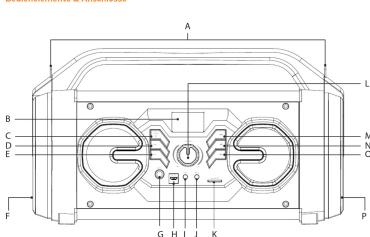
A) Ören für Schultergurt
3) Display
3、Display
c) MODE-TAX
DJ REC-Taste
E) EQ-Taste
F) Woofer
G) MIC1-Buchs
H) Lodebuchse/Lode-LFD
D. ALIX-Buchse
1) MISO Deposit
9) MOE Course
K) Speichennarle
Lj Laubtstandere
(M) [044]-Taste
N) ▶■-Taste
O) [HH]-Taste
P) Bossröhre
Hinweise
Der Hersteller erklärt hiermit, dass der Party BT
den wesentlichen Anforderungen und anderen relevanter
Bestimmungen der Richtlinie 2014/53/EU, 2011/65/EU
sowe 2009/125/EG entsprich
Hinweise zur Garantie
The following section 2011 is a new document with no further text.
Die Darunde beträgt 12 Jahre. Eine darüber hinsabgenhöhe Gesamt besteht nicht. Uzerinkte Modifikation am Gerät
können zum Verlust des Garantiegsoruchs führen.
[Non-Text]
Hinweise zur Entsorgung
Das aufgeführte Symbol weist darauf hin, dass in
diesem Produkt Bestandteile verbaut sind, die bei
Richtsachgemäher Entsorgung umwert- und/oder
Elektronik-Altpesäter ist er ihnen daher nicht gertattet
dieses Gerät über den unsortierten Hausmüll zu entsor
[Non-Text]
[Non-Text]
Notes
The manufacturer hereby confirms that the Party BT
device comples with the requirements and other relevan
provisions of Directive 2014/33/ED, 2011/85/ED with the
2021, 123, 2021
Welcome
EN
The quick guide and the safety instructions are an essential
part of the product.
Please read this document carefully before you use the
Party BT. It contains important information about the Party BT
in terms of safety and usage.
Please keep this document in a safe place and pass it on in full
to the new owner if the Party BT changes hands.
- The FAGs regarding your Party BT are available at
www.trek
Package contents
•TRIVSTED PARTY OF
■TREKSTOR PARTY BY USD Understandingable
■USB-A charging cable ■Microbopa
■Microphones ■Shoulder sites
■Quick Guide
Dumovii fil. nami
Remove uncomponents from the packaging and remove the packaging material, including the protective film. Check to
packaging material, musting the protective film order to ensure that the delivery is complete.
If you find that there are missing or damaged components.
contact cust
表决结果:9票同意,0票反对,0票弃权。
Technical specifications
Speaker: 4" woofer, 2.5" tweeter
Power output
Frequency response: 100 H
Network: Bluetooth S.0 (BR, EDR, BLE)
Interface: Mic in (3.5/6.3 mm), 1 x AUX
memory card reader
Memory card: microSD(HC/XC) up to 128 GB
Dimensions: co.
Weight: ca.
Color: black
Normal, Pop, Jazz, Rock, Classical
Plausible audio formats
up to 328 KB/s
For microSD: FAT, FAT32, exFa
Up to 12/03e
File name or
Recording format:
Max. directory depth
Capacity of battery:
Play time:
Charging time:
Languages:
Charge by:
USB charger** (5 V/ max. 1.8 A)
•
Operation and storage
Temperatures:
Relative humidity:
5^ C to 30^ C
30% to 70%
^a depending on volume, audio source and light effects. DC power optional. If not included in the delivery.
not included in the delivery
Safety instructions
Explanation of Safety Symbols and Keywords
This booklet uses the following safety symbols and keywords
▲
WARNING
Indicates possible danger to life and/or danger of severe,
irreversibly injure
CAUTION
Follow instructions to avoid injuries and material damage
NOTICE
Follow instructions to avoid material damage
Below this decouls of overmateral damage
General Safety Information
WARNING
Risk of multiple injuries due to reduced physical, surgery, or
Risk of multiple injuries due to reduced physical, sensory, or mental capabilities and/or lack of knowledge or practical
experience
■ Children and vulnerable
under direct supervision.
Risk of suffocation and severe injuries from accessories and
packaging materials
■ Keep accessories and packaging materials out of reach of
babies, young children, and pets.
■ Do not insert accessories and/or parts of the device into
orifices such as your mouth, ears, or eyes.
Risk of an epileptic seizure in at-risk persons
The flashing LEDs can trigger epileptic seizures in at-risk person
■ Do not look directly into the LED lights.
■ Use the device without the LED light function
Risk of electric shock ionization from live components
Risk of electric shock or electrocution from live components
■ Do not open the power adapter.
■ Do not touch the power adapter if your hands are wet.
■ Do not short out the device and/or charger.
Risk of electric shock or electrocution and/or fire hazard from
unsafe connections
■ Make sure the power cord is not bent, crimped, or damaged
In any other way,
■ Never use the power cord or plug if they are damaged.
■ Only use the included power adapter and only connect it to a suitable and professionally installed power outlet.
It to a suitable and professionally installed power outlet. Please read and observe the specifications on the power
Please read and observe the spot adapter's label.
■ Do not use power outlets if they are loose
Fire hazard and/or risk of burns from dampers
Fire hazard and of risk of burns from damaged or leaking batteries
■ Do not use or charge the device if the battery is damaged
or leaking
■ Avoid skin contact with the device and/or battery if the
battery is leaking. Wear protective gloves if it is not
possible to avoid touching the device/battery in such cases
■ Immediately wash your hands thoroughly in the event of
skin contact with the battery substrate.
■ If the battery substrate comes into contact with your
eyes, rinse them out with plenty of water and consult a physician immediately.
physician immodulator.
Risk of hearing loss through high volume
The device can generate high sound levels. This may result in
hearing loss if your ears are exposed to high sound levels over
on extended period or time. The higher you set the volume, the more (with) way hearing am be damaged. Hearing less may
more quickly your hearing can be damaged. Hearing loss may occur slowly over time.
■ Do not listen to music or other audio files for an extended
- This has listened to me to other trade fees for an extended period of time at high volumes.
■ Always set the volume at the lowest level where you can
still clearly hear the audio track being played without
causing discomfort.
■ Do not increase the volume once you have become
accustomed to that sound level.
■ Adjusting the default settings for the equalizer can boost
the device
CAUTION
Risk of fire or explosion when using non-approved chargers
and power adapters
■ Only use compatible power supplies. Please note the
specifications in the technical data.
Risk of multiple injuries from slipping, tripping, or failing
■ Do not expose the device and/or power adapter to
vibrations and/or any form of impact.
■ Do not drop the device and/or power adapter. Do not use
the device/power adapter if it has been dropped and/or
is damaged. Have a qualified service technician check the division (several adaptors before restarting it.
- Always group that the power and microphone send is
■ Always ensure that the power and microphone cords installed securely.
■ Do not allow the co
- We have not to see the following table
NOTICE
To avoid potential malfunctions and/or damage to the device
caused by environmental factors, please note the following:
■ The recommended humidity for operating, charging storing the device in between 30 and 70 percent.
Storing the device is between 30 and 70 percent.
■ The recommended ambient temperature for operating, choosing and storing the device is between 5°C and 30°C.
Charging, and storing the device it between 5°C and 30°C. Temperatures above or below this may adversely affect.
the charging capacity and service life of the device and
cause damage to the devio
■ Protect the device from rapid temperature fluctuations.
Condensation from humidity can damage the device and
may result in danger to the user.
■ Shield the device from direct sunlight (e. g., in the car) and is not stored, it goes a heat source to prevent the disk
and do not score it near a heat source to prevent the display and device from malfunctioning
- Keep the device angry from open flames such as candles
fireplaces and compfires.
■ Do not expose your device to rain or to dripping or
and not expused your advice to him or so shipping in splashing water.
■ Do not use the d
■ Should the device become wet, turn it off immediately.
Ensure that the device and/or the power adapter at
checked by a qualified person before using it again.
■ Use the device in a dust-free environment.
■ The surface of the device must not be cleaned with
solvents, paint thinners, cleaning agents or other chemical products. Use instead a soft, dry cloth as a soft brush.
products: Use instead a sort, dry cloth or a sort of dust. There we no observable or slightly paste inside the device
■ There are no serviceable or cleanable parts inside the device. Do not wait the membership of the device
■ Do not touch the membranes of the device
To prevent possible damage to your device:
■ Do not charge your device on standard USB ports such as
those found on desktop or laptop computers.
■ Moisture, dense smoke, and fumes may lead to self-furnies and/or limes the skin lesions.
malfunctions and/or damage the device's housing
Quick Guide
(1)
Attaching the shoulder strap
Connect the hooks of the shoulder strap to the eyelets (A)
on the Party BT. The shoulder strap is adjustable in length.
- Carry the Party BT using only the handle or the shoulder strap
The side bars attached to the membrane are not carrying
handles.
- The membranes must not be touched.
Charging the device
Present the USD for saving available to a suitable
Connect the USB-A charging cable included to a suitable USB charger and then to the micro-USB socket of the Party RT.
The charging LED lights up.
• The USB charger is not included
- The USB 4 charging cable is just
- The USB-A charging cable is just for charging
Connecting to a Bluetooth device
Switch on the Party RT
- Simonofthe Bank, St.
- If not displayed, select B "MODE" button
MODE Bottom
Activate the Bluetooth function of the device to be connected (e.g. smartphones or tablets).
(e.g. smartphone of cablec).
Select "Party BT" from the list of Bluetooth devices displayed.
displayed.
If necessary, en
(1) 2017年1月1日
Using the microphone
- Connect the microphone included to the MIC1 soc
the Party BT.
- Switch on both the Party RT and the microphone
Note the different equalizer settings: see "Function
- Note the different equation settings, see "Function of the control elements" → "EQ button" for more information.
Microspheres according
Microphone recording
+ Microphone recordings can only be made with a men
inserted. These are stored in MP3 format on this.
+ Press the "REC" button to start recording and press it
a second time to stop recording.
Controls & Ports
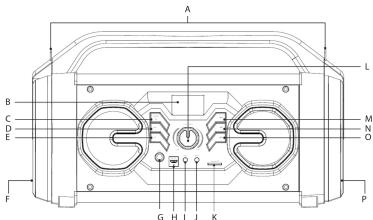
A) Eyelets for shoulder strap
B) Display
C) MODE button
D) REC button
E) EQ button
E) Woofer
G) MIC1 port
H) Chorgine port/choroine LED
I) AUX port
J) MIC2 port
K) Memory card reader
L) Volume control
(M) (144)-key
No. □-key
(1) ☐ 407
P) Boss tube
TREKSTOR
PARTY PT
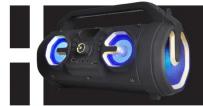
DE KURZANLEITUNG
EN QUICK GUIDE
2017年6月2日
GO-PET-01-10-D6-03(200137
Hinweis zum Kundendienst
Um direkten Kontakt zu unserem Service-Team
aufzunehmen, besuchen Sie bitte die Seite:
www.trekstor.de/support
Notes on customer service
To contact any service term directly plans visit
To contact our service de www.trejotes.de/covers
©
2017
Barclays King 7 10.623 Barclays Copyright
Copyright © 2022 / Market Data Review (4) Rights reserved. Other products and may be classified as Trade Services or
specifications may be subject to change without notice. We reserve the right to make changes and corrections. TENDER is a registered
trademarkial TRENOS (Gillaud in the European Community and other countries). The Bluetooth word marks and logos are registered trademarks owned by Bluetooth (I/O) Inc. respectively, using all such materials by TRENOS/OW GmbH in order
Jama. Other trademarks and trade names are those of their respective owners. All other loans, issuables, trademarks and registered trademarks.
are the prosperity of their responsive usomms.
[Non-Text]
[Non-Text]
[Non-Text]
[Non-Text]
[Non-Text]
[Non-Text]
[Non-Text]
[Non-Text]
[Non-Text]
[Non-Text]
[Non-Text]
[Non-Text]
[Non-Text]
[Non-Text]
[Non-Text]
[Non-Text]
[Non-Text]
[Non-Text]
[Non-Text]
[Non-Text]
[Non-Text]
[Non-Text]
[Non-Text]
[Non-Text]
[Non-Text]
[Non-Text]
[Non-Text]
[Non-Text]
[Non-Text]
[Non-Text]
[Non-Text]
[Non-Text]
[Non-Text]
[Non-Text]
[Non-Text]
[Non-Text]
[Non-Text]
[Non-Text]
[Non-Text]
[Non-Text]
[Non-Text]
[Non-Text]
[Non-Text]
[Non-Text]
[Non-Text]
[Non-Text]
[Non-Text]
[Non-Text]
[Non-Text]
[Non-Text]
[Non-Text]
[Non-Text]
[Non-Text]
[Non-Text]
[Non-Text]
[Non-Text]
[Non-Text]
Mærke : TrekStor
Model : Party BT
Kategori : Mp3-afspiller