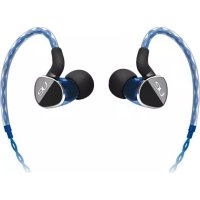
200 - øretelefoner ULTIMATE EARS - Gratis brugsanvisning og manual
Find enhedens vejledning gratis 200 ULTIMATE EARS i PDF-format.


Brugerspørgsmål om 200 ULTIMATE EARS
0 spørgsmål om dette apparat. Besvar dem du kender, eller stil dit eget.
Stil et nyt spørgsmål om dette apparat
Download vejledningen til din øretelefoner i PDF-format gratis! Find din vejledning 200 - ULTIMATE EARS og tag din elektroniske enhed tilbage i hånden. På denne side er alle dokumenter nødvendige for brugen af din enhed offentliggjort. 200 af mærket ULTIMATE EARS.
BRUGSANVISNING 200 ULTIMATE EARS
Getting started with Ultimate Ears™ 200vi Noise-Isolating Headset

ULTIMATE EARS
BY LOGITECH
www.facebook.com/ultimateears www.twitter.com/ultimateears
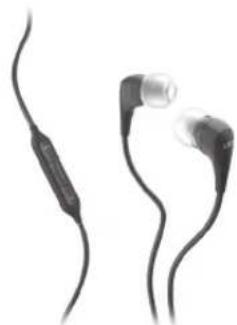
natural_image
Two black earbuds with metallic caps, shown from different angles (no text or symbols visible)
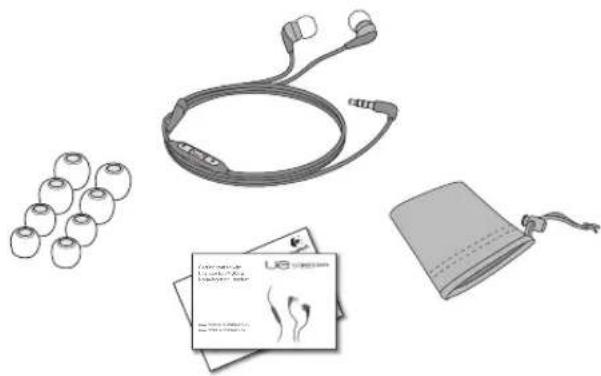
natural_image
Illustration of earplugs, earphones, and a medical device with a bandage (no text or symbols visible)1


XXS
XS
s
M
L
Choose an ear cushion size, extra, extra small (XXS) to large (L), which best fits your ears. Selecting the correct ear cushion size helps ensure a comfortable fit and seal to achieve optimal sound quality.
2
natural_image
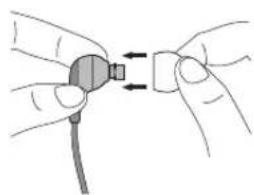
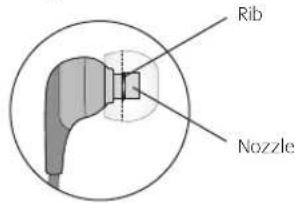
Illustration of hands connecting a cable to a connector (no text or symbols)Attach ear cushions to earphone nozzle. Push ear cushion past rib on nozzle so ear cushion will not separate from nozzle during use.
text_image
Rib Nozzle3
natural_image
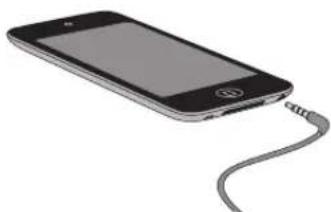
Illustration of a smartphone with a cable inserted, showing its screen and antenna (no text or symbols)Insert the earphone cable connector into the 3.5 mm headphone jack on your iPod ^® or MP3 player.
www.logitech.com
© 2011 Logitech. All rights reserved. Logitech, the Logitech logo, and other Logitech marks are owned by Logitech and may be registered. All other trademarks are the property of their respective owners. Logitech assumes no responsibility for any errors that may appear in this manual. Information contained herein is subject to change without notice.
iPod is a trademark of Apple Inc., registered in the U.S. and other countries. iPhone is a trademark of Apple Inc., registered in the U.S. and other countries. "Works with iPhone" means that an electronic accessory has been designed to connect specifically to iPhone and has been certified by the developer to meet Apple performance standards.
"Made for iPod" means that an electronic accessory has been designed to connect specifically to iPod and has been certified by the developer to meet Apple performance standards.
Apple is not responsible for the operation of this device or its compliance with safety and regulatory standards.
The Trademark BlackBerry is owned by Research In Motion Limited and is registered in the United States and may be pending or registered in other countries.
All other trademarks are the property of their respective owners.
620-003247.002

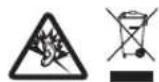
Hearing and Health is Critically Please review the safety guidelines in the Important Information Document.
4
natural_image
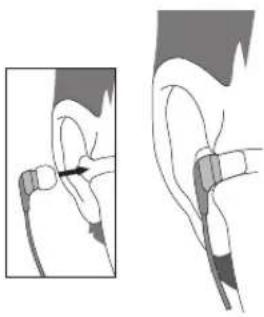
Medical illustration showing a hand holding a small object near the ear, with no visible text or symbolsGently insert earphone into your ear for a good seal: R for right ear; L for left. Never remove an earphone from your ear by pulling on its cable.
5
text_image
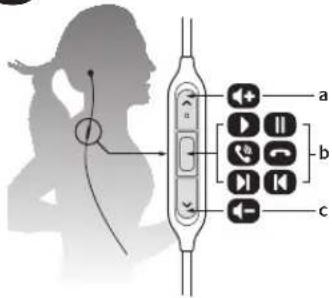
Diagram illustrating ear behavior with labeled buttons and directional arrows, showing audio and sound icons in a human silhouette.Headset controls are within easy reach:
a. Click, or press and hold, for volume up.
b. Media controls:
• One click: Play/pause (audio source)
• One click: Call answer/hang up (cell phone)
• Double click: next track (audio source)
- Triple click: previous track (audio source)
• Refer to the compatibility section for supported devices.
c. Click, or press and hold, for volume down.
6
natural_image
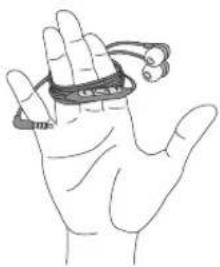
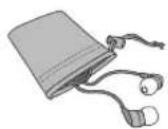
Line drawing of a hand holding a coiled spring or tape (no text or symbols)Store by wrapping cable around fingers; place earphones inside protective pouch. To clean, remove cushion and wipe with a clean cloth.
What do you think?
Please take a minute to tell us. Thank you for purchasing our product.
www.logitech.com/ithink

www.logitech.com/support
United States +1 646-454-3200
Compatibility
• Audio is supported by all iPod ^® , iPhone ^® , and BlackBerry ^® devices.
- The remote and mic are supported only by iPod nano (4th and 5th generation), iPod classic (120GB, 160GB only), iPod touch (2nd and 3rd generation), iPhone 3GS, iPhone 4 and iPad. The remote is supported by iPod shuffle (3rd generation). Audio is supported by all iPod and iPhone models. Requires latest iPod software.
- The remote is supported by iPod shuffle® (3rd generation). Requires latest iPod software.
• VoiceOver is supported by iPod nano (5th generation) and iPod shuffle (3rd generation).
• Voice Control is supported by iPhone 3GS and iPod touch (Late 2009).
• Volume control functionality is not available with BlackBerry devices.
Troubleshooting
- No sound/weak sound – ensure that the 3.5 mm headset connector is fully seated into the headphone jack on your iPod, MP3 player, cell phone, laptop, or gaming device. Check the volume setting in your media application. For laptops running Windows® or Mac® OS, make the headset the default audio device. (See operating system documentation for more information.)
- Weak bass – check ear cushion seal; try another ear cushion size.
- Detached ear cushions – firmly attach ear cushions to earphone nozzle. See step 2 on reverse side.
- Diminished sound quality – remove ear cushions, check for blockage in nozzle, and wipe with a clean cloth.
- Missing ear cushions – go to www.logitech.com for replacements.
Product information: www.logitech.com
Support: www.logitech.com/support (see phone numbers in this document)
Product registration: www.logitech.com/register
Protect your hearing: Read safety guidelines in Important Information Document.