Gamer Beast 3D - Højttaler TRUST - Gratis brugsanvisning og manual
Find enhedens vejledning gratis Gamer Beast 3D TRUST i PDF-format.


Brugerspørgsmål om Gamer Beast 3D TRUST
0 spørgsmål om dette apparat. Besvar dem du kender, eller stil dit eget.
Stil et nyt spørgsmål om dette apparat
Download vejledningen til din Højttaler i PDF-format gratis! Find din vejledning Gamer Beast 3D - TRUST og tag din elektroniske enhed tilbage i hånden. På denne side er alle dokumenter nødvendige for brugen af din enhed offentliggjort. Gamer Beast 3D af mærket TRUST.
BRUGSANVISNING Gamer Beast 3D TRUST
1. Safety
- Disconnect the power plug from the main supply before cleaning the speaker set. Do not use liquid cleaners or aerosols. Wipe the speaker set with a moist cloth.
- Do not use the speaker set near water.
- Make sure nothing is placed on the power lead. Locate the speaker set so as to prevent damage to the power lead.
- Do not insert any object whatsoever into the slots of the speaker cabinets.
- Do not attempt to repair the speaker set yourself. The set should be serviced by qualified service personnel.
2. Connecting the speaker set
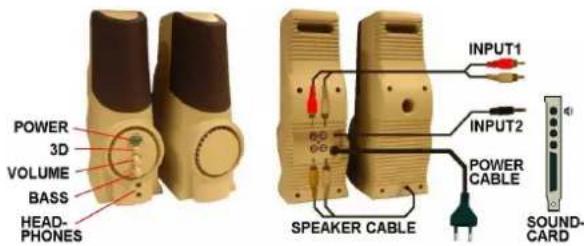
Figure 1. Connecting the Gamer Beast 3D
Connect the cables according to the diagram above. Connect 'INPUT-2' to the 'LINE OUT' output or the 'SPEAK' (i.e. speaker) output of the sound card. Use the 'INPUT-1' connection if you have a different sound installation, such as a radio or CD player.
3. Use
- Switch on the speakers. The power indicator will light up.
- Set your computer to produce sound.
-
Adjust the sound with the controls provided:
-
Volume control (adjusts sound level)
- Bass control (adjusts relative level of low frequencies)
-
3D control (increases the stereo image of the sound)
-
There are 2 connections on the front for using headphones.

Gamer Beast 3D
4. Connecting to a PlayStation or Nintendo 64
The GamerBeast 3D is also suitable for connecting to your PlayStation or Nintendo 64.
4.1 Before you connect the PlayStation/Nintendo 64
Remove the AV cables from the packaging and split the cables into two separate parts as required: (video = yellow en audio = red/white).
4.2 Connect the PlayStation/Nintendo 64 to the television
Connect your PlayStation/Nintendo 64 (video signal only) to the television (see your PlayStation's or Nintendo 64's instruction manual).
4.3 Connect the PlayStation/Nintendo 64 to the Trust Gamer Beast 3D
Connect the audio part of the AV cable to the 'Input 1' socket on the Trust Gamer Beast 3D (see chapter 2 in the Trust Gamer Beast 3D instruction manual).