
WF-T7010TP - Vaskemaskine LG - Gratis brugsanvisning og manual
Find enhedens vejledning gratis WF-T7010TP LG i PDF-format.


Brugerspørgsmål om WF-T7010TP LG
0 spørgsmål om dette apparat. Besvar dem du kender, eller stil dit eget.
Stil et nyt spørgsmål om dette apparat
Download vejledningen til din Vaskemaskine i PDF-format gratis! Find din vejledning WF-T7010TP - LG og tag din elektroniske enhed tilbage i hånden. På denne side er alle dokumenter nødvendige for brugen af din enhed offentliggjort. WF-T7010TP af mærket LG.
BRUGSANVISNING WF-T7010TP LG
WASHING MACHINE SERVICE MANUAL
CAUTION
Before servicing the washer, Read the safety precautions in the manual.
MODELS :WF-6776TTP
WF-T550(5)7TP
WF-777(8)6TTC
WF-7779TTP
WFT70A34DFP
T7012TDFP□
T7011TDFP
T7065TDFP
T7060TDFP
SAFETY PRECAUTION!
DISASSEMBLE POWER CORD BEFORE SERVING
■ RECONNECT ALL GROUNDING DEVICES
IMPORTANT SAFETY NOTICE!
This service information is intended for individuals possessing adequate backgrounds of electrical, electronic and mechanical experience.
Any attempt to repair this appliance may result in personal injury or property damage.
The manufacturer or seller can not be responsible for the interpretation of this information, nor can it assume any liability in connection with its use.
CONTENTS
- Specifications....3
- Installation Instructions....4
- Operating Instructions
3-1. Identification of Parts....10
3-2. Before Starting to Wash....11
3-3. Function of Each Button(For WF-777(8)6TTC)....16
3-4. Washing Programs(For WF-777(8)6TTC)....18
3-5. Function of Each Button (For WF-T550(5)7TP/WF-6776TTP) 20
3-6.Washing Programs (For WF-T550(5)7TP/WF-6776TTP)....22
3-7. Other Functions....24
3-8. Care and Maintenance....27
- Service Information
4-1. Schematic Diagram....28
4-2. Wiring Diagram 29
4-3. Program Time Chart....30
4-4. Adjustment....31
4-5. Disassembly Instruction 32
4-6. Test Running without water....35
4-7. Trouble Shooting against Common Washing Problems 36
4-8. Trouble Shooting According to Error Message 37
4-9. How to Diagnose and Repair by Symptom....39
- Exploded View ....51
- Replacement Part List....55
1. SPECIFICATIONS
| Model | WF-777(8)6TTCWF-T550(5)7TP | WF-6776TTP, WF-T7050TPWF-67761TP |
| Power Sourse | Refer to rating label on the back of Washer | Refer to rating label on the back of Washer |
| Input | Refer to rating label on the back of Washer | Refer to rating label on the back of Washer |
| Capacity | Refer to rating label on the back of Washer | Refer to rating label on the back of Washer |
| Inner Tub | Plastic / Stainless | Stainless |
| Inlet Water Pressure | 0.3kgf/cm^2 8kgf/cm^2 | 0.3kgf/cm^2 8kgf/cm^2 |
| Spin Speed | 50Hz: 690±5060Hz: 740±50 | 690±50 |
| Dim. | Refer to rating label on the back of Washer | Refer to rating label on the back of Washer |
| Weight | Refer to rating label on the back of Washer | Refer to rating label on the back of Washer |
| Program | Fuzzy, Economy, Jean, Wool | Fuzzy, Economy, Jean, Wool |
| Water Level | 4 Stages | 4 Stages |
| Reservation | Available for 3 ~ 48 Hr | Available for 3 ~ 48 Hr |
| Unbalance Switch | B.P Sensor | B.P Sensor |
| Lid Interlock Switch | Magnet Sensor | Magnet Sensor |
| Child Lock | Applied | Applied |
| Lint Filter | Single | Single |
| Softener Dispenser | Applied | Applied |
| Detergent Dispenser | Applied | Applied |
| Bleach Inlet | Applied | Applied |
| Auto Power Off | Applied | Applied |
2. INSTALLATION INSTRUCTIONS
2-1. HOW TO ADJUST LEVEL
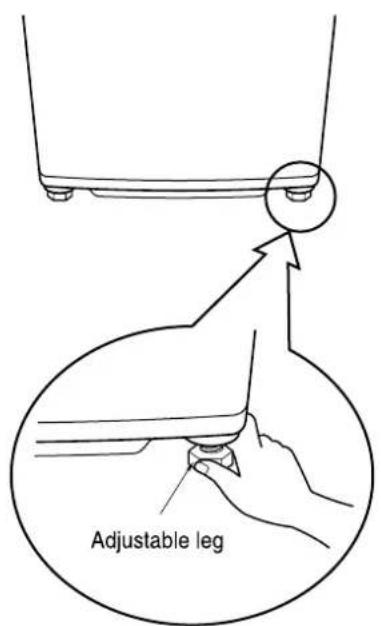
Turn the adjustable legs to set the washer horizontal (2 EA).
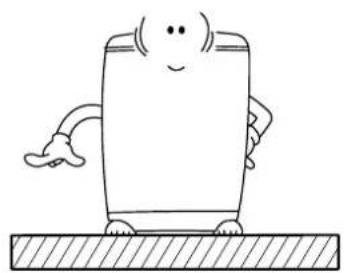
1 Installation area
Install the washer on flat and firm surface.
natural_image
Cartoon illustration of a smiling rectangular character with arms, standing on a textured surface (no text or symbols)
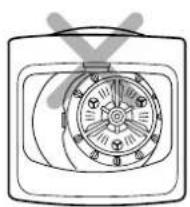
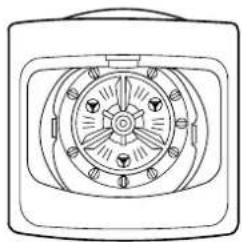
2 Checking level
Open the lid, and check if the washer is correctly leveled by looking down from the top.
natural_image
Diagram of a vintage air fan with visible blades and central hub (no text or labels)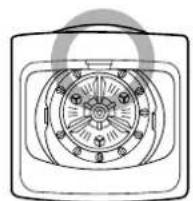
Improper installation of the washer may cause noise and malfunctioning.

- The ventilating openings in the base area must not be obstructed be carpeting when the washing machine is installed on a carpeted floor.
- Install the washing machine on a level and firm surface, any tilt should be less than 1.
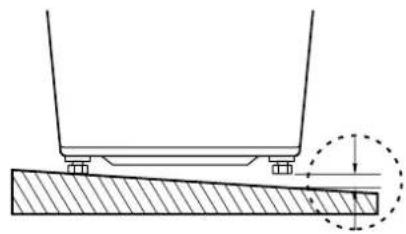
3 Checking slope
If installation surface is tilted, the washer will be shaken.
natural_image
Technical diagram showing a mechanical setup with a support frame and a hatched base, no text or symbols present.
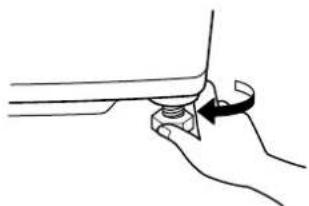
4 Horizontal setting
Lift up the front of the washer and adjust level by turning the adjustable legs clockwise.
natural_image
Line drawing of a hand holding a small object with an arrow indicating rotation (no text or symbols)5 Confirming level
Place the washer to original position and confirm the level.
natural_image
Technical line drawing of a mechanical component with no visible text or symbols
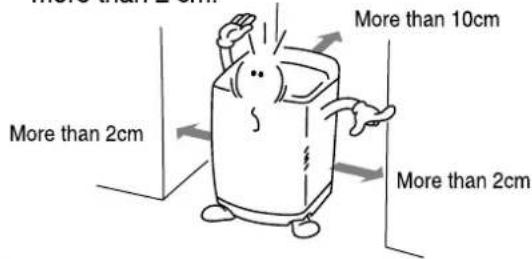
Distance between drain hose and the wall
Distance between drain hose and the wall should be more than 10 cm, and the distance between the other part and the wall should be more than 2 cm.
2-2. CONNECTING WATER SUPPLY HOSE
Before connecting Water Supply Hose to water tap, check your hose type and choose correct instruction. Water Supply Hose may vary according to the country. Make sure connect blue inlet hose to cold water tab, and orange inlet hose to hot water tab.
Connecting Water Supply Hose to water tap
Normal Type
(Normal tab without thread & screw type inlet hose.)
1 Untighten the screw
Untighten the screw of the connector so that the tap can be placed in the middle.
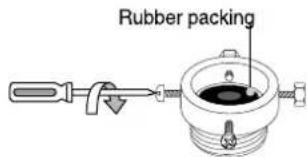
2 Fixing the connector to the tap
Push the upper connector up till the rubber packing is in tight contact with the tap. Then tighten the 4 screws.
3 Attach the water supply hose to the connector
Push the water supply hose vertically upwards so that the rubber seal within the hose can adhere completely to the tap.
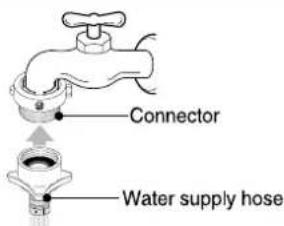
4 Fixing the connector of connector and water supply hose
Attach the water supply hose to the connector and then tighten it by screwing it to the right.
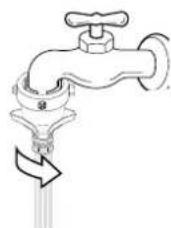
5 Check the connection of water supply hose and the connector
After connecting the hose, open the tap to check for any water leakage. In case of water leakage, close the tap and start again from step 1
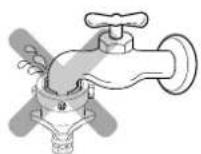
One Touch Type
(Normal tab widout thread & one touch type inlet house.)
1 Separate Middle connector from Water Supply Hose
Separate Middle connector from the Water Supply Hose by pulling the Pressing Rod and the Pressing Handle that is attached to the Water Supply Hose while pressing them.
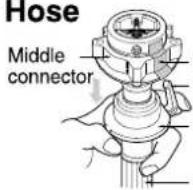
Fixed Stiicker Pressing Handle Pressing Rod
Water Supply Hose
2 Loosen the fixed nuts to connect the connector to the tap
Untighten the screw of the connector so that the tap can be placed in the middle.
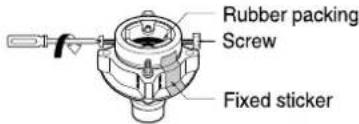
Note
In case the tap is large. If the tap diameter is too large or is square, open the 4 screw and take out the guide plate and follow step 1.
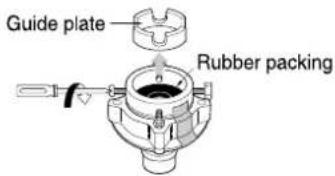
3 Fixing Connectors to the Tap
Push the upper connector up till the rubber packing is in tight contact with the tap. Then tighten the 4 screws.
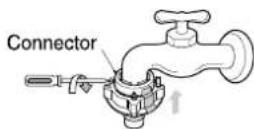
4 Fixing Upper Connector and Middle Connector
Remove the fixed sticker in between the Upper and Middle Connectors. Tighten the connectors by holding one connector and twist middle connector to the right.
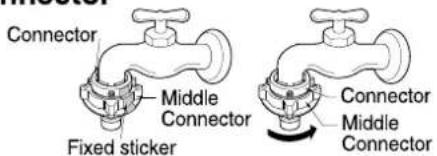
5 Connecting Middle Connector and Water Supply Hose
Press down the pressing rod of the Water Supply Hose which was separated from middle connector(refer to Step1) and then join it to the middle connector.
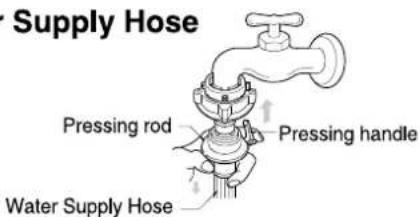
6 Checking the water leakage
After connecting the hose, open the tap to check for any water leakage. In case of water leakage, close the tap and start again from step 1. If you skip step1, it may cause water leakage.
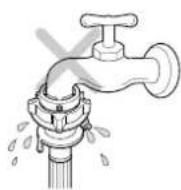
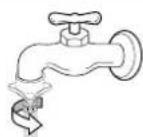
Screw Type
1 Attach the water supply hose to the tap.
Push the water supply hose up so that the rubber packing within the hose can adhere completely to the tap.
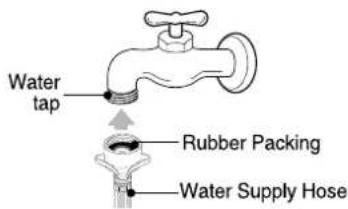
2 Connect the water supply hose to the tap.
Connect the water supply hose to the tap and then tighten it by screwing it to the right.
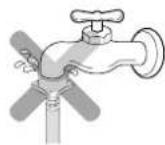
3 Check water leakage.
After connecting the hose, open the faucet to check for any water leakage.
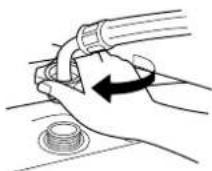
Connecting Water Supply Hose to the machine
Connect the water supply hose to inlet valve of the washing machine, and then lock it by turning the hose connecting part.
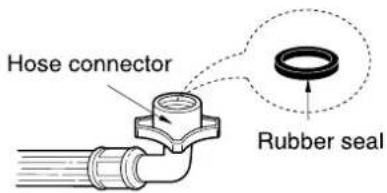
Check to see if there is a rubber seal inside the connector.
2-3. CONNECT THE DRAIN HOSE
■ For pump model
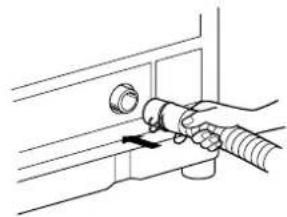
- Connect the drain hose to the outlet of the drain pump located at the rear of the washing machine.
- Attach the clip to the drain hose. And then push it toward the body of the washing machine as indicated by the arrow.
- Check that the drain hose is hung up over the edge of the laundry tub. - Do not use an extension hose.
natural_image
Line drawing of a hand holding a valve or knob, no text or symbols present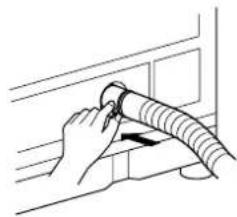
natural_image
Line drawing of a hand holding a coiled hose attached to a wall (no text or symbols)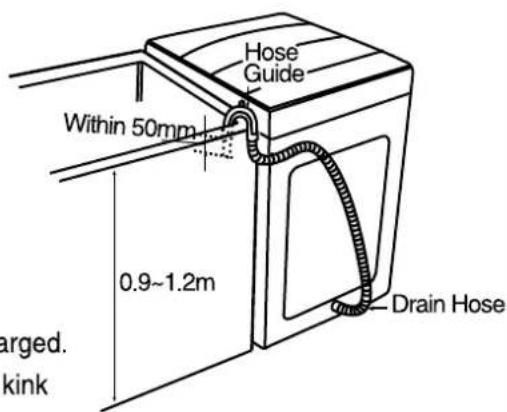
NOTE: Never lay down the drain hose, as water will be discharged.
- Be sure the drain hose is properly routed so it will not kink or lift from the sink.
- The discharge height should be approximately 0.9\~1.2m from the floor.
- Connect the drain hose adjusting the length of it not to be dropped. If drain hose is dropped the drainage could be poor because of blockage in the hose.
■ For non - pump model
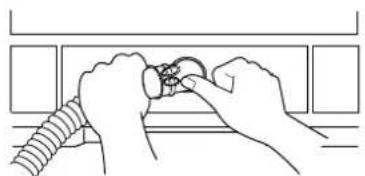
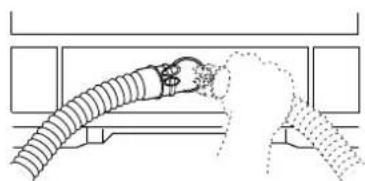
- Connect the drain hose to the outlet of the drain located at the back side of the washing machine.
natural_image
Line drawing of hands connecting a coiled cable to a ring component (no text or symbols)- Keep it downward while the washing machine is working.
- Ensure the hose is free from kinking.
- Fix the drain hose with the clip. And then push it toward the body as in the figure.
natural_image
Diagram of a hand holding a coiled cable or hose, with no visible text or symbols
- Do not install the washer where it is directly exposed to sunlight, wind, rain etc.
- Plug the power cord of this washer into a properly installed standard electrical outlet that is switched & earthed.
3. OPERATING INSTRUCTION
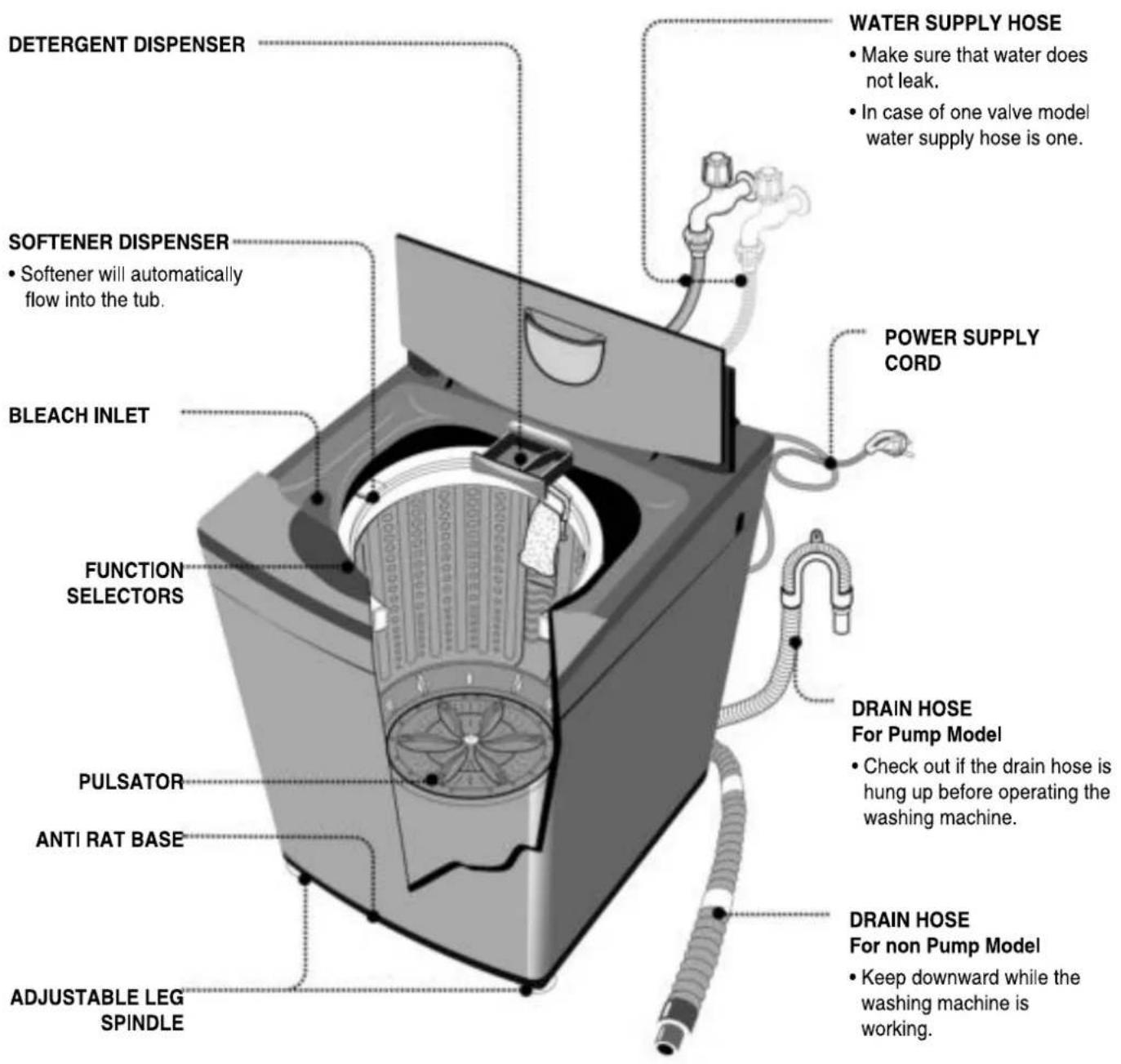
3-1. IDENTIFICATION OF PARTS
3-2. BEFORE STARTING TO WASH
Care Labels
* Look for a care label on your clothes. This will tell you about the fabric content of your garment and how it should be washed.
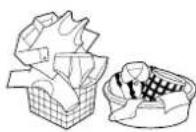
Sort clothes into loads that can be washed with the same wash cycle, water temperature and spin speed.
Sorting
To get the best results, different fabrics need to be washed in different ways.
• SOIL (Heavy, Normal, Light)
• COLOR (Whites, Lights, Darks)
• LINT (Lint producers, Collectors)
Lint Producers
Lint Collectors
Separate clothes according to the type and amount of soil.
Separate white fabrics from colored fabrics.
Separate lint producers and lint collectors.
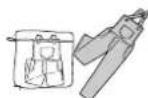
Terry cloth, Chenile, Towels, Nappies, Diapers
Synthetics, Corduroy, Permanent Press, Socks
Check before Loading
- Check all pockets to make sure that they are empty. Things such as nails, hairclips, matches, pens, coins, and keys can damage both your washer and your clothes.
- Mend any torn garments or loose buttons. Tears or holes may become larger during washing.
- Remove belts, underwires, etc. to prevent damage to the machine or your clothes.
- Pretreat any dirt and stains.
• Make sure the clothes are washable in water. - Check the washing instructions.
- Remove tissue in pockets.
Pretreatment on stains or heavy soil
- Pretreat shirt collars and cuffs with a pre-wash product or liquid detergent when placing them in the washer. Before washing treat special stains with bar soaps, liquid detergent or a paste of water and granular detergent.
- Use a pretreat soil and stain remover.
Treat stains AS SOON AS POSSIBLE. The longer they are left the harder they are to remove.
Loading
Do not wash fabrics containing flammable materials (waxes, cleaning fluids, etc.).
Load Size
The water level should just cover the clothes. Adjust the load size accordingly. Loosely load clothes no higher than the top row of holes in the washer tub. To add items after washer has started, press Start button and submerge additional items. Close the lid and press Start button again to restart.
Light and Large-sized clothing
Clothes like downs and woollens are light weight, large and float easily.
Use a nylon net and wash them in a small amount of water. If the laundry floats during the wash cycle, it may become damaged. Use dissolved detergent to prevent the detergent from clumping.
Long laundry items
Use nylon nets for long, delicate items. For laundry with long strings or long length, a net will prevent tangling during washing. Fasten zippers, hook, and strings to make sure that these items don't snag on other clothes.
※ Nylon net is not supplied by LG.
WARNING
Fire Hazard
Never place items in the washer that are dampened with gasoline or other flammable fluids.
No washer can completely remove oil. Do not dry anything that has ever had any type of oil on it (including cooking oils). Doing so can result in death, explosion, or fire.

Using Water
Amount of Water Level
- This machine detects the quantity of laundry automatically, then sets the water level and proper amount of detergent.
- When you select a wash program, the water level and amount of detergent (to be used) will be shown on the control panel.
• The following table shows the amount of water. - When the water level is automatically detected, it may differ depending on the quantity of laundry even though the same water level is indicated on the control panel.
- The amount of a cup in the diagram is about 40g for concentrated detergent.
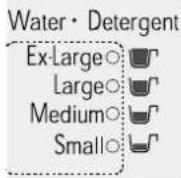
Water temperature
- The machine sets the appropriate temperature automatically according to the wash program.
- You can change the water temperature by pressing the WATER TEMP button.
-
The temperature of the water impacts the effectiveness of all laundry additives and therefore, the cleaning results. We recommend temperatures of:
-
HOT 49\~60°C...(120-140°F) White items, diapers, underclothing and heavily soiled, colorfast items.
- WARM 29\~40°C...(85-105°F) Most items
- COLD* 18\~24°C...(65-75°F) Only very bright colors with light soil.
- When washing in cold water additional steps may be needed:
- Adjust detergent amount and pre-dissolve detergent in warm water
- Pretreat spots and stains
- Soak heavily soiled items
- Use appropriate bleach
* Temperature below 18°C...(65°F) will not activate laundry additives and may cause lint, residue, poor cleaning, etc. In addition, detergent manufactures and care labels define cold water as 26\~29°C...(80-85°F). If the temperature of the water in the tub is too cold for your hands, the detergent will not activate and clean effectively.
Attention
If iron is present in the water the clothes may become an all-over yellow or they may be stained with brown or orange spots or streaks. Iron is not always visible. Installation of water softener or an iron filter may be necessary for severe cases.
Using Detergent
Detergent
Follow the detergent package directions. Using too little detergent is a common cause of laundry problems. Use more detergent if you have hard water, large loads, greasy or oily soils or lower water temperature.
Choosing the right detergent
We recommend the use of domestic detergent, (powder, liquid or concentrated). Soap flakes or granulated soap powders should not be used in your washing machine. When washing woolens remember to use detergent suitable for washing woolens.
Using Detergent
How much detergent
When you select a wash program the water level and the amount of detergent (to be used) will be shown on the control panel. The amount of a cup in the diagram is about 40g for concentrated detergent. The correct amount of detergent will vary depending on the amount of soil in your clothes (Jeans and work clothes may need more detergent, while bath towels usually need less.).
For liquid and concentrated detergents, follow the recommendations of the detergent manufacturer.
Note: To check you are using the correct amount of detergent, lift the lid of your machine about half-way through the wash. There should be a thin layer of foam over the surface of the water. Lots of foam may look good, but it does not contribute to cleaning your clothes. No foam means not enough detergent has been used; soil and lint can settle back on the clothes or the washing machine.
If excess detergent is used, the rinse will not be as clean and efficient. Also, it could cause environmental pollution, so use it accordingly.
Adding the detergent
Open the detergent dispenser and deposit the appropriate amount of detergent.
Some detergents MUST be fully dissolved before adding to your machine to get the best wash results.
Check the instructions on the detergent packet.
If you use powdered detergent it is essential that the required amount be fully dissolved in very hot water before being added to warm or hot water for the actual wash.
Pre-dissolving detergent in warm water when washing in cold water can improve its performance.
Powder Detergent
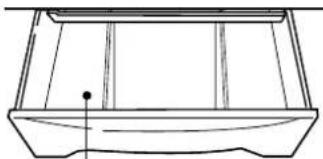
natural_image
Line drawing of a rectangular container with internal divisions and a small dot at the bottom (no text or symbols)Where you deposit the detergent
Using Liquid Bleach
- Check clothing care label for special instructions and separate the laundry to be bleached
• Dilute liquid chlorine bleach. - Measure the recommended amount of liquid bleach carefully following instructions on the bottle.
- Before starting the washer, pour measured amount of bleach directly into bleach dispenser. Avoid splashing or overfilling. Powdered bleach should be mixed with water before pouring.
Bleach dispenser
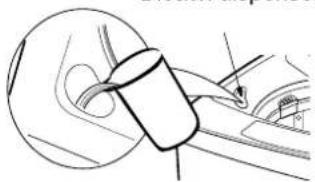
natural_image
Diagram of a mechanical component with a cylindrical part inserted into a car (no text or symbols visible)Never pour undiluted liquid bleach directly onto clothes or into the wash basket.
This may cause change of color or damage the laundry.
Do not mix chlorine bleach with ammonia or acids such as vinegar and/or rust remover. Mixing can reduce a toxic gas which may cause death.
Do not pour powdered bleach into bleach dispenser.
Using Fabric Softener
- Dilute fabric softener with water. Undiluted fabric softener may result in spots that look like oil stains.
- Measure and add the recommended amount of fabric softener into the compartment marked with this symbol( ). Follow manufacturer's direction.
Fabric softener is automatically dispensed in the final rinse. If you want extra rinse, you must add fabric softener manually when indication beep rings in the final rinse. This maximize the fabric softener function.
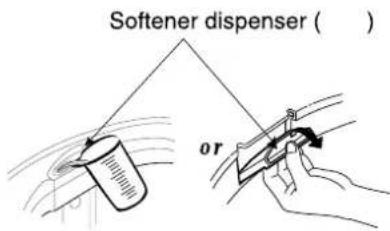
Do not overfill. The dispenser hold max 35mL.
Never add more than 35mL.
Overfilling can cause early dispensing of the fabric softener which could result in stained clothes. A cup with a pouring spout will help you avoid spilling.
- The effect of adding fabric softener may vary according to its viscosity. The stickier fabric softener makes its effect the lower. For a sticky fabric softener it is recommended that it be diluted with water, then be manually put during the time when the washer beeps several times before the final rinse. This function informing correct time to dispense manually is optionally applied to some models. Please keep it in mind that fabric softener has to be diluted with water before dispensed and never poured directly on clothes.
Attention
Do not mix with detergent or bleach.
Never pour fabric softener directly on clothes. It may stain them.
Do not stop the washer during the first spin for timely dispensing.
Option washing is not designed to be used with fabric softener dispenser.
Scrud(Waxy Build up)
Scrud is the name given to the waxy build-up that can occur within any washer when the fabric softener comes into contact with detergent. This build-up is not brought about by a fault in the machine.
If scrud is allowed to build-up in the machine it can result in stains on your clothes or an unpleasant smell in your washer.
If you wish to use fabric softener we recommend
• Using fabric softener sparingly.
- When filling the dispenser, do not splash or overfill.
- Clean dispenser as soon as the cycle is finished.
- Clean your machine regularly. (refer to page 27)
- Cold water washing increases the chance of this build-up occurring. We recommend a regular warm or hot wash e.g. every 5th wash should be at least a warm one.
- Fabric softener of thinner consistency is less likely to leave residue on the dispenser and contribute to a build-up.
Special Guide for Stain Removal
WARNING
Do not use or mix liquid chlorine bleach with other household chemicals such as toilet cleaners, rust removers, acid or products containing ammonia. These mixtures can produce dangerous fumes which can cause serious injury or death.
To reduce the risk of fire or serious injury to persons or property, comply with the basic warnings listed below:
- Read and comply with all instructions on stain removal products.
- Keep stain removal products in their original labeled containers and out of children's reach.
• Thoroughly wash any utensil used.
- Do not combine stain removal products, especially ammonia and chlorine bleach. Dangerous fumes may result.
- Never wash items which have been previously cleaned in, washed in, soaked in or spotted with gasoline, dry cleaning solvents or other flammable or explosive substances because they give off vapors that could ignite or explode.
- Never use highly flammable solvents, such as gasoline, inside the home. Vapors can explode on contact with flames or sparks.
For successful stain removal:
- Remove stains promptly.
- Determine the kind of stain, then follow the recommended treatment in the stain removal chart below.
- To pretreat stains, use a prewash product, liquid detergent, or a paste made from granular detergent and water.
- Use cold water on unknown stains because hot water can set stains.
- Check care label instructions for treatments to avoid on specific fabrics.
- Check for colorfastness by testing stain remover on an inside seam.
- Rinse and wash items after stain removal.
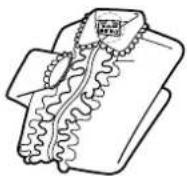
Follow fabric care label instructions
| Stain Removal | |
| STAIN | TREATMENT |
| Adhesive tape, chewing gum, rubber cement | Apply ice. Scrape off excess. Place stain face down on paper towels. Saturate with prewash stain remover or nonflammable dry cleaning fluid. |
| Baby formula, dairy products, egg | Use product containing enzymes to pretreat or soak stains. |
| Beverages (coffee, tea, soda, juice, alcoholic beverages) | Pretreat stain. Wash using cold water and bleach safe for fabric. |
| Blood | Rinse with cold water. Rub with bar soap. Or pretreat or soak with product containing enzymes. Wash using bleach safe for fabric. |
| Candle wax, crayon | Scrape off surface wax. Place stain face down between paper towels. Press with warm iron until wax is absorbed. Replace paper towels frequently. Treat remaining stain with prewash stain remover or nonflammable dry cleaning fluid. Hand wash to remove solvent. Wash using bleach safe for fabric. |
| Chocolate | Pretreat or soak in warm water using product containing enzymes. Wash using bleach safe for fabric. |
| Collar or cuff soil, cosmetics | Pretreat with prewash stain remover or rub with bar soap. |
| Dye transfer on white fabric | Use packaged color remover. Wash using bleach safe for fabric. |
| Grass | Pretreat or soak in warm water using product containing enzymes. Wash using bleach safe for fabric. |
| Grease, oil, tar (butter, fats, salad dressing, cooking oils, car grease, motor oils) | Scrape residue from fabric. Pretreat. Wash using hottest water safe for fabric. For heavy stains and tar, apply nonflammable dry cleaning fluid to back of stain. Replace towels under stain frequently. Rinse thoroughly. Wash using hottest water safe for fabric. |
| Ink | Some inks may be impossible to remove. Washing may set some inks. Use prewash stain remover, denatured alcohol or nonflammable dry cleaning fluid. |
| Mildew, scorch | Wash with chlorine bleach if safe for fabric. Or, soak in oxygen bleach and hot water before washing. Badly mildewed fabrics may be permanently damaged. |
| Mud | Brush off dry mud. Pretreat or soak with product containing enzymes. |
| Mustard, tomato | Pretreat with prewash stain remover. Wash using bleach safe for fabric. |
| Nail polish | May be impossible to remove. Place stain face down on paper towels. Apply nail polish remover to back of stain. Repeat, replacing paper towels frequently. Do not use on acetate fabrics. |
| Paint, varnish | WATER BASED: Rinse fabric in cool water while stain is wet. Wash. Once paint is dry, it cannot be removed, OIL BASED AND VARNISH: Use solvent recommended on can label. Rinse throughly before washing. |
| Rust, brown or yellow discoloration | For spots, use rust remover safe for fabric. For discoloration of an entire load, use phosphate detergent and nonchlorine bleach. Do not use chlorine bleach because it may intensify discoloration. |
| Shoe polish | LIQUID: Pretreat with a paste of granular detergent and water. PASTE: Scrape residue from fabric. Pretreat with prewash stain remover or nonflammable dry cleaning fluid. Rub detergent into dampened area, Wash using bleach safe for fabric. |
3-3. FUNCTION OF EACH BUTTON(FOR WF-777(8)6TTC)
WF-T7050TP
Water temperature button (option)
- Use to select water temperature. Pressing the button allows you to select COLD▶ WARM (HOT&COLD) ▶ HOT ▶ COLD respectively. Default setting is COLD.
Water level button
(indication of detergent amount)
- Use to adjust the water level as required. The appropriate amount of detergent is shown next to the water level in the Water-Detergent diagram
- Water level is automatically selected for Fuzzy (normal) program. The following settings are indicated as the button is pushed L ▶ EX ▶ S ▶ M ▶ L
WATER·DETERGENT
WARM
HOT COLD
WATER TEMP.
EXTRA WASH ○ EXTRA RINES ○ GENTLE SPIN ○
WASH OPTION
EX ○ 📁 L ○ 📁 M ○ 📁 S ○ 📁
WATER LEVEL
Wash option button(option)
- According to kinds of laundry, soiled extent or washing habit you can select suitable wash option manually.
- By pressing the button wash option is changed.
Delay Start (Reservation) button
- Use to set a delayed finishing time.
- The time increases when the button is pushed.
- The following settings are indicated as the button is pushed 3▶4▶5▶...11▶12▶14▶16▶...46▶48▶3 HOUR.
- To cancel delay time, turn the power switch off.
Note
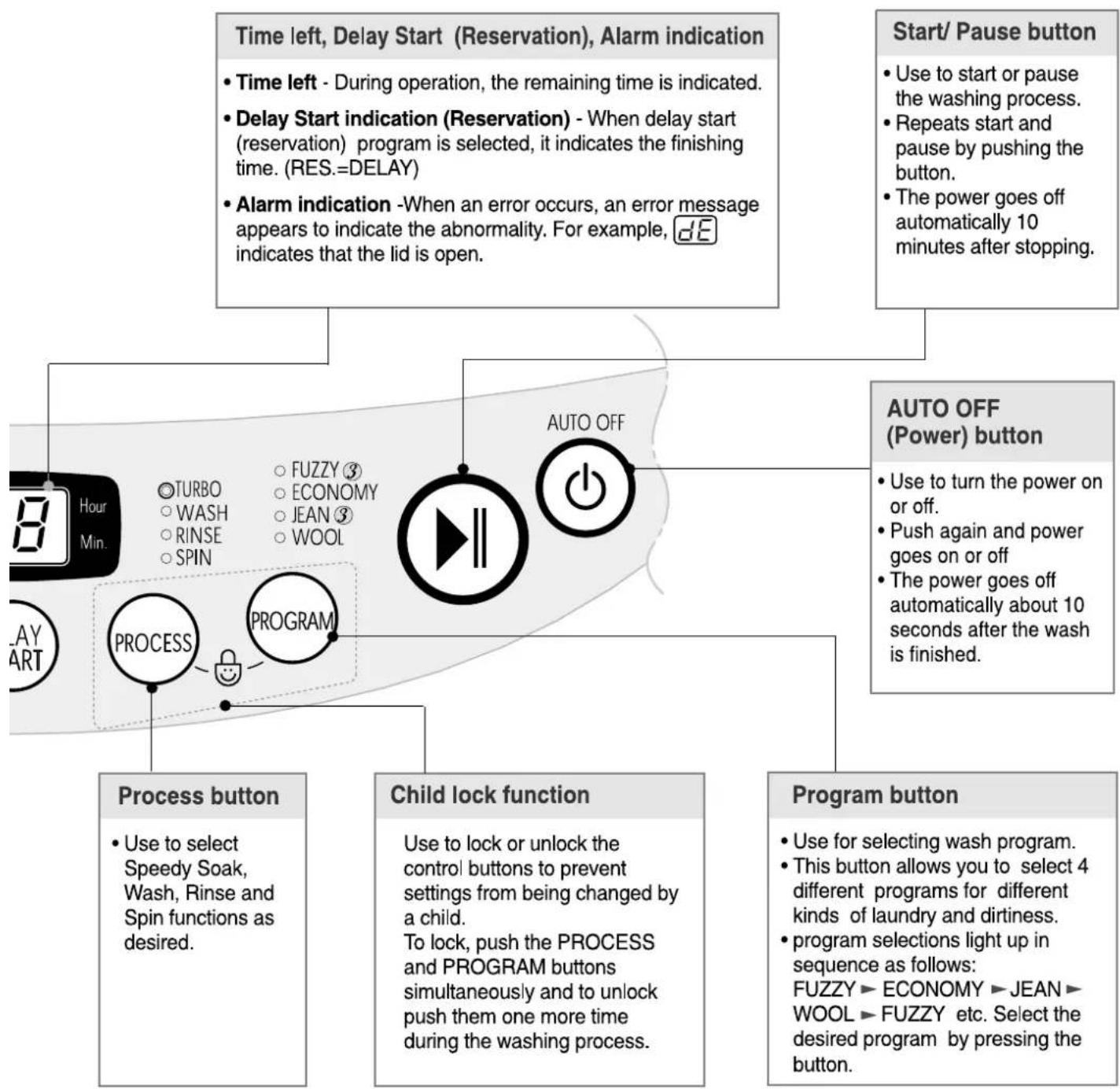
flowchart
graph TD
    A["Time left, Delay Start (Reservation), Alarm indication"] --> B["• Time left - During operation, the remaining time is indicated."]
    A --> C["• Delay Start indication (Reservation) - When delay start (reservation) program is selected, it indicates the finishing time. (RES.=DELAY)"]
    A --> D["• Alarm indication -When an error occurs, an error message appears to indicate the abnormality. For example, dE indicates that the lid is open."]
    E["Start/ Pause button"] --> F["• Use to start or pause the washing process."]
    E --> G["• Repeats start and pause by pushing the button."]
    E --> H["• The power goes off automatically 10 minutes after stopping."]
    I["AUTO OFF (Power) button"] --> J["• Use to turn the power on or off."]
    I --> K["• Push again and power goes on or off"]
    I --> L["• The power goes off automatically about 10 seconds after the wash is finished."]
    M["Process button"] --> N["• Use to select Speedy Soak, Wash, Rinse and Spin functions as desired."]
    O["Child lock function"] --> P["Use to lock or unlock the control buttons to prevent settings from being changed by a child."]
    Q["Program button"] --> R["• Use for selecting wash program."]
    Q --> S["• This button allows you to select 4 different programs for different kinds of laundry and dirtiness."]
    Q --> T["• program selections light up in sequence as follows: FUZZY ▶ ECONOMY ▶ JEAN ▶ WOOL ▶ FUZZY etc. Select the desired program by pressing the button."]
※③: 3 step works at large and medium water level of Fuzzy and Jean program.

unción de cada botón
Botón de Temperature del agua (opcional)
- Úselo para seleccionar la temperatura del agua. Presionar este botón le permite seleccionar
Fría ▶ Tíbia (Caliente y Fría) ▶
Caliente ▶ Fría.
respectivamente El ajuste por defecto es Fría.
Botón de nivel de agua (Indicación de cantidad de detergente)
- Úselo para ajustar el nivel de agua que necesite ; la cantidad de detergente adecuada se muestra al lado del nivel de agua en el diagrama Agua-Detergente. El nivel de agua es seleccionado automáticamente en los programas Fuzzy (normal) y Jean
- Los siguientes ajustes se indican cuando se presiona el botón : Alto ▶ Alto·Extra ▶ Extra ▶ Bajo ▶ Bajo·Medio ▶ Medio ▶ Medio·Alto ▶ Alto
TurboDrum
Tibia

Coliente

(30min.: Tube Dry)
Air Dry
Enjuogue Extra
Centrifugado Suove
Aguo-Deilengante
Extra
Alto
Alo
Medio
Bajo =
[Unreadable]
R
[Unreadable]
[Unreadable]
Hora
The image is too blurry to recognize any text content.
[Unreadable]
- Remojo
• Lavando
• Enjuoque
Centri-
fugado
Fuzzy
Delicada
QuickWash
Jean
TEMP. DEL AGUA
OPCIÓN
NIVEL DE AGUA
RESERVA
PRO- CESO

Opción
- El programa de lavado es cambiado de acuerdo a la selección de opciones, asimismo la opcion de "Aire de secado"(AIR DRY) puede ser seleccionada de igual forma, después de encender la lavadora, el numero de veces que se desea utilizar esta opción variara de acuerdo al número de veces que se opciones.
- Presione el boton de Opciones hasta que se encienda la luz del "Aire de secado" (Aire Dry). (refiéase a la página 23)
Botón de reserva
- Utilice esta función para el lavado retardado.
- Úsela para establecer el tiempo de retardo.
- Si se pulsa este botón, se efectuará un ciclo de [3→4→5→...→11→12→14→16→...→46→48→3] horas. Podrá establecerse un retardo máximo de 48 horas.
- Para cancelar el tiempo de retardo, apague el interruptor de alimentación.
(refiérase a la página 22)
Nota
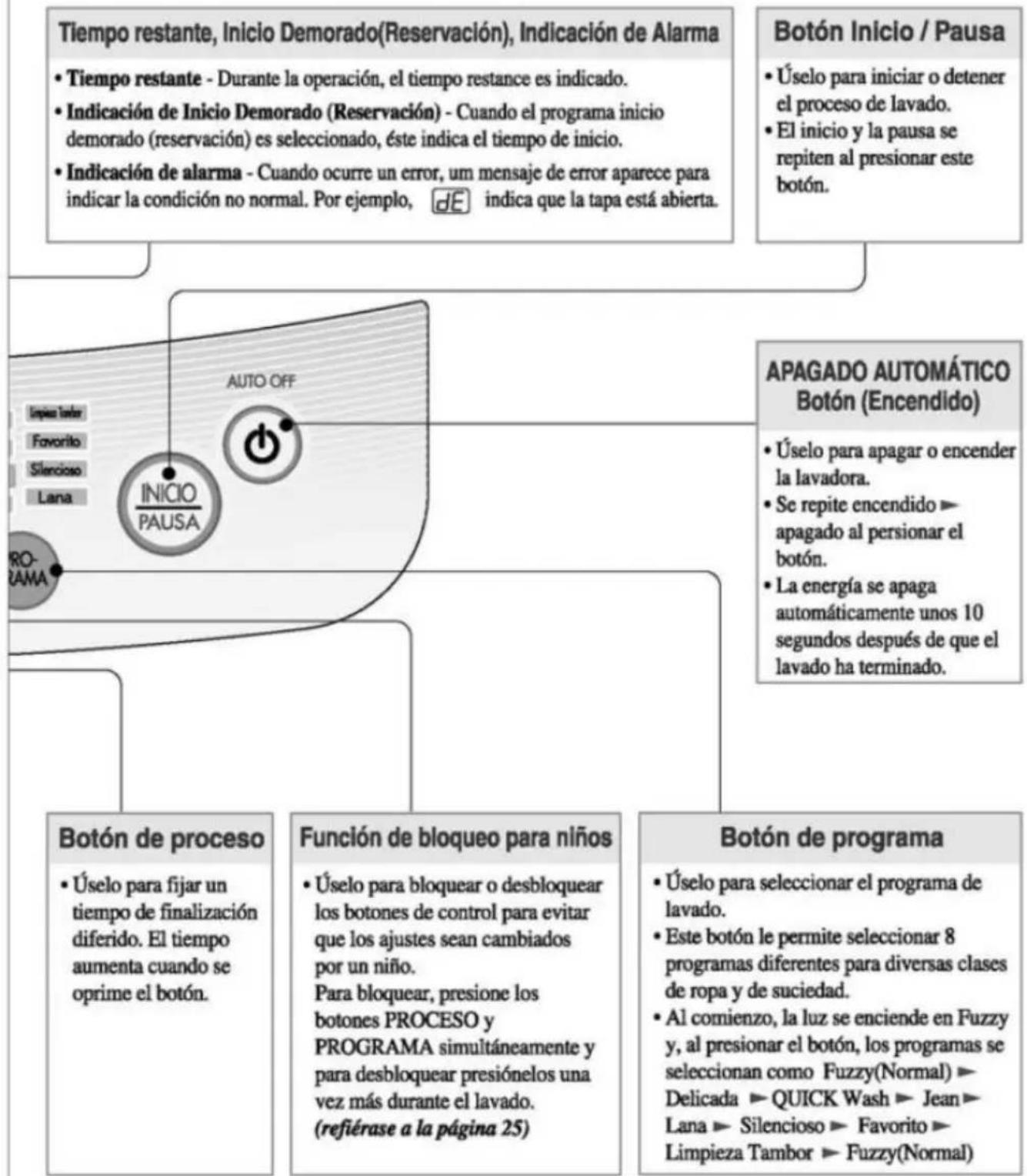
flowchart
graph TD
    A["Tiempo restante, Inicio Demorado(Reservación), Indicación de Alarma"] --> B["Tiempo restante - Durante la operación, el tiempo restance es indicado."]
    B --> C["Indicación de Inicio Demorado (Reservación) - Cuando el programa inicio demorado (reservación) es seleccionado, éste indica el tiempo de inicio."]
    C --> D["Indicación de alarma - Cuando ocurre un error, um mensaje de error aparece para indicar la condición no normal. Por ejemplo, dE indica que la tapa está abierta."]
    E["Botón Inicio / Pausa"] --> F["Úselo para iniciar o detener el proceso de lavado."]
    F --> G["El inicio y la pausa se repiten al presionar este botón."]
    H["APAGADO AUTOMÁTICO Botón (Encendido)"] --> I["Úselo para apagar o encender la lavadora."]
    I --> J["Se repite encendido → apagado al pensionar el botón."]
    J --> K["La energía se apaga automáticamente unos 10 segundos después de que el lavado ha terminado."]
    L["Botón de proceso"] --> M["Úselo para fijar un tiempo de finalización diferido. El tiempo aumenta cuando se oprime el botón."]
    N["Función de bloqueo para niños"] --> O["Úselo para bloquear o desbloquear los botones de control para evitar que los ajustes sean cambiados por un niño. Para bloquear, presione los botones PROCESO y PROGRAMA simultáneamente y para desbloquear presiónelos una vez más durante el lavado. (refiérase a la página 25)"]
    P["Botón de programa"] --> Q["Úselo para seleccionar el programa de lavado."]
    Q --> R["Este botón le permite seleccionar 8 programas diferentes para diversas clases de ropa y de suciedad."]
    R --> S["Al comienzo, la luz se enciende en Fuzzy y, al presionar el botón, los programas se seleccionan como Fuzzy(Normal) → Delicada → QUICK Wash → Jean → Lana → Silencioso → Favorito → Limpieza Tambor → Fuzzy(Normal)"]
* Según el modelo de la máquina, la figura del panel de control puede ser diferente.
Programas de Lavado
| Programas de Lavado | AUTO OFF | Agregue la ropa a lavor |  |  | Agregue el detergente. |
| Lavado Fuzzy (Lavado Normal)En este modo se puede realizar un lavado normal.En el lavado fuzzy, la máquina selecciona automáticamente las condiciones más propiadas para la ropa en una operación.Para el lavado fuzzy,un sensor detecta la cantidad de ropa y fija las más apropiadas características de potencia de lavado,tiempo de lavado,número de enjuagues y tiempo de centrifugado. |  | ||||
| QUICK WashUse este modo cuando lave ropas ligeramente manchadas, por un corto tiempo.Se recomienda un peso por carga de lavado inferior a 2 kg | [HYSW] |  | [X4AX] | ||
| • Seleccione el programa QUICK Washen el Panel de Control. | |||||
| Lavado de JeanSe puenden lavar fácilmente Jeans de diferentes tamaños. |  |  |  | ||
| • Seleccione el programa Jeanen el Panel de Control. | |||||
| Lavado de LanaÉste es un método de lavado para géneros fácilmente dañables,tales comor ropa interior y lana.Antes de lavar sus ropas de lana, verifique la etiqueta de advertencia para las instrucciones de lavado (lave sólo ropas lavables en agua) |  | [020A] | [32T4] | ||
| • Presione el botón PROGRAMA para seleccionar Lana. | |||||
| Lavado de DelicadaUse este programa para lavar prendas que requieran un Lavado Delicada. Éstas podrían ser blusas, prenda de nylon, y vestidos con aplicaciones. | [CDHX] | [54TX] | [573C] | ||
| • Seleccione el programa de Delicadaen el panel de Control |
 | Cierre la tapa. | Finalización | Precaución &Nota |
 |  |  | |
| El pulsador gira por 8 segundos para detectar la carga de lavado.Luego se mostrará el nivel de agua y la canti | El agua se suministrará por 2 minutos después del inicio del lavado para suplir el agua que ha absorbido la ropa. | Cuando termina el programa de lavado, el zumbador suena por 10 segundos antes de que la energía eléctrica se apague automáticamente. | Controlar el nivel de agua cuando el agua permanece en el tambor o poniendo la ropa mojada antes de anunciar el lavado aumentará el nivel de agua.En caso de ropa voluminosa y liviana,el nivel de agua puede ser bajo.Son posibles alteraciones de agua caliente/fría y de nivel de agua durante la operación. (refiérase a la página 14) |
 |  |  | |
 |  |  | |
 |  |  | |
 |  |  |

unción de cada botón
Botón de Temperature del agua (opcional)
- Úselo para seleccionar la temperatura del agua. Presionar este botón le permite seleccionar
Fría ▶ Tibia (Caliente y Fría) ▶
Caliente ▶ Fría.
respectivamente El ajuste por defecto es Fría.
Botón de nivel de agua (Indicación de cantidad de detergente)
- Úselo para ajustar el nivel de agua que necesite ; la cantidad de detergente adecuada se muestra al lado del nivel de agua en el diagrama Agua-Detergente. El nivel de agua es seleccionado automáticamente en los programas Fuzzy (normal) y Jean
- Los siguientes ajustes se indican cuando se presiona el botón : Alto ▶ Extra ▶ Bajo ▶ Medio ▶ Alto
TurboDrum
Tibia • Caliente • Fría
(30min.: Tub Dry)
Air Dry o
Enjvague Extra O
Centrifugado Suave O
Agua-Detergente
Extra □
Alto □
Medio □
Bajo □
DUREZA DEL AGUA - DETERGENTE - TEMP. DEL AGUA
O ENLIAGIE
CENTRIFUGADO

Fuzzy
QuickWeb
Jean
OPCIÓN
NIVEL DE AGUA
RESERVA
Opción
- El programa de lavado es cambiado de acuerdo a la seleccion de opciones, asimismo la opción de "Aire de secado"(AIR DRY) puede ser seleccionada de igual forma, despues de encender la lavadora, el numero de veces que se desea utilizar esta opción variara de acuerdo al número de veces que se opciones.
- Presione el boton de Opciones hasta que se encienda la luz del "Aire de secado"(Aire Dry). (refiéase a la página 22)
Botón de reserva
- Utilice esta función para el lavado retardado.
- Úsela para establecer el tiempo de retardo.
- Si se pulsa este botón, se efectuará un ciclo de [3→4→5→...→11→12→14→16→...→46→48→3] horas. Podrá establecerse un retardo máximo de 48 horas.
- Para cancelar el tiempo de retardo, apague el interruptor de alimentación.
(refiérase a la página 21)
Nota
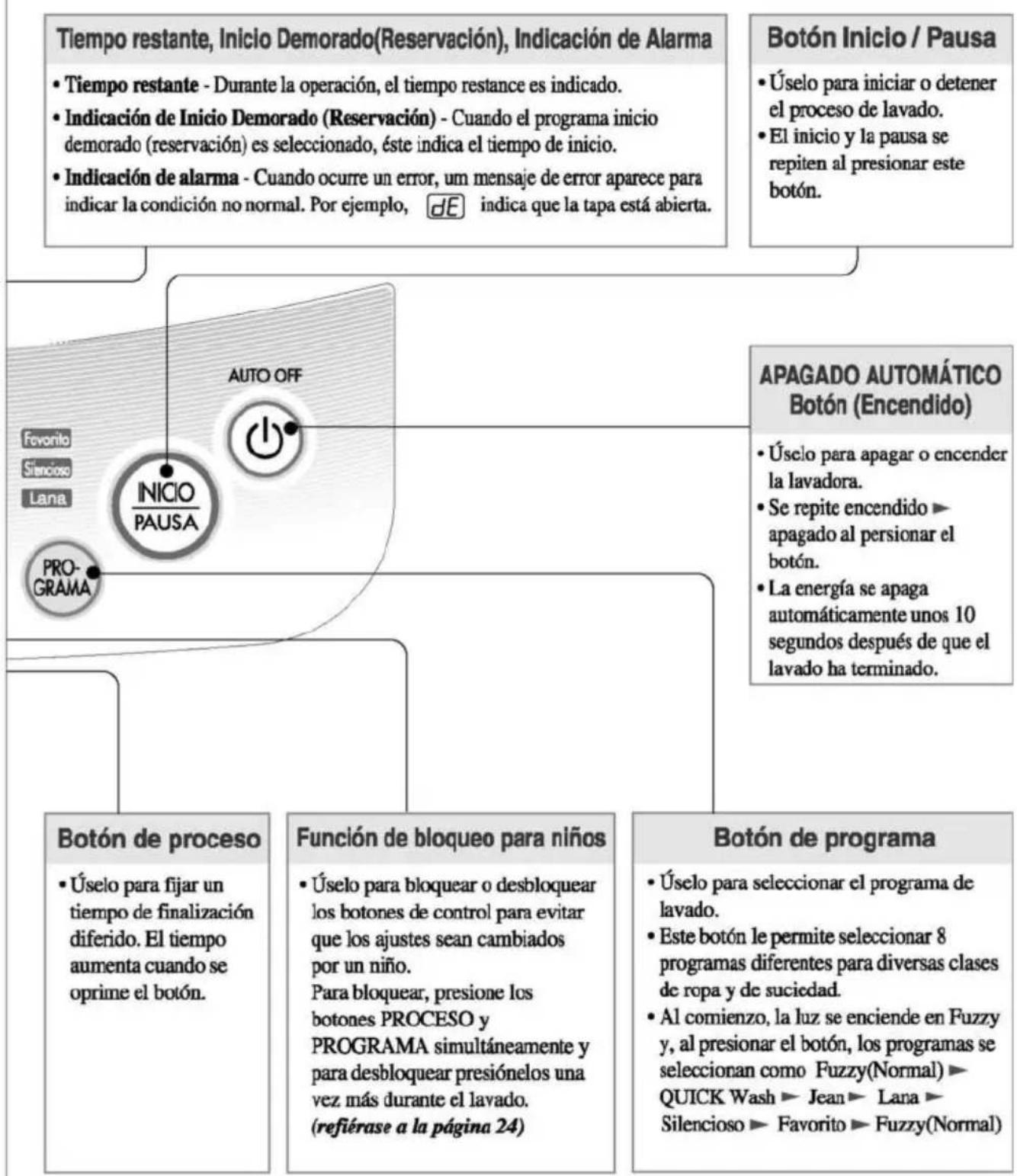
flowchart
graph TD
    A["Tiempo restante, Inicio Demorado(Reservación), Indicación de Alarma"] --> B["Tiempo restante - Durante la operación, el tiempo restance es indicado."]
    B --> C["Indicación de Inicio Demorado (Reservación) - Cuando el programa inicio demorado (reservación) es seleccionado, éste indica el tiempo de inicio."]
    C --> D["Indicación de alarma - Cuando ocurre un error, um mensaje de error aparece para indicar la condición no normal. Por ejemplo, dE indica que la tapa está abierta."]
    E["Botón Inicio / Pausa"] --> F["Úselo para iniciar o detener el proceso de lavado."]
    F --> G["El inicio y la pausa se repiten al presionar este botón."]
    H["APAGADO AUTOMÁTICO Botón (Encendido)"] --> I["Úselo para apagar o encender la lavadora."]
    I --> J["Se repite encendido → apagado al pensionar el botón."]
    J --> K["La energía se apaga automáticamente unos 10 segundos después de que el lavado ha terminado."]
    L["Botón de proceso"] --> M["Úselo para fijar un tiempo de finalización diferido. El tiempo aumenta cuando se oprime el botón."]
    N["Función de bloqueo para niños"] --> O["Úselo para bloquear o desbloquear los botones de control para evitar que los ajustes sean cambiados por un niño. Para bloquear, presione los botones PROCESO y PROGRAMA simultáneamente y para desbloquear presiónelos una vez más durante el lavado. (refiérase a la página 24)"]
    P["Botón de programa"] --> Q["Úselo para seleccionar el programa de lavado."]
    Q --> R["Este botón le permite seleccionar 8 programas diferentes para diversas clases de ropa y de suciedad."]
    R --> S["Al comienzo, la luz se enciende en Fuzzy y, al presionar el botón, los programas se seleccionan como Fuzzy(Normal) → QUICK Wash → Jean → Lana → Silencioso → Favorito → Fuzzy(Normal)."]
* Según el modelo de la máquina, la figura del panel de control puede ser diferente.
Programas de Lavado
| Programas de Lavado | AUTO OFF | Agregue la ropa a lavor |  | Agregue el detergente. | |
| Lavado Fuzzy (Lavado Normal)En este modo se puede realizar un lavado normal.En el lavado fuzzy, la máquina selecciona automáticamente las condiciones más propiadas para la ropa en una operación.Para el lavado fuzzy,un sensor detecta la cantidad de ropa y fija las más apropiadas características de potencia de lavado,tiempo de lavado,número de enjuagues y tiempo de centrifugado. |  |  |  Se indica la cantidad apropiada de detergente al lado del nivel de agua de Agua-Detergente se agrega de acuerdo a las instrucciones de uso del detergente. Se indica la cantidad apropiada de detergente al lado del nivel de agua de Agua-Detergente se agrega de acuerdo a las instrucciones de uso del detergente. | ||
| QUICK WashUse este modo cuando lave ropas ligeramente manchadas, por un corto tiempo.Se recomienda un peso por carga de lavado inferior a 2 kg |  | [324T] | [YAG3] |  Se indica la cantidad apropiada de etergente al lado del nivel de agua de Agua-Detergente o se agrega de acuerdo a las instrucciones de uso del detergente. Se indica la cantidad apropiada de etergente al lado del nivel de agua de Agua-Detergente o se agrega de acuerdo a las instrucciones de uso del detergente. | |
| • Seleccione el programa QUICK Washen el Panel de Control. | |||||
| Lavado de JeanSe pueden lavar fácilmente Jeans de diferentes tarnaños. | [KCA8] |  |  | [1YXYK] | |
| • Seleccione el programaJeanen el Panel de Control. | |||||
| Lavado de LanaÉste es un método de lavado para géneros fácilmente dañables,tales comor ropa interior y lana.Antes de lavar sus ropas de lana, verifique la etiqueta de advertencia para las instrucciones de lavado (lave sólo ropas lavables en agua) | [XOXO]Cuando lave ropas de lana use un detergente suave recomendado para lavar lana.Use la cantidad apropiada de detergente marcada junto al nivel de agua de agua-detergente o la indicada en las instrucciones de uso del detergente.Use detergente neutral apropiado para el lavado. | ||||
 | [TAYZ] |  | |||
| • Presione el botón PROGRAMA para seleccionar Lana. |
3-4. WASHING PROGRAMS(FOR WF-777(8)6TTC)
| Washing Programs | AUTO OFF | Add the laundry | — |  | Add the detergent |
| Fuzzy Washing(Normal Wash)Used for normal loads, this mode automatically selects the most appropriate conditions and completes the sequence in one operation. The built-in sensor detects the size of the load and the ideal wash power and wash, rinse and spin times are set accordingly |  |  · Add the appropriate quantity of detergent as indicated by the water level next to WATER-DETERGENT.Or follow the detergent manufacturer's instructions · Add the appropriate quantity of detergent as indicated by the water level next to WATER-DETERGENT.Or follow the detergent manufacturer's instructions | |||
| Economy WashUse this mode when washing lightly soiled clothes for a short time. The highly recommended laundry amount is under 2.0kg. |  |  |  · Select the ECONOMY program on the Control panel. · Select the ECONOMY program on the Control panel. |  · Add the appropriate quantity of detergent as indicated by the water level next to WATER-DETERGENT.Or follow the detergent manufacturer's instructions · Add the appropriate quantity of detergent as indicated by the water level next to WATER-DETERGENT.Or follow the detergent manufacturer's instructions | |
| Jean WashUse Jean program when washing Jeans of different sizes |  |  · Spread the jean evenly in the tub · Spread the jean evenly in the tub |  · Select the JEANprogram on the Control panel. · Select the JEANprogram on the Control panel. |  | |
| Wool WashUse this program for washing delicate fabrics such as lingerie and woolens.(wash only "water washable" clothes)Before washing your woolens check the care label for the washing instructions.(wash only water washable clothes) |  |  |  · Select the WOOL program on the Control panel. · Select the WOOL program on the Control panel. |  · Use neutral detergent appropriate for the laundry.When washing woolens use a mild detergent recommended for washing wool. · Use neutral detergent appropriate for the laundry.When washing woolens use a mild detergent recommended for washing wool. | |
| Speedy Soak WashUse this mode to wash normal clothes or thick and heavy clothes which are excessively dirty.Turbo mode can be used with FUZZY or JEAN program. |  |  |  · TURBO will not work in WOOL & ECONOMY Program. · TURBO will not work in WOOL & ECONOMY Program. |  | |
| · Keep pressing the PROCESS button until the TURBO light is on and then Wash, Rinse, Spin lights are on simultaneously.· Until the washing process is completed, the TURBO light is on. | |||||
 | Close the lid | Finish | Caution & Note |
 ·The pulsator rotates for 8 seconds to detect the laundry load.·Then the water level and the amount of detergent to be used will be shown and water will be supplied. ·The pulsator rotates for 8 seconds to detect the laundry load.·Then the water level and the amount of detergent to be used will be shown and water will be supplied. |  ·Water will be supplied for 2 minutes after the start of the wash to supplement the water the laundry has absorbed. ·Water will be supplied for 2 minutes after the start of the wash to supplement the water the laundry has absorbed. |  ·When the wash program ends, the buzzer will ring for 10 seconds before the Power goes off automatically. ·When the wash program ends, the buzzer will ring for 10 seconds before the Power goes off automatically. | ·If water is already in the tub, or putting wet laundry into the tub before starting will increase the water level.·With lightweight bulky loads, water level can be set low.·Changes to water temperature (hot/cold) and wash level are possible during operation. |
 |  |  | |
 |  |  | |
 |  |  | ·When setting the water level manually, do not set to MEDIUM and SMALL to prevent damage to laundry.·Washing with hot water may damage the laundry (Water is set to cold automatically). Ensure that the load is under 2kg·In order to avoid damage to laundry, the spin cycle may appear slow. This also avoids wrinkles and clothing may still contain some water. This is normal.·TURBO Wash cannot be selected for the Wool Wash and Economy Wash program.·If wool wash is selected, Gentle Spin will be set automatically. |
 ·The water level and the amount of detergent to be used will be shown and water will be supplied. ·The water level and the amount of detergent to be used will be shown and water will be supplied. |  |  |
3-5. FUNCTION OF EACH BUTTON(FOR WF-5505(5)7TP/WF-6776TTP)
Water temperature button (option)
- Use to select water temperature. Pressing the button allows you to select FRIA ▶ TIBIA(CALIENTE&FRÍA) ▶ CABIA ▶ FRÍA respectively. Default setting is COLD.
Water level button
(indication of detergent amount)
- Use to adjust the water level as required. The appropriate amount of detergent is shown next to the water level in the Water-Detergent diagram
- Water level is automatically selected for FUZZY program. The following settings are indicated as the button is pushed ALTO ▶ EXTRA ▶ BAJO ▶ MEDIO ▶ ALTO
TIBIA CALIENTE ○ FRÍA ○
AGUA·JABDN
EXTRA ○
ALTO
MEDIO
BAJO
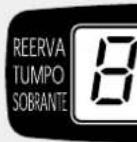
TEMP. DEL AGUA
(NIVEL DE AGUA)
Delay Start (Reservation) button
- Use to set a delayed finishing time.
- The time increases when the button is pushed.
- The following settings are indicated as the button is pushed 3▶4▶5▶...11▶12▶14▶16▶...46▶48▶3 HOUR.
- To cancel delay time, turn the power switch off.
Note
* The control panel may differ according to different models
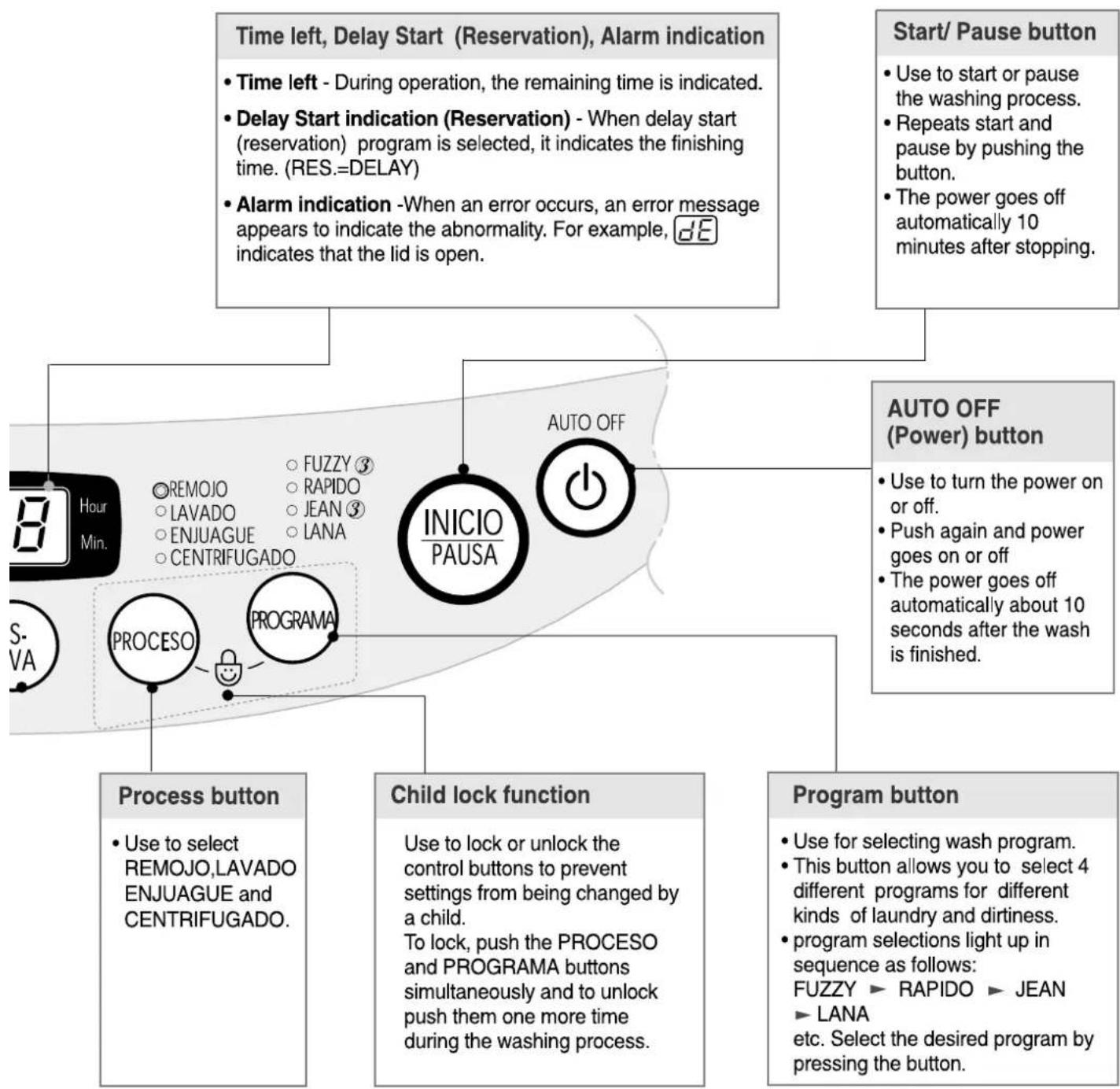
flowchart
graph TD
    A["Time left, Delay Start (Reservation), Alarm indication"] --> B["Time left - During operation, the remaining time is indicated."]
    A --> C["Delay Start indication (Reservation) - When delay start (reservation) program is selected, it indicates the finishing time. (RES.=DELAY)"]
    A --> D["Alarm indication -When an error occurs, an error message appears to indicate the abnormality. For example, dE indicates that the lid is open."]
    E["Start/ Pause button"] --> F["Use to start or pause the washing process."]
    E --> G["Repeats start and pause by pushing the button."]
    E --> H["The power goes off automatically 10 minutes after stopping."]
    I["AUTO OFF (Power) button"] --> J["Use to turn the power on or off."]
    I --> K["Push again and power goes on or off"]
    I --> L["The power goes off automatically about 10 seconds after the wash is finished."]
    M["Process button"] --> N["Use to select REMOJO, LAVADO ENJUAGUE and CENTRIFUGADO."]
    O["Child lock function"] --> P["Use to lock or unlock the control buttons to prevent settings from being changed by a child. To lock, push the PROCESO and PROGRAMA buttons simultaneously and to unlock push them one more time during the washing process."]
    Q["Program button"] --> R["Use for selecting wash program. This button allows you to select 4 different programs for different kinds of laundry and dirtiness. program selections light up in sequence: FUZZY ▶ RAPIDO ▶ JEAN ▶ LANA etc. Select the desired program by pressing the button."]
※③: 3 step works at large and medium water level of Fuzzy and Jean program.
3-6. WASHING PROGRAMS(FOR WF-T550(5)7TP/WF-6776TTP).
| Washing Programs | AUTO OFF | Add the laundry | — | — | Add the detergent |
| Fuzzy Washing(Normal Wash)Used for normal loads, this mode automatically selects the most appropriate conditions and completes the sequence in one operation. The built-in sensor detects the size of the load and the ideal wash power and wash, rinse and spin times are set accordingly |  |  · Add the appropriate quantity of detergent as indicated by the water level next to AGUA-JABÓN.Or follow the detergent manufacturersinstructions · Add the appropriate quantity of detergent as indicated by the water level next to AGUA-JABÓN.Or follow the detergent manufacturersinstructions | |||
| Economy WashUse this mode when washing lightly soiled clothes for a short time.The highly recommended laundry amount is under 2.0kg. |  |  |  · Select the RAPIDO program on the Control panel. · Select the RAPIDO program on the Control panel. |  · Add the appropriate quantity of detergent as indicated by the water level next to AGUA-JABÓN.Or follow the detergent manufacturersinstructions · Add the appropriate quantity of detergent as indicated by the water level next to AGUA-JABÓN.Or follow the detergent manufacturersinstructions | |
| Jean WashUse Jean program when washing Jeans of different sizes |  |  · Spread the jean evenly in the tub · Spread the jean evenly in the tub |  · Select the JEANprogram on the Control panel. · Select the JEANprogram on the Control panel. |  | |
| Wool WashUse this program for washing delicate fabrics such as lingerie and woolens.(wash only “water washable” clothes)Before washing your woolens check the care label for the washing instructions.(wash only water washable clothes) |  |  |  · Select the LANAprogram on the Control panel. · Select the LANAprogram on the Control panel. |  · Use neutral detergent appropriate for the laundry.When washing woolens use a mild detergent recommended for washing wool. · Use neutral detergent appropriate for the laundry.When washing woolens use a mild detergent recommended for washing wool. | |
| Speedy Soak WashUse this mode to wash normal clothes or thick and heavy clothes which are excessively dirty.Turto mode can be used with FUZZY or JEAN program. |  |  |  · REMOTOWill not work inLANA & RAPIDOProgram. · REMOTOWill not work inLANA & RAPIDOProgram. |  | |
| · Keep pressing the PROCESO button until the REMDJO light is on and then LAVADO,ENJUAGUE,CENTRIFUGADO lights are on simultaneously.· Untill the washing process is completed, the REMOJO light is on. | |||||
 | Close the lid | Finish | Caution & Note |
 The pulsator rotates for 8 seconds to detect the laundry load.Then the water level and the amount of detergent to be used will be shown and water will be supplied. The pulsator rotates for 8 seconds to detect the laundry load.Then the water level and the amount of detergent to be used will be shown and water will be supplied. |  Water will be supplied for 2 minutes after the start of the wash to supplement the water the laundry has absorbed. Water will be supplied for 2 minutes after the start of the wash to supplement the water the laundry has absorbed. | [HHC  When the wash program ends, the buzzer will ring for 10 seconds before the Power goes off automatically. When the wash program ends, the buzzer will ring for 10 seconds before the Power goes off automatically. | · If water is already in the tub, or putting wet laundry into the tub before starting will increase the water level.With lightweight bulky loads, water level can be set low.Changes to water temperature (hot/cold) and wash level are possible during operation. |
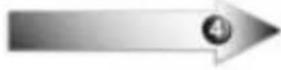 | 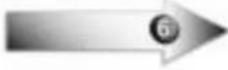 |  | |
 |  |  | |
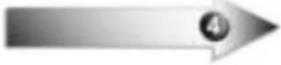 | 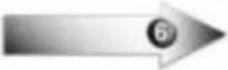 |  | · When setting the water level manually, do not set to MÉDIO and BAJO to prevent damage to laundry.Washing with hot water may damage the laundry (Water is set to cold automatically). Ensure that the load is under 2kgIn order to avoid damage to laundry, the spin cycle may appear slow.This also avoids wrinkles and clothing may still contain some water. This is normal.TURTO Wash cannot be selected for the Wool Wash and Economy Wash program.If wool wash is selected, Gentle Spin will be set automatically. |
 The water level and the amount of detergent to be used will be shown and water will be supplied. The water level and the amount of detergent to be used will be shown and water will be supplied. |  |  |
3-7. OTHERS FUNCTIONS
1) Delay Start(Reservation) Wash
Delay Start (Reservation) Wash is used to delay the finishing time of the operation. The hours to be delayed can be set by the user accordingly. The time on the display is the finishing time, not the start time.
1 Press the POWER button to turn power on.


2 Press the PROGRAM/PROGRAMA button to select the washing program.

- Select the program for laundry on the Control panel. This method will not work in Wool Program.
3 Press the DELAY START (RESERVA) button to set the time when the delayed washing is to be completed.

• How to set the delay time.
Example : It's 7 a.m. now. If you'd like your wash to finish at 9 p.m. set the time as in the figure below. When you push the button the reservation time changes [3 → 4 → 5 → ...12 → 14 → 16 → ... → 48 → 3] repeatedly.
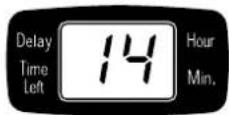
(RES.=DELAY)
4 Add the detergent.
- The appropriate quantity of detergent marked next to the water level of Water-Detergent. - When the lid is open the machine will not operate, and an alarm signal will remind you to close the lid
5 Add the laundry and press the START/PAUSE button.

* When you press the START/PAUSE button the light will blink.
6 Close the lid.
• Water will be supplied for 2 minutes after the start of the wash to supplement the water the laundry has absorbed.
Finish
The washing will be finished according to the delayed time.
Note
- If the lid is open, the machine will not work, and an alarm signal will alarm to remind you to close the lid.
- To select washing program, spinning time, water level or hot/cold manually, press the Delay Start (RESERVA) button and select the desired option. Then press the START/PAUSE button.
- When the laundry cannot be taken out immediately after the wash program ends, it is better to omit the spinning program. (The laundry will be wrinkled if left for a long time after spinning.)
2) Option Washing
When you only need the Wash, Wash/Rinse or Rinse cycles, these can be set manually
1 Press the AUTO OFF (Power) button to turn power on.

2 『Wash』, 『Wash+Rinse』, 『Rinse』, 『Rinse+Spin』, 『Spin』 only options
^1 LAVADO, ^2 LAVADO+ENJUAGUE, ^3 ENJUAGUE, ^4 ENJUAGUE+CENTRIFUGADO, ^5 CENTRIFUGADO, only options

- Press the PROCESS button until above Option Washing light is on.
- When you want to only drain, wait until the water in the washing tub drains completely and then, turn off the power.
3 Press the WATER LEVEL / NIVEL DE AGUA button, to control the water level according to the amount of laundry. If you do not choose anything, it is set the LARGE water level automatically

4 Add the laundry into the washing tub.
5 Press the START/PAUSE button.

6 Add the detergent and close the lid.
Note
- When a Wash, Wash/Rinse or Rinse only option is selected, the water will not be drained off after the wash is completely. If you wish to drain the water, press the SPIN button and wait until the water in the tub has drained completely. Then press the START/PAUSE button.
- If you do not specify the water level, then large will be automatically selected.
- If only Rinse is selected, the process will start from Water Supply.
3) Child Lock function
If you want to lock all the keys to prevent all the setting from being changed by a child, you can use the child lock option.
How to Lock
1 Press the POWER button.

- Turn Power on.
2 Press the START/PAUSE button to start washing.
After all washing conditions are set according to the manual.

3 Press both the PROCESS(PROCESO) button and the PROGRAM(PROGRAMA) button
simultaneously.
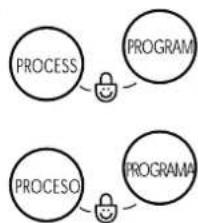
flowchart
graph TD
    A["PROCESS"] --> B["PROGRAM"]
    C["PROCESO"] --> D["PROGRAMA"]
- During the wash program, all the buttons are locked until washing is completed or until the child-lock function is deactivated manually.
- “ [L]” and the remaining time will be displayed alternately in child-lock mode.
How to Unlock
If you want to unlock during wash, press both the PROCESS(PROCESD) and the PROGRAM(PROGRAMA) button simultaneously again.
Wash Option (option)
One or more wash options can be selected for Fuzzy and Jean washing program.
Wash program is changed as follows according to selected wash options.
• Extra Wash : Gives additional 3 min wash
- Extra Rinse : Gives additional one deep rinse
eg.) If you want extra rinse, you must add fabric softener manually when indication beep rings in the final rinse. This maximize the fabric softener function.
- Gentle Spin : Gives gentle spin instead of normal spin.
Mute Option
If you want to use the washing machine without alarm signal sounds, press both the WATER LEVEL and PROCESS or NIVEL DE AGUA and PROCESO buttons simultaneously.
To make buzzer work, press both the WATER LEVEL and PROCESS or NIVEL DE AGUA and PROCESO buttons simultaneously one more time.
3-8. CARE AND MAINTENANCE
When there is a fear of freezing
- Close the water taps and remove the Water Supply Hose.
- Remove the water which remains in the water supply.
- Lower the drain hose and drain the water in the bowl and the drain hose by spinning.
If frozen
- Remove the water supply hose, and immerse it in hot water at approx.. 40°C.
- Pour approx.. 2 liters of hot water at approx.. 40^ , into the bowl and let it stand for 10 minutes.
- Connect the water supply hose to the water tap and confirm that the washing machine performs the supply and drainage of water.
| Wash Inner-tub | Leave the lid open after washing to allow moisture to evaporate. If you want to clean the inner-tub use a clean soft cloth dampened with liquid detergent, then rinse. (Do not use harsh or gritty cleaners.) |
| Inlet Hoses | Hoses connecting washer to faucet should be replaced every 5 years. |
| Exterior | Immediately wipe off any spills. Wipe with damp cloth. Try not to hit surface with sharp objects. |
| Long Vacations | Be sure water supply is shut off at faucets. Drain all water from hoses if weather will be below freezing. |
Cleaning the Inside of your Washer
If you use fabric softener or do regular cold water washing, it is very important that you occasionally clean the inside of your washer.
• Fill your washer with hot water.
- Add about two cups of a powdered detergent that contains phosphate.
- Let it operate for several minutes.
- Stop the washer, open the lid and leave it to soak overnight.
• After soaking, drain the washer and run it through a normal cycle.
We do not recommend that you wash clothes during this procedure.
4. SERVICE INFORMATION
4-1. SCHEMETIC DIAGRAM
WF-6776TTP
WF-T550(5)7TP WF-777(8)6TTC
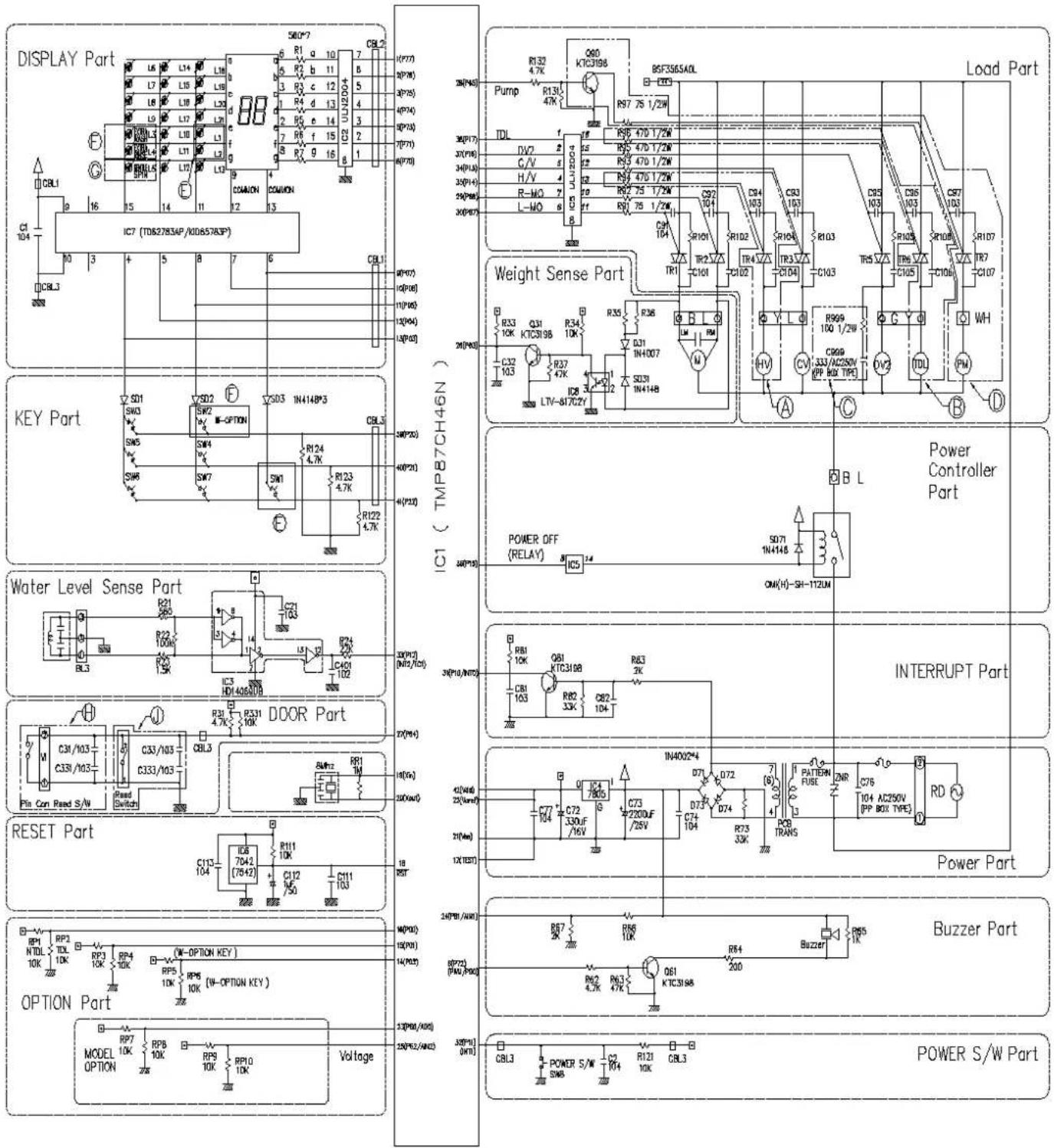
4-2. WIRING DIAGRAM
A) WF-6776TTP/WF-T550(5)TP WF-T7050TP
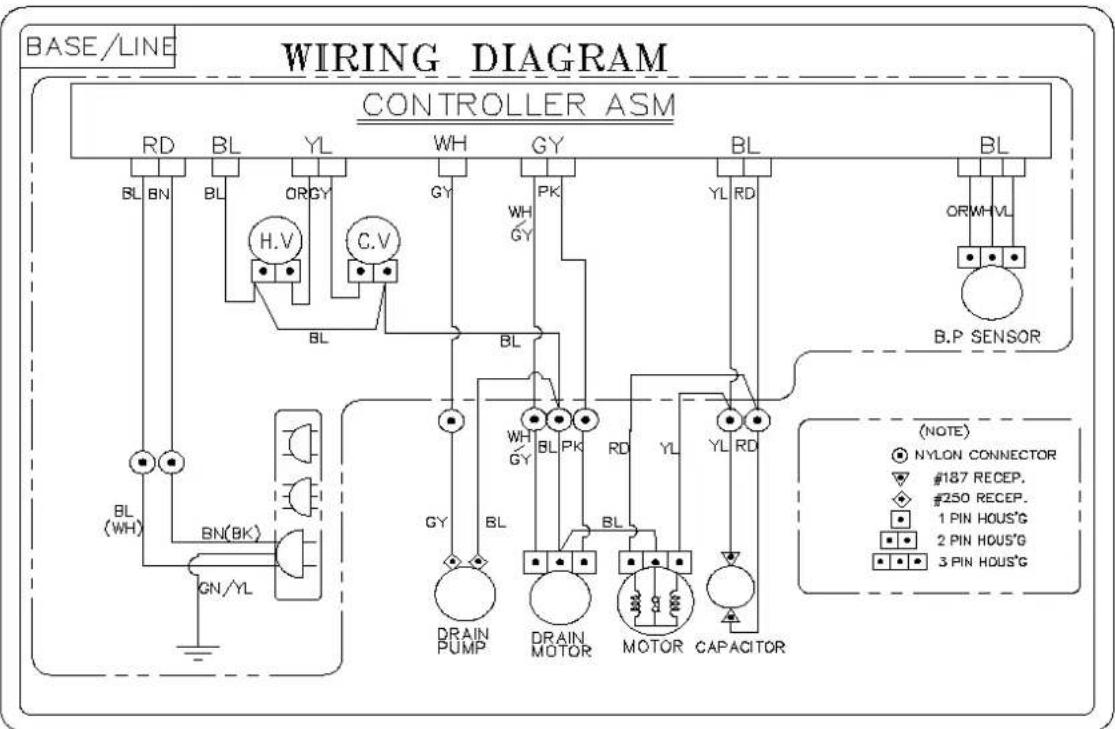
flowchart
graph TD
    A["BASE/LINE"] --> B["Controller ASM"]
    B --> C["RD BL YL"]
    B --> D["BL BN BL OR GY"]
    B --> E["HL V BL C.V"]
    B --> F["GL BL PK"]
    B --> G["BL RL YL RD"]
    B --> H["B.P SENSOR"]
    H --> I["OR WH VL"]
    B --> J["BL (WH) BL(BK)"]
    J --> K["GN/YL"]
    B --> L["BY BL"]
    L --> M["DRAIN PUMP"]
    L --> N["DRAIN MOTOR"]
    L --> O["MOTOR CAPACITOR"]
    B --> P["BY BL"]
    P --> Q["WH GY"]
    P --> R["PK"]
    P --> S["RL RD"]
    P --> T["BY BL"]
    T --> U["OR WH VL"]
    style A fill:#f9f,stroke:#333
    style B fill:#ccf,stroke:#333
    style H fill:#cfc,stroke:#333
    style I fill:#fcc,stroke:#333
    style J fill:#cff,stroke:#333
    style K fill:#ffc,stroke:#333
    style L fill:#cfc,stroke:#333
    style M fill:#fcc,stroke:#333
    style N fill:#cfc,stroke:#333
    style O fill:#fcc,stroke:#333
    style P fill:#ffc,stroke:#333
    style Q fill:#cfc,stroke:#333
    style R fill:#fcc,stroke:#333
    style S fill:#cfc,stroke:#333
    style T fill:#fcc,stroke:#333
B) WF-777(8)6TTC
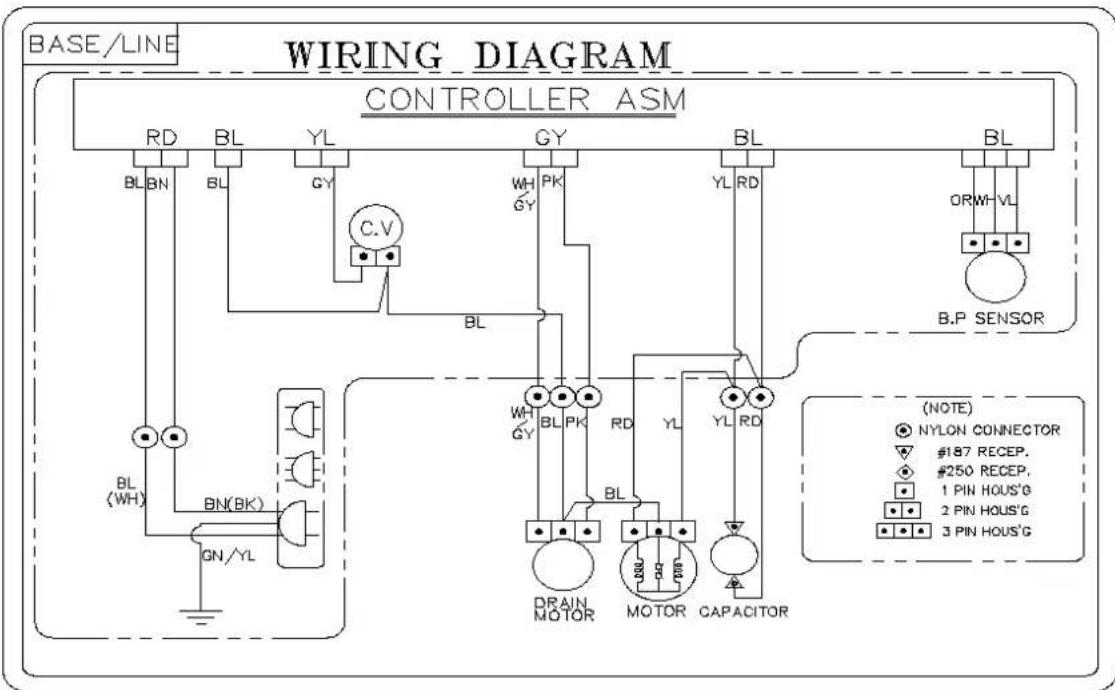
flowchart
graph TD
    A["BASE/LINE"] --> B["Controller ASM"]
    B --> C["RD BL YL GY C.V"]
    B --> D["BL BN BL"]
    B --> E["BL PK YL RD BL"]
    B --> F["OR WH VL B.P SENSOR"]
    B --> G["OR WH BL"]
    B --> H["OR WH PE"]
    B --> I["OR WH PE"]
    B --> J["OR WH PE"]
    B --> K["OR WH PE"]
    B --> L["OR WH PE"]
    B --> M["OR WH PE"]
    B --> N["OR WH PE"]
    B --> O["OR WH PE"]
    B --> P["OR WH PE"]
    B --> Q["OR WH PE"]
    B --> R["OR WH PE"]
    B --> S["OR WH PE"]
    B --> T["OR WH PE"]
    B --> U["OR WH PE"]
    B --> V["OR WH PE"]
    B --> W["OR WH PE"]
    B --> X["OR WH PE"]
    B --> Y["OR WH PE"]
    B --> Z["OR WH PE"]
    B --> AA["OR WH PE"]
    B --> AB["OR WH PE"]
    B --> AC["OR WH PE"]
    B --> AD["OR WH PE"]
    B --> AE["OR WH PE"]
    B --> AF["OR WH PE"]
    B --> AG["OR WH PE"]
    B --> AH["OR WH PE"]
    B --> AI["OR WH PE"]
    B --> AJ["OR WH PE"]
    B --> AK["OR WH PE"]
    B --> AL["OR WH PE"]
    B --> AM["OR WH PE"]
    B --> AN["OR WH PE"]
    B --> AO["OR WH PE"]
    B --> AP["OR WH PE"]
    B --> AQ["OR WH PE"]
    B --> AR["OR WH PE"]
    B --> AS["OR WH PE"]
    B --> AT["OR WH PE"]
    B --> AU["OR WH PE"]
    B --> AV["OR WH PE"]
    B --> AW["OR WH PE"]
    B --> AX["OR WH PE"]
    B --> AY["OR WH PE"]
    B --> AZ["OR WH PE"]
    B --> BA["OR WH PE"]
    B --> BB["OR WH PE"]
    B --> BC["OR WH PE"]
    B --> BD["OR WH PE"]
    B --> BE["OR WH PE"]
    B --> BF["OR WH PE"]
    B --> BG["OR WH PE"]
    B --> BH["OR WH PE"]
    B --> BI["OR WH PE"]
    B --> BJ["OR WH PE"]
    B --> BK["OR WH PE"]
    B --> BL["OR WH PE"]
    B --> BM["OR WH PE"]
    B --> BN["OR WH PE"]
    B --> BO["OR WH PE"]
    B --> BP["OR WH PE"]
    B --> BQ["OR WH PE"]
    B --> BR["OR WH PE"]
    B --> BS["OR WH PE"]
    B --> BT["OR WH PE"]
    B --> BU["OR WH PE"]
    B --> BV["OR WH PE"]
    B --> BW["OR WH PE"]
    B --> BX["OR WH PE"]
    B --> BY["OR WH PE"]
    B --> BZ["OR WH PE"]
4-3. PROGRAM TIME CHART
| [ ] | 1st Deep Rinse | Extra Rinse/Option | Spin | |||||||||||||||||||||||||||||
| Water Supply | Washing | Drain | Intermittent Spin | No Power Spin | Rotate Shower | Drain | Intermittent Spin | High Speed Spin | No Power Spin | Water Supply | Rinsing | Drain | Intermittent Spin | No Power Spin | Intermittent Spin | High Speed Spin | No Power Spin | Water Supply | Rinsing | Drain | Intermittent Spin | High Speed Spin | No Power Spin | Water Supply | Rinsing | Drain | Intermittent Spin | High Speed Spin | No Power Spin | Power Off | ||
| Fuzzy | Ex-large | 4 | 15 | 2 | 91" | 90" | 30" | 2 | 91" | - | 90" | 4 | 3 | 2 | 175" | 90" | - | - | - | 4 | 3 | 2 | 175" | - | 90" | 4 | 3 | 2 | 173" | 4 | 90" | 10" |
| Large | 3 | 14 | 2 | 91" | 90" | 30" | 2 | 91" | - | 90" | 3 | 3 | 2 | 175" | 90" | - | - | - | 3 | 3 | 2 | 175" | - | 90" | 3 | 3 | 2 | 175" | 4 | 90" | 10" | |
| Medium | 2 | 13 | 1 | 91" | 60" | 30" | 1 | 91" | - | 60" | 2 | 3 | 1 | 175" | 60" | - | - | - | 2 | 3 | 1 | 175" | - | 60" | 2 | 3 | 1 | 173" | 3 | 60" | 10" | |
| Small | 2 | 9 | 1 | 91" | 60" | 30" | 1 | 91" | - | 60" | 2 | 3 | 1 | 175" | 60" | - | - | - | 2 | 3 | 1 | 175" | - | 60" | 2 | 3 | 1 | 173" | 3 | 60" | 10" | |
| Economy | Ex-large | 4 | 3 | 2 | - | - | - | - | 175" | - | 90" | 4 | 3 | 2 | 175" | 90" | - | - | - | 4 | 3 | 2 | 175" | - | 90" | 4 | 3 | 2 | 173" | 4 | 90" | 10" |
| Large | 3 | 3 | 2 | - | - | - | - | 175" | - | 90" | 3 | 3 | 2 | 175" | 90" | - | - | - | 3 | 3 | 2 | 175" | - | 90" | 3 | 3 | 2 | 173" | 4 | 90" | 10" | |
| Medium | 2 | 3 | 1 | - | - | - | - | 175" | - | 60" | 2 | 3 | 1 | 175" | 60" | - | - | - | 2 | 3 | 1 | 175" | - | 60" | 2 | 3 | 1 | 173" | 3 | 60" | 10" | |
| Small | 2 | 3 | 1 | - | - | - | - | 175" | - | 60" | 2 | 3 | 1 | 175" | 60" | - | - | - | 2 | 3 | 1 | 175" | - | 60" | 2 | 3 | 1 | 173" | 3 | 60" | 10" | |
| Jean | Ex-large | 4 | 15 | 2 | 175" | 120" | - | - | - | 20" | 90" | 4 | 3 | - | - | - | - | - | - | - | - | - | - | - | - | - | - | 2 | 173" | 1 | 90" | 10" |
| Large | 3 | 14 | 2 | 175" | 120" | - | - | - | 20" | 90" | 3 | 3 | - | - | - | - | - | - | - | - | - | - | - | - | - | - | 2 | 173" | 1 | 90" | 10" | |
| Medium | 2 | 13 | 1 | 175" | 90" | - | - | - | 20" | 60" | 2 | 3 | - | - | - | - | - | - | - | - | - | - | - | - | - | - | 1 | 173" | 1 | 60" | 10" | |
| Small | 2 | 9 | 1 | 175" | 90" | - | - | - | 20" | 60" | 2 | 3 | - | - | - | - | - | - | - | - | - | - | - | - | - | - | 1 | 173" | 1 | 60" | 10" | |
| Wool | Ex-large | 4 | 6 | 2 | - | - | - | - | 175" | - | 90" | 4 | 3 | 2 | 175" | 90" | - | - | - | 4 | 3 | 2 | 175" | - | 90" | 4 | 3 | 2 | 173" | - | 90" | 10" |
| Large | 3 | 6 | 2 | - | - | - | - | 175" | - | 90" | 3 | 3 | 2 | 175" | 90" | - | - | - | 3 | 3 | 2 | 175" | - | 90" | 3 | 3 | 2 | 173" | - | 90" | 10" | |
| Medium | 2 | 6 | 1 | - | - | - | - | 175" | - | 60" | 2 | 3 | 1 | 175" | 60" | - | - | - | 2 | 3 | 1 | 175" | - | 60" | 2 | 3 | 1 | 173" | - | 60" | 10" | |
| Small | 2 | 6 | 1 | - | - | - | - | 175" | - | 60" | 2 | 3 | 1 | 175" | 60" | - | - | - | 2 | 3 | 1 | 175" | - | 60" | 2 | 3 | 1 | 173" | - | 60" | 10" | |
* No Power Spin : Spin by remained power
* Time Unit is minute in the chart (34": 34 second)
* Total time for full process can be changeable depending on the water pressure.
4-4. ADJUSTMENT
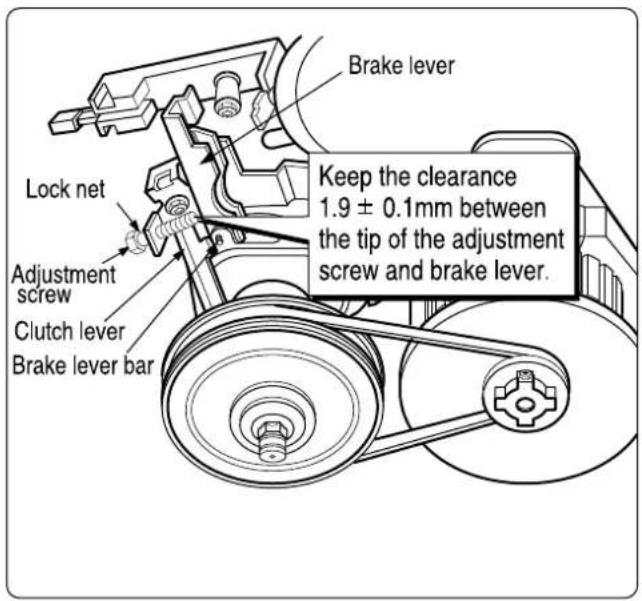
1) BRAKE LEVER ADJUSTMENT
- Shown as in the figure, untighten the adjustment screw to keep clearance less than 1.9 ± 0.1mm between the tip and the brake lever. And turn on the lock nut then paint it red.
CAUTION
- Painting part is adjusted in factory, it does not need adjusting.
- Adjust the screw properly if the brake doesn't work during spin.
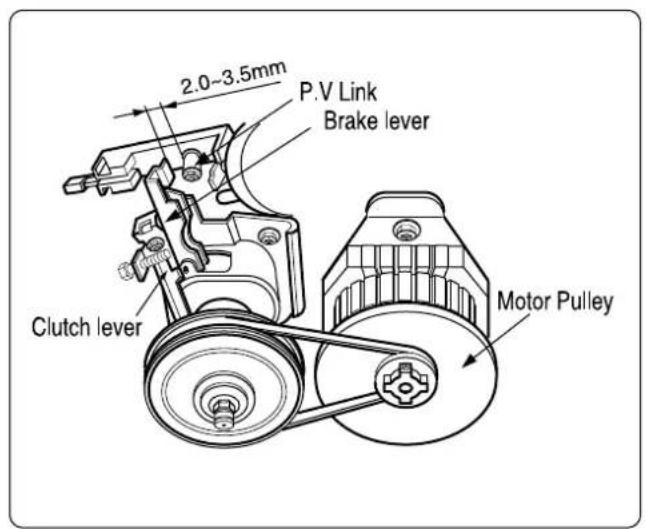
2) KEEPING CLEARANCE
- Keep the clearance about 2.0\~3.5mm between brake lever and P.V link as shown in the figure.
CAUTION
- Clutch pulley must be turning to one side P.V. Link is pulling the brake Lever.
- Clutch pulley must be turning to the left and the right when P.V Linke does not pull the brake Lever.
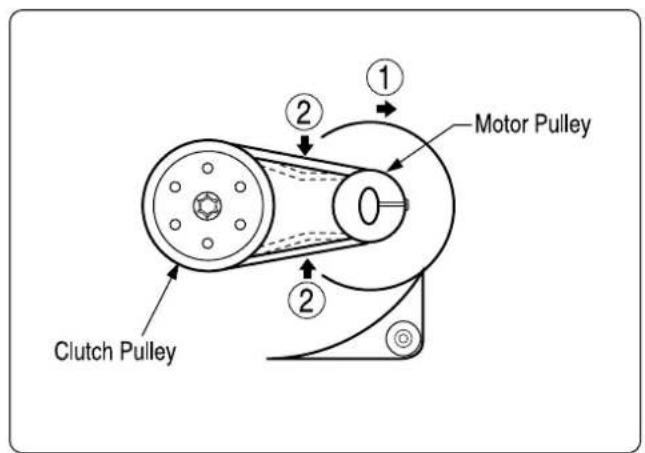
3) V-BELT ADJUSTMENT
- Adjust the motor pulley by pushing the motor like arrow ①, to make V-belt tension parallel when pushed at the point of arrow ②.
CAUTION
- When the V-belt is not properly adjusted, the motor will not be running or the belt will be slipping.
4-5. DISASSEMBLY INSTRUCTION
natural_image
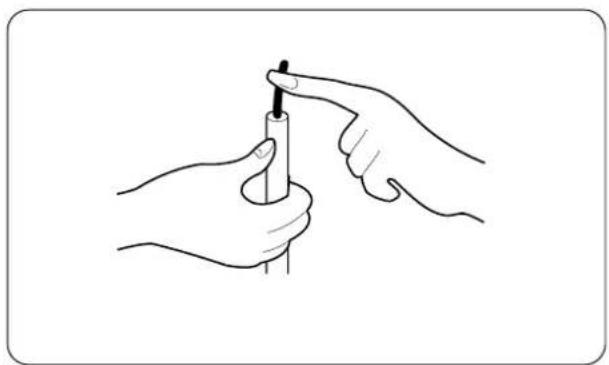
Line drawing of two hands holding a pen, no text or symbols present▶ Be sure to unplug the power to repair and replace electric parts.
CAUTION FOR ELECTROSTATICS
Be sure to make earth connection for trouble diagnosis and parts replacement. If impossible, touch earth wire on the body to remove electric deviation between the body and product before work.
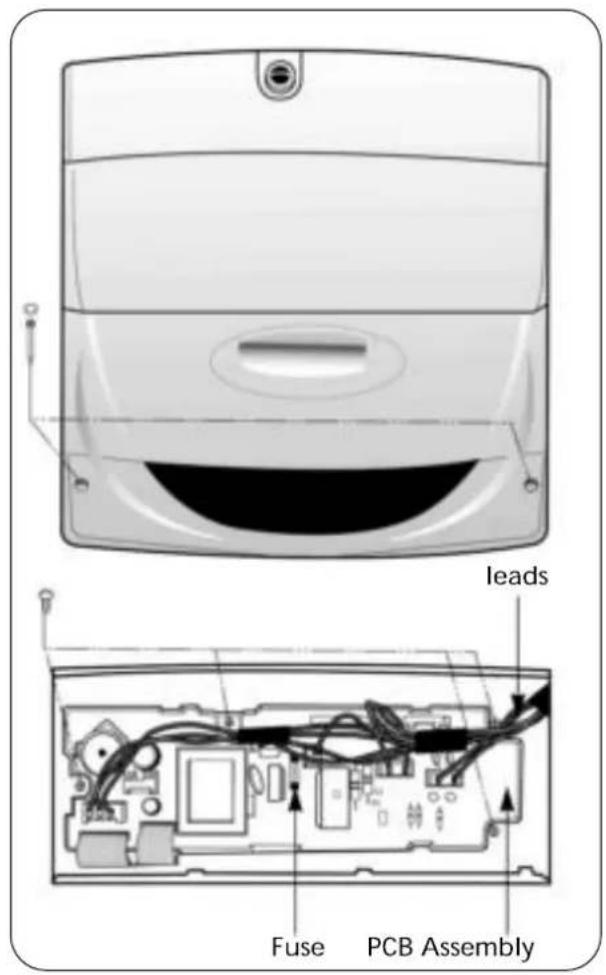
1) Disassembly of Front Panel & PCB Assembly
① Remove two screw caps using a sharp tool and two front panel fixing screws.
② Push the front panel to the left side then pull it out
③ Disconnect the leads from the controller
④ Remove 4 screw from the front panel
⑤ Remove the PCB Assembly.
▶ Fuse is located in the PCB assembly For fuse replacement use the following rated fuse
* Rating of fuse
- 250V 6A fusing type for 220-240V product
- 125V 12A fusing type for 100-127V product
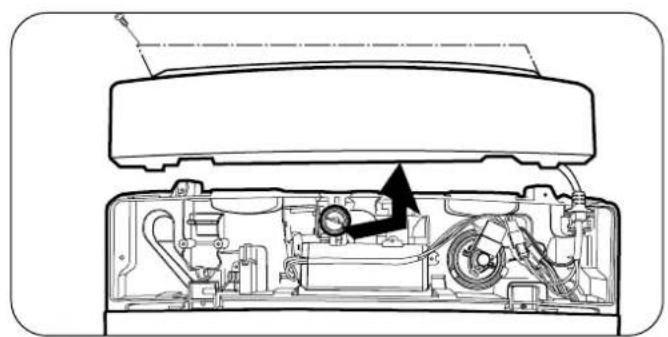
natural_image
Cross-sectional diagram of a device showing internal components and a black arrow indicating a specific part (no text or symbols present)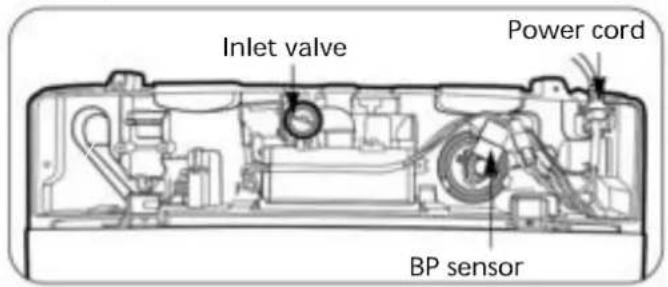
2) Disassembly of Back Panel, Power Cord, Inlet Valve & BP Sensor
① Remove two back panel fixing screws in the back side.
② Disassemble the back panel.
③ Disconnect two connectors and disassemble the power cord.
④ Remove a valve fixing screw & disconnect the leads form the inlet valve.
⑤ Remove the inlet valve.
⑥ Disconnect the leads & the pressure tube from the BP sensor.
⑦ Remove the BP sensor.
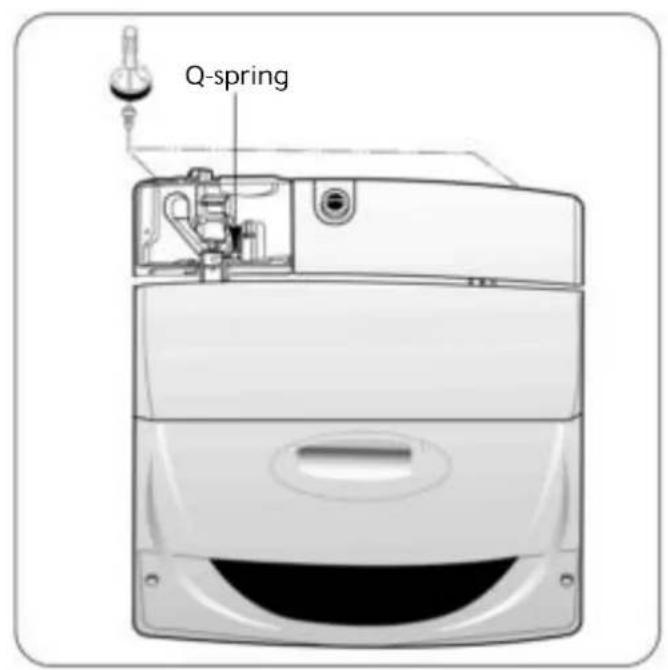
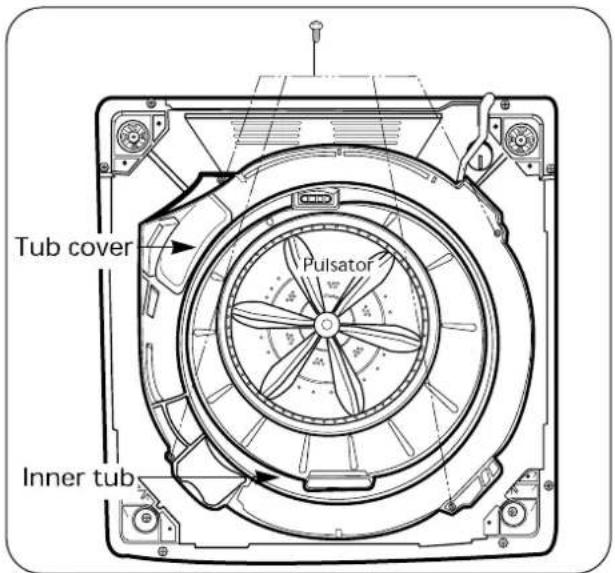
3) Disassembly of Lid Assembly, Top Cover, Tub Cover, Pulsator & Inner Tub
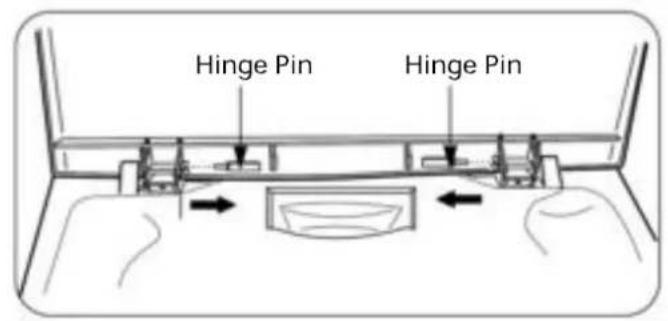
① Remove Q-spring & two hinge pins then disassemble the lid assembly
② Remove two top cover fixing screws in the rear then disassemble the top cover.
③ Remove tub cover fixing screws then disassemble the tub cover.
④ Remove the pulsator fixing screw then disassemble the pulsator.
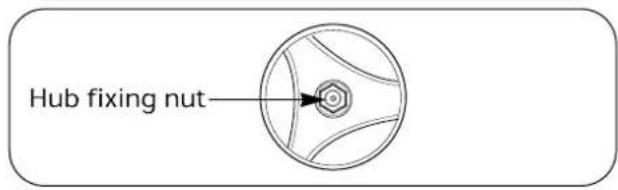
⑤ Remove the hub fixing nut by a special tool.
⑥ Disassemble the inner tub.
4) Disassembly of Back Cover, Drain Pump, Clutch(Transmission) & Motor
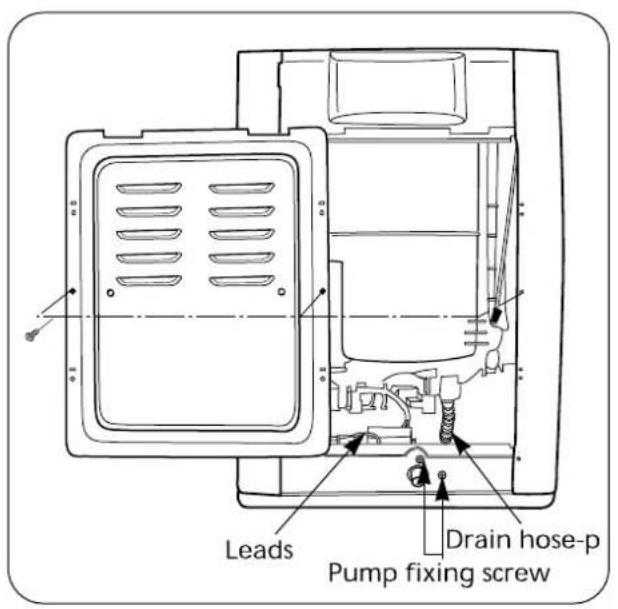
① Remove back cover fixing screws then disassemble the back cover.
② Disconnect the leads and the drain hose-p from the drain pump.
③ Remove the pump fixing screws then disassemble the drain pump.
④ Fall down the washer for clutch & motor removal.
⑤ Remove the belt.
⑥ Disassemble the clutch.
⑦ Remove two motor fixing screws then disassemble the motor.
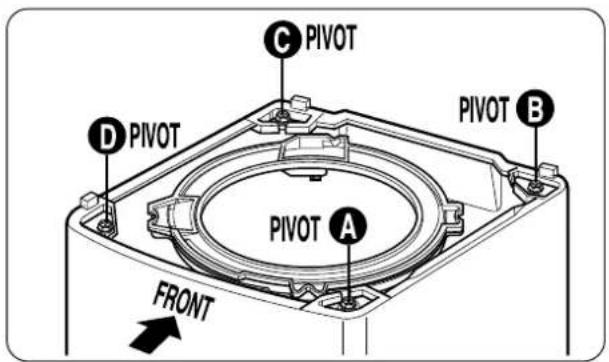
5) Replacement of Damper asm
① Separate top cover from washing machine.
② As in the fig, lift snubber bar and take it out of out case with out tub.
③ Damper assembly shall not be disassembled. Replace damper as assembly.
④ For assembly, keep the following.(Location & color)
| Location | P/No. | PIVOT(Color) | |
| WF-6776TTP WF-T550(5)7TP | WF-777(8)TTC | ||
| A, D | 4902EA2001A | 4902EA3001A | NATURAL |
| C, B | 4902EA2001B | 4902EA3001B | BLUE |
4-6. TEST RUNNING WITHOUT WATER METHOD TO USE QC TEST MODE
- To use the CHECK PROGRAM (QC TEST MODE), press WATER LEVEL, PROCESS and POWER or NIVEL DE AGUA, PRDCESO and POWER button ON without depositing any laundry.
- In QC TEST MODE all LEDs are on and press START(PAUSE) button to check over the following items.
| NO | CHECK METHOD | DISPLAY | CHECK ITEM |
| 1 | Initial state | ·Water level frequency is on DISPLAY in the condition of no water in TUB. | ·All LEDS ON.64~69 DISPLAY. |
| 2 | Press once | ·After detecting laundry amount the number of pulse is on the DISPLAY. | ·Laundry amount test. |
| 3 | Press twice | 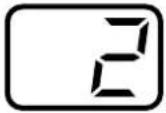 | ·COLD water. |
| 4 | Press 3 times | 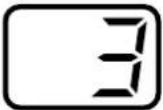 | ·HOT water. (option) |
| 5 | Press 4 times | 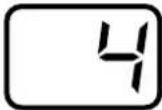 | ·If the LID is opened, DE is on the DISPLAY. In that case, close the LID.DRAIN MOTOR is 1st start. |
| 6 | Press 5 times | 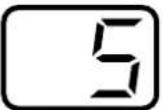 | ·DRAIN MOTOR is 2nd start and drain pump is on. |
| 7 | Press 6 times | ·AUTO off. | ·All LEDS OFF. |
4-7. TROUBLE SHOOTING AGAINST COMMON WASHING PROBLEMS
Many washing problems involve poor soil & stain removal, residues of lint and scum, and fabric damage. For satisfactory washing results, follow these instructions.
WASH PROBLEM
| Problems | Possible Causes | Solutions & Preventive Measures |
| Poor soil removal | Not enough detergentWash water temperature too low.Overloading the washerIncorrect wash cycleIncorrect sortingDo not pretreat stain | Use correct amount of detergent for load size, amount of soil and water hardness.Use warm or hot water for normal soil.Different water temperature may be required according to soil type.Reduce load size.Wash with Jean or Soak(Speedy Soak) & Jean wash cycle for heavy soiled laundry.Separate heavily soiled items from lightly soiled ones.Pretreat stain and heavy soil according to directions shown on page 11. |
| Blue Stains | Undiluted fabric softener dispensed directly onto fabric | Rub the stain with bar soap. Wash.Do not overfill fabric softener dispenser and do not pour liquid fabric softener directly onto fabric.See page 14 for more instructions. |
| Black or gray marks on clothes | A buildup caused by the interaction of fabric softener and detergent can flake off and mark clothesNot enough detergent | Keep the recommendations against Scrud(waxy buildup). (refer to scrud page14.)Use correct amount of detergent for load size, amount of soil and water hardness. |
| Yellow or brown rust stains | Iron or manganese in water supply, water pipes, or water heater | To restore discolored load of whites, use rust remover safe for fabric.Install nonprecipitating water softener or an iron filter in your water supply system for an ongoing problem.Before washing, run water for a few minutes to clear lines. |
| Lint | Incorrect sortingTissues left in pocketOverloading the washer | Wash lint givers eg towels, flannelette sheets, separately from lint collectors eg synthetic fabrics and remove tissues in pockets before wash. See page 11 for sorting and caring before loading.Do not overload the washer |
| Residue or detergent | Overloading the washerUndissolved detergentUse too much detergent | Do not overload the washer.Some detergents need to be pre-dissolved, check the detergent instructions. Try pre-dissolving the detergent.Increase water temperature using hot water safe for fabric.Use proper amount of detergent. |
| Holes, tears, or snags | Incorrect use of chlorine bleach.Unfastened zippers, hooks, bucklesRibs, tears and broken threadsOverloading the washerDegradation of fabric | Never pour chlorine bleach directly on fabric.See page 13 for adding liquid bleach.Fasten zippers, hooks, and buckles.Remove objects in pockets. See page 11 for caring before loading.Do not overload the washer. |
4-8. TROUBLE SHOOTING METHODS ACCORDING TO ERROR MESSAGE
▶ For more detailed information for trouble shooting refer to page 46 to 57.
| ERROR | ERROR DECISION BASIS | CAUSE FOR ERROR OCCURRENCE | REMEDY |
| WATER SUPPLY & INLET V/V. | ·Water level does not rise to the set level in 40 minutes.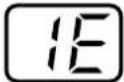 | ·Water faucet is closed?·Water supply is interrupted.·Inlet V/V is clogged with dirt.s.·Connector has bad contact to the inlet valve.·Yellow(YL) 2 pin connector has bad contact to the P.W.B ASM. | ·Open water faucet.·Wait until water supply is resumed.·Clean or replace filter.·Correct the connector contact.·Same as above. |
| DRAINAGE | ·Water is not completely drained in 10 minutes.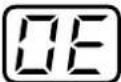 | ·Is the drain hose located properly?·Drain hose is not lowered.·Drain hose is folded or clogged due to freeze or dirt.s.·Bad Drain Motor part or WHITE(WH) 2 pin connector to the P.W.B ASM has bad connection. | ·Hung up drain hose at 0.9~1.3m high. (For pump)·Put the hose lower.(For : Non-pump)·Unclog the drain hose.·Replace Drain Motor or correct the connector contact. |
| UNBALANCE | ·Laundry unbalance during spin.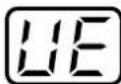 | ·Laundry in the INNER TUB is filled unevenly.·Washer is tilted.·S.F S/W is too closed to the washing tub, or has bad contact.·Is the CONNECTOR of Ball pressure sensor disconnected or badly tonched? | ·Try to fill laundry uniformly in the inner tub.·Adjust the leg.·Check and replace S.F S/W.·Check B.P SENSOR CONNECTOR or replace B.P sensor |
| OVER FLOODING ERROR | ·In the second QC Mode the following message is displayed.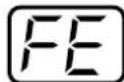 | ·Check INLET valve | |
| DOOR OPEN | ·LID is opened in the course of intermittent spin, normal spin or processing reservation. 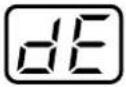 ·SIGNAL continuously ringing. ·SIGNAL continuously ringing. | ·Lid is opened during intermittent spin or normal spin? ·Lid is opened while processing reservation? ·Connector to the S.F S/W or VIOLET(VL) 2 PIN CONNECTOR to the P.W.B ASM has bad connection. ·S.F S/W or BALL PRESSURE SENSOR is bad or bad contact. ·Is placed magnetic in LID-B? | ·Closed the lid. ·Closed the lid. ·Correct the connector contact. ·Check and replace S.F S/W or BALL PRESSURE SENSOR. ·Change the LID-B. |
| PRESSURE SENSOR | ·Water Pressure Switch is off. 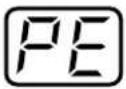 | ·Connector the Ball Pressure Sensor(Pressure Switch) or BLUE(BL) 3 pin connector to P.W.B ASM has bad connection. ·Ball Pressure Sensor (Pressure Switch) is bad. (In the initial state of QC TEST MODE, the number on the DISPLAY is less than 63 or more than 70) | ·Correct the connector contact. ·Replace Ball Pressure Sensor(Pressure Switch). |
| AUTO OFF | ·AUTO OFF relay S/W is out of order. 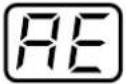 | ·BLUE(BL) 1pin connector to P.W.B ASM has bad connection. | ·Correct the connector contact. ·Change P.W.B ASM. |
| LAUNDRY AMOUNT SENSOR | ·In the second QC MODE, the following message is displayed. 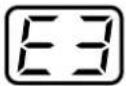 | ·Check MOTOR, CLUTCH, V-BELT, CONDENSOR. ·Check over all connectors if they have bad connection. | ·Adjust or replace those parts. ·Correct the connectors contact. |
4-9. HOW TO DIAGNOSE AND REPAIR BY SYMPTOM
1) Washer is not energized.
| Where, what & how to check? | Result of Check | Possible Cause | How to repair & settle |
| Household Power supply1. Check whether connection between the plug and the electrical is poor | Poor | Defect of the electrical | Change the electrical. |
| 2. Measure voltage of the electrical. | Around rating | No defect | |
| 0V | Defect of household power supply | Call for power supply company | |
| Wiring of the Washer1. Measure resistance between both ends of the power supply cord with both the plug pins short-circuited. | Less than 1 Ω | No defect | |
| ∞ Ω | Open circuit of the power supply cord | Change the power supply cord. | |
| 2. Check whether every connector in the bundle of connectors has a good connection. | Male & female connectors separated | Poor connection. | Remove the cause to give strain and reconnect them. |
| 3. Check resistance of every wire to find out a open wire. | ∞ Ω | Wire is opened. | Change the lead wire. |
| Electrical component1. Check resistance with power relay switch turned on | Less than 0.5 Ω | No defect | |
| More than 1.0 Ω | Poor contact | Change the Auto Off Switch | |
| 2. Check the secondary voltage of the transformer. | 10~14V | No defect | |
| 0V | Coil is open | Change the transformerformer. | |
| 3. Measure resistance to check whether the T.P of the motor is blown out. | ∞ Ω and motor is hot | T.P blown out | Remove cause to overload the motor |
| 4. Check whether the fuse is open. | Open | Defect of the fuse | Change the fuse.CAUTIONCheck the fuse rating AC100~127V:125V 12AAC220~240V:250V 6A |
| ControllerIf there are no defects in the above, it should be defect of the controller.If supply voltage is 120% higher than rating the varistar in the controller may be broken. Check supply voltage. | Over 120% voltage than rating check | Change the controller if all the electrical parts have no defects. |
2) Defects on displaying function
| Where, what & how to check? | Result of Check | Possible Cause | How to repair & settle |
| Main voltage1. Measure mains voltage at the wall outlet | Less than 85% of the rating. | Low voltage. | To explain that it is caused by low voltage in electric supply and recommend using a transformer if voltage has been continuously low. |
| 2. Measure voltage at the extended outlet that the washer is plugged in if the extended outlet is used and voltage at the electrical outlet is normal in the above. | Less than 85% of the rating | The dia of the lead wire is smaller or many loads are connected at the same outlet | To use a transformer having a enough capacity if using a transformer. |
| Transformer1. Measure the secondary voltage of the transformer. | Less than AC 10V | Defect of the transformer. | Change the controller. |
| Controller1. Defect of LED.2. Defect of LED driving circuit.3. Defect of micom. | Defect of controller. | Change the controller. |
3) Reset During operation
| Where, what & how to check? | Result of Check | Possible Cause | How to repair & settle |
| Mains Voltage1. Measure voltage of the outlet that the washer is plugged into during wash and spin. | Less than 80% of the rating. | Mains voltage is too low or size of a lead wire is too small. | Explain that it is caused by low voltage in electric mains and recommend using a suitable size of leads. |
| 2. Reset symptom happens at specific time zone repeatedly. | External noise inrushed. | Explain it is caused by using environment. (It happens when equipment with high frequency is used around) | |
| 3. Check whether a transfomerient power cut happens. (Fluorescent lamp is transfomeriently blinked.) | Explain it is a problem of electric supply environment. |
3) Reset during operation
| Where, what & how to check? | Result of Check | Possible Cause | How to repair & settle |
| Drain Motor1. Operate washer setting spin only, then press the start/pause button when the wash motor starts to work and then press the start/pause button again in order for the drain motor to work intermittently. | Reset happens after the drain motor works. | Defect of the drain motor (A noise generated when the internal relay works.) | Change the drain motor |
| Controller1. If mains voltage and the drain motor have no defects a defect of the controller is highly possible. | Change the controller. |
4) Water doesn't come into the wash tub.
| Where, what & how to check? | Result of Check | Possible Cause | How to repair & settle |
| Inlet Valve1. If water doesn't come though the inlet valve works(electric sound occurs)1) Check whether water mains is cut. | Water mains cut. | Mains cut. | Explain. |
| 2) Check whether tabs are turned on. | Don't turned on. | Mistake of use. | Turn on the tap. |
| 3) Hot & cold tab are opposite connected. | Connected opposite. | Wrong installation. | Correct their locations and turn on the tap. |
| 4) Wrongly select water temperature option. | Selected opposite. | Mistake of use. | Explain how to use. |
| 5) If there are no problems in the above, check the inlet valve filters after disconnecting the water supply hoses. | Filters blocked by foreign substance. | Don't clean. | Clean them by brush and explain cleaning regularly them. |
| 6) If there are no problems in the above a diaphragm hole in the valve is blocked by foreign substance or the plunger in it is locked. | Defect of the inlet valve. | Change the inlet valve. | |
| 2. If the inlet valve doesn't work(there is no electric sound)during filling cycle.1) Check whether it's connectors are taken off or they have poor connection. | A connector is taken off. | Defect of contact. | Reconnect it or remove the causes to make poor connection. |
| 2) Check resistance of the inlet valve. | ∞ Ω | Coil is open | Change the inlet valve. |
4) Water doesn't come into the wash bowl.
| Where, what & how to check? | Result of Check | Possible Cause | How to repair & settle |
| Ball Pressure Sensor (Pressure Switch)1. Is there PE error on the display which means Ball Pressure Senosr (Pressure Switch) error | PE Error displayed. | Connector is taken off, or lead or coil is open. | Reconnect the connector or change leads. Change the Ball Pressure Sensor (Pressure Switch) if coil is open. |
| 2. Check frequency of the Ball Pressure Sensor(Pressure Switch) without load if wash is proceeding without filling. | Less then 26.2kHz | Defect of the Ball Pressure Sensor (Pressure Switch) | Change the Ball Pressure Sensor (Pressure Switch). |
| Controller1. Defect of controller is highly possible if inlet valve and Ball Pressure Sensor have no defects in the above. | Change the controller. |
5) Water fills continuously or intermittently.
| Where, what & how to check? | Result of Check | Possible Cause | How to repair & settle |
| Wrong Installation/Leakage1. Check whether the drain hose is laying down on the floor.(For pump model) | Drain hose laying down. | Wrong installation. | The drain hose should be hung on the stand-pipe or the tub.Change the part. |
| 2. Check where water leaks. | Water leaks from a part. | Defect of the part. | Repair it. |
| Ball Pressure Sensor (Pressure Switch)1. Check the pulsator is rotating when water fills continuously. | It doesn't rotate. | Water pressure is not sensed. | Check the tube of the Ball Pressure Sensor(Pressure Switch), it is bent or blocked, repair that. |
| 2. If there is no defect in the Ball Pressure Sensor(Pressure Switch), check whether the air hole of the outer tub is blocked. | Blocked. | Air hole blocked. | Repair the blocked hole. |
| Inlet Valve1. Does water fills even though it is not energized (power is off)? | Water fills. | Defect of the inlet valve. | Change the inlet valve. |
| Controller1. Does water fill immediately after the power switch turns on before pushing the start/pause button. | Short circuit of the triac of the controller. | Change the controller. |
6) Pulsator doesn't rotate normally.
| Where, what & how to check? | Result of Check | Possible Cause | How to repair & settle |
| Pulsator rotates at one direction.1. The Pulsator rotates normally at the beginning of wash cycle, but is it not rotate at clockwise direction (locked) after some wash cycles though there is motor-working sound? | Clockwise rotation locked. | Unusual operation. | Turn the power off and on again then that symptom disappears. Explain “Don’t run wash only continuously”. |
| 2. In the case the pulsator doesn’t rotates either clockwise or counterclockwise from the beginning of wash cycle:1) Check resistance of the wash motor if there is no motor-working sound. | Resistance is normal. | Defect of controller or poor contact of connectors of motor leads. | Change the controller if there are no contact defects in the leads of the motor. |
| 2) Check belt tension & whether the clutch rotates normally if there is motor-working sound. | V-belt is loose. | Loose the belt. | Adjust belt tension by changing motor fixing location and change the belt if it is impossible to adjust belt tension. |
| Clutch locked. | Defect of the clutch. | Change the clutch if the clutch pulley is locked when making it rotated clockwise and counterclockwise by hand. | |
| 3. The pulsator doesn’t rotate at both directions.1) Check whether motor rotates at both directions if there is motor-working sound when it’s energized. | Motor rotates at both directions. | Loose the belt. | Adjust belt tension or change the belt if it is impossible to adjust. |
| The plusator locked. | Remove cause locking the pulsator | ||
| Defect of the clutch. | Change the clutch. | ||
| Motor doesn’t rotates at both directions. | Defect of the capacitor(check the capacitor’s capacitance) | Change the motor if the motor is locked when having its shaft rotated by hand. | |
| Defect of the motor. | Change the capacitor if there is no contact defect in capacitor’s lead | ||
| 2) Check resistance of the motor if there is no motor-working sound. | ∞ Ω | Motor coil is open. | Change the motor. |
| Normal resistance. | Contact defect of the leads. | Remove the causes. |
6) Pulsator doesn't rotate normally.
| Where, what & how to check? | Result of Check | Possible Cause | How to repair & settle |
| 4. Pulsator weakly rotates.1) Check voltage at the power outlet where the washer is plugged into. | Less than 85% of rating. | Lower voltage. | Explain the causes and a transformer should be used if necessary. |
| 2) Check capacitance of the capacitor. | Indicating needle rises and immediately indicates ∞. | Capacitor is normal. | |
| The needle is stopped after it is raised. | Lack of capacitance of the capacitor. | Change the capacitor. | |
| The needle doesn’t move. | Capacitor is fully discharged. | Change the capacitor. |
7) Water does not drain.
| Where, what & how to check? | Result of Check | Possible Cause | How to repair & settle |
| Drain Pump1. Check whether there is drain pump working sound. | There is pump working sound. | Drain pump is blocked by foreign objects. | Disassemble the drain pump cap and remove the foreign objects in the pump casing. |
| 2. Check resistance between terminals if there is no working sound of the drain pump. | ∞ Ω | It's coil is open. | Change the drain pump. |
| 3. Check connection parts of the leads if there is no working sound and its resistance is normal. | Defect in connection part. | Defect in connection part. | Repair defected connection. |
| Connection part has no defects. | Defect of the controller. | Change the controller. | |
| Drain Hose1. Check whether the drain hose is put in a narrow space and kinked. | Kinked. | Defect of installation. | Reinstall so that it should not be kinked. |
| 2. Check whether the internal drain rubber asm is bent.(For Non-pump model) | Bent. | Defect of the drain rubber asm. | Change the drain rubber asm. |
| 3. Check whether the end of the drain hose submerged into water or higher than required.(For non-pump model) | Submerged or higher than required. | Defect of installation. | Re-install so that it can't be submerged or not higher than required. |
7) Water does not drain.
| Where, what & how to check? | Result of Check | Possible Cause | How to repair & settle |
| 4. Check whether the drain hose is blocked by foreign objects. It may happen in case of the hose is a little kinked. | Blocked. | Blocked hose. | Remove the objects and reinstall so that it can't be kinked. |
| PV Case(for Non-Pump Model only)1. Check whether the PV asm is blocked by foreign objects. | Blocked. | Separate the drain motor from the PV link, disassemble PV cover and then remove the foreign objects within PV case.Check the washer works normally after repair and reassembling them.(PV link & drain motor lever should be assembled accuratel.) | |
| Drain Motor(For Non-Pump Model only)1. Check resistance of the drain motor if it can not pull the PV link. | ∞ Ω | Drain motor coil is open. | Change the drain motor→Check the washer works normally after reassembling.(PV link & drain motor lever should be assembled accurately.) |
| Resistance is normal. | Contact defect in connection parts or defect of the controller. | Change the controller if there is no defects in the connection parts. |
8) Water drains though it is not the time of drain.
| Where, what & how to check? | Result of Check | Possible Cause | How to repair & settle |
| Drain Motor(for Non-Pump Model only)1. Check whether the drain motor is normally returned after turning power off.(It is considered normal if the lever of the drain motor is fully pulled out by the PV spring) | Blocked. | Defect of the drain motor. | Change the drain motor. |
| PV Case1. If water drains though the drain motor is normally returned, check whether PV asm is blocked by foreign objects or the bellows in the PV asm is deformed. | Blocked. | Remove the objects in the PV asm. | |
| Bellows deformed. | Defect of PV Bellows. | Change the PV bellows.(The bellows may swell up if it contact petroleum or petrochemical substance because it is made of rubber) | |
| Controller1. Check whether the drain motor or the drain pump works immediately after power is turned on. | Works. | Defect of the controller(Triac defect) | Change the controller. |
9) Drain error happens while water drains normally.
| Where, what & how to check? | Result of Check | Possible Cause | How to repair & settle |
| Ball Pressure Sensor (Pressure Switch)1. Check generation frequency of the Ball Pressure Sensor (Pressure Switch) without water. | Less than 26.3 kHz | Defect of the Ball Pressure Sensor(Pressure Switch). | Change the Ball Pressure Sensor (Pressure Swtich) |
| 26.3~27.1 kHz | Defect of the controller. | Change the controller. |
10) Spin extraction is not proceeded.
| Where, what & how to check? | Result of Check | Possible Cause | How to repair & settle |
| Motor1. In the case that the wash motor does not spin during spin extraction;1) Check there is motor working sound,or | There is motor working sound. | Defect of the capacitor or Mechanically locked. | Change the capacitor after checking defect of capacitor.check whether the washing clutch or the washing tub is blocked if the motor rotates after removing the V-belt.Check whether the motor is locked if the motor does not rotates even though the V-belt being removed. |
| 2) If there is no motor-working sound;1 Check frequency of the Ball Pressure Sensor (Pressure Switch), under no load, or | Less than 26.3kHz | Defect of the Ball Pressure Sensor(Pressure Switch). | Change the Ball Pressure Sensor(Pressure Switch). |
| 2 Check contact defect of the safety switch, defect of connection parts and whether the lid is open if door error is displayed. | The lid is open | Mistake in use. | Explain “The lid is close during operation” |
| Defect of connection part. | Reconnect the conncetors. | ||
| 3 Is placed the magnetic in Lid-B. | The lid is open. | Mistake in use. | Explain“The lid is close during operation” |
| Defect of magnetic in LID-B | Change the Lid-B | ||
| 4 Check resistance of the motor. | Contact defect of the Ball Pressure Sensor(Safety Switch) | Change the Ball Pressure Sensor(Safety Switch). | |
| ∞ Ω | Coil is open. | Change the motor. | |
| Drain Motor/Clutch1. In the case the motor rotates but the inner tub does not rotates;1) Check resistance of the drain motor if the drain motor doesn’t work,or | ∞ ΩResistance is normal | Coil is open.Defect of connection part or defect of the controller. | Change the drain motor.Change the controller after checking connection parts. |
| 2) Check gap between the PV link and the brake lever if the inner tub does not rotates while the drain motor works. | The clearance is less than 2.0mmor more then 3.5mm | Assembling defect of the drain motor or the clutch | Reassemble the drain motor or the clutch to keep the clearance. |
| The gap is normal (2.0~3.5mm) | Defect of the clutch. | Change the clutch. |
11) Spining is going on even though the lid is open.
| Where, what & how to check? | Result of Check | Possible Cause | How to repair & settle |
| Safety Switch1. Check resistance between both terminals of the safety switch with the lid open. | 0~9 | Contact points of the safety switch are welded. | Change the Safety Switch |
| Defect of the controller. | Change the controller | ||
| Ball Pressure Sensor1. Is placed the magnetic on the wash? | Yes | Reed S/W is short by magnetic on the washer. | Keep magnet away from the washer. |
| No | Reed Switch. | Change the controller. |
12) Spin basket doesn't reach to full speed(normal rpm)
| Where, what & how to check? | Result of Check | Possible Cause | How to repair & settle |
| Main voltage1. Check voltage at the power outlet where the washer is plugged into. | Less than 85% of rating | Tool low voltage | Explain the cause and recommend using a transformerformer if necessary. |
| Starting Capacitor1. Check the capacitance of the starting capacitor. | Lack of capacitance | Defect of capacitor | Change the capacitor |
| Clutch Assembling1. Check the clearance between the PV link and the brake lever and clearance between the clutch lever and the adjustment bolt. | The clearance is less than 2.0mm or more than 3.5mm | Adjust PV lever bolt and paint it red.Reassemble the drain motor or the clutch. | |
| Bolt clearance is out of range 1.9±0.1mm | Defect of the clutch | Adjust the bolt clearance. | |
| Blocked by foreign objects1. Check whether the PV asm, the drain pump & the drain hose are blocked by foreign objects so that it makes water-splashing noise in the tub. | Remove the foreign objects. |
13) Vibration, Noise or Unbalance Error happens during spin.
| Where, what & how to check? | Result of Check | Possible Cause | How to repair & settle |
| Using conditions such as installation etc.1. Check whether the washer is leveled. (Check clearance with out tub and out case the left gap is the same as the right and the rear gap is 1.5~2 time bigger than the front gap, between the cabinet and the wash bowl, when it is leveled.) | Not leveled. | Defect of installation | Level the washer. |
| 2. Check whether laundry in the wash bowl is out of balance that can cause severe vibration & noise. | Laundry is unbalanced. | Explain that it is not out of order and it may happen when big & long laundry is washed. | |
| 3. Check whether the pulsator doesn't rotate during spin.(To check that, remove the front lid and than run the spin only cycle.) | The pulsator rotates initially then the inner tub rotates. | Defect of the clutch | Change the clutch spring-B or the clutch asm. |
| Safety Switch1. Check whether the lever of the safety switch touches the outer tub if touching noise happens. | The lever is bented | Defect of the safety switch | Change the safety switch.Don't repair and reuse it because it creates another problem if it is wrongly repaired. |
| Damper1. Check whether the outer tub cover hit the top cover without load during spin. | Hit | Defect of the damper | Change four dampers simultaneously.(In assembling, check the position to damper asm) |
| ※ It is very important to find out what kinds of noise & where comes from to settle noise during spin and accumulately service experience. | |||
14) Power is automatically turned off during operation or immediately turning on the power switch.
| Where, what & how to check? | Result of Check | Possible Cause | How to repair & settle |
| Main voltage1. It is mostly caused by noise from mains or transfomerient power cut. | Defect in main. | Explain the cause.(It happens specially when a high frequency equipment is a used around the washer or in the case voltage fluctuation is big) | |
| Auto Off switch or Controller1.Check whether power is automatically turned off when turning on the auto off switch after unplugging the power cord from the outlet | Automatically turned off | Mechanical defect of the auto off switch. | Change the auto off switch. |
| 2. It would be defect of the controller if power is automatically turned off immediately when turning on the power switch even though there is no defects in the auto off switch. | Change the controller. |
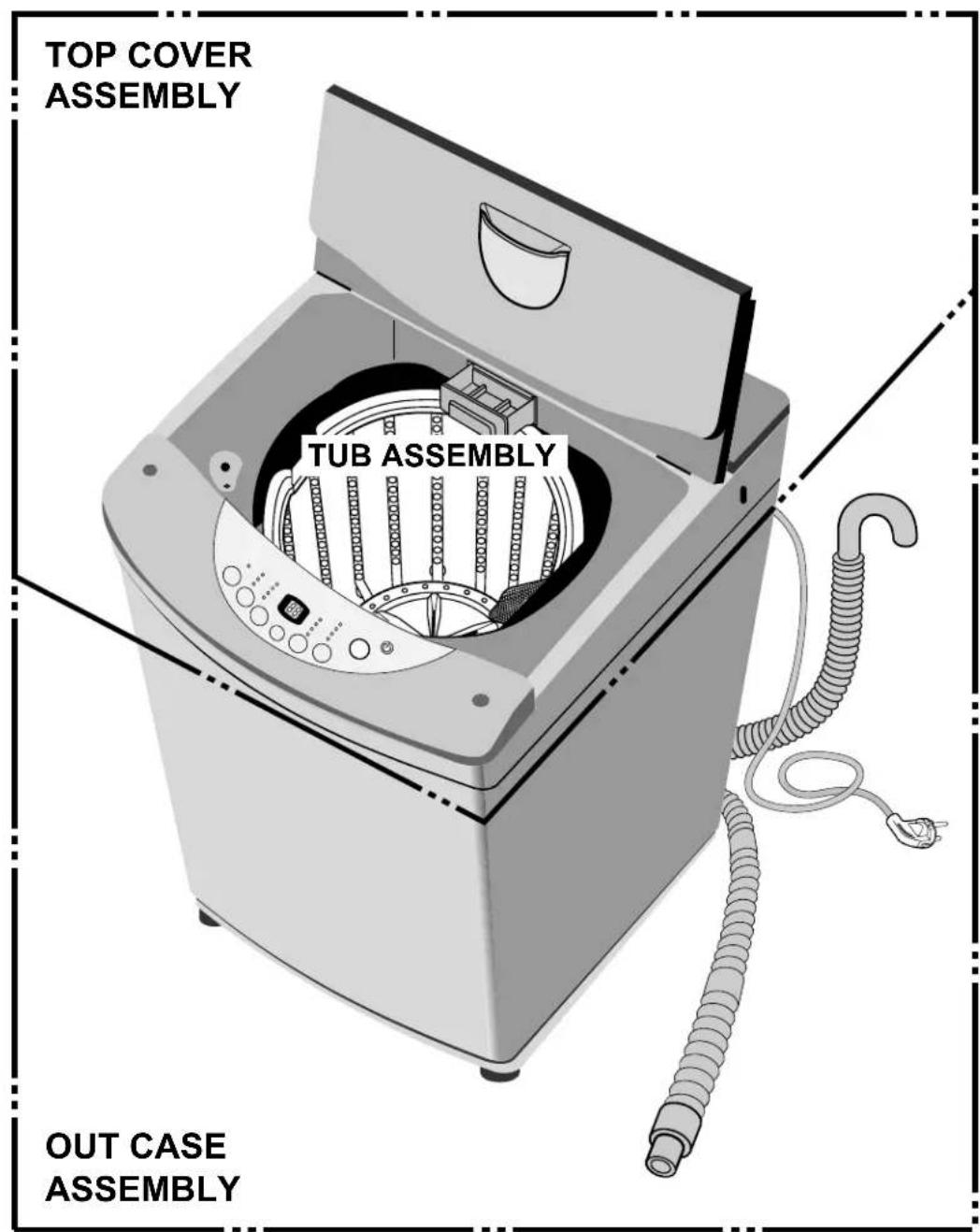
5-1. THE EXPLODED VIEW OF TOP COVER ASSEMBLY
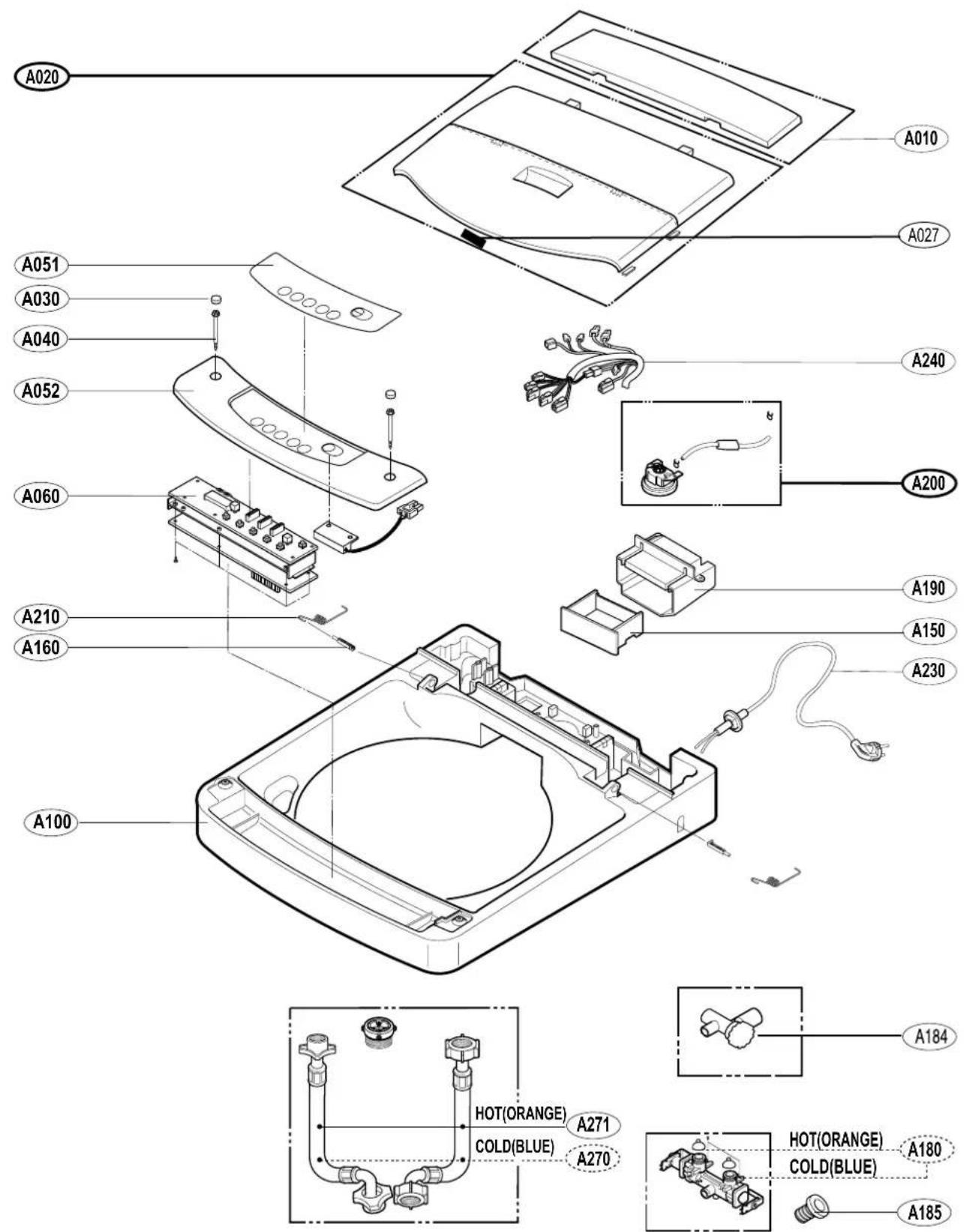
5-2. THE EXPLODED VIEW OF OUT CASE ASSEMBLY
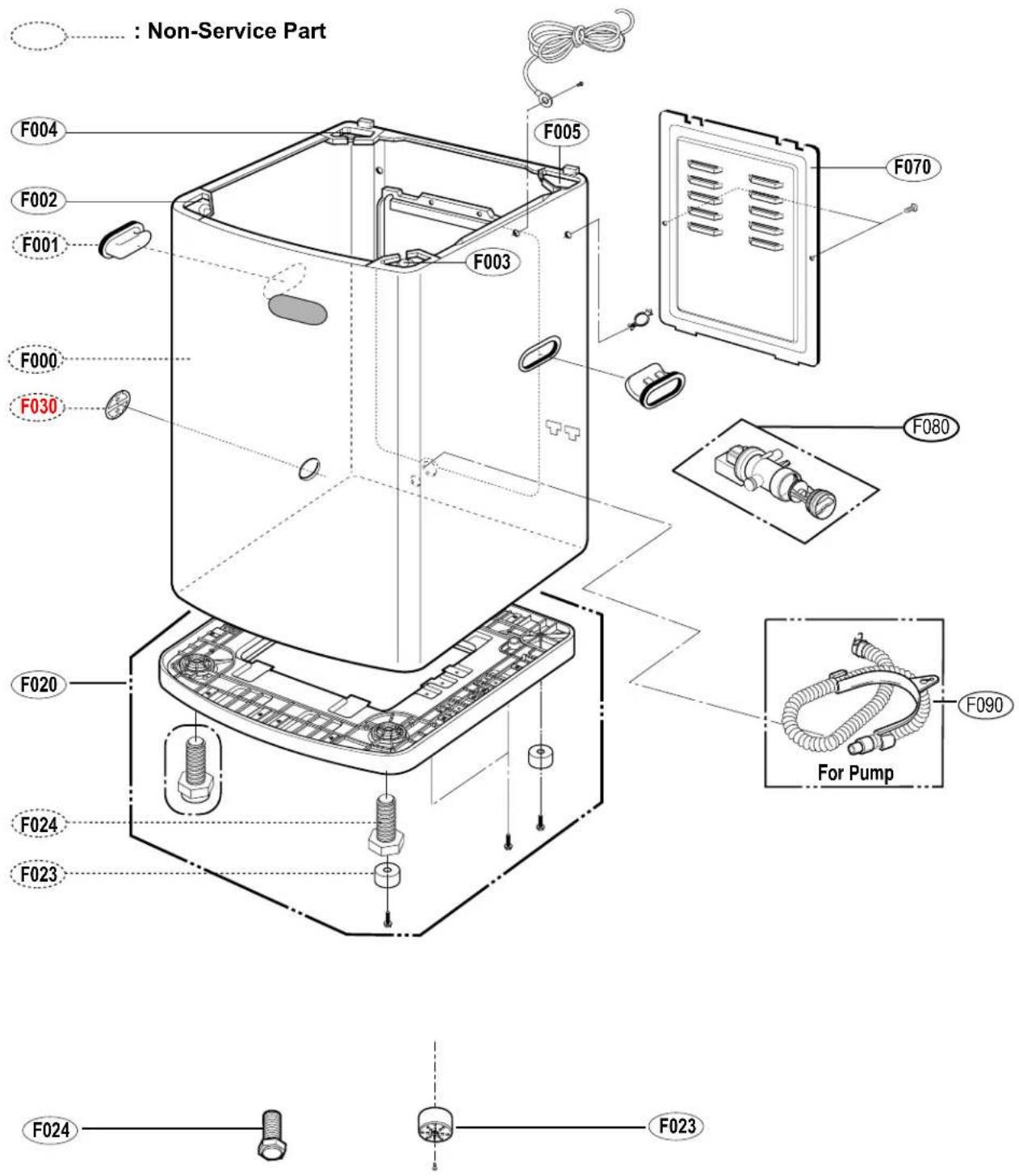
5-3. THE EXPLODED VIEW OF TUB ASSEMBLY
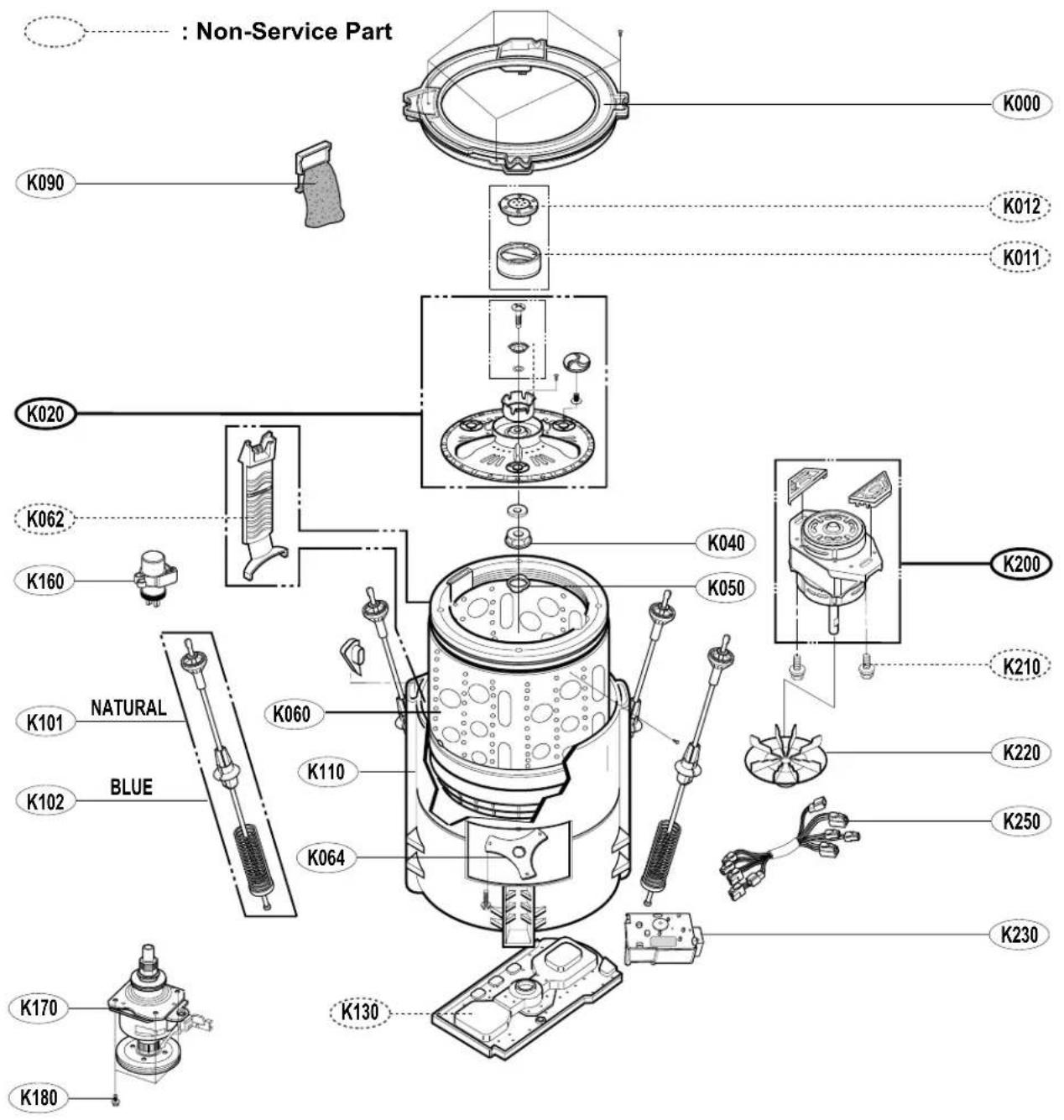
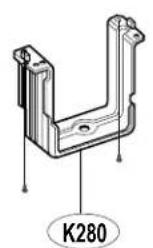
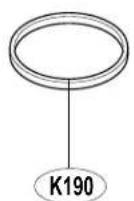
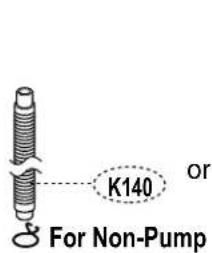
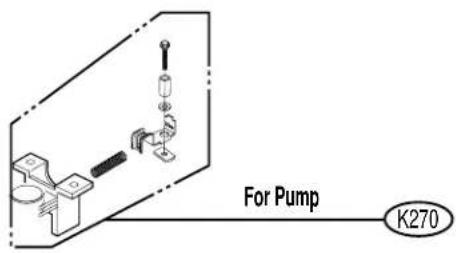
- WASHING MACHINE SERVICE MANUAL
- SAFETY PRECAUTION!
- IMPORTANT SAFETY NOTICE!
- CONTENTS
- SPECIFICATIONS
- INSTALLATION INSTRUCTIONS
- 2-1. HOW TO ADJUST LEVEL
- Installation area
- Checking level
- Checking slope
- Horizontal setting
- Confirming level
- Distance between drain hose and the wall
- 2-2. CONNECTING WATER SUPPLY HOSE
- Connecting Water Supply Hose to water tap
- Untighten the screw
- Fixing the connector to the tap
- Attach the water supply hose to the connector
- Fixing the connector of connector and water supply hose
- Check the connection of water supply hose and the connector
- One Touch Type
- Separate Middle connector from Water Supply Hose
- Loosen the fixed nuts to connect the connector to the tap
- Note
- Fixing Connectors to the Tap
- Fixing Upper Connector and Middle Connector
- Connecting Middle Connector and Water Supply Hose
- Checking the water leakage
- Screw Type
- Attach the water supply hose to the tap.
- Connect the water supply hose to the tap.
- Check water leakage.
- Connecting Water Supply Hose to the machine
- 2-3. CONNECT THE DRAIN HOSE
- ■ For pump model
- ■ For non - pump model
- OPERATING INSTRUCTION
- 3-1. IDENTIFICATION OF PARTS
- 3-2. BEFORE STARTING TO WASH
- Care Labels
- Sorting
- Check before Loading
- Pretreatment on stains or heavy soil
- Loading
- Load Size
- Light and Large-sized clothing
- Long laundry items
- WARNING
- Fire Hazard
- Using Water
- Amount of Water Level
- Water temperature
- Attention
- Using Detergent
- Detergent
- Choosing the right detergent
- How much detergent
- Adding the detergent
- Using Liquid Bleach
- Using Fabric Softener
- Scrud(Waxy Build up)
- If you wish to use fabric softener we recommend
- Special Guide for Stain Removal
- For successful stain removal:
- 3-3. FUNCTION OF EACH BUTTON(FOR WF-777(8)6TTC)
- WF-T7050TP
- Water temperature button (option)
- Water level button
- (indication of detergent amount)
- Wash option button(option)
- Delay Start (Reservation) button
- unción de cada botón
- Botón de Temperature del agua (opcional)
- Botón de nivel de agua (Indicación de cantidad de detergente)
- TurboDrum
- Opción
- Botón de reserva
- Programas de Lavado
- DUREZA DEL AGUA - DETERGENTE - TEMP. DEL AGUA
- 3-5. FUNCTION OF EACH BUTTON(FOR WF-5505(5)7TP/WF-6776TTP)
- 3-7. OTHERS FUNCTIONS
- 1) Delay Start(Reservation) Wash
- 2) Option Washing
- 3) Child Lock function
- How to Lock
- Press the POWER button.
- Press the START/PAUSE button to start washing.
- Press both the PROCESS(PROCESO) button and the PROGRAM(PROGRAMA) button
- How to Unlock
- Wash Option (option)
- Mute Option
- 3-8. CARE AND MAINTENANCE
- When there is a fear of freezing
- If frozen
- Cleaning the Inside of your Washer
- SERVICE INFORMATION
- 4-1. SCHEMETIC DIAGRAM
- 4-2. WIRING DIAGRAM
- 4-3. PROGRAM TIME CHART
- 4-4. ADJUSTMENT
- 1) BRAKE LEVER ADJUSTMENT
- CAUTION
- 2) KEEPING CLEARANCE
- 3) V-BELT ADJUSTMENT
- 4-5. DISASSEMBLY INSTRUCTION
- CAUTION FOR ELECTROSTATICS
- 1) Disassembly of Front Panel & PCB Assembly
- 2) Disassembly of Back Panel, Power Cord, Inlet Valve & BP Sensor
- 3) Disassembly of Lid Assembly, Top Cover, Tub Cover, Pulsator & Inner Tub
- 4) Disassembly of Back Cover, Drain Pump, Clutch(Transmission) & Motor
- 5) Replacement of Damper asm
- 4-6. TEST RUNNING WITHOUT WATER METHOD TO USE QC TEST MODE
- 4-7. TROUBLE SHOOTING AGAINST COMMON WASHING PROBLEMS
- 4-8. TROUBLE SHOOTING METHODS ACCORDING TO ERROR MESSAGE
- 4-9. HOW TO DIAGNOSE AND REPAIR BY SYMPTOM
- 13) Vibration, Noise or Unbalance Error happens during spin.
- 14) Power is automatically turned off during operation or immediately turning on the power switch.
Mærke : LG
Model : WF-T7010TP
Kategori : Vaskemaskine