
Series 1000 S1031 - Skægtrimmer PHILIPS - Gratis brugsanvisning og manual
Find enhedens vejledning gratis Series 1000 S1031 PHILIPS i PDF-format.


Brugerspørgsmål om Series 1000 S1031 PHILIPS
0 spørgsmål om dette apparat. Besvar dem du kender, eller stil dit eget.
Stil et nyt spørgsmål om dette apparat
Download vejledningen til din Skægtrimmer i PDF-format gratis! Find din vejledning Series 1000 S1031 - PHILIPS og tag din elektroniske enhed tilbage i hånden. På denne side er alle dokumenter nødvendige for brugen af din enhed offentliggjort. Series 1000 S1031 af mærket PHILIPS.
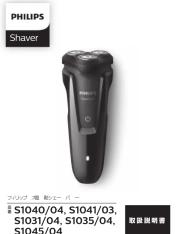
BRUGSANVISNING Series 1000 S1031 PHILIPS

©2019 Philips Japan, Ltd. 1050-037-10331/04/18
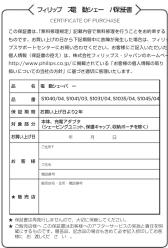
★ 製品の使用方法や修理に関するお問い合わせ
フィリップ スフェーバーをお買い上げいただき、まことにありがとうございます。長い間ご愛用いただくために、ご使用前にこの取扱説明書をよくお読みのうえ、正しくお使いください。また、お読みになった後は、お使いになる方がいつでも見られるところに必ず保管してください。
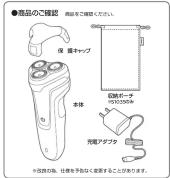
お買い上げるお図番へ 祐めてご使用になる際は、ご使用前に充電してください
广力云智慧零售收银系统
[Non-Text]
目次
①《公司章程》(草案)
① 名称の名称
② 容重の仕安
① 2014年1月1日(星期二)
② 2014年1月1日
① 2023年1月1日(星期六) ② 书签入单方法
② 分纸箱数从本
② 担除本表中的取扱付方
② 保証キレフローの取引付け方 ③ 巳の交換
①为0支质 ②3-15 车度穿透了上水
① 好置知知21周,A.C.
① 保障が準に悪化した ② 保障に同様な、共一人間
② 保証にノブターナ ヒス
② 记录 ③ 招出价格说明
⑤ 煮料修造规定
Guidance in English
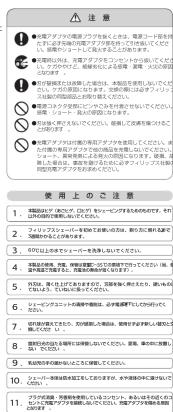
① 必ずお守りください
安全上の注意
为了员工可以主动改善利益,④会议模式及费用由内容逐步分配。
■ 本店所の代理理念等の場合は、安全体関する重要な内容です。は、お ず守ってください。
(図った取扱い)をしたときに想定される内容友「警告」と「注意」
区分けしています。
二絵表示について
A 記局は、「警告、注意」を示します。
2013年不进入《网上媒体的注册内容指引》。
A 原告 人が死亡または重傷を負担可能性が限定される内容。
B
注意 人が傷害を負う可能性及び物的傷害の発生が想定され
-
○給表示の例
・記号はしこいけない「禁止」を示します。図の中や近くに具
① 本表正内容(注释)是指本表原表正)表示125家。
・記号は、必ずしていただく「強制」を示します。臨の中や近 体的な施設内容(支臨の場合は需要づいて発行センターから必
こと)を示します。
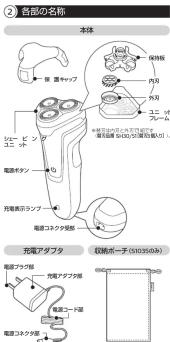





















































































































































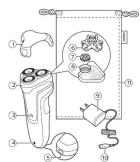
General description (Fig. 1)
1 Protection cap
2 Shaving unit
3 On/off button
4 Charging light
5 Socket for small plug
6 Retaining frame
7 Cutter
8 Guard
9 Supply unit
10 Small plug
11 Pouch (S)035 only)
Note: You can find the type number on the back of
Introduction
Congratulations on your purchase and welcome to Philips! To fully benefit from the support that Philips offers, register your product at www.philips.com/welcome.
Please read this user manual, as it contains information about the features of this shaver as well as some tips to make shaving easier and more enjoyable.
Important safety information
Important safety information Read this important information carefully before you use the appliance and its accessories and save it for future reference. The accessories supplied may vary for different products.
Danger
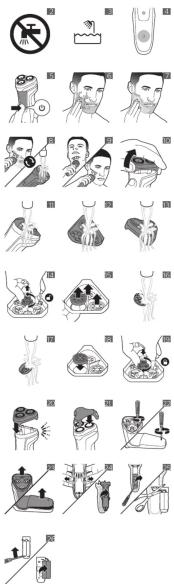
-Keep the supply unit dry (Fig. 2)
Warning
-To charge the battery, only use the detachable
supply unit (A00390) provided with the
The supply unit contains a transformer. Do not
- The supply unit contains a transformer. Do not cut off the supply unit to replace it with another
plug, as this causes a hazardous situation.
-This appliance can be used by children aged from
8 years and above and persons with reduced
physical, sensory or mental capabilities of lack of awareness and knowledge if they have been
of experience and knowledge if they have been than supervision or instruction concerning use of
the appliance in a safe way and understand the
hazards involved. Children shall not play with the
appliance. Cleaning and user maintenance shall
not be made by children without supervision.
-Always unplug the shaver before you clean it under the lip
-Always check the appliance before you use it. Do
not use the appliance if it is damaged, as this mar
cause injury. Always replace a damaged part with
one of the original type.
-Do not open the appliance to replace the
rechargeable battery.
Caution
- Never immerse the cleaning system or the
charging stand in water and do not rinse it under
the tap (Fig. 2). Never use water better than 60°C to rise the
Never use water model than 100^ C to rinse the shauer.
-Only use this appliance for its intended purpose
as shown in the user manual.
-For hygienic reasons, the appliance should only
be used by one person.
- Never use compressed air, scouting pads, abrasivoo cleaning agents or aggressive liquid
advisative clearing agents or aggressive liquids such as petrol or acetone to clean the appliance
-If your shaver comes with a cleaning system,
always use the original Philips cleaning fluid
(cartridge or bottle, depending on the type of
cleaning system).
-Always place the clearing system on a stable, level and horizontal surface to prevent leakage.
If your cleaning system uses a cleaning cartridge
always make sure the cartridge compartment is
closed before you use the cleaning system to
clean or charge the shaver.
-When the cleaning system is ready for use, do not move it to prevent lesions of clearing fluid.
move it to prevent leakage of cleaning fluid. Water may drop from the rocket at the bottom
- Watch may grip from the socket at the bottom of the shaver when you rinse it. This is normal
and not dangerous because all electronics are
enclosed in a sealed power unit inside the shaver
-Do not use the supply unit in or near wall sockets
that contain an electric air freshener to prevent inoperable damages to the supply unit
Imparable damage to the supply unit
Electromagnetic fields (EMF)
This Philips appliance compiles with all applicable standards and regulations regarding exposure to electromagnetic fields.
General
-This shaver is waterproof (Fig. 3). It is suitable
for use in the bath or shower and for cleaning
under the tap. For safety reasons, the shaver can
therefore only be used without cord.
- The supply unit is suitable for mains voltages ranging from 100 to 340 volts.
The supply unit transforms 130-240 volts to a
The supply of low voltage is 102-215 volts to a safe low voltage of less than 24 volts.
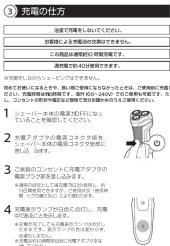
Charging
Charging
Note: This appliance can only be used without cord.
When you charge the appliance for the first time or
When you charge the appliance for the first time of after a long period of disuse, let it charge for at least
10 hours.
A fully charged appliance provides up to 40 minutes
of shaving time.
The shaving time may be less as a result of your
shaving behavior, your cleaning habits of your beard type
(1)
Charging with the supply unit
1 Make sure the shaver is switched o
2 Put the small plug in the shaver and put the supply unit in the well socket.
supply unit in the wall socket. The display of the shaves indicates that the
The display of the shaver is charging
-
After charging some
-
Atom charging, Remove the supply unit from the wall socket and pull the small plug out of the
appliar
Charge indications
Battery Low
Battery low When the battery is almost empty, the appliance
When the battery is almost starts working more slowly
Changine
When the appliance is charging, the charging light
lights up v
-The charging light will keep lighting up white
when the appliance is fully charged.
Note. After charging, remove the supply unit from
the wall socket and pull the small plug out of the
Using the appliance
Note: This appliance can only be used
cord.
Switching the appliance on and off
Switching the appliance on and off
1 To switch the appliance on or off, press the on/off button area (Fig. 5).
Button
Shaving tips
-Use the shaver with shaving gel or foam t
skin comfort, or use the shaver dry for extra
convenience )We advice
- We advise you to use the shaver with shaving gel or foam when you use it for a wet shave.
Do not us
with this shaver.
-When you use the shaver for dry shaving, we
advise you to make sure your skin is fully dry so that the above slides smoothly run away.
so that the shaver glides smoothly over your
-For best resul
beard if you have not shaved for 3 days or longer.
- For optimal shaving results, make circular
movements
- The shaver is waterproof and can be used in the bath or shower.
-Your skin may
Your share may focus £ on 9 weeks to get accustomed to the Philips shaving system.
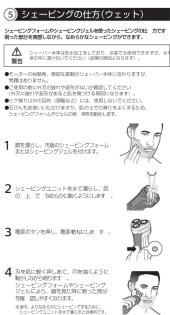
Wet shaving
wet shaving
For a more comfortable shave, you can also use this appliance on a wet face with shaving foam or
this appliance on a wetlace with shaving foam or shaving gel
To shave with sh
the steps below:
1 Apply some w
2 Apply shaving foam or shaving gel to (Fig. 7)
- Rinse the shaving unit under the tan to ensure
that the shay
skin (Fig. 8).
4 Switch on the
- Move the shaving heads over your skin in circular
movements to catch all hairs growing in different directions (Fig. 8). Make sure each shaving head
is fully in contact with the skin. Exert gentle
pressure for a close, comfortable shave.
Note: Rinse
that it continues to glide smoothly over your skin.
6 Dry your face
7 Clean the appliance after use (see 'Cleaning and
maintenance
Note: Make sure you rinse all foam or shaving gel
off the apple
Dry shaving
1. Switch on the
2 Move the shaving head
movements to catch all hairs growing in different
directions (Fig. 9). Make sure each shaving head
is fully in con
pressure for a close, comfortable shade.
Note: Do Not irritation
- Clear the appliance after use (see Cleaving and
3 Cleanone app maintenance
(四) 所有者权益
Cleaning and maintenance
Cleaning the shaver under the tap
Cleaning the shaver under the tap Clean the shaver after every shaver for and
Clean the shaver after every shave for optimal performance
Always unplug and switch off the appliance before
you clean it.
Note: Water may leak from the socket at the bottom
of the shaver when you rinse it. This is normal and
not dangerous Because all electronics are enclosed
In a sealed power unit inside the shaker.
Be careful with hot water. Always check if the water
is not too hot, to prevent burning your hands.
Never dry the shaving unit with a towel or tissue, as
this may damage the shaving heads.
1 Hold the shaving unit and first lift the front, then
the back upwards of the appliance (Fig. 10).
Note: Make sure to hold the shaving unit while
-
Rinse the hair chamber under the tap (Fig. 11).
-
Rinse the half chamber under the tap (Fig. 11).
-
Rinse the inside of the shading unit under a warm
-
There is an issue of the sharing and order & warm tap (Fig. 12).
4 Rinse the outside of the shaving unit under a
warm tap (Fig. 13).
Thorough cleaning
5 Tum the lock anticlockwise and remove the
retaining frame from the shaving unit (Fig. 14).
- Remove and clean one shaving head at a time
(Fig. 15). Each and a guard
Do not close more than one cutter and guard.
Do not clean more than one cutter and guard at a time, since they are all matching sets. If you
to a time, since they saw all matching sets. If you accidentally mix up the cutters and guards, it
may take several weeks before optimal shaving
performance is restored.
7 Remove the cutter from the shaving guard and
rinse it with water (Fig. 16).
- Rinse the inside and outside of the shaving guard with water (Fig. 17).
with water (Fig. 17) 9. Put the shaving be
(FIG. 18) Make sure that the projections of the
shaving heads fit exactly into the recesses.
10 Put the retaining frame back into the shaving unit
and turn the lock clockwise (Fig. 19)
11 Reattach the shaving unit (Fig. 20).
Note: If you cannot reattach the shaving unit properly check if you have inserted the shaving
property, check if you have inserted the shaving heads properly and if the retaining frame is
Head's property and the Reaming Market is locked.
- Carefully shake off excess water, open the
shaving unit again and leave it open to let the
shaving unit air dry completely.
Caution: Be careful not to hit the shaving unit
against anything while you shake off excess
water.
Storage
Storage
Protection cap
We advise you to let the appliance dry before you
put the protection cap on
1 Switch off the appliance. 2 Put the protection set on
2 Put the protection cap on the shaving unit after use to prevent damage and to avoid dirt
at 100 gm to prevent damage and to avoid the accumulation in the shaving heads (Fig. 21).
Dough (51035 only)
Pouch (Sloss only)
Note: Make sure the appliance is dry before you
store it in the pouch.
- Switch off the appliance.
- Store the appliance in the pouch.
2 Store the appliance
Replacement
m
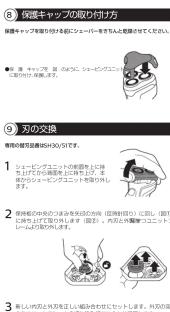
Replacing the shaving heads
For maximum shaving performance, we advise you to replace the shaving bands every two us
you to replace the shaving heads every two years. Replace damaged shaving heads immediately.
Replace damaged shaving heads immediately. Always replace the shaving heads with original
Philips shaving heads' (see 'Ordering accessories')
1 Switch off the appli
the power outlet.
2 Hold the shaving unit and first lift th
the back upwards of the appliance.
Note: Make sure to hold the shaving unit while doing so.
- Turn the lock anti-clarative and remove the
3. Turn the lock article retaining frame
4 Remove the shaving heads and place new one
in the shaving unit. Make sure that the projections
of the shaving heads fit exactly into the recesses.
5 Put the retaining frame back into the shaving unit and turn the alkyl chloride (Fig. 10).
and turn the lock clockwise (Fig. 19).
Note: How applicable
Note: If you cannot reach the shaving unit properly, check if you have inserted the shaving
heads properly and if the retaining frame is
locked
广力云智慧零售收银系统
Ordering accessories
To buy accessories or spare parts, visit www.shop
philips.com/service or go to your Philips dealer.
can also contact the Philips Consumer Care Center in
your country (see the for contact details)
The following accessories and spare parts are
available:
-SH30/51 Philips shaving heads
Note: Availability of the accessories may differ by
country.
D. Modelling
Recycling
-Do not throw away the product with the normal householdware at the end of its life, but hand
household waste at the end of its life, but hand it in at an official collection point for recycling. By
doing this, you help to preserve the environme
-This product contains a built-in rechargeable
battery which shall not be disposed of with
normal household waste. Please take your
product to an official collection point or a Phillips service center to have a professional removal the
rechargeable battery
-Follow your country
collection of electa
and rechargeable
helps prevent negative consequences for the
environment and human health.
Removing the rechargeable battery
Only removes the rechargeable battery when
Only remove the rechargeable battery when you discard the shaver. Before you remove
you discard the shaver. Before you remove the battery, make sure that the shaver is
disconnected from the mains and that the
battery is completely empty.
Take the following provisions upon
Take any necessary safety precautions when you handle tasks to open the shoes.
you handle tools to open the shaver.
Be careful, the battery strips are sharp.
- Disconnect one shaver from one wall socket
-
Let the shaver operate until it stops
-
Remove the screws in the back of the shaver and
in the hair chamber (Fig. 22).
4 Remove the top part of the shaver (Fig. 23).
5 Remove the front panel and the back panel (Fig. 22)
23). 6. Take out
3 Take out the power unit (Fig. 24)
Be careful, the hooks are sharp.
7 Band the snap hooks aside and remove the transparent cover of the power unit (Fig. 24).
- Lift out the battery holder and cut the wires with
a pair of cutting pliers or scissors (Fig. 25).
9 Bend the battery tags aside with a screwdriver
(Fig. 26).
10 Remove the rechargeable batteries.
Warranty and support
Warranty and Support If you need information or support, please visit
www.philips.com/support or read the international
warranty leaflet.
Warranty
- General description (Fig. 1)
- Introduction
- Important safety information
- Danger
- Warning
- rechargeable battery.
- Caution
- Electromagnetic fields (EMF)
- General
- Charging
- (1)
- appliar
- Changine
- lights up v
- Using the appliance
- Button
- Shaving tips
- convenience )We advice
- Do not us
- -For best resul
- movements
- -Your skin may
- Wet shaving
- To shave with sh
- Apply some w
- that the shay
- Switch on the
- Note: Rinse
- Dry your face
- maintenance
- off the apple
- Switch on the
- is fully in con
- Note: Do Not irritation
- Cleanone app maintenance
- Cleaning and maintenance
- warm tap (Fig. 13).
- Thorough cleaning
- (Fig. 15). Each and a guard
- with water (Fig. 17) 9. Put the shaving be
- Storage
- Protection cap
- Dough (51035 only)
- Pouch (Sloss only)
- m
- Turn the lock article retaining frame
- Note: How applicable
- 广力云智慧零售收银系统
- Ordering accessories
- Modelling
- Recycling
- -Follow your country
- collection of electa
- and rechargeable
- Removing the rechargeable battery
- 23). 6. Take out
- Warranty
Mærke : PHILIPS
Model : Series 1000 S1031
Kategori : Skægtrimmer