
HSN12SN - Aircondition LG - Gratis brugsanvisning og manual
Find enhedens vejledning gratis HSN12SN LG i PDF-format.


Brugerspørgsmål om HSN12SN LG
0 spørgsmål om dette apparat. Besvar dem du kender, eller stil dit eget.
Stil et nyt spørgsmål om dette apparat
Download vejledningen til din Aircondition i PDF-format gratis! Find din vejledning HSN12SN - LG og tag din elektroniske enhed tilbage i hånden. På denne side er alle dokumenter nødvendige for brugen af din enhed offentliggjort. HSN12SN af mærket LG.
BRUGSANVISNING HSN12SN LG
OWNER'S MANUAL
AIR CONDITIONER
Please read this manual carefully before operating your set and retain it for future reference.
TYPE : WALL MOUNTED
Safety Precautions
Warning 2
Caution 3
Operating Instructions
Preparation before operation ..4
Remote Control Features .....5
Operation Mode Selection .....6
Additional features....10
Care and Maintenance
Care and Maintenance .....12
Operation Tips....14
Troubleshooting tips
Before You
Call For Service 15
Safety precautions
To prevent injury and property damage, follow these instructions.
⚠️ Incorrect operation due to ignoring instructions will cause harm or damage, the seriousness of which is indicated by the following symbols.
WARNING
This symbol shows the possibility of death or serious injury.
CAUTION
This symbol indicates the possibility of injury or damage to property.
■ The following items are classified by these symblos.
 | Never Do This |
 | Always Do This |
WARNING
Plug in the power plug properly.
- Otherwise, it will cause electric shock or fire due to heat generation or electric shock.
Do not operate or stop the unit by inserting or pulling out the power plug.
- It will cause electric shock or fire due to heat generation.
Do not damage or use an unspecified power cord.
- It will cause electric shock or fire.
- In the supply cord is damaged, it must be replaced by the manufacturer or its service agent or a similarly qualified person in order to avoid a hazard. (Y Attachment)
Do not direct airflow at room occupants only.
• This could damage your health.
Do not modify power cord length or share the outlet with other appliances.
- It will cause electric shock or fire due to heat generation.
Do not operate with wet hands or in damp environment.
• It may cause electric shock.
Always install air leakage breaker and a dedicated switching board.
- No installation may cause fire and electric shock accident.
Always perform grounding work.
- No grounding may cause electric shock.
Do not allow water to run into electric parts.
- It may cause failure of machine or electric shock.
Do not open the entrance during operation.
- It may cause electric shock.
Unplug the unit if strange sounds, smell, or smoke comes from it.
- It may cause fire and electric shock accident.
Do not use the socket if it is loose or damaged.
- It may cause fire and electric shock.
Do not use the power cord near flammable gas or combustibles, such as gasoline, benzene, thinner, etc.
• It may cause an explosion or fire.
Keep firearms away.
- It may cause fire.
Do not use the power cord close to the heating tools.
- It may cause fire and electric shock.

WARNING
Ventilate before operating air conditioner when gas goes out.
- It may cause explosion, fire and, burn.
Do not disassemble or modify products randomly.
- It may cause failure and electric shock.

CAUTION
Never touch the metal parts of the unit when removing the filter.
• They are sharp and may cause injury.
When cleaning the unit, first make sure the power and breaker are turned off.
- Since the fan rotates at high speed during operation, it may cause injury.
Stop operation and close the window in storm or hurricane.
• Operation with windows opened may cause wetting of indoor and soaking of household furniture.
Do not place obstacles around the absorption inlet or instead of blowing-out inlet.
- It may cause failure of appliance or accident.
Do not use strong detergent such as wax or thinner but use a soft cloth.
- Appearance may be deteriorated due to change of product color or scratching of its surface.
Do not clean the air conditioner with water.
• Water may enter the unit and degrade the insulation. It may cause an electric shock.
Do not put a pet or house plant where it will be exposed to direct air flow.
• This could injure the pet or plant.
Hold the plug by the head of the power plug when taking it out.
- It may cause electric shock and damage.
① Ensure that an installation console of the outdoor appliance is not damaged due to the use for a long time.
• If leaving appliance damaged, there is concern of damage due to the falling of product.
Do not place heavy object on the power cord and take care so that the cord should not be pressed.
• There is danger of fire or electric shock.
Ventilate well when used together with a stove, etc.
• An oxygen shortage may occur.
Do not use appliance for special purpose such as animals or vegetables, precision machine, or conservation of art articles.
- It may cause damage of animals or vegetables or loss of property.
Turn off the main power switch when not using it for a long time.
- It may cause failure of product or fire.
Always insert the filters securely. Clean it once every two weeks.
• Operation without filters may cause failure.
Do not drink water drained from air conditioner.
• It contains contaminants and will make you sick.
Use caution when unpacking and installing. Sharp edges could cause injury.
If water enters the product, turn the power switch of the main body of appliance off. After taking the power-plug out from the socket, contact with the service center.
Preparation before operation
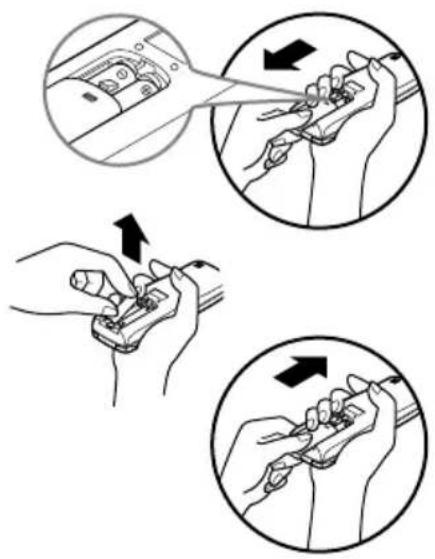
How to Insert the Batteries
Remove the battery cover by pulling it according to the arrow direction.
2 Insert new batteries making sure that the (+) and (-) of battery are installed correctly.
3 Reattach the cover by sliding it back into position.
NOTES:
- Use 2 AAA(1.5volt) batteries. Do not use rechargeable batteries.
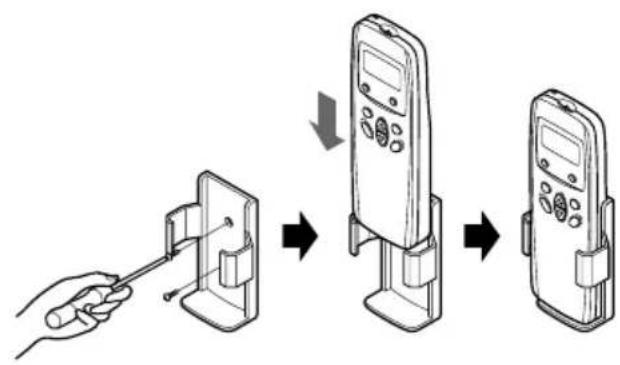
Storage and Tips For Using the Remote Control
• The remote control may be stored by mounting it on a wall.
• To operate the room air conditioner, aim the remote control at the signal receptor.
flowchart
graph TD
    A["Hand holding device"] --> B["Inserting to a mobile phone"]
    B --> C["Add to the phone"]
    C --> D["Add to the second phone"]

natural_image
Illustration of a car air conditioner unit with a diagonal line extending from it, no text or symbols present.Signal Receptor
Receives the signals from the remote control.(Signal receiving sound: two short beeps or one long beep.)
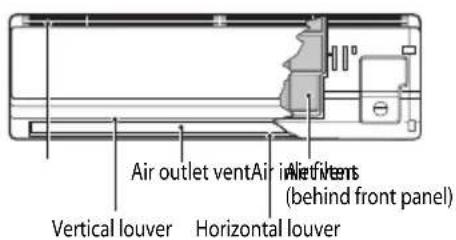
Operation Indication Lamps

On/Off
: Lights up during the system operation.

Timer
: Lights up during Timer operation.
OUT OUTDOOR UNIT : Lights up during outdoor unit operation. DOOR OPERATION (Cooling model only)

natural_image
Technical line drawing of a car air conditioner unit showing airflow path and panel layout (no text or symbols)Operation indicating lamps

Features of the Remote Control
Remote Controller
Signal transmitter
Transmits the signals to the room air conditioner.

1 OPERATION DISPLAY
Displays the operation conditions.
2 AIRFLOW DIRECTION START/STOP BUTTON
Used to stop or start louver movement and set the desired up/down airflow direction.
3 OPERATION MODE SELECTION BUTTON Used to select the operation mode.
4 OFF TIMER BUTTON Used to set the time of stopping operation.
5 START/STOP BUTTON Operation starts when this button is pressed, and stops when the button is pressed again.
6 ROOM TEMPERATURE SETTING BUTTONS
7 INDOOR FAN SPEED SELECTION BUTTON
JET COOL OPERATION BUTTON
Used to start or stop the speed (speed cooling operates super high fan speed in cooling mode.)
Operation Mode Selection button

Features of the Remote Control
(1) OPERATION MODE
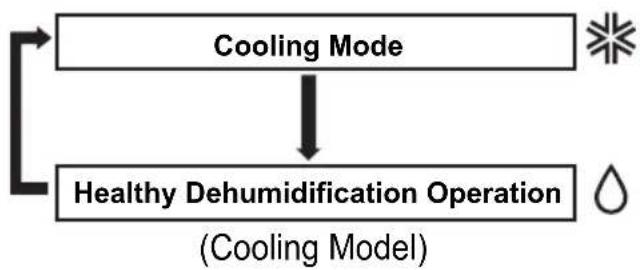
flowchart
graph TD
    A["Cooling Mode"] --> B["Healthy Dehumidification Operation"]
    B --> C["Feedback Loop"]
    C --> A
(2) OPERATION PROCEDURE


Cooling Operation
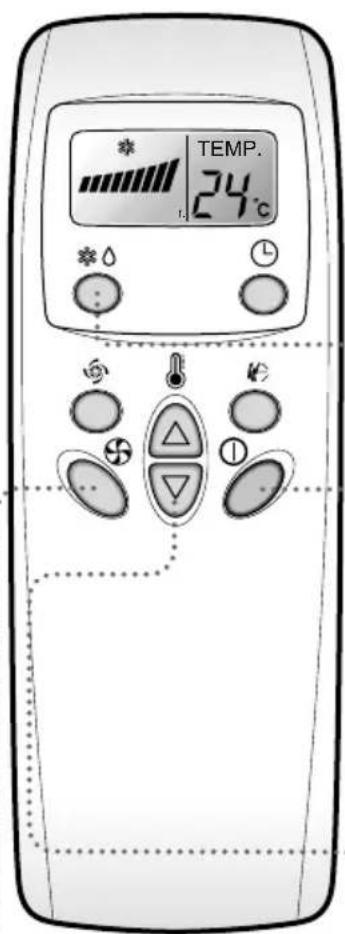
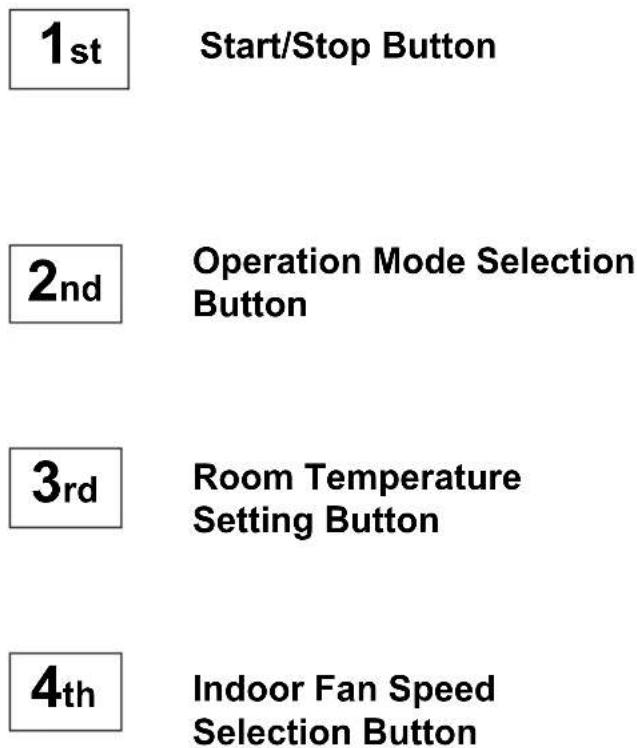
1 Press the Start/Stop button. The unit will respond with a beep.

2 Selection Cooling Operation. Press the Operation Mode Selection Button. Each time the button is pressed, the operation mode is shifted in the arrow direction.

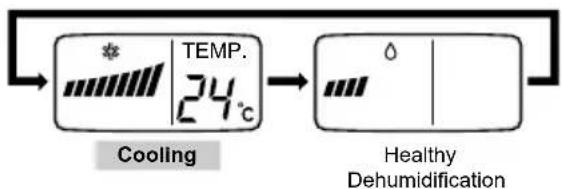
flowchart
graph LR
    A["TEMP. 24℃"] --> B["Healthy Dehumidification"]
    B --> C["Dehumidified Heat State"]
    style A fill:#f9f,stroke:#333
    style B fill:#ccf,stroke:#333
3 Set the temperature lower than the room temperature.
- The temperature can be set within a range of 18^ 30^ by 1^ .


aise the temperature
To lower the temperature
4 Set the fan speed.
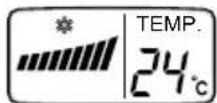

- Select the fan speed in tow steps -low, high.
• The display shows high fan speed.

Healthy Dehumidification Operation
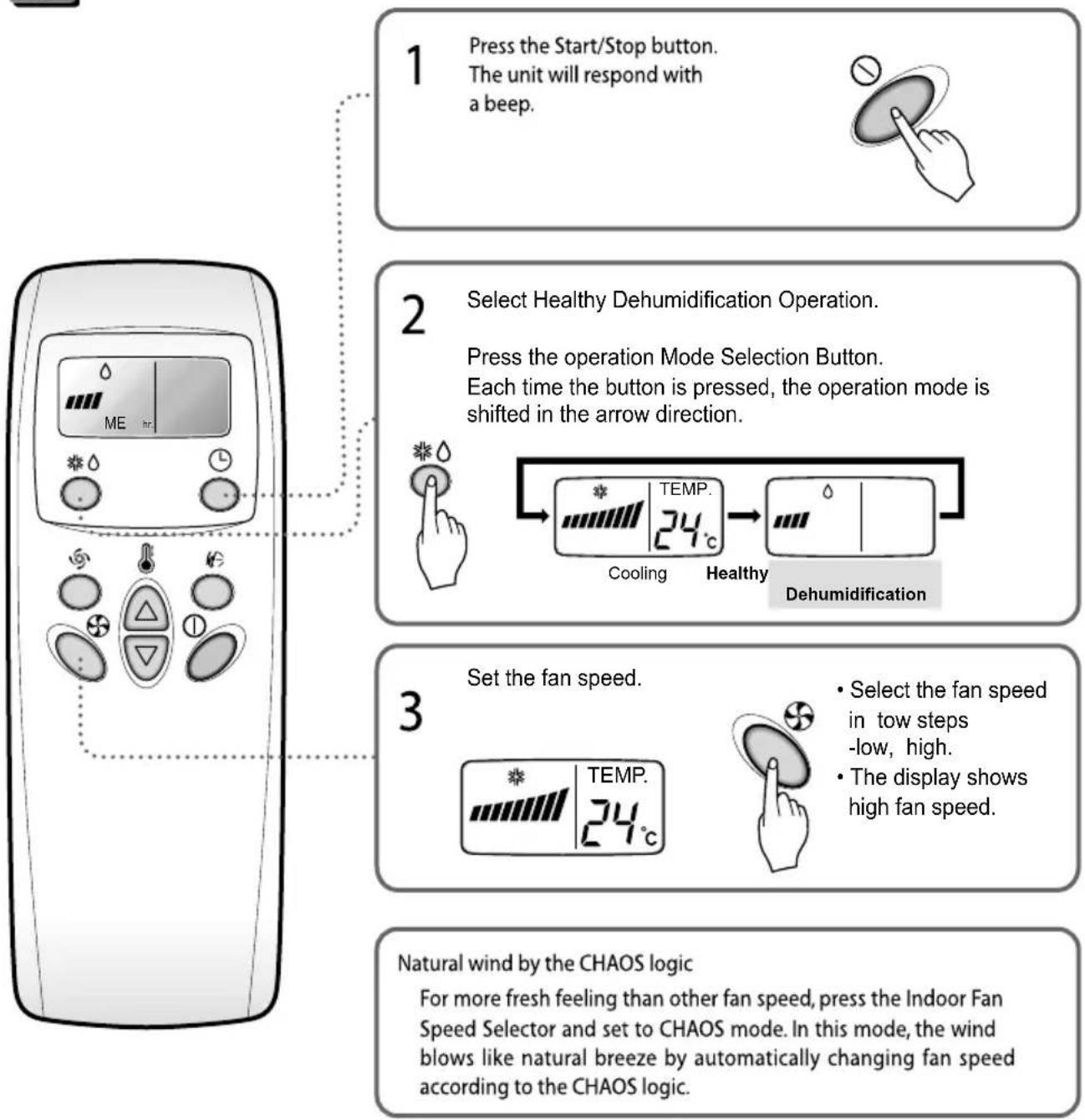
flowchart
graph TD
    A["1 Press the Start/Stop button.<br>The unit will respond with a beep."] --> B["2 Select Healthy Dehumidification Operation.<br>Press the operation Mode Selection Button.<br>Each time the button is pressed, the operation mode is shifted in the arrow direction."]
    B --> C["3 Set the fan speed.<br>• Select the fan speed in tow steps -low, high.<br>• The display shows high fan speed."]
    C --> D["Natural wind by the CHAOS logic<br>For more fresh feeling than other fan speed, press the Indoor Fan Speed Selector and set to CHAOS mode. In this mode, the wind blows like natural breeze by automatically changing fan speed according to the CHAOS logic."]
During Healthy Dehumidification Operation:
- The indoor fan speed is automatically set to the low, so the shift of the indoor fan speed is impossible because of already being set to the best speed for Dry Operation by Micom Control.
- The indoor fan may be stopped not so as to be the room overcooling.

Jet Cool Operation

Press the Jet Cool button to operate the speed cooling mode and the unit will operate at super high fan speed on cooling mode for 30 minutes.

To cancel the Jet Cool mode, press the Jet Cool button, the fan speed button or the room temperature setting button again and the unit will operate at high fan speed on cooling mode.

Timer Control Setting

Press the OFF Time Button.

- Press the OFF Time Button.
- Check the OFF Time LED of the room air conditioner.
- The Timer is programmed by 1 hour each pressing the OFF Time button from 1 hour to 7 hours.
Additional features

Vertical Airflow Direction Control
Airflow Direction Control
The airflow direction can be adjusted as desired by using the remote controller. This is effective when you want to cool yourself directly, such as after taking a bath.

natural_image
Illustration of a rectangular air conditioner with a curved arrow indicating airflow or rotation (no text or symbols)Horizontal Airflow Direction Control
- Adjust the horizontal airflow direction by manually moving the horizontal airflow direction louver by hand.
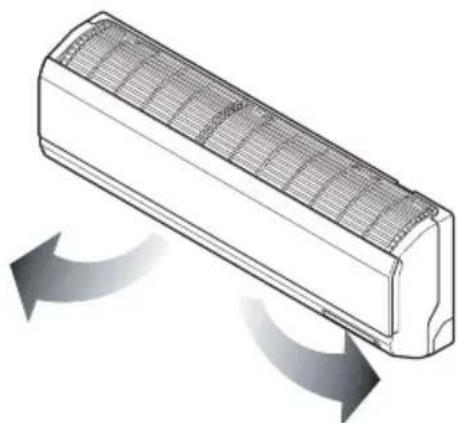
natural_image
Diagram of a rectangular air conditioner with airflow arrows indicating direction (no text or symbols)1 Press the Start/Stop Button. (Confirm the unit on operation.)
2 Press the Airflow Direction Control Button and the vertical louvers swing up and down automatically.

3 Press again the Airflow Direction Control Button to set the vertical louver at the desired airflow direction.

Caution
• Always use the remote controller to adjust the airflow direction. Manually moving the vertical airflow direction louver by hand could cause operation errors.
- When air conditioner operation is stopped, the vertical airflow direction louver will close the air outlet vent of room air conditioner.

Forced Operation
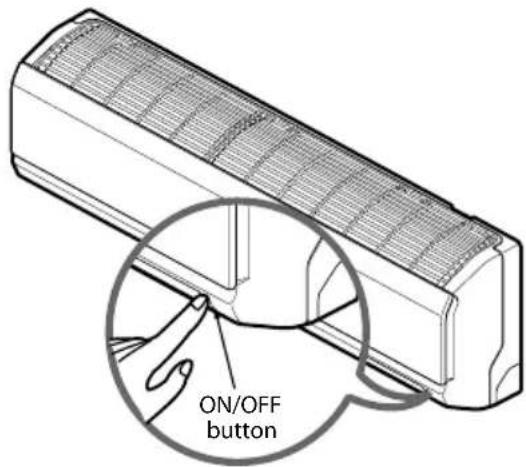
Operation procedures when the remote control can't be used.
The operation will be started if the power button is pressed.
If you want to stop operation, re-press the button.
| Cooling Model | Heat pump Model | |||
| Room Temp. 24°C | 21°C Room Temp.<24 °C | Room Temp.<21 °C | ||
| Operating mode | Cooling | Cooling | Healthy Dehumidification | Heating |
| Indoor FAN Speed | High | High | High | High |
| Setting Temperature | 22°C | 22°C | 23°C | 24°C |
Test operation
During the TEST OPERATION, the unit operates in cooling mode at high speed fan, regardless of room temperature and resets in 18 minutes.
During test operation, if remote controller signal is received, the unit operates as remote controller sets.
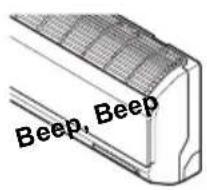
If you want to use this operation, Press and hold the ON/OFF button for 3\~5 seconds, then the buzzer sound 1 "beep".
If you want to stop the operation, re-press the button.

Auto restart
In case the power comes on again after a power failure, Auto Restarting Operation is the function to operate procedures automatically to the previous operating conditions.
So there is no need of activating this function by pressing any key or button.
In the initial mode, the fan operates at a low speed and the compressor starts 2.5\~3 minutes later.
As the compressor starts, the fan speed also resumes its previous setting mode.
Helpful information
Fan speed and cooling capacity.
The cooling capacity indicated in the specification is the value when the fan speed is set to high, and the capacity will be lower at low or medium fan speed.
High fan speed is recommended when you wish to cool the room quickly.

Care and maintenance of the air conditioner
CAUTION: Before performing any maintenance, turn off the main power to the system.
Indoor Unit
Grille, Case, and Remote Control
Turn the system off before cleaning. To clean, wipe with a soft, dry cloth. Do not use bleach or abrasives.
NOTE:
Supply power must be disconnected before cleaning the indoor unit.
AIR FILTERS
The air filters behind the front grille should be checked and cleaned once in every 2 weeks or more often if necessary.

natural_image
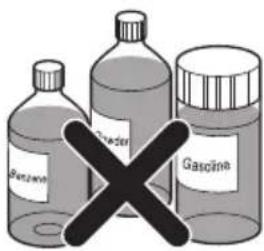
Illustration of a wall-mounted air conditioner unit with cooling fins and ventilation slots, showing hand placement (no text or symbols)Never use any of the followings:
• Water hotter than 40^ C
Could cause deformation and/or discoloration.
Volatile substances
- Could damage the surfaces of the air conditioner.
1 Lift the front access panel and pull the filter tab slightly forward to remove the filter.
2 Clean the filter with a vacuum cleaner or warm, soapy water.
- If dirt is conspicuous, wash with a solution of detergent in lukewarm water.
- If hot water (40°C or more) is used, it may be deformed.
3 After washing with water, dry well in the shade.
4 Re-install the air filter.

Outdoor Unit
The heat exchanger coils and panel vents of the outdoor unit should be checked regularly. If clogged with dirt or soot, the heat exchanger and panel vents may be professionally steam cleaned.
NOTE:
Dirty or clogged coils will reduce the
operating efficiency of the system and cause higher operating costs.

When the air conditioner is not going to be used for a long time.
When air conditioner is not going to be used for a long time.

Turn off the circuit breaker, and disconnect the plug.

CAUTION
Turn off the circuit breaker when the air conditioner is not going to be used for a long time. Dirt may collect and may cause a fire.

Remove the batteries from the remote control.
When the air conditioner is to be used again.

Clean the air filter and install it in the indoor unit. (Refer to page 12 for cleaning filters.)

Check that the air inlet and outlet of the indoor/outdoor unit are not blocked.
Operation Tips
Do not overcool the room.
This is not good for the health and wastes electricity.
Make sure that the doors and windows are shut tight.
Avoid opening doors and windows as much as possible to keep the cool air in the room.
Keep blinds or curtains closed.
Do not let direct sunshine enter the room when the air conditioner is in operation.
Clean the air filter regularly.
Blockages in the air filter reduces the airflow and lowers the cooling and dehumidifying effects. Clean at least once in every two weeks.
Keep the room temperature uniform.
Adjust the vertical and horizontal airflow direction to ensure a uniform temperature in the room.
Ventilate the room occasionally.
Since windows are kept closed, it is a good idea to open them and ventilate the room now and then.

Troubleshooting Tips! Save time and money!
Check the following points before requesting repairs or service..... If the fault persists, please contact your dealer or service center.
| Case | Explanation | See page |
| The air conditioner does not operate. | Have you made a mistake in timer operation. | 9 |
| Has the fuse blown or has the circuit breaker been tripped. | - | |
| The room has a peculiar odor. | Check that this is not a damp smell exuded by the walls, carpet, furniture, or cloth items in the room. | - |
| It seems that condensation is leaking from the air conditioner. | Condensation occurs when the airflow from the air conditioner cools the warm room air. | - |
| Air conditioner does not operate for about 3 minutes when restarted. | This is the protector of the mechanism.Wait about three minutes and operation will begin. | - |
| Does not cool or heat effectively. | Is the air filter dirty? See air filter cleaning instructions. | 12 |
| Has the temperature been set incorrectly. | 7 | |
| Are the indoor unit's air inlet or outlet vents obstructed. | - | |
| The air conditioner operation is noisy. | For a noise that sounds like water flowing.-This is the sound of freon flowing inside the air conditioner unit.For a noise that sounds like the compressed air releasing into atmosphere.-This is the sound of the dehumidifying water being processed inside the air conditioning unit. | - |
| Remote control display is faint, or no display at all. | Are the batteries depleted.Are the batteries inserted in the opposite (+) and (-) directions. | 4 |
| Crack sound is heard. | This sound is generated by the expansion/constriction of the front panel, etc. due to changes of temperature. | - |
NOTE
WATER RESISTANT:
The outdoor side of this appliance is WATER RESISTANT.
The indoor side is not water resistant and should not be exposed to excess water.

LG
Life's Good


- OWNER'S MANUAL
- AIR CONDITIONER
- Safety Precautions
- Operating Instructions
- Care and Maintenance
- Troubleshooting tips
- WARNING
- CAUTION
- Plug in the power plug properly.
- Do not operate or stop the unit by inserting or pulling out the power plug.
- Do not damage or use an unspecified power cord.
- Do not direct airflow at room occupants only.
- Do not modify power cord length or share the outlet with other appliances.
- Do not operate with wet hands or in damp environment.
- Always install air leakage breaker and a dedicated switching board.
- Always perform grounding work.
- Do not allow water to run into electric parts.
- Do not open the entrance during operation.
- Unplug the unit if strange sounds, smell, or smoke comes from it.
- Do not use the socket if it is loose or damaged.
- Do not use the power cord near flammable gas or combustibles, such as gasoline, benzene, thinner, etc.
- Keep firearms away.
- Do not use the power cord close to the heating tools.
- Preparation before operation
- How to Insert the Batteries
- NOTES:
- Storage and Tips For Using the Remote Control
- Signal Receptor
- Operation Indication Lamps
- Features of the Remote Control
- Remote Controller
- Signal transmitter
- Operation Mode Selection button
- Cooling Operation
- Healthy Dehumidification Operation
- During Healthy Dehumidification Operation:
- Jet Cool Operation
- Timer Control Setting
- Press the OFF Time Button.
- Additional features
- Vertical Airflow Direction Control
- Airflow Direction Control
- Horizontal Airflow Direction Control
- Forced Operation
- Test operation
- Auto restart
- Helpful information
- Care and maintenance of the air conditioner
- Indoor Unit
- Grille, Case, and Remote Control
- NOTE:
- AIR FILTERS
- Outdoor Unit
- When the air conditioner is not going to be used for a long time.
- Operation Tips
- Troubleshooting Tips! Save time and money!
- LG
Mærke : LG
Model : HSN12SN
Kategori : Aircondition