FPO-11 - Måling ALECTO - Gratis brugsanvisning og manual
Find enhedens vejledning gratis FPO-11 ALECTO i PDF-format.


Brugerspørgsmål om FPO-11 ALECTO
0 spørgsmål om dette apparat. Besvar dem du kender, eller stil dit eget.
Stil et nyt spørgsmål om dette apparat
Download vejledningen til din Måling i PDF-format gratis! Find din vejledning FPO-11 - ALECTO og tag din elektroniske enhed tilbage i hånden. På denne side er alle dokumenter nødvendige for brugen af din enhed offentliggjort. FPO-11 af mærket ALECTO.
BRUGSANVISNING FPO-11 ALECTO

FPO-11
FYSIC
Puls oximeter
Introduction:
The Fysic FPO-11 is a pulse Oximeter which measures the percentage of the amount of oxygen found in the blood.
Intended use:
The Pulse Oximeter is a non-invasive device intended for spot checking of functional oxygen saturation of arterial hemoglobin (SpO2) and pulse rate (PR). This portable device is indicated for use in adult patients in clinical institution and home environments.
Measuring principle:
By shining an infra-red light through the skin, the reflected light will be compared with the emitted light which will in turn analyze the color of the red blood cells. This colour measured will reflect the amount of oxygen in the blood.
Do not use:
Do not use the FPO-11 with an irregular heart beat (Atrial Fibrillation).
Installation:
The FPO-11 comes with two included batteries, a wrist strap and a protective case.
Install batteries:
- Slide the battery cover off of the FPO-11
- Insert the two
supplied batte-
ries, be sure to
take note of the positive and negative poles (+ and -)
- Place the battery cover back onto the FPO-11
Fastening the wristband:
-
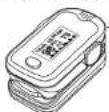
Push the thin cord through the hole on the FPO-11 and then make a loop from the cord.
-
Put the thick part of the strap through the loop.
- Pull the thick part of the cord all the way through the loop tugging slightly to tighten it.
Use:
Preparations & tips:
• Make sure that you are familiar with the operation of the pulse Oximeter.
- Avoid bright lights.
- Remove artificial nails and/or nail polish.
- Wash your hands before using.
• Make sure your hands are warm to ensure a good blood circulation.
- Sit quietly before and during the taking of the measurement.
Measurement:
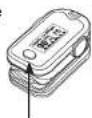
- Open the clip and place your finger on the FPO-11 with the nail facing upwards, as shown on the adjacent picture; use your middle finger preferably pushing it gently towards the back of the Oximeter.


- Turn on the FPO-11 by pressing the on/off button.
- If necessary, the reading direction of the display can be changed by pressing the on/off button repeatedly.
- Do not move your finger during the measurement.
5. Readings in the display:
- The "% SpO2" shows the percentage of oxygen in the blood.
- The "PRbpm" gives the pulse rate of the pulse per minute.
- The PI (Perfusion Index) is the ratio of the pulsatile blood flow to the non-pulsatile blood flow. The PI's values range from 0.02% for very weak pulses to 20% for strong pulses.
-
Depending on the selected reading direction, a pulsating bar graph shows the strength of the heartbeat or the heart rate can be seen at the bottom of the display.
-
The FPO-11 will turn off 15 seconds after the clip has been taken off the finger.
Setting an alarm:
You can set alarm tones to give alert signals when the level of the oxygen in your blood, or the pulse rate exceeds the adjustable upper or lower values.
- Turn on the FPO-11 by quickly pressing the on/off button.
- Hold down the on/off button for more than one second to open the settings menu.
- Now release the on/off button. You will see one of the following statements:
| Limit Setup | * |
| SPO2 Hi | 100 |
| SPO2 Lo | 94 |
| PR Hi | 130 |
| PR Lo | 50 |
| +/- | + |
| Exit |
| Remind Setup | * |
| Sound Reminder | on |
| Beep | off |
| Demo | off |
| Restore | Ok |
| Brightness | 4 |
| Exit | |
- The line with the star at the end is the active line.
- Press quickly on the on/off button to move the star to the next line.
- Press and hold the on/off button to change the setting of the current line.


Screen 1
- Limit Setup To go to the other menu
- SpO2 Hi Set hi levels of oxygen percentage
- SpO2 Lo Set low levels of oxygen percentage
- PR Hi Set high levels of pulse rate
- PR Lo Set low levels of pulse rate
- +/- Switch between going higher or lower
- Exit To exit the menu
Screen 2
- Remind Setup To go to the other menu
- Sound reminder To switch the alarm on or off
- Beep To switch the pulse rate alarm on or off
- Demo to play a demo (power off to start again without the demo)
- Restore To restore back to factory settings
- Brightness To set the display intensity
- Exit To exit the menu
Maintenance:
Cleaning and storage:
- The device is non-sterile and not intended to be sterilized.
- Clean the black rubber finger sleeve before and after using with medicinal alcohol (> 95%).
- The exterior part of the tester can be cleaned using a damp cloth. The FPO-11 is not waterproof, so DO NOT immerse in water.
- Keep the pulse Oximeter out of the reach of children, and preferably inside the included case in a dry place.
• See the technical specifications regarding storage conditions.
Batteries:
- The batteries can power the unit for over 20 hours continuously.
- If the device will not be used for a long period (> 2 months), remove the batteries. Doing so prevent any possible damage from leaking batteries.
- Replace the batteries when the battery indicator shows that the batteries are running low (display: □ or □).
• Always place two identical batteries, type alkaline, size AAA. - Rechargeable batteries should not be used due to their lower voltage.
Environment:
• Should the device need to be discarded, hand it over to your supplier. They will dispose of it in an environmentally friendly manner.
- Empty batteries can be returned to the supplier or disposed of in an environmentally-friendly manner according to your local regulations. Do not dispose of used batteries with your normal household waste.
Technical:
- 24 months Warranty ● FPO-11 does not contain any service components/accessories ● maintenance only through the service department of Fysic.
Calibration:
• The FPO-11 does not need to be calibrated.
Declaration of Conformity:
• http://DOC.hesdo.com/FPO-11-DOC.pdf
Specifications:
• Display: Colour, type OLED
- Pulse rate:
Range: 30bpm \~ 250bpm
Resolution: 1bpm
Accuracy: 1bpm
Strength: bar chart
(bpm = beats per minute)
-
SpO_2
Range: 35 -100%
Resolution: 1%
Accuracy: 90% -100%: ±2%
70% - 90%: ±3%
< 70%: unspecified -
Perfusion Index:
Range: 0-20%
Resolution: 0,1%
Accuracy: 0% - 1%: 0,1%
1% - 20%: 1%
• Batteries: 2x AAA, 1.5V, Alkaline
Consumption: 30mA (nominal)
Battery life: >20 hours continuous use
• Dimensions, weight:
62,8 x 38 x 29mm / 51 grams (incl. batt)
- Surroundings:
Operating temperature: 5°C \~ 40°C
Storage temperature: -10°C \~ 50°C
Operating humidity: 15% \~ 80%
Storage Humidity: 10% \~ 93%
EC REP: Shanghai International Holding Corp. GmbH (Europe).
Eiffestrasse 80, 20537, Hamburg, Germany.
: Shenzhen AEON Technology Co. LTD. RM6H02, Block 27-29, Tianxia IC Industrial Park Majialong, No. 133 of Yiyuan Road, Nantou Street, Nanshan District, Shenzhen, China. Model: A340
CE0123