
DishDrawer DD60SHLI7 - Opvaskemaskine Fisher & Paykel - Gratis brugsanvisning og manual
Find enhedens vejledning gratis DishDrawer DD60SHLI7 Fisher & Paykel i PDF-format.


Brugerspørgsmål om DishDrawer DD60SHLI7 Fisher & Paykel
0 spørgsmål om dette apparat. Besvar dem du kender, eller stil dit eget.
Stil et nyt spørgsmål om dette apparat
Download vejledningen til din Opvaskemaskine i PDF-format gratis! Find din vejledning DishDrawer DD60SHLI7 - Fisher & Paykel og tag din elektroniske enhed tilbage i hånden. På denne side er alle dokumenter nødvendige for brugen af din enhed offentliggjort. DishDrawer DD60SHLI7 af mærket Fisher & Paykel.
BRUGSANVISNING DishDrawer DD60SHLI7 Fisher & Paykel
QUICK START GUIDE
DishDrawer™ dishwasher (Integrated)
GB IE
Fisher&Paykel
Keep this document handy for easy reference.
For detailed information on the features of your dishwasher, see your 'User guide'.
Before using your dishwasher, make sure you read the full 'User guide', with special attention to the 'Safety and warnings' section.
For contact information or if you require service, assistance or replacement parts, see the end of this document or your 'Service & warranty' booklet.
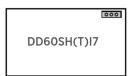
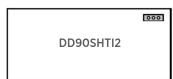
Your model
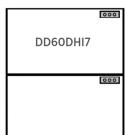
Note: each drawer in double models has its own controls and can run independently of the other drawer.
Operating instructions - Starting a wash
Discard scraps
Scrape large food particles off (e.g. bones, fruit stones) and remove any foreign objects (e.g. toothpicks, strings, paper).
Load dishes carefully
To help with wash performance, arrange dishes so they are evenly spaced and not nesting.
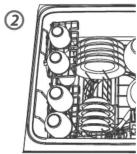
Check spray arm(s)
Ensure there are no items blocking the spray arm(s) from rotating.
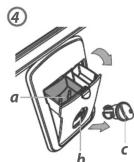


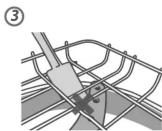
Add detergent and check rinse aid
Fill the detergent dispenser (a) with powdered detergent and close the dispenser door.
Important! Do not place liquid detergent or tablets in the detergent dispenser.
If the indicator on its plug (c) flashes bright red, refill the rinse aid dispenser (b) with liquid rinse aid. Make sure you then refit the rinse aid plug back into its original position.
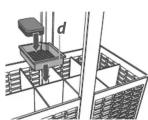
If using a tablet, place it in the cutlery basket (d) or at the bottom of the drawer.


Select wash
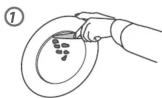
Power DishDrawer on ① then select wash program
Start wash or set Delay start
Close the drawer and press
Wash program controls
Wash program indicators
These show which program is selected.

Wash program selector
Press to scroll through the wash programs.


STANDARD PROGRAMS - designed to clean and dry your dishes
| HEAVY | NORMAL | FAST | DELICATE |
| Heavily soiled pots, pans and dishes. | Dishes with normal soils for optimum performance. | Lightly soiled dishes. | Lightly soiled and heat sensitive crockery. |
ECO PROGRAMS - designed to clean your dishes energy-efficiently
| HEAVY ECO | NORMAL ECO | FAST ECO | DELICATE ECO |
| Heavily soiled everyday dishes. | Normal soiled dishes for optimum water and energy use. | Lightly soiled, non-greasy dishes. | Lightly soiled, non-greasy and heat sensitive crockery. |
ECO selector and indicator
Press if you'd like the program to use less energy. The indicator will glow red when an Eco program has been selected. If you require enhanced drying, we do not recommend selecting an Eco program.
Main controls

Power on/off
Press to turn the dishwasher on or off.
Opening the drawer will automatically turn the dishwasher on for 30 seconds.
Cancel wash/Cancel Delay start
Press to cancel a wash that has already started or to cancel the Delay start setting.
If there is any water in the drawer, it will automatically drain before the dishwasher turns off.

Start/Pause
Press to start, pause, or resume a wash.
After pausing a wash, wait for 3 beeps before opening the drawer. Forcing it open in mid-cycle may cause damage or injury.
Set Delay start
1 Press and hold until the light above it changes from green to orange, then release. You are now
in Delay start mode.
2 Press hot-fly again, repeating as many times as the number of hours you want to delay the start of a wash by. The dishwasher will emit a beep for every hour of delay time (1 to 12 hours).
You have now set Delay start. The wash will start once the delay time is over, provided the drawer is closed.

Keylock
Keylock disables all the buttons – helpful when cleaning the dishwasher.
To activate, press and hold until you hear one beep (3 seconds). The light above the button will glow steadily.
To cancel, press and hold until the light above it goes out.
Childlock
Childlock locks the drawer and disables all the buttons, preventing unauthorized use by children.
To activate, press and hold 📋 until you hear two beeps (5 seconds). The light above the button will glow steadily.
To cancel, press and hold 📋 until the light above it goes out.
After the wash
The dishwasher will beep six times to indicate the end of the wash program.
You may notice the following noises at the end of the wash. These are all part of normal operation:
- In double models, both drawers may be draining simultaneously.
- The drying fan may continue to run after a wash program has finished for a set time. The fan assists with drying and uses negligible amounts of energy.
For best drying results, we recommend unloading the dishes once they have cooled.
Dos and don'ts of loading
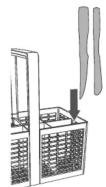

Sharp or pointed items must be placed horizontally or with sharp edges/points facing down to avoid risk of injury.
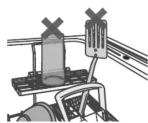

Protruding items will stop the internal lid of the drawer from sealing properly, which could result in a service call.
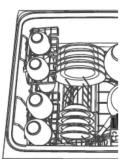

A neatly arranged load with evenly spaced dishes helps wash performance.
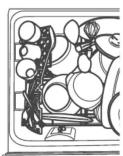

Overcrowding reduces wash performance.
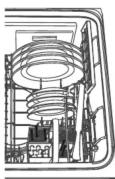

Ensure there is enough space between plates. Mix spoons, knives and forks within the cutlery basket to prevent them from nesting.
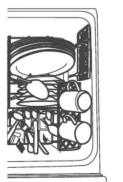

If plates and cutlery are nesting, they are less likely to be cleaned well.
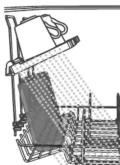

Ensure that water reaches all items on the adjustable racks.
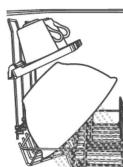

Dishware is blocking water from reaching items on the adjustable racks.
Preference options
You can change the setting of these options to suit your preferences or circumstances. We recommend selecting the most suitable settings before you start using your dishwasher.
| Option Rinse aid Water softener | Open drawer auto power-on | Beeps at end of wash | Closed drawer autolock | ||
| What does it do? | Regulates the amount of rinse aid dispensed. Reduce this setting if there is excess foam after a wash. Increase this setting if dishes are wet or streaky after a wash. | Refer to the 'Water softener' section of the 'User guide' for details. | Your DishDrawer is factory-set to automatically power on for 30 seconds whenever you open it. You can turn this setting off. | Your DishDrawer is factory-set to beep six times at the end of a wash. You can turn this setting off. | When this setting is on, the drawer will automatically lock 30 seconds after it's closed. It can then be unlocked by pressing Unless Keylock or Childlock is also activated). Useful in boats or motor homes. |
How to change the setting of an option
1 CHECK & OPEN
Check that there is no wash underway, press Ⓞ, then open the drawer.
2 ENTER MENU & SCROLL TO OPTION
To enter the menu: press the ⏻ selector on top first with one finger, then the ⏻ button on the front with another finger, hold both until one long beep sounds, then release.
- You are now in the Rinse aid option of the preference options menu.
If you want to change the Rinse aid setting, go to step 3 now.
If you want to change the setting of another option, you will need to scroll to that option first.
To scroll to the next option: press 🎯. To know which option you're in, watch the lights above 🎯 and 🏠 (see table below). When you have scrolled to the end of the sequence, it will start again with Rinse aid (after the lower tone).
| Option Rinse aid Water softener | Open drawer auto power-on | Beeps at end of wash | Closed drawer autolock | ||||||
| Which option am 1 in? | red | unlit | green | unlit | orange | red | green | ||
| Possible settings | 1 to 50 to 5 On or Off | On or Off | On or Off | ||||||
| Example | |||||||||
| 4 indicators lit = setting is 4 | Off | ||||||||
3 CHANGE SETTING
Press to change the setting within an option. For example, to change the Rinse aid setting from 4 (factory default) to 2,
you need to press 3 times
4 SAVE SETTING & QUIT MENU
Press this will save the new setting and quit the preference options menu.
For more info
For detailed information on the features of your dishwasher
For warranty information

see your 'User guide'

see your 'Service and warranty' booklet
If you...
■ have any questions or comments
■ need a Fisher & Paykel authorized
technician to service your product
■ need replacement parts or accessories
■ want to register your product

GB toll-free, 24/7
IE toll-free, 24/7
0845 066 2200
1800 625 174
www.fisherpaykel.co.uk
www.fisherpaykel.ie
Mærke : Fisher & Paykel
Model : DishDrawer DD60SHLI7
Kategori : Opvaskemaskine