
SBTB 3.0 A1 - Tastatur SILVERCREST - Gratis brugsanvisning og manual
Find enhedens vejledning gratis SBTB 3.0 A1 SILVERCREST i PDF-format.


Brugerspørgsmål om SBTB 3.0 A1 SILVERCREST
0 spørgsmål om dette apparat. Besvar dem du kender, eller stil dit eget.
Stil et nyt spørgsmål om dette apparat
Download vejledningen til din Tastatur i PDF-format gratis! Find din vejledning SBTB 3.0 A1 - SILVERCREST og tag din elektroniske enhed tilbage i hånden. På denne side er alle dokumenter nødvendige for brugen af din enhed offentliggjort. SBTB 3.0 A1 af mærket SILVERCREST.
BRUGSANVISNING SBTB 3.0 A1 SILVERCREST
SILVER CREST®

TASTIERA BLUETOOTH® SBTB 3.0 A1
IT MT
TASTIERA BLUETOOTH®
Istruzioni per l'uso e indicazioni relative alla sicurezza
GB MT
BLUETOOTH® KEYBOARD
Operating instructions and safety instructions
DE AT CH
BLUETOOTH®-TASTATUR
Bedienungsanleitung und Sicherheitshinweise
IT MT
Prima di leggere aprire la pagina con le immagini e prendere confidenza con le diverse funzioni dell'apparecchio.
GB MT
Before reading, unfold the page containing the illustrations and familiarise yourself with all functions of the device.
DE AT CH
Klappen Sie vor dem Lesen die Seite mit den Abbildungen aus und machen Sie sich anschließend mit allen Funktionen des Gerätes vertraut.
IT / MT Istruzioni per l'uso e indicazioni relative alla sicurezza Pagina 1
GB / MT Operating instructions and safety instructions Page 17
DE/AT/CH Bedienungsanleitung und Sicherheitshinweise Seite 33


natural_image
Coiled black cable with USB port, labeled with number 6 (no text or symbols on the cable itself)
Indice
Introduzione 2
Informazioni sul presente manuale di istruzioni 2
Diritto d'autore 2
Limitazione di responsabilità 2
Indicazioni sui marchi....2
Uso conforme....3
Avvertenze utilizzate 3
Sicurezza....4
Indicazioni generali relative alla sicurezza 4
Avvertenza sull'interfaccia radio 5
Descrizione dei componenti....5
Messa in funzione....6
Controllo della fornitura 6
Smaltimento dell'imballaggio....6
Caricamento della batteria 6
Comandi e funzionamento....7
Accensione / spegnimento della tastiera....7
Collegamento ad un computer, notebook o dispositivo mobile ..... 7
Speciali assegnazioni dei tasti 8
Illuminazione tastiera 10
Ricerca dei guasti 11
Pulizia 12
Conservazione in caso di mancato utilizzo e trasporto .. 12
Smaltimento 12
Smaltimento dell'apparecchio 12
Appendice 13
Dati tecnici 13
Indicazioni sulla dichiarazione di conformità CE....13
Garanzia della Kompernass Handels GmbH 14
Assistenza....15
Importatore....15
Introduzione
Informazioni sul presente manuale di istruzioni
Congratulazioni per l'acquisto del nuovo apparecchio. È stato scelto un prodotto di alta qualità. Il manuale di istruzioni è parte integrante del presente prodotto. Esso contiene importanti indicazioni per la sicurezza, l'uso e lo smaltimento. Prima di utilizzare il prodotto, leggere interamente il presente manuale di istruzioni e familiarizzare con tutte le indicazioni relative ai comandi e alla sicurezza. Utilizzare il prodotto solo come descritto e per i campi d'impiego indicati. Conservare sempre le istruzioni per l'uso nelle vicinanze del prodotto in modo da poterle consultare all'occorrenza. In caso di cessione del prodotto a terzi, consegnare anche le istruzioni per l'uso.
Diritto d'autore
La presente documentazione è tutelata dal diritto d'autore.
La diffusione o ristampa di qualsiasi genere, anche se parziale, nonché la riproduzione delle illustrazioni, anche se modificate, è consentita solo previa autorizzazione scritta del produttore.
Limitazione di responsabilità
Tutte le informazioni tecniche contenute nel presente manuale di istruzioni, i dati e le indicazioni relativi al collegamento e all'uso, corrispondono allo stato più aggiornato al momento della messa in stampa e rispecchiano le nostre esperienze e conoscenze più attuali.
I dati, le illustrazioni e le descrizioni contenute nel presente manuale di istruzioni non costituiscono una base valida per alcun tipo di rivendicazione.
Il produttore non si assume alcuna responsabilità per eventuali danni derivanti da mancata osservanza del manuale di istruzioni, uso non conforme, riparazioni non professionali, modifiche non consentite o uso di parti di ricambio non omologate.
Indicazioni sui marchi
Il marchio Bluetooth® e il logo Bluetooth® sono marchi registrati di Bluetooth SIG, Inc. (Special Interest Group). Qualsiasi utilizzo del marchio da parte di Kompernaß Handels GmbH avviene dietro licenza.
USB® è un marchio registrato di USB Implementers Forum, Inc.
Il marchio SilverCrest e il marchio commerciale sono proprietà del relativo titolare.
■ I marchi iPhone, iPad e iOS sono marchi registrati di Apple Inc., Cupertino Calif., US.
■ Microsoft ^® , Windows ^® e altri nomi dei prodotti Microsoft sono marchi registrati di Microsoft Corporation.
- Android® è un marchio registrato di Google Inc. negli Stati Uniti d'America e in altri Paesi.
Tutti gli altri nomi e prodotti possono essere marchi o marchi registrati dei rispettivi proprietari.
Uso conforme
La tastiera Bluetooth® è un apparecchio informatico e serve come dispositivo di input per computer, notebook o dispositivo mobile. Questo apparecchio non deve essere utilizzato al di fuori di luoghi chiusi. Questo apparecchio non è previsto per l'uso in aziende e in ambito commerciale (ad es. uffici). Utilizzare l'apparecchio esclusivamente in ambito domestico per l'uso privato. Un uso diverso o esulante da quanto sopra è considerato non conforme. Sono escluse rivendicazioni di qualsiasi genere in caso di danni derivanti da uso non conforme. Il rischio è esclusivamente a carico dell'utente. Attenersi alle disposizioni e alle leggi del Paese di utilizzo.
Avvertenze utilizzate
Nel presente manuale di istruzioni vengono utilizzate le seguenti avver- tenze:

PERICOLO
Un'avvertenza contrassegnata da questo livello di pericolo indica una situazione potenzialmente pericolosa.
Se non si evita tale situazione pericolosa, essa può dare luogo a lesioni gravi o provocare la morte.
▶ Seguire le avvertenze contenute in questo elenco per evitare il pericolo di gravi lesioni personali o di morte.
ATTENZIONE
Un'avvertenza contrassegnata da questo livello di pericolo indica la possibilità di danni materiali.
Qualora non fosse possibile evitarla, tale situazione può causare danni materiali.
▶ Seguire le indicazioni di questa avvertenza per evitare danni materiali.
NOTA
▶ Un'indicazione fornisce ulteriori informazioni volte a facilitare l'uso dell'apparecchio.
Sicurezza
In questo capitolo sono riportate importanti indicazioni di sicurezza per l'uso dell'apparecchio. L'apparecchio è conforme alle norme di sicurezza previste. L'uso non conforme può comportare danni a persone e a cose.
Indicazioni generali relative alla sicurezza
Per l'uso sicuro dell'apparecchio, rispettare le seguenti indicazioni relative alla sicurezza:
■ Prima dell'uso, controllare l'apparecchio per rilevare eventuali danni esterni visibili. Non mettere in funzione l'apparecchio se danneggiato o caduto.
- Questo apparecchio può essere utilizzato dai bambini di almeno 8 anni di età e inoltre anche da persone con capacità fisiche, sensoriali o mentali ridotte o insufficiente esperienza o conoscenza, solo se sorvegliati o istruiti sull'uso sicuro dell'apparecchio e qualora ne abbiano compreso i pericoli associati. I bambini non devono giocare con l'apparecchio. La pulizia e la manutenzione a cura dell'utente non devono essere eseguite da bambini, a meno che non siano sorvegliati.
■ PERICOLO! I materiali d'imballaggio non sono un giocattolo! Tenere tutti i materiali d'imballaggio fuori dalla portata dei bambini. Sussiste pericolo di soffocamento!
■ Appoggiare l'apparecchio su una superficie piana e stabile. Esso può danneggiarsi in caso di caduta.
Non esporre l'apparecchio alla luce solare diretta o a temperature elevate. Non coprire mai l'apparecchio durante il processo di caricamento. In caso contrario, il dispositivo potrebbe surriscaldarsi e subire danni irreparabili.
Non collocare il prodotto in prossimità di fonti di calore come radiatori o altri apparecchi che generano calore.
Non azionare l'apparecchio in vicinanza di fiamme libere (ad es. candele).
L'apparecchio non è predisposto per l'uso in locali esposti a temperature e umidità elevate (ad es. bagni) o a polvere eccessiva.
Non aprire mai l'alloggiamento dell'apparecchio. All'interno dell'apparecchio non si trovano componenti che necessitano manutenzione. Inoltre decade ogni diritto di garanzia.
■ Evitare di apportare autonomamente modifiche o cambiamenti all'apparecchio.
Fare eseguire le riparazioni solo da aziende specializzate o dall'assistenza ai clienti. Le riparazioni non eseguite professionalmente possono causare gravi pericoli per l'utente e comportano la decadenza della garanzia.
Non esporre l'apparecchio a spruzzi d'acqua e/o gocciolamenti e non collocare oggetti contenenti liquidi sull'apparecchio, come ad esempio vasi o contenitori di bevande.
Se si riscontrasse odore di bruciato o sviluppo di fumo, spegnere immediatamente l'apparecchio e disconnettere il cavo di carica eventualmente collegato. Fare verificare l'apparecchio da un tecnico qualificato prima di riutilizzarlo.
PERICOLO! L'utilizzo errato delle batterie può causare incendi, esplosioni, fuoriuscita di sostanze pericolose o altre situazioni pericolose! Non gettare l'apparecchio nel fuoco, in quanto la batteria integrata potrebbe esplodere.
Avvertenza sull'interfaccia radio
Spegnere l'apparecchio se ci si trova in aereo, in ospedale, in sala operatoria o in prossimità di un sistema medico elettronico. Le onde radio trasmesse potrebbero infatti influenzare il funzionamento degli apparecchi sensibili.
■ Mantenere l'apparecchio a una distanza di almeno 20 cm da un pacemaker, in quanto le onde radio potrebbero comprometterne il corretto funzionamento.
Le onde radio trasmesse potrebbero causare interferenze anche negli apparecchi acustici.
Non avvicinare l'apparecchio con componenti radio accesi a gas infiammabili o in un ambiente potenzialmente esplosivo (ad es. stabilimento di verniciatura), in quanto le onde radio trasmesse potrebbero causare un'esplosione o un incendio.
La portata delle onde radio dipende dalle condizioni dell'ambiente.
Nella trasmissione di dati attraverso un collegamento senza cavo, anche terzi non autorizzati possono ricevere i dati.
Descrizione dei componenti
(per le illustrazioni vedere la pagina apribile)
1 Piedini di sostegno
2 Presa di carica micro USB (←)
3 Segnalazione LED (A)
4 LED di carica (☐)
5 Interruttore di accensione/spegnimento (OFF/ON)
6 Cavo di carica USB (da USB a micro USB)
⑦ Manuale di istruzioni (immagine simbolo)
Messa in funzione
Controllo della fornitura
(per le illustrazioni vedere la pagina apribile)
Il volume della fornitura comprende i seguenti componenti:
- Tastiera Bluetooth® SBTB 3.0 A1 (esempio campione, il layout tastiera può cambiare a seconda del Paese di fornitura)
• Cavo USB (da USB a micro USB)
• Il presente manuale di istruzioni
NOTA
Controllare se la fornitura è integra e se presenta danni visibili.
In caso di fornitura incompleta o in presenza di danni da trasporto o da imballaggio inadeguato, rivolgersi alla linea diretta di assistenza (vedere capitolo Assistenza).
▶ Prelevare tutti i componenti dell'apparecchio dall'imballaggio e rimuovere tutto il materiale di imballaggio.
Smaltimento dell'imballaggio
L'imballaggio protegge l'apparecchio dai danni da trasporto. I materiali di imballaggio sono stati selezionati in relazione alla loro ecocompatibilità e alle caratteristiche di smaltimento e pertanto sono riciclabili.

Il riciclo dell'imballaggio consente di risparmiare materie prime e riduce la generazione di rifiuti. Smaltire il materia-le di imballaggio inutilizzato in conformità alle norme vigenti locali.
Caricamento della batteria
NOTA
Caricare l'apparecchio solo in luoghi chiusi e asciutti.
Per caricare l'apparecchio utilizzare esclusivamente il cavo di carica 6 in dotazione!
Al termine del processo di carica rimuovere assolutamente il cavo di carica 6!
Prima di utilizzare l'apparecchio occorre caricare completamente la batteria integrata.
Assicurarsi che l'interruttore ON/OFF ⑤ si trovi in posizione OFF.
♦ Collegare la spina USB del cavo di carica ⑥ a un PC o a un alimentatore USB.
♦ Collegare il connettore micro-USB del cavo di carica ⑥ alla presa di carica micro-USB ② (↔) dell'apparecchio.
NOTA
Durante il processo di caricamento, il LED di carica (☐7) è acceso di colore arancione. Una volta che la batteria è completa-mente carica, il LED di carica si spegne (☐7) 4.
Se il LED di carica (☐/☐) 4 lampeggia con colore rosso, significa che la batteria è quasi scarica. Una volta che la batteria è completamente scarica, il LED di carica si spegne (☐/☐) 4. Caricare nuovamente l'accumulatore.
Comandi e funzionamento
In questo capitolo sono riportate indicazioni importanti relative ai comandi e al funzionamento dell'apparecchio.
Accensione / spegnimento della tastiera
◆ Portare l'interruttore ON/OFF ⑤ in posizione ON per attivare la tastiera. Il LED di segnalazione (A) ③ si accende per 2 secondi. Anche l'illuminazione della tastiera si accende per 2 secondi.
NOTA
Se la tastiera non è ancora collegata ad un computer, notebook o dispositivo mobile, l'indicatore LED (A) ③ e l'illuminazione della tastiera si accendono due volte per 2 secondi.
◆ Portare l'interruttore ON/OFF ⑤ in posizione OFF per spegnere la tastiera.
Collegamento ad un computer, notebook o dispositivo mobile
Attivare sull'apparecchio la connessione Bluetooth® e avviare la ricerca degli apparecchi Bluetooth®. Una descrizione dettagliata si trova nel manuale di istruzioni del proprio computer, notebook o dispositivo mobile.
Attivare la tastiera con l'interruttore ON/OFF ⑤. Il LED di segnalazione (A) ③ si accende per 2 secondi. Anche l'illuminazione della tastiera si accende per 2 secondi.
Premere i tasti + . L'indicatore LED (A) ③ lampeggia di blu per 3 minuti. In questo tempo la tastiera può essere trovata dal rispettivo apparecchio.
♦ Scegliere dall'elenco degli apparecchi trovati del computer, notebook o dispositivo mobile la voce STB 3.0 A1.
L'apparecchio mostra ora un codice per il collegamento.
♦ Inserire il codice sulla tastiera e confermare con il tasto ←.
L'indicatore LED (A) ③ si spegne e il collegamento è generato.
Per interrompere un collegamento Bluetooth® esistente, spegnere la tastiera oppure premere i tasti _n + sulla tastiera.
Quando si interrompe il collegamento Bluetooth® con i tasti [Fn] + [C], l'indicatore LED lampeggia di blu (A) ③ per 3 minuti. Durante questo tempo, è possibile collegare alla tastiera un altro apparecchio Bluetooth® direttamente.
NOTA
- Alla prossima accensione la tastiera si ricollega automaticamente all'ultimo dispositivo Bluetooth® con cui era stato collegato. Se il dispositivo Bluetooth® non si ricollega automaticamente con la tastiera, occorre creare il collegamento manualmente. Una descrizione dettagliata è presente nel manuale di istruzioni del dispositivo Bluetooth®.
Se si desidera collegare la tastiera a un altro dispositivo Bluetooth®, occorre prima scollegare il dispositivo Bluetooth® attualmente collegato.
Speciali assegnazioni dei tasti
I tasti nella fila più in alto sono riservati alle funzioni speciali. In base al simbolo è possibile controllare direttamente le funzioni del programma come ad es. riproduzione multimediale o volume.
I tasti hanno funzioni differenti a seconda del sistema operativo in uso. Nel seguente schema è possibile vedere ad esempio un tasto e le sue configurazioni possibili in base al sistema operativo.
![Tasto funzione speciale Tutti i sistemi operativi: + tasto ! Q iOS: + tasto (se diverso rispetto ad Android) Android: [Alt Option] + tasto i iOS: [Alt Option] + tasto Tutti i sistemi operativi: tasto 1 iOS: tasto (se diverso rispetto ad Android)](/content/2026/05/872494/images/f5a56aa6c8eaf91fd08f8845ea18bef3f9186034f5e44828308a8404d144f0c2.jpg)
A seconda della funzione del sistema operativo, talvolta non tutti i tasti speciali operano con la funzione descritta. Al primo collegamento con un computer/notebook/dispositivo mobile il layout della tastiera della fila più in alto viene impostato sul sistema operativo Windows.
NOTA
A seconda della versione operativa di Android, prima del primo utilizzo è necessario impostare la lingua della tastiera fisica (ad es. italiano) per ottenere l'assegnazione dei tasti abituale. La voce di menù "Tastiera fisica" compare solo nel menù Impostazioni/Lingua & Digitazione se la tastiera Bluetooth è collegata.
Per adattare il layout della tastiera a un altro sistema operativo, premere le seguenti combinazioni di tasti:
| Combinazione dei tasti | Sistema operativo |
 | Sistema iOS |
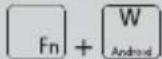 | Sistema Android |
 | Sistema Windows |
A seconda del sistema operativo usato (iOS, Android o Windows), tramite il tasto ( \left[\frac{x}{Cmd}\right] ) e un altro tasto è possibile richiamare altre funzioni come il tasto ( \left[\frac{x}{Cmd}\right] + "C" = avviare contatti o il tasto ( \left[\frac{x}{Cmd}\right] + "B" = avviare il browser (sistema Android). )
Sistema iOS / Android:
Per svolgere una funzione della seguente tabella, premere il tasto [Fn] più il tasto della tabella.
Sistema Windows:
Per svolgere una funzione della seguente tabella, premere il tasto _n e il tasto Shift più il tasto della tabella.
| [SKZX] | Tasto Home*1 |  | Cerca |
| [26DW] | Seleziona tutti |  | Copia |
 | Aggiungi | [K3DO] | Taglia |
| [270A] | Brano precedente/riavvolgimento rapido*2 | [5K3X] | Play/pausa |
| [2X2C] | Brano successivo/avanzamento rapido*3 |  | Accendi/spegni audio |
| [5KST] | Abbassamento del volume | [00HH] | Aumento del volume |
| [HXST] | Sblocco/blocco*4 |  | Elimina*5 |
*1: La pagina iniziale del browser si apre (solo per Windows).
*2: Brano precedente - premendo una volta; riavvolgimento rapido se il tasto viene tenuto premuto (solo per iOS).
*3: Brano successivo - premendo una volta; avanzamento rapido se il tasto viene tenuto premuto (solo per iOS).
*4: Se non è stato creato alcun codice, il display viene solo attivato/disattivato. Se il tasto viene tenuto premuto, l'iPad/iPhone viene disattivato. Viene visualizzata la richiesta comune di spegnere.
*5: Solo per iOS e Android.
Per utilizzare i tasti ESC, F1, F2, F3...F12 e Del (Canc) in Windows, si deve premere anche il tasto [Fn]. Il tasti ESC, F1, F2, F3....F12 configurati nella parte superiore dei normali tasti, tuttavia sui tasti non sono raffigurati.
Premendo il tasto indipendentemente dal sistema, si illumina l'indicatore LED (A) finché non si preme nuovamente il tasto.
Illuminazione tastiera
La tastiera ha la funzione di una retroilluminazione RGB variabile. Sono disponibili sette colori in due stati di luminosità.
Premere i tasti + 54 per attivare l'illuminazione. Il livello di luminosità è ora al 50%.
Premere nuovamente i tasti + \& per aumentare il livello di luminosità al 100%.
Premere i tasti _n + * per cambiare il colore dell'illuminazione. In totale è possibile scegliere tra sette colori.
♦ Premere i tasti + ♀ per ridurre il livello di luminosità al 50%.
♦ Premere nuovamente i tasti + per disattivare l'illuminazione.
NOTA
Dopo circa 1 minuto senza alcuna pressione dei tasti, la tastiera passa nella modalità sleep per risparmiare batteria. La retroilluminazione RGB attivata si spegne.
Per riattivare la tastiera, premere un tasto a piacere, che attiva direttamente la funzione. La retroilluminazione RGB eventualmente attivata si riaccende nell'ultimo colore impostato.
Ricerca dei guasti
Se non è possibile associare la tastiera a un computer, notebook o dispositivo mobile compatibile o se l'apparecchio non reagisce agli input, procedere nel modo seguente:
♦ Sincerarsi che la tastiera sia accesa.
Accertarsi che l'accumulatore della tastiera sia carico. (vedere anche il capitolo Caricamento della batteria).
♦ Verificare se il collegamento Bluetooth® del computer/notebook/dispositivo mobile e la tastiera è attivo.
Se si utilizzano più apparecchi Bluetooth®, assicurarsi che sia stato disconnesso un collegamento precedente. Si potrebbe trovare nel raggio d'azione un apparecchio precedentemente abbinato.
Assicurarsi che la tastiera sia ad una distanza massima di 8 metri dal computer/notebook/dispositivo mobile e che non vi siano ostacoli o apparecchi elettronici nel mezzo.
Eseguire nuovamente il collegamento Bluetooth® tra il computer/notebook/dispositivo mobile e la tastiera.
Se i tasti speciali o altri tasti della tastiera non hanno funzioni o hanno una funzione errata, verificare se è stato impostato il sistema operativo e il layout tastiera corretto (vedere anche il capitolo Speciali assegnazioni dei tasti).
NOTA
Se non si riuscisse a risolvere il problema eseguendo quanto indicato precedentemente, rivolgersi alla linea diretta di assistenza (vedere capitolo Assistenza).
Pulizia

ATTENZIONE
Possibile danneggiamento dell'apparecchio.
All'interno della tastiera non vi sono pezzi da pulire o sottoporre a manutenzione. L'infiltrazione di umidità può provocare danni all'apparecchio.
Per evitare l'irreparabile danneggiamento dell'apparecchio, assicurarsi che durante la pulizia non vi penetri umidità.
Non utilizzare detergenti corrosivi, abrasivi o contenenti solventi. Essi possono danneggiare le superfici dell'apparecchio.
♦ Pulire l'apparecchio esclusivamente con un panno leggermente inumidito e un detergente delicato.
Conservazione in caso di mancato utilizzo e trasporto
Conservare l'apparecchio in un luogo asciutto, privo di polvere e non esposto all'irradiazione solare diretta.
Caricare regolarmente l'accumulatore per garantirne una lunga durata di vita.
♦ Trasportare l'apparecchio nell'imballaggio originale o in una borsa idonea.
Smaltimento
Smaltimento dell'apparecchio

Il simbolo del bidone dei rifiuti barrato, raffigurato a lato, indica che l'apparecchio è soggetto alla Direttiva 2012/19/EU. Tale direttiva prevede che l'apparecchio non venga smaltito assieme ai normali rifiuti domestici al termine della sua vita utile, bensì venga obbligatoriamente conferito ad appositi punti di raccolta, centri di riciclaggio o aziende di smaltimento.
Questo smaltimento è gratuito per l'utente. Rispettare l'ambiente e smaltire l'apparecchio in modo adeguato.
Per ulteriori informazioni rivolgersi alla propria azienda di smaltimento locale o all'amministrazione cittadina o comunale.
Appendice
Dati tecnici
| Tensione, corrente di esercizio | 5 V---, 500 mA tramite presa di carica USB |
| Specifica Bluetooth® | Versione 3.0 (portata fino a 8 m) |
| Banda di frequenza | 2,4 GHz |
| Potenza di trasmissione | < 10 dBm |
| Sistemi operativi supportati | iOS 8.0 o superiore, Android 4.4 o superiore, Windows Vista o superiore |
| Accumulatore integrato | 3,7 V, 500 mAh (litio-polimero) |
| Layout tastiera | Design a 64 tasti |
| Autonomia | circa 90 h (senza retroilluminazione LED) |
| circa 4-10 h (con retroilluminazione LED attivata al 100% di livello di luminosità; a seconda del colore scelto) | |
| Tempo di carica | circa 3 h |
| Temperatura di esercizio | 15°C - +35°C |
| Temperatura di conservazione | 0°C - +40°C |
| Umidità dell'aria (assenza di condensa) | ≤75% |
| Dimensioni (L x P x A) | circa 28 x 10,3 x 1,8 cm |
| Peso | circa 235 g |
Indicazioni sulla dichiarazione di conformità CE

Questo apparecchio è conforme ai requisiti fondamentali e alle altre norme rilevanti della Direttiva RE 2014/53/EU e RoHS 2011/65/EU.
La dichiarazione di conformità UE completa può essere scaricata tramite il link www.kompernass.com/support/289493_DOC.pdf.
Garanzia della Kompernass Handels GmbH
Egregio Cliente,
Questo apparecchio ha una garanzia di 3 anni dalla data di acquisto. Qualora questo prodotto presentasse vizi, Le spettano diritti legali nei confronti del venditore del prodotto. La garanzia qui di seguito descritta non costituisce alcun limite a tali diritti legali.
Condizioni di garanzia
Il periodo di garanzia decorre dalla data dell'acquisto. Si prega di conservare lo scontrino di cassa originale. Tale documento è necessario come prova di acquisto.
Qualora entro tre anni a partire dalla data dell'acquisto di questo prodotto si presentasse un vizio del materiale o di fabbricazione, provvederemo, a nostra discrezione, a riparare o a sostituire gratuitamente il prodotto. Questa prestazione di garanzia ha come presupposto che l'apparecchio difettoso e la prova di acquisto (scontrino di cassa) vengano presentati entro il termine di tre anni e che si descriva per iscritto in cosa consiste il vizio e quando si è presentato.
Se il vizio rientra nell'ambito della nostra garanzia, il Suo prodotto verrà riparato o sostituito da uno nuovo. Con la riparazione o la sostituzione del prodotto non decorre un nuovo periodo di garanzia.
Periodo di garanzia e diritti legali di rivendicazione di vizi
Il periodo di garanzia non viene prolungato da interventi in garanzia. Ciò vale anche per le parti sostituite e riparate. Danni e vizi eventualmente già presenti al momento dell'acquisto devono venire segnalati immediatamente dopo che l'apparecchio è stato disimballato. Le riparazioni eseguite dopo la scadenza del periodo di garanzia sono a pagamento.
Ambito della garanzia
L'apparecchio è stato prodotto con cura secondo severe direttive qualitative e debitamente collaudato prima della consegna.
La garanzia viene prestata in caso di vizi del materiale o di fabbricazione. Questa garanzia non si estende a componenti del prodotto che sono esposti al normale logorio e possono pertanto essere considerati come componenti soggetti a usura o a danni che si verificano su componenti delicati, per es. interruttori, batterie, stampi da forno o parti realizzate in vetro.
Questa garanzia decade se il prodotto è stato danneggiato oppure utilizzato o sottoposto a interventi di manutenzione in modo non conforme. Per un utilizzo adeguato del prodotto si devono rigorosamente rispettare tutte le istruzioni esposte nel manuale di istruzioni per l'uso. Si devono assolutamente evitare modalità di utilizzo e azioni che il manuale di istruzioni per l'uso sconsiglia o da cui esso mette in guardia.
Il prodotto è destinato esclusivamente all'uso domestico e non a quello commerciale. La garanzia decade in caso di impiego improprio o mano-missione, uso della forza e interventi non eseguiti dalla nostra filiale di assistenza autorizzata.
Trattamento dei casi di garanzia
Per garantire una rapida evasione della Sua richiesta, La preghiamo di seguire le seguenti istruzioni:
Tenga a portata di mano per qualsiasi richiesta lo scontrino di cassa e il codice dell'articolo (per es. IAN 12345) come prova di acquisto.
Il codice dell'articolo è indicato sulla targhetta di modello, su un'incisione, sul frontespizio del manuale di istruzioni per l'uso (in basso a sinistro) o come adesivo sul lato posteriore o inferiore.
Qualora si presentassero malfunzionamenti o altri tipi di vizi, contatti innanzitutto il reparto assistenza clienti qui di seguito indicato telefonicamente o via e-mail.
Una volta che il prodotto è stato registrato come difettoso, lo può poi spedire a nostro carico, provvedendo ad allegare la prova di acquisto (scontrino di cassa), una descrizione del vizio e l'indicazione della data in cui si è presentato, all'indirizzo del servizio di assistenza clienti che Le è stato comunicato.

Al sito www.lidl-service.com si possono scaricare questo e molti altri manuali di istruzioni per l'uso, filmati sui prodotti e software.
Assistenza
IT Assistenza Italia
Tel.: 02 36003201
E-Mail: kompernass@lidl.it
MT Service Malta
Tel.: 80062230
E-Mail: kompernass@lidl.com.mt
IAN 289493
Importatore
Badi che il seguente indirizzo non è quello del servizio di assistenza clienti. Contatti innanzitutto il servizio di assistenza clienti indicato.
KOMPERNASS HANDELS GMBH
BURGSTRASSE 21
DE-44867 BOCHUM
GERMANIA
www.kompernass.com
Contents
Introduction....18
Information about these operating instructions....18
Copyright 18
Limitation of liability 18
Notes on trademarks 18
Intended use....19
Warning notices....19
Safety 20
Basic safety instructions 20
Notes on the radio interface 21
Description of components 21
Operation 22
Check package contents 22
Disposal of the packaging 22
Charging the battery 22
Handling and use 23
Switching the keyboard on and off 23
Establishing a connection with a computer, notebook or mobile device. 23
Special key assignments....24
Keyboard illumination....26
Troubleshooting 27
Cleaning. 28
Storage when not in use and transport 28
Disposal....28
Disposal of the appliance....28
Attachment 29
Technical data 29
Notes on the EU Declaration of Conformity....29
Kompernass Handels GmbH warranty 30
Service 31
Importer 31
Introduction
Information about these operating instructions
Congratulations on the purchase of your new appliance. You have selected a high-quality product. The operating instructions are part of this product. They contain important information about safety, usage and disposal. Read the supplied operating instructions fully and familiarise yourself with all handling and safety guidelines before using the product. Use the product only as described and for the range of applications specified. Keep these operating instructions as a reference and store them near the product. Please pass the operating instructions on to any future owner.
Copyright
This documentation is protected by copyright.
Any copying or reproduction, including in the form of extracts, or any reproduction of images (even in a modified state), is permitted only with the written authorisation of the manufacturer.
Limitation of liability
All the technical information, data and instructions regarding installation, connection and operation contained in these operating instructions correspond to the latest information available to us at the time of printing and take into account our previous experience and know-how.
No claims can be derived from the details, illustrations and descriptions in these instructions.
The manufacturer assumes no responsibility for damage caused by failure to observe these instructions, improper use, incompetent repairs, unauthorised modifications or for the use of non-approved replacement parts.
Notes on trademarks
The Bluetooth® logotype and Bluetooth® logo are registered trademarks of Bluetooth SIG, Inc. (Special Interest Group). Any use of the trademarks by Kompernaß Handels GmbH is made under the provision of a licence.
USB® is a registered trademark of USB Implementers Forum, Inc.
The SilverCrest trademark and the retail name are the property of their respective owner.
The brands iPhone, iPad and iOS are registered trademarks of Apple Inc., Cupertino Calif., USA.
■ Microsoft ^® , Windows ^® and other Microsoft product names are registered trademarks of the Microsoft Corporation.
- Android ^ is a registered trademark of Google Inc. in the United States of America and in other countries.
All other names and products may be trademarks or registered trademarks of their respective owner.
Intended use
The Bluetooth® keyboard is an information technology appliance and is designed as an input device for a computer, notebook or mobile device. The appliance must not be used outside of closed rooms. This appliance is not intended for use in companies or for other commercial uses (e.g. office applications). Use the appliance only in the home for private purposes. The appliance is not intended for any other purpose, nor for use beyond the scope described. No claims of any kind will be accepted for damage arising as a result of incorrect use. The risk shall be borne solely by the user. Comply with the respective provisions or laws of the country in which you are using the appliance.
Warning notices
The following warning symbols are used in these operating instructions:
DANGER
A warning at this hazard level indicates a potentially hazardous situation.
Failure to avoid this hazardous situation could result in serious injuries or death.
▶ Follow the instructions in this warning notice to avoid the risk of death or serious injury.
CAUTION
A warning notice of this hazard level indicates a risk of property damage.
Failure to avoid this situation could result in property damage.
▶ Follow the instructions in this warning notice to prevent material damage.
NOTE
▶ A note provides additional information that makes handling the appliance easier for you.
Safety
This section contains important safety instructions for handling the appliance. This appliance complies with statutory safety regulations. Improper use may result in personal injury and property damage.
Basic safety instructions
To ensure safe operation of the appliance, follow the safety guidelines set out below:
- Check the appliance for visible external damage before use. Do not operate an appliance that has been damaged or dropped.
This appliance may be used by children aged 8 years and above and by persons with limited physical, sensory or mental capabilities, or lack of experience and knowledge, provided that they are under supervision or have been told how to use the appliance safely and are aware of the potential risks. Children must not play with the appliance. Cleaning and user maintenance tasks must not be carried out by children unless they are supervised.
DANGER! Do not allow children to play with the packaging material! Keep all packaging materials away from children. There is a risk of suffocation!
■ Always place the appliance on a stable and level surface. It can be damaged if dropped.
Do not expose the appliance to direct sunlight or high temperatures. Do not cover the appliance during charging. Otherwise it may overheat and be irreparably damaged. - Do not place the product near heat sources such as radiators or other heat-generating appliances.
- Do not operate the appliance close to naked flames (e.g. candles).
The appliance is not designed for use in rooms with high temperature or humidity (e.g. bathrooms) or excessive dust generation.
■ Never open the appliance housing. There are no parts inside the appliance which can be maintained. What is more, it will invalidate the warranty. - Do not make any unauthorised modifications or alterations to the appliance.
All repairs must be carried out by authorised specialist companies or by the customer service department. Improper repairs may put the user at risk. It will also invalidate any warranty claims.
Do not expose the appliance to water spray or dripping water, and do not place liquid-filled objects such as vases or open drink containers on or near the appliance.
■ Turn the appliance off immediately and disconnect any connected charging cables from the appliance if you smell fumes or notice any smoke. Have the appliance checked by a qualified specialist before using it again.
DANGER! Improper use of batteries can cause fires, explosions, leakages or other hazards! Do not throw the appliance into a fire, since the integrated battery may explode.
Notes on the radio interface
■ Switch off the appliance if you are in an aeroplane, hospital, operating theatre or in the vicinity of a electronic medical system. The transmitted radio waves can affect the functionality of sensitive appliances.
- Keep the appliance at least 20 cm away from a pacemaker, as the proper functioning of the pacemaker could be affected by radio waves.
■ The transmitted radio waves can cause noise interference in hearing aids.
Do not use the unit in the presence of flammable gases or in a potentially explosive atmosphere (e.g. in a paint shop) while the radio component is activated, as the transmitted radio waves can cause an explosion or ignite a fire.
The range of the radio waves is dependent on the environment and the ambient conditions.
■ Data transmissions via a wireless connection can be intercepted by unauthorised third parties.
Description of components
(See fold-out page for illustrations)
1 Stand
2 Micro-USB charging port (→)
3 LED display (A)
4 Charging LED (☐)
⑤ On/Off switch (OFF/ON)
6 USB charging cable (USB to micro-USB)
⑦ Operating instructions (symbol)
Operation
Check package contents
(See fold-out page for illustrations)
The product includes the following components:
- Bluetooth® keyboard SBTB 3.0 A1
(model; keyboard layout varies according to delivery country)
• USB cable (USB to micro-USB)
• These operating instructions
NOTE
▶ Check the package for completeness and signs of visible damage.
If the delivery is incomplete or damage has occurred as a result of defective packaging or during transport, contact the service hotline (see section Service).
▶ Remove all parts of the appliance from the packaging and remove all packaging materials.
Disposal of the packaging
The packaging protects the appliance from damage during transport. The packaging materials have been selected for their environmental friendliness and ease of disposal, and are therefore recyclable.

Returning the packaging to the material cycle conserves raw materials and reduces the amount of waste that is generated. Dispose of packaging materials that are no longer needed in accordance with applicable local regulations.
Charging the battery
NOTE
▶ Use the appliance only in dry interior rooms.
▶ Use only the supplied charger cable ⑥ to charge the appliance.
▶ Always disconnect the charger cable ⑥ when charging is complete!
Before using the appliance, the integrated battery must be completely charged.
◆ Ensure that the On/Off switch ⑤ is in the OFF position.
Connect the USB plug on the charger cable ⑥ to a PC or to a USB power supply.
Connect the micro-USB plug on the charger cable ⑥ to the micro-USB charging port ② (↔) on the appliance.
NOTE
The charging LED (☐) 4 illuminates orange during the charging process. When the battery is fully charged, the charging LED (☐) 4 goes out).
If the charging LED (☐7) 4 flashes red, the battery is nearly empty. When the battery is fully charged, the charging LED (☐7) 4 goes out. Recharge the battery.
Handling and use
This section provides you with important information on handling and using the appliance.
Switching the keyboard on and off
Move the On/Off Switch 5 to the ON position to switch the keyboard on. The LED display (A) 3 illuminates green for 2 seconds. The keyboard illumination also illuminates for 2 seconds.
NOTE
If the keyboard is not already connected to a computer, notebook or mobile device, the LED display (A) ③ and the keyboard illumination will light up twice for 2 seconds.
Move the On/Off switch 5 to the OFF position to switch the keyboard off.
Establishing a connection with a computer, notebook or mobile device
◆ Activate the Bluetooth® connection on the appropriate appliance and allow it to search for Bluetooth® appliances. You can find detailed instructions in the operating instructions of your computer, notebook or mobile device.
Switch the keyboard on using the On/Off switch ⑤. The LED display (A) ③ illuminates green for 2 seconds. The keyboard illumination also illuminates for 2 seconds.
Press the + keys. The LED display (A) ③ flashes blue for 3 minutes. The keyboard can be found by the searching appliance during this period.
Select the SBTB 3.0 A1 entry on the list of devices found on your computer, notebook or mobile device.
Your device now shows a code for the connection.
Enter the code on the keyboard and confirm it using the key. The LED display (A) ③ goes out and the connection is made.
To disconnect an existing Bluetooth® connection, either switch the keyboard off or press the _n + _t keys on the keyboard.
If you disconnect the Bluetooth® connection using the _n + keys, the LED display (A) ③ will flash blue for 3 minutes. During this time, another Bluetooth® device can be coupled with the keyboard.
NOTE
The next time you turn on the keyboard, it will automatically connect to the last-connected Bluetooth® appliance. If your Bluetooth® device does not automatically reconnect to the keyboard, you will have to re-establish the connection manually. Detailed instructions can be found in the operating instructions for your Bluetooth® device.
If you want to connect the keyboard to another Bluetooth® device, you must first unpair the current Bluetooth® device.
Special key assignments
The keys in the top row are reserved for special functions. Corresponding to the symbols used, they can be used to directly control program features such as media playback or volume.
Depending on the operating system used, the keys may have slightly different functions. The following diagram shows an example of a key and its possible assignment depending on the operating system.

Note that depending on the version of the operating system, some special keys may not work with the described function. During the first connection to a computer/notebook/mobile device, the keyboard layout of the top row is set to the Windows operating system.
NOTE
Depending on the version of the Android OS, the language of the physical keyboard must be set before first use (e.g. English) to set up the keyboard layout you are familiar with. The menu item "physical keyboard" only appears in the menu Settings/Language & input if the Bluetooth keyboard has been paired.
To change the keyboard layout to a different operating system, press the following key combinations:
| Key combination | Operating system |
 | iOS system |
 | Android system |
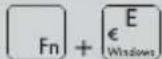 | Windows system |
Depending on the operating system (iOS, Android or Windows), you can use the key and a further key to call up additional functions, such as key + "C" = start Contacts or key + "B" = start browser (Android system).
iOS system / Android system:
To implement a function from the following table, press the _n key plus the key in the table.
Windows system:
To implement a function from the following table, press the _n key plus the shift key plus the key in the table.
 | Home key*1 | Search | |
| [0720] | Select All | Copy | |
| [0480] | Paste | Cut | |
 | Previous track/rewind*2 | Play/pause | |
 | Next track/fast forward*3 | Mute/unmute sound | |
 | Decrease volume | Increase volume | |
| [TT05] | Unlock/lock*4 | Del | Delete*5 |
*1: The browser initial page is opened (only under Windows).
*2: previous track - press once; hold the key down for fast rewind (only in iOS).
*3: Next track - hold the key down for fast forward (only in iOS).
*4: If no code is stored, the display is simply switched on/off. If the key is held down, the iPad/iPhone can be switched off. The usual shutdown query appears.
*5: Only under iOS and Android.
If you want to use the ESC, F1, F2, F3....F12 and Del (Delete) keys under windows, press the _n key in addition. The ESC, F1, F2, F3....F12 keys are stored on the remaining keys in the top row but not marked on the keys themselves.
If you press the ☑ key, the LED display (A) ③ will illuminate until you press the key again, regardless of the system used.
Keyboard illumination
The keyboard has the function of a changeable RGB background illumination. Seven colours are available at two different brightness levels.
◆ Press the _n + keys to activate the illumination. The brightness level is now at 50%.
◆ Press the + keys again to increase the brightness level to 100%.
◆ Press the _n + * keys to change the illumination colour. You can choose from a total of seven colours.
◆ Press the _n + keys to decrease the brightness level to 50%.
◆ Press the + 52 keys again to deactivate the illumination.
NOTE
The keyboard enters sleep mode to conserve battery power after approximately 1 minute of idleness. If the RGB background illumination is activated, it will also be deactivated.
▶ Press any key to reactivate the keyboard. The key may directly output its assigned function. If activated, the RGB background illumination will illuminate in the colour you last set.
Troubleshooting
If you are unable to pair the keyboard with a compatible computer, notebook or mobile device, or it no longer responds to keystrokes, please proceed as follows:
◆ Check whether the keyboard is switched on.
◆ Ensure that the keyboard battery is charged. (See also Chapter Charging the battery).
Check whether the Bluetooth® interface is enabled on the keyboard and on your computer/notebook/mobile device.
If you use several Bluetooth® appliances, ensure that any previous connection is disconnected. There may be a previously paired appliance in range.
Make sure that the keyboard is no more than 8 metres away from the computer/notebook/mobile device and that no obstacles or electronic devices are located in between.
♦ Reconnect the Bluetooth® connection between the keyboard and your computer/notebook/mobile device.
If the special keys or the other keys on the keyboard have no function or the wrong function, check whether the correct operating system and country-specific keyboard layout are set in the operating system (see also the sections Special key assignments).
NOTE
If you cannot solve the problem with the above-mentioned solutions, please contact the Service Hotline (see section Service).
Cleaning

CAUTION!
Possible damage to the appliance.
There are no serviceable parts or parts requiring cleaning inside the keyboard. Moisture can cause damage to the appliance.
▶ To avoid irreparable damage to the appliance, ensure that no moisture penetrates the appliance during cleaning.
▶ Do not use caustic, abrasive or solvent-based cleaning materials. These can damage the surfaces of the appliance.
- Clean the housing of the appliance with a lightly moistened cloth and a mild detergent only.
Storage when not in use and transport
◆ Store the appliance in a location which is clean, dry, dust-free and not in direct sunlight.
To ensure a long battery life, charge the battery at regular intervals.
◆ Transport the device in its original packaging or in a suitable pouch.
Disposal
Disposal of the appliance

The adjacent symbol of a crossed-out dustbin means that this appliance is subject to Directive 2012/19/EU. This directive states that this appliance may not be disposed of in the normal household waste at the end of its useful life, but must be handed over to specially set-up collection locations, recycling depots or disposal companies.
This disposal is free of charge for the user. Protect the environment and dispose of this appliance properly.
You can obtain further information from your local disposal company or the city or local authority.
Attachment
Technical data
| Operating voltage/current | 5 V---, 500 mA via USB charging port |
| Bluetooth®specification | Version 3.0(range up to 8 m) |
| Frequency band | 2.4 GHz |
| Transmission output | < 10 dBm |
| Supported operating systems | iOS 8.0 or higher, Android 4.4 or higher, Windows Vista or higher |
| Integrated battery | 3.7 V, 500 mAh (lithium-polymer) |
| Keyboard layout | 64 key design |
| Operating time | approx. 90 h (without LED back-ground illumination) |
| approx. 4-10 h(with activated LED background illumination, at 100% brightness level; depending on selected colour) | |
| Charging time | approx. 3 h |
| Working temperature | 15°C - +35°C |
| Storage temperature | 0°C - +40°C |
| Humidity (no condensation) | ≤75% |
| Dimensions (W x H x D) | approx. 28 x 10.3 x 1.8 cm |
| Weight | approx. 235 g |
Notes on the EU Declaration of Conformity

This appliance complies with the essential requirements and other relevant provisions of the RE Directive 2014/53/EU and the RoHS Directive 2011/65/EU.
You can download the complete EU conformity declaration from: www.kompernass.com/support/289493_DOC.pdf.
Kompernass Handels GmbH warranty
Dear Customer,
This appliance has a 3-year warranty valid from the date of purchase. If this product has any faults, you, the buyer, have certain statutory rights. Your statutory rights are not restricted in any way by the warranty described below.
Warranty conditions
The validity period of the warranty starts from the date of purchase. Please keep your original receipt in a safe place. This document will be required as proof of purchase.
If any material or production fault occurs within three years of the date of purchase of the product, we will either repair or replace the product for you at our discretion. This warranty service is dependent on you presenting the defective appliance and the proof of purchase (receipt) and a short written description of the fault and its time of occurrence.
If the defect is covered by the warranty, your product will either be repaired or replaced by us. The repair or replacement of a product does not signify the beginning of a new warranty period.
Warranty period and statutory claims for defects
The warranty period is not prolonged by repairs effected under the warranty. This also applies to replaced and repaired components. Any damage and defects present at the time of purchase must be reported immediately after unpacking. Repairs carried out after expiry of the warranty period shall be subject to a fee.
Scope of the warranty
This appliance has been manufactured in accordance with strict quality guidelines and inspected meticulously prior to delivery.
The warranty covers material faults or production faults. The warranty does not extend to product parts subject to normal wear and tear or fragile parts such as switches, batteries, baking moulds or parts made of glass.
The warranty does not apply if the product has been damaged, improperly used or improperly maintained. The directions in the operating instructions for the product regarding proper use of the product are to be strictly followed. Uses and actions that are discouraged in the operating instructions or which are warned against must be avoided.
This product is intended solely for private use and not for commercial purposes. The warranty shall be deemed void in cases of misuse or improper handling, use of force and modifications/repairs which have not been carried out by one of our authorised Service centres.
Warranty claim procedure
To ensure quick processing of your case, please observe the following instructions:
Please have the till receipt and the item number (e.g. IAN 12345) available as proof of purchase.
You will find the item number on the type plate, an engraving on the front page of the instructions (bottom left), or as a sticker on the rear or bottom of the appliance.
If functional or other defects occur, please contact the service department listed either by telephone or by e-mail.
You can return a defective product to us free of charge to the service address that will be provided to you. Ensure that you enclose the proof of purchase (till receipt) and information about what the defect is and when it occurred.

You can download these instructions along with many other manuals, product videos and software on www.lidl-service.com.
Service
GB Service Great Britain
Tel.: 0871 5000 720 (£ 0.10/Min.)
E-Mail: kompernass@lidl.co.uk
MT Service Malta
Tel.: 80062230
E-Mail: kompernass@lidl.com.mt
IAN 289493
Importer
Please note that the following address is not the service address. Please use the service address provided in the operating instructions.
KOMPERNASS HANDELS GMBH
BURGSTRASSE 21
DE-44867 BOCHUM
GERMANY
www.kompernass.com
Inhaltsverzeichnis
Einführung 34
Informationen zu dieser Bedienungsanleitung 34
Urheberrecht 34
Haftungsbeschränkung. 34
Hinweise zu Warenzeichen 34
Bestimmungsgemäße Verwendung 35
Verwendete Warnhinweise. 35
Sicherheit....36
Grundlegende Sicherheitshinweise 36
Hinweise zur Funkschnittstelle....37
Teilebeschreibung....37
Inbetriebnahme 38
Lieferumfang prüfen 38
Entsorgung der Verpackung 38
Akku laden 38
Bedienung und Betrieb. 39
Tastatur ein-/ausschalten....39
Verbindung mit einem Computer,
Notebook oder mobilen Gerät herstellen 39
Spezielle Tastenbelegungen....40
Tastaturbeleuchtung 42
Fehlersuche 43
Reinigung 44
Lagerung bei Nichtbenutzung und Transport ..... 44
Entsorgung 44
Gerät entsorgen 44
Anhang 45
Technische Daten 45
Hinweise zur EU-Konformitätserklärung 45
Garantie der Kompernaß Handels GmbH. 46
Service 47
Importeur 47
Einführung
Informationen zu dieser Bedienungsanleitung
Herzlichen Glückwunsch zum Kauf Ihres neuen Gerätes. Sie haben sich damit für ein hochwertiges Produkt entschieden. Die Bedienungsanleitung ist Bestandteil dieses Produkts. Sie enthält wichtige Hinweise für Sicherheit, Gebrauch und Entsorgung. Lesen Sie die vorliegende Bedienungsanleitung vollständig und machen Sie sich vor der Benutzung des Produkts mit allen Bedien- und Sicherheitshinweisen vertraut. Benutzen Sie das Produkt nur wie beschrieben und für die angegebenen Einsatzbereiche. Bewahren Sie die Bedienungsanleitung immer als Nachschlagewerk in der Nähe des Produkts auf. Händigen Sie die Bedienungsanleitung bei Weitergabe des Produkts an Dritte mit aus.
Urheberrecht
Diese Dokumentation ist urheberrechtlich geschützt.
Jede Vervielfältigung, bzw. jeder Nachdruck, auch auszugsweise, sowie die Wiedergabe der Abbildungen, auch im veränderten Zustand ist nur mit schriftlicher Zustimmung des Herstellers gestattet.
Haftungsbeschränkung
Alle in dieser Bedienungsanleitung enthaltenen technischen Informationen, Daten und Hinweise für den Anschluss und die Bedienung, entsprechen dem letzten Stand bei Drucklegung und erfolgen unter Berücksichtigung unserer bisherigen Erfahrungen und Erkenntnisse nach bestem Wissen.
Aus den Angaben, Abbildungen und Beschreibungen in dieser Anleitung können keine Ansprüche hergeleitet werden.
Der Hersteller übernimmt keine Haftung für Schäden aufgrund von Nichtbeachtung der Anleitung, nicht bestimmungsgemäßer Verwendung, unsachgemäßen Reparaturen, unerlaubt vorgenommenen Veränderungen oder Verwendung nicht zugelassener Ersatzteile.
Hinweise zu Warenzeichen
■ Die Bluetooth® Wortmarke und das Bluetooth® Logo sind eingetragene Warenzeichen der Bluetooth SIG, Inc. (Special Interest Group). Jegliche Verwendung der Warenzeichen durch die Kompernaß Handels GmbH erfolgt im Rahmen einer Lizenz.
USB® ist ein eingetragenes Warenzeichen von USB Implementers Forum, Inc.
Das SilverCrest Warenzeichen und der Handelsname sind Eigentum des jeweiligen Inhabers.
■ Die Marken iPhone, iPad und iOS sind eingetragene Warenzeichen von Apple Inc., Cupertino Calif., US.
■ Microsoft ^® , Windows ^® und andere Namen von Microsoft-Produkten sind eingetragene Warenzeichen der Microsoft Corporation.
- Android® ist ein eingetragenes Warenzeichen der Google Inc. in den Vereinigten Staaten von Amerika und in anderen Ländern.
Alle weiteren Namen und Produkte können die Warenzeichen oder eingetragene Warenzeichen ihrer jeweiligen Eigentümer sein.
Bestimmungsgemäße Verwendung
Die Bluetooth®-Tastatur ist ein Gerät der Informationstechnik und dient als Eingabegerät an einem Computer, Notebook oder mobilen Gerät. Das Gerät darf nicht außerhalb von geschlossenen Räumen genutzt werden. Dieses Gerät ist nicht für den Betrieb in Unternehmen und den gewerblichen Einsatz vorgesehen (z. B. Büroanwendungen). Verwenden Sie das Gerät ausschließlich im Wohnbereich für den privaten Gebrauch. Eine andere oder darüber hinausgehende Benutzung gilt als nicht bestimmungsgemäß. Ansprüche jeglicher Art wegen Schäden aus nicht bestimmungsgemäßer Verwendung sind ausgeschlossen. Das Risiko trägt allein der Benutzer. Beachten Sie auch die jeweiligen Bestimmungen bzw. Gesetze des Einsatzlandes.
Verwendete Warnhinweise
In der vorliegenden Bedienungsanleitung werden folgende Warnhinweise verwendet:
GEFAHR
Ein Warnhinweis dieser Gefahrenstufe kennzeichnet eine mögliche gefährliche Situation.
Falls die gefährliche Situation nicht vermieden wird, kann dies zu schweren Verletzungen oder zum Tode führen.
Die Anweisungen in diesem Warnhinweis befolgen, um die Gefahr von schweren Verletzungen oder des Todes zu vermeiden.
ACHTUNG
Ein Warnhinweis dieser Gefahrenstufe kennzeichnet einen möglichen Sachschaden.
Falls die Situation nicht vermieden wird, kann dies zu Sachschäden führen.
Die Anweisungen in diesem Warnhinweis befolgen, um Sachschäden zu vermeiden.
HINWEIS
Ein Hinweis kennzeichnet zusätzliche Informationen, die den Umgang mit dem Gerät erleichtern.
Sicherheit
In diesem Kapitel erhalten Sie wichtige Sicherheitshinweise im Umgang mit dem Gerät. Dieses Gerät entspricht den vorgeschriebenen Sicherheitsbestimmungen. Ein unsachgemäßer Gebrauch kann zu Personen- und Sachschäden führen.
Grundlegende Sicherheitshinweise
Beachten Sie für einen sicheren Umgang mit dem Gerät die folgenden Sicherheitshinweise:
■ Kontrollieren Sie das Gerät vor der Verwendung auf äußere sichtbare Schäden. Nehmen Sie ein beschädigtes oder heruntergefallenes Gerät nicht in Betrieb.
Dieses Gerät kann von Kindern ab 8 Jahren und darüber sowie von Personen mit verringerten physischen, sensorischen oder mentalen Fähigkeiten oder Mangel an Erfahrung und Wissen benutzt werden, wenn Sie beaufsichtigt oder bezüglich des sicheren Gebrauchs des Gerätes unterwiesen wurden und die daraus resultierenden Gefahren verstehen. Kinder dürfen nicht mit dem Gerät spielen. Reinigung und Benutzer-Wartung dürfen nicht von Kindern ohne Beaufsichtigung durchgeführt werden.
GEFAHR! Verpackungsmaterialien sind kein Kinderspielzeug!
Halten Sie alle Verpackungsmaterialien von Kindern fern.
Es besteht Erstickungsgefahr!
■ Stellen Sie das Gerät immer auf eine stabile und gerade Fläche. Bei Stürzen kann es beschädigt werden.
Setzen Sie das Gerät nicht direktem Sonnenlicht oder hohen Temperaturen aus. Decken Sie das Gerät während des Ladevorgangs nicht ab. Anderenfalls kann es überhitzen und irreparabel beschädigt werden.
■ Stellen Sie das Produkt nicht in der Nähe von Wärmequellen wie Heizkörpern oder anderen Wärme erzeugenden Geräten auf.
■ Betreiben Sie das Gerät nicht in der Nähe von offenen Flammen (z. B. Kerzen).
Das Gerät ist nicht für den Betrieb in Räumen mit hoher Temperatur oder Luftfeuchtigkeit (z. B. Badezimmer) oder übermäßigen Staubaufkommen ausgelegt.
- Öffnen Sie niemals das Gehäuse des Gerätes. Es befinden sich keine zu wartenden Teile im Inneren. Des Weiteren verlieren Sie Ihren Garantieanspruch.
■ Nehmen Sie keine eigenmächtigen Umbauten oder Veränderungen an dem Gerät vor.
Lassen Sie Reparaturen am Gerät nur von autorisierten Fachbetrieben oder dem Kundensservice durchführen. Durch unsachgemäße Reparaturen können Gefahren für den Benutzer entstehen. Zudem erlischt der Garantieanspruch.
Setzen Sie das Gerät keinem Spritz- und/oder Tropfwasser aus und stellen Sie keine mit Flüssigkeit gefüllten Gegenstände wie Vasen oder offene Getränke auf oder neben das Gerät.
Schalten Sie das Gerät unverzüglich aus und ziehen Sie das möglicherweise angeschlossene Ladekabel vom Gerät ab, falls Sie Brandgeruch oder Rauchentwicklung feststellen. Lassen Sie das Gerät durch einen qualifizierten Fachmann überprüfen, bevor Sie es erneut verwenden.
GEFAHR! Eine falsche Handhabung von Akkus kann zu Feuer, Explosionen, Auslaufen gefährlicher Stoffe oder anderen Gefahren-situationen führen! Werfen Sie das Gerät nicht ins Feuer, da der integrierte Akku explodieren kann.
Hinweise zur Funkschnittstelle
■ Schalten Sie das Gerät aus, wenn Sie sich in einem Flugzeug, in einem Krankenhaus, einem Operationssaal oder in der Nähe eines medizinischen Elektroniksystems befinden. Die übertragenen Funkwellen können empfindliche Geräte in Ihrer Funktion beeinträchtigen.
Halten Sie das Gerät mindestens 20 cm von einem Herzschrittmacher fern, da sonst die ordnungsgemäßen Funktionen des Herzschrittmachers durch Funkwellen beeinträchtigt werden können.
■ Die übertragenen Funkwellen können Störgeräusche in Hörgeräten verursachen.
■ Bringen Sie das Gerät nicht mit eingeschalteter Funkkomponente in die Nähe entflammbarer Gase oder in eine explosionsgefährdete Umgebung (z. B. Lackiererei), da die übertragenen Funkwellen eine Explosion oder Feuer auslösen können.
■ Die Reichweite der Funkwellen ist abhängig von Umwelt- und Umgebungsbedingungen.
■ Bei Datenverkehr über eine drahtlose Verbindung ist es auch unberechtigten Dritten möglich, Daten zu empfangen.
Teilebeschreibung
(Abbildungen siehe Ausklappseite)
1 Standfüße
2 Micro-USB-Ladebuchse (←)
3 LED-Anzeige (A)
4 Lade-LED (7)
5 Ein-/Ausschalter (OFF/ON)
6 USB-Ladekabel (USB auf Micro-USB)
7 Bedienungsanleitung (Symbolbild)
Inbetriebnahme
Lieferumfang prüfen
(Abbildungen siehe Ausklappseite)
Der Lieferumfang besteht aus folgenden Komponenten:
- Bluetooth®-Tastatur SBTB 3.0 A1
(Musterbeispiel; Tastaturlayout je nach Lieferland abweichend)
• USB-Kabel (USB auf Micro-USB)
• Diese Bedienungsanleitung
HINWEIS
Prüfen Sie die Lieferung auf Vollständigkeit und auf sichtbare Schäden.
Bei einer unvollständigen Lieferung oder Schäden infolge mangelhafter Verpackung oder durch Transport wenden Sie sich an die Service-Hotline (siehe Kapitel Service).
Entnehmen Sie alle Teile des Gerätes aus der Verpackung und entfernen Sie sämtliches Verpackungsmaterial.
Entsorgung der Verpackung
Die Verpackung schützt das Gerät vor Transportschäden. Die Verpackungsmaterialien sind nach umweltverträglichen und entsorgungs-technischen Gesichtspunkten ausgewählt und deshalb recyclebar.

Die Rückführung der Verpackung in den Materialkreislauf spart Rohstoffe und verringert das Abfallaufkommen. Entsorgen Sie nicht mehr benötigte Verpackungsmaterialien gemäß den örtlich geltenden Vorschriften.
Akku laden
HINWEIS
Laden Sie das Gerät nur in trockenen Innenräumen.
▶ Verwenden Sie ausschließlich das mitgelieferte Ladekabel ⑥ zum Laden des Gerätes!
Entfernen Sie unbedingt das Ladekabel 6 nach Beendigung des Ladevorgangs!
Vor der Nutzung des Gerätes muss der integrierte Akku vollständig geladen werden.
♦ Stellen Sie sicher, dass der Ein-/Ausschalter 5 in der Position OFF steht.
♦ Verbinden Sie den USB-Stecker des Ladekabels ⑥ mit einem PC oder einem USB-Netzteil.
♦ Verbinden Sie den Micro-USB-Stecker des Ladekabels ⑥ mit der Micro-USB-Ladebuchse ② (↔) des Gerätes.
HINWEIS
Die Lade-LED (☐/☐) 4 leuchtet während des Ladevorgangs orange. Wenn der Akku vollständig geladen ist, erlischt die Lade-LED (☐/☐) 4.
▶ Wenn der Akku fast erschöpft ist, blinkt die Lade-LED (☐7) 4 rot. Wenn der Akku vollständig erschöpft ist, erlischt die Lade-LED (☐7) 4. Laden Sie den Akku erneut auf.
Bedienung und Betrieb
In diesem Kapitel erhalten Sie wichtige Hinweise zur Bedienung und Betrieb des Gerätes.
Tastatur ein-/ausschalten
Stellen Sie den Ein-/Ausschalter ⑤ in die Position ON, um die Tastatur einzuschalten. Die LED-Anzeige (A) ③ leuchtet für 2 Sekunden grün auf. Die Tastaturbeleuchtung leuchtet ebenfalls für 2 Sekunden auf.
HINWEIS
▶ Wenn die Tastatur noch nicht mit einem Computer, Notebook oder mobilen Gerät verbunden ist, leuchten die LED-Anzeige (A) ③ und die Tastaturbeleuchtung zweimal für 2 Sekunden auf.
♦ Stellen Sie den Ein-/Ausschalter ⑤ in die Position OFF, um die Tastatur auszuschalten.
Verbindung mit einem Computer, Notebook oder mobilen Gerät herstellen
♦ Aktivieren Sie an dem entsprechenden Gerät die Bluetooth®-Verbindung und lassen Sie es nach Bluetooth®-Geräten suchen. Eine detaillierte Beschreibung dazu finden Sie in der Bedienungsanleitung Ihres Computers, Notebooks oder mobilen Gerätes.
Schalten Sie die Tastatur mit dem Ein-/Ausschalter ⑤ ein. Die LED-Anzeige (A) ③ leuchtet für 2 Sekunden grün auf. Die Tastaturbe-leuchtung leuchtet ebenfalls für 2 Sekunden auf.
Drücken Sie die Tasten _n + 3 . Die LED-Anzeige (A) ③ blinkt für 3 Minuten blau. In dieser Zeit kann die Tastatur von dem entsprechenden Gerät gefunden werden.
Wählen Sie aus der Liste der gefundenen Geräte Ihres Computers, Notebooks oder mobilen Gerätes den Eintrag SBTB 3.0 A1 aus. Ihr Gerät zeigt nun einen Code zur Verbindung an.
♦ Geben Sie den Code auf der Tastatur ein und bestätigen ihn mit der ←-Taste. Die LED-Anzeige (A) ③ erlischt und die Verbindung ist hergestellt.
Um die bestehende Bluetooth®-Verbindung zu trennen, schalten Sie entweder die Tastatur aus oder drücken auf der Tastatur die Tasten + _3 .
Wenn Sie die Bluetooth®-Verbindung mit den Tasten + * trennen, blinkt die LED-Anzeige (A) ③ für 3 Minuten blau. In dieser Zeit ist es direkt möglich ein anderes Bluetooth®-Gerät mit der Tastatur zu koppeln.
HINWEIS
Die Tastatur verbindet sich beim nächsten Einschalten automatisch wieder mit dem zuletzt verbundenen Bluetooth®-Gerät. Wenn Ihr Bluetooth®-Gerät sich nicht automatisch wieder mit der Tastatur verbindet, müssen Sie die Verbindung manuell herstellen. Eine detaillierte Beschreibung dazu finden Sie in der Bedienungsanleitung Ihres Bluetooth®-Gerätes.
▶ Wenn Sie die Tastatur mit einem anderen Bluetooth®-Gerät verbinden möchten, müssen Sie zuerst das aktuell verbundene Bluetooth®-Gerät entkoppeln.
Spezielle Tastenbelegungen
Die Tasten in der obersten Reihe sind für Spezialfunktionen reserviert. Entsprechend der Symbolik können so direkt Programmfunktionen wie z. B. die Medienwiedergabe oder die Lautstärke gesteuert werden. Je nach verwendetem Betriebssystem haben die Tasten unterschiedliche Funktionen.
In dem folgenden Schema sehen Sie beispielsweise eine Taste und deren mögliche betriebssystemabhängigen Belegungen.
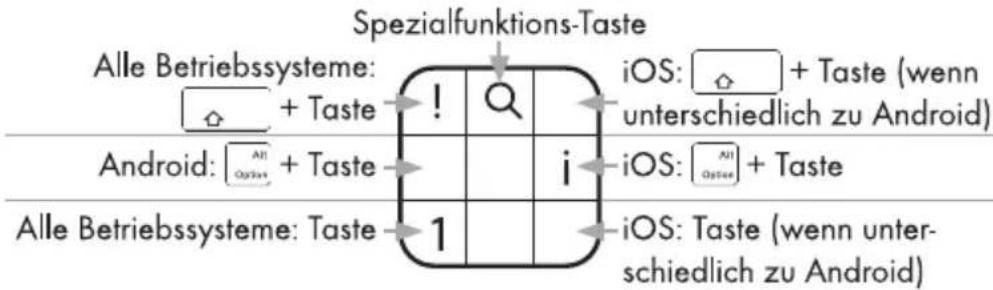
Beachten Sie, dass je nach Version des Betriebssystems evtl. nicht alle Sondertasten mit der beschriebenen Funktion arbeiten. Bei der ersten Verbindung mit einem Computer/Notebook/mobilen Gerät ist das Tastaturlayout der obersten Reihe auf das Betriebssystem Windows eingestellt.
HINWEIS
Je nach Version des Android-Betriebssystems muss vor der ersten Verwendung die Tastatursprache der Physischen Tastatur eingestellt werden (z. B. Deutsch), um die gewohnte Tastaturbelegung zu erhalten. Der Menüpunkt „Physische Tastatur“ erscheint erst im Menü Einstellungen/Sprache & Eingabe, wenn die Bluetooth-Tastatur gekoppelt ist.
Um das Tastaturlayout an ein anderes Betriebssystem anzupassen, drücken Sie folgende Tastenkombinationen:
| Tastenkombination | Betriebssystem |
 | iOS-System |
 | Android-System |
 | Windows-System |
Je nach verwendetem Betriebssystem (iOS, Android oder Windows) können über die -Taste und einer weiteren Taste zusätzliche Funktionen, wie z. B. -Taste + „C“ = Kontakte starten oder -Taste + „B“ = Browser starten (Android-System), aufgerufen werden.
iOS-System / Android-System:
Um eine Funktion der folgenden Tabelle auszuführen, drücken Sie die [Taste plus die Taste aus der Tabelle.
Windows-System:
Um eine Funktion der folgenden Tabelle auszuführen, drücken Sie die [Fn]-Taste und die Shift-Taste plus die Taste aus der Tabelle.
 | Home-Taste*1 |  | Suchen |
| [HGZT] | Alles auswählen | [4H70] | Kopieren |
| [X8AH] | Einfügen | [0638] | Ausschneiden |
| [CWZE] | Vorheriger Titel/schneller Rücklauf*2 | [23KA] | Play/Pause |
| [4AXK] | Nächster Titel/schneller Vorlauf*3 | [83CO] | Ton ein-/ausschalten |
| [0H4S] | Lautstärke verringern | [W2TB] | Lautstärke erhöhen |
 | Ent-/Verriegeln*4 |  | Entfernen*5 |
*1: Die Startseite des Browsers wird geöffnet (nur bei Windows).
*2: Vorheriger Titel - bei einmaligem Drücken; schneller Rücklauf, wenn die Taste gehalten wird (nur bei iOS).
*3: Nächster Titel – bei einmaligem Drücken; schneller Vorlauf, wenn die Taste gehalten wird (nur bei iOS).
*4: Ist kein Code hinterlegt wird nur das Display ein/ausgeschaltet. Wird die Taste gehalten, kann das iPad/iPhone ausgeschaltet werden. Es erscheint die gewohnte Abfrage zum Herunterfahren.
*5: Nur bei iOS und Android.
Um unter Windows die Tasten ESC, F1, F2, F3....F12 und Del (Entfernen) zu verwenden, müssen Sie zusätzlich die _n -Taste drücken. Die Tasten ESC, F1, F2, F3....F12 sind auf den üblichen Tasten der obersten Reihe hinterlegt, allerdings auf den Tasten nicht abgebildet.
Wenn Sie unabhängig vom System die □-Taste drücken, leuchtet die LED-Anzeige (A) ③ solange bis Sie die Taste erneut drücken.
Tastaturbeleuchtung
Die Tastatur hat die Funktion einer veränderbaren RGB-Hintergrundbeleuchtung. Sieben Farben stehen in zwei Helligkeitszuständen zur Auswahl.
Drücken Sie die Tasten + 12 , um die Beleuchtung zu aktivieren. Der Helligkeitszustand ist nun bei 50 %.
- Drücken Sie erneut die Tasten + 42 , um den Helligkeitszustand auf 100 % zu erhöhen.
- Drücken Sie die Tasten + * , um die Farbe der Beleuchtung zu wechseln. Insgesamt können Sie aus sieben Farben wählen.
- Drücken Sie die Tasten _n + 12 , um den Helligkeitszustand auf 50 % zu verringern.
- Drücken Sie erneut die Tasten [Fn] + , um die Beleuchtung zu deaktivieren.
HINWEIS
Nach ca. 1 Minute ohne Tastendruck wechselt die Tastatur in den Schlafmodus, um den Akku zu schonen. Die ggf. aktivierte RGB-Hintergrundbeleuchtung erlischt dabei.
Um die Tastatur wieder zu aktivieren, drücken Sie eine beliebige Taste, die ggf. direkt ihre Funktion ausgibt. Die ggf. aktivierte RGB-Hintergrundbeleuchtung leuchtet wieder in der zuletzt eingestellten Farbe auf.
Fehlersuche
Wenn Sie die Tastatur nicht mit einem kompatiblen Computer, Notebook oder mobilen Gerät koppeln können oder sie nicht auf Eingaben reagiert, gehen Sie bitte folgendermaßen vor:
♦ Stellen Sie sicher, dass die Tastatur eingeschaltet ist.
♦ Stellen Sie sicher, dass der Akku der Tastatur aufgeladen ist. (siehe auch Kapitel Akku laden).
Prüfen Sie, ob an Ihrem Computer/Notebook/mobilen Gerät und der Tastatur die Bluetooth®-Verbindung aktiviert ist.
Wenn Sie mehrere Bluetooth®-Geräte verwenden, stellen Sie sicher, dass eine zuvor hergestellte Verbindung getrennt wurde. Es könnte sich noch ein zuvor gekoppeltes Gerät in Reichweite befinden.
Stellen Sie sicher, dass sich die Tastatur maximal 8 Meter vom Computer/Notebook/mobilen Gerät entfernt ist und sich keine Hindernisse oder elektronische Geräte dazwischen befinden.
♦ Stellen Sie die Bluetooth®-Verbindung zwischen Ihrem Computer/Notebook/mobilen Gerät und der Tastatur neu her.
Wenn die Sondertasten oder andere Tasten der Tastatur ohne oder mit falscher Funktion belegt sind, überprüfen Sie bitte, ob das richtige Betriebssystem und das landesspezifische Tastaturlayout im Betriebssystem eingestellt ist (siehe auch Kapitel Spezielle Tastenbelegungen).
HINWEIS
▶ Wenn Sie mit den vorstehend genannten Schritten das Problem nicht lösen können, wenden Sie sich an die Service-Hotline (siehe Kapitel Service).
Reinigung

ACHTUNG
Mögliche Beschädigung des Gerätes.
Es befinden sich keine zu reinigenden bzw. wartenden Teile im Inneren der Tastatur. Eindringende Feuchtigkeit kann zu einer Beschädigung des Gerätes führen.
▶ Stellen Sie sicher, dass bei der Reinigung keine Feuchtigkeit in das Gerät eindringt, um eine irreparable Beschädigung des Gerätes zu vermeiden.
▶ Verwenden Sie keine ätzenden, scheuernden oder lösungsmittelhaltigen Reinigungsmittel. Diese können die Oberflächen des Gerätes angreifen.
♦ Reinigen Sie das Gerät ausschließlich mit einem leicht feuchten Tuch und einem milden Spülmittel.
Lagerung bei Nichtbenutzung und Transport
Lagern Sie das Gerät an einem trockenen und staubfreien Ort ohne direkte Sonneneinstrahlung.
Laden Sie den Akku in regelmäßigen Abständen auf, um eine lange Lebensdauer des Akkus zu gewährleisten.
- Transportieren Sie das Gerät in der Originalverpackung oder in einer geeigneten Tasche.
Entsorgung
Gerät entsorgen

Das nebenstehende Symbol einer durchgestrichenen Mülltonne auf Rädern zeigt an, dass dieses Gerät der Richtlinie 2012/19/EU unterliegt. Diese Richtlinie besagt, dass Sie dieses Gerät am Ende seiner Nutzungszeit nicht mit dem normalen Haushaltsmüll entsorgen dürfen, sondern in speziell eingerichteten Sammelstellen, Wertstoffhöfen oder Entsorgungsbetrieben abgeben müssen.
Diese Entsorgung ist für Sie kostenfrei. Schonen Sie die Umwelt und entsorgen Sie fachgerecht.
Weitere Informationen erhalten Sie bei Ihrem lokalen Entsorger oder der Stadt bzw. Gemeindeverwaltung.
Anhang
Technische Daten
| Betriebsspannung, -strom | 5 V ---, 500 mA über USB-Ladebuchse |
| Bluetooth®-Spezifikation | Version 3.0 (bis zu 8 m Reichweite) |
| Frequenzband | 2,4 GHz |
| Sendeleistung | < 10 dBm |
| Unterstützte Betriebssysteme | iOS 8.0 oder höher, Android 4.4 oder höher, Windows Vista oder höher |
| Integrierter Akku | 3,7 V, 500 mAh (Lithium-Polymer) |
| Tastaturlayout | 64 Tasten Design |
| Betriebszeit | ca. 90 h (ohne LED-Hintergrundbeleuchtung) |
| ca. 4-10 h (mit aktivierter LED-Hintergrundbeleuchtung, bei 100 % Helligkeitszustand; je nach ausgewählter Farbe) | |
| Ladezeit | ca. 3 h |
| Betriebstemperatur | 15°C - +35°C |
| Lagertemperatur | 0°C - +40°C |
| Luftfeuchtigkeit (keine Kondensation) | ≤75% |
| Abmessungen (B x T x H) | ca. 28 x 10,3 x 1,8 cm |
| Gewicht | ca. 235 g |
Hinweise zur EU-Konformitätserklärung

Dieses Gerät entspricht hinsichtlich Übereinstimmung mit den grundlegenden Anforderungen und den anderen relevanten Vorschriften der RE-Richtlinie 2014/53/EU und der RoHS-Richtlinie 2011/65/EU.
Die vollständige EU-Konformitätserklärung können Sie unter www.kompernass.com/support/289493_DOC.pdf herunterladen.
Garantie der Kompernaß Handels GmbH
Sehr geehrte Kundin, sehr geehrter Kunde,
Sie erhalten auf dieses Gerät 3 Jahre Garantie ab Kaufdatum. Im Falle von Mängeln dieses Produkts stehen Ihnen gegen den Verkäufer des Produkts gesetzliche Rechte zu. Diese gesetzlichen Rechte werden durch unsere im Folgenden dargestellte Garantie nicht eingeschränkt.
Garantiebedingungen
Die Garantiefrist beginnt mit dem Kaufdatum. Bitte bewahren Sie den Original-Kassenbon gut auf. Diese Unterlage wird als Nachweis für den Kauf benötigt.
Tritt innerhalb von drei Jahren ab dem Kaufdatum dieses Produkts ein Material- oder Fabrikationsfehler auf, wird das Produkt von uns – nach unserer Wahl – für Sie kostenlos repariert oder ersetzt. Diese Garantieleistung setzt voraus, dass innerhalb der Drei-Jahres-Frist das defekte Gerät und der Kaufbeleg (Kassenbon) vorgelegt und schriftlich kurz beschrieben wird, worin der Mangel besteht und wann er aufgetreten ist. Wenn der Defekt von unserer Garantie gedeckt ist, erhalten Sie das reparierte oder ein neues Produkt zurück. Mit Reparatur oder Austausch des Produkts beginnt kein neuer Garantiezeitraum.
Garantiezeit und gesetzliche Mängelansprüche
Die Garantiezeit wird durch die Gewährleistung nicht verlängert. Dies gilt auch für ersetzte und reparierte Teile. Eventuell schon beim Kauf vorhandene Schäden und Mängel müssen sofort nach dem Auspacken gemeldet werden. Nach Ablauf der Garantiezeit anfallende Reparaturen sind kostenpflichtig.
Garantieumfang
Das Gerät wurde nach strengen Qualitätsrichtlinien sorgfältig produziert und vor Auslieferung gewissenhaft geprüft.
Die Garantieleistung gilt für Material- oder Fabrikationsfehler. Diese Garantie erstreckt sich nicht auf Produkteile, die normaler Abnutzung ausgesetzt sind und daher als Verschleißteile angesehen werden können oder für Beschädigungen an zerbrechlichen Teilen, z. B. Schalter, Akkus, Backformen oder Teile die aus Glas gefertigt sind.
Diese Garantie verfällt, wenn das Produkt beschädigt, nicht sachgemäß benutzt oder gewartet wurde. Für eine sachgemäße Benutzung des Produkts sind alle in der Bedienungsanleitung aufgeführten Anweisungen genau einzuhalten. Verwendungszwecke und Handlungen, von denen in der Bedienungsanleitung abgeraten oder vor denen gewarnt wird, sind unbedingt zu vermeiden.
Das Produkt ist nur für den privaten und nicht für den gewerblichen Gebrauch bestimmt. Bei missbräuchlicher und unsachgemäßer Behandlung, Gewaltanwendung und bei Eingriffen, die nicht von unserer autorisierten Service-Niederlassung vorgenommen wurden, erlischt die Garantie.
Abwicklung im Garantiefall
Um eine schnelle Bearbeitung Ihres Anliegens zu gewährleisten, folgen Sie bitte den folgenden Hinweisen:
- Bitte halten Sie für alle Anfragen den Kassenbon und die Artikelnummer (z. B. IAN 12345) als Nachweis für den Kauf bereit.
Die Artikelnummer entnehmen Sie bitte dem Typenschild, einer Gravur, auf dem Titelblatt Ihrer Anleitung (unten links) oder als Aufkleber auf der Rück- oder Unterseite.
Sollten Funktionsfehler oder sonstige Mängel auftreten, kontaktieren Sie zunächst die nachfolgend benannte Serviceabteilung telefonisch oder per E-Mail.
Ein als defekt erfasstes Produkt können Sie dann unter Beifügung des Kaufbelegs (Kassenbon) und der Angabe, worin der Mangel besteht und wann er aufgetreten ist, für Sie portofrei an die Ihnen mitgeteilte Service-Anschrift übersenden.

Auf www.lidl-service.com können Sie diese und viele weitere Handbücher, Produktvideos und Software herunterladen.
Service
DE Service Deutschland
Tel.: 0800 5435 111
(Kostenfrei aus dem dt. Festnetz/Mobilfunknetz)
E-Mail: kompernass@lidl.de
AT Service Österreich
Tel.: 0820 201 222 (0,15 EUR/Min.)
E-Mail: kompernass@lidl.at
CH Service Schweiz
Tel.: 0842 665566
(0,08 CHF/Min., Mobilfunk max. 0,40 CHF/Min.)
E-Mail: kompernass@lidl.ch
IAN 289493
Importeur
Bitte beachten Sie, dass die folgende Anschrift keine Serviceanschrift ist. Kontaktieren Sie zunächst die benannte Servicestelle.
KOMPERNASS HANDELS GMBH
BURGSTRASSE 21
DE-44867 BOCHUM
DEUTSCHLAND
www.kompernass.com
KOMPERNASS HANDELS GMBH
BURGSTRASSE 21
DE-44867 BOCHUM
GERMANY
www.kompernass.com
Versione delle informazioni · Last Information Update
Stand der Informationen: 07/2017
Ident.-No.: SBTB3.0A1-052017-2

- SILVER CREST®
- TASTIERA BLUETOOTH® SBTB 3.0 A1
- TASTIERA BLUETOOTH®
- BLUETOOTH® KEYBOARD
- BLUETOOTH®-TASTATUR
- Indice
- Introduzione 2
- Sicurezza....4
- Descrizione dei componenti....5
- Messa in funzione....6
- Comandi e funzionamento....7
- Ricerca dei guasti 11
- Pulizia 12
- Conservazione in caso di mancato utilizzo e trasporto .. 12
- Smaltimento 12
- Appendice 13
- Introduzione
- Informazioni sul presente manuale di istruzioni
- Diritto d'autore
- Limitazione di responsabilità
- Indicazioni sui marchi
- Uso conforme
- Avvertenze utilizzate
- PERICOLO
- Un'avvertenza contrassegnata da questo livello di pericolo indica una situazione potenzialmente pericolosa.
- ATTENZIONE
- Un'avvertenza contrassegnata da questo livello di pericolo indica la possibilità di danni materiali.
- NOTA
- Sicurezza
- Indicazioni generali relative alla sicurezza
- Avvertenza sull'interfaccia radio
- Descrizione dei componenti
- Messa in funzione
- Controllo della fornitura
- Smaltimento dell'imballaggio
- Caricamento della batteria
- Comandi e funzionamento
- Accensione / spegnimento della tastiera
- Collegamento ad un computer, notebook o dispositivo mobile
- Speciali assegnazioni dei tasti
- Illuminazione tastiera
- Ricerca dei guasti
- Pulizia
- Possibile danneggiamento dell'apparecchio.
- Conservazione in caso di mancato utilizzo e trasporto
- Smaltimento
- Smaltimento dell'apparecchio
- Questo smaltimento è gratuito per l'utente. Rispettare l'ambiente e smaltire l'apparecchio in modo adeguato.
- Appendice
- Indicazioni sulla dichiarazione di conformità CE
- Garanzia della Kompernass Handels GmbH
- Condizioni di garanzia
- Periodo di garanzia e diritti legali di rivendicazione di vizi
- Ambito della garanzia
- Trattamento dei casi di garanzia
- Assistenza
- Importatore
- Contents
- Introduction....18
- Safety 20
- Description of components 21
- Operation 22
- Handling and use 23
- Troubleshooting 27
- Cleaning. 28
- Storage when not in use and transport 28
- Disposal....28
- Attachment 29
- Introduction
- Information about these operating instructions
- Copyright
- Limitation of liability
- Notes on trademarks
- Intended use
- Warning notices
- DANGER
- A warning at this hazard level indicates a potentially hazardous situation.
- CAUTION
- A warning notice of this hazard level indicates a risk of property damage.
- NOTE
- Safety
- Basic safety instructions
- Notes on the radio interface
- Description of components
- Operation
- Check package contents
- Disposal of the packaging
- Charging the battery
- Handling and use
- Switching the keyboard on and off
- Establishing a connection with a computer, notebook or mobile device
- Special key assignments
- Keyboard illumination
- Troubleshooting
- Cleaning
- CAUTION!
- Possible damage to the appliance.
- Storage when not in use and transport
- Disposal
- Disposal of the appliance
- Attachment
- Notes on the EU Declaration of Conformity
- Kompernass Handels GmbH warranty
- Warranty conditions
- Warranty period and statutory claims for defects
- Scope of the warranty
- Warranty claim procedure
- Service
- Importer
- Inhaltsverzeichnis
- Einführung 34
- Sicherheit....36
- Teilebeschreibung....37
- Inbetriebnahme 38
- Bedienung und Betrieb. 39
- Fehlersuche 43
- Reinigung 44
- Lagerung bei Nichtbenutzung und Transport ..... 44
- Entsorgung 44
- Anhang 45
- Einführung
- Informationen zu dieser Bedienungsanleitung
- Urheberrecht
- Haftungsbeschränkung
- Hinweise zu Warenzeichen
- Bestimmungsgemäße Verwendung
- Verwendete Warnhinweise
- GEFAHR
- Ein Warnhinweis dieser Gefahrenstufe kennzeichnet eine mögliche gefährliche Situation.
- ACHTUNG
- Ein Warnhinweis dieser Gefahrenstufe kennzeichnet einen möglichen Sachschaden.
- HINWEIS
- Sicherheit
- Grundlegende Sicherheitshinweise
- Hinweise zur Funkschnittstelle
- Teilebeschreibung
- Inbetriebnahme
- Lieferumfang prüfen
- Entsorgung der Verpackung
- Akku laden
- Bedienung und Betrieb
- Tastatur ein-/ausschalten
- Verbindung mit einem Computer, Notebook oder mobilen Gerät herstellen
- Spezielle Tastenbelegungen
- Tastaturbeleuchtung
- Fehlersuche
- Reinigung
- Mögliche Beschädigung des Gerätes.
- Lagerung bei Nichtbenutzung und Transport
- Entsorgung
- Gerät entsorgen
- Diese Entsorgung ist für Sie kostenfrei. Schonen Sie die Umwelt und entsorgen Sie fachgerecht.
- Anhang
- Hinweise zur EU-Konformitätserklärung
- Garantie der Kompernaß Handels GmbH
- Garantiebedingungen
- Garantiezeit und gesetzliche Mängelansprüche
- Garantieumfang
- Abwicklung im Garantiefall
- Importeur
Mærke : SILVERCREST
Model : SBTB 3.0 A1
Kategori : Tastatur