
CCB 30 - Ukategoriseret Extron - Gratis brugsanvisning og manual
Find enhedens vejledning gratis CCB 30 Extron i PDF-format.


Brugerspørgsmål om CCB 30 Extron
0 spørgsmål om dette apparat. Besvar dem du kender, eller stil dit eget.
Stil et nyt spørgsmål om dette apparat
Download vejledningen til din Ukategoriseret i PDF-format gratis! Find din vejledning CCB 30 - Extron og tag din elektroniske enhed tilbage i hånden. På denne side er alle dokumenter nødvendige for brugen af din enhed offentliggjort. CCB 30 af mærket Extron.
BRUGSANVISNING CCB 30 Extron
CCB 30 Installation Guide
The CCB 30 Contact Closure Remote for Cable Cubby Series/2 contains three contact closure buttons to control input selection on Extron switchers and products with contact closure control ports. Assemble the CCB 30 module and wire it to the control product as shown in this guide.
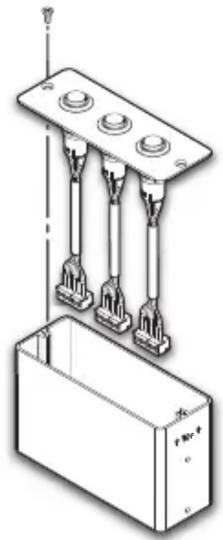
Step 1: Assemble the CCB 30 module.
Use the module screws (2) to secure the CCB 30 on the connectivity bracket.
natural_image
Technical line drawing of a mechanical assembly with three vertical rods and a rectangular housing (no text or symbols)Step 2: Wire the CCB 30 module to a switcher or control product.
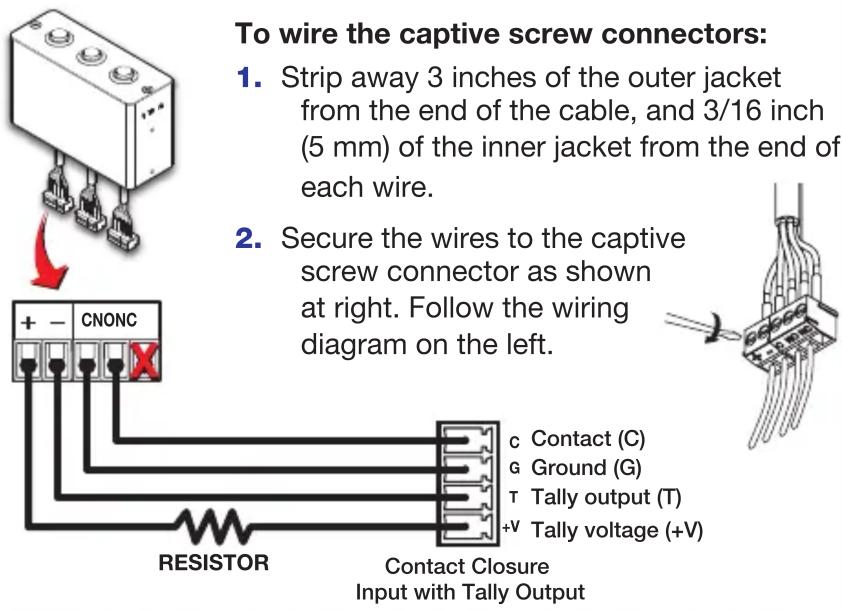
To wire the captive screw connectors:
- Strip away 3 inches of the outer jacket from the end of the cable, and 3/16 inch (5 mm) of the inner jacket from the end of each wire.
- Secure the wires to the captive screw connector as shown at right. Follow the wiring diagram on the left.
c Contact (C)
G Ground (G)
T Tally output (T)
-V Tally voltage (+V)
NOTE: See the table on the back to determine the appropriate current-limiting resistor, if needed.
Step 3: Install the CCB 30 module in a Cable Cubby 700.
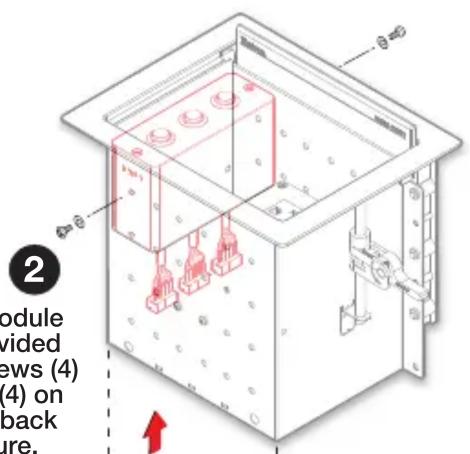
Secure the module using the provided mounting screws (4) and washers (4) on the front and back of the enclosure.

natural_image
Isometric line drawing of a rectangular electronic component with three ports and three connectors (no text or symbols)1
Insert the CCB 30 module into the Cable Cubby.
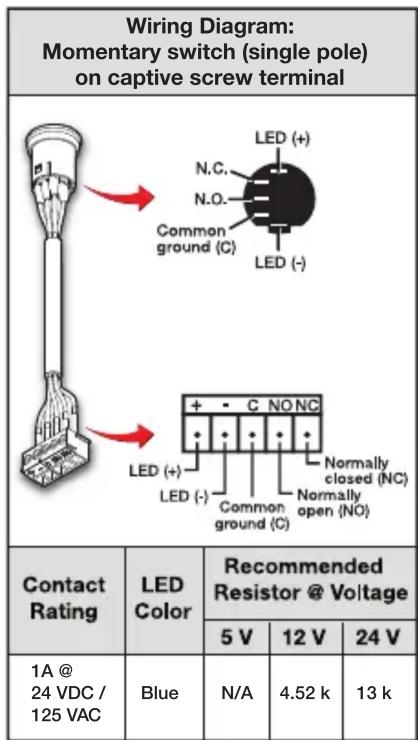
| Contact Rating | LED Color | Recommended Resistor @ Voltage | ||
| 5 V | 12 V | 24 V | ||
| 1A @ 24 VDC / 125 VAC | Blue | N/A | 4.52 k | 13 k |