
IDATA HDMI-AI4K - Lyd/video konverter Techly - Gratis brugsanvisning og manual
Find enhedens vejledning gratis IDATA HDMI-AI4K Techly i PDF-format.


Brugerspørgsmål om IDATA HDMI-AI4K Techly
0 spørgsmål om dette apparat. Besvar dem du kender, eller stil dit eget.
Stil et nyt spørgsmål om dette apparat
Download vejledningen til din Lyd/video konverter i PDF-format gratis! Find din vejledning IDATA HDMI-AI4K - Techly og tag din elektroniske enhed tilbage i hånden. På denne side er alle dokumenter nødvendige for brugen af din enhed offentliggjort. IDATA HDMI-AI4K af mærket Techly.
BRUGSANVISNING IDATA HDMI-AI4K Techly
Gentile Cliente
Grazie per aver acquistato questo prodotto. Per ottenere il massimo delle prestazioni nella salvaguardia della sua sicurezza, le consigliamo di leggere con attenzione il presente manuale prima di collegare
e mettere in funzione il prodotto. Tenga sempre a disposizione il presente manuale per ulteriori esigenze future.
La nostra serie di convertitori HDMI, switch, extender, matrici e splitter sono progettati per rendere l'uso del dispositivo A/V più conveniente, più pratico, più efficiente ed economicamente vantaggioso.
INTRODUZIONE
Questo inseritore audio HDMI 4K2K consente di inserire un segnale audio esterno in una sorgente HDMI o DVI (con adattatore da DVI a HDMI). L'unità consente di inserire segnali audio surround stereo o multicanale per offrire agli utenti la possibilità di selezionare i formati audio mentre si estende il segnale HDMI. Inoltre, sia l'input che l'output HDMI supportano la risoluzione HD fino a 3D e 4K2K per un esperienza audio completa rispetto alla sincronizzazione di video e audio.
APPLICAZIONI
• Incorpora un segnale audio esterno in un segnale HDMI
- Integra audio e video DVI (con un adattatore da DVI a HDMI) ad un'uscita di segnale HDMI
- Sostituisce l'audio nel segnale HDMI originale tramite altre ingresso
CONTENUTO DELLA CONFEZIONE
• Inseritore audio HDMI 4K2K
- Alimentatore 5V
• Manuale utente
REQUISITI DI SISTEMA
Apparecchiature sorgente in ingresso come PC / laptop o lettore Blu-ray / DVD e uscita su schermi TV / monitor o amplificatore con cavi di collegamento.
CARATTERISTICHE
- Conforme con HDMI, HDCP 1.2 e DVI 1.0
• Supporta HDMI audio sampling rate fino a 192 kHz
• Supporta audio ottico S/PDIF audio sampling rate fino a 192 kHz
• Supporta HDMI high-bit-rate (HBR) audio
• Supporta conversione DVI con adattatore da DVI a HDMI
• Supporta funzione di bypass CEC
• Supporta risoluzione 4K2K e segnale 3D
- Supporta segnale audio HDMI esterno, Digitale o Analogico segnale HDMI
Nota: quando si visualizza il segnale HDMI 4K2K, sono necessari una sorgente di segnale, uno schermo in uscita e dei cavi HDMI equivalenti per garantire la migliore visualizzazione dell'immagine.
CONTROLLI DI FUNZIONAMENTO E FUNZIONI
Pannello frontale:
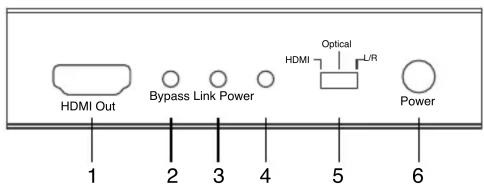
1. HDMI OUT:
Collegare allo schermo (TV/monitor) con un cavo HDMI per l'uscita audio e video. Per la visualizzazione dell'immagine 4K2K o 3D, si schermo che supporti lo standard equivalente.
2. Bypass:
Questo LED si illumina quando l'ingresso audio è commutato su HDMI.
3. Link:
Questo LED si illumina quando una sorgente in ingresso è collegata col segnale HDMI.
4. Power:
Questo LED si illumina quando l'unità è collegata all'alimentazione ed è accesa.
5. HDMI/Optical/L/R:
La selezione dell'audio consente agli utenti di selezionare tra 3 diverse opzioni di ingresso audio. Commutazione tra audio HDMI originale, audio digitale (ottico) e stereo analogico (L / R).
6. Power:
Premere questo tasto per accendere il dispositivo o per impostare la modalità di standby.
Pannello posteriore:
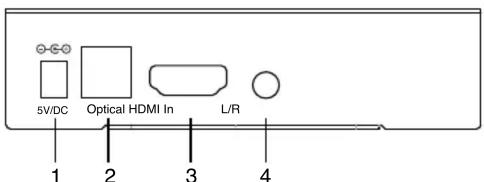
1. DC 5V:
Collegare con l'alimentatore 5V DC e l'altro capo alla presa di alimentare il prodotto.
2. Optical In:
Collegare i dispositivi audio sorgente come un ricevitore AV o un lettore DVD con uscita ottica.
3. HDMI In:
Questo slot è per la connessione con apparecchiature sorgente come lettore Blu-ray / PS3 o PC / laptop con invio di segnale HDMI.
4. L/R In:
Collegare un dispositivo audio sorgente come PC/Laptop o lettore DVD/Blu-ray con uscita audio L/R.
SCHEMA DI COLLEGAMENTO
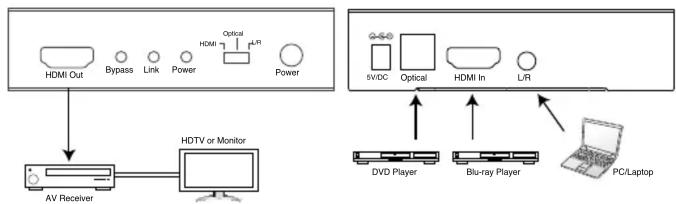
flowchart
graph TD
    A["HDMI Out"] --> B["AV Receiver"]
    C["Bypass"] --> B
    D["Link"] --> B
    E["Power"] --> B
    F["Optical"] --> G["HDMI In"]
    H["Power"] --> G
    I["HDTV or Monitor"] --> J["Computer"]
    K["sv/DC"] --> L["DVD Player"]
    M["Optical"] --> N["Blu-ray Player"]
    O["L/R"] --> P["PC/Laptop"]
SPECIFICHE
| Larghezza di banda video | 300Mbps / 10.2Gbps |
| Porte di ingresso | 1 x HDMI, 1 x Ottica (Audio Digitale), 1 connettore telefonico 3.5mm (L/R) |
| Porta di uscita | 1 x HDMI |
| HDMI Audio Sampling Rate | Fino a 192 kHz |
| Audio ottico S/PDIF Sampling Rate | Fino a 192 kHz |
| Formato audio HDMI | LPCM 2/5.1/7.1CH, DTS 2-5.1CHTrueHD e DTS-HD Master Audio |
| Formato audio ottico | LPCM 2CH e DTS 2~5.1CH |
| Formato audio L/R | Stereo Analogico 2 CH |
| Alimentazione | 5V / DC |
| Dimensioni (mm) | 95°83'24 mm |
| Temperatura d'esercizio | 0°C~40°C/32°F~104°F |
| Temporato nel temperatura di stoccaggio | -20°C~60°C/-4°F~140°F |
IMPORTANTI INFORMAZIONI SULLA SICUREZZA
USO PREVISTO

Non è consentito l'uso dell'apparecchio in modi diversi da quello indicato nel presente manuale. Utilizzare il prodotto solo luoghi interni asciutti. Non rispettare le istruzioni e le precauzioni di sicurezza riportate nel presente manuale potrebbe causare incidenti mortali, lesioni e danni a persone e cose. Il costruttore/fornitore non risponde dei danni risultanti da un utilizzo non conforme all'uso previsto.

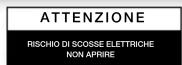

Per ridurre il rischio di shock elettrico, questo prodotto dovrebbe essere aperto SOLO da un tecnico autorizzato quando è necessario
ripararlo. Scollegare il prodotto dall'alimentazione e da altri apparecchi se dovesse esserci un problema. Non esporre il prodotto ad acqua o umidità.
- Questo prodotto non è un giocattolo e non è pensato per i bambini, contiene piccole vanche potrebbero venir ingerite o inalate e provocare danni se non utilizzate correttamente!
- Installare l'apparecchio e le periferiche ad esso collegate in modo ch possano provocare danni a persone e oggetti come far inciampare o causare cadute.
- Rimuovere tutti gli imballi che potrebbero causare soffocamento se manipolati da bambini.
- Evitare di installare l'apparecchio in luoghi con temperature o umidità eccessive, o luoghi che potrebbero venire a contatto con l'acqua. Non installare a bocchette dell'aria condizionata o in luoghi che presentano polvere e eccessivi.
• Non installare il prodotto in luoghi soggetti a vibrazioni o oscillazioni. - Non modificare o alterare il prodotto e i suoi accessori! Non utilizza danneggiate.
- Mantenere sufficiente spazio attorno alla periferica per garantire una bu ventilazione, permettere una maggiore libertà di movimento ed evitare danni.
- Non scollegare la periferica durante l'uso, mantenere il prodotto distant materiali infiammabili ed esplosivi.
- Alimentatore: DC 5V, utilizzare solo l'alimentatore fornito nella confezione. Non utilizzare se l'alimentatore risulta danneggiato.
Manutenzione:
Pulire solo con un panno asciutto. Non utilizzare solventi detergenti o abrasivi.
Garanzia:
Non sarà accettata alcuna garanzia o responsabilità in relazione a cambiamenti e modifiche del prodotto o a danni determinati dall'uso improprio del p stesso.

In conformità alla normativa WEEE, le apparecchiature elettriche ed elettroniche non devono essere smaltite con i rifiuti domestici. Il presente prodotto deve essere consegnato ai punti di raccolta preposti allo smaltimento e riciclo delle apparecchiature elettriche ed elettroniche. Contattate le autorità locali competenti per ottenere informazioni in merito 80% smaltimento corretto della presente apparecchiatura.

Con il marchio CE, Techly® garantisce che il prodotto e conforme alle norme e europee richieste.
Dear customer
Thank you for purchasing this product. For optimum performance please read these instructions carefully before connecting, operating or adjusting this product. Please keep this manual for future reference.
Our series of HDMI converters, switchers, extenders, matrixes and designed to make your A/V device use more convenient, more comfortable, more productive and more cost-efficient.
INTRODUCTION
The HDMI 4K2K Audio Inserter lets you insert an external audio signal into your HDMI or DVI (with DVI to HDMI adaptor) signal path. The unit allows you to insert stereo or multi-channel surround sound signals to give users the capability to select audio formats while extending your HDMI signal. Further, both input output HDMI support HD resolution up to 3D and 4K2K allowing a full enjoyment over synchronize video and audio.
APPLICATIONS
• Embeds external audio into HDMI signal
- Integrates audio and DVI (with DVI to HDMI adaptor) video output
- Replaces audio in the original HDMI signal by other audio input sources
PACKAGE CONTENTS
• HDMI 4K2K Audio Inserter
- 5V Power Adaptor
- User Manual
SYSTEM REQUIREMENTS
Input source equipment such as PC/Laptop or Blu-ray/DVD player and output display TV/monitor or amplifier with connection cables.
FEATURES
• Compliant with HDMI, HDCP 1.2 and DVI 1.0
• Supports HDMI audio sampling rate up to 192 kHz
• Supports Optical S/PDIF audio sampling rate up to 192 kHz
• Supports external HDMI, Digital or Analog audio signal embeds into HDMI
• HDMI supports high-bit-rate (HBR) audio
• Supports DVI conversion with DVI to HDMI adaptor
• Supports CEC bypass
• Supports 4K2K resolution and 3D signal
Note: When displaying HDMI 4K2K signal, equivalent source signal, output display and HDMI cables are required in order to secure the best image display.
OPERATION CONTROLS AND FUNCTIONS
Front Panel:
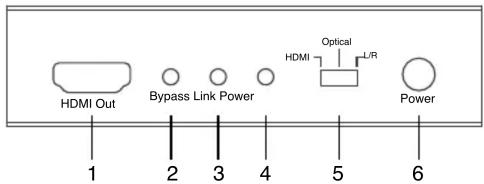
1. HDMI OUT:
Connect to the display (TV/monitor) with an HDMI cable for video and audio signal output. For 4K2K or 3D image display, an equivalent standard display is required.
2. Bypass:
This LED will illuminate when the input audio is switch to HDMI.
3. Link:
This LED will illuminate when input source is connected with HDMI signal,
4. Power:
This LED will illuminate when the unit is connected with power supply and switched ON.
5. HDMI/Optical/L/R:
Audio in selection allows users to select among 3 of different audio input options. Switch among the original HDMI audio, Digital audio (Optical) and Analog stereo (L/R).
6. Power:
Press this button to switch on the device or to set it into standby mode.
Back Panel:
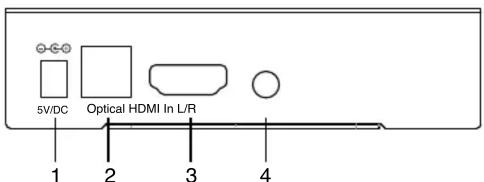
1. DC 5V:
Plug with 5V DC power adaptor from the AC wall outlet for power supply.
2. Optical In:
Connect from audio source equipment such as AV receiver or DVD player with optical signal output.
3. HDMI In:
This slot is to connect with source equipment such as Blu-ray/PS3 player or PC/laptop with HDMI signal sending.
4. L/R In:
Connect from audio source equipment such as PC/Laptop or DVD/Blu-ray player with L/R audio signal output.
CONNECTION DIAGRAM and safety,
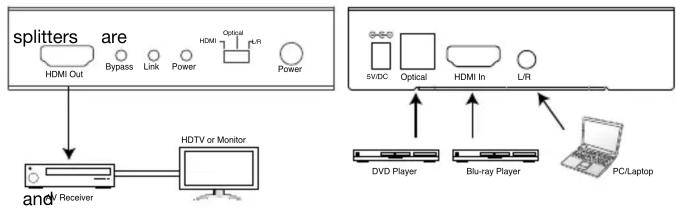
flowchart
graph TD
    A["splitters"] --> B["HDMI Out"]
    A --> C["Bypass"]
    A --> D["Link"]
    A --> E["Power"]
    A --> F["Optical"]
    A --> G["L/R"]
    A --> H["Power"]
    I["and Receiver"] --> J["HDTV or Monitor"]
    K["DVD Player"] <--> L["Blu-ray Player"]
    M["PC/Laptop"] --> N["L/R"]
SPECIFICATIONS
| Video Bandwidth | 300Mbps / 10.2Gbps |
| toInpHD Ports signal | 1 x HDMI, 1 x Optical (Digital Audio), 1 X 3.5mm Phone Jack (L/R) |
| Output Port | 1 x HDMI |
| HDMI Audio Sampling Rate | Up to 192 kHz |
| Optical S/PDIF Audio Sampling Rate | Up to 192 kHz |
| HDMI Audio Format | LPCM 2/5.1/7.1CH, DTS 2-5.1CHTrueHD, and DTS-HD Master Audio |
| Optical Audio Formal | LPCM 2CH,and DTS 2~5.1CH |
| L/R Audio Format | Analog Stereo 2 CH |
| Power supply | 5V / DC |
| Dimensions (mm) | 95°83'24 mm |
| Operating Temperature | 0°C~40°C/32°F~104°F |
| Storage Temperature | -20°C~60°C/-4°F~140°F |
IMPORTANT SAFETY INFORMATION
INTENDED USE
We do not permit using the device in other ways like user's manual. Use the product only in dry interior rooms. Not attending to these regulations and safety instruction might cause fatal accidents, injuries, and damages to persons and property. The manufacturer/supplier assumes no liability for damages caused by failure to comply with the intended use.
described

product from mains and other equipme expose the product to water or moisture.
To reduce risk of electric shock, this product should ONLY be opened by an authorized technician when service is required. Disconnect the if a problem should occur. Do not
- Your product is not a toy and is not meant for children, because it contains small parts which can be swallowed and can injure when used inappropriately!
- Please install the system and devices attached to it in a way that persons cannot be injured, or objects not be damaged for example by dropping or stumbling.
- Please remove the packing materials, because children may cut themselves on them while playing. Furthermore, there is a risk of swallowing and inhalation of incidentals and insulating material.
- Avoid places with high temperatures, or humidity, or places which might come into contact with water. Do not install the product close to openings of air conditioners, or at places with an excessive amount of dust or smoke.
- Do not install the product at places subject to vibration, or oscillation
- Do not modify and alter the product and any accessories! damaged parts.
- Keep enough space around all devices for a good ventilation and free motion and to avoid damages. ABLE
- Do not unplug the device when it is in using, keep distance from flammable and explosive devices.
- Power supply: DC 5V, usage only the supplied power unit, do not use the power supply if it is damaged.
Do not
Maintenance:
Clean only with a dry cloth. Do not use cleaning solvents or abrasives.
Warranty:
No guarantee or liability can be accepted for any changes and modifications of the product or damage caused due to incorrect use of this product.

In compliance with EU Directive WEEE this product is marked with this symbol. It means that used electrical and electronic products should not be mixed with general household waste. There is a separate collections system for these products in compliance with WEEE directive, otherwise contaminative and hazardous substances can pollute the environment.

With the CE sign, Techly® ensures that the product is conformed to the basic
European standards and directives