
DAB-28 - Radio DENVER - Gratis brugsanvisning og manual
Find enhedens vejledning gratis DAB-28 DENVER i PDF-format.


Brugerspørgsmål om DAB-28 DENVER
0 spørgsmål om dette apparat. Besvar dem du kender, eller stil dit eget.
Stil et nyt spørgsmål om dette apparat
Download vejledningen til din Radio i PDF-format gratis! Find din vejledning DAB-28 - DENVER og tag din elektroniske enhed tilbage i hånden. På denne side er alle dokumenter nødvendige for brugen af din enhed offentliggjort. DAB-28 af mærket DENVER.
BRUGSANVISNING DAB-28 DENVER




Instruction Manual
Wooden DAB Radio
DAB-28


说明书1.42 2014-04-23 16:14:45



English

The lighting flash with arrowhead symbol, with an equilateral triangle is intended to alert the user of the presence of uninsulated dangerous voltage within the product's enclosure that may be of sufficient magnitude to constitute a risk of electric shock to persons.
CAUTION
RISK OF ELECTRIC SHOCK DO NOT OPEN
CAUTION: TO REDUCE THE RISK OF ELECTRIC SHOCK, DO NOT REMOVE COVER(OR BACK). NO USER SERVICEABLE PARTS INSIDE. REFER SERVICING TO QUALIFIED SERVICE PERSONNEL.

The exclamation point within an equilateral triangle to intended to alert the user of presence of important operating and maintenance(servicing) instruction. In the literature accompanying the appliance.
CAUTION :
TO PREVENT ELECTRIC SHOCK, MATCH WIDE BLADE OF PLUG TO WIDE SLOT, FULLY INSERT.
WAARSCHUWING:
STEL HET APPARAAT NOOIT BLOOT AAN REGEN OF VOCHT OM HET RISICO OP BRAND OF ELEKTRISCHE SCHOKKEN TE REDUCEREN.
ENG ↓
D328 nealal 2014123 R1.pdf 3 2015 01 29 16:15:57


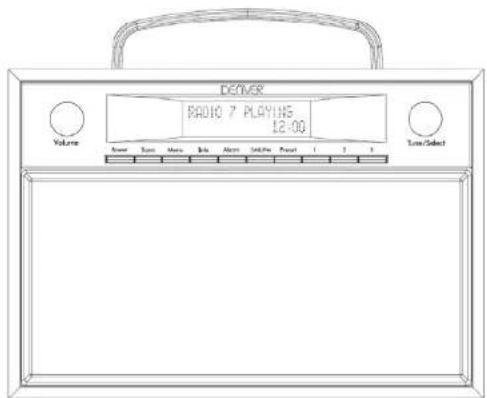
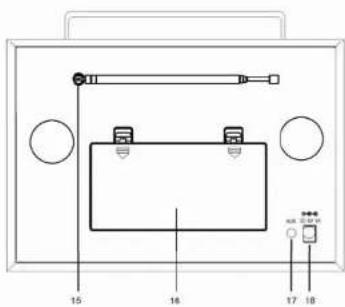
LOCATION OF CONTROLS
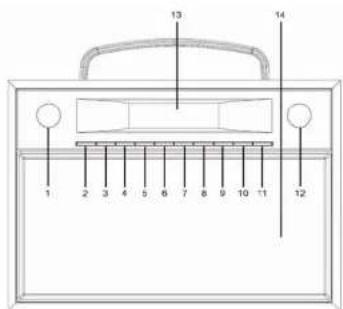
- Volume knob
- Standby
- Scan button
- Menu button
- Info button
- Alarm set button
- DAB/FM/AUX
- Preset button
- 1 (Preset 1)
- 2 (Preset 2)
- 3 (Preset 3)
- Tune/Select knob
- LCD display
- Speakers
- Antenna
- Battery compartment
- AUX in jack
- DC jack
ENG 2





POWER SUPPLY
OPERATING THE UNIT ON AC POWER
Insert one end at the supplied power cord to the DC 6V IN Jack located at the rear of
the unit and the other end into the Wall outlet.
When the First time used the cord has to be firmly pushed into the socket if does not
work on AC, to try again to be sure for a positive connection.
OPERATING THE UNIT ON BATTERIES
- To play your unit on batteries, the AC power cord must be disconnected from the player.
- Unplug the AC power cord from the unit and insert 4 size "C" batteries (not provided) in the compartment.
- Close the battery compartment door.
Note: Check your batteries regularly. Old or discharged batteries should be replaced. If the unit is not to be used for sometime or is being run exclusively on AC electrical current, remove batteries from the battery compartment to avoid leakage.
- Warning: Before using the unit. Check that the local mains supply is compatible with the Unit Do not plug or unplug the power cable when your hands wet.
- When planning not to use this unit for long periods of time (i.e. Vacation etc.) disconnect the plug from the wall outlet.
BATTERY SAFETY PRECAUTIONS:
- Keep batteries away from children and pets.
- Insert the batteries observing the proper polarity (+/-). Failure to properly align the battery polarity can cause personal injury and/or property damage.
- Remove old or discharged batteries from the product. Remove the batteries when the product will not be used for extended periods of time to prevent damage due to rusted or corroded batteries.
- Never throw batteries into a fire, do not expose batteries to fire or other heat sources.
- Battery Disposal: Old or discharged batteries must be properly disposed of and recycled in compliance with all applicable laws. For detailed Information, contact your local solid waste authority.
ENG 3
- Follow the battery manufacturer's safety, usage, and disposal instructions.
OPERATION
Press the Standby button to turn the unit.
IN DAB MODE
- Press the DAB/FM/AUX button to select DAB radio mode
i) Auto select: Press the SCAN button, "AUTOTUNE FULL SCAN" will show on the display, and the number of DAB station will shown on the upper right corner, and it will automatically play the first station. Tune the TUNE/SELECT knob to choose the next or previous station.
ii) Manual select: Press and hold the TUNE/SELECT knob until the "MANUAL TUNE" icon shown on the display, then tune the TUNE/SELECT knob to choose the station.
Note : you many have to wait for the unit to tune in to the new channel.
- DAB Radio stations presetting:
i) To receive the desired DAB station, press and hold the PRESET button, "Preset Empty X" (X is the current program number) will appear on the display, the current program number "X" is flashing on the display
ii) Tune the TUNE/SELECT knob to choose your desired program number (1-10) you want stored to. Then press TUNE/SELECT knob to store it.
iii) Repeat the same procedures until all the desired radio stations were stored into the program list.
iv) Recall the memory, press PRESET button and tune the TUNE/SELECT knob to select the stored radio station as desired. Press the TUNE/SELECT knob to confirm.
Please note: You may also recall the memory of Preset 1, Preset 2 and Preset 3 stations by simply press the 1, 2, 3 knob on the unit.
IN FM MODE
1) Press the DAB/FM/AUX button to select FM radio mode, press the SCAN button, when a radio is found, the frequency on display will stop running and start playback automatically.
2) If reception is no good, tune the TUNE/SELECT knob to fine tune. FM radio presetting is same as DAB radio presetting
ENG 4
说明书1.pdf 3

2014-04-23 16:14:45



INFO Button
A. The UNIT has DAB information modes which are shown on the bottom line of the display. Short press the INFO key to see the available types.
- Program type
Displays the type of station content being broadcast e.g. Classic, Pop, News, etc.
- Ensemble Freq.
Displays the DAB station frequency such as 13F 239.200MHz.
- Audio Bit Rate
Displays the data rate in kilo Bits per second and the audio mode e.g.Stereo.
- Ensemble name
Displays the name of the multiplex to which the Digital1 Network current station belongs.
- Signal strength
Displays the signal strength for the station being listened to.
- Time/Date
Displays current time and date, received off-air.
- DLS (Dynamic Link Segment)
Scrolling text which includes messages such as Artist and track name, phone numbers, program details, etc.
B. The UNIT has six FM information modes which are shown on the bottom line of the display. Short press the INFO/SETUP button to see the available types.
- PTY (program type)
Displays the type of station content being broadcast e.g. Classic, Pop, News, etc.
- Signal strength
Displays the signal strength for the station being listened to.
- Time and Date
Displays current time and date, received off-air.
- Station frequency
Displays the frequency of the station being listened to.
- Audio mode
Displays the current audio mode setting i.e. Auto(Stereo) or Mono.
- Radio Text
Scrolling text which includes messages such as Artist and track name, phone numbers, program details, etc.
ALARM 1 SETTINGS
ENG 5
1) With the UNIT switched ON, or in Standby mode, press the ALARM button until the Alarm1 menu is shown.
2) OFF or ON is flashing to indicate that it can be changed. Tune the TUNE/SELECT knob to ON. Then press TUNE/SELECT knob to confirm
3) The hour digits are now flashing tune the TUNE/SELECT knob to ON. Then press TUNE/SELECT knob to confirm
4) The minutes can now be set, as described above and then short press TUNE/SELECT knob to confirm.
5) Alarm mode: Daily, Weekdays (Monday to Friday), Weekends (Saturday), Once can be selected. Tune the TUNE/SELECT knob to choose the desire alarm mode, press TUNE/SELECT knob to confirm.
6) Alarm source (BEEPER1, BEEPER2, DAB or FM) is now flashing. Tune the TUNE/SELECT knob to choose the desire alarm mode, press TUNE/SELECT knob to confirm to save the setting and exit.
SET THE ALARM 2
With the UNIT switched ON, or in Standby mode, press the ALARM button 2 times until the Alarm2 menu is shown.
(other setting is same as ALARM 1)
SHUT OFF ALARM
To cancel the Alarm when it has activated. Press ALARM button or STANDBY button to stop the alarm sound, the alarm will reset for next day.
OR the Alarm will automatically switch off after 59 minutes unless cancelled or switched off manually.
TO TURN OFF THE ALARM COMPLETELY
Press the ALARM button and while the Alarm settings are still on screen,
Tune the TUNE/SELECT knob to choose the desire alarm mode, press TUNE/SELECT knob to confirm.
MENU
During the DAB mode, press the MENU button to get the version of software, e.g. V1.28
USING THE AUX INPUT
1) Connect the AUX connect wire from the out jack of your Personal Player such as portable MP3 player to the AUX input jack.
2) Press the DAB/FM/AUX button to select AUX mode,
ENG 6
说明书1.pdf 4

2014-04-23 16:14:46



3) Turn on your Personal Player to begin playing, adjust the volume to desire listening level.
ALL RIGHTS RESERVED, COPYRIGHT DENVER ELECTRONICS A/S
DENVER®
www.denver-electronics.com
Electric and electronic equipment contains materials, components and substances that can be hazardous to your health and the environment, if the waste material(discarded electric and electronic equipment) is not handled correctly.
Electric and electronic equipment is marked with the crossed out trash can symbol, seen above. This symbol signifies that electric and electronic equipment should not be disposed of with other household waste, but should be disposed of separately.
All cities have established collection points, where electric and electronic equipment can either be submitted free of charge at recycling stations and other collection sites, or be collected from the households. Additional information is available at the technical department of your city.
Importer:
DENVER ELECTRONICS A/S
Stavneagervej 22
DK-8250 Egaa
Denmark
www.facebook.com/denverelectronics
ENG 7
说明书1.42 5 2014-04-23 16:14:45


- Instruction Manual
- Wooden DAB Radio
- DAB-28
- English
- CAUTION
- RISK OF ELECTRIC SHOCK DO NOT OPEN
- CAUTION :
- WAARSCHUWING:
- POWER SUPPLY
- OPERATING THE UNIT ON AC POWER
- OPERATING THE UNIT ON BATTERIES
- BATTERY SAFETY PRECAUTIONS:
- OPERATION
- IN DAB MODE
- IN FM MODE
- INFO Button
- ALARM 1 SETTINGS
- SET THE ALARM 2
- SHUT OFF ALARM
- TO TURN OFF THE ALARM COMPLETELY
- USING THE AUX INPUT
- DENVER®
Mærke : DENVER
Model : DAB-28
Kategori : Radio