
874 - Lommeregner CASIO - Gratis brugsanvisning og manual
Find enhedens vejledning gratis 874 CASIO i PDF-format.


Brugerspørgsmål om 874 CASIO
0 spørgsmål om dette apparat. Besvar dem du kender, eller stil dit eget.
Stil et nyt spørgsmål om dette apparat
Download vejledningen til din Lommeregner i PDF-format gratis! Find din vejledning 874 - CASIO og tag din elektroniske enhed tilbage i hånden. På denne side er alle dokumenter nødvendige for brugen af din enhed offentliggjort. 874 af mærket CASIO.
BRUGSANVISNING 874 CASIO
ModuleNos.s.5494680/6906874/8846
[Reading the display]
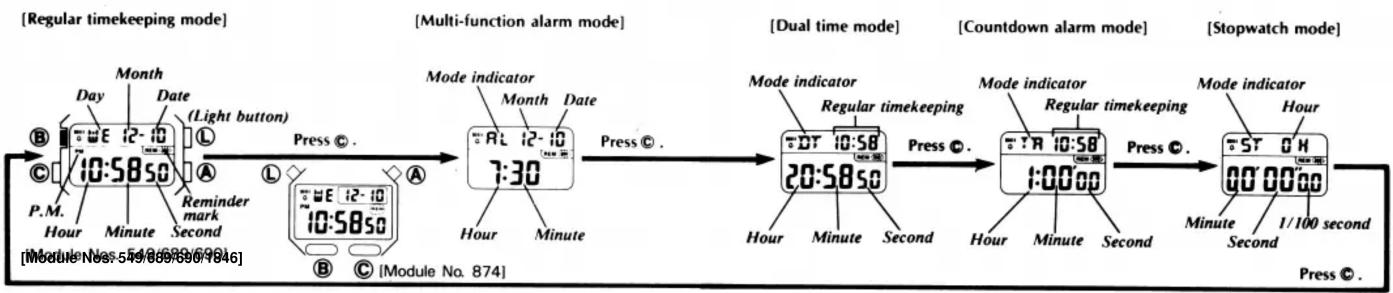
flowchart
graph LR
    A["Regular timekeeping mode"] --> B["Day: 10:5850"]
    B --> C["Date (Light button)"]
    C --> D["Reminder mark Second"]
    D --> E["Hour: 54/689/699/7846"]
    E --> F["Module No. 54/689/699/7846"]
    F --> G["Hour: 12-10"]
    G --> H["Timepoint 7:30"]
    H --> I["Mode indicator"]
    I --> J["Month: 12-10"]
    J --> K["Date"]
    K --> L["Hour: 10:58"]
    L --> M["Timepoint 20:5850"]
    M --> N["Mode indicator"]
    N --> O["Regular timekeeping"]
    O --> P["Hour: 10:58"]
    P --> Q["Timepoint 1:00:00"]
    Q --> R["Hour: 10:58"]
    R --> S["Timepoint 1:00:00"]
    S --> T["Hour: 10:58"]
    T --> U["Timepoint 1:00:00"]
    U --> V["Hour: 10:58"]
    V --> W["Stopwatch mode"]
    W --> X["Hour: 1/100 second"]
    X --> Y["Hour: 1/100 second"]
    Y --> Z["Hour: 1/100 second"]
(Reversion to regular timekeeping) The watch reverts to regular timekeeping mode when © button is pressed after operation, regardless of mode.
[Multi-function alarm operation]
This alarm can be used in 4 different ways. Daily alarm, Monthly alarm, Daily alarm for 1-month period or Date alarm. Beeper sounds for 20 seconds at preset time when alarm is set on. Press any button to stop beeper. Signal sounds every hour on the hour if time signal is set.
(Sound demonstration) Press and hold Ⓐ in alarm mode to sound beeper.
Mode indicator
![CASIO 874 - [Multi-function alarm operation] - 1](/content/2026/05/868238/images/1ca9e0451d960372e1220719d55ba60f0255a9587c4a45313c64eb30221d2e2e.jpg)
1) Press® in alarm mode to set time and date. First, set hour. Pressing Ⓐ increments digit. Keep pressed for high speed change.
2) Press© to shift flashing digit(s). Digit(s) to be change flash. Set minute, month and date.
![CASIO 874 - [Multi-function alarm operation] - 2](/content/2026/05/868238/images/3d8d572fc82a22533d2cbd1887c7ccaf7c87c03686746e24bd07652401b15707.jpg)
(Auto-retrieve function)
Display automatically returns to initial daily alarm mode display if no button is pressed for 2 to 3 minutes.
3) Press® to complete
*Alarm time is displayed in 24-hour system when timekeeping is in 24-hour system.
[4 types of alarms]
| Daily alarm | Month and date not set | Beeper sounds at preset time every day | |
| Monthly alarm | Only date set | Beeper sounds on preset date and time once every month | |
| 1 month alarm | Only month set | Beeper sounds at preset time every day during the set month | |
| Date alarm | Month and date set | Beeper sounds at preset time, month and date |
[On or off setting of alarm and time signal]
![CASIO 874 - [Multi-function alarm operation] - 3](/content/2026/05/868238/images/e1b769a7fd74c5f2fdc5bcbc8fc2d938081c1ff098ad36d1f16070726d86c2b1.jpg)
flowchart
graph LR
    A["Alarm and time signal sound."] -->|Press ①.| B["Alarm and time signal do not sound."]
    B -->|Press ②.| C["Alarm only sounds."]
    C -->|Press ③.| D["Time signal only sounds."]
    D -->|Press ④.| E["End"]
[Setting regular time and calendar]
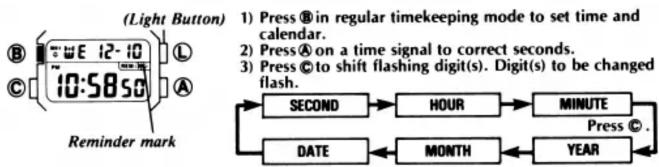
4) Each press of Ⓐ increments digit. Keep pressed to change at high speed.
(Changeover between 12-hour and 24-hour system)
Display switched between 12-hour and 24-hour formats by pressing Ⓐ
(Auto-retrieve function)
Display automatically returns to regular timekeeping mode display if no button is
pressed for 2 to 3 minutes.
(Independent correction)
Correction of any digit(s) can be skipped by pressing ©.
5) Press ⑧ to complete setting.
[On or off setting of reminder mark]
Press and hold in regular timekeeping mode to switch reminder mark on and off. When on, reminder acts as a "string around your finger" each time you look at the watch.
[Countdown alarm operation]
Countdown can be set from 1 second to 24 hours (display shows 0:00'00), and times to an accuracy of 1 second. Start/stop operation is possible by pressing Ⓐ and is confirmed by a signal. When display reaches zero, beeper will sound for 10 seconds unless any button is pressed.
![CASIO 874 - [Countdown alarm operation] - 1](/content/2026/05/868238/images/a2de650b6df5393d2074a74bca3af20ca021da34de8115c55b98bbf7d41e10e1.jpg)
[Setting countdown time]
1) Press® in countdown alarm mode to set new time.
2) Each press of Ⓛ selects auto-repeat or repeat function.
3) Pressing Ⓐ increments digit(s). Keep pressed for high
speed change.
4) Press © to shift flashing digit(s).
![CASIO 874 - [Countdown alarm operation] - 2](/content/2026/05/868238/images/c1ae122cd5e9d092371adc5eb1cb63cab7b4f9ebb9e04c9d0e18b9825d3dfe5b.jpg)
(Auto-retrieve function)
Display automatically returns to initial countdown alarm mode display if no button is
pressed for 2 to 3 minutes.
5) Press® to complete setting.
(Auto-repeat function)
Pre-entered time is retrieved and started again when display reaches zero.
(Repeat function)
Pre-entered time is retrieved, when display reaches zero.
[Setting dual time]
Mode indicator Regular timekeeping
![CASIO 874 - [Setting dual time] - 1](/content/2026/05/868238/images/0fab77856f7c9eda0037e0af3afb7dab4df43b8529216afaa20107f894f2cef9.jpg)
1) Press® in dual time mode to set new time.
2) Pressing Ⓐ increments digit. Keep pressed to change at a
high speed
3) Press© to shift flashing digits.
![CASIO 874 - [Setting dual time] - 2](/content/2026/05/868238/images/0b39b7fccf4aa55f506c23f73c28a5e9616a3510119014cdef99d13b18a2d6ec.jpg)
(Changeover between 12-hour and 24-hour system)
Display switched between 12-hour and 24-hour system by pressing Ⓛ.
(Auto-retrieve function)
Display automatically returns to initial daily alarm mode display if no button is pressed.
for 2 to 3 minutes.
4) Press® to complete setting.
[Stopwatch operation]
Mode indicator Hour
![CASIO 874 - [Stopwatch operation] - 1](/content/2026/05/868238/images/8b21528ce04ec047bcb1d3dffd2664f35cd42fa837673e94244ebe0dbfcf6317.jpg)
A signal confirms start/stop operation. (Working range) Total elapsed time display is limited to 23 hours 59 minutes 59.99 seconds. For longer times reset and start again.
Minute Second 1/100 second
a) Net time measurement
Ⓐ → Ⓐ (Time loss)
(Start) (Stop)
b) Split time measurement
(A)→(L)→
(Start) (Split)
c) 1st-2nd place times
Ⓐ→ Ⓛ→
(Start) (Split) First finisher.
![CASIO 874 - [Stopwatch operation] - 2](/content/2026/05/868238/images/ebb9c1e138328dba1cf93785f0a447fb084228222cb986f8be7e7766aba0813c.jpg)
flowchart
graph LR
    A["Start"] --> B["Stop"]
    B --> C["Reset"]
    D["Split release"] --> E["Stop"]
    E --> F["Reset"]
    G["Second finisher. Record time of first finisher."] --> H["Split release"]
    H --> I["Record time of second finisher."]
•
广力云智慧零售收银系统
[Non-Text]
[Non-Text]


Mærke : CASIO
Model : 874
Kategori : Lommeregner