
MDA 3SVA - Modtager Extron - Gratis brugsanvisning og manual
Find enhedens vejledning gratis MDA 3SVA Extron i PDF-format.


Brugerspørgsmål om MDA 3SVA Extron
0 spørgsmål om dette apparat. Besvar dem du kender, eller stil dit eget.
Stil et nyt spørgsmål om dette apparat
Download vejledningen til din Modtager i PDF-format gratis! Find din vejledning MDA 3SVA - Extron og tag din elektroniske enhed tilbage i hånden. På denne side er alle dokumenter nødvendige for brugen af din enhed offentliggjort. MDA 3SVA af mærket Extron.
BRUGSANVISNING MDA 3SVA Extron
Setup Guide — MDA 3 Series
This card provides quick start instructions for an experienced installer to set up and operate Extron MDA 3 Series S-video, composite video, and audio distribution amplifiers. See the table below right to identify the attributes of each model covered in this guide.
Installation
Step 1 — Mounting
Turn off or disconnect all equipment power sources and mount the MDA as required.
Step 2 — Connections
NOTE The drawings below may show features not on your MDA, depending on your model. The MDA 3V Dual has two separate DAs in a single enclosure.
① Input connector (MDA 3SV models) — Connect an S-video video source to the Input 4-pin mini DIN connector.

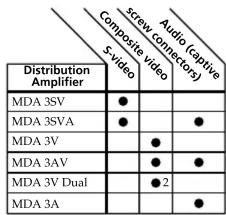
2 = Two separate DAs.
② Output connectors (MDA 3SV models) — Connect up to three S-video displays to these 4-pin mini DIN Output connectors.
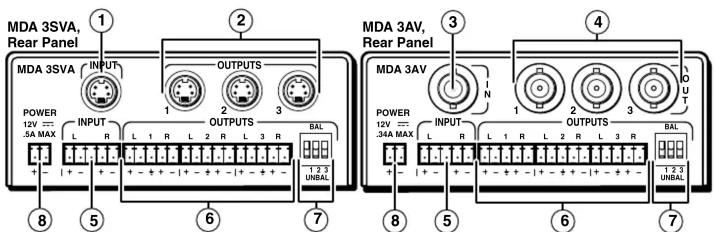
③ In connector (MDA 3V and 3AV models) — Connect a composite video source to the BNC connector.

④ Out connectors (MDA 3V and 3AV models) — Connect up to three composite video displays to these BNC connectors.
⑤ Input connector (MDA 3SV A, MDA 3AV, and MDA 3A) — Connect a balanced or unbalanced stereo audio or mono audio device to the Input 5-pole captive screw connector. Wire the connectors as shown below:

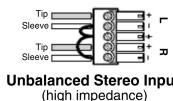
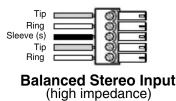
Setup Guide — MDA 3V Series, cont'd
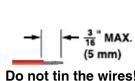
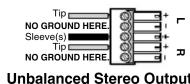
⑥ Output connectors (MDA 3SV A, MDA 3AV, and MDA 3A) — Connect up to three balanced or unbalanced stereo audio or mono audio devices to the Output 5-pole captive screw connectors. Wire the connectors as shown below.
CAUTION
For unbalanced audio output, connect the sleeve(s) to the ground contact. DO NOT connect the sleeve(s) to the negative (-) contacts).
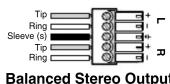
⑦ Bal(anced)/Unbal(anced) DIP switches (Audio models) — For each balanced audio output, set the associated DIP switch to the Balanced (up) position. For each unbalanced audio output, set the associated DIP switch to the Unbalanced (down) position.
Each output can be balanced or unbalanced independently of the other two outputs.
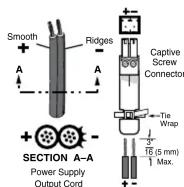
⑧ Power connector — Connect an IEC power cord between the included 12 V power supply and a 100 VAC/240 VAC, 50-60 Hz source. Connect the power supply to the MDA as shown at right.
CAUTION
Always use a power supply supplied and or specified by Extron. Use of an unauthorized power supply voids all regulatory compliance certification and may cause damage to the supply and the end product. Unless otherwise stated, the AC/DC adapters are not suitable for use in air handling spaces or in wall cavities. The installation must always be in accord provisions of National Electrical Code ANSI/NFPA 7 Canadian Electrical Code part 1, section 16. The power permanently fixed to building structure or similar str
Operation
After all devices are powered up, the system is fully operational. If any problems are encountered, verify that the cables are routed and connected properly. If your problems persist, call the Extron S ^3 Sales & Technical Support Hotline that is closest to you, at the number shown below.
| Extron USA - West Headquarters | Extron USA - East | Extron Europe | Extron Asia | Extron Japan | Extron China | Extron Middle East |
| +800.63 3.9876Inside USA / Canada Only | +800.39 3.9767Inside USA / Canada Only | +800.39 87.6673Inside USA / Canada Only | +800.7339.8766 | +81.3.3511.7655 | +400.863.1568 | +971.4.2991800 |
| Inside USA / Canada Only | +1.919.86 3.1794 | +31.33.453.4040 | +65.638 3.44 0 | +81.3.3511.7656 FAX | Inside USA / Canada Only | +971.4.2991800 FAX |
| +714.491.1500+714.491.1517 FAX | +1.919.86 3.1797 FAX | +31.33.453.4550 FAX | +65.638 3.46 64 FAX | +86.21.3760.1568+86.21.3760.1566 FAX X | 68-607-50Rev. A 01 10 | |
| © 2010 Extron Electronics. All rights reserved. | ||||||