
KR-4 - Kassetteafspiller Soundmaster - Gratis brugsanvisning og manual
Find enhedens vejledning gratis KR-4 Soundmaster i PDF-format.


Brugerspørgsmål om KR-4 Soundmaster
0 spørgsmål om dette apparat. Besvar dem du kender, eller stil dit eget.
Stil et nyt spørgsmål om dette apparat
Download vejledningen til din Kassetteafspiller i PDF-format gratis! Find din vejledning KR-4 - Soundmaster og tag din elektroniske enhed tilbage i hånden. På denne side er alle dokumenter nødvendige for brugen af din enhed offentliggjort. KR-4 af mærket Soundmaster.
BRUGSANVISNING KR-4 Soundmaster
Model KR4
LOCATION OF CONTROLS
- Left Microphone Switch
- Left Microphone
- Cassette Compartment
- Pause Button
- Stop/Eject Button
- F.FWD Button
-
Rewind Button
-
Play Button
-
Record Button
-
Right Microphone
-
Right Microphone Switch
-
DC 6V In Jack
-
Volume/Power Control
-
Speaker
-
Battery Compartment (Bottom of Unit)

POWER SOURCES
BATTERY OPERATION
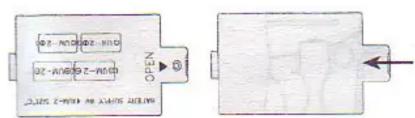
- Open the Battery Door located on the bottom of the unit by loosing the screw.
- Insert four (4) C size batteries into the Battery Compartment with polarities aligned as shown in the diagram outside the compartment and replace the Battery Compartment Cover.
BATTERY PRECAUTIONS
Follow these precautions when using batteries in the device:
- Use only the size and type of batteries specified.
- Be sure to follow the correct polarity when installing the Batteries as indicated next to the battery compartment. Reversed batteries may cause damage to the device and/or present an explosion hazard.
- Do not mix different types of batteries together (e.g. Alkaline and Carbon-zinc) or old batteries with fresh ones
- If the device is not to be used for a long period of time, remove the batteries to prevent damage or injury from possible battery leakage.
- Do not try to recharge batteries not intended to be recharged; they can overheat and rupture. (Follow battery manufacturer's directions.)
- Never dispose of batteries in a fire as an explosion hazard exists. Dispose of batteries according to battery manufacturer's instructions.
AC OPERATION
To operate the unit using AC power, connect an AC adaptor (not included) having a 6V negative center ( ) to the DC jack on the side of the unit and to a wall outlet having 120V, 60Hz AC only. The batteries are automatically disconnected when the AC adaptor is used.
OPERATION
USING THE MICROPHONE AS A PA (Public Address)
- Each microphone comes with an ON/OFF switch that is used to turn the microphone on and off. Turn on one or botch microphones.
- Rotate the Volume/Power control clockwise until al click is heard to turn the unit on and then adjust to a desired volume.
- Speak or sing into the microphone about 1 inch from the microphone
- When finished, set the microphones switch(es) to the OFF position and turn the unit off.
Note : To avoid feedback, avoid placing the microphone close to the unit. If feedback occurs, lower the volume and/or move the mirophone away from the unit.
TO PLAY CASSETTE TAPE
- Press the Stop/Eject butten and insert a cassette with the open surface facing up and the full side to the right.
- Shut the Cassette Compartment.
- Rotate the Volume/Power control clockwise until a "click" is heard to turn the unit on.
- Press the RECORD butten to start recording and speak or sing into the microphone about 1 inch from the microphone.
- To stop the tape before it reaches the end, press the Stop/Eject button.
TO RECORD
- Press the Stop/Eject button and insert a blank cassette with the open surface facing up and the full side to the right.
- Shut the Cassette Compartment.
- Rotate the Volume/Power control clickwise untail a "click" is heard to turn the unit on.
- Press the RECORD button to start recording and speak or sing into the microphone about 1 inch from the microphone.
- Adjust the Volume/Power control as desired.
- To stop the tape before it reaches the end, press the Stop/Eject button.
TO FAST FORWARD/REWIND A CASSETTE TAPE
- To rapidly advance the tape in the Stop mode, press the F.FWD button.
- To rapidly rewind the tape in the Stop mode, press the REWIND button.
TO USE UNIT AS SING-A-LONG
- Insert a prerecorded tape in the Cassette Compartment and press the PLAY button.
- Turn the unit on and turn on one or both microphones. Sing along!
SPECIFICATIONS:
Tape System Monaural Cassette
Tape Speed 4,75cm / sec. (1-7/8 in/sec)
Wow & Flutter 0.6% maximum WRMS
Singal to Noise 35 dB
Power 6V DC, 4 'C' batteries or 6V AC Adapter
Copyright by Wörlein GmbH, 90556 Cadolzburg, Germany


Mærke : Soundmaster
Model : KR-4
Kategori : Kassetteafspiller