
Show Me - Câbles pour ordinateurs et périphériques Extron - Gratis brugsanvisning og manual
Find enhedens vejledning gratis Show Me Extron i PDF-format.


Brugerspørgsmål om Show Me Extron
0 spørgsmål om dette apparat. Besvar dem du kender, eller stil dit eget.
Stil et nyt spørgsmål om dette apparat
Download vejledningen til din Câbles pour ordinateurs et périphériques i PDF-format gratis! Find din vejledning Show Me - Extron og tag din elektroniske enhed tilbage i hånden. På denne side er alle dokumenter nødvendige for brugen af din enhed offentliggjort. Show Me af mærket Extron.
BRUGSANVISNING Show Me Extron
"Show Me" Cable Series
The Extron “Show Me” cables are for use with Extron TeamWork™ systems. They feature a Share button for remote input source selection and a control pigtail, which can be wired directly into Extron switchers with contact closure and tally outputs. All versions of the “Show Me” cable are male to male.

Installation
- Connect the input end of the "Show Me" cable to the source device.
- Connect the output end to the Extron switcher.
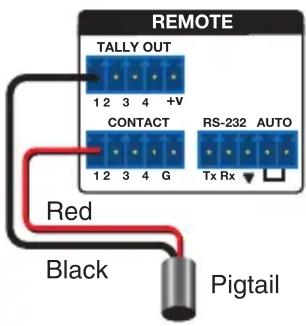
- Connect the black (Tally Out) and red (Contact) pigtail wires as shown at right. The number under the Tally Out and Contact pins corresponds to that particular video input on the switcher.
NOTES:
- The drain wire does not need to be wired to the switcher. The “Show Me” cables are grounded via the video connectors.
- Do not connect the “Show Me” cable pigtail wires to the +V pin on the Extron switcher.
Operation
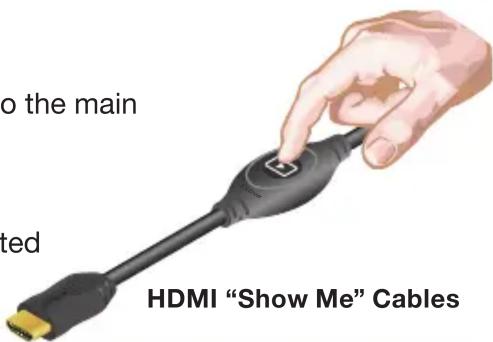
Press the Share button to switch the connected source to the main presentation display.
Pressing the Share button creates a momentary contact closure, which triggers the switcher to select the connected source device. If a tally output is available, the button lights up blue.
NOTES:
- The source device provides the +5 VDC supply voltage needed to illuminate the Share button. This is standard for both analog (VGA) and digital source devices. If the source device does not supply this +5 VDC, the Share button will not illuminate. Some mobile devices do not provide the required voltage to light up the button.
- Digital “Show Me” cables support embedded audio and CEC signals. The VGA “Show Me” cable does not support audio.
68-2321-50
Rev. D
11 13
| Extron Headquarters+1.800.633.9876 (Inside USA/Canada Only) | Extron Asia+65.6383.4400 | Extron China+86.21.3760.1568) | Extron Korea+82.2.3444.1571 |
| Extron Europe+31.33.453.4040 | Extron Japan+81.3.3511.7655 | Extron Middle East+971.4.299.1800 | Extron India+91.80.3055.3777 |