
BTS-301 - Dockingstation DENVER - Gratis brugsanvisning og manual
Find enhedens vejledning gratis BTS-301 DENVER i PDF-format.


Brugerspørgsmål om BTS-301 DENVER
0 spørgsmål om dette apparat. Besvar dem du kender, eller stil dit eget.
Stil et nyt spørgsmål om dette apparat
Download vejledningen til din Dockingstation i PDF-format gratis! Find din vejledning BTS-301 - DENVER og tag din elektroniske enhed tilbage i hånden. På denne side er alle dokumenter nødvendige for brugen af din enhed offentliggjort. BTS-301 af mærket DENVER.
BRUGSANVISNING BTS-301 DENVER
MANUAL


natural_image
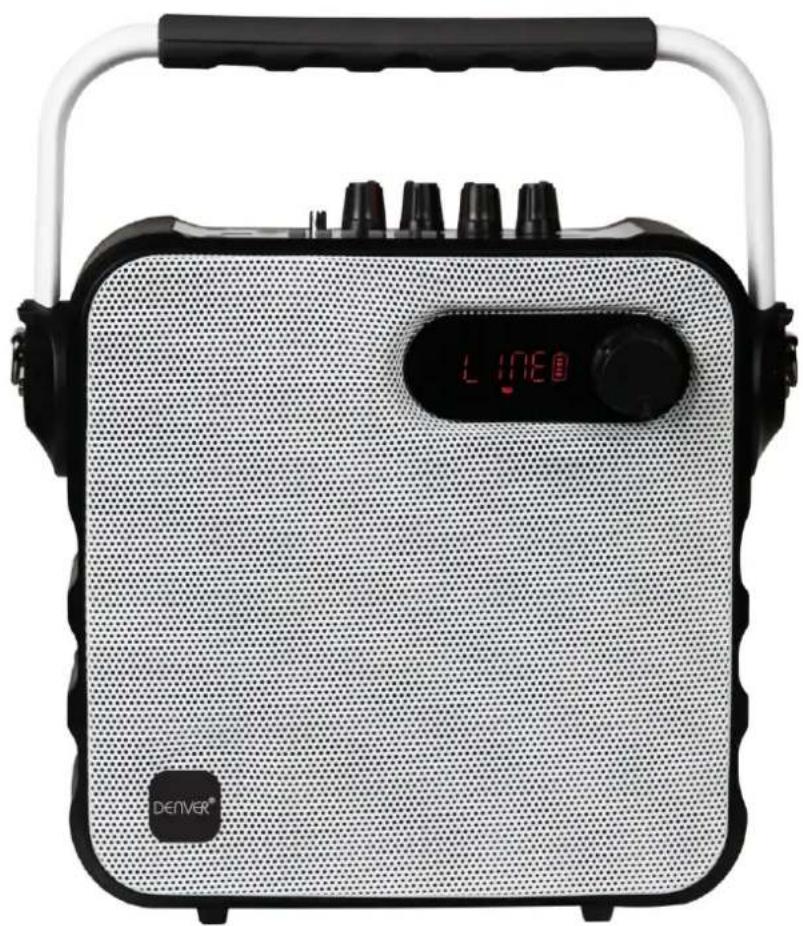
Exterior view of a modern portable electronic device with black handle and digital display (no readable text or symbols)BTS-301
Blueooth speaker with built-in battery
www.denver-electronics.com
DENVER BTS-301 USER MANUAL
Bluetooth Speaker – Please read this manual before use
Display Description:
"LINE" when operating in AUX mode; "FM Frequency" when operating in FM mode; "Time" when operating in USB& Micro SD mode. "BT" when operating in BT mode. Flashing when the power is low, charging is needed.
Panel Function
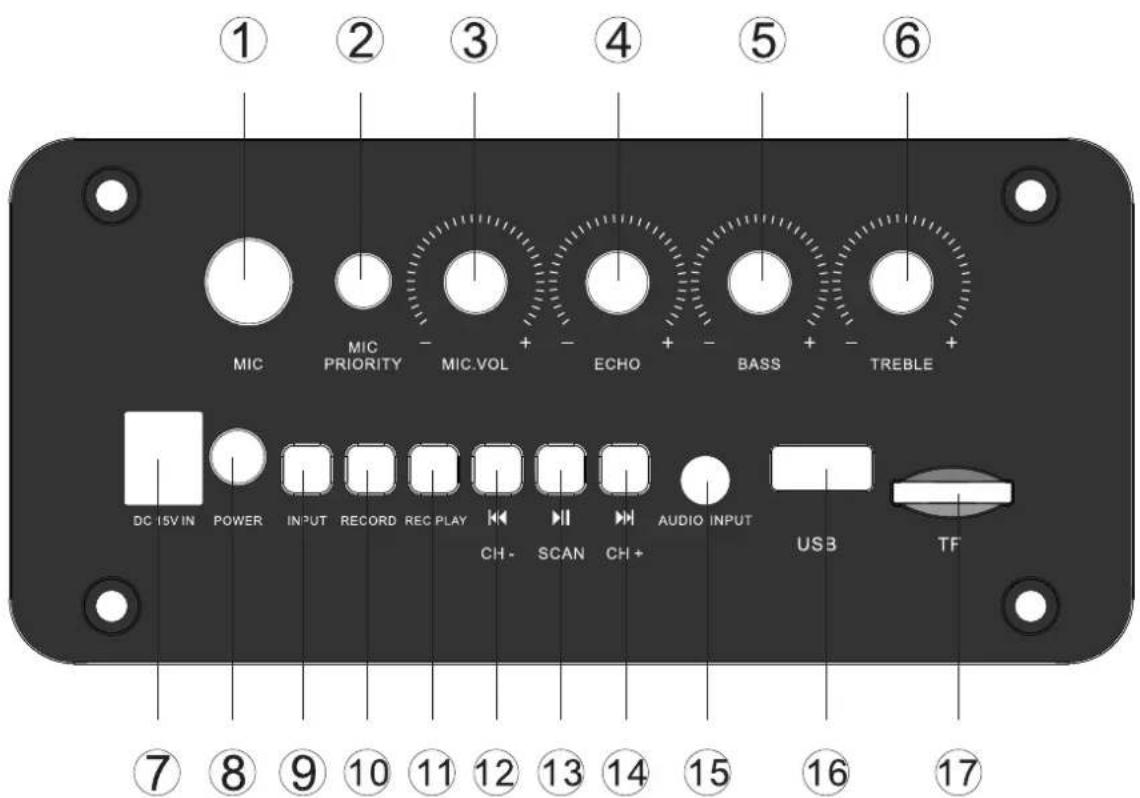
- Mic Input Jack
- Mic Volume Control Dial
- BASS Volume Control Dial
- DC Input Port
- Input selection
- Play the recordings
- Play/Pause/Scan
- Audio input
-
TF (Micro SD) Slot
-
MIC Priority
- Echo Volume Control Dial
- Treble Volume Control Dial
- Power off/on
- Record
- Previous
- Next
- USB Input Port
Remote Control Functions
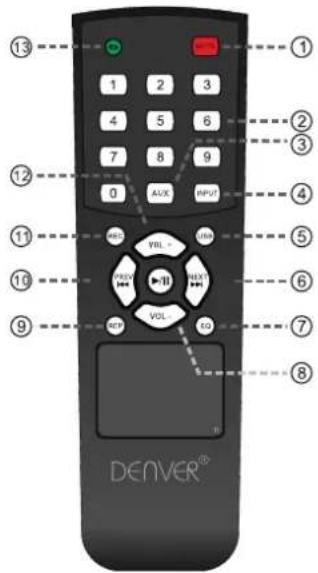
- Mute
- Track number
- AUX mode
- Input selection
- USB input
- Next
- EQ
- Decrease volume
- Play the recording
- Previous
- Record
- Increase the volume
- Repeat
Wireless microphone
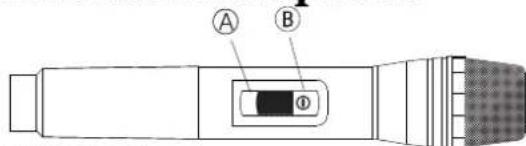
Ⓐ Microphone off
B Microphone on
***This picture is for reference purposes only!
- Open the battery compartment, insert batteries and ensure that the polarities are correct.
- Switch ON the power switch of the microphone. If the power indicator light does not light up, check if the battery has been inserted correctly.
- Adjust the microphone volume knob on the speaker.
- When singing, if you need to suspend the wireless microphones, please switch to mute state (center) on the microphone, and if you want to stop using the microphone, switch to the off state.
General Function Description
- Volume: Turning to adjust master volume.
- Treble: Turning to adjust treble.
- Echo: Turning to adjust echo.
- Mic. Vol: Turning to adjust mic volume.
- INPUT: Change to other mode when operating sequence: LINE-BT-FM-USB-TF (MICRO SD). Priority to play in USB or TF (Micro SD) card mode when insert the USB or Micro SD.
MP3 Function Description
- USB: Playing when insert A USB stick with MP3 music.
-
TF (Micro SD): Playing when insert TF (Micro SD) card with MP3 music.
-
AUX: Playing when plug in the audio cable and connected with music device.
-
Play/Pause Button: In USB or TF (Micro SD) mode, press to play or pause. In FM mode, press to automatic search.
-
PREV & NEXT Button: While playing music in USB or Micro SD mode, short press to skip to next or previous track. Long press to fast forward or rewind.
Recording function
In record mode, press “REC/INPUT” to stop recording. Press “REC.PLAY” to play the recordings in the external memory, press PREV and NEXT to choose the recordings to play.
Bluetooth Function Description
-
Pairing: Press INPUT button to Bluetooth mode, speaker will be under automatic pairing mode, LED display shows "BT", pair the Bluetooth compatible device by selecting "TSP-300" from the listed devices, speaker will prompt "tick" tone To ensure continuous stability of the music signal, try to keep the BT and the mobile phone facing one another.
-
Music Playing: Press Play/Pause, PREV & NEXT Button to play music.
3.#The BT of the unit can be used up to 10 meters if there are no barriers.
FM Function Description
- Choose "INPUT" to switch to FM radio.
- Choose "PLAY/PAUSE" for automatic searching and saving.
- Choose "PREV" and "NEXT" to switch channels.
Battery Volume and Charging Indication
When charging, connect a matched power adapter to AC100V - AC240V. Charging time is approximately 4 to 8 hours. Once fully
charged unplug the power supply as leaving a full battery on charge may cause damage to the battery. Battery Charge Indicator: LED panel has battery status indicator. In the middle of the shape of the bat-
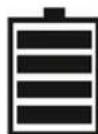
tery have four horizontal lines, each horizontal line represents 25% of electricity remaining. When no horizontal line in the shape of the battery or the shape flashes, please power off and promptly charge to avoid damage to the battery. When charging, the battery indicator on LED display panel flashes. The indicator stops blinking after full charged. Then please continue to charge the battery for 1-2 hours to extend the battery life.
Warning: If the battery is under voltage, please fully charge it within 48 hours. If the speaker has to be left unused for a long time, please let the battery fully charged, otherwise it will cause damage to the battery!
In the process of playing, keep unit away from high temperature environments, high magnetic fields and high frequencies. If the system is fails to work, turn off the power source or pull out the USB disc/TF card, then reinsert it and it will resume play.#
Remarks: Please charge the speaker when the unit is off or lower the volume to avoid sound distortion.
Warning
- Do not use product in high temperature or wet environments. It will be damaged if getting wet.
- Please do not open the speaker, as there is risk for electric shock or other accidents.
- If it needs to be fixed, please contact the store where it is bought.
- If any liquid comes into the speaker, please turn the power off right away. It has to be checked by certified staff.
- When the device is not used, please turn the power off and pull out power plug.
- Do not put anything on top of the speaker.
- If the battery is incorrectly replaced an explosion could happen, so please replace it with the same type or equivalent type of battery.
Specification
Power Output 30W
Speaker Size 5.25"
R. Frequency 20-20KHz
S/N Ratio ≥ 71 dB
Power Input AC100-240V
Dimension 220x220x140mm
ALL RIGHTS RESERVED, COPYRIGHT DENVER ELECTRONICS A/S
DENVER®
www.denver-electronics.com



Electric and electronic equipment and included batteries contains materials, components and substances that can be hazardous to your health and the environment, if the waste material (discarded electric and electronic equipment and batteries) is not handled correctly.
Electric and electronic equipment and batteries is marked with the crossed out trash can symbol, seen below. This symbol signifies that electric and electronic equipment and batteries should not be disposed of with other household waste, but should be disposed of separately.
As the end user it is important that you submit your used batteries to the appropriate and designated facility. In this manner you make sure that the batteries are recycled in accordance with legislature and will not harm the environment.
All cities have established collection points, where electric and electronic equipment and batteries can either be submitted free of charge at recycling stations and other collection sites, or be collected from the households. Additional information is available at the technical department of your city.
Imported by:
DENVER ELECTRONICS A/S
Omega 5A, Soeften
DK-8382 Hinnerup
Denmark
www.facebook.com/denverelectronics
DENVER®
denver-electronics.com
Imported by: Denver Electronics A/S
Omega 5A, Soeften, DK-8382 Hinnerup, Denmark
www.denver-electronics.com


- MANUAL
- BTS-301
- DENVER BTS-301 USER MANUAL
- Display Description:
- Remote Control Functions
- Wireless microphone
- General Function Description
- MP3 Function Description
- Recording function
- Bluetooth Function Description
- FM Function Description
- Battery Volume and Charging Indication
- Warning
- Specification
- DENVER®
Mærke : DENVER
Model : BTS-301
Kategori : Dockingstation