
CD 9155MP3 - CD-afspiller Soundmaster - Gratis brugsanvisning og manual
Find enhedens vejledning gratis CD 9155MP3 Soundmaster i PDF-format.


Brugerspørgsmål om CD 9155MP3 Soundmaster
0 spørgsmål om dette apparat. Besvar dem du kender, eller stil dit eget.
Stil et nyt spørgsmål om dette apparat
Download vejledningen til din CD-afspiller i PDF-format gratis! Find din vejledning CD 9155MP3 - Soundmaster og tag din elektroniske enhed tilbage i hånden. På denne side er alle dokumenter nødvendige for brugen af din enhed offentliggjort. CD 9155MP3 af mærket Soundmaster.
BRUGSANVISNING CD 9155MP3 Soundmaster

soundmaster®


DEUTSCH
ENGLISH
FRANÇAIS
NEDERLANDS
ROMÂNÃ
ESPAÑOL

CAUTION
RISK OF ELECTRIC SHOCK DO NOT OPEN

WARNING: SHOCK HAZARD - DO NOT OPEN
AVIS:RISQUE DE CHOC ÉLECTRONIQUE - NE PAS OUVRIR
WARNUNG: ELEKTROSCHOCK GEFAHR - NICHT ÖFFNEN
LASERSCHUTZKLASSE 1 PRODUKT
CLASS 1 LASER PRODUCT
APPAREIL A LASER DE CLASSE 1
CD 9155MP3
ENGLISH
Location of Controls

1) Battery Door (under cover)
2) Display
3) Skip/F.FWR ▶▶
4) CD Program
5) Play/Pause
6) CD Door open switch
7) ESP / Directory search
8) Earphone socket
9) Loop
10) Volume
11) Bass Boost
12) Stop ■
13) Mode
14) Skip/REV
15) DC input socket
16) Charge LED indicator
Power Supply
Using Battery (Batteries not incl.)
1) Open the lid of the battery compartment
2) Insert 2 "AA" Size (UM-3) alkaline batteries by matching the (+ and -) to the diagram inside the battery compartment and close the lid.
When the battery is used up "☐", indicator flashes in the display. Replace all the batteries with new alkaline batteries.
Note: * Do not mix new batteries with old one
* Do not use different types of batteries together
AC Power Adapter (adapter incl.)
1) Insert the adapter plug into the DC input jack on the unit
2) Plug the adapter into the AC wall outlet
3) Unplug from wall outlet when not in use
Note: Use only a 4.5V DC, 500mA Adapter

CD Operation
Warning: To protect your hearing if you are using headphones or earphones, set VOLUME to its lowest setting before you play a CD
1) Power is on by pressing PLAY ◀ button
2) Press OPEN button and open the lid
3) Place the CD firmly "with the label side facing up" on the pivot and close the CD door.
4) Press PLAY ◀ button to start the CD
5) Adjust the volume
6) Press once STOP ■ to stop playback
7) Skip / Search Button – Press once to skip to next track ▶▶ or back to previous ◀◀ track a. Press continuously to search forward ▶▶ or ◀◀ backward
8) Power is off by pressing STOP ■ button
Directory Search Function (for MP3 CD)
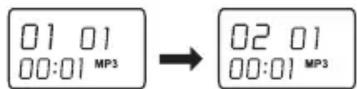
This feature allows you to skip to different directories on your MP3 disc. It makes file searching easier and faster.
While playing an MP3 CD, press the ESP/DIR button once. The display will show the next directory file.
Repeat One/All-Track/Album/Random/Intro by pressing MODE button
Press once: Repeat current track
Press twice: Repeat all tracks
Press three times: Repeat Album (for MP3 CD only)
Press three times (MP3 four times):
Press four times (MP3 five times):
Random Play
Intro Play (10 seconds each song)
ENGLISH
Program Play
You can program up to CD 20/MP3 99 tracks to play/ in any order you choose.
CD mode:
1) During stop mode, press PROG button, the "PGM" indicator will appear with the track number and playing order
2) Press ◀◀ or ▶◀ SKIP/SEARCH button to choose a track
3) Press PROG button to store the track
4) Repeat steps 2 and 3 to program desired tracks
5) Press ◀ PLAY/PAUSE button, to play the tracks
MP3 mode:
1) During stop mode, press PROG button, the "PGM" indicator will appear with the track number and playing order
2) Press ◀◀ or ▶◀ SKIP/SEARCH button to choose a directory number
3) Press PROG button once
4) Press ◀◀ or ▶◀ SKIP/SEARCH button to choose a track
5) Press PROG button to program the track
6) Repeat steps 2, 3 and 4 to program desired tracks.
7) Press ◀ PLAY/PAUSE button, to play the tracks.
8) Erase the program, press STOP button twice,
BBS Power Bass Sound
Press the BBS button, to enjoy more powerful bass boosted sound
To Prevent Sound from Skipping (Anti Skip System)
When the ESP function is turned on, you can see "ESP" is displayed on the LCD. → ESP function is on
This ESP function is solely for audio CD only. For MP3, is automatically activated whenever the player is used for playing MP3 disc.
CD ESP time is about 45 seconds
MP3 ESP time is about 120 seconds
Off ESP (for CD only), press ESP button once
Notes:
- When using ANTI SHOCK function the battery power consumption increases because the disc rotates faster then normal and the dynamic memory is active.
- Whilst the ANTI SHOCK function provides for continuous sound output when the unit is subjected to shock or vibration. It will not correct errors arising from the use of defective scratched or dirty discs.
- When powering the player solely from batteries, only use the ANTI SHOCK function were necessary to preserve their life.
Charging and use of Rechargeable Batteries
- Disconnect the AC/DC adapter from the wall outlet, if it is connected to the unit.
- Open the battery compartment door as mentioned previously
- Insert 2 rechargeable batteries (1.2V 800mA) (not incl.), following the correct polarity as indicated on the unit.
Put the metal bushing onto the "-" side of one of the 2 rechargeable batteries.

Important: * In order for the charge function to perform properly, one of the rechargeable batteries must be covered by the Metal cap as illustrated above.
* Keep the provided metallic cap for future use
- Close the battery compartment door
- Insert the adapter plug into the DC input jack on the unit, during charged LED indicator will on.
- After 15 hours of charging, pull the adapter out.
Caution:
- Do not mix the rechargeable (nickel-Cadmium) or NIMH and regular (carbon-zinc) batteries.
Notes:
- If the Nickel Cadmium recharge batteries are being used the first time, it will take approximately 15 hours to be fully charged.
Specification:
Power Requirements
2x LR6 / UM-3 "AA" alkaline battery - DC in 4.5V jack
accepts AC power adaptor 500mA
Copyright by Woerlein GmbH, 90556 Cadolzburg, www.woerlein.com


- SOUNDMASTER®
- CAUTION
- ENGLISH
- LOCATION OF CONTROLS
- POWER SUPPLY
- USING BATTERY (BATTERIES NOT INCL.)
- AC POWER ADAPTER (ADAPTER INCL.)
- CD OPERATION
- DIRECTORY SEARCH FUNCTION (FOR MP3 CD)
- REPEAT ONE/ALL-TRACK/ALBUM/RANDOM/INTRO BY PRESSING MODE BUTTON
- PROGRAM PLAY
- CD MODE
- MP3 MODE
- BBS POWER BASS SOUND
- TO PREVENT SOUND FROM SKIPPING (ANTI SKIP SYSTEM)
- NOTES
- CHARGING AND USE OF RECHARGEABLE BATTERIES
- SPECIFICATION
Mærke : Soundmaster
Model : CD 9155MP3
Kategori : CD-afspiller