
RCD 1400 - CD-afspiller Soundmaster - Gratis brugsanvisning og manual
Find enhedens vejledning gratis RCD 1400 Soundmaster i PDF-format.


Brugerspørgsmål om RCD 1400 Soundmaster
0 spørgsmål om dette apparat. Besvar dem du kender, eller stil dit eget.
Stil et nyt spørgsmål om dette apparat
Download vejledningen til din CD-afspiller i PDF-format gratis! Find din vejledning RCD 1400 - Soundmaster og tag din elektroniske enhed tilbage i hånden. På denne side er alle dokumenter nødvendige for brugen af din enhed offentliggjort. RCD 1400 af mærket Soundmaster.
BRUGSANVISNING RCD 1400 Soundmaster
natural_image
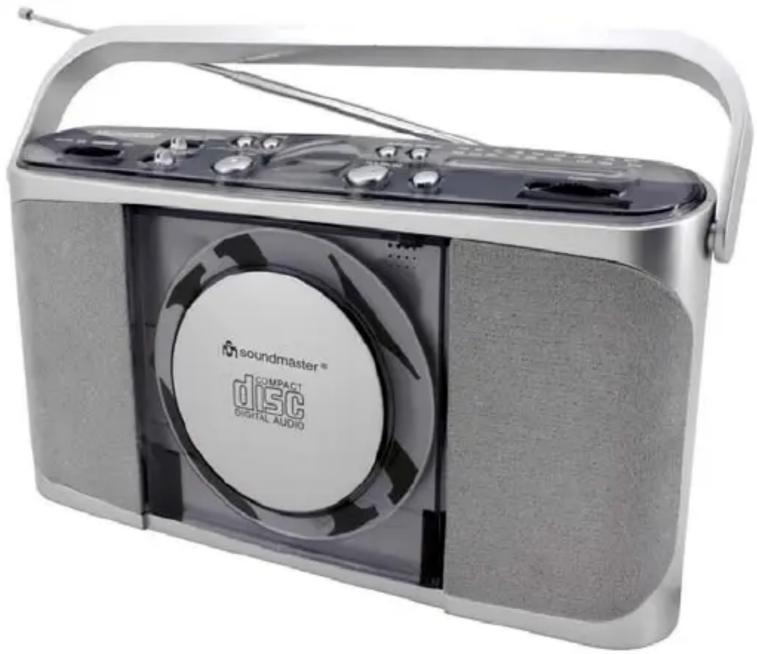
Exterior view of a compact portable electronic device with a CD and speaker grille (no visible text or symbols on body)DEUTSCH
NEDERLANDS
ENGLISH
F R A N Ç A I S
R O N
E S |
CAUTION
RISK OF ELECTRIC SHOCK DO NOT OPEN
WARNING: SHOCK HAZARD - DO NOT OPEN AVIS: RISQUE DE CHOC ÉLECTRONIQUE - NE PAS OUVRIR WARNUNG: ELEKTROSCHOCK GEFAHR - NICHT ÖFFNEN

LASERSCHUTZKLASSE 1 PRODUKT CLASS 1 LASER PRODUCT APPAREIL A LASER DE CLASSE 1
ENGLISH
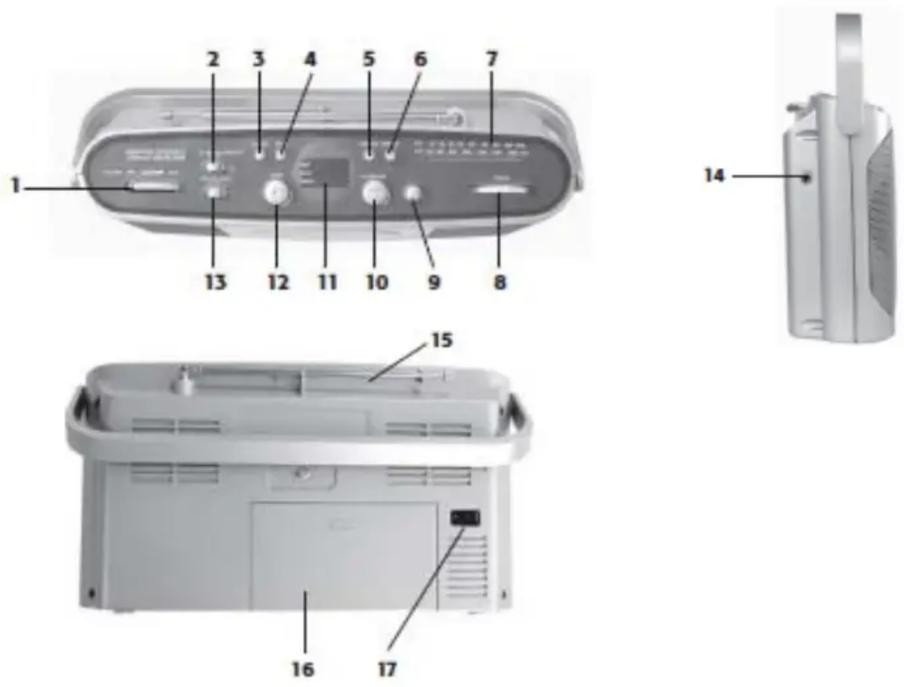
- Volume control
- Function switch: CD/RADIO/OFF
- REPEAT button
- PROGRAM button
- CD SKIP/SEARCH backwards |<<
- CD SKIP/SEARCH forwards >>|
- Frequency scale
- Tuning control
-
CD open
-
CD Play/Pause
- CD Display
- CD Stop
- Band switch AM/FM/FM-ST.
- Earphone jack
- FM antenna
- Battery compartment
- AC connection for electric cabel
Mains operation
Insert the electric cable into the plug (17) at the back of the radio and plug the cord into a wall socket.
Battery operation (Battery not incl.)
Insert the batteries (6x UM-2 Type 1,5V) with the plus (+) and minus (-) sides as indicated in the compartment (16) on the back side of item.
- Do not mix old and new batteries, or different types of batteries.
- Always remove the batteries to prevent damage if there is a battery leakage.
Earphone operation (earphone not incl.)
Connect the stereo earphones (3.5 mm, 8-32ohm) in the jack (14).
Volume control
Adjust the volume with the control (1)
ENGLISH
Radio operation
- Slide the function selector (2) to Pos. RADIO
- Band switch (13) to FM-ST, FM or AM
- Rotate the TUNING control (8) to find the desired stations
-
Radio off: Slide the function selector (2) to Pos. OFF/
-
For FM, pull out the telescopic antenna (15). Incline and turn the antenna. Reduce its length if the signal is too strong (very close to a transmitter)
- For AM the set is provided with a built-in antenna so the telescopic antenna is not needed. Direct the antenna by turning the whole set.
CD operation
- Slide the function selector (2) to Pos. CD
- Press the button (9) to open the CD compartment, insert the CD and close the compartment
- The CD is read in and the number of tracks is shown in the display (11)
- Press (10) PLAY to start the player / press it again to stop the playback temporarily (pause)
- Press (6) >>| SKIP once briefly for the next track
- Press (5) |<< SKIP once to return to the beginning of current track, press twice to go the previous track
- Press and hold down to fast forward within the track
- Press STOP (12) to Stop the CD playback
CD repeat
Press 1x REPEAT (3) to repeat the current track
Press 2x REPEAT (3) to repeat all tracks or the program
Press 3x REPEAT (3) to cancel the function
CD programming track numbers
You may store up to 20 tracks in the desired sequence
- Press PROG. (4), display will flashed PROG
- Press |<< or >>|(5/6) for select your desired track
- When your chosen track number appears, press PROG (4) once to store the track.
- Repeat steps 2 and 3 to select and store all desired tracks in this way
- To play your program, press PLAY (3)
- To delete your program, press twice STOP (12)
Specification:
FM Frequency 87,5 – 108 MHz
AM Frequency 540 – 1600 KHz
Power Consumption 7 W
AC Power Supply AC 230V 50Hz
DC Power Supply 6 x 1,5V Type UM-2/C
Copyright by Woerlein GmbH, 90556 Cadolzburg, www.woerlein.com


Mærke : Soundmaster
Model : RCD 1400
Kategori : CD-afspiller