
UT300B - Miljøtermometer Uni-T - Gratis brugsanvisning og manual
Find enhedens vejledning gratis UT300B Uni-T i PDF-format.


Brugerspørgsmål om UT300B Uni-T
0 spørgsmål om dette apparat. Besvar dem du kender, eller stil dit eget.
Stil et nyt spørgsmål om dette apparat
Download vejledningen til din Miljøtermometer i PDF-format gratis! Find din vejledning UT300B - Uni-T og tag din elektroniske enhed tilbage i hånden. På denne side er alle dokumenter nødvendige for brugen af din enhed offentliggjort. UT300B af mærket Uni-T.
BRUGSANVISNING UT300B Uni-T
UT300 SERIES
Non-contact Infrared Thermometer
Operating Manual

natural_image
Black LRX-T handheld device with control panel and display screen (no visible text or symbols on body)Introduction
The Model UT300A and UT300B Infrared Thermometer (hereafter, the "Thermometer") can determine the surface temperature by measuring the amount of infrared energy radiated by the target's surface. They have different distance to spot (D:S) figure and differen temperature range, details see the contents.
The Thermometers are non-contact infrared thermometer with low consumption design so that they can be used for a longer time, which can solve the frequently changing battery and low battery issues during measurement. Intelligent design can make measurement easier and quicker.
Contacting Uni-Trend
To contact Uni-Trend. call (852) 2950 9168 or visit Uni-Trend web site at www.uni-trend.com
Safety Information
Warning
A warning identifies conditions and actions that pose hazards to the user. To avoid electrical shock or personal injury, follow these guidelines:
- Do not point laser directly at eye or indirectly off reflective surfaces.
- Before using the Thermometer inspect the case. Do not use the Thermometer if it appears damaged. Look for cracks or missing plastic.
- Replace the battery as soon as the battery indicator appears.
- Do not use the Thermometer if it operates abnormally Protection may be impaired. When in doubt, have the Thermometer serviced.
- Do not operate the Thermometer around explosive gas, vapor, or dust.
- To avoid a burn hazard, remember that highly reflective objects will often result in lower than actual temperature measurements.
- Do not use in a manner not specified by this manual or the protection supplied by the equipment may be impaired.

Figure 1. Symbols and Safety Markings
Caution
To avoid damaging the thermometer or the equipment under test protect them from the following:
• EMF (electro-magnetic fields) from arc welders, induction heaters, etc.
• Static electricity.
- Thermal shock (caused by large or abrupt ambient temperature changes – all 30 minutes from the Thermometer to stabilize before use).
- Do not leave the Thermometer on or near objects of high temperature.
Features
The Thermometer includes:
• Single-spot Laser Sighting
• White colour Backlit Display
• Current Temperature Plus MIN and MAX
Temperature Displays
• Degree Celsius and Fahrenheit Temperature
Selectable
- Battery power monitoring
- Low Battery Display
Display

| Laser “On” Symbol | |
| HOLD SCAN | SCAN or HOLD |
| MAX/MIN | Temperature values for the MAX and MIN |
| Battery indication | |
| Display backlit | |
| °C/°F | °C/°F Symbol (Celsius/Fahrenheit) |
How the Thermometer Works
Infrared thermometers measure the surface temperature of an opaque object. The Thermometer's optics sense infrared energy, which is collected and focused onto a detector. The Thermometer's electronics then translate the information into a displayed temperature reading which appears on the display. The laser is used for aiming purposes only.
Operating the Thermometer
The Thermometer turns on when you press the trigger. The Thermometer turns off when no activity is detected for 8 seconds.
To measure temperature, aim the Thermometer at the target, pull and hold the trigger. Release the trigger to hold a temperature reading.
Be sure to consider distance-to-spot size ratio and filed of view. The laser is used for aiming only.
| Button / Connector | Description |
| °C/°F | Press to toggle between Celsius and Fahrenheit. |
| MAX/MIN | Press to toggle between MAX and MIN options.MAX and MIN values are displayed on the secondary display. |
| Press to toggle between turning on the laser and display backlight.The sequence is:△, △, none. |
P/N: 110401101601
Locating a Hot or Cold Spot
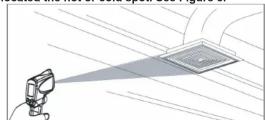
To find a hot or cold spot, aim the Thermometer outside the target area. Then, slowly scan across the area with an up and down motion until you located the hot or cold spot. See Figure 5.
Distance and Spot Size
As the distance (D) from the target being measured increases, the spot size (S) of the area measured by the unit becomes larger. The spot size indicates 90% encircled energy. The maximum D:S is
obtained when the Thermometer is 1000mm (100 in) form the target resulting in a spot size of 20mm (2 in).

Field of View
Make sure that the target is larger than the spot size. The smaller the target, the closer you should be to it. Suggested distance less than 75% of the theory value.

Emissivity
Emissivity describes the energy-emitting characteristics of materials. Most organic materials and painted or oxidized surfaces have an emissivity of about 0.95.
If possible, to compensate for inaccurate readings that may result from measuring shinymetal surfaces, cover the surface to be measured with masking tape or flat black paint (<150 °C/ 302°F) and use the high emissivity setting. Allow time for the tape or paint to reach the same temperatures as the surface beneath it. Measure the temperature of the tape or painted surface.
Maintenance
Changing the Battery
To install or change the 9V battery, open the battery compartment the battery.
Cleaning the Lens
Blow off loose particles using clean compressed air. Carefully wipe the surface with a moist cotton swab. The swab may be moistened with water.
Cleaning the Housing
Use soap and water on a damp sponge or soft cloth. To avoid damage to the Thermometer, do not soak the unit into water.
Caution
To avoid damaging the Thermometer, do NOT
submerge it in water.
Troubleshooting
| Symptom | Problem | Action |
| OL (on display) | Target temperature is over range | Select target with specifications |
| -OL (on display) | Target temperature is under range | Select target with specifications |
| Low Battery | Replace Battery | |
| Blank Display | Possible dead battery | Check and / or replace battery |
| Laser does not work | Low or dead batteryAmbient temperature above 40^ ( 104^ ) | Replace batteryUse in area with lower ambient temperature. |
CE Certification
The Thermometer conforms to the following standards:
• EN61326: 2006
• EN60825-1: 1994+A2: 2001+A1: 2002 Laser Safety Standard
Certification testing was conducted using a frequency range of 80 to 100MHz with instrument in three orientations.
Specifications
| Function | UT300A | UT300B |
| Auto Power off | √ | √ |
| HOLD | √ | √ |
| SCAN | √ | √ |
| MIN | √ | √ |
| MAX | √ | √ |
| Laser turn off | √ | √ |
| °C/°T Selectable | √ | √ |
| Emissivity | 0.95 | 0.95 |
| Temperature Range | -18°C ~ 280°C | -18°C ~ 380°C |
| Maximum Measuring Accuracy | ±2°C or ±2%.Assumes ambient operating temperature of 23°C ±2°C . | |
| Repeatability | <±0.5 °C or <±0.5% | |
| Resolution | 0.1 | 0.1 |
| Response Time | 500mS | |
| White Display Backlit | √ | √ |
\*\* END \*\*
This operating manual is subject to change without notice. ©Copyright 2008 Uni-Trend Group Limited. All rights reserved.
Manufacturer:
Uni-Trend Technology (Dongguan) Limited
Dong Fang Da Dao
Bei Shan Dong Fang Industrial Development District
Hu Men Town, Dongguan City
Guang
China
Postal Code: 523 925
Headquarters:
Uni-Trend Group Limited
Rm901, 9/F, Nanyang Plaza
57 Hung To Road
Kwun Tong Kawlan Hu
Kowloon, Hong Kong Tel: (852) 2950 9168
Email: info@uni-trend.com http://www.uni-trend.com

Mærke : Uni-T
Model : UT300B
Kategori : Miljøtermometer