NPort 5650I-8-DTL - Server Moxa - Gratis brugsanvisning og manual
Find enhedens vejledning gratis NPort 5650I-8-DTL Moxa i PDF-format.


Brugerspørgsmål om NPort 5650I-8-DTL Moxa
0 spørgsmål om dette apparat. Besvar dem du kender, eller stil dit eget.
Stil et nyt spørgsmål om dette apparat
Download vejledningen til din Server i PDF-format gratis! Find din vejledning NPort 5650I-8-DTL - Moxa og tag din elektroniske enhed tilbage i hånden. På denne side er alle dokumenter nødvendige for brugen af din enhed offentliggjort. NPort 5650I-8-DTL af mærket Moxa.
BRUGSANVISNING NPort 5650I-8-DTL Moxa
MOXA®
NPort 5600-8-DTL
Quick Installation Guide
First Edition, March 2011
Overview
The NPort 5600-8-DTL series includes the following models:
• NPort 5610-8-DTL: 8 ports, RS-232, 0 to 60°C
• NPort 5650-8-DTL: 8 ports, RS-232/422/485, 0 to 60°C
• NPort 5650I-8-DTL: 8 ports, RS-232/422/485, 0 to 60°C,
2KV optical isolation.
• NPort 5610-8-DTL-T: 8 ports, RS-232, -40 to 75°C
• NPort 5650-8-DTL-T: 8 ports, RS-232/422/485, -40 to 75°C
• NPort 5650I-8-DTL-T: 8 ports, RS-232/422/485, 2KV
optical isolation, -40 to 75°C
Package Checklist
The NPort 5600-8-DTL package should contain the following items:
• NPort 5600-8-DTL device server
• Wall mounting and DIN-Rail kits
- Stick-on pads
- Documentation and software CD
• Quick installation guide (printed)
- Warranty card
Optional Accessories\*
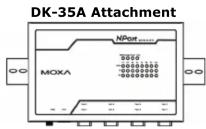
DK-35A: DIN-Rail mounting kit (35 mm)
Note: Please notify your sales representative if any of the above items are missing or damaged.
*Optional Accessories can be ordered separately.
Hardware Introduction
Top and Rear Views
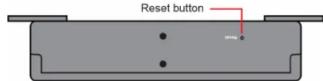
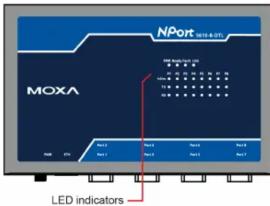
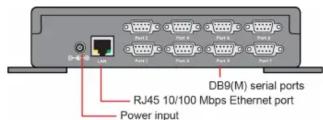
Front View
Reset Button
Use a pointed object to hold the reset button down for at least five seconds to load the factory defaults. Release the reset button when the Ready LED stops blinking.
LED Indicators
The LED indicators on the top panel are used to display the status as follows:
| Name | Color | Function |
| PWR | red | Power is on. |
| off | Power is off. | |
| Ready | green | Steady: NPort is operationalBlinking: NPort is responding to NPort Administrator "Locate" function or NPort is resetting to factory default |
| off | Power is off or fault condition exists. | |
| Fault | red | IP conflict or DHCP or BOOTP server did not respond properly. |
| off | No fault condition detected. |
| Link | green | Steady: Network is connected; no data is being transmitted.Blinking: Network is connected; data is being transmitted. |
| off Ethernet | cable is disconnected or has a short. | |
| InUse (P1 to P8) | green | Serial port has been opened by server side software. |
| off | Serial port is not currently opened by serve side software. | |
| TX/RX (P1 to P8) | green (Tx) | Serial device is transmitting data. |
| orange (Rx) | Serial device is receiving data. | |
| off | No data is flowing to or from the serial port |
Hardware Installation
STEP 1: After removing the NPort 5600-8-DTL from the box, place it on a desktop or other horizontal surface. Connect the 12-48 VDC power adaptor to the NPort 5600-8-DTL's power input when using an AC power source, or connect the NPort 5600-8-DTL's terminal block directly to a DC power source.
STEP 2: Use an Ethernet cable to connect the NPort 5600-8-DTL to a network hub or switch. You can also connect directly to your computer's Ethernet port, which is convenient for initial configuration or testing.
STEP 3: Connect the NPort 5600-8-DTL's serial port to a serial device.
Wall or Cabinet Mounting
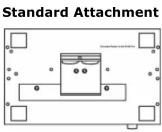
The NPort 5600-8-DTL comes with two metal attachment plates to allow installation on a wall or the inside of a cabinet. First, attach the brackets to the back of the NPort with screws. Next, mount the unit on a wall or cabinet with screws. Screws should be less than 6.0 mm in head diameter, and less than 3.5 mm in shaft diameter.
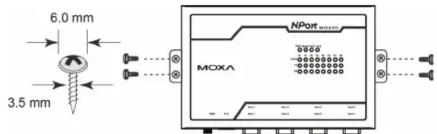
P/N: 1802056000010
DIN-Rail Mounting
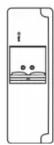
DIN-Rail attachments can be purchased separately to attach the product to a DIN-Rail. The DIN-Rail attachments should be oriented with the metal springs on top.
Software Installation Information
To install NPort Administration Suite, insert the NPort
Document & Software CD into your PC's CD-ROM drive. Locate and run the setup program and follow the on-screen instructions. The setup program will be named
Npadm_Setup_[Version]_Build_[DateTime].exe (e.g., "Npadm_Setup_Ver1.16_Build_11021010.exe"). Refer to the NPort 5600-8-DTL User's Manual for more details.
Pin Assignments
DB9 Male Ports
| Pin | RS-232 | RS-422/RS-485-4W | RS-485-2W |
| 1 | DCD | TxD-(A) | - |
| 2 | RxD | TxD+(B) | |
| 3 | TxD | RxD+(B) | Data+(B) |
| 4 | DTR | RxD-(A) | Data-(A) |
| 5 | GND | GND | GND |
| 6 | DSR | - | - |
| 7 | RTS | - | - |
| 8 | CTS | - | - |
| 9 | - | - | - |
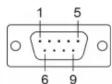
Note: The NPort 5610-8-DTL supports RS-232 only.
Specifications
LAN
Ethernet Ports: 10/100 Mbps (RJ45)
Protection: Built-in 1.5 KV magnetic isolation
Serial Interface
RS-232: NPort 5610-8-DTL
RS-232/422/485: NPort 5650-8-DTL, 5650I-8-DTL
Serial Ports: 8 (DB9-M connectors)
Isolation: 2 KV isolation (NPort 5650I-8-DTL)
Serial Signals
RS-232: TxD, RxD, RTS, CTS, DTR, DSR, DCD, GND
RS-422: Tx+, Tx-, Rx+, Rx-, GND
RS-485 (2-wire): Data+, Data-, GND
RS-485 (4-wire): Tx+, Tx-, Rx+, Rx-, GND
Serial Line Protection: 15 KV ESD for all signals
RS-485 Data Direction: ADDC™ (Automatic Data Direction Control)
Serial Communication Parameters
Parity: None, Even, Odd, Space, Mark
Data Bits: 5, 6, 7, 8
Stop Bit(s): 1, 1.5, 2
Flow Control: RTS/CTS, DSR/DTR (for RS-232 only), XON/XOFF
Transmission Speed: 50 bps to 921.6 Kbps
Power Requirements
Power Input: 12 to 48 VDC
Physical Characteristics
Operating Temperature:
Standard Models: 0 to 60°C (32 to 140°F)
Wide Temp. Models: -40 to 75°C (-40 to 167°F)
Storage Temperature: -40 to 85°C (-40 to 185°F)
Operating Humidity: 5 to 95% RH
Material: SECC sheet metal (0.8 mm)
Dimensions:
Without ears: 197 × 44 × 125 mm
With ears: 229 × 46 × 125 mm
With DIN-Rail kit: 197 × 52.8 × 125 mm
Certifications
Regulatory Approvals: FCC Class A, CE Class A, UL 60950-1,
LVD
Warranty: 5 years
MOXA®
www.moxa.com/support
The Americas: +1-714-528-6777 (toll-free: 1-888-669-2872)
Europe: +49-89-3 70 03 99-0
Asia-Pacific: +886-2-8919-1230
China: +86-21-5258-9955 (toll-free: 800-820-5036)
© 2011 Moxa Inc., All Rights Reserved