MS-HF6500 - Højttaler Moonki - Gratis brugsanvisning og manual
Find enhedens vejledning gratis MS-HF6500 Moonki i PDF-format.


Brugerspørgsmål om MS-HF6500 Moonki
0 spørgsmål om dette apparat. Besvar dem du kender, eller stil dit eget.
Stil et nyt spørgsmål om dette apparat
Download vejledningen til din Højttaler i PDF-format gratis! Find din vejledning MS-HF6500 - Moonki og tag din elektroniske enhed tilbage i hånden. På denne side er alle dokumenter nødvendige for brugen af din enhed offentliggjort. MS-HF6500 af mærket Moonki.
BRUGSANVISNING MS-HF6500 Moonki
- Reproduction controls
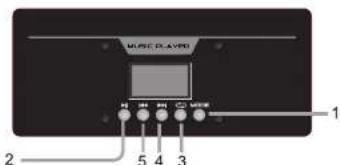
- Model: Select an operation modality.
- Play/Pause: Press to play a song or pause while playing a song.
- Press once to select a player mode, the options are:
- One: select this to play or repeat all music.
- All: with this option you can repeat all music.
- Next/Volume +: Press once to jump to the next song/press and hold to raise the volume level.
- Previous /Volume:- Oress once to jump previos song/ press and hold to diminish the volumen level.
6. Caution
- Avoid exposing the speaker box to moisture. If they are set up outdoors, be sure they are under cover.
- Do not use or store equipment near wet or damp places. It may cause a malfunction or shock hazard.
- If the power cord is broken, it must be replaced by the manufacturer, a service agent, or qualified personnel to avoid risks.
- To reduce the risk of fire or electric shock, do not expose this equipment to rain or moisture.
- Clean only with a soft, dry cloth.
3. TWS
WS (True Wireless Stereo) Playback: The speaker includes a TWS function. If you have two units of the same model on hand, switch to BT mode. The first time you play, you will need to choose one of the speakers as the master. Then, press and hold the play/pause button on the control panel for 5 seconds to pair it with the other speaker.
A quick notification sound will come from the "right channel" of the master speaker and a "left channel" sound from the other speaker after pairing successfully. You can then proceed with BT operation as usual. The sound will play through both speakers. When you turn off or change the playback mode and return to Bluetooth mode, the two speakers can automatically pair for TWS playback.
The first time TWS is paired, you may hear a brief noise from the speaker, which is not a malfunction. If the master speaker is turned off, TWS playback will stop.
Note: To successfully establish the TWS connection, both units must first be disconnected from any device.
moonki®
PRO AUDIO
MS-HF6500
1. Packing contents
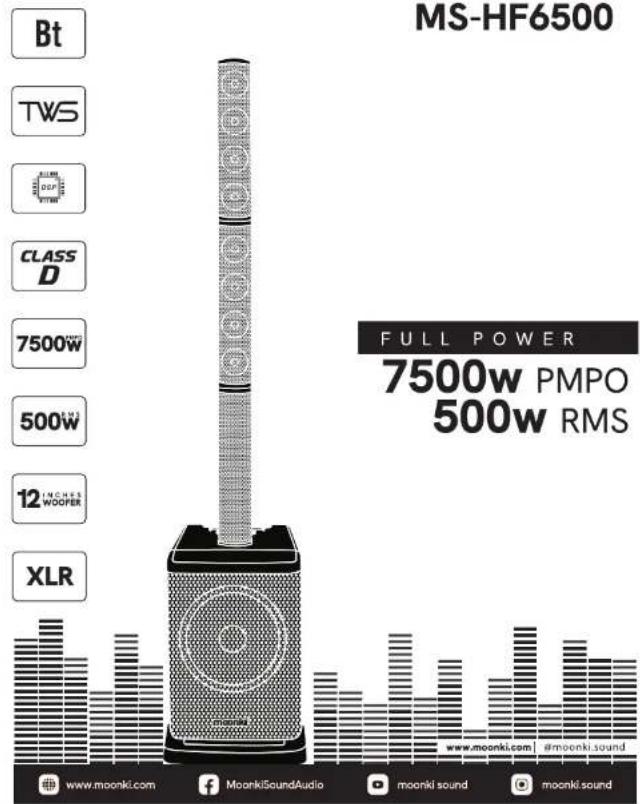
- 1 x Professional sound system
- 1 x Remote control
- 1 x Power cable
-
1 x Warranty card
-
Specifications
| Type | ACTIVE SPEAKER |
| Input | AC 115/230 V, 50/60 Hz350W Class I |
| Subwoofer | 12 inch |
| Voice coil | 2" (50mm) |
| Magnet | 3.12 lbs |
| Sensitivity | 95dB(+/-2dB) |
| Frequency response | 45Hz-20KHz |
| Column | 3 inch x 8 |
| Function | USB only for charging, BT |
| Remote control | Yes |
- Remote Control
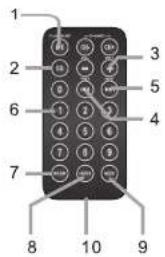
- Press to play a song or pause while playing a song.
- In play mode, press to set one equalizer mode.
- Vol +/Vol -
- Previous: Press once to jump to the previous song, press and hold to rewind.
- Next: Press once to jump to the next song, press and hold to fast-forward.
- No function.
- No function.
- Enter: Choose repeat mode.
- Model: Select an operating modality.
- Battery compartment
Wireless connection:
- To pair the professional system with a BT phone or audio device, press "MODE" repeatedly on the music player until selecting this mode.
- Put your phone or device to be used in BT device discovery mode.
- When your phone or device shows "MS-HF6500" device, confirm the link.
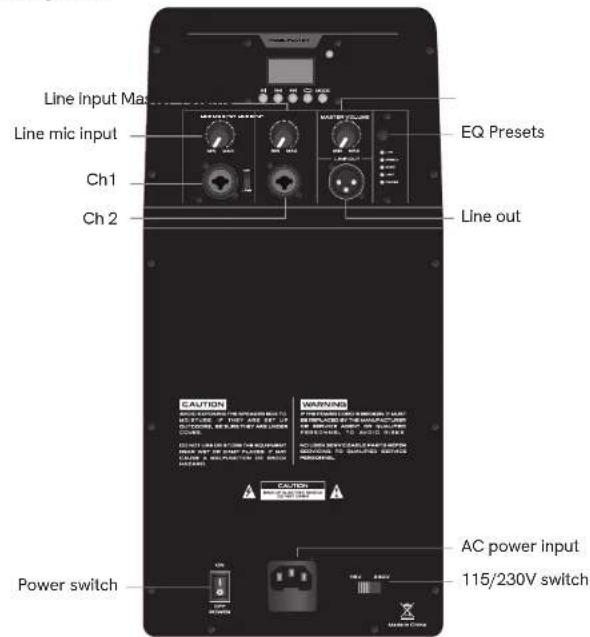
4.Amplifier