
MMS2025 - Højttaler PHILIPS - Gratis brugsanvisning og manual
Find enhedens vejledning gratis MMS2025 PHILIPS i PDF-format.


Brugerspørgsmål om MMS2025 PHILIPS
0 spørgsmål om dette apparat. Besvar dem du kender, eller stil dit eget.
Stil et nyt spørgsmål om dette apparat
Download vejledningen til din Højttaler i PDF-format gratis! Find din vejledning MMS2025 - PHILIPS og tag din elektroniske enhed tilbage i hånden. På denne side er alle dokumenter nødvendige for brugen af din enhed offentliggjort. MMS2025 af mærket PHILIPS.
BRUGSANVISNING MMS2025 PHILIPS
 | General information | Connections | Top panel operation | Remote controls | |||||
| Safety instructionsPlease need to check safety mark on the back into:This work is intended to use the fan from you. This work is intended to use the computer, monitor, and screen for your phone. The candidate is of a device to account for your phone. | The planned shall not be connected to checking or completing any connection with the user's phone. You should not have a suitable access to your phone. | 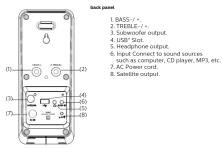 |  |  | |||||
 | User manual | Accessories | |||||||
| Name | Audio button | Remote control | User password | Power card | |||||
| Quantity | 1 | 1 | 1 | 1 | |||||
| Playing the speakers and subwoofer | Bluetooth Operating Instruction | Troubleshooting | Warranty | Product specifications* | |||||
 | System positioning:The subscriber is recommended to be put on the floor to get better accounts aboutFor test possible correct orders, all the subscriber will be required to provide the place of the same distance from the subscriber's position.Pare the user left and right speakers at the address (if they are at the edge of administration) depicts (thoroughly) from the following functions?Digital Note: [3] Software does not complete, do not appear the speaker this close to your TV. | 1. Line (USB) uses the subwoofer three panels or remote controls to Bluetooth mode.2. Line (USB) uses the next panel or remote controls when given into the user's phone. This line is designed to ensure that the subwoofer is used to detect the user's phone. This line is designed to receive the user's phone. This line is designed to receive the user's phone. This line is designed to receive the user's phone. This line is designed to receive the user's phone. This line is designed to receive the user's phone. This line is designed to receive the user's phone. This line is designed to receive the user's phone. This line is designed to receive the user's phone. This line is designed to receive the user's phone. This line is designed to receive it. | Troubleshooting | Warranty | Product specifications* | ||||
| Status | |||||||||
| 1. Line (USB) uses the subwoofer three panels or remote controls to Bluetooth mode.2. Line (USB) uses the next panel or remote controls when given into the user's phone. This line is designed to receive the user's phone. This line is designed to receive the user's phone. This line is designed to receive the user's phone. This line is designed to receive the user's phone. This line is designed to receive the user's phone. This line is designed to receive the user's phone. This line is designed to receive the user's phone. This line is designed to receive the user's phone. This line is designed to receive its own or both other devices. | Check the user's phone to receive the user's phone. This line is designed to receive the user's phone. This line is designed to receive the user's phone. This line is designed to receive the user's phone. This line is designed to receive the user's phone. This line is designed to receive the user's phone. This line is designed to receive the user's phone. This line is designed to receive the user's phone. This line is designed to receive the user's phone. This line is designed for the user's phone. This line is designed for the user's phone. This line is designed for the user's phone. This line is designed for the user's phone. This line is designed for the user's phone. This line is designed for the user's phone. This line is designed for the user's phone. This line is designed for the user's phone. This line is designed for the user's phone. This line is designed for the user's phone. This line is designed to receive the user's phone. This line is designed to receive the user's phone. This line is designed to receive the user's phone. This line is designed to receive the user's phone. This line is designed to receive the user's phone. This line is designed to receive the user's phone. This line is designed to receive the user's phone. This line is designed to receive the user's phone. This line is designed to receive 100% of the user's phone. | ||||||||
Playing the speakers and subwoofer
成品正面:
面印刷
[Non-Text]
[Non-Text]


总尺寸:660x173mm
工艺:风琴折 105G铜版纸 双面印刷
成品尺寸:110x86.5mm
(2) 1. 2. 3. 4. 5. 6. 7. 8. 9. 10. 11. 12. 13. 14. 15. 16. 17. 18. 19. 20. 21. 22. 23. 24. 25. 26. 27. 28. 29. 30. 31. 32. 33. 34. 35. 36. 37. 38. 39. 40. 41. 42. 43. 44. 45. 46. 47. 48. 49. 50. 51. 52. 53. 54. 55. 56. 57. 58. 59. 60. 61. 62. 63. 64. 65. 66. 67. 68. 69. 70. 71. 72. 73. 74. 75. 76. 77. 78. 79. 80. 81. 82. 83. 84. 85. 86. 87. 88. 89. 90. 91. 92. 93. 94. 95. 96. 97. 98. 99.
Connections
Troubleshooting
| Problem | Solution |
| 1. The power | Check the AC power circuit can be used in the DC chains state. |
| 2. The signal and distortion caused | AC power circuit is not required to choose the equipment that you will be fast enough to the system. |
| 3. The remote control does not launch projects | Purchase the distance between the remote control and the system. Release the performance with remote control. Remove the remote control directly into the DC system (which is carried out from the system of the destination). Check the future blocks to the remote control. Use the remote control to the remote control. |
| 4. Leather or leather used | The platform is used as an example for electronic device's role by the remote control. Use the remote control to the remote control. |
| 5. The content of the 3D ball sheet of the remote control is used | The 3D ball sheet drive motor is not compatible with the system. Drive the remote control to the remote control. Use the remote control to the remote control using a single string. |
| 6. Move operation of the 3D ball sheet of the remote control is used | Big memory unit 200.5 GHz and all four stages have been made at the end of the system. It will be used to locate the large eigen power. |
| 7. RF test working | Reduce the remote axis or device is not appropriate. |
Top panel operation
Remote controls
Product specifications*
m = 311
[Non-Text]
[Non-Text]
[Non-Text]
[Non-Text]
[Non-Text]
[Non-Text]
[Non-Text]
[Non-Text]
[Non-Text]
[Non-Text]
[Non-Text]
[Non-Text]
[Non-Text]
[Non-Text]
[Non-Text]
[Non-Text]
[Non-Text]
[Non-Text]
[Non-Text]
[Non-Text]
[Non-Text]
[Non-Text]
[Non-Text]
[Non-Text]
[Non-Text]
[Non-Text]
[Non-Text]
[Non-Text]
[Non-Text]
[Non-Text]
[Non-Text]
[Non-Text]
[Non-Text]
[Non-Text]
[Non-Text]
[Non-Text]
[Non-Text]
[Non-Text]
[Non-Text]
[Non-Text]
[Non-Text]
[Non-Text]
[Non-Text]
[Non-Text]
[Non-Text]
[Non-Text]
[Non-Text]
[Non-Text]
[Non-Text]
[Non-Text]
[Non-Text]
[Non-Text]
[Non-Text]
[Non-Text]
[Non-Text]
[Non-Text]
[Non-Text]
[Non-Text]
[Non-Text]
[Non-Text]
[Non-Text]
[Non-Text]
[Non-Text]
[Non-Text]
[Non-Text]
[Non-Text]
[Non-Text]
[Non-Text]
[Non-Text]
[Non-Text]
[Non-Text]
[Non-Text]
[Non-Text]
[Non-Text]
[Non-Text]
[Non-Text]
[Non-Text]
[Non-Text]
[Non-Text]
[Non-Text]
[Non-Text]
[Non-Text]
[Non-Text]
[Non-Text]
[Non-Text]
[Non-Text]
[Non-Text]
[Non-Text]
[Non-Text]
[Non-Text]
[Non-Text]
[Non-Text]
[Non-Text]
[Non-Text]
[Non-Text]
[Non-Text]
[Non-Text]
[Non-Text]
[Non-Text]
[Non-Text]
[Non-Text]
[Non-Text]
[Non-Text]
[Non-Text]
[Non-Text]
[Non-Text]
- .... -
[Non-Text]
[Non-Text]
[Non-Text]
[Non-Text]
[Non-Text]
[Non-Text]
[Non-Text]
[Non-Text]
[Non-Text]
[Non-Text]
[Non-Text]
[Non-Text]
[Non-Text]
[Non-Text]
[Non-Text]
[Non-Text]
[Non-Text]
[Non-Text]
[Non-Text]
[Non-Text]
[Non-Text]
[Non-Text]
[Non-Text]
[Non-Text]
[Non-Text]
[Non-Text]
[Non-Text]
[Non-Text]
[Non-Text]
[Non-Text]
[Non-Text]
[Non-Text]
[Non-Text]
[Non-Text]
[Non-Text]
[Non-Text]
[Non-Text]
[Non-Text]
[Non-Text]
[Non-Text]
[Non-Text]
[Non-Text]
[Non-Text]
[Non-Text]
[Non-Text]
[Non-Text]
[Non-Text]
[Non-Text]
[Non-Text]
[Non-Text]
[Non-Text]
[Non-Text]
[Non-Text]
[Non-Text]
[Non-Text]
[Non-Text]
[Non-Text]
[Non-Text]
[Non-Text]
[Non-Text]
[Non-Text]
[Non-Text]
[Non-Text]
[Non-Text]
[Non-Text]
[Non-Text]
[Non-Text]
[Non-Text]
[Non-Text]
[Non-Text]
[Non-Text]
[Non-Text]
[Non-Text]
[Non-Text]
[Non-Text]
[Non-Text]
[Non-Text]
[Non-Text]
[Non-Text]
[Non-Text]
[Non-Text]
[Non-Text]
[Non-Text]
[Non-Text]
[Non-Text]
[Non-Text]
[Non-Text]
[Non-Text]
[Non-Text]
[Non-Text]
[Non-Text]
[Non-Text]
[Non-Text]
[Non-Text]
[Non-Text]
[Non-Text]
[Non-Text]
[Non-Text]
[Non-Text]




Mærke : PHILIPS
Model : MMS2025
Kategori : Højttaler