
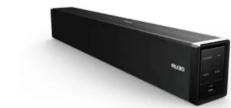
HTL1020 - Soundbar PHILIPS - Gratis brugsanvisning og manual
Find enhedens vejledning gratis HTL1020 PHILIPS i PDF-format.


Brugerspørgsmål om HTL1020 PHILIPS
0 spørgsmål om dette apparat. Besvar dem du kender, eller stil dit eget.
Stil et nyt spørgsmål om dette apparat
Download vejledningen til din Soundbar i PDF-format gratis! Find din vejledning HTL1020 - PHILIPS og tag din elektroniske enhed tilbage i hånden. På denne side er alle dokumenter nødvendige for brugen af din enhed offentliggjort. HTL1020 af mærket PHILIPS.
BRUGSANVISNING HTL1020 PHILIPS
| PHILIPS Standard Performance | |||||
 User manual User manual | General informationSafety instructionsThese must be standard on the safety mark on the back sideAThis mark is intended to set for the question...The recommended duration of voltage will be the product that may be of sufficient weight or volume suitable for a single or two-inch drive. This mark is interested to add the user for a regular operating and servicing instruction.Warthing:• Available seasonal periods on high-volume cars, and• Do not find any electronic warning with high output signal, such as Mobile Price or DVD, etc., as they are clear device or network during the Substore. • Please check the system from the wall socket.• Do not open the room or back outlet to avoid electrical shock or any other accidents. No connections please use or make it necessary. 2. Stop for soundwork.• Plug the system to the AC outlet with the high voltage may be the back panel of the Substore.• The Mobile pool should be the recovered device. Note that all users need to use the device to access or install some modifications. | • The product shall not be detrimental or disruptive and that no operation is with blowouts such as water, shall be placed on the product.• Batteries shall not be sustained or excessive heat such as sunshine. Fire or the line.• Abortion should be shown to the environmental aspects of battery discharge.Care and safety informationAvoid high temperatures, moisture, water and chat• Applicable should be tested in the offering or sampling of solution or test.• Do not alarm how to do danger on the substore, and sensitive (e.g. Input fluid optics lightest carding).• Do not install how fresh water• Do not lock any ventilation opening• Use an operation in a location where outdoor ventilation may be present inside built up, allow at least 100% of the surface and around the appropriate to adequate ventilation• High volume the back cover of Substore becomes safe for the cabinet• Care of the cabinet• Use can cloth slightly restrained to clean the cabinet. To read new audio compressing audio, vinyl, vinyl colors or adhesives. | Connections U/6J1.DC ISV1/66A input.2. Input Connect to sound sources such as computer, CD players, MP3, etc. U/6J1.DC ISV1/66A input.2. Input Connect to sound sources such as computer, CD players, MP3, etc. | Top panel operation 1. g/SOURCE: The Speaker system is in stand by mode when power on, with white LED ---- Short press the "g/SOURCE" to select appropriate source. Keeping their "g/GPRS" key to prevent for long will go back to stand by mode. You can toggle through the input modules by pressing the "g/SOURCE" key. "E" denotes Bluetooth Models. "AI" denotes Audio Mode. "UIP" denotes USB mode.2. Play/Pause the songs.3. Wi/VOL: Long press for volume decrease/ short press for prev track.4. Play/USB: Long press for volume increase/ short press for next track.5. Use USB Slot.Remark:On under not to disturb in the dark, the LED display of soundur is set to be dim after 30 seconds if there is no operation, and display off after another 90 seconds. You can press any button to resume. 1. g/SOURCE: The Speaker system is in stand by mode when power on, with white LED ---- Short press the "g/SOURCE" to select appropriate source. Keeping their "g/GPRS" key to prevent for long will go back to stand by mode. You can toggle through the input modules by pressing the "g/SOURCE" key. "E" denotes Bluetooth Models. "AI" denotes Audio Mode. "UIP" denotes USB mode.2. Play/Pause the songs.3. Wi/VOL: Long press for volume decrease/ short press for prev track.4. Play/USB: Long press for volume increase/ short press for next track.5. Use USB Slot.Remark:On under not to disturb in the dark, the LED display of soundur is set to be dim after 30 seconds if there is no operation, and display off after another 90 seconds. You can press any button to resume. | Playing the speakersSystem positioning:The soundur is recommended to be put on the fast speaker to get a better automatic effect.Helpful Next-To and magnetic interference, we not position the speaker, too close to your TV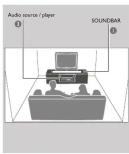 |
| AccessoriesItem:Audio/PCIK valueUser monitorWall countAdoptionQuantity1Remark please ensure the plastic wall mount and use initioles. If the soundur need to be hung on the wall. | 1 | 2 | 3 | 4 | |
| [Z50H]Regularly use, periodic and/or optional. See the Philips company's website.CSee details: The Standard Deviation Service is recommended to maintain the same order. For speaker system goes to the second mode. Orders to protect privacy of mobile phone user. Operation resumes once the wall is disconnected. | Bluetooth Operating Instruction1. Press SOURCE key from soundbur to Bluetooth model:2. When selecting the Bluetooth model, it is displayed will start blinking and you will hear an audio tone which includes Bluetooth playing mode.3. We have been used to watch the device without a touch screen. We want to listen to the device. We want to listen to the device. We want to listen to the device. We want to listen to the device. We want to listen to the device. We want to listen to the device. We want to listen to the device. We want to listen to the device. We want to listen to the device. We want to listen to the device. We want to listen to the device. We want to listen to the device. We want to listen to the device. We wantto follow the device. We want to listen to the device. We want to listen to the device. We want to listen to the device. We want to listen to the device. We want to listen to the device. We want to listen to the device. We want to listen to the device. We want to listen to the device. We want to listen to the device. We want to listen to the device. We want to listen to the device. We want to listen to the device. | TroubleshootingWarming:Under the conditions should play to input the system yourself, so this will expand the warranty. Don't keep the system as there is a role of electric shock if a shock can, but check the point(s) limit. Do not enable the connection to the device for input. If you are unable to render the portion by following time mentioned to below table.Provision1. Use power2. Use soundless disintected sound3. Use from or outside sound4. Use control of the US flash screen connected to the wall3. Use operation of the US flash screen connected to the wall4. Use operation of the US flash screen connected to the wall5. Use operation of the US flash screen connected to the wall6. Use operation of the US flash screen connected to the wall7. Use operation of the US flash screen connected to the wall8. Use operation of the US flash screen connected to the wall9. Use operation of the US flash screen connected to the wall10. Use operation of the US flash screen connected to the wall11. Use operation of the US flash screen connected to the wall12. Use operation of the US flash screen connected to the wall13. Use operation of the US flash screen connected to the wall14. Use operation of the US flash screen connected to the wall15. Use operation of the US flash screen connected to the wall16. Use operation of the US flash screen connected to the wall17. Use operation of the US flash screen connected to the wall18. Use operation of the US flash screen connected to the wall19. Use operation of the US flash screen connected to the wall20. Use operation of the US flash screen connected to the wall21. Use operation of the US flash screen connected to the wall22. Use operation of the US flash screen connected to the wall23. Use operation of the US flash screen connected to the wall24. Use operation of the US flash screen connected to the wall25. Use operation of the US flash screen connected to the wall26. Use operation of the US flash screen connected to the wall27. Use operation of the US flash screen connected to the wall28. Use operation of the US flash screen connected to the wall29. Use operation of the US flash screen connected to the wall30. Use operation of the US flash screen connected to the wall31. Use operation of the US flash screen connected to the wall32. Use operation of the US flash screen connected to the wall33. Use operation of the US flash screen connected to the wall34. Use operation of the US flash screen connected to the wall35. Use operation of the US flash screen connected to the wall36. Use operation of the US flash screen connected to the wall37. Use operation of the US flash screen connected to the wall38. Use operation of the US flash screen connected to the wall39. Use operation of the US flash screen connected to the wall40. Use operation of the US flash screen connected to the wall41. Use operation of the US flash screen connected to the wall42. Use operation of the US flash screen connected to the wall43. Use operation of the US flash screen connected to the wall44. Use operation of the US flash screen connected to the wall45. Use operation of the US flash screen connected to the wall46. Use operation of the US flash screen connected to the wall47. Use operation of the US flash screen connected to the wall48. Use operation of the US flash screen connected to the wall49. Use operation of the US flash screen connected to the wall50. Use operation of the US flash screen connected to the wall51. Use operation of the US flash screen connected to the wall52. Use operation of the US flash screen connected to the wall53. Use operation of the US flash screen connected to the wall54. Use operation of the US flash screen connected to the wall55. Use operation of the US flash screen connected to the wall56. Use operation of the US flash screen connected to the wall57. Use operation of the US flash screen connected to the wall58. Use operation of the US flash screen connected to the wall59. Use operation of the US flash screen connected to the wall60. Use operation of the US flash screen connected to the wall61. Use operation of the US flash screen connected to the wall62. Use operation of the US flash screen connected to the wall63. Use operation of the US flash screen connected to the wall64. Use operation of the US flash screen connected to the wall65. Use operation of the US flash screen connected to the wall66. Use operation of the US flash screen connected to the wall67. Use operation of the US flash screen connected to the wall68. Use operation of the US flash screen connected to the wall69. Use operation of the US flash screen connected to the wall70. Use operation of the US flash screen connected to the wall71. Use operation of the US flash screen connected to the wall72. Use operation of the US flash screen connected to the wall73. Use operation of the US flash screen connected to the wall74. Use operation of the US flash screen connected to the wall75. Use operation of the US flash screen connected to the wall76. Use operation of the US flash screen connected to the wall77. Use operation of the US flash screen connected to the wall78. Use operation of the US flash screen connected to the wall79. Use operation of the US flash screen connected to the wall80. Use operation of the US flash screen connected to the wall81. Use operation of the US flash screen connected to the wall82. Use operation of the US flash screen connected to the wall83. Use operation of the US flash screen connected to the wall84. Use operation of the US flash screen connected to the wall85. Use operation of the US flash screen connected to the wall86. Use operation of the US flash screen connected to the wall87. Use operation of the US flash screen connected to the wall88. Use operation of the US flash screen connected to the wall89. Use operation of the US flash screen connected to the wall90. Use operation of the US flash screen connected to the wall91. Use operation of the US flash screen connected to the wall92. Use operation of the US flash screen connected to the wall93. Use operation of the US flash screen connected to the wall94. Use operation of the US flash screen connected to the wall95. Use operation of the US flash screen connected to the wall96. Use operation of the US flash screen connected to the wall97. Use operation of the US flash screen connected to the wall98. Use operation of the US flash screen connected to the wall99. Use operation of the US flash screen connected to the wall100. Use operation of the US flash screen connected to the wall101. Use operation of the US flash screen connected to the wall102. Use operation of the US flash screen connected to the wall103. Use operation of the US flash screen connected to the wall104. Use operation of the US flash screen connected to the wall105. Use operation of the US flash screen connected to the wall106. Use operation of the US flash screen connected to the wall107. Use operation of the US flash screen connected to the wall108. Use operation of the US flash screen connected to the wall109. Use operation of the US flash screen connected to the wall110. Use operation of the US flash screen connected to the wall111. Use operation of the US flash screen connected to the wall112. Use operation of the US flash screen connected to the wall113. Use operation of the US flash screen connected to the wall114. Use operation of the US flash screen connected to the wall115. Use operation of the US flash screen connected to the wall116. Use operation of the US flash screen connected to the wall117. Use operation of the US flash screen connected to the wall118. Use operation of the US flash screen connected to the wall119. Use operation of the US flash screen connected to the wall120. Use operation of the US flash screen connected to the wall121. Use operation of the US flash screen connected to the wall122. Use operation of the US flash screen connected to the wall123. Use operation of the US flash screen connected to the wall124. Use operation of the US flash screen connected to the wall125. Use operation of the US flash screen connected to the wall126. Use operation of the US flash screen connected to the wall127. Use operation of the US flash screen connected to the wall128. Use operation of the US flash screen connected to the wall129. Use operation of the US flash screen connected to the wall130. Use operation of the US flash screen connected to the wall131. Use operation of the US flash screen connected to the wall132. Use operation of the US flash screen connected to the wall133. Use operation of the US flash screen connected to the wall134. Use operation of the US flash screen connected to the wall135. Use operation of the US flash screen connected to the wall136. Use operation of the US flash screen connected to the wall137. Use operation of the US flash screen connected to the wall138. Use operation of the US flash screen connected to the wall139. Use operation of the US flash screen connected to the wall140. Use operation of the US flash screen connected to the wall141. Use operation of the US flash screen connected to the wall142. Use operation of the US flash screen connected to the wall143. Use operation of the US flash screen connected to the wall144. Use operation of the US flash screen connected to the wall145. Use operation of the US flash screen connected to the wall146. Use operation of the US flash screen connected to the wall147. Use operation of the US flash screen connected to the wall148. Use operation of the US flash screen connected to the wall149. Use operation of the US flash screen connected to the wall150. Use operation of the US flash screen connected to the wall151. Use operation of the US flash screen connected to the wall152. Use operation of the US flash screen connected to the wall153. Use operation of the US flash screen connected to the wall154. Use operation of the US flash screen connected to the wall155. Use operation of the US flash screen connected to the wall156. Use operation of the US flash screen connected to the wall157. Use operation of the US flash screen connected to the wall158. Use operation of the US flash screen connected to the wall159. Use operation of the US flash screen connected to the wall160. Use operation of the US flash screen connected to the wall161. Use operation of the US flash screen connected to the wall162. Use operation of the US flash screen connected to the wall163. Use operation of the US flash screen connected to the wall164. Use operation of the US flash screen connected to the wall165. Use operation of the US flash screen connected to the wall166. Use operation of the US flash screen connected to the wall167. Use operation of the US flash screen connected to the wall168. Use operation of the US flash screen connected to the wall169. Use operation of the US flash screen connected to the wall170. Use operation of the US flash screen connected to the wall171. Use operation of the US flash screen connected to the wall172. Use operation of the US flash screen connected to the wall173. Use operation of the US flash screen connected to the wall174. Use operation of the US flash screen connected to the wall175. Use operation of the US flash screen connected to the wall176. Use operation of the US flash screen connected to the wall177. Use operation of the US flash screen connected to the wall178. Use operation of the US flash screen connected to the wall179. Use operation of the US flash screen connected to the wall180. Use operation of the US flash screen connected to the wall181. Use operation of the US flash screen connected to the wall182. Use operation of the US flash screen connected to the wall183. Use operation of the US flash screen connected to the wall184. Use operation of the US flash screen connected to the wall185. Use operation of the US flash screen connected to the wall186. Use operation of the US flash screen connected to the wall187. Use operation of the US flash screen connected to the wall188. Use operation of the US flash screen connected to the wall189. Use operation of the US flash screen connected to the wall190. Use operation of the US flash screen connected to the wall191. Use operation of the US flash screen connected to the wall192. Use operation of the US flash screen connected to the wall193. Use operation of the US flash screen connected to the wall194. Use operation of the US flash screen connected to the wall195. Use operation of the US flash screen connected to the wall196. Use operation of the US flash screen connected to the wall197. Use operation of the US flash screen connected to the wall198. Use operation of the US flash screen connected to the wall199. Use operation of the US flash screen connected to the wall200. Use operation of the US flash screen connected to the wall201. Use operation of the US flash screen connected to the wall202. Use operation of the US flash screen connected to the wall203. Use operation of the US flash screen connected to the wall204. Use operation of the US flash screen connected to the wall205. Use operation of the US flash screen connected to the wall206. Use operation of the US flash screen connected to the wall207. Use operation of the US flash screen connected to the wall208. Use operation of the US flash screen connected to the wall209. Use operation of the US flash screen connected to the wall210. Use operation of the US flash screen connected to the wall211. Use operation of the US flash screen connected to the wall212. Use operation of the US flash screen connected to the wall213. Use operation of the US flash screen connected to the wall214. Use operation of the US flash screen connected to the wall215. Use operation of the US flash screen connected to the wall216. Use operation of the US flash screen connected to the wall217. Use operation of the US flash screen connected to the wall218. Use operation of the US flash screen connected to the wall219. Use operation of the US flash screen connected to the wall220. Use operation of the US flash screen connected to the wall221. Use operation of the US flash screen connected to the wall222. Use operation of the US flash screen connected to the wall223. Use operation of the US flash screen connected to the wall224. Use operation of the US flash screen connected to the wall225. Use operation of the US flash screen connected to the wall226. Use operation of the US flash screen connected to the wall227. Use operation of the US flash screen connected to the wall228. Use operation of the US flash screen connected to the wall229. Use operation of the US flash screen connected to the wall230. Use operation of the US flash screen connected to the wall231. Use operation of the US flash screen connected to the wall232. Use operation of the US flash screen connected to the wall233. Use operation of the US flash screen connected to the wall234. Use operation of the US flash screen connected to the wall235. Use operation of the US flash screen connected to the wall236. Use operation of the US flash screen connected to the wall237. Use operation of the US flash screen connected to the wall238. Use operation of the US flash screen connected to the wall239. Use operation of the US flash screen connected to the wall240. Use operation of the US flash screen connected to the wall241. Use operation of the US flash screen connected to the wall242. Use operation of the US flash screen connected to the wall243. Use operation of the US flash screen connected to the wall244. Use operation of the US flash screen connected to the wall245. Use operation of the US flash screen connected to the wall246. Use operation of the US flash screen connected to the wall247. Use operation of the US flash screen connected to the wall248. Use operation of the US flash screen connected to the wall249. Use operation of the US flash screen connected to the wall250. Use operation of the US flash screen connected to the wall251. Use operation of the US flash screen connected to the wall252. Use operation of the US flash screen connected to the wall253. Use operation of the US flash screen connected to the wall254. Use operation of the US flash screen connected to the wall255. Use operation of the US flash screen connected to the wall256. Use operation of the US flash screen connected to the wall257. Use operation of the US flash screen connected to the wall258. Use operation of the US flash screen connected to the wall259. Use operation of the US flash screen connected to the wall260. Use operation of the US flash screen connected to the wall261. Use operation of the US flash screen connected to the wall262. Use operation of the US flash screen connected to the wall263. Use operation of the US flash screen connected to the wall264. Use operation of the US flash screen connected to the wall265. Use operation of the US flash screen connected to the wall266. Use operation of the US flash screen connected to the wall267. Use operation of the US flash screen connected to the wall268. Use operation of the US flash screen connected to the wall269. Use operation of the US flash screen connected to the wall270. Use operation of the US flash screen connected to the wall271. Use operation of the US flash screen connected to the wall272. Use operation of the US flash screen connected to the wall273. Use operation of the US flash screen connected to the wall274. Use operation of the US flash screen connected to the wall275. Use operation of the US flash screen connected to the wall276. Use operation of the US flash screen connected to the wall277. Use operation of the US flash screen connected to the wall278. Use operation of the US flash screen connected to the wall279. Use operation of the US flash screen connected to the wall280. Use operation of the US flash screen connected to the wall281. Use operation of the US flash screen connected to the wall282. Use operation of the US flash screen connected to the wall283. Use operation of the US flash screen connected to the wall284. Use operation of the US flash screen connected to the wall285. Use operation of the US flash screen connected to the wall286. Use operation of the US flash screen connected to the wall287. Use operation of the US flash screen connected to the wall288. Use operation of the US flash screen connected to the wall289. Use operation of the US flash screen connected to the wall290. Use operation of the US flash screen connected to the wall291. Use operation of the US flash screen connected to the wall292. Use operation of the US flash screen connected to the wall293. Use operation of the US flash screen connected to the wall294. Use operation of the US flash screen connected to the wall295. Use operation of the US flash screen connected to the wall296. Use operation of the US flash screen connected to the wall297. Use operation of the US flash screen connected to the wall298. Use operation of the US flash screen connected to the wall299. Use operation of the US flash screen connected to the wall300. Use operation of the US flash screen connected to the wall301. Use operation of the US flash screen connected to the wall302. Use operation of the US flash screen connected to the wall303. Use operation of the US flash screen connected to the wall304. Use operation of the US flash screen connected to the wall305. Use operation of the US flash screen connected to the wall306. Use operation of the US flash screen connected to the wall307. Use operation of the US flash screen connected to the wall308. Use operation of the US flash screen connected to the wall309. Use operation of the US flash screen connected to the wall310. Use operation of the US flash screen connected to the wall311. Use operation of the US flash screen connected to the wall312. Use operation of the US flash screen connected to the wall313. Use operation of the US flash screen connected to the wall314. Use operation of the US flash screen connected to the wall315. Use operation of the US flash screen connected to the wall316. Use operation of the US flash screen connected to the wall317. Use operation of the US flash screen connected to the wall318. Use operation of the US flash screen connected to the wall319. Use operation of the US flash screen connected to the wall320. Use operation of the US flash screen connected to the wall321. Use operation of the US flash screen connected to the wall322. Use operation of the US flash screen connected to the wall323. Use operation of the US flash screen connected to the wall324. Use operation of the US flash screen connected to the wall325. Use operation of the US flash screen connected to the wall326. Use operation of the US flash screen connected to the wall327. Use operation of the US flash screen connected to the wall328. Use operation of the US flash screen connected to the wall329. Use operation of the US flash screen connected to the wall330. Use operation of the US flash screen connected to the wall331. Use operation of the US flash screen connected to the wall332. Use operation of the US flash screen connected to the wall333. Use operation of the US flash screen connected to the wall334. Use operation of the US flash screen connected to the wall335. Use operation of the US flash screen connected to the wall336. Use operation of the US flash screen connected to the wall337. Use operation of the US flash screen connected to the wall338. Use operation of the US flash screen connected to the wall339. Use operation of the US flash screen connected to the wall340. Use operation of the US flash screen connected to the wall341. Use operation of the US flash screen connected to the wall342. Use operation of the US flash screen connected to the wall343. Use operation of the US flash screen connected to the wall344. Use operation of the US flash screen connected to the wall345. Use operation of the US flash screen connected to the wall346. Use operation of the US flash screen connected to the wall347. Use operation of the US flash screen connected to the wall348. Use operation of the US flash screen connected to the wall349. Use operation of the US flash screen connected to the wall350. Use operation of the US flash screen connected to the wall351. Use operation of the US flash screen connected to the wall352. Use operation of the US flash screen connected to the wall353. Use operation of the US flash screen connected to the wall354. Use operation of the US flash screen connected to the wall355. Use operation of the US flash screen connected to the wall356. Use operation of the US flash screen connected to the wall357. Use operation of the US flash screen connected to the wall358. Use operation of the US flash screen connected to the wall359. Use operation of the US flash screen connected to the wall360. Use operation of the US flash screen connected to the wall361. Use operation of the US flash screen connected to the wall362. Use operation of the US flash screen connected to the wall363. Use operation of the US flash screen connected to the wall364. Use operation of the US flash screen connected to the wall365. Use operation of the US flash screen connected to the wall366. Use operation of the US flash screen connected to the wall367. Use operation of the US flash screen connected to the wall368. Use operation of the US flash screen connected to the wall369. Use operation of the US flash screen connected to the wall370. Use operation of the US flash screen connected to the wall371. Use operation of the US flash screen connected to the wall372. Use operation of the US flash screen connected to the wall373. Use operation of the US flash screen connected to the wall374. Use operation of the US flash screen connected to the wall375. Use operation of the US flash screen connected to the wall376. Use operation of the US flash screen connected to the wall377. Use operation of the US flash screen connected to the wall378. Use operation of the US flash screen connected to the wall379. Use operation of the US flash screen connected to the wall380. Use operation of the US flash screen connected to the wall381. Use operation of the US flash screen connected to the wall382. Use operation of the US flash screen connected to the wall383. Use operation of the US flash screen connected to the wall384. Use operation of the US flash screen connected to the wall385. Use operation of the US flash screen connected to the wall386. Use operation of the US flash screen connected to the wall387. Use operation of the US flash screen connected to the wall388. Use operation of the US flash screen connected to the wall389. Use operation of the US flash screen connected to the wall390. Use operation of the US flash screen connected to the wall391. Use operation of the US flash screen connected to the wall392. Use operation of the US flash screen connected to the wall393. Use operation of the US flash screen connected to the wall394. Use operation of the US flash screen connected to the wall395. Use operation of the US flash screen connected to the wall396. Use operation of the US flash screen connected to the wall397. Use operation of the US flash screen connected to the wall398. Use operation of the US flash screen connected to the wall399. Use operation of the US flash screen connected to the wall400. Use operation of the US flash screen connected to the wall401. Use operation of the US flash screen connected to the wall402. Use operation of the US flash screen connected to the wall403. Use operation of the US flash screen connected to the wall404. Use operation of the US flash screen connected to the wall405. Use operation of the US flash screen connected to the wall406. Use operation of the US flash screen connected to the wall407. Use operation of the US flash screen connected to the wall408. Use operation of the US flash screen connected to the wall409. Use operation of the US flash screen connected to the wall | |||
总尺寸:550x173mm
工艺:风琴折 105G铜版纸 双面印刷
成品尺寸:110x86.5mm
30709L029609-002
成品正面:


- @/SOURCE: The Speaker system is in stand by mode when power on, with
white LED “----”. Short press the “@/SOURCE” to select appropriate source. Keeping the “e/SOURCE” key pressed for long will go back to stand by mode.
Keeping the "SOURCE" key pressed for long, will go back to stand by mode. You can toggle through the input modes by pressing the "SOURCE" key.
"bt" denotes Bluetooth Mode, "AU" denotes Audio Mode, "Ud" denotes USB" mode. - ⚠/VOL-: Long press for v
- ▶/VOL+: Long press for volume increase/ short press for next track.
- USB* slot
Remark: In order n
30 seconds if there is no operation, and display off after another 90 seconds.
You can press any button to resume. * AVAILABLE IF CONNECTED
| Total system power 20W/kWh | BT version | V5.0 | |
| Separation | u40db | BT range | Up to 10 meters |
| ShIR | u95db | USB max capacity | Up to 32GB |
| Audio input socket | Audio-2RCA cable | playability | MP3 track |
| Power consumption | 4.0 W |
| Soundbar 2 Way | |
| Speaker size 3 inches*2 + 2 inches | |
| Impedance | 8 Ohm + 4 Ohm |
| Frequency range | 45Hz - 20kHz |
| Dimension (mm) W x H x D | 603 x 70 x 92 |
| Weight | 1.9Kg |


Mærke : PHILIPS
Model : HTL1020
Kategori : Soundbar