
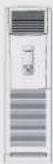
CS-C18FFH - Aircondition PANASONIC - Gratis brugsanvisning og manual
Find enhedens vejledning gratis CS-C18FFH PANASONIC i PDF-format.


Brugerspørgsmål om CS-C18FFH PANASONIC
0 spørgsmål om dette apparat. Besvar dem du kender, eller stil dit eget.
Stil et nyt spørgsmål om dette apparat
Download vejledningen til din Aircondition i PDF-format gratis! Find din vejledning CS-C18FFH - PANASONIC og tag din elektroniske enhed tilbage i hånden. På denne side er alle dokumenter nødvendige for brugen af din enhed offentliggjort. CS-C18FFH af mærket PANASONIC.
BRUGSANVISNING CS-C18FFH PANASONIC
Panasonic®
Operating Instructions Air Conditioner
CS-C18FFH CU-C18FFH
CS-C28FFH CU-C28FFH
natural_image
Interior view of a modern living room with sofa, coffee table, and wall art (no visible text or symbols)
ENGLISH
Before operating the unit, read these operating instructions thoroughly and keep them for future reference.
CONTENTS
- Safety Precautions....2
• Product Overview....3
• How to Operate....5 - Care & Cleaning....7
- Product Specification 8
Thank you for purchasing Panasonic Air Conditioner
SAFETY PRECAUTIONS
■ Definition
To prevent personal injury, injury to others and property damage, the following instructions must be followed.
Incorrect operation due to failure to follow instructions will cause harm or damage, the seriousness of which is classified as below:

Warning
This sign warns of death or serious injury.

Caution
This sign warns of injury or damage to property.
The instructions to be followed are classified by the following symbols:

This symbol denotes an action that is PROHIBITED.


These symbols denote actions that are COMPULSORY.
Installation Precautions

Warning
Do not install, remove and reinstall the unit by yourself.
- Improper installation will cause leakage, electric shock or fire. Please consult an authorized dealer or specialist for the installation work.
- This equipment must be earthed and installed with ELCB. Otherwise, it may cause electrical shock or fire in case of malfunction.

Caution

• This air conditioner must be earthed. Improper grounding will cause electric shock.
- Ensure that the drainage piping is connected properly. Otherwise, water will leak.

- Do not install the unit in a potentially explosive atmosphere.
Operation Precautions

Warning

• Do not share power outlet.
- Do not modify power cord.
• Do not use an extension cord.
• Do not operate with wet hands.
- Do not insert finger or other objects into the indoor or outdoor unit.
- Do not attempt to repair the unit by yourself.
- Do not use rechargeable (Ni-Cd) batteries in remote control.
- Keep the remote control away from infants and small children to prevent them from accidentally swallowing the batteries.
- Do not touch the fin of the indoor and outdoor unit.

- Remove the cover of the outdoor unit before operating.
• Use specified supply cord. - If the supply cord is damaged or needed to be replaced, it must be replaced by the manufacturer or its service agent or a similarly qualified person in order to avoid a hazard.
- Remove the batteries of remote control if the unit is not going to be used for a long period of time.
- New batteries of the same type must be inserted following the polarity stated to prevent malfunction of the remote control.
- In case of emergency or abnormal condition (burnt smell, etc) occurs, turn off the power supply.
- In case of emergency or abnormal condition (burnt smell, etc) occurs, turn off the power supply.


Caution

- Stand on a firm platform to operate the air conditioner or carry out maintenance.
- Do not wash the unit with water, benzene, thinner or scouring powder.
- Do not use for other purposes such as preservation of food.
- Do not use any combustible equipment at airflow direction.
- Do not sit or place anything on the indoor or outdoor unit.
- Do not expose directly to cold air for a long period.

• Ventilate the room regularly.
- Pay attention as to whether the installation rack is damaged after long period of usage.
- Switch off the power supply before cleaning or servicing.
- Switch off the power supply when the unit is not to be used for an extended period of time.
Safety Regulation
The appliance is not intended for use by young children or infirm person without supervision. Young children should be supervised to ensure that they do not play with the appliance.
Replacement or installation of circuit breaker shall be performed by authorized/qualified personnel only. The wires in this mains lead are coloured in accordance with the following code:
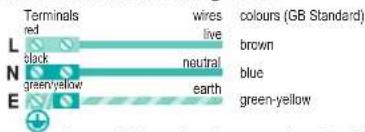
Different countries may have different colour coding for the wires.
Operation Condition (°C)
Use this air conditioner under the following temperature range.
| DBT: Dry Bulb TemperatureWBT: Wet Bulb Temperature | Indoor Outdoor | |||
| DBT WBT DBT WBT | ||||
| Maximum Temperature 32 23 43 26 | ||||
| Minimum Temperature 21 15 21 15 | ||||
Note: The illustrations in this manual are for explanation purposes only and may differ from the actual unit. It is subjected to change without notice for future improvement.
PRODUCT OVERVIEW
Indoor Unit
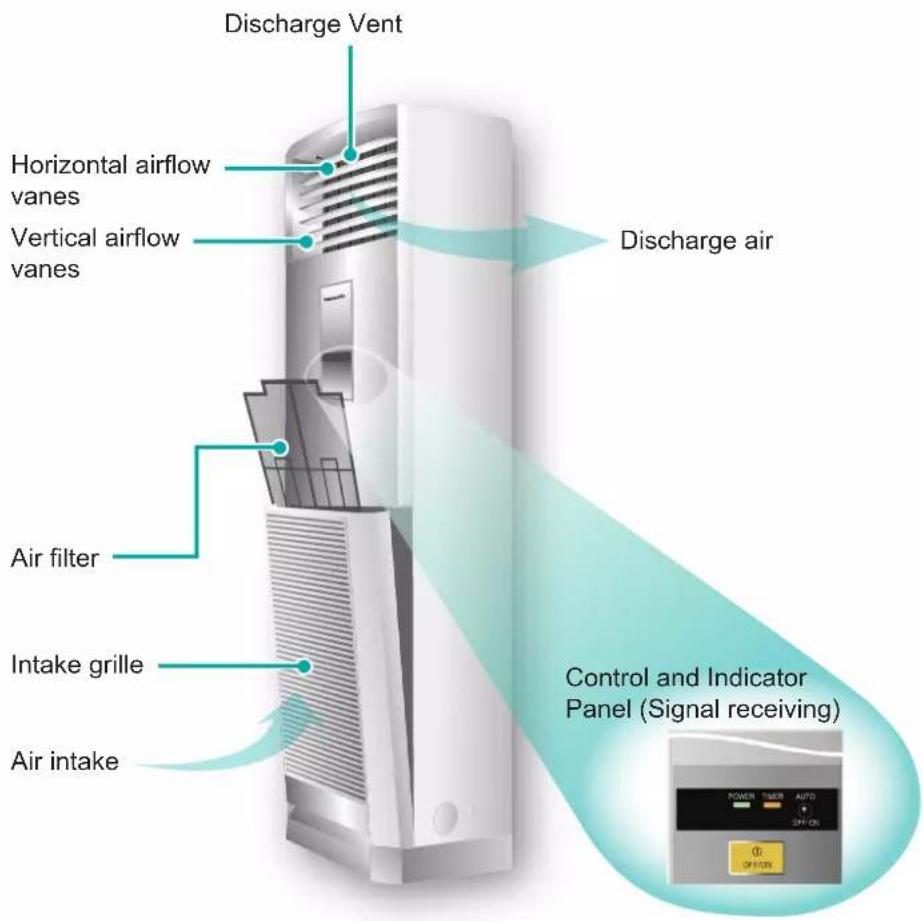
Outdoor Unit
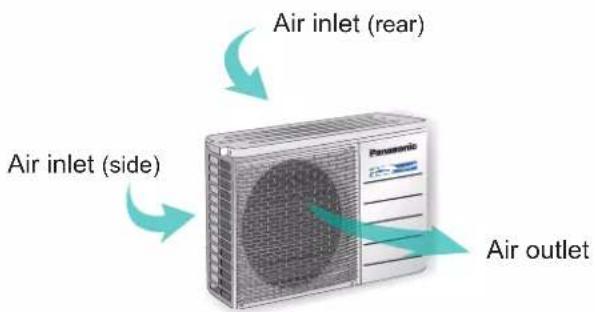
About
OFF/ON operation button
• To turn off or turn on the air conditioner.
- Operation mode, temperature, fan speed and OFF/ON timer should be set by remote control.
Auto OFF/ON Button
• To operate the unit if the remote control is misplaced or malfunctioning.
| Action Operation mode | |
| Press once. | Automatic Operation |
| Press until “beep” sound. | Cooling Operation |
- To OFF, press again the Auto OFF/ON button.
• To switch the remote control signal receiving sound off or on.
-
Keep pressing the Auto OFF/ON button for about 10 seconds until "beep-beep" sound to switch off the signal receiving sounds.
-
Repeat the above step if you want to switch on the signal receiving sounds.
AIR SWING
• Airflow direction only can be adjusted manually.
• Vertical airflow direction control.
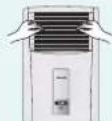
- Pull the vane by the left and right portion gently.
-
Don't use the uppermost and the lowest vane to adjust.
-
Don't let the vanes downward continuously for a long time, otherwise condensation may be caused around the discharge vent.
• Horizontal airflow direction control.
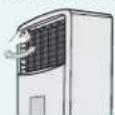
To adjust horizontal airflow vanes gently by holding the control handle on the top left.

Troubleshooting
● Operation delayed for few minutes after restart.
● Sound like water flowing during operation.
- Mist emerges from indoor unit.
- Noisy during operations.
● Remote control/display does not work.
• The unit cannot operate.
● Outdoor unit emits water/steam.
This is a normal self protection control.
Caused by refrigerant flow inside.
Condensation effect due to cooling process.
Installation work could be slanted or intake grille didn't close properly.
▶ Check whether batteries are correctly inserted or need replacement.
Check either circuit breaker is tripped, or timer is used correctly.
Condensation or evaporation happens at piping surface.
About
Remote Control Preparation
- Pull out
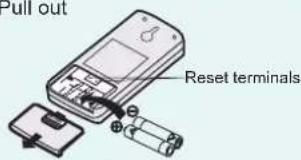
• Insert batteries (AAA or R03)
• The batteries can be used for approximately 1 year.
- Remove the batteries if the unit is not to be used for a long period.
• The batteries must be recycled or disposed of properly.
Note:
- The retention period of batteries might be affected to be shorter because of the using times of the remote control, even less than one year.
Remote Control Signal
• Make sure it is not obstructed.
• Maximum distances : 8m.
• Certain fluorescent lights may interfere with signal transmission. Consult your dealer.
Reset the remote control
- If the display is chaotic or can not be adjusted, use a screwdriver to short the two terminals to reset the remote control to the original set by manufacturer.
PRODUCT OVERVIEW
Remote Control
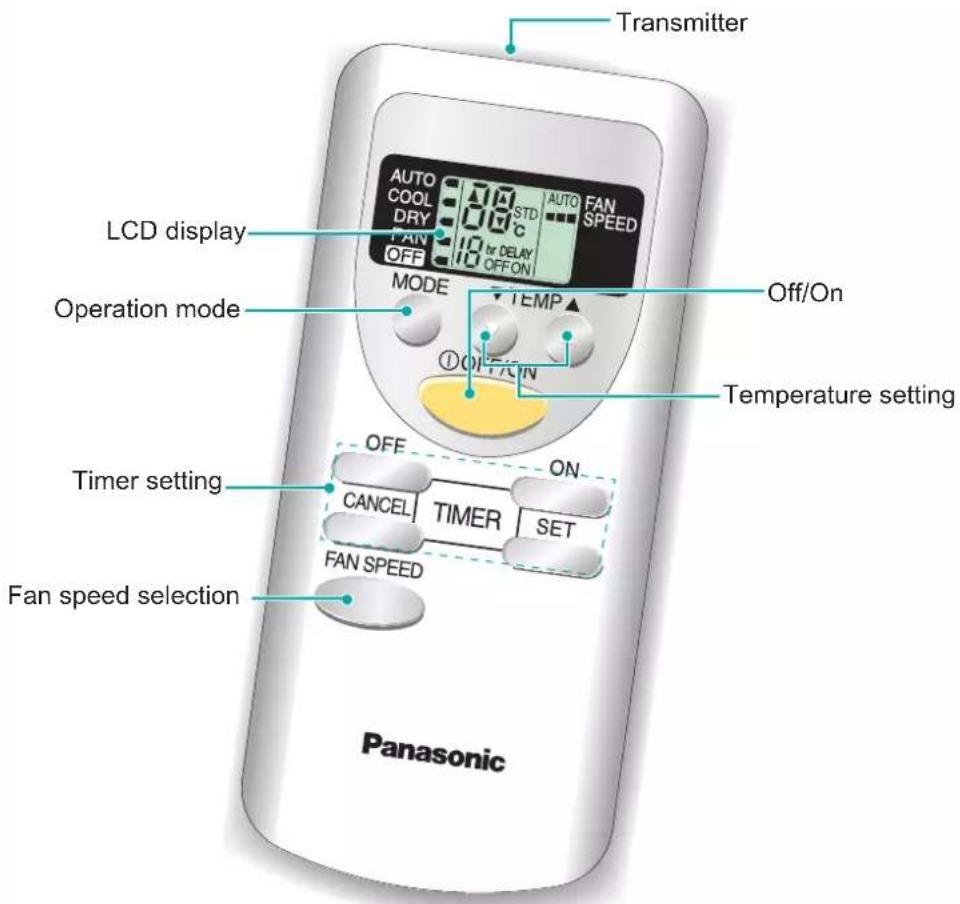

Hints
- If you wish to have the cool air blowing directly on you, set the airflow direction downward but not for an excessive length of time, as it may harm your health.
- Approximately 10% of electricity can be saved if you set the temperature 1°C higher than the desired temperature during cooling operation.

Troubleshooting
- Indoor fan stops occasionally during Automatic Fan Speed setting.
This is an advanced feature that helps to remove smell from the surrounding area during operation.
HOW TO OPERATE
Auto, Cool, Dry, Fan Fan Speed
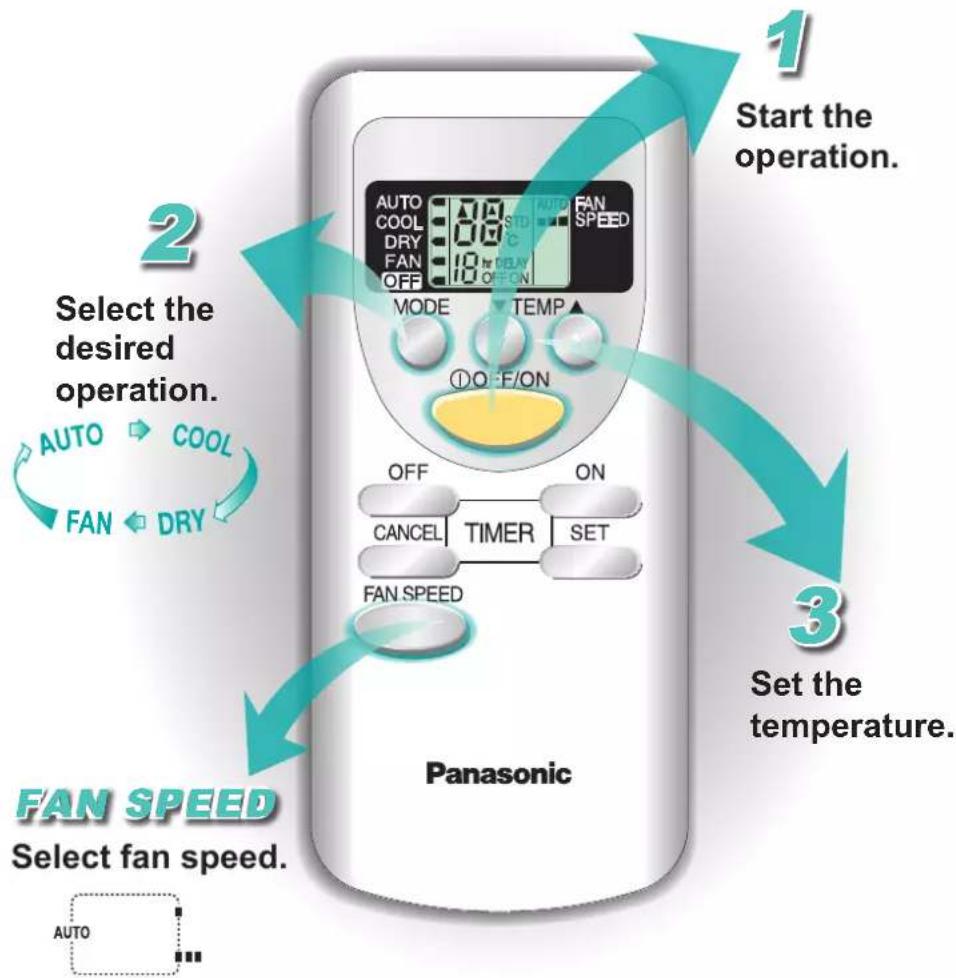
flowchart
graph TD
    A["1 Start the operation."] --> B["2 Select the desired operation."]
    B --> C["3 Set the temperature."]
    C --> D["3 Select fan speed."]
Operation Details
AUTO - Automatic Operation
- The unit will automatically select the operation mode according to the room temperature.
- Once the operation mode is selected, the unit will operate at the standard setting temperature as shown:
| Room temperature | Operation mode | Standard setting temperature |
| 23°C & above | Cool 25°C | |
| Below 23°C | Dry 22°C |
- The operation mode judging temperature and standard setting temperature can be increased or decrease by 2°C permanently, by pressing temperature button or.
COOL - Cooling Operation
- Enables you to enjoy the cooling effect at your preferred setting temperature.
• The range of temperature can be selected from 16^ C \~ 32^ C.
DRY - Soft Dry Operation
- Enables you to set the desired temperature at low fan speed which provides you with the dehumidifying surroundings.
- The range of temperature can be selected from 16°C \~ 32°C.
FAN - Air Circulation operation
- Enable the room to maintain a good ventilation; purifying and deodorizing the air.
• The compressor will not operate during air circulation operation.
FAN SPEED
• To provide you with the various fan speed selections.
• There are 2 levels of fan speed in addition to automatic fan speed.
• Automatic fan speed:
The speed of the indoor fan is automatically adjusted according to the operation.

Hint
● To save electricity, close the curtains when using air conditioner to prevent sunlight and heat from coming in.

Troubleshooting
● The room has a peculiar odour.
● Air conditioner does not cool efficiently.
This may be a damp smell emitted by the wall, carpet, furniture or clothing in the room.
▶ Ensure the temperature has been set correctly.
Ensure windows and doors have been closed properly.
▶ Ensure filters are cleaned or replaced when necessary.
Ensure inlet and outlet vents of the units have not been obstructed.
Operation Details
ON TIMER
- Use the ON timer to turn on the air conditioner at the desired time. This will give you a cooling environment, e.g. when you return from work or wake up.
- When the ON timer and COOL or DRY operation mode are set, operation will start 15 minutes before the actual set time in order to reach the remote control's set temperature at the set time.
- The ON timer can be only set while the air conditioner is not in operation.
OFF TIMER
- Use the OFF timer to stop the air conditioner operation at the desired time. This can save electricity while you are going out or sleeping.
• The OFF timer can be only set while the air conditioner is in operation.
HOW TO OPERATE
Timer
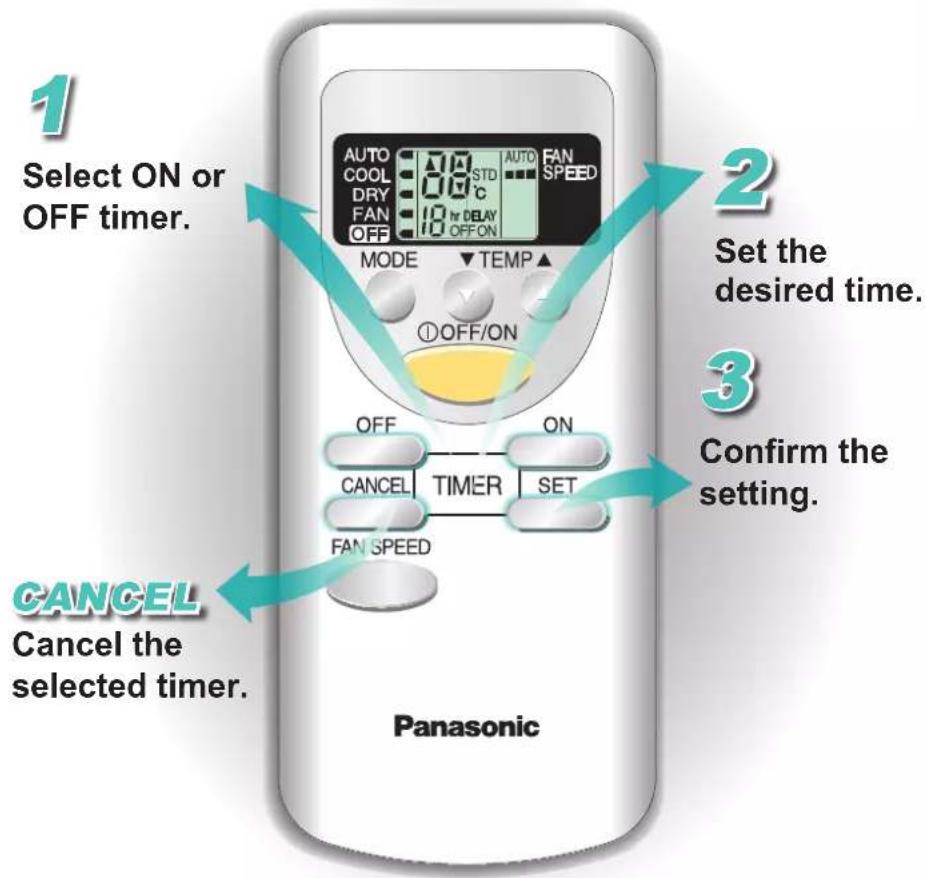
flowchart
graph TD
    A["1 Select ON or OFF timer."] --> B["2 Set the desired time."]
    B --> C["3 Confirm the setting."]
    C --> D["4 Cancel the selected timer."]
● The timer indicator of the indoor unit will light up during the timer operation.
● To cancel either the ON or OFF timers, press ☐. If you
press operation button during the timer setting operation, timer setting will be cancelled.
- When a power failure occurs, the timer setting will be cancelled. Once power is resumed, reset the timer.

Hints
- For your convenience, you could set the air conditioner to operate automatically by using either ON or OFF timer.

Troubleshooting
● POWER indicator is blinking 30 minutes before ON timer is activated.
The unit is determining the operation mode by sensing the room temperature. This happens when it has been set to AUTO operation mode.
CARE & CLEANING

Switch off the power supply before cleaning
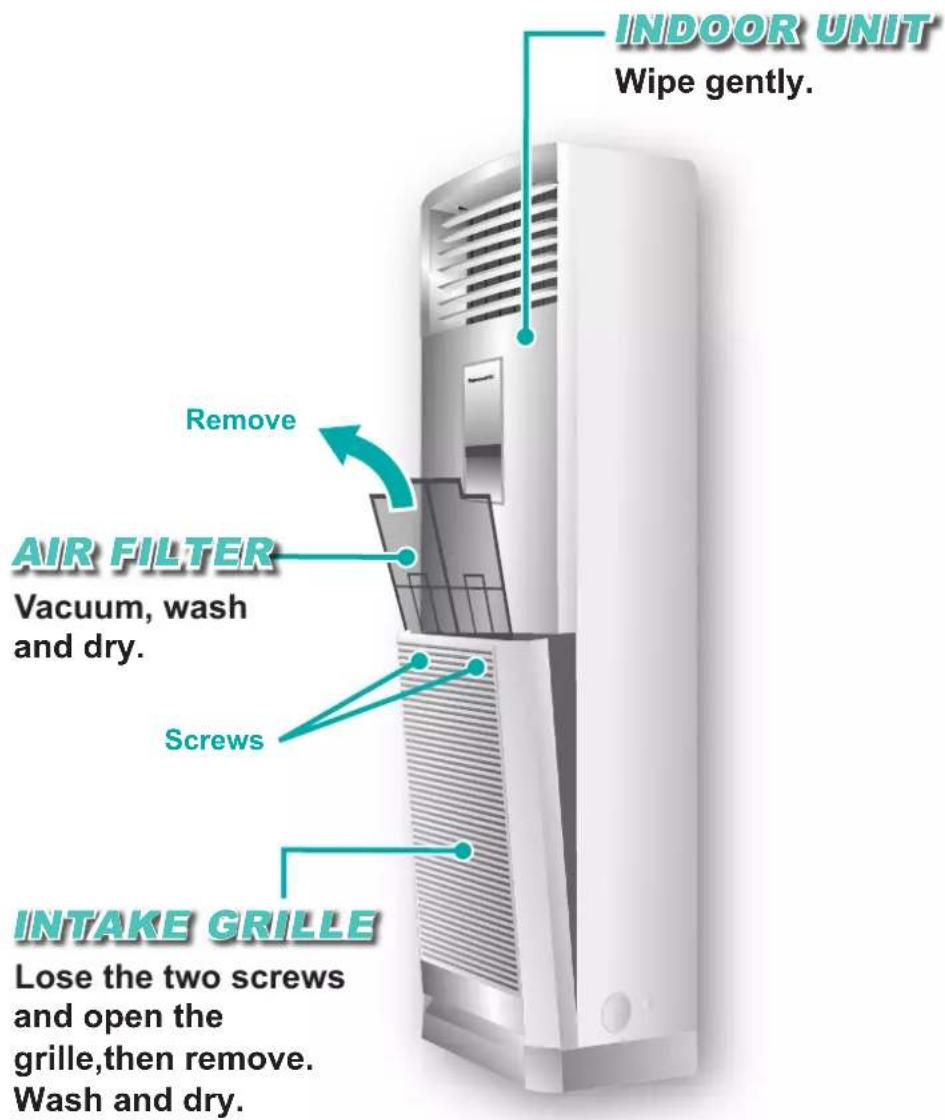
■ Washing Instructions
- Do not use benzene, thinner or scouring powder.
- Use soaps or neutral household detergent ( pH7) only.
- Do not use water with temperature higher than 40°C.
INDOOR UNIT
- Wipe the unit gently with a soft, dry cloth.
AIR FILTER
• It is recommended to clean the air filters once every 2 weeks.
• Purchase the replacement filter if it is damaged.
Part no.: CWD001217
■ Preparation for extended Non-operation
- To dry the internal parts of the indoor unit, operate the unit for 2-3 hours using FAN operation.
- Switch off the air conditioner and disconnect the power supply.
- Remove the remote control batteries.
■ Pre-season Inspection
- This inspection is recommended before operating the air conditioner at every season.
- Check if the remote control batteries needed to be replaced.
- Ensure there is no obstruction at all air intake and outlet vents.
• After the start of operation for 15 minutes, it is normal if the temperature differences between air intake and outlet vents at indoor unit is:-
| Operation | Temperature difference |
| Cooling | 8°C ≥ |

Hints
- Clean the filter regularly as dirty filters will cause unpurified air, low cooling capacity, unpleasant smells and higher energy consumption.
- The unit will become dirty and the performance of the unit will decrease after used for several seasons. Please consult an authorized dealer to perform seasonal inspections in addition to regular cleaning.
- When thunder and lightning occur, stop the unit and switch off the power to protect the air-conditioner.
- If power resumed after a power failure, the operation will be restarted automatically under the previous operation mode.
● This air-conditioner may cease because of strong surge of voltage. If that happens, consult to an authorized dealer.
PRODUCT SPECIFICATION


door Unit

loor Unit
 Model Model | C18-FFH C18-FFH | C28-FFH C28-FFH | |||
| COOLING | |||||
| Single, 220V-240V, 50Hz Single, 220V-240V, 50Hz | |||||
 Power/Current Power/Current | [W] 1900 - 1950 2600 - 2650 | ||||
| [A] 8.65 - 8.80 | 11.90 - 12.00 | ||||
 Refrigerant Refrigerant | [kg] | R22* 0.94 | R22 1.41 | ||
 Cooling Capacity Cooling Capacity | [kW] 5.10 - 5.15 7.20 - 7.30 | ||||
 Noise Level Noise Level | JIS C 9612 [<70 dB(A)] | [dB(A)] | ☐ | 46 - 47 48 - 49 | |
| Conditions 1m Distance Max. cooling | ☐ | 53 - 54 53 - 54 | |||
 Air Circulation Air Circulation | [m3/min.] 14.5 - 15.5 15.0 - 16.2 | ||||
 Product Weight Product Weight | [kg] | ☐ | 34 35 | ||
| ☐ | 40 55 | ||||
 Dimensions (H × W × D) Dimensions (H × W × D) | [mm] | ☐ | 1680 × 500 × 298 | ||
| ☐ | 540 × 780 × 289 795 × 900 × 320 | ||||
| Ambient Temperature [°C] 18 - 43 | |||||
*60 g for air purging is not included.
Test conditions
- Cooling: Indoor Dry Bulb Temp. (°C) 27
Outdoor Dry Bulb Temp. (°C) 35
Wet Bulb Temp. (°C) 19
Wet Bulb Temp. (°C) 24
- Standard piping length: 5 m (Includes Indoor Unit piping length).
- Air filter is attached.
TURN OFF POWER SUPPLY and CALL Authorized Distributor under the following conditions:
• Abnormal noise during operation • Circuit breaker switches off frequently
• Water/foreign particles have entered the Remote Control • Power cord becomes unnaturally warm
• Water leak from Indoor unit • Switches or buttons are not functioning properly
- Panasonic®
- Operating Instructions Air Conditioner
- ENGLISH
- CONTENTS
- Thank you for purchasing Panasonic Air Conditioner
- SAFETY PRECAUTIONS
- ■ Definition
- Warning
- Caution
- Installation Precautions
- Operation Precautions
- Safety Regulation
- Operation Condition (°C)
- PRODUCT OVERVIEW
- About
- OFF/ON operation button
- Auto OFF/ON Button
- AIR SWING
- Troubleshooting
- Remote Control Preparation
- Remote Control Signal
- Reset the remote control
- Remote Control
- Hints
- HOW TO OPERATE
- Auto, Cool, Dry, Fan Fan Speed
- Operation Details
- AUTO - Automatic Operation
- COOL - Cooling Operation
- DRY - Soft Dry Operation
- FAN - Air Circulation operation
- FAN SPEED
- Hint
- ON TIMER
- OFF TIMER
- Timer
- CARE & CLEANING
- Switch off the power supply before cleaning
- ■ Washing Instructions
- INDOOR UNIT
- AIR FILTER
- ■ Preparation for extended Non-operation
- ■ Pre-season Inspection
- PRODUCT SPECIFICATION
- Test conditions
- TURN OFF POWER SUPPLY and CALL Authorized Distributor under the following conditions:
Mærke : PANASONIC
Model : CS-C18FFH
Kategori : Aircondition