POE8SW9 - Overvågningskamera Speco Technologies - Gratis brugsanvisning og manual
Find enhedens vejledning gratis POE8SW9 Speco Technologies i PDF-format.


Brugerspørgsmål om POE8SW9 Speco Technologies
0 spørgsmål om dette apparat. Besvar dem du kender, eller stil dit eget.
Stil et nyt spørgsmål om dette apparat
Download vejledningen til din Overvågningskamera i PDF-format gratis! Find din vejledning POE8SW9 - Speco Technologies og tag din elektroniske enhed tilbage i hånden. På denne side er alle dokumenter nødvendige for brugen af din enhed offentliggjort. POE8SW9 af mærket Speco Technologies.
BRUGSANVISNING POE8SW9 Speco Technologies
Thank you for your choice of Speco Technologies' POE8SW9 IP camera accessory. This unit is designed and manufactured to provide an economical solution for powering IP cameras via Power over Ethernet. The sturdy construction of these units ensures a long & productive life.
DESCRIPTION
The POE8SW9 consists of a single chassis with 9 RJ-45 connectors. These units are designed to provide PoE power for up to 8 PoE ready IP cameras.
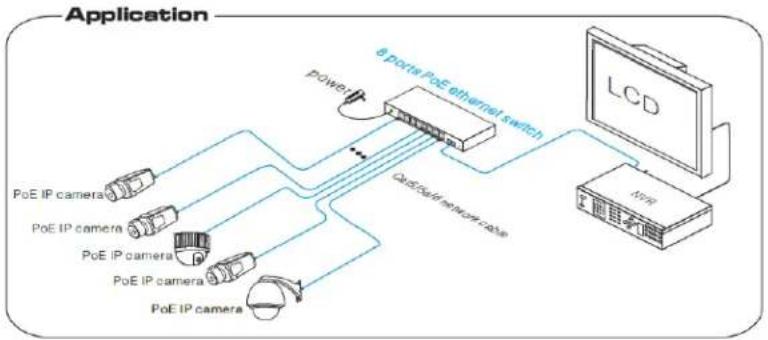
flowchart
graph TD
    A["PoE IP camera"] --> B["6 ports PoE Ethernet switch"]
    C["PoE IP camera"] --> B
    D["PoE IP camera"] --> B
    E["PoE IP camera"] --> B
    F["PoE IP camera"] --> B
    B --> G["LCD"]
    B --> H["Power"]
    B --> I["QoS/Internet Case"]
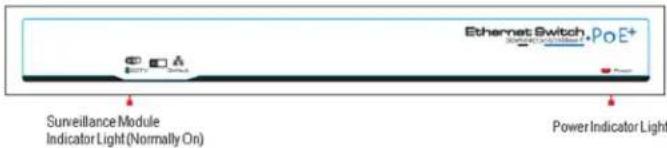
Front Panel
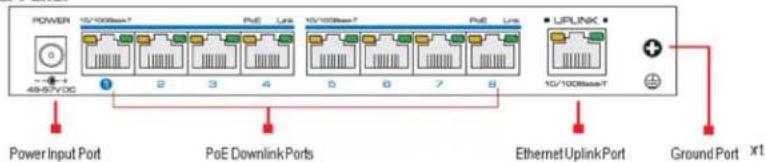
Rear Panel
INSTALLATION INSTRUCTIONS:
1) Turn off power to the units and sources. Installing the POE8SW9 while power is live may damage the units.
2) Use an RJ45 network cable to connect a POE capable IP camera with any or all of the POW8SW9 ports 1-8.
3) Use an RJ45 network cable to connect your recording device (NVR, Hybrid DVR, etc.) with the POE8SW9 uplink port.
4) Connect the power adapter.
5) Confirm all cables are connected securely and properly and power on all units.
NOTE: Isolate/Default switch function: Activation of this switch will isolate downlink ports and thus prevent ports from sharing data. This, in turn, could improve data forwarding efficiency, port bandwidth utilization and system security. IMPORTANT: Using this feature will slow ports to 10MBPS speed, so it is recommended to keep switch on default unless you have specific application.
SPECIFICATIONS:
- Ports: 8 x RJ-45 Downlink, 1 x RJ-45 Uplink
- Ethernet Speed: 10/100MBPs under default setting (10MBPs if "Isolate" setting selected)
- Ethernet Standards: IEEE 802.3/802.3u/802.3at/af
Power:
o Max per single port: 25W
o Max for entire unit (8 ports combined): 100W
- Operating temperature: 32^ to 131^
• Storage temperature: -40°F to 185°F
• Operating humidity: 0% to 95%RH
• Dimensions: 8" (W) x 1" (H) x 4" (L)
• Weight: 1.1 Lbs.
• Warranty: 2 Years (please visit Specotech.com for full warranty terms and conditions)
Speco Technologies is constantly developing and improving products.
We reserve the right to modify product design and specifications without notice and without incurring any obligation.
Speco Technologies . 200 New Highway . Amityville . NY . 11701 . www.specotech.com