RF-SM-DC - Røgalarm KIDDE - Gratis brugsanvisning og manual
Find enhedens vejledning gratis RF-SM-DC KIDDE i PDF-format.


Brugerspørgsmål om RF-SM-DC KIDDE
0 spørgsmål om dette apparat. Besvar dem du kender, eller stil dit eget.
Stil et nyt spørgsmål om dette apparat
Download vejledningen til din Røgalarm i PDF-format gratis! Find din vejledning RF-SM-DC - KIDDE og tag din elektroniske enhed tilbage i hånden. På denne side er alle dokumenter nødvendige for brugen af din enhed offentliggjort. RF-SM-DC af mærket KIDDE.
BRUGSANVISNING RF-SM-DC KIDDE
Quick Setup Guide for Kidde Wireless Alarms
1 DO NOT POWER-UP THE DEVICES.
Locate the 8-position dipswitch on the back of each of your Kidde Wireless devices. ▶▶
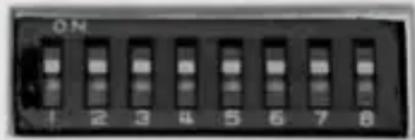
DIPSWITCH
2 Choose a random sequence of OFF and
ON positions and set all your devices to this pattern. The devices only read the sequence when they are first powered up. DO NOT USE THE DEFAULT CODE THE DEVICES WERE SHIPPED WITH!
3 Power each device up, push and hold the test button for 5 seconds and verify all the devices produce an alarm signal. If all the units do not respond, disconnect power, remove the batteries, verify the dipswitches on all units are the same and wait 30 seconds.
Power the units back up and try again. If the units do not respond refer to the user's guide for more information
CAUTION: Due to the loudness of the alarm, always stand an arms length away from the unit when testing.
4 Install your units using the guidelines in the User's Guide and then test again.
5 Test your Kidde wireless devices weekly to ensure changes in your home, such as the location of furniture, have not interfered with the reception and transmission capabilities of your system.
If your Wireless smoke alarms enter alarm mode, first check to see if there is a fire. If a fire does not exist, and the test button has not been activated on any of the units, it is likely that you are receiving interference from a similar system nearby. In this case, repeat the above steps and select a different dipswitch pattern, making sure to disconnect the power and remove the batteries before changing the switch positions.
Types of Alarms
Battery Operated:
Alarm DOES NOT have any wires connected to the back of it. The alarm is ONLY powered by a battery or batteries.
Hardwired:
Alarm has two wires (typically white and black colored) connected to the back of it. Alarm DOES NOT have a third wire (typically red, orange or yellow in color) connected to the back of it. You can determine if an alarm is Hardwired by confirming that two power wires are connected to it, and then by pressing the test button on the alarm, and listening for the other alarms to sound. If other alarms DO NOT sound, the alarm is Hardwired.
Hardwired with Interconnect:
Alarm has two wires (typically white and black colored) connected to the back of it. Alarm DOES have a third wire (typically red, orange or yellow in color) connected to the back of it. You can determine if an alarm is Hardwired with Interconnect by confirming that three wires are connected to it, and then by pressing the test button on the alarm, and listening for the other alarms to sound. If other alarms DO sound, the alarm is Hardwired with Interconnect.
DO NOT connect two RF-SM-ACDC alarms to a Hardwired with Interconnect system. Doing so will result in the RF-SM-ACDC alarms triggering each other. They will not stop alarming until one is disconnected from the electrical circuit. If your home has Hardwired alarms, which are not interconnected, you can use up to twelve RF-SM-ACDC alarms.
TEST YOUR ALARMS WEEKLY: This ensures that changes in your environment (i.e. moved furniture, addition of electronic appliances) have not adversely affected the operation of your Wireless system.