DT22-M - Lydprocessor ALLEN & HEATH - Gratis brugsanvisning og manual
Find enhedens vejledning gratis DT22-M ALLEN & HEATH i PDF-format.


Brugerspørgsmål om DT22-M ALLEN & HEATH
0 spørgsmål om dette apparat. Besvar dem du kender, eller stil dit eget.
Stil et nyt spørgsmål om dette apparat
Download vejledningen til din Lydprocessor i PDF-format gratis! Find din vejledning DT22-M - ALLEN & HEATH og tag din elektroniske enhed tilbage i hånden. På denne side er alle dokumenter nødvendige for brugen af din enhed offentliggjort. DT22-M af mærket ALLEN & HEATH.
BRUGSANVISNING DT22-M ALLEN & HEATH
DT22-M
The DT22-M is a PoE enabled Dante I/O unit. It can be used to complement Allen & Heath digital mixing systems, or any other system on a Dante network. It provides 2 mic/line preamps with local gain and phantom power control, and 2 line level outputs. It connects to the Dante network over a single Cat cable.
The DT22-M comes complete with brackets for surface mounting.
Software
Visit the Audinate website to learn more about Dante, and download Dante Controller to route audio and configure devices on a Dante network: https://www.audinate.com/
Specification
| Mic/Line Inputs | Balanced Phoenix, +48V PP |
| Analogue Gain | 0 to +55dB |
| Line Inputs | -20dB PAD |
| Maximum Input Level | +30dBu (line in) |
| Input Impedance | >4kΩ (mic), >10kΩ (line) |
| Line Outputs | Balanced Phoenix |
| Output Impedance | <75Ω |
| Nominal Output | +4dBu = 0dB meter reading |
| Maximum Output | +22dBu |
| Dante | 48kHz/96kHz |
| Power and Temperature | |
| DC Input | +12V DC 1.25A |
| Power Consumption | 10W max |
| Operating | 0°C to 40°C (32°F to 104°F) |
| Temperature Range | |
| PoE Requirements | 802.3af 15W |
Surface mounting
The surface mounting ears allow the device to be mounted on top or under a surface, desktop or podium, or vertically on a wall or partition. They can be installed to face either the top or bottom of the unit.
Position the ears centrally on each side of the unit, aligned with the threaded holes on the insert bars, facing either up or down as required, and secure them using the 4x M3x6mm screws provided in the package.
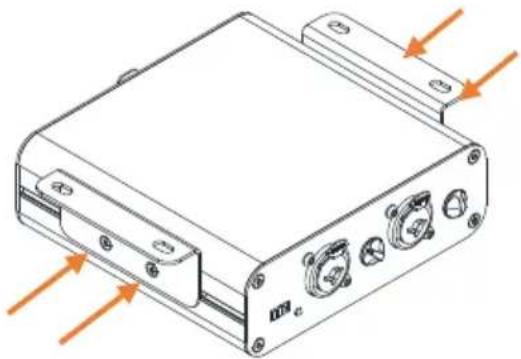
natural_image
Technical line drawing of a rectangular electronic device with mounting holes and control buttons (no text or symbols)Rack mounting
Up to two units can be rack-mounted in a single 1U rack space with the optional rack kit DT-RK19.
| Dimensions and Weight | Width x Depth x Height x Weight |
| DT22 | 130 x 100 x 43 mm, 0.5kg(5.1" x 3.9" x 1.7", 1lbs) |
Read the Safety Instructions Sheet included with the product and the information printed on the panel before operating.
A limited one year manufacturer's warranty applies to this product, the conditions of which can be found at: www.allen-heath.com/legal
Register your product with Allen & Heath online at: http://www.allen-heath.com/support/register-product/
ALLEN&HEATH
Copyright © 2021 Allen & Heath. All rights reserved.
Front panel
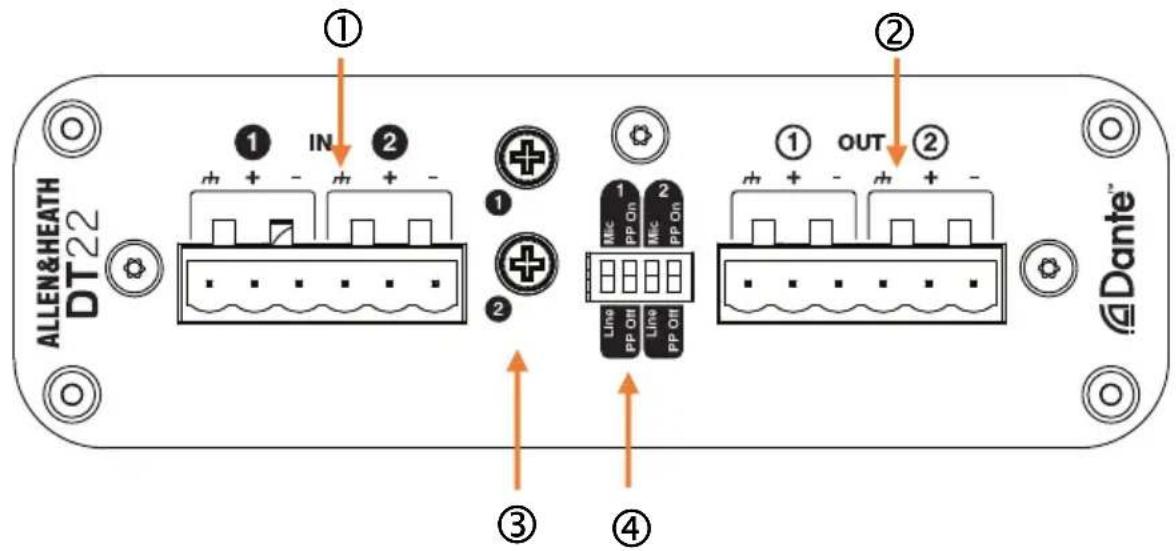
① Inputs Balanced Phoenix mic/line inputs.
② Output Balanced Phoenix line outputs.
③ Gain Rotary controls for the preamp analogue gain, 0dB to 55dB. Use a Philips screwdriver to adjust the gain.
④ PP +48V Phantom Power and Mic/Line switches for Input 1 and 2.
Rear panel
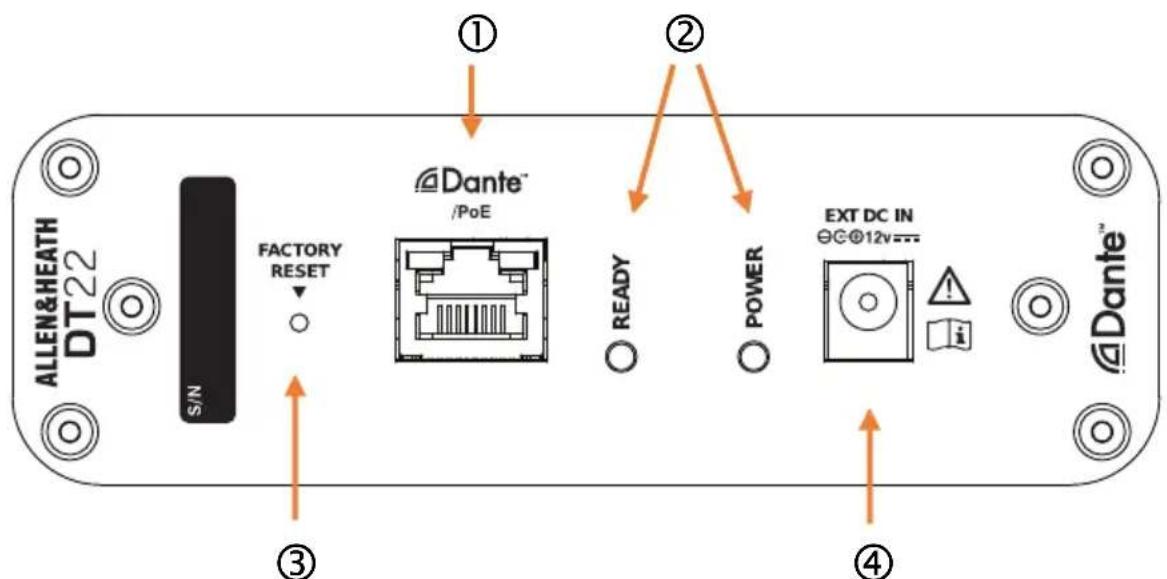
① Dante EtherCon port for connection to the Dante network and Link / Activity LED indicator. Use a PoE Ethernet switch or PoE injector to power the unit via this port.
② Power LED indicator and Ready indicator. Ready lights up when the unit is successfully booted and ready to pass audio.
③ Factory Reset Hold down the recessed switch while powering up. After at least 10 seconds, remove power then power up again normally to reset the network settings and name. This will delete any static IP address and revert to factory default (DHCP / zero-conf).
④ DC input DC 12V connector.