iLive MADI 64 - Stavblender ALLEN & HEATH - Gratis brugsanvisning og manual
Find enhedens vejledning gratis iLive MADI 64 ALLEN & HEATH i PDF-format.


Brugerspørgsmål om iLive MADI 64 ALLEN & HEATH
0 spørgsmål om dette apparat. Besvar dem du kender, eller stil dit eget.
Stil et nyt spørgsmål om dette apparat
Download vejledningen til din Stavblender i PDF-format gratis! Find din vejledning iLive MADI 64 - ALLEN & HEATH og tag din elektroniske enhed tilbage i hånden. På denne side er alle dokumenter nødvendige for brugen af din enhed offentliggjort. iLive MADI 64 af mærket ALLEN & HEATH.
BRUGSANVISNING iLive MADI 64 ALLEN & HEATH
Part number M-MADI-A
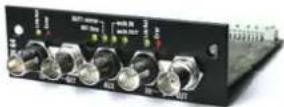
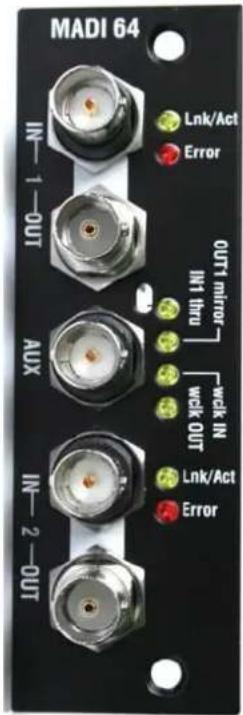
M-MADI is one of several plug-in card options that may be fitted to the iLive Series. It provides a multi channel digital audio network that can distribute signals between iLive and 3 ^rd party MADI equipment. MADI offers an addition or alternative to EtherSound and other networking standards available for the iLive system.
MADI (Multichannel Audio Digital Interface) is an industry standard multiple channel audio interface documented by the Audio Engineering Society as AES10. The M-MADI option supports 64 channels of 48kHz serial digital audio transmission over 75 ohm coaxial cable to a maximum cable length of up to 150 meters (500 feet) depending on equipment connected and cable type used.
Two MADI ports are provided. These are referred to as LINK 1 and LINK 2. Each has two BNC connectors, one for audio input, the other for audio output. To connect audio in both directions two cables must be used. iLive sources may be assigned from either input port in blocks of 8. Outputs patched to MADI appear at both port outputs. LINK 2 may be used as a second MADI port or configured for redundant cable connection. One redundant cable is required for each direction connected. The audio within the MADI card can be synchronised to either LINK 1 or LINK 2 or to the word clock. The iLive can be synchronised to this audio by setting its sync to Remote Port B.
Lnk/Act Yellow indicator flashes steadily to indicate that the network is linked and active. It lights solid if the port is connected to a second cable available as a redundant link.
Error Red indicator lights when a connection or data error is detected. It is normal for it to light briefly when the cable is plugged or unplugged.
AUX An additional BNC connection can be configured in one of four different ways – to mirror the outputs appearing on the LINK 1 OUT socket, to duplicate audio from the LINK 1 IN socket so passing it thru to other equipment, or to use it as a word clock input or clock output.
Fitting to iDR-48, iDR-32 or iDR-16
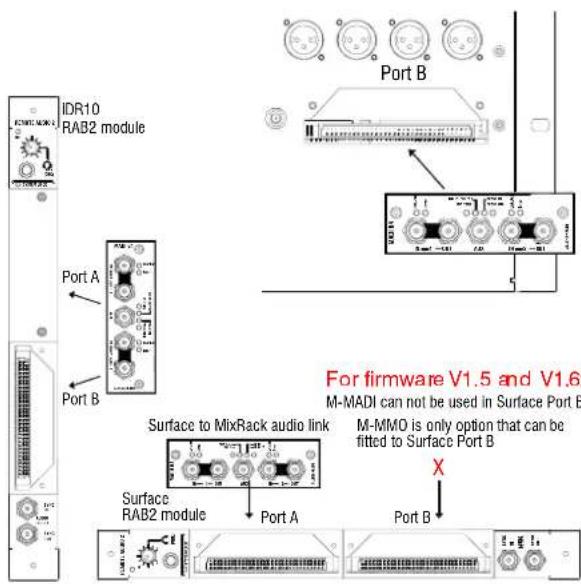
The M-MADI card option may be fitted to Port B in the MixRack. First make sure the MixRack is switched off. Remove the 2 screws securing the blank panel over Port B. Slide the M-MADI card into the slot and press it firmly into the mating connector. Secure the card in place using the 2 screws.
Fitting to iDR10 and iLive Surfaces
The option card can be fitted into the Port A (MixRack or Surface) or Port B (MixRack only) slot in the Remote Audio 2 (RAB2) module. Systems fitted with the older Remote Audio module can be upgraded with the new RAB2 module.
Note The option port is not available on T Series surfaces.
Note Up to and including firmware version V1.6 the M-MADI card may not be fitted in the Surface Port B. The only option currently supported in Surface Port B is the M-MMO (Mini Multi Out) card.
First make sure the System is switched off. Remove the 2 screws securing the blank panel over the port slot. Slide the M-MADI card into the slot and press it firmly into the mating connector. Secure the card in place using the 2 screws.
Specification
MADI Inputs x2 High sensitivity, equalising receivers. Auto detects 56 or 64 channels. 24-bit. AC coupled.
MADI outputs x3 Standards compliant, low jitter transmitters. 64 channels, 24-bit.
Word clock input High sensitivity (>200mV pp) with 75 ohm termination. AC coupled.
Word clock output 5V pp through 75 ohm termination. AC coupled.
Status indicators AUX modes, Per MADI input = Link/Activity (yellow), Stream Error (red)
Sync sources MADI input LINK 1, LINK 2, AUX word clock.
Audio clock sync range 48kHz +/-100ppm
Cables 75 ohm coaxial, BNC connectors. Max:
150m (500') A&H ↔ A&H
150m (500') 3 ^rd party → A&H
50-100m (165-330') 3 ^rd party ↔ A&H
Also consult 3 ^rd party documentation
Operating modes
Dual Link mode The card supports two separate MADI BNC links letting you connect to two separate devices simultaneously. Make sure the MIXER SETUP / Mixer Pref screen Redundant Link Option is set to 'Off'.
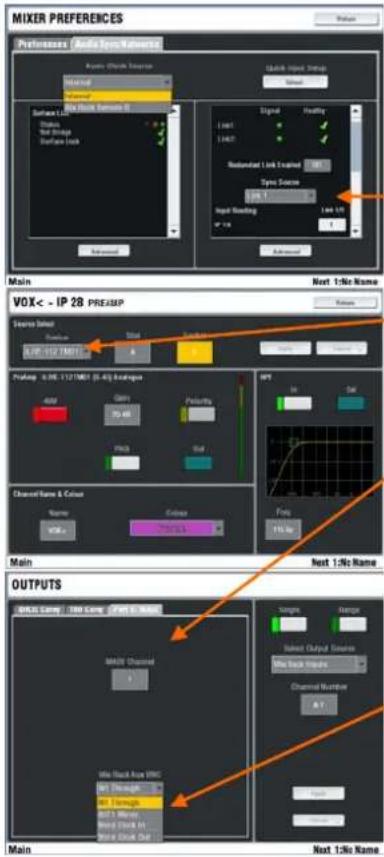
Sources to the iLive channels can be patched from either LINK 1 or LINK 2 MADI stream in blocks of 8. First, use the MIXER SETUP / Mixer Pref screen to set up which MADI link is made available as a selectable source to the blocks of 8 iLive channels. Next, select MADI as the source to individual or a range of channels using their PREAMP screens or the MIXER SETUP / Mixer Pref / Quick Source Setup screen.
Outputs to the MADI links are patched using the OUTPUTS screen. Select the source from the drop down menu. The same outputs are broadcast on both MADI LINK 1 and LINK 2.
Redundant mode Set the MIXER SETUP / Mixer Pref screen Redundant Link Option to 'On'. This configures LINK 1 and LINK 2 as a redundant pair. Audio and clock will continue without interruption if one of the cables fails or is unplugged.
AUX modes A 5 ^th BNC socket supports 4 modes, greatly increasing system flexibility. Set the mode using the OUTPUTS screen (V1.5) or the MIXER SETUP / Mixer Pref screen (V1.6).
OUT 1 mirror - Duplicates the output stream appearing at the MADI LINK 1 output. Useful for splitting signals to multiple devices, for example, mic splitter and recording.
IN 1 thru - Duplicates the input stream appearing at the MADI LINK 1 input. Allows daisy chaining of signals to an unlimited number of devices. The signal is fully reclocked and buffered for optimal reliability, and will automatically switch to LINK 2 if 1 fails in redundant mode.
WordClock IN - Provides a word clock input to sync the system from an external (48kHz) source. Use the MIXER SETUP / Mixer Pref screen to choose which MADI socket to sync off, then s Remote Port B as the iLive sync source.
WordClock OUT - Provides a standard 48kHz word clock output to allow other systems to sync from the iLive system, useful when connecting to 3^rd party devices which may not be able to sync from the MADI stream.
Cables Two 75 ohm coaxial cables with BNC connectors are required for each link, one for each direction of audio. The MADI standard supports up to 50 meters (165 feet). However, the M-MADI card features an equalizing receiver circuit, originally designed for HD video, allowing greatly increased sensitivity and noise rejection. Because of this, connecting two A&H MADI cards together allows cable runs in excess of 150m (3 times the standard) depending on cable type. All inputs, including word clock, are ACCoupled, to avoid potential ground loop problems.
Allen & Heath have tested and recommend Belden 1505A 75 ohm coaxial cable for use with MADI. Other cable that meets the same specification as this cable may be used too. For more information on cables please refer to the Allen & Heath web site:
www.ilive-digital.com/cables.html

This product complies with the European Electromagnetic Compatibility directives 89/336/EEC & 92/31/EEC.
Copyright© 2010 Allen & Heath Ltd. All rights reserved.
For further information refer to www.allen-heath.com
NOTE: Any changes or modifications to the equipment not approved by Allen & Heath could void the compliance of the equipment. Whilst we believe the information in these instructions to be reliable we do not assume responsibility for inaccuracies. We also reserve the right to make changes in the interest of further product development.