ICC-83 - Hesap makinesi SANYO - Ücretsiz kullanım kılavuzu
Cihazın kılavuzunu ücretsiz bulun ICC-83 SANYO PDF formatında.


Kullanıcıların soruları hakkında ICC-83 SANYO
0 soru bu cihaz hakkında. Bildiklerinizi cevaplayın veya kendinizinki sorun.
Bu cihaz hakkında yeni bir soru sor
Cihazınız için talimatları indirin Hesap makinesi PDF formatında ücretsiz! Kılavuzunuzu bulun ICC-83 - SANYO ve elektronik cihazınızı yeniden ele alın. Bu sayfada cihazınızın kullanımı için gerekli tüm belgeler yayınlanmaktadır. ICC-83 markasının SANYO.
KULLANIM KILAVUZU ICC-83 SANYO
Sanyo
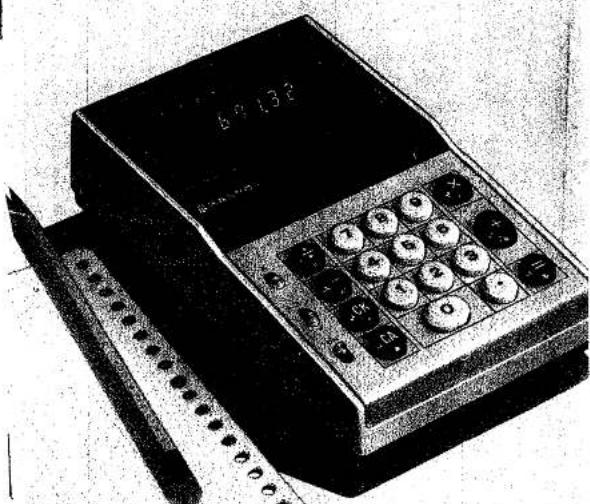
Mini Electronic Calculator ICC-83
Instruction Manual
natural_image
Illustration of a vintage digital telephone with keypad and screen (no visible text or symbols)
SANYO
CONTENTS
Page
Features 1
Name of Parts 2
Keys, Switches and Lamps 3
Preparations Before Starting 4
Loading of dry cell batteries 5
Calculations....6
- Additions and Subtractions 6
- Multiplications and Successive Multiplications ..... 6
- Divisions and Successive Divisions 7
- Multiplication with a Constant 7
- Division by a Constant 7
- Power Calculations 8
- Mixed Calculations 8
- Overflow 8
Specifications
FEATURES
This compactly designed, high performance mini electronic calculator is equipped with single-chip LSI and has a number of outstanding features and functions:
* Key operation follows the figure alignment of each arithmetic expression.
* Three-register, underflow system (priority given to upper 8 digits).
* Zero suppression makes reading the display easier.
* Full calculating versatility with constant calculations, mixed calculations, power calculations, etc.
* Handy fixed/floating decimal point selector switch.
* Two convenient power sources: ordinary house current or dry cell batteries.
* With automatic clear system.
NAME OF PARTS
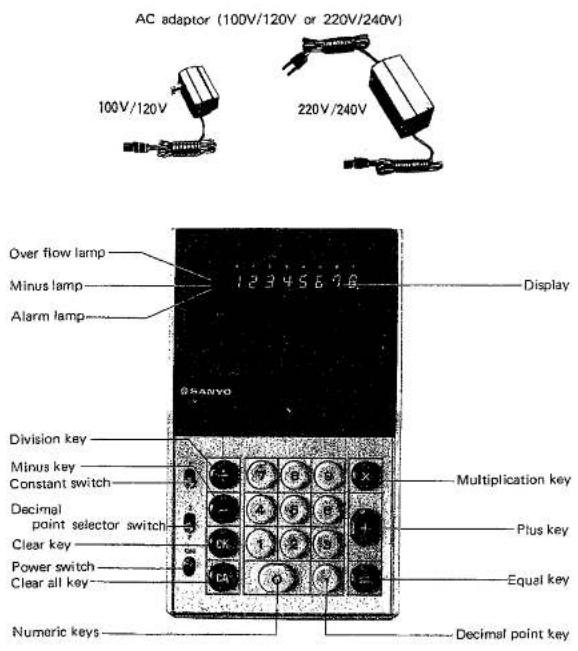
KEYS, SWITCHES AND LAMPS

......⑨
Numeric Keys
Figures are registered by depressing these keys in the order in which they appear in the calculation.

Decimal Point Key
Depress this key at the appropriate position when registering figure with a decimal point.

- × ÷ =
Function Keys
These keys are depressed in accordance with the given arithmetic expression.

Clear All Key
This key clears the entire machine. (The same effect is obtained when turning on the power switch.)

Clear Key
Depressing this key clears only the displayed figures.

Constant Switch
Switch to the "K" position before beginning the calculation with a constant multiplicand or divisor. In ordinary calculations, it must always be switched off.

Decimal point selector switch
The decimal point in the result of calculation can either be selected to floating or fixed by selector switch. (Calculated result is drop off)
• Over-flow lamp
This lamp lights when the integer part in result exceeds 8 digits.
— Minus lamp
This lamp lights when the result of calculation is negative.
- Alarm lamp
This lamp lights when battery power is exhausted, and warn you to replace them.

Power switch
Turning on the power * Slide the power switch ON. Turning off the power * Slide down the power switch
PREPARATIONS BEFORE STARTING
- The right-most digit lights zero (0) when turn the power switch on.
- Make sure if alarm lamp is not lit in using dry cell battery.
- Preselect the decimal point and constant switch, according to the calculation.
LOADING OF DRY CELL BATTERIES
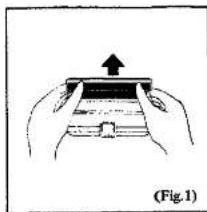
- To open the battery lid, lift the lid towards the direction of the arrow, pushing slightly inward. (Fig. 1)
natural_image
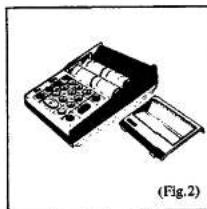
Illustration of hands holding a device with an upward arrow, labeled (Fig.1) at bottom (no text or symbols on device)- Load 4 C-size batteries into the battery container. When loading, insert negative pole of the battery first. (Fig. 2)
natural_image
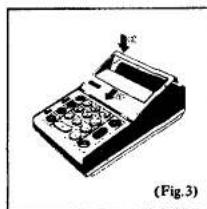
Diagram of a mechanical device with internal components and a separate drawer, labeled (Fig.2) (no text or symbols on the diagram itself)- After loading the batteries, ①: insert the hook of lid into the calculator. ②: push the lid to downward. (Fig. 3)
NOTE: Replace batteries when an alarm lamp will lights.
natural_image
Illustration of a handheld electronic device with control panel and display (no text or symbols visible)CALCULATIONS.
- ADDITIONS AND SUBTRACTIONS
(Ex. 1) 456+789-496=749
| 2 | 456 | + | 789 | - | 496 | = | 749. |
(Ex. 2) 12.3+8.18-9.42=11.06
| 12 | 3 | 8 | 18 | 9 | 42 | 11.06 |
(Ex. 3) -456+320=-136
| ∅ | SM | -456 | +320 | - | - | 136. |
- MULTIPLICATIONS AND SUCCESSIVE MULTIPLICATIONS
(Ex. 1) 1.234 × 9.876 = 12.186984
| a | 1 234 9 876 = | 12.186984 |
| b | Key operation is the same as in a | 12.186 |
(Ex. 2) -123×789=-97047
| 2 | ||
| 9 | 123 | 789 |
(Ex. 3) 7.41 × 8.52 × 9.63 = 607.972716
| a | 7 41 8 52 9 63 = | 607.97271 |
| b | Key operation is the same as in a | 607.972 |
- DIVISIONS AND SUCCESSIVE DIVISIONS
(Ex. 1) 9.876÷8=1.2345
| a | 9 876 8 = | 1.2345 |
| b | Key operation is the same as in a | 1.234 |
(Ex. 2) -625 ÷ 25 = -25
| 2 | 625 25 = | — 25. |
(Ex. 3) 625 ÷ 25 ÷ 0.5 = 50
| 625 25 5 | 50. |
| Key operation is the same as in (a) | 50.000 |
- MULTIPLICATION WITH A CONSTANT
| (Ex.) | 3.14×2=6.28 |
| 3.14×3=9.42 | |
| 3.14×8.5=10.99 |
| 3 | 14 | 2 | |
| 3 | |||
| 3 | 5 |
(NOTE) Regard the constant as the multiplicand.
- DIVISION BY A CONSTANT
| (Ex.) | 56÷2.8=20 |
| 63÷2.8=22.5 | |
| 14÷2.8=5.25 | |
| 20. | |
| 22.5 | |
| 5.25 |
(NOTE) Regard the constant as the divisor.
- POWER CALCULATIONS
| (Ex.) | 2^2 = 4 | |
| 2^3 = 8 | ||
| 2^4 = 16 | ||
| 2 | 4. | |
| 8. | ||
| 16. |
- MIXED CALCULATIONS
| (Ex.1) 3.6×2÷8=0.9 | |
| 0.900 | |
| (Ex.2) (392-123)×8/4=538 | |
| 538.000 | |
- OVERFLOW
| (Ex.) | 123456×333333=41151958848 | |
| 123456×333333= | 411.51958 | |
| -411.51958×10⁴ | ||
| →41.151,958,000. | ||
| NOTE: OVF indicator in results means x 108 | ||
(NOTE) Clear all key
This key should always be depressed before operations below mentioned.
-
When the first operation is begun in the negative.
-
When beginning the operation, after turning the constant switch off.
-
When beginning the operation, after occurred overflow.
SPECIFICATIONS
| Type | Mini Electronic Calculator |
| Model | ICC-83 |
| Display | 8-digit display with zero suppression |
| Decimal point | Input: FloatingOutput: Floating/Fixed (3) |
| Negative figure | True number with a minus sign |
| Calculating capacity | Addition/Subtraction: 8 digits ± 8 digitsMultiplication: (Max.) 8 digits × 8 digits=8 digits (product)Division: (Max.) 8 digits ÷ 8 digits =8 digits (quotient) |
| Calculating speeds | Additions and subtractionsMax. 0.03 sec.Multiplications Max. 0.05 sec.Divisions Max. 0.06 sec. |
| Semiconductor | LSI |
| Operating temperature | 0°C ~ 40°C (32°F ~ 104°F) |
| Power consumption | 2W |
| Power source | AC adaptor for ICC-83 or Dry cell batteries (UM~2x4) |
| Dimensions | 53 (H) × 113 (W) × 187 (D) mm |
| Weight | 0.7 kg, including dry cell batteries |

SANYO
SANYO ELECTRIC TRADING CO. LTD. OSAKA JERAN
Printed in Japan