LCT 280 - Telefon Lewitt - Gratis bruksanvisning och manual
Hitta enhetens manual gratis LCT 280 Lewitt i PDF-format.


Användarfrågor om LCT 280 Lewitt
0 fråga om denna apparat. Svara på dem du kan eller ställ din egen.
Ställ en ny fråga om denna apparat
Ladda ner instruktionerna för din Telefon i PDF-format gratis! Hitta din manual LCT 280 - Lewitt och ta tillbaka ditt elektroniska enhet i hand. På denna sida publiceras alla dokument som behövs för att använda din enhet. LCT 280 av märket Lewitt.
BRUKSANVISNING LCT 280 Lewitt
PROFESSIONAL RECORDING
HIGH END CONDENSER MICROPHONE FOR MAXIMUM SOUND QUALITY, VERSATILITY AND EASE OF USE
// Overview
// Compact condenser microphone
// Cardioid polar pattern for effective isolation of the main sound source
// Noiseless pushbuttons for quick and easy attenuation and low-cut filter selection
// 3 low-cut filter settings: linear, 40 Hz (12 dB/oct), 300 Hz (6 dB/oct)
// 3 pre-attenuation settings: 0 dB, -10 dB, and -20 dB
// High dynamic range and low self-noise
// Illuminated user interface for easy handling in dark environments
// Gold plated & corrosion-resistant 3-pin XLR output connector
Top applications // Vocals, acoustic instruments, spoken word and podcasting
// Getting started
1 Connect your microphone to your mixing console, audio interface or microphone preamplifi er using a 3-pin XLR cable.
2 Supply the LCT 280 with 48V phantom power.
3 Choose your settings.
4 You are ready to go!
// User interface
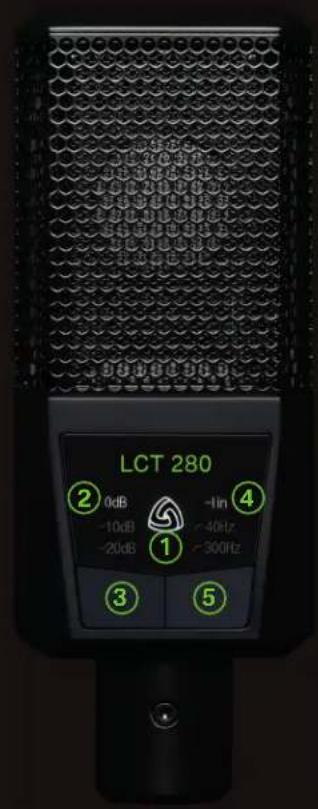
① Status indicator // Illuminated in white: The microphone is in normal working mode. Illumination is off: Key-lock active. Illumination flashes in red: The microphone is experiencing clipping due to high SPL. Illumination in red: The microphone is in automatic attenuation mode. Illumination flashes in white and red: The microphone indicates the clipping history.
② Attenuation indicator // The current attenuation level is illuminated.
③ Attenuation push button // Choose between 0 dB, -10 dB and -20 dB by pushing the left button. Attenuation is used in high SPL environments in order to prevent clipping of the microphone, mixer and other audio equipment.
④ Low-cut filter indicator // The current low-cut filter is illuminated.
⑤ Low-cut filter push button // Choose between linear, 40 Hz (12 dB/oct) and 300 Hz (6 dB/oct) by pushing the right button. Low-cut filters eliminate unwanted low frequency noise such as structure borne noise, wind and handling noise. Do not forget to use the supplied windshield if suitable.
To learn about the key-lock function, automatic attenuation and clipping history please visit our website.
// Please Note
// To ensure high sensitivity and best sound reproduction of the microphone, avoid exposing it to moisture, dust or extreme temperatures.
// Do not apply excessive force on the switches or the connected cable.
// When disconnecting the microphone cable, grasp the connector and do not pull the cable.
// Do not attempt to modify or fix the microphone, as it would void your product warranty.
// The casing of the microphone can be cleaned easily using a wet cloth, never use alcohol or another solvent for cleaning.
// The windshield can be washed with soap water, if necessary.
LEWITT
Burggasse 79
1070 Vienna
Austria
www.lewitt-audio.com

LEWITT