PVCKT5 - Kontroll Pyle - Gratis bruksanvisning och manual
Hitta enhetens manual gratis PVCKT5 Pyle i PDF-format.


Användarfrågor om PVCKT5 Pyle
0 fråga om denna apparat. Svara på dem du kan eller ställ din egen.
Ställ en ny fråga om denna apparat
Ladda ner instruktionerna för din Kontroll i PDF-format gratis! Hitta din manual PVCKT5 - Pyle och ta tillbaka ditt elektroniska enhet i hand. På denna sida publiceras alla dokument som behövs för att använda din enhet. PVCKT5 av märket Pyle.
BRUKSANVISNING PVCKT5 Pyle
OWNER'S MANUAL

PVCKT5
www.pyleaudio.com
Impedance Matching Stereo Volume Control
Introduction
This is a wall mounted impedance matching stereo volume control, which connects between the speaker level output of an amplifier, receiver or speaker selector and a pair of speakers.
Volume Control Placement
When deciding where the volume control will be mounted in the wall, consider the various ways it will be used. The primary listening area and the ease of running the wire to your chosen location are the important things to keep in mind. The most common locations to mount volume controls are by the door as you walk into the room, next to existing wall fixtures, or in the area that you will be listening to music. If you do not understand any part of these instructions, please contact your system dealer. Improper wiring could cause damage to your audio system.
Do not put the volume control into the same box as a 110v AC circuit. (i.e. light switch, electrical outlet, etc.). Speaker wires can act as an "antenna" for electrical noise. Locating speaker wires too close to a light switch or dimmer may cause a buzzing or popping around to be heard through the speakers. If you must locate the volume control near electrical devices, use a separate electrical box.
Once a location has been chosen, you may install the volume control after you have first installed a standard single gang plaster ring, or a single gang electrical box (light switch type).
Wiring the Volume Control
CAUTION. Please make sure your amplifier or receiver is turned off before proceeding.
This volume control can be used with up to 14-gauge wire.
Measure the distance from the speaker to the amplifier. For distances of 50 feet or less, use 18-gauge speaker wire or ordinary lamp cord. For distances greater than 50 feet, use heavier 15-gauge wire.
For best results, strip the speaker wire no more than 1/4" from the end. Loosen the screws on the underside of the wire block terminal to allow the wire to be pushed completely into the opening, then tighten the screws to secure the wire. (See Figure #1). If you need to remove the wire, simply loosen the screws on the underside of the wire block terminal.
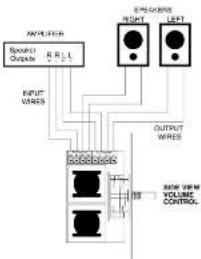
Refer to Figure #2 when wiring the volume control:
-
Connect the amplifier or receiver's left speaker output to the left input terminals on the removable wire block terminal. Please observe proper polarity of the connections (+ amplifier to + input on the volume control).
-
Repeat step 1 for the right side.
-
Connect the wires from the left speaker to the left speaker output terminals on the wire block terminal. Please observe proper polarity of the wires for correct speaker phase (+ speaker to + output).
-
Repeat step 3 for right speaker connection.
CAUTION: If the input and output connections are reversed, the minimum setting on the volume control will cause a short across the amplifier or receiver output terminals, resulting in serious damage to your amplifier or receiver. Please double check steps 1 through 4. This volume control cannot be connected in series with another volume control.
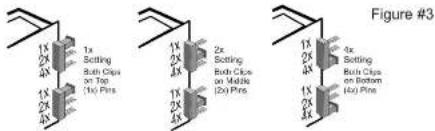
Adjusting the Bridge Clips for Multiple Speakers (See Figure #3)
Figure #1
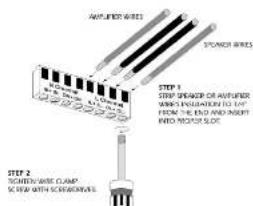
Figure #2
Page 2
Owner's Manual
This volume control is designed to run multiple pairs of speakers without damaging your amplifier or receiver. The adjustment is made by using bridge clips that can be easily changed. NOTE: Both bridge clips must have the same setting - i.e. 1x, 2x or 4x. Failure to properly set the bridge clips may result in damage to your amplifier or receiver. Please follow the recommendations in this section carefully. Failure to properly set the bridge clips may result in damage to your amplifier or receiver.
Use the chart in Figure 14 to determine a) the maximum number of speaker pairs that can be connected to your amplifier or receiver and b); the appropriate bridge clip setting (1x, 2x or 4x) to use on the volume control.
- In the first column, determine the minimum impedance capability of your amplifier or receiver.
- Move across the row to the number of Bohm speaker pairs you wish to use.
- The resulting number (1x, 2x or 4x) is the bridge clip setting appropriate for your configuration. NOTE: Both bridge clips must have the same setting.
- The gray area indicates a setting that is slightly below the amplifier or receiver's minimum impedance but will most likely work.
| 1 | 2 | 3 | 4 | 5 | 6 | 7 | 8 | 9 | |
| 8ohm | 1x | 2x | 4x | 4x | 4x | ||||
| 6ohm | 1x | 2x | 4x | 4x | 4x | 4x | |||
| 4ohm | 1x | 1x | 2x | 2x | 4x | 4x | 4x | 4x | 4x |
Figure #4
Mounting the Volume Control
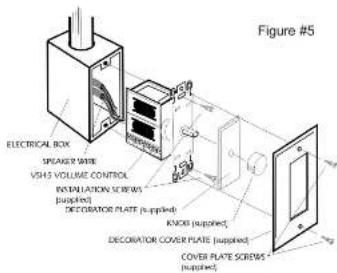
Once the control has been wired, it is ready to be mounted into the wall. Referring to Figure #5, place the components of the volume control into the wall in the order illustrated. Use the enclosed screws to hold the components in place.
NOTE: The rotary switch is shipped with the control turned as far counterclockwise as it will turn off. If you changed this, return it to the full counterclockwise position before starting installation.