176798 - Hörlurar MANHATTAN - Gratis bruksanvisning och manual
Hitta enhetens manual gratis 176798 MANHATTAN i PDF-format.


Användarfrågor om 176798 MANHATTAN
0 fråga om denna apparat. Svara på dem du kan eller ställ din egen.
Ställ en ny fråga om denna apparat
Ladda ner instruktionerna för din Hörlurar i PDF-format gratis! Hitta din manual 176798 - MANHATTAN och ta tillbaka ditt elektroniska enhet i hand. På denna sida publiceras alla dokument som behövs för att använda din enhet. 176798 av märket MANHATTAN.
BRUKSANVISNING 176798 MANHATTAN
ML3 LASER DESKTOP MOUSE REFERENCE GUIDE
MODEL 176798
Thank you for your purchase of this MANHATTAN® ML3 Laser Desktop Mouse.
The undermount push-button switches the resolution on the fly (800, 1000 or 1600 dpi) to suit a range of applications; Plug and Play installation plus Windows and Mac OS compatibility offer easy operation; and, with no mechanical parts to wear out, little maintenance is needed to maintain optimal performance.
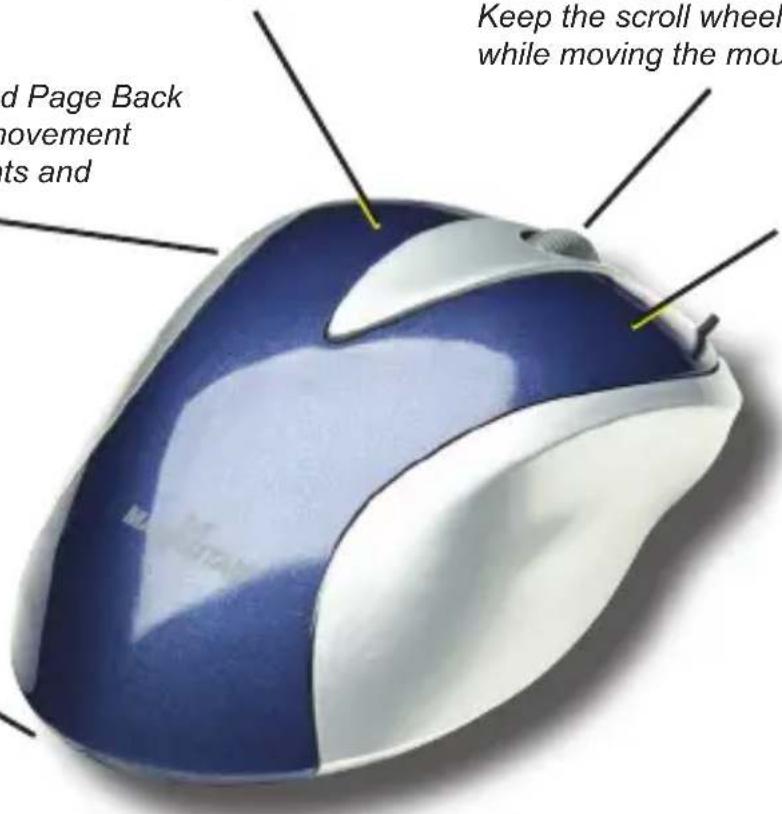
Left-click to select on-screen options.
Roll the scroll wheel forward or back to move through a document or screen. Keep the scroll wheel pressed down while moving the mouse to auto-scroll.
Page Forward and Page Back provide quicker movement through documents and Web sites
Right-click to view pop-up menus available in your programs.
The low-frictio n base smoothly glides over work surfaces .

MANHATTAN® offers a complete line of PC Components, Peripherals, Cables and Accessories Ask your local computer dealer for more information or visit us online at
www.manhattan-products.com
Copyright © MANHATTAN
All products mentioned are trademarks or registered trademarks of their respective owners.
SPECIFICATIONS
Standards & Certifications
• USB 1.1, CE, FCC, WEEE, Class 1 Laser IEC 60825-1-2001
General
- USB 1.1 receiver
- Mouse: laser; 800/1000/1600 dpi user-adjustable resolution
- Controls: right mouse, left mouse with scroll wheel; page forward and page back buttons
• Material: ABS plastic - Compatible with Windows 98SE/Me/2000/XP/Vista; Mac OS X 10.2 and above
Dimensions
- Mouse: 12 x 8 x 4 cm (4.75 x 3 x 1.7 in.); 122 g (4.3 oz.)
- USB cable: 1.5 m (5 ft.)
Environmental
• Operational temperature: 0 – 45°C
• Storage temperature: -40 – 45°C
• Working humidity: <85%
• Electrical: 5 V <30 mA
Package Contents
- Laser Desktop Mouse
- Reference guide
FCC Statement
This equipment has been tested and found to comply with the limits for a class B digital device, pursuant to part 15 of the FCC rules. These limits are designed to provide reasonable protection against harmful interference in a residential installation.
This equipment generates, uses and can radiate radio frequency energy and, if not installed and used in accordance with the instructions, may cause harmful interference to radio communications. However, there is no guarantee that interference will not occur in a particular installation. If this equipment does cause harmful interference to radio or television reception — which can be determined by turning the equipment off and then back on — the user is encouraged to try to correct the interference by one or more of the following measures:
- Reorient or relocate the receiving antenna.
- Increase the separation between the equipment and receiver.
- Connect the equipment into an outlet on a circuit different from that to which the receiver is connected.
- Consult your MANHATTAN dealer or an experienced radio/TV technician.
Operating Tips
- Do not use the mouse in conditions of extreme temperatures or excessive moisture, dust or dirt.
- The optical mouse will not work freely on a smooth desk, glass or any reflective surface or 3D mouse pad.