VM7804 - некатегоризовано ATEN - Besplatni korisnički priručnik
Pronađite besplatno priručnik za uređaj VM7804 ATEN u PDF formatu.


Pitanja korisnika o VM7804 ATEN
0 питање о овом уређају. Одговорите на оне које знате или поставите своје.
Постави ново питање о овом уређају
Preuzmite uputstvo za vaš некатегоризовано u PDF formatu besplatno! Pronađite svoj priručnik VM7804 - ATEN i uzmite svoju elektronsku napravu nazad u ruke. Na ovoj stranici su objavljeni svi dokumenti potrebni za korišćenje vaše naprave. VM7804 marke ATEN.
KORISNIČKI PRIRUČNIK VM7804 ATEN
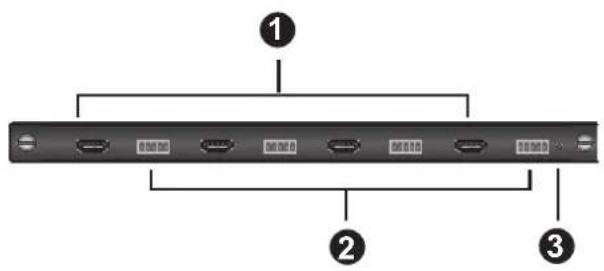
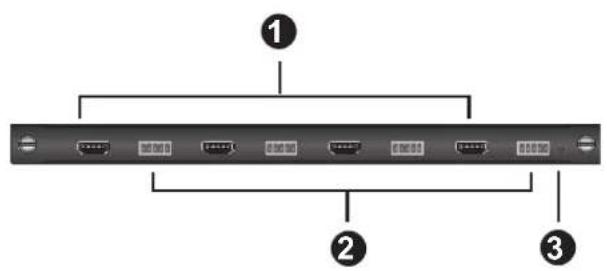
VM7804 Front View VM8804 Front View
Hardware Review
VM7804 Front View
- HDMI Input Ports
- Audio Input Ports
- Status LED
VM8804 Front View
- HDMI Output Ports
- Audio Output Ports
- Status LED
Hardware Setup
I/O Board Installation
- (Optional) Power off the Modular Matrix switch.
Note: The Input/Output Boards are hot swappable.
-
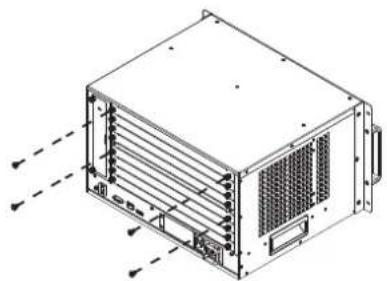
On the rear of the VM1600 unscrew the two phillips head screws and remove a back panel cover.
-
Slide the I/O board into the open slot on the VM1600 until it secures in place.
Note: The upper four slots are for input boards; the lower four slots are for output boards.
-
Tighten the screws on the I/O board to fasten it to the Modular Matrix switch, until its secure.
-
Repeat the steps if you are installing more I/O boards.
- Power on the Modular Matrix switch.
natural_image
Technical line drawing of a server rack unit with ventilation grilles and mounting brackets (no text or symbols)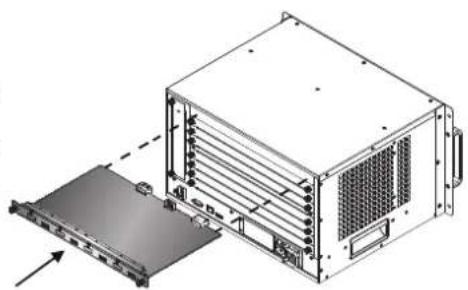
natural_image
Technical illustration of a server rack unit with an open panel and ventilation slots (no text or symbols)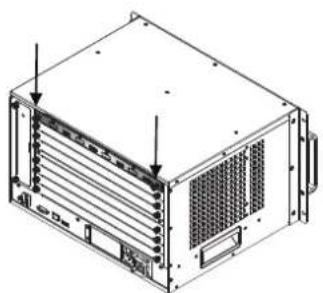
natural_image
Isometric line drawing of a server rack unit with ventilation grilles and mounting brackets (no text or symbols)Installation
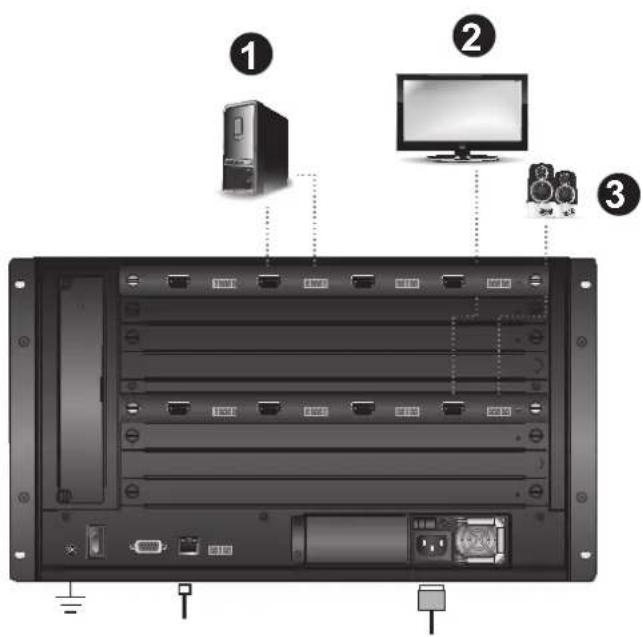
- Connect your A/V input source device to the HDMI / audio input port of the VM7804.
- Connect your video display device to the HDMI output port of the VM8804.
- Connect your speakers / audio output device to the Audio output port of the VM8804.
- Power on the VM1600 and all devices in the installation.
Online Registration
http://eservice.aten.com
Technical Phone
Support
International:
886-2-86926959
North America:
1-888-999-ATEN
Ext: 4988
United Kingdom:
44-8-4481-58923


This device complies with Part 15 of the FCC Rules. Operation is subject to the following two conditions: (1) this device may not cause harmful interference, and (2) this device must accept any interference received, including interference that may cause undesired operation.
Important Notice
Considering environmental protection, ATEN does not provide a fully printed user manual for this product. If the information contained in the Quick Start Guide is not enough for you to configure and operate your product, please visit our website www.aten.com, and download the full user manual.
The following contains information that relates to China:
○表示该有害有害物质在碳素中所有均质材料中的含量均在12711361.3006规定的限量要求之下。
- 表示符合欧盟的额外条款,但该有毒有害物质至少在该部件的某一均质材料中的含量超出5.47 11383-2006的限量要求。
X: 表示该有害有害物质至少在该部件的某一地质材料中的含量超出5.27\~11383-2006的限量要求。
All information, documentation, firmware, software utilities, and specifications contained in this package are subject to change without prior notification by the manufacturer. Please visit our website http://www.aten.com/download/?cid=dds for the most up-to-date versions.
© Copyright 2014 ATEN® International Co., Ltd.
ATEN and the ATEN logo are trademarks of ATEN International Co., Ltd. All rights reserved. All other trademarks are the property of their respective owners.
This product is RoHS compliant.