LWMT72UV - перилица веша Lloyd - Besplatni korisnički priručnik
Pronađite besplatno priručnik za uređaj LWMT72UV Lloyd u PDF formatu.


Pitanja korisnika o LWMT72UV Lloyd
0 питање о овом уређају. Одговорите на оне које знате или поставите своје.
Постави ново питање о овом уређају
Preuzmite uputstvo za vaš перилица веша u PDF formatu besplatno! Pronađite svoj priručnik LWMT72UV - Lloyd i uzmite svoju elektronsku napravu nazad u ruke. Na ovoj stranici su objavljeni svi dokumenti potrebni za korišćenje vaše naprave. LWMT72UV marke Lloyd.
KORISNIČKI PRIRUČNIK LWMT72UV Lloyd

LIVE THE FUTURE
Imported & Marketed By:
LLOYD ELECTRIC & ENGINEERING LIMITED
159, Okhla Industrial Estate Phase-III, New Delhi - 110020
Correspondence Address
Plot-2, Industrial Area, Kalkaji, New Delhi - 110019
Email:perfectservice@lloydmail.com
Customer Care Toll Free No.
Gujarat, Madhya Pradesh: 1800-2582-583 | Punjab, Haryana, Himachal Pradesh, J&K: 1800-1377-781 Maharashtra, Chhattisgarh, Goa: 1800-1024-212 | South India: 1800-1200-666 | Rest of India: 1800-1020-666

FULLY AUTOMATIC TOP LOADING
WASHING MACHINE
LWMT70P | LWMT72UV | LWMT72H

natural_image
Line drawing of a square washing machine with control panel and circular vent (no text or symbols)INSTRUCTION MANUAL
Please read this manual carefully before operating the machine

Dear Customer
Congratulations on being the proud owner of Lloyd Washing Machine. Your Washing Machine comes with a Lloyd Guarantee of Quality.
Lloyd takes great pride in providing its customers with perfect products that adheres to international quality standards.
Lloyd is committed to provide the ultimate customer satisfaction as nothing brings us greater joy than having satisfied customers of Lloyd.
At Lloyd, feedback and suggestions based on your product usage experience are greatly appreciated.
Please feel free to contact us at perfectservice@lloydmail.com
NIPUN SINGHAL DIRECTOR
Contents
- Main Features 2
- Parts Description 2
- Attention List 3
- Installation and Adjustment 5
- Drain Pipe Usage 6
- Installation of the Water Inlet 7
- Control Panel and Features 9
- Operating Procedure 12
- Recommended Detergent and Water Quantity 13
- Maintenance 14
- Troubleshooting 15
- Features Description 16
- Specifications 17
- Safety Alarm 18
- Package List 18
- Warranty Terms & Conditions 19
1.Main Features
LWMT70P
| 1. Fuzzy Logic | 5. Crystal Drum | 1. Hot Wash | 6. Child Lock |
| 2. Memory Backup | 6. Tub Clean | 2. Fuzzy Logic | 7. Crystal Drum |
| 3. LED Display | 7. Air Dry | 3. IMD | 8. LED Display |
| 4. Delay Start | 8. DIY Process | 4. Damping Lid | 9. Tub Clean |
| 5. Memory Backup | 10. Bubble Wash |
LWMT72H
LWMT72UV
| 1. Uvtron | 6. Crystal Drum |
| 2. Fuzzy Logic | 7. LED Display |
| 3. Damping Lid | 8. DIY Process |
| 4. IMD | 9. Bubble Wash |
| 5. Memory Backup | 10. Tub Clean |
- Parts Description

Accessories:
| Connect to Washing MachineThe Tap AdaptorConnect to Adaptor | ||
| Rat Mesh (1) | Inlet Water Pipe (1)Inlet water Pipe Connector (1) | Drain Pipe with Clamp (1) |
Use only new hose-sets supplied with the machine for connecting the machine to the water mains. Do not re-use old hose-sets.
3.Attention List
| Warning | This mark means “danger” The content is related to safety of user and washing machine. Please operate according to the instructions or it may lead to damage. |
| No Permission | This mark means no permission, or it will lead to washing machine damage. |
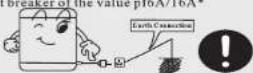
Ensure the earth connection in your electrical supply is proper before connecting the power cord. The socket should be standard and independent of 2 round Europe type of 230V AC,50HZ. A connection with separate line fuse or circuit breaker of the value pf6A/16A*
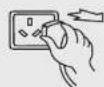
Pull out plug and turn off water tap when there is no power supply.

Do not bend/twist the electrical cord too much. Please contact our after sales service department when line or socket is damaged or slacked.


| Do not install the machine in damp surrounding such as bathroom. Never rinse or wash the machine; Never put the wet clothes on control panel. | Do not use hot water more than 50°C. |
| Do not block up vent when you install the washer on carpet floor. | Do not wash raincoats, bicycle covers, etc.; to prevent severe vibration. |
| Do not use extension junction box since it may not be properly earthed; Do not use an extension cord. |

Never open the wash lid or put your hand in washer tub when washing or spinning process is going on.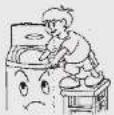  | Do not dismantle or repair the washer by yourself.  |
Do not put any hot or heavy objects on the washer!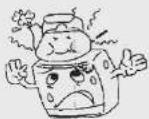  | Do not wash clothes with volatile material such as alkaline or petrol.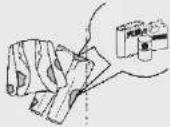  |
Do not permit children to go near the machine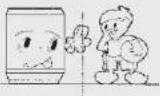  | Do not expose the machine to direct sunlight, rain or heat.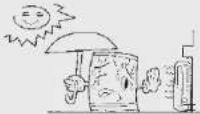  |
- Please clean the magic filter after every 5 wash cycles.
- Ensure that the plug is disconnected to wall socket before
taking out the filter. - Drain off all water in the tub
- Pull the filter out and wash it as shown in the picture.
- Assemble the filter again after cleaning it
Please ensure that you empty all pockets of objects such as coins, pens, toothpies, match sticks etc. They might get stuck inside the machine and could cause the damage to your clothes.


4. Installation and Adjustment
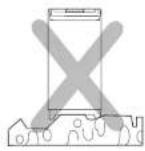
- Do not place the washing machine on a slanting, uneven or unstable surface.
- Place the washing machine on a solid levelled surface to avoid excessive vibration during operation.


natural_image
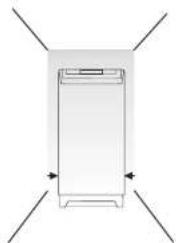
Simple line drawing of a rectangular device with four directional arrows pointing outward (no text or symbols)Keep the machine at least 10cm away from the wall on all sides.

Place the drain hose flat on the floor before operating the machine.

Washing machine should be directly connected to socket.
Switch off the machine when not in operation.
- If the power cord is damaged, it must be replaced by the Lloyd authorized service person in order to avoid hazard.
- Discard the cushion balance ring assy cover.
- Remove transit bracket.
Dismantling the package
- Dismantle the package and take out the rat mesh package with upper foam.
- Open the wash lid and take out all the accessories
- Remove all packaged items including convex plastic cube.
Adjusting The Washing Machine
- The front legs of the machine are adjustable. Lift the front side slightly and rotate the legs to let the machine stable and horizontal.
- Then lock the nut if the legs has nut.
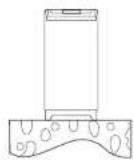
- Please check whether the machine is horizontal as shown in picture.

5.Drain Pipe Usage

n pipe assembly
● Connect the drain pipe to the
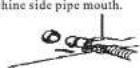
● Push the pipe to the machine side until it
touche clamp
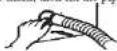
- Ensure the pipe is connected firmly to prevent leakage.
- Ensure the pipe is flat on the ground when the machine is working.
● The height should be less than 6cm as shown in the picture.


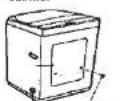
ction Change of drain pipe
● Unscrew and take out
the back cover.
● Take down the pipe mouth fixed on the cabinet
Drain pipe
● Turn the inner drain pipe to reverse direction carefully. Never bend the drain pipe.
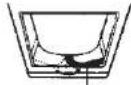
Inner drain pipe
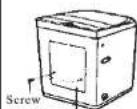
- Lock the screw firmly that fixes the inner drain pipe.

Drain pipe
● Assemble the back cover and pipe mouth to the other side of the cabinet.
Rat mesh
6. Installation of the water inlet
Proper water inlet

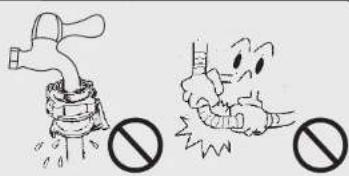
The tap mouth should be smooth.
Front length should be more than 10mm.
Connect the adaptor to the tap
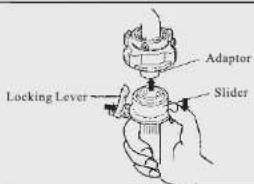
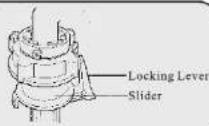
- Detach the adaptor from the water inlet pipe accessories as picture1: Hold the bottom part of locking lever and press down the slider;
- Loosen the four screws of the tap adaptor and press the tap adaptor against the mouth of the water tap as shown in Picture 2 (Detach the ring if it is smaller than the tap mouth as Picture 3).
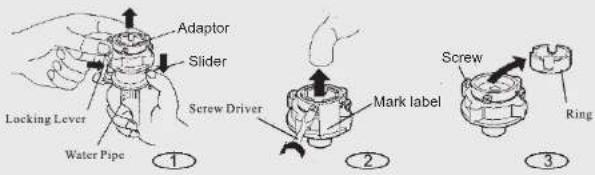
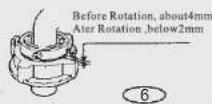
3. Tighten the screws evenly as shown in picture 4.
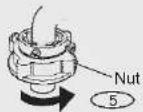
4. Remove the mark, rotate the nut in counter clockwise direction.

Connect the inlet water pipe to the machine
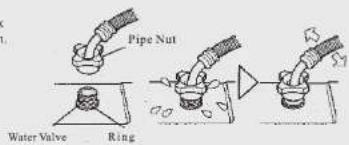
- Do not detach the water proof ring. Please check whether the ring is damaged before the wash.
2 Cover the pipe nut on the water valve.
3.Fit the nut tightly.
Connect the inlet water pipe to the adaptor
-
Press Down the slider, insert the pipe to the adaptor.
-
Let the locking lever hook the pipe connector, release the slider until you hear a sound.
Check the water inlet pipe and the tap
- Pull the pipe gently to check whether it is tight.
2.Open the tap to check leakage
- Ensure the pipe is connected to the tap and the machine properly before each wash.
Detach the inlet water pipe
-
Close the water tap.
-
Hold the locking lever and press down the slider, then take down the pipe.
| Program | Deep Wash | Standard | Cotton | Gentle | MiNi | Soak Wash | Air Dry | Tub Clean | |||||
| Soak | No | Yes | No | Yes | No | Yes | No | Yes | No | Yes | Yes | ||
| Time(min) | 38 | 53 | 33 | 48 | 35 | 50 | 30 | 45 | 15 | 30 | 47 | 60 | 13 |

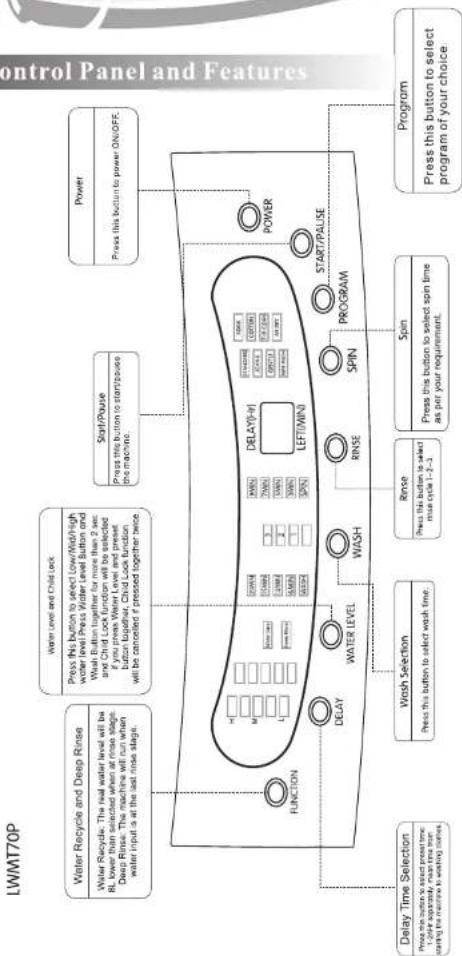
flowchart
graph TD
    A["AIR DRY\nPress this button to select the dry time\nKOMIN=20MM+KOMIN+KOMIN-KOMIN\nThis function can be selected under the initial situation."] --> B["Process Selection\nPress this button to select any wash process such as Sink/Wash/River/San. Original setting is Wash-Base-Spin."]
    B --> C["Water Level Selection\nPress this button to select water level\nThe machine will adjust water level by filter when using Normal or Large program."]
    C --> D["Delay Selection\nPress this button to select press time 1~24h, mean time from during the machine is washing clothes."]
    D --> E["Start/Pouse\nPress this button to start/pose the machine."]
    E --> F["Power\nPress this button to power ON/OFF."]
    F --> G["Program Selection\nPress this button to select program of your choice."]
    G --> H["Discharge/Place"]
    H --> I["LEFT(MIN)\nDELAY(Hr)"]
    I --> J["Process"]
    I --> K["DELAY"]
    I --> L["DISCOH"]
    I --> M["POWER"]
    M --> N["Start/Pouse"]
| Program | Normal | Large | Gentle | Baby Clothes | Speedy | Hot wash | Standard | Tub Clean | |||||||
| Soak | No | Yes | No | Yes | No | Yes | No | Yes | No | Yes | No | Yes | No | Yes | |
| Time(min) | 35 | 60 | 45 | 90 | 29 | 44 | 29 | 44 | 19 | 34 | 31 | 56 | 37 | 52 | 18 |

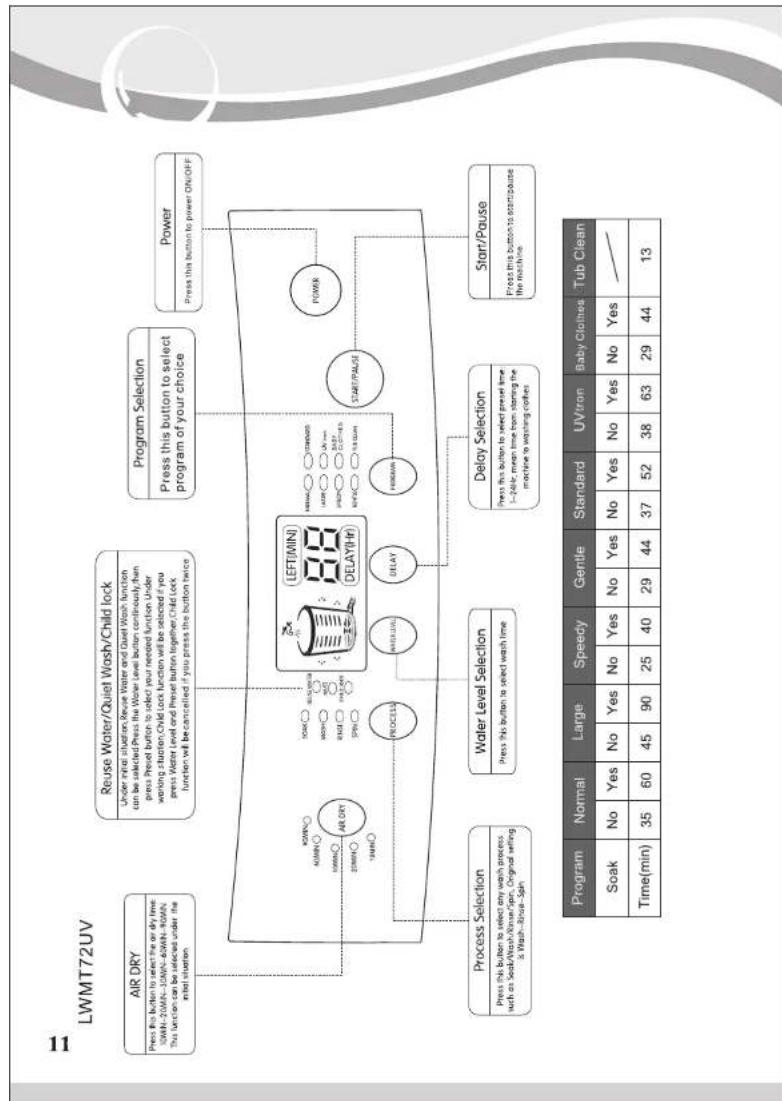
flowchart
graph TD
    A["Program Selection"] --> B["Press this button to select program of your choice"]
    B --> C["Power"]
    C --> D["Press this button to power ON/OFF"]
    D --> E["Start/Pause"]
    E --> F["Delay Selection"]
    F --> G["Water Level Selection"]
    G --> H["Process Selection"]
    H --> I["Process Selection"]
    I --> J["Reuse Water/Quiet Wash/Child lock"]
    J --> K["Under mini situation: Reuse Water and Dial Wash function can be selected. Press the Water level button continuously. From press. Press button to select your needed function under wrong Station Child lock function will be selected if you press. Water level and Press button together Child lock function will be cancelled if you press the Button twice"]
    J --> L["Pressure This button to select any wash/child lock"]
    L --> M["Under mini situation: Reuse Water and Dial Wash function can be selected. Press the Water level button continuously. From press. Press button to select your needed function under wrong Station Child lock function will be selected if you press. Water level and Press button together Child lock function will be cancelled if you press the Button twice"]
    J --> N["Pressure This button to select any wash/child lock"]
    N --> O["Under mini situation: Reuse Water and Dial Wash function can be selected. Press the Water level button continuously. From press. Press button to select your needed function under wrong Station Child lock function will be selected if you press. Water level and Press button together Child lock function will be cancelled if you press the Button twice"]
    J --> P["Pressure This button to select any wash/child lock"]
    P --> Q["Under mini situation: Reuse Water and Dial Wash function can be selected. Press the Water level button continuously. From press. Press button to select your needed function under wrong Station Child lock function will be selected if you press. Water level and Press button together Child lock function will be cancelled if you press the Button twice"]
    J --> R["Pressure This button to select any wash/child lock"]
    R --> S["Under mini situation: Reuse Water and Dial Wash function can be selected. Press the Water level button continuously. From press. Press button to select your needed function under wrong Station Child lock function will be selected if you press. Water level and Press button together Child lock function will be cancelled if you press the Button twice"]
    J --> T["Pressure This button to select any wash/child lock"]
    T --> U["Under mini situation: Reuse Water and Dial Wash function can be selected. Press the Water level button continuously. From press. Press button to select your needed function under wrong Station Child lock function will be selected if you press. Water level and Press button together Child lock function will be cancelled if you press the Button twice"]
    J --> V["Pressure This button to select any wash/child lock"]
    V --> W["Under mini situation: Reuse Water and Dial Wash function can be selected. Press the Water level button continuously. From press. Press button to select your needed function under wrong Station Child lock function will be selected if you press. Water level and Press button together Child lock function will be cancelled if you press the Button twice"]
    J --> X["Pressure This button to select any wash/child lock"]
    X --> Y["Under mini situation: Reuse Water and Dial Wash function can be selected. Press the Water level button continuously. From press. Press button to select your needed function under wrong Station Child lock function will be selected if you press. Water level and Press button together Child lock function will be cancelled if you press the Button twice"]
    J --> Z["Pressure This button to select any wash/child lock"]
    Z --> AA["Under mini situation: Reuse Water and Dial Wash function can be selected. Press the Water level button continuously. From press. Press button to select your needed function under wrong Station Child lock function will be selected if you press. Water level and Press button together Child lock function will be cancelled if you press the Button twice"]
    J --> AB["Pressure This button to select any wash/child lock"]
    AB --> AC["Under mini situation: Reuse Water and Dial Wash function can be selected. Press the Water level button continuously. From press. Press button to select your needed function under wrong Station Child lock function will be selected if you press. Water level and Press button together Child lock function will be cancelled if you press the Button twice"]
    J --> AD["Pressure This button to select any wash/child lock"]
    AD --> AE["Under mini situation: Reuse Water and Dial Wash function can be selected. Press the Water level button continuously. From press. Press button to select your needed function under wrong Station Child lock function will be selected if you press. Water level and Press button together Child lock function will be cancelled if you press the Button twice"]
    J --> AF["Pressure This button to select any wash/child lock"]
    AF --> AG["Under mini situation: Reuse Water and Dial Wash function can be selected. Press the Water level button continuously. From press. Press button to select your needed function under wrong Station Child lock function will be selected if you press. Water level and Press button together Child lock function will be cancelled if you press the Button twice"]
    J --> AH["Pressure This button to select any wash/child lock"]
    AH --> AI["Under mini situation: Reuse Water and Dial Wash function can be selected. Press the Water level button continuously. From press. Press button to select your needed function under wrong Station Child lock function will be selected if you press. Water level and Press button together Child lock function will be cancelled if you press the Button twice"]
    J --> AJ["Pressure This button to select any wash/child lock"]
    AJ --> AK["Under mini situation: Reuse Water and Dial Wash function can be selected. Press the Water level button continuously. From press. Press button to select your needed function under wrong Station Child lock function will be selected if you press. Water level and Press button together Child lock function will be cancelled if you press the Button twice"]
    J --> AL["Pressure This button to select any wash/child lock"]
    AL --> AM["Under mini situation: Reuse Water and Dial Wash function can be selected. Press the Water level button continuously. From press. Press button to select your needed function under wrong Station Child lock function will be selected if you press. Water level and Press button together Child lock function will be cancelled if you press the Button twice"]
    J --> AN["Pressure This button to select any wash/child lock"]
    AN --> AO["Under mini situation: Reuse Water and Dial Wash function can be selected. Press the Water level button continuously. From press. Press button to select your needed function under wrong Station Child lock function will be selected if you press. Water level and Press button together Child lock function will be cancelled if you press the Button twice"]
    J --> AP["Pressure This button to select any wash/child lock"]
    AP --> AQ["Under mini situation: Reuse Water and Dial Wash function can be selected. Press the Water level button continuously. From press. Press button to select your needed function under wrong Station Child lock function will be selected if you press. Water level and Press button together Child lock function will be cancelled if you press the Button twice"]
    J --> AR["Pressure This button to select any wash/child lock"]
    AR --> AS["Under mini situation: Reuse Water and Dial Wash function can be selected. Press the Water level button continuously. From press. Press button to select your needed function under wrong Station Child lock function will be selected if you press. Water level and Press button together Child lock function will be cancelled if you press the Button twice"]
    J --> AT["Pressure This button to select any wash/child lock"]
    AT --> AU["Under mini situation: Reuse Water and Dial Wash function can be selected. Press the Water level button continuously. From press. Press button to select your needed function under wrong Station Child lock function will be selected if you press. Water level and Press button together Child lock function will be cancelled if you press the Button twice"]
    J --> AV["Pressure This button to select any wash/child lock"]
    AV --> AW["Under mini situation: Reuse Water and Dial Wash function can be selected. Press the Water level button continuously. From press. Press button to select your needed function under wrong Station Child lock function will be selected if you press. Water level and Press button together Child lock function will be cancelled if you press the Button twice"]
    J --> AX["Pressure This button to select any wash/child lock"]
    AX --> AY["Under mini situation: Reuse Water and Dial Wash function can be selected. Press the Water level button continuously. From press. Press button to select your needed function under wrong Station Child lock function will be selected if you press. Water level and Press button together Child lock function will be cancelled if you press the Button twice"]
    J --> AZ["Pressure This button to select any wash/child lock"]
    AZ --> BA["Under mini situation: Reuse Water and Dial Wash function can be selected. Press the Water level button continuously. From press. Press button to select your needed function under wrong Station Child lock function will be selected if you press. Water level and Press button together Child lock function will be cancelled if you press the Button twice"]
    J --> BB["Pressure This button to select any wash/child lock"]
    BB --> BC["Under mini situation: Reuse Water and Dial Wash function can be selected. Press the Water level button continuously. From press. Press button to select your needed function under wrong Station Child lock function will be selected if you press. Water level and Press button together Child lock function will be cancelled if you press the Button twice"]
    J --> BD["Pressure This button to select any wash/child lock"]
    BD --> BE["Under mini situation: Reuse Water and Dial Wash function can be selected. Press the Water level button continuously. From press. Press button to select your needed function under wrong Station Child lock function will be selected if you press. Water level and Press button together Child lock function will be cancelled if you press the Button twice"]
    J --> BF["Pressure This button to select any wash/child lock"]
    BF --> BG["Under mini situation: Reuse Water and Dial Wash function can be selected. Press the Water level button continuously. From press. Press button to select your needed function under wrong Station Child lock function will be selected if you press. Water level and Press button together Child lock function will be cancelled if you press the Button twice"]
    J --> BH["Pressure This button to select any wash/child lock"]
    BH --> BI["Under mini situation: Reuse Water and Dial Wash function can be selected. Press the Water level button continuously. From press. Press button to select your needed function under wrong Station Child lock function will be selected if you press. Water level and Press button together Child lock function will be cancelled if you press the Button twice"]
    J --> BJ["Pressure This button to select any wash/child lock"]
    BJ --> BK["Under mini situation: Reuse Water and Dial Wash function can be selected. Press the Water level button continuously. From press. Press button to select your needed function under wrong Station Child lock function will be selected if you press. Water level and Press button together Child lock function will be cancelled if you press the Button twice"]
    J --> BL["Pressure This button to select any wash/child lock"]
    BL --> BM["Under mini situation: Reuse Water and Dial Wash function can be selected. Press the Water level button continuously. From press. Press button to select your needed function under wrong Station Child lock function will be selected if you press. Water level and Press button together Child lock function will be cancelled if you press the Button twice"]
    J --> BN["Pressure This button to select any wash/child lock"]
    BN --> BO["Under mini situation: Reuse Water and Dial Wash function can be selected. Press the Water level button continuously. From press. Press button to select your needed function under wrong Station Child lock function will be selected if you press. Water level and Press button together Child lock function will be cancelled if you press the Button twice"]
    J --> BP["Pressure This button to select any wash/child lock"]
    BP --> BQ["Under mini situation: Reuse Water and Dial Wash function can be selected. Press the Water level button continuously. From press. Press button to select your needed function under wrong Station Child lock function will be selected if you press. Water level and Press button together Child lock function will be cancelled if you press the Button twice"]
    J --> BQ
    BQ --> BW["Pressure This button to select any wash/child lock"]
    BW --> BX["Under mini situation: Reuse Water and Dial Wash function can be selected. Press the Water level button continuously. From press. Press button to select your needed function under wrong Station Child lock function will be selected if you press. Water level and Press button together Child lock function will be cancelled if you press the Button twice"]
    BQ --> BY["Pressure This button to select any wash/child lock"]
    BY --> BZ["Under mini situation: Reuse Water and Dial Wash function can be selected. Press the Water level button continuously. From press. Press button to select your needed function under wrong Station Child lock function will be selected if you press. Water level and Press button together Child lock function will be cancelled if you press the Button twice"]
    BQ --> BY
    BY --> BZ

- Process Selection: Soak, Wash, Rinse, Spin
-
Water Level selection: Select water level according to the quantity of the clothes.
-
Under initial wash cycle select "delay time" if needed. Press Power button to cancel the delay time.
-
Under initial wash cycle, Air Dry time can be selected if the machine has this function. The machine will run once the lid is closed and the Start/Pause button is pressed.
-
Under initial wash situation, 'Reuse Water' and 'Quiet Wash' function can be selected: press and hold the Water Level button continuously, then press Delay button to select your needed function. Note: 'Reuse water' can be realized only when you select Rinse and Spin function or Wash and Spin function, and the program will be locked.
-
Close the top lid and press Start/Pause button, then the machine will start. Child lock function can be activated while the machine is running. Note: The machine will stop and give an alarm if you open the lid while running
-
Once the process is complete, the machine will send out a buzzer & the power will be automatically turned off.
-
Recommended Detergent and Water Quantity
| Clothes Weight | Water Level | Liquid Detergent | Power Detergent |
| >6 Kg | High | 110ml | 110g |
| 4-6 Kg | Medium | 90ml | 90g |
| 2-4 Kg | Low | 70ml | 70g |
| 0-2 Kg | Minimum | 50ml | 50g |
Note: Detergent powder with little soap recommended, please check the above water quantity and package instruction if you use other detergent.

10. Maintenance
| Program FinishThe machine will make a buzzer sound automatically once the program finishes. | Shell MaintenanceWipe the machine with soft and dry cloth after each wash.Do not use soda or bleach for cleaning the washing machine. |
Magic Filter ClearanceEnsure the Magic Filter is before washing.Clean the Magic Filter after wash as shown in the pictus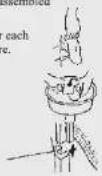 | Inlet Mouse ClearancePlease clean the inlet filter if it is blocked. |
TROUBLESHOOTING
Key points for trouble locating

Washing machine not running
• Is the water tap open?
- Is the power cord plugged into the socket properly?
- Is the power supply turned on?
• Is the Fuse sound?
• Is the water Level enough?
No water entering the machine
• Is the water tap open?
- Has the water supply ceased?
- Is the water inlet hose of connection pipe clogged?
- Has the water tap frozen?
- If water supply is not supplied within 20 minutes,
the buzzer will give out an audible alarm.
Water is not draining out of the machine
• Is the drain pipe let down?
• Is the drain pipe frozen?
• Is the drain pipe clogged?
- If the drain is not realized within 20 minutes, the
buzzer will give out an audible alarm.
The Rinse/Spin cycle is not functioning properly.
- Are the clothes put evenly inside the washing barrel?
- Is the washing machine positioned stable and
horizontally?
• Is the top cover of the washing machine close?
Power supply cannot be turned off
- If the error flag is still displayed, contact commercial agent of service center.
Water is overflowing from the machine
- Drain the machine
- If the error flag is still being displayed, contact
an authorised service center.

12. Features Description
Auto Alarm
| Digital Display | Problem | Tactics |
| E0 | The wash tub is filled with water for more than 20 minutes | Open the lid |
| E1 | Ensure the drain pipe is horizontal and the height is less than 5cm; Ensure the drain pipe is not blocked or bend | The machine automatically detects and rearranges the load if it is out of balance, this results in a better cleaning process |
| E2 | Load imbalance | Open the lid and put the clothes evenly and symmetrically, then close the lid |
| E3 | The lid is open | Close the lid properly |
| E4 | The water sensor is abnormal | Contact our service department |
| E6 | Open the lid after setting Child Lock function | Close the lid properly |
1. Fuzzy Logic
The machine selects the program/process/water level/rinse cycle, etc. by itself by detecting the size, dirt and weight of clothes.
2. Memory Backup
The machine remembers wash cycle status if power cuts off during the washing process. The machine will continue the washing process once the power is back.
3. LED Display
Intelligent central digital dynamic LED display indicates the operation status vividly.
4. Delay Start
Select the delay start time from 1 Hr to 24 Hr separately, the machine will start working with the set program after the desired time.
5. Crystal Drum
The special design helps to improve the quality of wash and reduce the wear rate of clothes.
6. Tub Clean
We recommend consumers to use this function every 2 weeks to keep the machine clean.
Press Program button to select Tub Clean, then close the lid and Press Start/Pause button.
7. Air Dry
Air is supplied to the clothes during the washing and rinsing process thus keeping the clothes fresh.
8. DIY (Do It Yourself)
To automize and save a program as per your needs.
9. IMD
IMD means "In-mould decoration". This technology keeps the panel shining forever.
10. Dampling Lid
The lid closes smoothly to avoid jerks.
11. Child Lock
Ensures that your child does not change the ongoing process setting.
12. Bubble Wash
Soap bubbles are generated which then collide with the clothes giving a better soaking action.
13. UVtron
Uses Electromagnetic waves to sterilize the clothes and makes them gem free.
14. Hot wash
Inbuilt heater to wash clothes with warm water to give better water washing action.
- Specification
| Models | LWMT70P | LWMT72H | LWMT7UV | |||
| Power | 230V/50Hz | |||||
| Wash/ Spin Capacity | 7.0kg | 7.2kg | 7.2kg | |||
| Water Level(L) | 10/54 | 9/50 | 10/54 | 9/50 | 10/54 | 9/50 |
| 8/46 | 7/42 | 8/46 | 7/42 | 8/46 | 7/42 | |
| 6/38 | 5/34 | 6/38 | 5/34 | 6/38 | 5/34 | |
| 4/30 | 3/26 | 4/30 | 3/26 | 4/30 | 3/26 | |
| 2/22 | 1/18 | 2/22 | 1/18 | 2/22 | 1/18 | |
| Input Power (W) | 380 | |||||
| Inlet Water Pressure | 0.03Mpα~0.85Mpα | |||||
| Water Proof Level | IPX4 | |||||
| Dimensions(mm) | 550x550x930 | 550x550x955 | 550x550x955 | |||
| NW | 30kg | 32kg | 32kg | |||
| Noise | Wash Noise:≤60dB Spin Noise:≤70dB | |||||
| Power Consumption(KW·l) | 0.11 | 0.11 | 0.11 | |||
| Water Consumption (L) | 167 | 167 | 167 | |||
| Cleaning Rate | 0.80 | 0.80 | 0.80 | |||

14. Safety Alarm

- Ensure the earth connection in your electrical supply is proper before connecting the power cord!
• The machine must be earthed! - Do not use an extension cord. Ensure using a special socket!
15.Package List
| Name | Inlet Pipe Accessories | Rat Mesh | Use Manual | Guaranty Card | Drain Pipe and Clamp |
| Quantity | 1 | 1 | 1 | 1 | 1 |
Customer Privileges
Dear Customer,
Congratulations! We wish you a long and happy association with LLOYD. We would like you to know your privileges with respect to your washing machine you are entitled to:
- a. Repair or replacement of any parts other than rubber and plastic parts free of charge, for a period of 24 months from the date of Invoice/bill.
b. The defective part(s) shall be replaced with a functionally working equivalent part(s). The removed part(s) will be LLOYD property. - After sales service is available with in the municipal limits of the city where the service station/authorised dealer is located.
- These privileges are available to the original purchaser only.
- In an event the washing machine requires attention at the company's service centre / authorised dealer under the supervision of company's service engineer, the purchaser should arrange to deliver the washing machine to the service centre at his cost.
- A 10 Year warranty on Copper motor shall be applicable from the date of invoice/bill of purchase.
WARRANTY CARD
| TERMS OF WARRANTY*Repair or replacement of any part other than the plastic parts and rubber parts is free of charge for a period of 24 months from the date of the Invoice/Bill | |
| Machine SI. No.: ____.Model : ____.Dealer's Name : ____.Address : ____.Date of Purchase: ____ | Dealer stamp & signature |
* CONDITIONS APPLY AS DESCRIBED IN THE MANUAL
* DESIGN AND SPECIFICATIONS SUBJECT TO CHANGE FOR PRODUCT IMPROVEMENT.
WARRANTY
- This warranty covers repair and replacement of the defective parts only and does not cover any consequential damages or loss or replacement of the washing machine itself or a refund.
- The warranty stands void in case of the following conditions:
a. The washing machine has been damaged due to misuse, negligence, accident, improper installation, improper electrical circuit outside the machine, any defective electric supply, pests or any external agency.
b. The washing machine has been damaged due to use of sea water and/or sub standard detergent.
c. The washing machine is damaged in transit whether carried by the company's transport or by the purchaser himself.
d. The washing machine is tampered with, serviced or repaired by any agency not specifically authorised by the company.
e. The washing machine is not used in accordance with the instructions given in the USER MANUAL given along with this machine.
f. The serial number of the washing machine is deleted, defaced or altered.
g. The washing machine has been transported to another city without obtaining warranty transfer note from LLOYD.
h. The washing machine is purchased from any agency/dealer not authorised by LLOYD.
i. Accessories other than those supplied with this washing machine are used. - The company shall not be liable for any dealer expenses, if any, in carrying out the terms of this warranty.
- The company shall not be liable for any delay in rectifying the washing machine, in the event of non-availability of parts or situations beyond the control of the company. The company will not be responsible for any losses direct or indirect in this regard.
- This warranty is not applicable if the machine is put into any commercial use or used at places like hospitals, institutions, community halls, hostels and other similar applications.
- LLOYD employees, dealer and service personnel have no authority to vary the terms of this warranty.
- This warranty issued is subject to the jurisdiction of civil court of New Delhi.
- Dear Customer
- Contents
- 1.Main Features
- Installation and Adjustment
- Dismantling the package
- Adjusting The Washing Machine
- 5.Drain Pipe Usage
- n pipe assembly
- ction Change of drain pipe
- Installation of the water inlet
- Connect the inlet water pipe to the machine
- Connect the inlet water pipe to the adaptor
- Check the water inlet pipe and the tap
- Detach the inlet water pipe
- Maintenance
- TROUBLESHOOTING
- Key points for trouble locating
- Washing machine not running
- No water entering the machine
- Water is not draining out of the machine
- The Rinse/Spin cycle is not functioning properly.
- Power supply cannot be turned off
- Water is overflowing from the machine
- Features Description
- Fuzzy Logic
- Memory Backup
- LED Display
- Delay Start
- Crystal Drum
- Tub Clean
- Air Dry
- DIY (Do It Yourself)
- IMD
- Dampling Lid
- Child Lock
- Bubble Wash
- UVtron
- Hot wash
- Safety Alarm
- WARRANTY
Marka : Lloyd
Model : LWMT72UV
Kategorija : перилица веша