APPOM24 - Miu Approx - Manual falas për përdoruesin
Gjeni manualet e pajisjes falas APPOM24 Approx në format PDF.


Pyetjet e përdoruesve rreth APPOM24 Approx
0 pyetje rreth kësaj pajisjeje. Përgjigjuni atyre që njihni ose bëni tuajin.
Bëni një pyetje të re rreth kësaj pajisjeje
Shkarko udhëzimet për tuajin Miu në format PDF falas! Gjeni manualin tuaj APPOM24 - Approx dhe merrni pajisjen tuaj elektronike sërish në duar. Në këtë faqe janë publikuar të gjitha dokumentet e nevojshme për përdorimin e pajisjes suaj. APPOM24 e markës Approx.
MANUAL I PËRDORUESIT APPOM24 Approx

GUÍA DE USUARIO USER GUIDE
2.4GHz Wireless Optical Mouse APPOM24

CONTENIDO
• Ratón óptico inalámbrico
- Receptor USB
• 2 x Baterías AAA 1,5V
- Manual de usuario
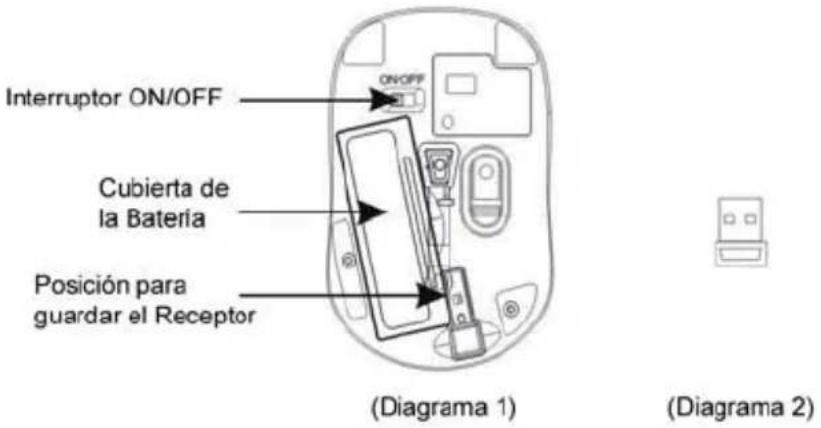
INSTALACIÓN DE LAS BATERÍAS
Siempre que se instalen nuevas baterías en el dispositivo, asegúrese de que son del tipo AAA de 1,5V y que están completamente cargadas.
I. Retire la cubierta de las baterías.
II. Inserte dos baterías AAA de 1,5V en el compartimento, asegurándose de que los polos positivo (+) y negativo (-) están correctamente alineados tal y como especifican las marcas del interior del compartimento. Vuelva a colocar la cubierta asegurándose de que ha quedado encajada correctamente.
III. Encienda el ratón, el LED de la parte inferior comenzará a parpadear.
INSTALACIÓN DEL RECEPTOR
La sincronización entre el receptor y el ratón ha sido configurada en la fábrica de forma correcta. El usuario puede utilizar el dispositivo sin necesidad de configurar la conexión.
I. Inserte el receptor en uno de los puertos USB de su ordenador, el sistema detectará y configurará el dispositivo de forma automática para su uso.
II. Ahora puede utilizar el ratón.
Si el dispositivo no funciona, por favor, vuelva a realizar los pasos descritos
anteriormente.
INTERRUPTOR "ON/OFF"
Si no está utilizando el ratón, por favor, desconéctelo utilizando el interruptor "ON/OFF" para no gastar las baterías.
DESCRIPCIÓN DE LOS BOTONES Y AJUSTE DE DPI
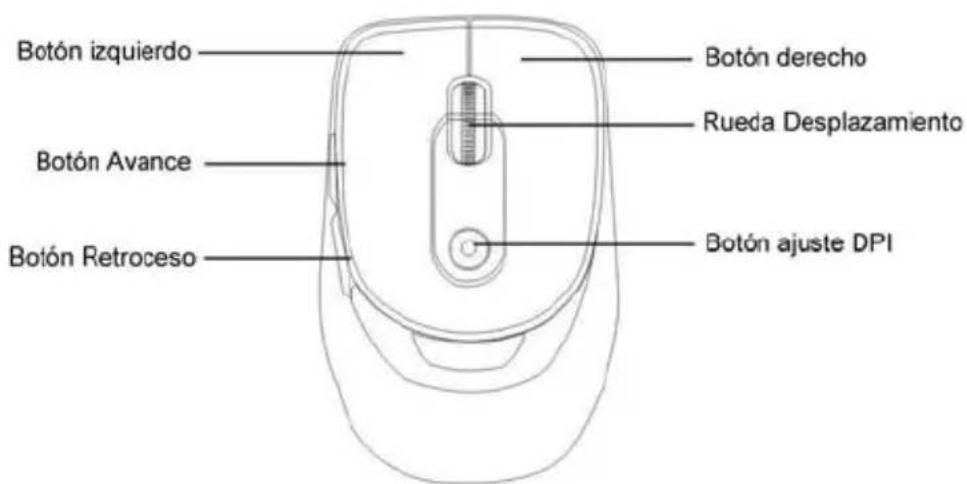
A. Usando el “botón de ajuste de DPI”, puede cambiar la resolución del ratón seleccionando entre 800DPI y 1600DPI. El LED ubicado en el “botón de ajuste de DPI” parpadeará lentamente si la resolución seleccionada es 800DPI y más rápidamente si la resolución seleccionada es 1600DPI.
B. Los botones de "Avance" y "Retroceso" le permitirán navegar de forma cómoda y rápida a través de las páginas de Internet que haya visitado.
FUNCIÓN DE ALARMA BATERÍA BAJA
Cuando las baterías hayan sido usadas durante un largo período de tiempo y el LED situado en el "botón de ajuste de DPI" empiece a parpadear automáticamente, el dispositivo le estará indicando que le queda poca batería, por lo que se recomienda cambiar las baterías por unas nuevas.
REQUISITOS DEL SISTEMA
Compatible con: MS Windows ME/2000/XP/Vista/7
ESPECIFICACIONES TÉCNICAS
- Nano receptor. Puede guardarse en la parte inferior del ratón para transportarlo cómodamente
• 2.4GHz, con alcance de hasta 10m - Rango de frecuencia: 2,402MHz \~ 2,480MHz
- 16 canales seleccionables automáticamente
- Función de Encendido/Apagado (Interruptor "ON/OFF")
- Función de alarma de batería baja
- Resolución: 800DPI y 1600DPI ajustable manualmente
PACKAGE CONTENTS
• Wireless Optical Mouse
- USB receiver
• 2 AAA alkaline batteries
- User manual
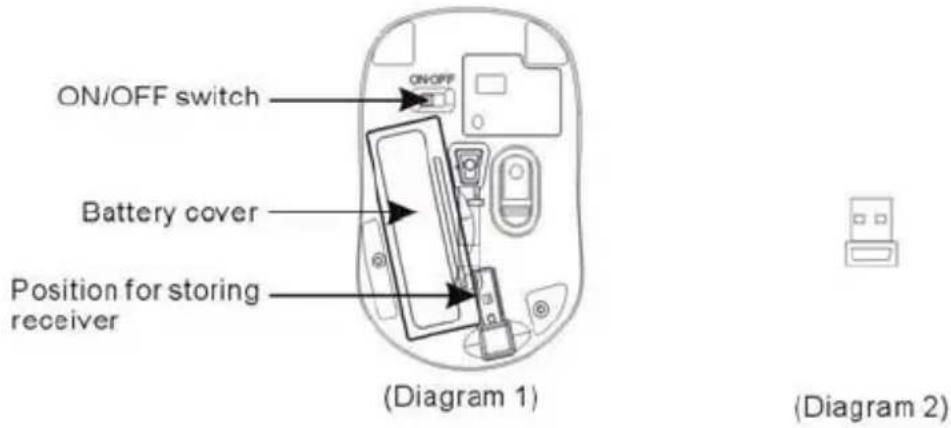
INSTALLING THE BATTERY
Whenever new batteries are installed, make sure that they are fresh 1.5V AAA batteires.
A) Remove the battery cover.
B) Insert two AAA batteries into the battery compartment, make sure to properly orient the positive (+) and negative (-) ends as specified by the marks in the battery compartment. Replace the battery cover and make sure it is locked.
C) Switch on the mouse, the LED in bottom of mouse will blink.
INSTALLING THE RECEIVER
The codes of receiver and mouse were successfully connected in factory. User can directly use the complete set of products, no worry about the code connecting.
A) Insert receiver into USB port of PC, the computer system will automatically detect and prepare it for full operation.
B) The mouse may use then.
If the user wrongly operates, please redo the above operating procedures.
"ON/OFF" SWITCH
Without using the mouse, user may turn off it by "ON/OFF" switch for saving battery power.
DESCRIPTION OF KEYS AND DPI ADJUSTING
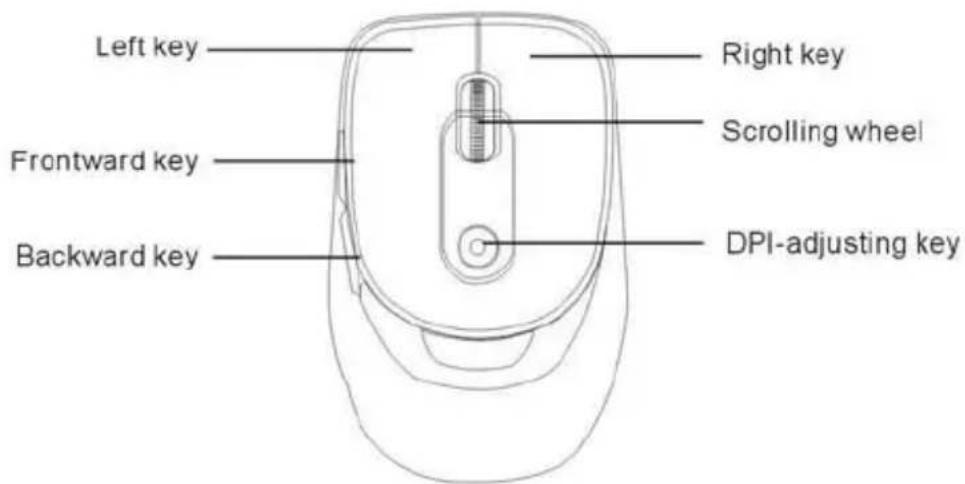
A) Using "DPI-adjusting key" the resolution of mouse can be switched between 800dpi and 1600dpi in turn. That LED light in !DPI-adjusting key" blinks slow indicates 800dpi and fast 1600dpi.
B) Backward and Forward keys for your easily navigating forward and backward on the Internet.
LOW-VOLTAGE ALARMING FUNCTION
When batteries have been used for some time and discover the LED light in "DPI-adjusting key" blinks automatically, which reminds your that the batteries voltage is becoming low, suggested you replace the batteries with new ones.
SYSTEM REQUIREMENTS
Windows ME/ 2000/ XP, VISTA, 7
SPECIFICATIONS
- Super mini receiver can be stored at bottom for easy carrying
• 2.4GHz, freely operating within 10 meters
English
- Wireless carrier frequency: 2,402MHz - 2,480MHz.
• 16 Wireless working channels, automatic frequency jumping. - Low-voltage alarming function
- Resolution: 800DPI and 1600DPI adjustable
Importado por / Imported by:
APPROX IBERIA S. L.
CIF: B-91202499
Soporte técnico / Technical support:
soporte@approx.es
MADE IN CHINA
aqprox!
www.printyourideas.com