SPL6407 - Web kamera PHILIPS - Brezplačna navodila za uporabo
Brezplačno poiščite navodila za napravo SPL6407 PHILIPS v formatu PDF.


Pick your language and provide your email: we'll send you a specifically translated version.
Vprašanja uporabnikov o SPL6407 PHILIPS
0 vprašanje o tej napravi. Odgovorite na tiste, ki jih poznate, ali zastavite svoje.
Zastavite novo vprašanje o tej napravi
Še ni vprašanj. Bodite prvi, ki postavi vprašanje.
Prenesite navodila za vaš Web kamera v formatu PDF brezplačno! Poiščite svoja navodila SPL6407 - PHILIPS in vzemite svojo elektronsko napravo nazaj v roke. Na tej strani so objavljeni vsi dokumenti, potrebni za uporabo vaše naprave. SPL6407 znamke PHILIPS.
NAVODILA ZA UPORABO SPL6407 PHILIPS
正面1
正面2
正面3
正面4
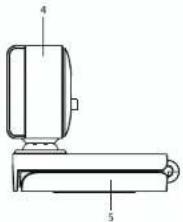
 | 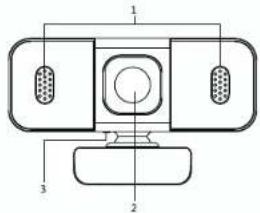 |  Functional Overview1. Built in microspanes 4. Principles port2. HC Semi 5. Adjustable broker3. Status indicator 6. Standard MI course mixConnection Guide Functional Overview1. Built in microspanes 4. Principles port2. HC Semi 5. Adjustable broker3. Status indicator 6. Standard MI course mixConnection Guide 1. Plug into the computer USB port2. The device features plug-and-play. 1. Plug into the computer USB port2. The device features plug-and-play. | Packaging Contents- 1" Webcam- 1" User manual/warranty cardSystem Requirements-Windows T/Windows 8, Windows 10 or later Linux Y:24 and above, Android 9and above; Max OS 10.4 and above- 1" USB portTrouble ShootingGuiding QuestionsEnsure that the USB connector of the computer camera is correctlyinserted into the USB port of the computerEnsure that the computer needs the minimum system requirements.F you encourage a problem that cannot be stored, please do notdisassemble if yourself, log on to the official website to find a solutionor send it to the recent dealerAttentionDo not touch the glass part of the optical lens with your hands or shape objects.Pause angle 8 with a special glass lens cleaning cloth.When in use, avoid the camera from fading and other external forces imposingthe product and matching the lens and electronic parts to not work properly.When using in words around discharge static electronics for to avoid damage ofelectronic parts caused by direct contact of bands with USB interface, so thatindex can not be recognized.Technical SpecificationsConnectivity: USB wiret Image sensor: 1/2.9 inch CMOS sensorResolution: 130°/1080 Effective Post: 2 paragraphsFrame rate: 30/195Viewing angle: 50° Video format: MPSC707G Facial length: 2.86mmVideo Interface: USB White balance: AutomaticPickup distance: 3m Wide dynamic: SupportPickup angle: 160° Microphone specification: Digital MICSample rate: 4800 Hz/6bit | |
 | ||||
 | Product Environmental NoticesDisposal of Waste Equipment by Users inPrivate Household in the European UnionThis symbol on the product or on its packaging indicates that this product must notbe disposed of with your household waste. Instead, it's your responsibility to disposeof your waste equipment by funding in over a design made electrical panel for therecycling or waste electrical, and electronic equipment. The separate collection andrecycling of your waste equipment at the time of disease will help to consume naturalresources and ensure that it is recycled in a customer that projects human health andthe environment. For more information about where you can drop off your wasteequipment for recycling, please contact the local city office, the household asoredissociol service or the shop where you purchased the product.PHILIPS Recycling ProgramPHILIPS encourages customers to recycle used electronics hardware. PHILIPS originalport cartridges, and rechargeable batteries. For more information about recyclingprograms, go to http://www.philips.com/sen/about/humanability.html | PHILIPSWarranty CardDear customer.Thank you for purchasing a Philips IT accessory product.To ensure you a reliable after-sales service, please read the followinginstructions carefully.This product warranty period is valid for two years from the date ofpurchase (the date of receipt of the return receipt and the invicicedate of the buyer).Register your product and get support at.www.philips.com/welcomeThe following situations are not covered by after-sales service1. Unable to provide a valid warranty card and invoice (not includingthose that can prove the products is within the valid warrantyperiod) or the alteration of the warranty without authorization.2. The product model and serial number on the warranty card arenot in conformity with the physical product or without thedistributor seal.3. Damage due to not used in accordance with product instructions.4. Damage caused by the use of printed software or computer virusduring use5. Damage caused by accident, damage, or repair from unauthorizedservice vendors.6. Without serial number.7. Damage caused by force majeure.The serial number of the product filled in the form must be consistentwith the actual product. This certificate the primary instrument for theafter-sales service, please safe keep it. If you need technical support,please show this warranty card, and we will provide quality andprofessional services.This product was manufactured and brought to the market by or onbehalf of Top Victory Investments Ltd. or one of its affiliates. TopVictory Investments Ltd. is the warrantor in relation to this product. | ||
| 2021 © Top Victory Investments Limited. All rights reserved.Philips and the Philips Shield Emblem are registered trademarksof Koninklijke Philips N.V. and are used under license. This producthas been manufactured by and is sold under the responsibility ofTop Victory Investments Limited, and Top Victory InvestmentsLimited is the warrantor in relation to this product.Made in ChinaThrough the following website, you can register your productin order to get support. www.philips.com/welcome. | Users | Name | ||
| ADD | ||||
| Model No | ||||
| Serial No | ||||
| CommodityInformation | None | |||
| ADO | ||||
| Id | ||||
| PostCode | ||||
| SalesInformation | Date of Sold | |||
| Invoice No | ||||
| Storage Signature | ||||
| Data customer the same information is to be filed in by the sales. Please complete with us. Thank you!The missinginformation includes filelet by the maintenance agency returned to the customer | ||||
| MaintenanceInformation | MaintenanceCompany Name | |||
| ADD | ||||
| Id | ||||
| PostCode | ||||
| Document No | ||||
| Date | ||||
| MaintenancePlan Signature | ||||
PHILIPS
Warranty Card
| Username | Name | |
| ADD | ||
| Model No. | ||
| Serial No | ||
| Commodity Information | Name | |
| ADD | ||
| Tel | ||
| PostCode | ||
| Sales Information | Retailer | |
| Place of origin | ||
| Tel | ||
| PostCode | ||
| Date of Sale | ||
| Institute No. | ||
| Stamp & Signature | ||
| Dear customer the same information is to be filed in by the seller. Please complete with us. Thank you!The following information shall be filed by the maintenance agency not returned to the customer | ||
| Maintenance Information | Maintenance Company Name | |
| ADD | ||
| Tel | ||
| PostCode | ||
| Document No. | ||
| Date | ||
| Maintenance main Signature | ||
背面1
背面2
背面3
背面4
成品尺寸:65*100mm
材质:120铜板纸
颜色:四色印刷 正反印刷
装订:三折页