
PAC030 - Wifi dostopna točka PHILIPS - Brezplačna navodila za uporabo
Brezplačno poiščite navodila za napravo PAC030 PHILIPS v formatu PDF.


Vprašanja uporabnikov o PAC030 PHILIPS
0 vprašanje o tej napravi. Odgovorite na tiste, ki jih poznate, ali zastavite svoje.
Zastavite novo vprašanje o tej napravi
Prenesite navodila za vaš Wifi dostopna točka v formatu PDF brezplačno! Poiščite svoja navodila PAC030 - PHILIPS in vzemite svojo elektronsko napravo nazaj v roke. Na tej strani so objavljeni vsi dokumenti, potrebni za uporabo vaše naprave. PAC030 znamke PHILIPS.
NAVODILA ZA UPORABO PAC030 PHILIPS
Always there to help you
Register your product and get support at www.philips.com/support
PAC03X

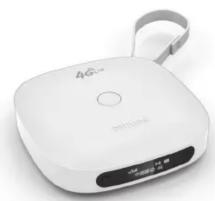
natural_image
White 4G branded electronic device with a gray strap and control buttons (no visible text or symbols)用户手册
User manual
PHILIPS

2014 ©WOOX Innovations Limited. All rights reserved. This product has been manufactured by, and is sold under the responsibility of WOOX Innovations Ltd., and WOOX Innovations Ltd. is the warrantor in relation to this product. Philips and the Philips Shield Emblem are registered trademarks of Koninklijke Philips N.V. and are used under license from Koninklijke Philips N.V.
PAC03X_93_UM_V2.0_WK1430.4.2


RESET (重置): 本机对按键操作无反应
RESET (Reset): Device does not respond to the pressing of keys.
作为便携式充电器使用
Use as the portable power bank

为智能手机、平板电脑或其它设备充电时,1. 使用OTG线及USB线将PAC03X与该设备相连;2. 将PAC03X开机。
To charge your smartphones, tablets or other devices on the go, do the following: 1. Use the OTG cable and USB cable to connect PAC03X with the device; 2. Switch on PAC03X.

充电 Charge

使用随附的USB电源适配器为PAC03X充电直至电池电量指示为充满。
Through the supplied USB AC/DC power adapter, charge PAC03X until the battery power indicator is displayed as full.
4G 1/(-)作为移动无线路由器 (MiFi) 使用 Use as the mobile Wi-Fi modem (MiFi)


在PAC03X中插入SIM卡(TD-LTE, TD-SCDMA)。你可经由移动网络将多达5个无线Wi-Fi设备接入互联网络,如智能手机、笔记本电脑、平板电脑等。
注:在插入或拔出SIM卡或Micro SD存储卡前,应先将PAC03X关机。
Mount the SIM card (TD-LTE, TD-SCDMA) onto PAC03X. You can connect a maximum of five Wi-Fi devices to the Internet through the mobile network, such as your smartphones, laptops, or tablets.
Note: Before you mount/ remove a SIM card or Micro SD card, make sure that you have switched off PAC03X.
4G / (--)
建立MiFi网络 Set up MiFi

开机时,按住直至蓝色电源指示灯亮起。等待直至SIM卡读卡完成,屏幕显示通讯服务信息。
关机时,按住 ⏻ 直至电源指示灯熄灭。重新启动PAC03X时,按住 ⏻ 约10秒钟。
To switch on, press and hold ⏻ until the LED lights up blue. Wait until the SIM card is read and service information is displayed.
To switch off, press and hold ⏻ until the LED dims. To restart PAC03X, press and hold ⏻ for about 10 seconds.

在无线Wi-Fi设备上,搜索并选择MIFI-XXXXXX。在弹出屏幕输入PAC03X的网络名称和密码(你可在PAC03X的机身底部标签上找到本机的网络名称(SSID)和出厂密码)。
On your Wi-Fi device, search for and select MIFI-XXXXXX. On the pop-up screen, enter the network name and password of PAC03X (you can find the network name (SSID) and default password on the label at the bottom of PAC03X).
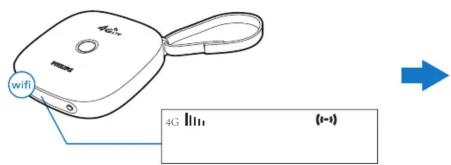
按住 开启 Wi-Fi。 (1-4) Wi-Fi 开启。
Press and hold Wi-Fi to switch on Wi-Fi. (1-4) Wi-Fi on
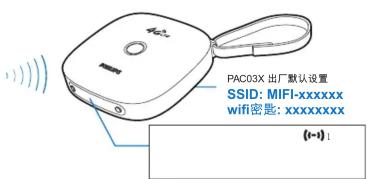
成功连接后,该无线Wi-Fi设备即加入了PAC03X的网络。
(1-1): 一台无线设备已加入PAC03X的网络。
After successful connection, the Wi-Fi device joins the network of PAC03X.
(i-1): One Wi-Fi device has joined the network of PAC03X.
4G ||| / (1-1)
更改MiFi设置 Change MiFi settings


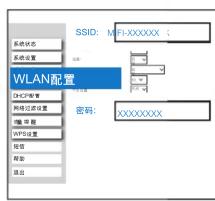

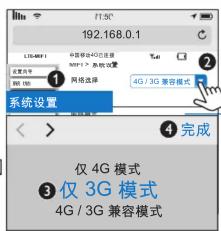
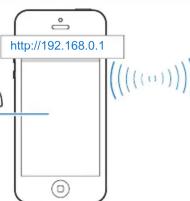
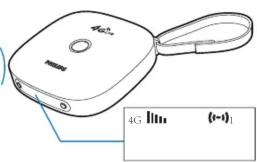
你可更改PAC03X的Mi-Fi设置,如网络名称(SSID)、密码。在无线Wi-Fi设备上,1. 开启网络浏览器并输入 http://192.168.0.1;
- 选择设置页面并根据需要更改设置选项;3. 按屏幕指令完成设置更改。
You can change the MiFi settings of your PAC03X, such as the name of the network (SSID) or the password. On your Wi-Fi device, 1. open the web browser and enter http://192.168.0.1;
- select a settings page and change the settings options as needed; 3. follow onscreen instructions to complete the settings changes.
帮助:
- 关闭SSID广播,你可使PAC03X在网络搜索时在可用网络列表中不可见。此时,需输入PAC03X的SSID以搜索到PAC03X。
- 当DHCP (Dynamic Host Conguration Protocol)关闭时,PAC03X停止为无线Wi-Fi设备自动分配IP地址。此时,需手动为无线Wi-Fi设备分配IP地址以加入PAC03X的网络。
- 根据你的SIM卡类型,选择相应模式的通讯网络:对于仅支持3G的SIM卡,选择“仅3G模式”选项。否则,你可能无法将你的无线Wi-Fi设备通过PAC03X接入互联网。
Tips:
- Disable the SSID broadcasting, and you can keep PAC03X invisible in the list of available networks during the network search. In this case, enter the SSID of your PAC03X to find it.
- When DHCP (Dynamic Host Conguration Protocol) is disabled, PAC03X stops assigning IP addresses to the Wi-Fi devices automatically. In this case, manually assign an IP address to the Wi-Fi device to join the network of PAC03X.
- According to the type of your SIM card, select the suitable network mode. For example, for a SIM card that supports 3G only, select the option for 3G only mode. Otherwise, you may fail to connect your Wi-Fi device to the Internet through PAC03X.
4G ||| / (←→)


WPS PIN 输入

使用WPS PIN输入(WPS-PIN)设置时,在无线Wi-Fi设备上,在无线Wi-Fi网络的设置菜单中选择WPS PIN输入选项。屏幕出现提示信息,显示PIN的输入值。
To use the WPS-PIN setup, do the following: On the Wi-Fi device, select the WPS-PIN option in the settings menu of Wi-Fi network. A message appears, displaying the PIN number:
使用无线Wi-Fi保护设置 (WPS)建立MiFi网络 Set up MiFi through Wi-Fi Protected Setup (WPS)


如果你的无线Wi-Fi设备支持WPS,你可选择使用两种WPS设置方法中的任一一种:WPS推送按钮(WPS-PBC)或WPS PIN输入(WPS-PIN)。使用WPS推送按钮(WPS-PBC)设置时,在无线Wi-Fi设备上,在无线Wi-Fi网络的设置菜单中按下WPS推送按钮。
If your Wi-Fi device supports WPS, you can select one of the two WPS setup methods: PBC (Push Button Configuration), or PIN (Personal Identification Number). To use the WPS-PBC setup, do the following: On the Wi-Fi device, press the WPS button in the settings menu of Wi-Fi network.
按无线Wi-Fi设备上的提示,按住PAC03X上的WPS按钮启动PAC03X与该无线Wi-Fi设备的连接。
As prompted by the message on the Wi-Fi device, press and hold the WPS button on PAC03X to start connecting PAC03X to the Wi-Fi device.

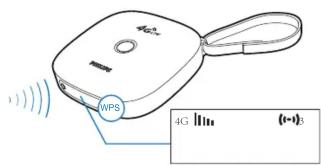
在无线Wi-Fi设备上更改PAC03X的Mi-Fi设置:1. 开启网络浏览器并输入http://192.168.0.1;2. 选择WPS设置页面,开启WPS-PIN,然后输入PIN。
To change the Mi-Fi settings of PAC03X, do the following on the Wi-Fi device: 1. Open the web browser and enter http://192.168.0.1; 2. Select the WPS settings page, enable WPS-PIN, and then, enter the PIN number.
成功连接后,该无线设备即加入了PAC03X的网络。
(1-4) 三台无线设备已加入PAC03X的网络。
After successful connection, the Wi-Fi device joins the network of PAC03X.
(1-1)3 Three Wi-Fi devices have joined the network of PAC03X.
/
作为Micro SD存储卡读卡器或USB大容量存储器使用
Use as the Micro SD card reader/ USB massive storage device

natural_image
Illustration of a laptop connected to a USB cable via a device (no text or symbols present)使用USB线将PAC03X连接至电脑。你可读取PAC03X上插入的Micro-SD存储卡上的数据或将数据存入该Micro-SD存储卡。
注:在插入或拔出SIM卡或Micro SD存储卡前,应先将PAC03X关机。
Use the USB cable to connect PAC03X with a computer. You can read or store data on the Micro SD card that you have mounted onto the PAC03X.
Note: Before you mount/ remove a SIM card or Micro SD card, make sure that you have switched off PAC03X.

规格 Specifications
Connectivity 连接
Mobile network 移动网络
• TD - LTE
- TD - SCDMA
Wireless LAN 无线局域网
Wi-Fi 802.11 b/g/n
USB
2.0 High speed, Micro type/2.0 高速、微型
Storage media 存储介质
External storage外接存储器
Micro SD memory card slot (Maximum memory card capacity: 32 GB)/Micro SD存储卡槽 (最大容量: 32 GB)
输入:交流100-240伏,50/60赫兹,0.3安
Output: DC 5.0 V, 2 A
输出:直流5.0伏,2安
- 3800 mAh Li-ion polymer internal rechargeable battery 3800毫安时锂聚合物内置充电电池
Temperature 温度
0°C to 45°C (Operation/工作)
-25°C to 70 °C (Storage/存储)
Dimensions 尺寸
Main Unit (W × H × D): 89 × 89 × 24 mm
主机(宽×高×厚):89×89×24毫米
Weight 重量
Main Unit: 0.15 kg
主机:0.15千克
General information 一般信息
Power电源
• Power adapter 电源适配器
PA03-050200U-C (Philips) Input: 100-240 V\~ 50/60 Hz, 0.3 A

Znamka : PHILIPS
Model : PAC030
Kategorija : Wifi dostopna točka