GX700B - Televízor PANASONIC - Bezplatný návod na obsluhu
Nájdite návod k zariadeniu zdarma GX700B PANASONIC vo formáte PDF.


Otázky používateľov k GX700B PANASONIC
0 otázka o tomto zariadení. Odpovedzte na tie, ktoré poznáte, alebo položte vlastnú.
Položte novú otázku o tomto zariadení
Stiahnite si návod pre váš Televízor vo formáte PDF zadarmo! Nájdite svoj návod GX700B - PANASONIC a vezmite svoje elektronické zariadenie späť do rúk. Na tejto stránke sú zverejnené všetky dokumenty potrebné na používanie vášho zariadenia. GX700B značky PANASONIC.
NÁVOD NA OBSLUHU GX700B PANASONIC
Panasonic®
Operating Instructions
LED TV
English
Model No.
TX-40GX700B
TX-50GX700B
TX-58GX700B
TX-65GX700B
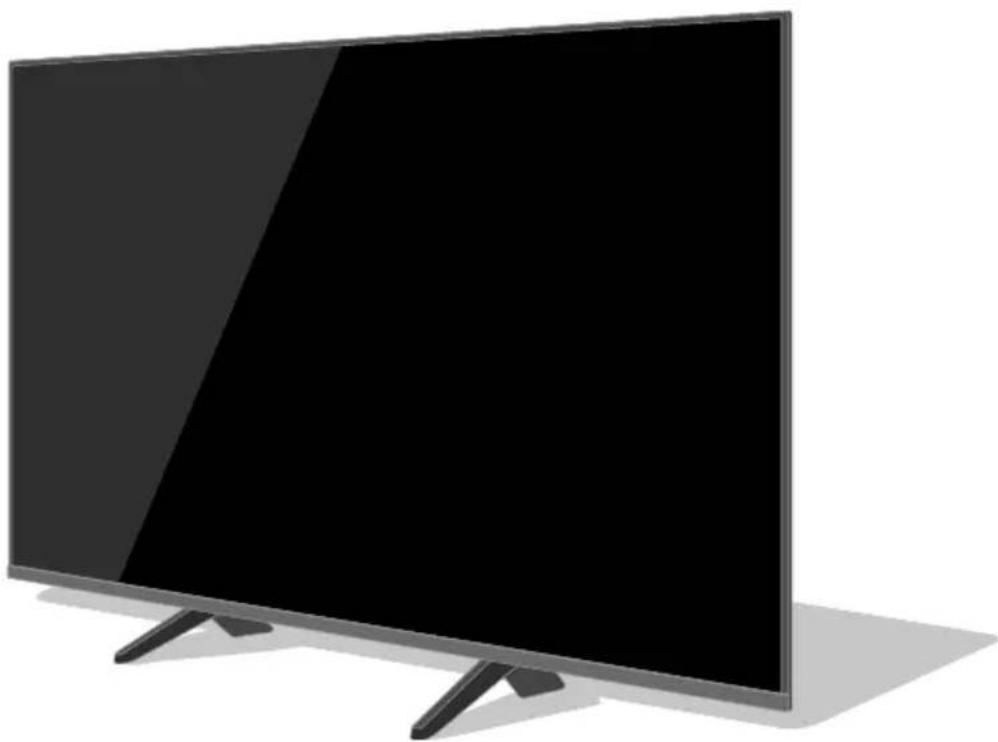
natural_image
Modern flat-screen TV with black screen and stand, no visible text or symbols1image2 TX)504X500,)

For ore detailed instructions, please refer to [eHELP] (Built-in Operating Instructions).
• How to use 9eHELP:→(p. 1-)
Thank you for purchasing this Panasonic product.
Please read these instructions carefully before operating this product and retain them for future reference.
Please carefully read the !afety Precautions" of this manual before use.
The images shown in this manual are for illustrative purposes only.

TQ,0E-. (30)-
The terms HDMI and HDMI High)Definition Multimedia Interface, and the HDMI Logo are trademarks or registered trademarks of HDMI Licensing Administrator, Inc. in the United States and other countries.
Manufactured under license from Dolby Laboratories. Dolby, Dolby Audio, and the double)D symbol are trademarks of Dolby Laboratories.
DV, and the DV, logos are trademarks of the DV, ProCect.
x.v.ColourE is a trademark.
- For information about the trademarks, refer to 9eHELP: 1!earch by Purpose F Read first F ,efore use F Licence).
The illustration for TX)504X500, is used in this manual unless otherwise mentioned. Illustrations shown may be different depending on the model.
DOLBY AUDIO™
Contents
Be 0ure to 1ead
Important Notice....3
!afety Precautions 4
Accessories 5
Installing the TV 5
Installing the wall)hanging bracket 11
Connections 1-
Identifying Controls 16
First time Auto !etup....1.
Aatching TV....1(
How to 0se eHELP....1(
FAQs....-1
Maintenance ....
!pecifications
I portant 3otice
3otice for 4VB / 4ata broadcasting / IPTV functions
This TV is designed to meet the standards 1as of August, -01.) of digital services.
- Not all the features are available depending on the country, area, broadcaster, service provider and network environment.
- Compatibility with future services is not guaranteed.
Internet apps are provided by their respective service providers, and may be changed, interrupted, or discontinued at any time.
Panasonic assumes no responsibility and makes no warranty for the availability or the continuity of the services.
Panasonic does not guarantee operation and performance of peripheral devices made by other manufacturers; and we disclaim any liability or damage arising from operation and/or performance from usage of such other maker's peripheral devices.
Handling of custo er infor ation
Certain customer information such as IP address of your device 1this TV)'s network interface will be collected as soon as you connect your Panasonic)branded smart television 1this TV) or other devices to the internet 1excerpted from our privacy policy). Ae do this to protect our customers and the integrity of our !ervice as well as to protect the rights or property of Panasonic. If you wish to know more about the processing of your information in this context, please refer to the full text of our privacy policy displayed at 9eHELP: 1!earch by Purpose F Network F Network settings F Terms of !ervice and !ettings).
Ahen using Internet connecting function of this TV, after agreeing 1 in the Curisdictions where customer's consent is reKuired to collect personal information under applicable privacy laws) to or reviewing Panasonic's terms of service I privacy policy 1 hereinafter referred to as terms and conditions etc.), customer information on the use of this unit may be collected and used according to terms and conditions etc.
For details of terms of service I privacy policy, refer to 9eHELP: 1!earch by Purpose F Network F Network settings F Terms of !ervice and !ettings).
Customer's personal information may be recorded on this TV by broadcasting organization or application provider. ,efore repairing, transferring or discarding this TV, erase all the information recorded on this TV according to the following procedure.
9eHELP: 1!earch by Purpose F Functions F !hipping Condition)
Customer information may be collected by provider via application provided by third parties on this TV or website. Please confirm the terms and conditions etc. of provider in advance.
M Panasonic will not be held responsible for collecting or using customer information via application provided by third party on this TV or website.
M Ahen entering your credit card number, name, etc., pay special attention to the trustworthiness of the provider.
M Registered information may be registered in the server etc. of provider, ,efore repairing, transferring or discarding this TV, be sure to erase the information according to the terms and conditions etc. of provider.
The recording and playback of content on this or any other device may reKuire permission from the owner of the copyright or other such rights in that content. Panasonic has no authority to and does not grant you that permission and explicitly disclaims any right, ability or intention to obtain such permission on your behalf. It is your responsibility to ensure that your use of this or any other device complies with applicable copyright legislation in your country. Please refer to that legislation for more information on the relevant laws and regulations involved or contact the owner of the rights in the content you wish to record or playback.
This product is licensed under the AVC patent portfolio license for the personal and non)commercial use of a consumer to 1i) encode video in compliance with the AVC !tandard 1 AVC Video") and/or 1ii) decode AVC Video that was encoded by a consumer engaged in a personal and non)commercial activity and/or was obtained from a video provider licensed to provide AVC Video. No license is granted or shall be implied for any other use.
Additional information may be obtained from MPE4 LA, LLC.
!ee http211www.mpegla.com.

This mark indicates the product operates on AC voltage.

This mark indicates a Class II or double insulated electrical appliance wherein the product does not reKuire a safety connection to electrical earth 1ground).
Transport only in upright position.
0afet8 Precautions
To help avoid risk of electrical shock, fire, damage or injury, please follow the warnings and cautions below:
9 Mains plug and lead
Warning
If you detect anything unusual, immediately switch off the mains supply switch and remove the mains plug.
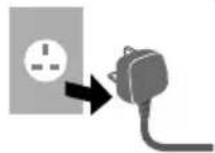
IMPO1TA3T:
THE MOUL4E4 MAI30 PLUG
FO1 YOU1 0AFETY, PLEA0E 1EA4 THE
FOLLOWI3G TEXT CA1EFULLY.
This TV is supplied with a moulded 3-pin mains plug for your safety and convenience.
A 5 amp fuse is fitted in this mains plug. Shall the fuse need to be replaced, please ensure that the replacement fuse has a 5 amp rating and that it is approved by ASTA or BSI to BS1362.
Check for the ASTA mark or the BSI mark on the fuse body.
If the mains plug contains a removable fuse cover, you must ensure that it is refitted when the fuse is replaced.
If you lose the fuse cover, the mains plug must not be used until a replacement cover is obtained.
A replacement fuse cover may be purchased from your local dealer.
Do not cut off the mains plug.
Do not use any other type of mains lead except the one supplied with this TV.
The supplied mains lead and moulded plug are designed to be used with this TV to avoid interference and for your safety.
If the mains socket in your home is not suitable, get it changed by a qualified electrician.
If the plug or mains lead becomes damaged, purchase a replacement from an authorised dealer.
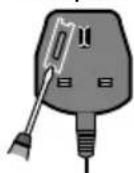
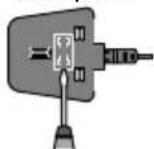
How to replace the fuse:
For plug t8pe shown in exa ple 1
Lift out the removable fuse cover with a screwdriver and replace the fuse, then refit it securely into the mains plug.
For plug t8pe shown in exa ple.
Lift open the fuse cover in the mains plug with a screwdriver and replace the fuse, then press the fuse cover down securely.
Example 1
Example 2
- This TV is designed to operate on AC \~220-240 V, 50 / 60 Hz.
- Insert the mains plug fully into the mains socket.
- To turn Off the apparatus completely, you must pull the mains plug out of the mains socket.
Consequently, the mains plug should be easily accessible at all times.
- Disconnect the mains plug when cleaning the TV.
- Do not touch the mains plug with wet hands.
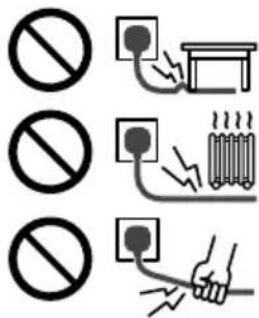
- Do not damage the mains lead.
- Do not place a heavy object on the lead.
- Do not place the lead near a high temperature object.
- Do not pull on the lead. Hold onto the mains plug body when disconnecting the plug.
- Do not move the TV with the lead plugged into a mains socket.
- Do not twist the lead, bend it excessively or stretch it.
- Do not use a damaged mains plug or mains socket.
- Ensure the TV does not crush the mains lead.
- Do not use any mains lead other than that provided with this TV.
9 Take care
Warning
- Do not remove covers and never modify the TV yourself as live parts are accessible and risk of electric shock when they are removed. There are no user serviceable parts inside.
- Do not expose the TV to rain or excessive moisture. This TV must not be exposed to dripping or splashing water and objects filled with liquid, such as vases, must not be placed on top of or above the TV.
- Do not insert foreign objects into the TV through the air vents.
- If the TV is used in an area where insects may easily enter the TV.
It is possible for insects to enter the TV, such as small flies, spiders, ants, etc. which may cause damage to the TV or become trapped in an area visible on the TV, e.g. within the screen.
- If the TV is used in an environment where there is dust or smoke.
It is possible for dust/smoke particles to enter the TV through the air vents during normal operation which can become trapped inside the unit. This may cause


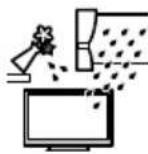
overheating, malfunction, deterioration in picture Kuality, etc.
- Do not use an unapproved pedestal I mounting eKuipment. ,e sure to ask your local Panasonic dealer to perform the setup or installation of approved wall)hanging brackets.
- Do not apply any strong force or impact to the display panel.
- Ensure that children do not climb on the TV.
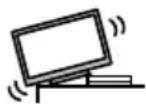
- Do not place the TV on sloping or unstable surfaces, and ensure that the TV does not hang over the edge of the base.

Warning
Never place a TV in an unstable location. A TV may fall, causing serious personal inCury or death. Many inCuries, particularly to children, can be avoided by taking simple precautions such as2
M Osing cabinets or stands recommended by the manufacturer of the TV.
M Only using furniture that can safely support the TV.
M Ensuring the TV is not overhanging the edge of the supporting furniture.
M Not placing the TV on tall furniture 1for example, cupboards or bookcases) without anchoring both the furniture and the TV to a suitable support.
M Not placing the TV on cloth or other materials that may be located between the TV and supporting furniture.
M Educating children about the dangers of climbing on furniture to reach the TV or its controls.
If your existing TV is being retained and relocated, the same considerations as above should be applied.
- This TV is designed for table)top use.
- Do not expose the TV to direct sunlight and other sources of heat.

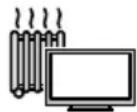
To preCent the spread of fire, keep candles or other open fla es awa8 fro this product at all ti es

9 0uffocation / Choking HaDard
Warning
- The packaging of this product may cause suffocation, and some of the parts are small and may present a choking hazard to young children. Keep these parts out of reach of young children.
9 Pedestal
Warning
- Do not disassemble or modify the pedestal.
Caution
- Do not use any pedestal other than the one provided with this TV.
- Do not use the pedestal if it becomes warped or physically damaged. If this occurs, contact your nearest Panasonic dealer immediately.
- During setup, make sure that all screws are securely tightened.
- Ensure that the TV does not suffer any impact during installation of the pedestal.
- Ensure that children do not climb onto the pedestal.
- Install or remove the TV from the pedestal with at least two people.
- Install or remove the TV according to the specified procedure.
9 1adio waCes
Warning
- Do not use the TV in any medical institutions or locations with medical eKuipment. Radio waves may interfere with the medical eKuipment and may cause accidents due to malfunction.
- Do not use the TV near any automatic control eKuipment such as automatic doors or fire alarms. Radio waves may interfere with the automatic control eKuipment and may cause accidents due to malfunction.
- Keep at least 15 cm away from the TV if you have a cardiac pacemaker. Radio waves may interfere with the operation of the pacemaker.
- Do not disassemble or alter the TV in any way.
9 Built-in wireless LA3
Caution
- Do not use the built)in wireless LAN to connect to any wireless network 1!!ID *) for which you do not have usage rights. !uch networks may be listed as a result of searches. However, using them may be regarded as illegal access.
*!!!ID is a name for identifying a particular wireless network for transmission.
- Do not subCect the built)in wireless LAN to high temperatures, direct sunlight or moisture.
- Data transmitted and received over radio waves may be intercepted and monitored.
- The built)in wireless LAN uses -.4 4Hz and 5 4Hz freKuency bands. To avoid malfunctions or slow response caused by radio wave interference when
using the built)in wireless LAN, keep the TV away from other devices that use -.4 4Hz and 5 4Hz signals such as other wireless LAN devices, microwave ovens, and mobile phones.
- Ahen problems occur due to static electricity, etc., the TV might stop operating to protect itself. In this case, turn the TV off at the Mains power On I Off switch, then turn it back on.
9 Ventilation
Caution
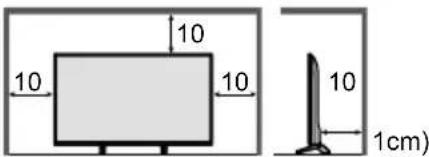
Allow sufficient space 1at least 10 cm) around the TV in order to help prevent excessive heat, which could lead to early failure of some electronic components.
text_image
10 10 10 10 1cm)- Ventilation should not be impeded by covering the ventilation openings with items such as newspapers, tablecloths and curtains.

- Whether you are using a pedestal or not, always ensure the vents at the bottom of the TV are not blocked and there is sufficient space to enable adeKuate ventilation.
9 MoCing the TV
Caution
,efore moving the TV, disconnect all cables.
- At least two people are reKuired to move the TV to prevent inCury that may be caused by the tipping or falling of TV.
- Do not hold the screen part as shown below when moving the TV. This may cause malfunction or damage.
How to carry the TV.→(p.-)
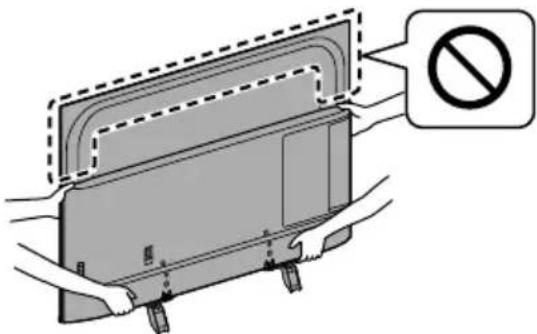
text_image
Diagram showing a device with a prohibition sign, indicating no movement or disassembly.9 When not in use for a long ti e
Caution
This TV will still consume some power even in the Off mode, as long as the mains plug is still connected to a live mains socket.
- Remove the mains plug from the wall socket when the TV is not in use for a prolonged period of time.
9 ExcessiCe Colu e
Caution
- Do not expose your ears to excessive volume from the headphones. Irreversible damage can be caused.


- If you hear a drumming noise in your ears, turn down the volume or temporarily stop using the headphones.
9 Batter8 for the 1e ote Control
Caution
- Incorrect installation may cause battery leakage, corrosion and explosion.
- Replace only with the same or eKuivalent type.
- Do not mix old and new batteries.
- Do not mix different battery types 1 such as alkaline and manganese batteries).
- Do not use rechargeable batteries 1Ni)Cd, etc.).
- Do not burn or break up batteries.
- Do not expose batteries to excessive heat such as sunshine, fire or the like.
• Make sure you dispose of batteries correctly. - Remove the battery from the unit when not using for a prolonged period of time to prevent battery leakage, corrosion and explosion.
LE4 TV
4eclaration of Confor it8 (4oC)
Hereby, Panasonic Corporation declares that this TV is in compliance with the essential reKuirements and other relevant provisions of the Directive -014I53IE0."
If you want to get a copy of the original DoC of this TV, please visit the following website2
http211www.ptc.panasonic.euldoc
Authorized Representative2
Panasonic Testing Centre
Panasonic Marketing Europe 4mbH
Ainsbergring 15, D)--5-5 Hamburg, 4ermany

5.15 T 5.35 4Hz band of wireless LAN is restricted to indoor operation only in the following countries.
Ireland, United Kingdom
Maximum radio)freKuency power transmitted in the freKuency bands
| Type of wireless | FreKuency band Maxiun EIRP |
| Aireless LAN | -41)-45-MHz -0 d,m |
| 5 150)5 -50 MHz -3 d,m | |
| 5 -50)5 350 MHz -3 d,m | |
| 5 450)5 5-5 MHz -3 d,m |
Accessories
0tandard accessories
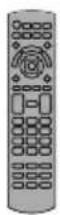
1e ote Control
→ (p. 16)
N-QAU,001-1-or
N-QAU,0011.1
Pedestal
→ (p. 8, -, 10)
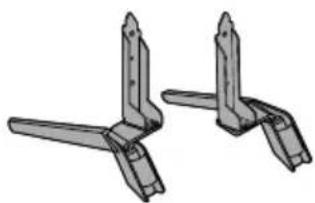
natural_image
Two identical mechanical bracket components with flanges and end caps, shown in 3D rendering (no text or symbols)Mains lead
→ (p. 1.)
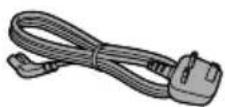
Batteries (.)
R6
→ (p. 17)

Operating Instructions
Production 1egistration Leaflet
- Accessories may not be placed all together. Take care not to throw them away unintentionally.
3ote
- Illustrations shown above may be different between models and countries.
Installing the TV
Asse bling / 1e oCing the pedestal
Ⓐ Asse bl8 screw (4)

M5 × 1-
B Asse bl8 screw (4)

M4 × 1-
© Bracket①
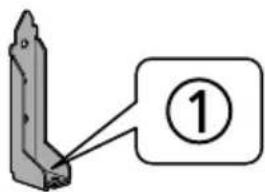
text_image
Diagram showing a mechanical component with a numbered label (1) pointing to its edge.D Bracket②
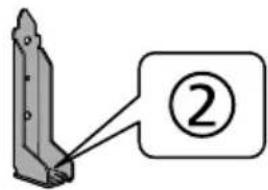
text_image
Diagram showing a mechanical component with a numbered label (②) pointing to it.⑤ Base①
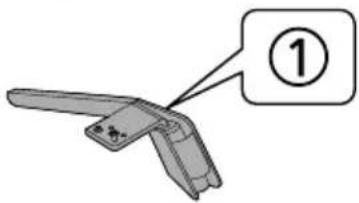
text_image
Diagram of a handheld device with labeled component ①, showing a handle and handle assembly.⑤ Base②
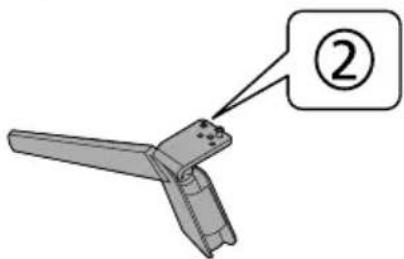
text_image
②© Cushioning aterial
40-inch model
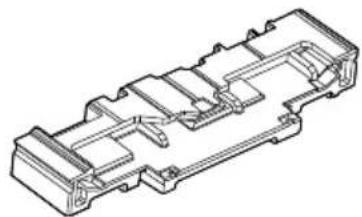
natural_image
Technical line drawing of a mechanical component with internal channels and mounting brackets (no text or symbols)50-inch model
58-inch model
65-inch model
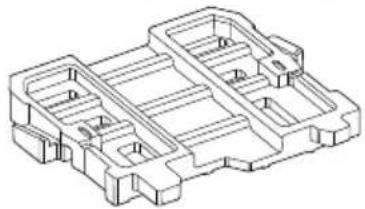
natural_image
Technical line drawing of a mechanical housing or enclosure with internal compartments and mounting points (no text or symbols)Preparations
- Make sure to assemble the pedestal before taking out the TV from the carton.
- Do not dispose the cushioning material which is also used for removing the pedestal when using the wall-hanging bracket or repacking the TV.
40-inch model
• Make sure to use the top cushion for pedestal assembly.
50-inch model
58-inch model
65-inch model
- Make sure to use the rear cushion for pedestal assembly.
- Do not hold the screen panel part.
• Make sure not to scratch or break the TV.
Asse bling the pedestal
- Do not assemble the pedestal by any method other than those specified below.
• Cable arrangement (p. 15)
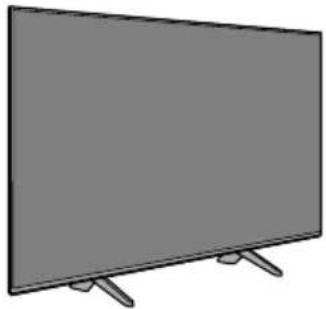
natural_image
Illustration of a flat-screen TV with two legs and a blank screen (no text or symbols)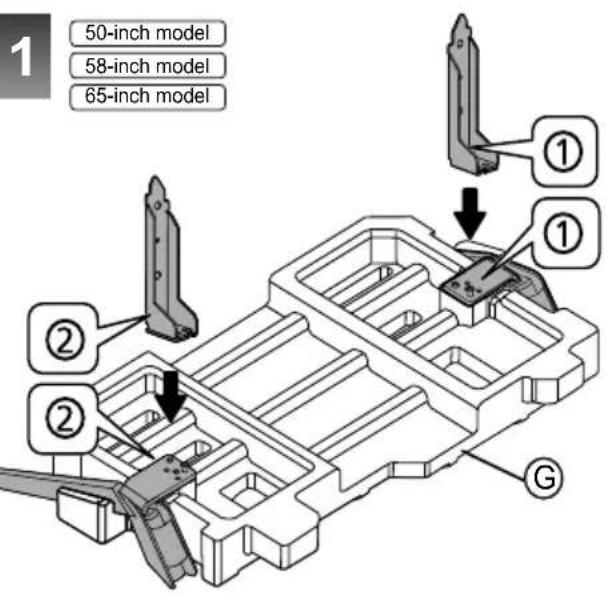
text_image
1 50-inch model 58-inch model 65-inch model ① ① ② ② G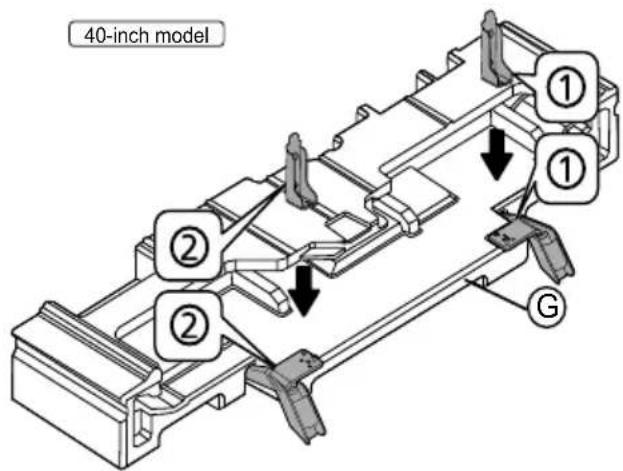
text_image
40-inch model ① ① ② ② G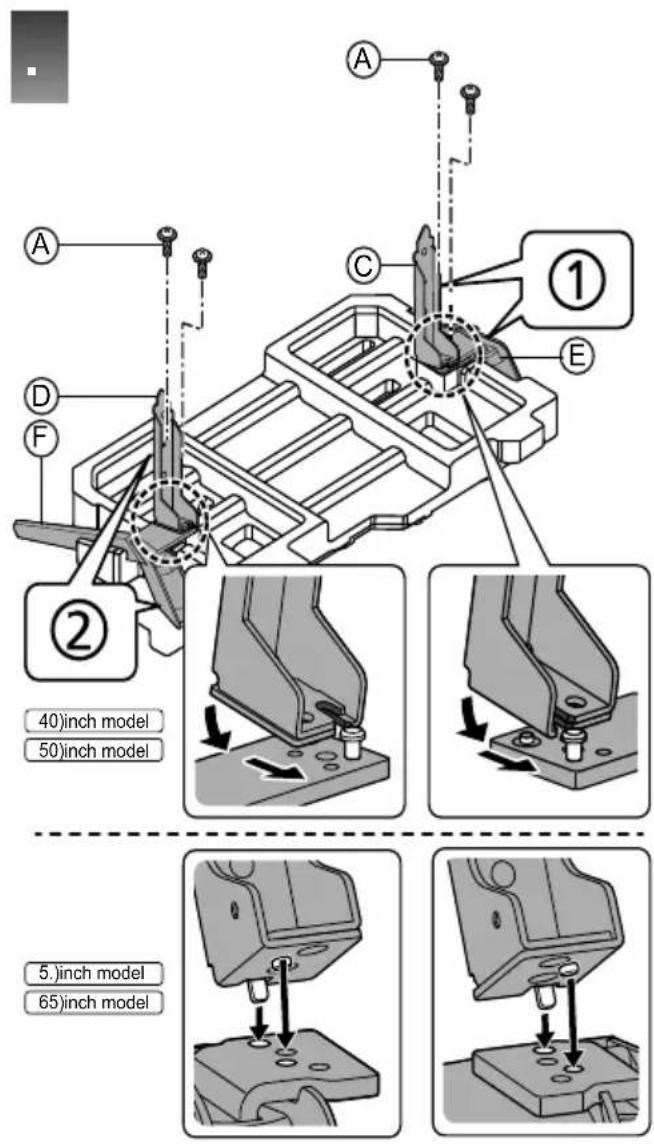
text_image
A C ① E D F ② 40)inch model 50)inch model 5)inch model 65)inch model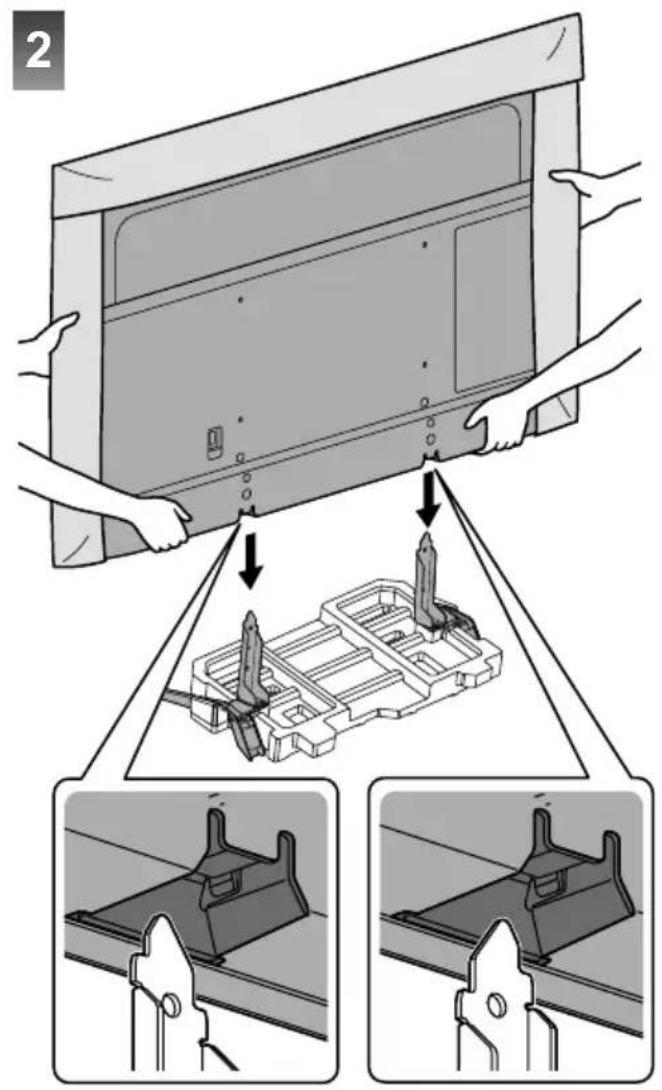
text_image
2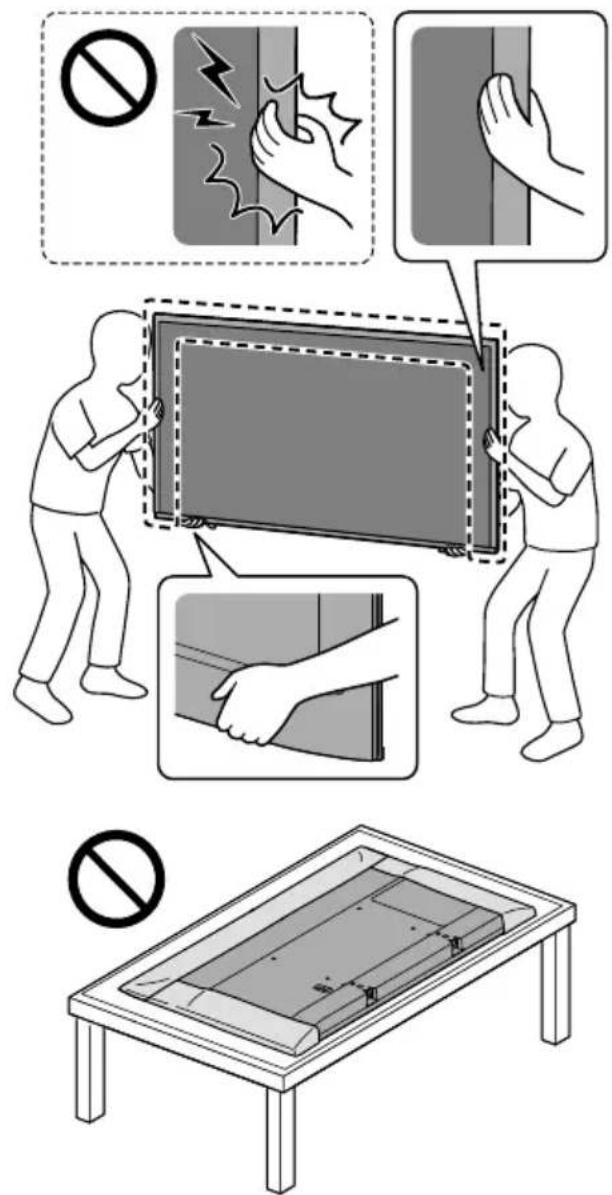
text_image
Safety guidelines for installing a TV panel, showing no violations and hand gestures with accompanying diagrams.3ote
When lifting the TV, support the TV as shown.
- Do not hold the screen part strongly as shown.
- Lift the TV with the protective sheet attached.
- Do not place the TV temporarily on the floor or desk with TV screen facing down.
text_image
4 B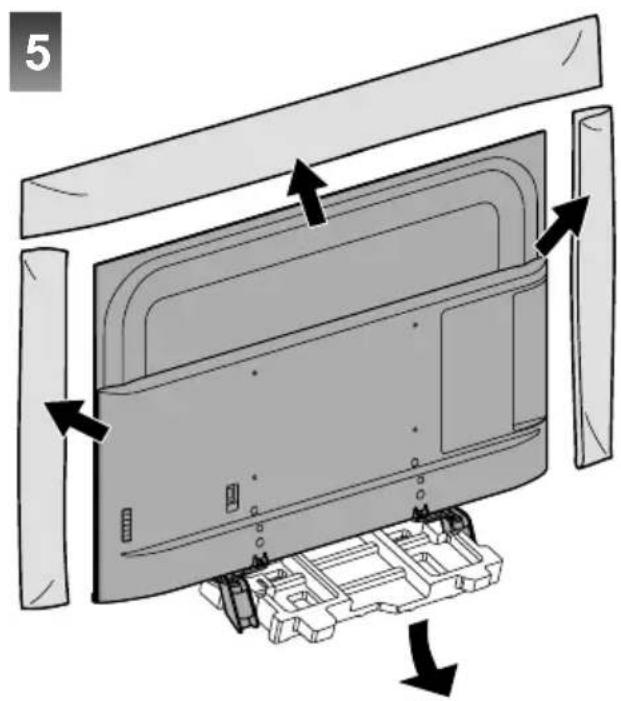
text_image
53ote
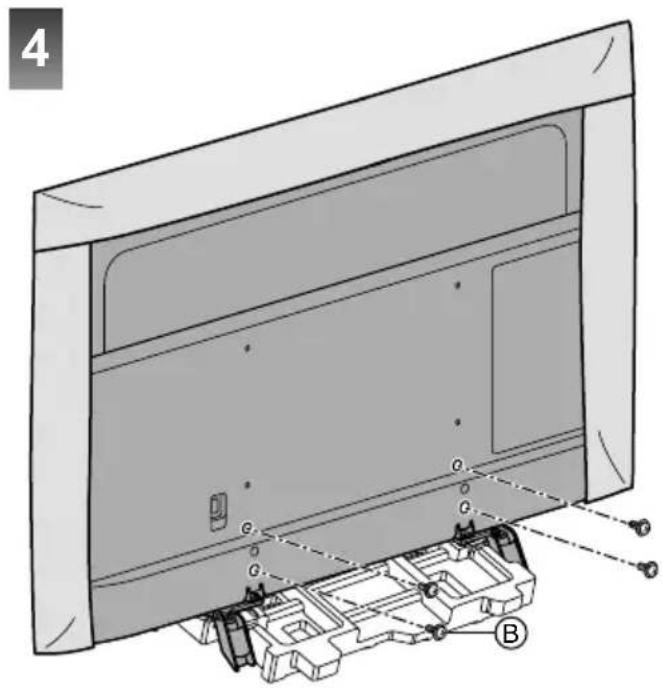
- Remove the protective sheet and the protective film from TV after installing the pedestal.
1e oCing the pedestal fro the TV
Be sure to remove the pedestal in the following way when using the wall-hanging bracket or repacking the TV.
40-inch model
- Use the top cushion to hold the pedestal.
50-inch model 58-inch model 65-inch model
• Use the rear cushion to hold the pedestal.
1 Remove the assembly screws® from the TV.
. Pull out the pedestal from the TV.
2 Remove the assembly screws® from the bracket.
Installing the wall- hanging bracket
Please contact your local Panasonic dealer to purchase the recommended wall-hanging bracket.
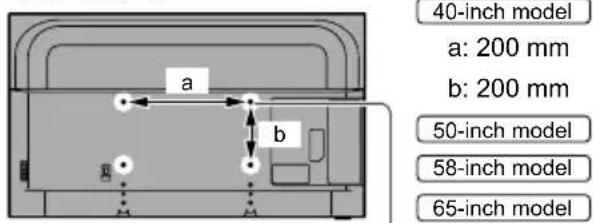
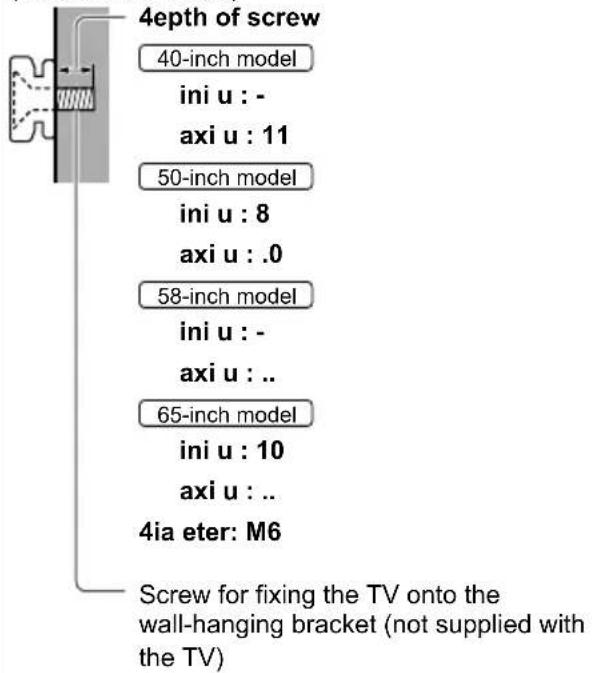
• Holes for wall-hanging bracket installation
Rear of the TV
text_image
40-inch model a: 200 mm b: 200 mm 50-inch model 58-inch model 65-inch model40-inch model
a: 200 mm
b: 200 mm
50-inch model
58-inch model
\$5-inch model
a: 400 mm
b: 200 mm
(View from the side)
text_image
4epth of screw 40-inch model ini u : - axi u : 11 50-inch model ini u : 8 axi u : .0 58-inch model ini u : - axi u : .. 65-inch model ini u : 10 axi u : .. 4ia eter: M6 Screw for fixing the TV onto the wall-hanging bracket (not supplied with the TV)Warning
- Using other wall-hanging brackets, or installing a wall-hanging bracket by yourself have the risk of personal injury and product damage. In order to maintain the unit's performance and safety, be absolutely sure to ask your dealer or a licensed contractor to secure the wall-hanging brackets. Any damage caused by installing without a qualified installer will void your warranty.
- Carefully read the instructions accompanying optional accessories, and be absolutely sure to take steps to prevent the TV from falling off.
- Handle the TV carefully during installation since subjecting it to impact or other forces may cause product damage.
• Take care when fixing wall brackets to the wall. Always ensure that there are no electrical cables or pipes in the wall before hanging bracket.
- To prevent fall and injury, remove the TV from its fixed wall position when it is no longer in use.
Connections
- External eKuipment and cables shown are not supplied with this TV.
- Please ensure that the unit is disconnected from the mains socket before attaching or disconnecting any cables.
- Check the terminal type and cable plugs are correct for connection.
- 0se a fully wired HDMI compliant cable. Please use a High !peed HDMI cable when connecting for high resolution pictures.
- Keep the TV away from electronic eKuipment 1video eKuipment, etc.) or eKuipment with an infrared sensor, otherwise distortion of image I sound may occur or operation of other eKuipment may be affected.
- Please also read the manual of the eKuipment being connected.
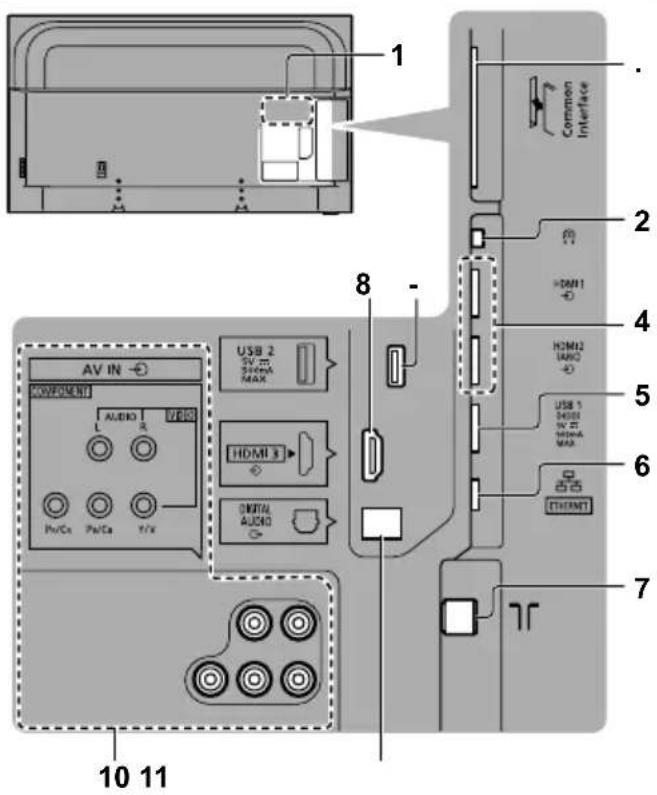
Terinals
text_image
1 2 3 4 5 6 7 8 9 10 11 AV IN COMPONENT L AUDIO 1 R HDMI 3 Pv/Cx Pw/Ca T/Fx USB 2 SVM SWM MAX HDMI1 HDMI2 IJKQ USB 1 HDMI NVR HDMI MAX DIGITAL AUDIO THOMNT1 Model na e plate
. Cl slot (p. 15)
2 Headphone jack→(p. 15)
4 H4MI1 - . (p. 1., 12, 14)
5 U0B 1 port
== This s8 bol indicates 4C operation.
6 ETHE13ET terminal → (p. 12)
7 Terrestrial ter inal → (p. 1.)
8 H4MI2
- U0B . port
--- This s8 bol indicates 4C operation.
10 AV I3 (COMPO3E3T / VI4EO) (p. 14)
11 4IGITAL AU4IO
To watch content in 4K format, use HDMI terminal.
→ (p. 12)
Basic connections
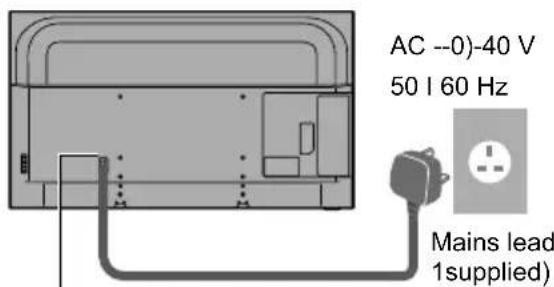
9 Mains lead
text_image
AC --0)-40 V 50 I 60 Hz Mains lead 1supplied)Insert the ains plug fir 18 into place.
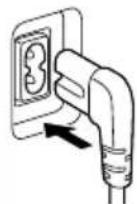
- Ahen disconnecting the mains lead, be absolutely sure to disconnect the mains plug from the mains socket first.
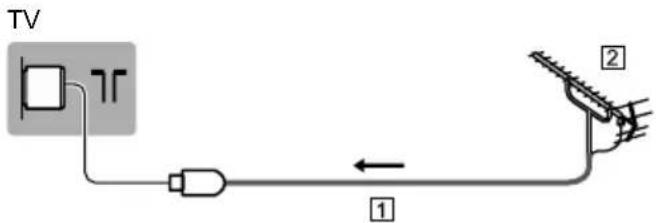
9 Aerial
text_image
TV 1 2① RF cable
② Terrestrial aerial
- For DV,
AV deCices
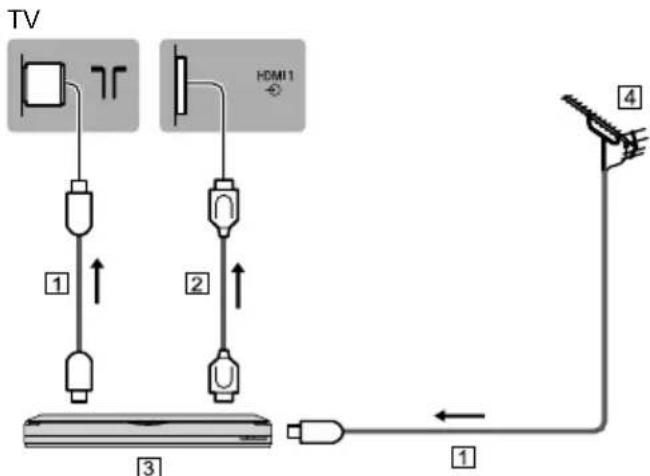
9 4V4 1ecorder / Blu-ra8 1ecorder, etc.
flowchart
graph TD
    TV["TV"] --> 1["Component 1"]
    TV --> 2["Component 2"]
    TV --> 3["Component 3"]
    1 --> 2
    2 --> 3
    3 --> 4["Capacitor"]
    4 -->|←| 1
    4 -->|↑| 2
    4 -->|↓| 3
1 RF cable
② HDMI cable
③ DVD Recorder I ,lu)ray Recorder, etc.
4 Terrestrial aerial
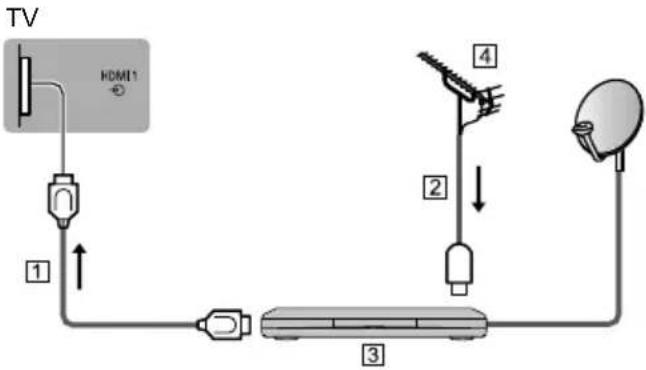
9 0atellite receiCer
flowchart
graph TD
    TV["TV"] --> HDMI1["HDMI1"]
    HDMI1 --> 1["1"]
    1 --> 2["2"]
    2 --> 3["3"]
    3 --> 4["4"]
    4 --> 5["Satellite"]
1 HDMI cable
② RF cable
3!atellite receiver
4 Terrestrial aerial
3etwork
A broadband network environment is reKuired to be able to use internet services.
- If you do not have any broadband network services, please consult your retailer for assistance.
• Prepare the internet environment for wired connection or wireless connection. - letup of the network connection will start when first using the TV. (p. 18)
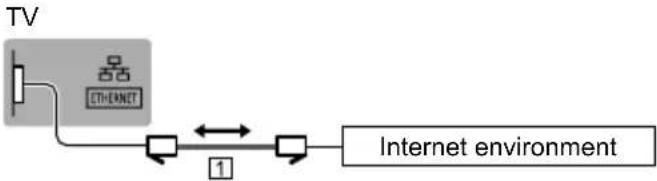
9 Wired connection
flowchart
graph LR
    TV["TV"] -->|Ethernet| InternetEnvironment["Internet environment"]
    InternetEnvironment -->|1| Data["Data Flow"]
    Data -->|2| Data1["Data Flow"]
    Data1 -->|3| Data2["Data Flow"]
1 LAN cable 1!hielded)
- 0se !hielded Twist Pair 1!TP) LAN cable.
9 Wireless connection
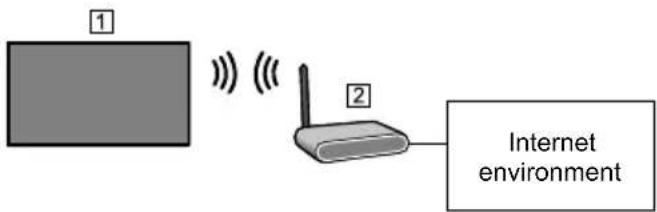
text_image
① ② Internet environment① ,uilt)in wireless LAN 1Rear of the TV)
② Access point
3ote
- Network reconnection may take a while after the TV set is turned on. If network features cannot be accessed, please wait and try again later.
Connections for 4K / H41 co patible equip ent
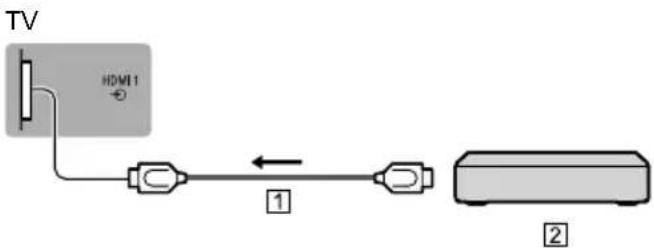
text_image
TV HDMI 1 ① ②① HDMI cable
② 4K I HDR compatible eKuipment
- To watch high)definition 4K more accurately or HDR content, connect the 4K I HDR compatible eKuipment to HDMI1 or - terminal.
- Connect the 4K compatible eKuipment to HDMI terminal using a 4K compatible cable and you can watch content in 4K format.
- !supporting HDR does not increase the peak brightness capabilities of the TV panel.
9 [H4MI ..0 0etting] (Oetup Menu)
Reproduces the image more precisely with the expanded colour gamut when connecting the 4K compatible eKuipment. !elect the mode depending on the eKuipment.
94K@60Hz 42-20:2
For better compatibility. !et to 94K@60Hz 42-20: when the image or sound in HDMI input is not played properly.
94K@60Hz 42424142-20:2
For the 4K compatible eKuipment that has the function to output the image precisely with the expanded colour gamut.
• To change the mode
1. !elect the HDMI input mode connected to the eKuipment.
- Display the menu and select 9HDMI -.0 !etting: 1!etup Menu).
- For information about the valid format, refer to 9eHELP: 1!earch by Purpose F Aatching F 4K resolution F Valid 4K format).
Other connections
9 4V4 Pla8er
1COMPONENT eKuipment)
TV
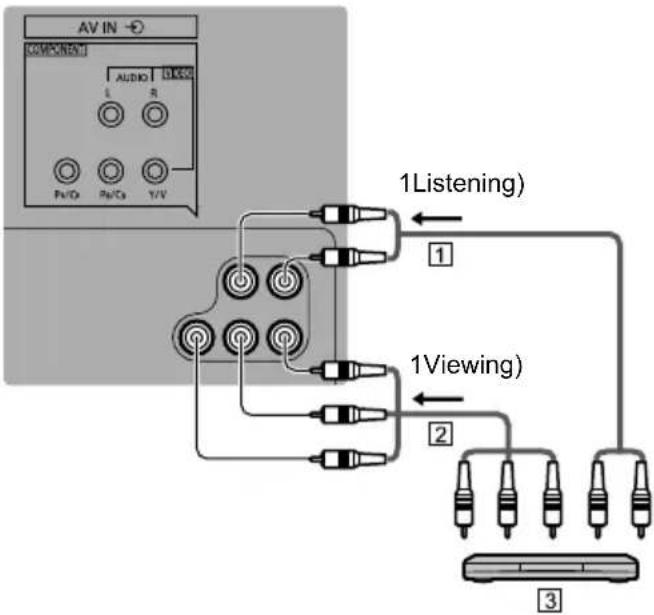
flowchart
graph TD
    A["AV IN"] --> B["Component"]
    B --> C["1Listening"]
    B --> D["1 Viewing"]
    B --> E["2"]
    C --> F["3"]
1 Audio cable 1!hielded)
② Component video cable 1!hielded)
③ DVD Player
9 Ca corder / Ga e equip ent
1VIDEO eKuipment)
TV
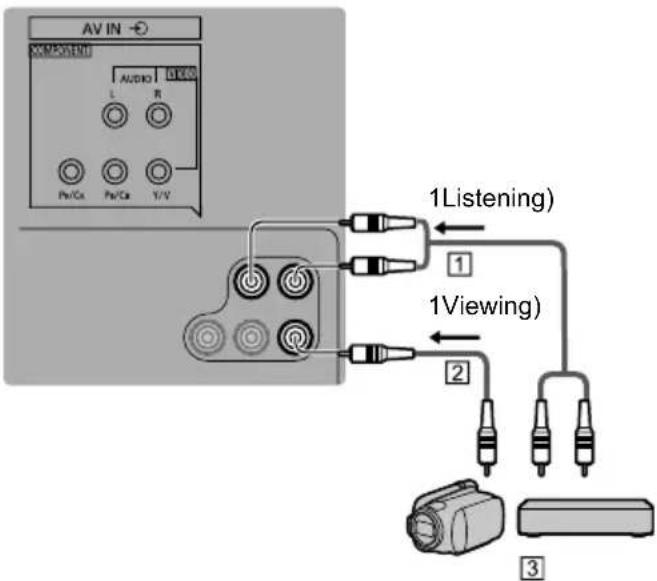
text_image
AV IN COMPONENT AUDIO L R Pv/Cx Pv/Ca Y/Y 1Listening) 1 1Viewing) 2 3① Audio cable 1!hielded)
② Composite video cable 1!hielded)
3 Camcorder | 4ame eKuipment
9 A plifier 1 listening with external speakers)
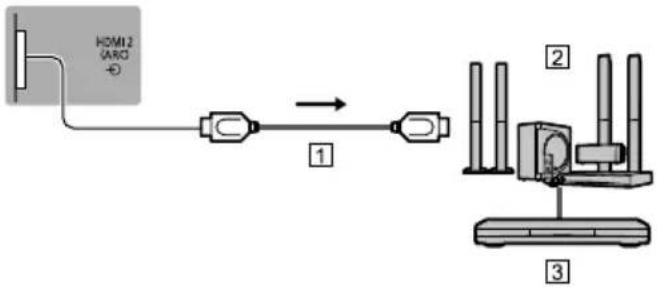
- To enCoy multi)channel sound from external eKuipment 1e.g. Dolby Digital 5.1ch), connect the eKuipment to the amplifier. For information about the connections, read the manuals of the eKuipment and amplifier.
TV
flowchart
graph LR
    A["HDMI2 (ARO)"] --> B["Switch"]
    B --> C["Device 1"]
    C --> D["Device 2"]
    D --> E["Device 3"]
① HDMI cable
② Amplifier with speaker system
③ External eKuipment 1DVD Player, etc.)
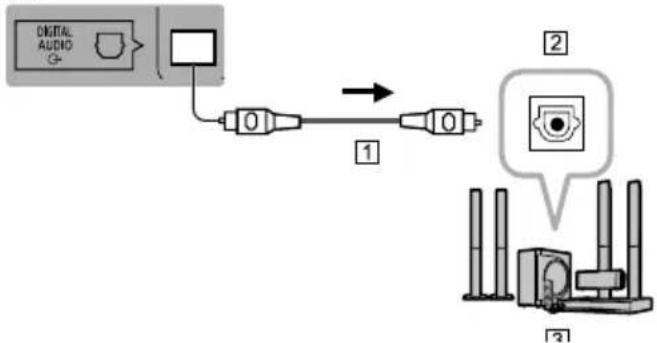
- 0se HDMI- to connect the TV to an amplifier which has ARC 1Audio Return Channel) function.
If connecting to an amplifier without ARC function, use DI4ITAL A0DIO.
TV
flowchart
graph LR
    A["Digital Audio"] --> B["0"]
    B --> C["1"]
    C --> D["0"]
    D --> E["2"]
    E --> F["3"]
① Optical cable
② DI4ITAL A0DIO IN
③ e.g. Amplifier with speaker system
3ote
- ARC function is not supported when performing mirroring on the TV set.
• To enable ARC function in CEC Menu
1 Display Home with 9HOME:.
. !elect 'CEC' and press 9OK: to access.
2 Choose Enable Audio !ystem" under Audio !system 1*).
1*) Name will vary depending on external eKuipment and amplifier.
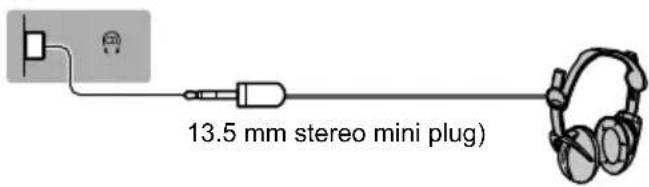
9 Headphones
- For information about the volume settings, refer to 9eHELP: 1!earch by Purpose F !settings F Audio).
TV
text_image
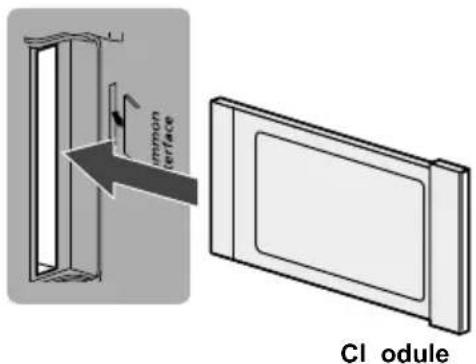
13.5 mm stereo mini plug)9 Co on Interface
- Turn the TV off with Mains Power On I Off switch whenever inserting or removing the CI module.
- If a smart card and a CI module come as a set, first insert the CI module, then insert the smart card into the CI module.
- Insert or remove the CI module completely in the correct direction as shown.
- Normally encrypted channels will appear. 1Viewable channels and their features depend on the CI module.)
If encrypted channels do not appear
→ [Co on Interface] in the Oetup Menu
- There might be some CI modules in the market with older firmware versions that do not work fully interoperable with this new CI+ v1.4 TV. In this case, please contact your content provider.
- For details, refer to 9eHELP: 1!earch by Purpose F Functions F Common Interface), read the manual of the CI module, or check with the content provider.
- ,e sure to remove the CI module card, etc. before repairing, transferring or discarding.
TV
text_image
immun interface CI odule9 U0B H44 (for recording)
- 0se 0!, 1 port for connecting the 0!, HDD.
- For details, refer to 9eHELP: 1!earch by Purpose F Recording).
9 H4MI CEC
- 0se HDMI1 ) 3 for HDMI CEC connection.
- For details, refer to 9eHELP: 1!earch by Purpose F Functions F HDMI CEC).
9 Media Pla8er
- !elect Filter" options to filter the files as per the content type 1Photo I Video I Music)
1 Display the option menu with 9OPTION:
. !elect Filter" and press 9OK: to access.
2 !elect Photo | Video | Music" and press 9OK: to set.
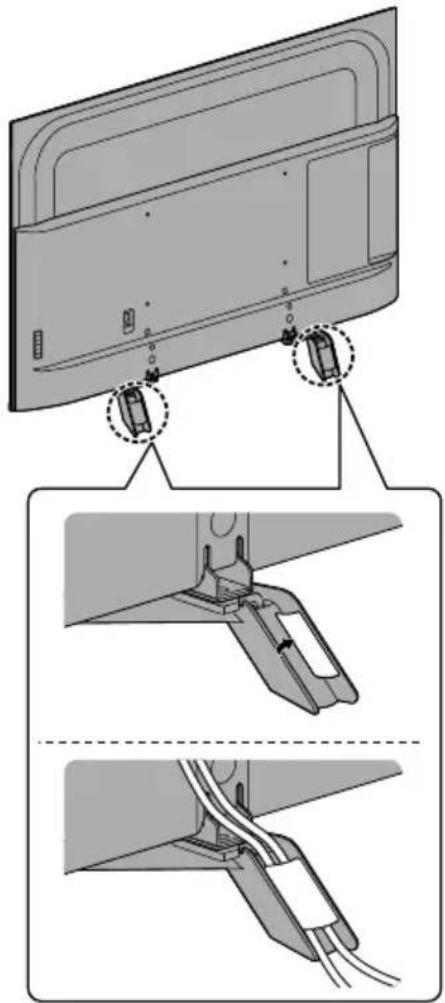
Cable arrange ent
9 Fixing the cables
natural_image
Technical illustration of a device's rear panel assembly with three views showing internal components and cable connections (no text or symbols)• Fix cables as necessary.
- Ahen using the optional accessory, follow the option's assembly manual to fix cables.
Identif8ing Controls
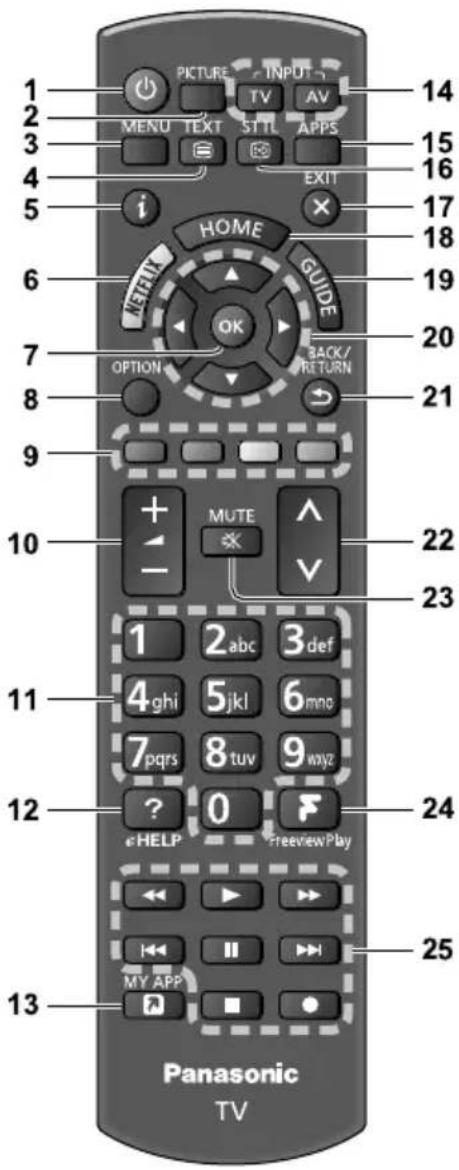
1e ote Control
text_image
1 2 3 4 5 i PICTURE INPUT MENU TEXT STIL APPS HOME GUIDE OK BACK/ OPTION RETURN MUTE - 1 2 abc 3 def 4 ghi 5 jkl 6 mno 7 pqr s 8 tuv 9 wayz ? 0 HELP FreeviewPlay MY APP Panasonic TV 14 15 16 17 18 19 20 21 22 23 24 251 [+] 0witches TV On or Off (standb8)
. Picture
• Changes Viewing Mode.
2 [Main Menu]
- Press to access Video, Audio, TV, !etup and Parental Menus, etc.
4 Text serCice button
5 Infor ation
• Displays channel and programme information.
6 3etflix
- Accesses NETFLIX service directly.
- A broadband network environment is reKuired in order to fully use this function.
- This service may be stopped or changed without notice.
7 OK
• Confirms selections and choices.
- Press after selecting channel positions to Kuickly change channel.
8 [Option Menu]
- Easy optional setting for viewing, sound, etc.
- Coloured buttons
(red-green-8ellow-blue)
- Osed for the selection, navigation and operation of various functions.
10 Volu e Up / 4own
11 3u eric buttons
• Changes channel and teletext pages.
- !ets characters.
1. [eHELP]
• Displays 9eHELP: 1,uilt)in Operating Instructions).
12 [M8 App]
- Assigns a favourite application. After setting, starts the application easily by pressing this button.
- For details, refer to 9eHELP: 1!earch by Purpose F Home F Home)
14 Input ode selection
• TV ) switches to TV input mode 1DV,).
- AV ) switches to AV input mode from Input !election list.
15 APP0
• Displays 9Apps List: 1 applications list).
16 0ubtitles
- Displays subtitles.
17 Exit
- Returns to the normal viewing screen.
18 HOME
• Displays 9Home:.
- For details, refer to 9eHELP: 1!earch by Purpose F Read first F Features).
1- TV Guide
• Displays Electronic Programme 4uide.
.0 Cursor buttons
- Makes selections and adCustments.
.1 1eturn
- Returns to the previous menu I page.
.. Channel Up / 4own
.2 0ound Mute On / Off
.4 FreeCiew Pla8
- Accesses Freeview Play service directly.
- A broadband network environment is reKuired in order to fully use this function.
- This service may be stopped or changed without notice.
.5 Operations for contents, connected equipment, etc.
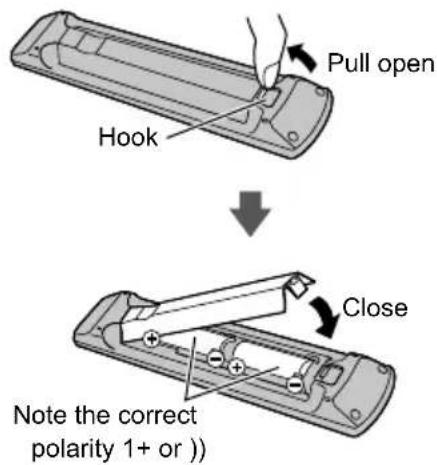
9 Installing / 1e oCing batteries
text_image
Pull open Hook ↓ Close Note the correct polarity 1+ or ))Indicator / Control panel
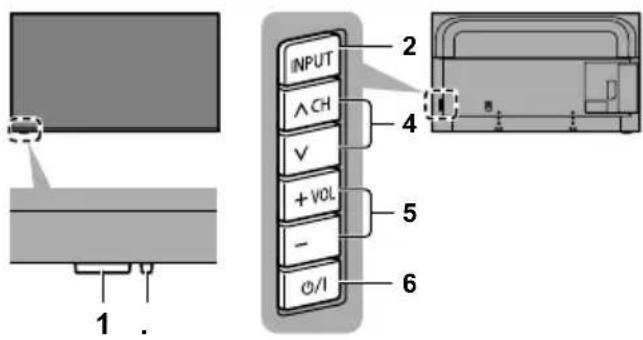
text_image
INPUT △CH V + VOL - O/I 2 4 5 6 1.Rear side of the TV
3ote
- Location of indicators may vary depending on the models.
1 1e ote control signal receiCer
- Do not place any obCects between the TV remote control signal receiver and remote control.
A bient sensor
- !enses brightness to adCust picture Kuality when 9Ambient !ensor: in the Video Menu is set to 9On:.
. Power LE4
1ed: !tandby
Green:
On
Orange:
!tandby with some functions 1recording, etc.) active
- The LED blinks when the TV receives a command from the remote control.
2 Input ode selection
- Press repeatedly until you reach the desired mode.
[Main Menu]
- Press and hold for about 3 seconds to display main menu.
OK 1when in the menu system)
4 Channel Up / 4own
- Cursor 0p I Down 1when in the menu system)
5 Volu e Up / 4own
- Cursor Left I Right 1when in the menu system)
6 Mains power On / Off switch
- 0se to switch the mains power.
- To turn Off the apparatus completely, you must pull the mains plug out of the mains socket.
• 9:2/ Itandby I On
First ti e Auto 0etup
Ahen the TV is turned on for the first time, it will automatically search for available TV channels and give options to set up the TV.
- These steps are not necessary if the setup has been completed by your local dealer.
- Please complete connections 1p. 1-) 15) and settings 1(if necessary) of the connected eKuipment before starting Auto letup. For information about the settings for the connected eKuipment, read the manual of the eKuipment.
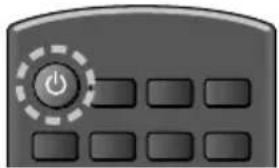
1 Plug the TV into a liCe ains socket and turn the power on

• Takes a few seconds to be displayed.
natural_image
Close-up of a gray remote control with a power button and ten buttons (no text or symbols visible). 0elect the following ite s
!et up each item by following the on)screen instructions.
Example2
Please select 8our Ciewing enCiron ent.
Ho e 0hop
9 How to use the re ote control

Move the cursor

Access the item I store the setting
BACK/ RETURN

Return to the previous item 1 if available)
0elect 8our countr8
0elect [Ho e]
!elect 9Home: for use in a home viewing environment.
- 9!hop: is for shop display.
- To change the viewing environment later on, the set will need to have all settings initialised by accessing !hipping Condition.
0et up the network connection
Auto 0etup is now co plete and the TV is read8 for Ciewing.
If tuning has failed check the RF cable, and the network connection, and then follow the on)screen instructions.
3ote
- The TV goes into !tandby mode when no operation is performed. 0ser can choose when the TV should go into standby mode by selecting available options in 9Auto !leep: in 9Time !etup: 1!etup Menu) 1Off I 4 I 6 I . hours).
- The TV goes into !tandby mode when no signal is received and no operation is performed for 10 minutes if 9No signal Power off: in the 9Time !etup:1!etup Menu) is set to 9On:.
• To retune all channels
[FreeCiew Auto 0etup] in [Tuning Menu] (TV Menu) UK
[Auto atic channel search] in [Tuning Menu] (TV Menu) Ireland
• To add the available TV channels later
[FreeCiew Update Channel List] in [Tuning Menu] (TV Menu) UK
[Update 0can] in [Tuning Menu] (TV Menu) Ireland
• To initialise all settings
→ [0hipping Condition] (Oetup Menu)
Watching TV
1 Turn power on
1TV)
or

1Remote Control)
- Mains power On I Off switch should be on. 1p. 15)
. 0elect the ode
- !electable modes vary depending on the channels stored.
2 0elect a channel
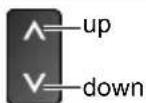
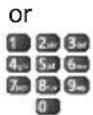
• DV, channel position begins from number 1 upward.
How to Use eHELP
9eHELP: is the detailed operating instructions built into the TV, and gives a more detailed explanation for a better understanding of the operation of each feature.
1 4ispla8 [eHELP]
![PANASONIC GX700B - 4ispla8 [eHELP] - 1](/content/2026/06/1177820/images/47386b71e85a4a48ca9bf2ac08bd1547f41317f8d1676639eec723011b7185de.jpg)
eHELP
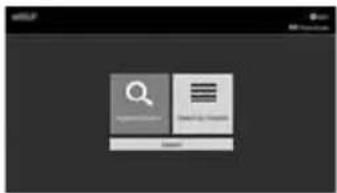
. 0elect the enu
text_image
Search Download
• To access 9How to use:

[Ke8word 0earch]: !earch the content of eHELP in the keyword.
[0earch b8 Purpose]: !earch the content of eHELP for each item.
[0upport]: Access the support information 1FAQs, etc.).
2 0elect the ite
Example2
text_image
Screenshot of a software interface showing menu options and a dropdown menu with Chinese text.
• To return to the previous screen I field BACK/ RETURN

- To scroll the description 1 if more than 1 page) Ahile the description is highlighted

• To open the reference screen 1


• To check the features of this TV !earch by Purpose F Read first F Features
FAQs
,efore reKuesting service or assistance, please follow these simple guides to solve the problem.
- For details, refer to 9eHELP: 1!upport F FAQs).
The TV does not switch on
- Check the mains lead is plugged into the TV and the mains socket.
- The fuse in the mains plug may have blown. Replace it with one of an identical rating. (p. 4)
The TV goes into 0tandb8 ode
• Auto power standby function is activated.
The re ote control does not work or is inter ittent
- Are the batteries installed correctly? (p. 17)
• Has the TV been switched on? - The batteries may be running low. Replace them with new ones.
- Point the remote control directly at the TV's remote control signal receiver 1 within about 5 m and a 30 degree angle of the signal receiver).
- lituate the TV away from sunshine or other sources of bright light so they do not shine on the TV's remote control signal receiver.
30 i age is displa8ed
- Check the TV is turned on.
- Check the mains lead is plugged into the TV and the mains socket.
- Check the correct input mode is selected.
- Check the selection of 9Composite: I 9Component: in 9Input llection: to match the signal being output by the external eKuipment.
- Is 9,acklight:, 9Contrast:, 9,rightness: or 9Colour: in the Video Menu set to the minimum?
- Check all reKuired cables and connections are firmly in place.
An unusual i age is displa8ed
- Turn the TV off with Mains power On I Off switch, then turn it on again.
- If the problem persists, initialise all settings.
→ [0hipping Condition] (Oetup Menu)
The i age or sound fro external equip ent are unusual when the equip ent is connected Cia H4MI
- !et 9HDMI -.0 !etting: 1!etup Menu) to 94K@60Hz 42-20:→(p. 12)
Parts of the TV beco e hot
- Parts of the TV may become hot. These temperature rises do not pose any problems in terms of performance or Kuality.
When pushed with a finger, the displa8 panel oCes slightl8 and akes a noise
- There is a little gap around the panel to prevent damage to the panel. This is not a malfunction.
MoCing i age is not s ooth
- Intelligent Frame Creation automatically compensates the picture frame rate and removes Cuddering movements to make the images smooth.
• However, smoothness of moving image is not guaranteed for certain input stream formats.
The LE4 indicator flashes red
- Please reset the TV by unplugging it from the electrical outlet if the LED flashes red.
• After a minute, plug the TV back in to the electrical outlet. - If the flashing continues, contact your TV dealer or Panasonic service center.
About the inquir8
- Please contact your local Panasonic dealer for assistance. If you make an inKuiry from a place where this TV is not present, we cannot answer about contents that reKuire visual confirmation for connection, phenomenon, etc. of this TV itself.
Check you can get Freeview HD in your area by visiting www.freeview.co.uk
To get the most up to date service from Freeview it is important for Freeview customers to retune from time to time.
How do I re-tune 8 FreeCiew TV?
This is a Kuick reference. If you have any problems, check the Operating Instructions or ask a friend or family member to show you how. Alternatively, go to your local electrical retailer, contact your local Panasonic dealer or visit freeCiew.co.uk/retune
Re)tuning only takes a few minutes, Cust follow the steps below2
- Press the TV button to select DV, mode.
-. Press the MEN0 button to open the main menu. - 9TV:→ 9Tuning Menu:→ 9Freeview Auto !etup:
Please note2 most digital TV recorders will keep your original recordings after running a re)tune but you will need to reset any future recordings.
Maintenance
First, re oCe the ains plug fro the ains socket.
4ispla8 panel, Cabinet, Pedestal
1egular care:
Gently wipe the surface of the display panel, cabinet, or pedestal by using a soft cloth to remove dirt or fingerprints.
For stubborn dirt:
(1) First clean the dust from the surface.
(2) Dampen a soft cloth with clean water or diluted neutral detergent (1 part detergent to 100 parts water).
(3) Wring out the cloth firmly. (Please note, do not let liquid enter the TV inside as it may lead to product failure.)
(4) Carefully wipe moisten and wipe away the stubborn dirt.
(5) Finally, wipe away all the moisture.
Caution
- Do not use a hard cloth or rub the surface too hard, otherwise this may cause scratches on the surface.
• Take care not to subject the surfaces to insect repellent, solvent, thinner or other volatile substances. This may degrade surface quality or cause peeling of the paint. - The surface of the display panel is specially treated and may be easily damaged. Take care not to tap or scratch the surface with your fingernail or other hard objects.
- Do not allow the cabinet and pedestal to make contact with a rubber or PVC substance for a long time. This may degrade surface quality.
Mains plug
Wipe the mains plug with a dry cloth at regular intervals. Moisture and dust may cause fire or electrical shock.
0pecifications
9 TV
Model 3o.
| 40-inch model | TX-40GX700B |
| 50-inch model | TX-50GX700B |
| 58-inch model | TX-58GX700B |
| 65-inch model | TX-65GX700B |
4i ensions (W × H × 4)
| 40-inch model |
| 901 mm × 569 mm × 208 mm (With Pedestal) |
| 901 mm × 517 mm × 63 mm (TV only) |
50-inch model
| 1 | 120 mm × 703 mm × 242 mm (With Pedestal) |
| 1 | 120 mm × 651 mm × 63 mm (TV only) |
58-inch model
| 1 297 mm × 812 mm × 242 mm (With Pedestal) |
| 1 297 mm × 759 mm × 65 mm (TV only) |
65-inch model
| 1 454 mm × 903 mm × 344 mm (With Pedestal) |
| 1 454mm × 843 mm × 66 mm (TV only) |
Mass
| 40-inch model |
| 11.0 kg Net (With Pedestal) |
| 10.5 kg Net (TV only) |
| 50-inch model |
| 15.0 kg Net (With Pedestal) |
| 14.0 kg Net (TV only) |
58-inch model
| 21.0 kg Net (With Pedestal) |
| 20.0 kg Net (TV only) |
65-inch model
| 27.0 kg Net (With Pedestal) |
| 26.0 kg Net (TV only) |
Power source
AC 220-240 V, 50 / 60 Hz
Panel
LED LCD panel
0ound
0peaker output
20 W (10 W + 10 W)
Headphones
3.5 mm stereo mini jack × 1
Connection ter inals
AV input (COMPO3E3T / VI4EO)
VI4EO
Pin Cack × 1
1.0 V9p)p: 155 Ω)
AU4IO L - 1
Pin Cack × -
0.5 V9rms:
Y
1.0 V9p)p: 1 including synchronisation)
P_B/C_B, P_1/C_1
±0.35 V9p)p:
H4MI1 / . / 2 input
TUPE A Connectors
HDMI1 I 32
4K, Content Type, Deep Colour, x.v.ColourE
HDMI-2
4K, Content Type, Audio Return Channel, Deep
Colour, x.v.ColourE
Card slot
Common Interface slot 1 complies with CI Plus) × 1
ETHE13ET
RJ45, IEEE.0-.3 10,A!E)T I 100,A!E)TX
U0B 1/.
0!, 12 DC == 5 V, Max. (00 mA 9!uper!peed 0!, 10!, 3.0):
0!, -2 DC 5V, Max. 500 mA 9Hi)!peed 0!, 10!, -.0):
4IGITAL AU4IO output
PCM I Dolby Digital, Fibre optic
1eceiCing s8ste s / Band na e
4VB-T / T.
Digital terrestrial services
PAL 5.5/60 (AV input onl8)
Playback of NT!C tape from some PAL Video recorders 1VCR) or NT!C disc playback from DVD player and recorder
M.3T0C (AV input onl8)
Playback from M.NT!C Video recorders 1VCR)
3T0C (AV input onl8)
Playback from NT!C Video recorders 1VCR)
Aerial input
UK
OHF
Ireland
VHF10HF
Operating conditions
Te perature
0 °C ) 35 °C
Hu idit8
-0 % ) .0 % RH 1non)condensing)
Built-in wireless LA3
0tandard co pliance and Frequenc8 range \*
IEEE.0-.11aInlac
5.1.0 4Hz) 5.3-0 4Hz, 5.500 4Hz) 5.5.0 4Hz,
5.660 4Hz ) 5.500 4Hz
IEEE.0-.11blgIn
-.41-4Hz)-.45-4Hz
Oecurit8
APA-)P!K 1TKIPIAE!)
APA)P!K 1TKIPIAE!)
AEP 164 bit1-. bit)
*2 The freKuency and channel differ depending on the country.
3ote
- Design and !specifications are subCect to change without notice. Mass and Dimensions shown are approximate.
- For information about the power consumption, display resolution, etc., refer to Product fiche.
- For information about the open source software, refer to 9eHELP: 1!earch by Purpose F Read first F ,efore use F Licence).
Disposal of Old Equipment and Batteries
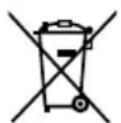
Only for European Union and countries with recycling systems
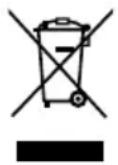
These symbols on the products, packaging, and/or accompanying documents mean that used electrical and electronic products and batteries must not be mixed with general household waste.
For proper treatment, recovery and recycling of old products and used batteries, please take them to applicable collection points in accordance with your national legislation.
By disposing of them correctly, you will help to save valuable resources and prevent any potential negative effects on human health and the environment.
For more information about collection and recycling, please contact your local authority.
Penalties may be applicable for incorrect disposal of this waste, in accordance with national legislation.
Note for the battery symbol (bottom symbol):
This symbol might be used in combination with a chemical symbol. In this case it complies with the requirement set by the Directive for the chemical involved.
Sales and Support Information
Customer Communications Centre
• For customers within the UK: 0344 844 3899
• For customers within Ireland: 01289 8333
- Monday – Friday 9:00am – 5:00pm, (Excluding public holidays).
- For further support on your product, please visit our website: www.panasonic.co.uk
Direct Sales at Panasonic UK
- Order accessory and consumable items for your product with ease and confidence by phoning our Customer Communications Centre Monday – Friday 9:00am – 5:00pm, (Excluding public holidays).
- Or go on line through our Internet Accessory ordering application at www.pas-europe.com.
- Most major credit and debit cards accepted.
- All enquiries transactions and distribution facilities are provided directly by Panasonic UK.
- It couldn't be simpler!
- Also available through our Internet is direct shopping for a wide range of finished products. Take a browse on our website for further details.
Customer's Record
The model number and serial number of this product may be found on its rear panel. You should note this serial number in the space provided below and retain this book, plus your purchase receipt, as a permanent record of your purchase to aid in identification in the event of theft or loss, and for Warranty Service purposes.
Model Number Serial Number