
CHIC II - Мобильный телефон OLYMPIA - Бесплатное руководство пользователя
Найдите руководство к устройству бесплатно CHIC II OLYMPIA в формате PDF.



Вопросы пользователей о CHIC II OLYMPIA
0 вопрос об этом устройстве. Ответьте на те, что знаете, или задайте свой.
Задать новый вопрос об этом устройстве
Скачайте инструкцию для вашего Мобильный телефон в формате PDF бесплатно! Найдите своё руководство CHIC II - OLYMPIA и возьмите своё электронное устройство обратно в руки. На этой странице опубликованы все документы, необходимые для использования вашего устройства. CHIC II бренда OLYMPIA.
РУКОВОДСТВО ПОЛЬЗОВАТЕЛЯ CHIC II OLYMPIA
OLYMPIA
text_image
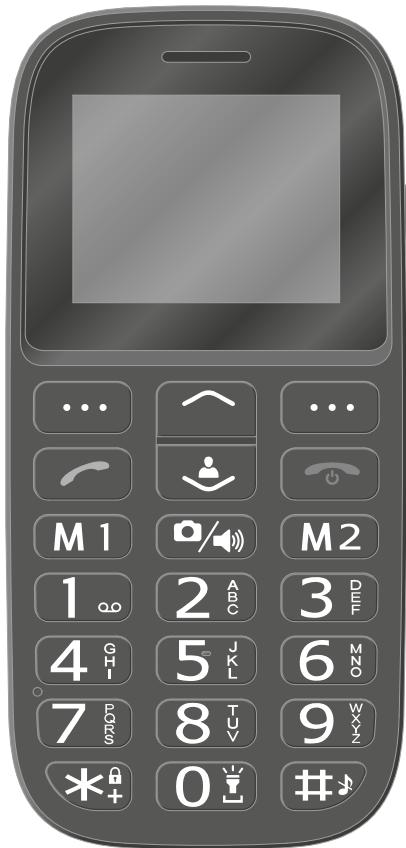
Black-and-white image of a mobile phone keypad with labeled buttons and function iconsMobile phone
BELLA
For Your Safety 8
Observe Safety Instructions 9
Intended Use.... 14
Checking the Package Contents.... 14
Mobile Phone in Detail 16
Front View 16
View of Rear and Underside 18
Putting the Mobile Phone into Operation .....20
Inserting SIM Cards. 21
Inserting a MicroSD Memory Card 22
Inserting the Battery 22
Charging the Battery 23
Charging the battery, charging adapter 23
Charging the battery, charging cradle 24
Switching the Mobile Phone On and Off 25
Start Screen.... 26
Other icons on the start screen 28
Using the Mobile Phone .....29
Navigating in the Menu 29
Entering Phone Numbers and Letters.... 30
Making Calls 31
Taking, Ending and Rejecting Calls.... 32
Making an Emergency Call 33
Quick Access.... 34
Mobile Phone Menu....35
Menu Structure 35
Display Texts 35
Menu Options Available During a Call.... 36
Volume during a call 36
Handsfree function 36
Muting the microphone 36
Putting a call on hold 37
Conference facility.... 37
Call Logs 38
Options for the call lists 39
Phone Book.... 43
Phone book settings 47
Text Messages.... 48
Writing a Text Message 49
Viewing a Text Message 49
Replying to a Text Message 50
Calling the Sender of a Text Message.... 50
Forwarding a Text Message 51
Deleting a Text Message 52
Saving Phone Numbers in the Phone Book 52
Saving a text message as a draft 53
Settings for Text Messages 53
Settings 55
Phone Settings 56
Setting the time and date.... 56
Setting the language 56
Speed dialling 57
More phone settings 59
Call Settings 61
Transmitting your own caller ID....61
Call Waiting 61
Call Divert 62
Security Settings 63
Switching the PIN request On/Off 63
Changing the PIN 64
Switching the phone lock On/Off 65
Changing the phone lock password 65
Network Settings 66
Bluetooth 67
Switching Bluetooth On/Off 67
Visibility 67
Connecting devices via Bluetooth 68
Changing the device name 68
Emergency call key (SOS) 69
Switching the emergency call function On/Off....69
Setting up a call chain 70
Cancelling an emergency call 70
Emergency call function settings.... 71
Low Battery Power Alert 72
Switching the low battery alert on/off. 72
Settings for low battery power alert....73
Restoring the Default Factory Settings 74
Organiser....75
Calendar 75
Alarm clock 76
Camera 78
Radio 80
File Manager 84
User Profiles 85
Activating the user profile 85
Adapting the user profile 86
Dialling Picture Contacts 89
Transferring photos from a computer 90
Adding contacts to picture selection 90
Adding a picture to the picture contacts 91
Dialling via the picture menu 91
Sending text messages to picture contacts....92
Other settings 93
Additional Functions....94
Favourite contacts keys (M1 and M2) 94
Other Important Information....95
Technical Data....95
Declaration of Conformity 96
Guarantee 96
Care Instructions 97
Disposal....97
Frequently Asked Questions (FAQ)....98
For Your Safety
The information on the following pages will help to ensure you can use the mobile phone safely.

Read the operating manual carefully and pay attention to the information when using your mobile phone. Keep the operating manual handy for future reference.

Pay attention to this symbol. Texts which are highlighted by this symbol provide helpful information on handling the mobile phone.

This symbol indicates warnings regarding certain situations which could lead to personal injuries or damage to the mobile phone.
Observe Safety Instructions
Pay attention to the following safety instructions to protect yourself from any possible personal injury.

WARNING!
The mobile phone can be used by children from eight years of age and by persons with restricted physical, sensory or mental capabilities or a lack of experience and/or knowledge when they are under supervision or have been instructed with regard to safe use of the mobile phone and have understood the potential risks which result if the instructions are ignored. Children may not be allowed to play with the mobile phone. Cleaning and user maintenance may not be completed by children without any supervision.

WARNING!
Risk of electric shock! Never attempt to open and repair the mobile phone or accessories yourself. Never touch bare contacts with metallic objects. Never plug in or unplug the charging adapter when your hands are wet.

WARNING!
Risk of suffocation! Risk to health through packaging material and protective foil! Keep packaging material and protective foil out of reach of children. Small children can swallow small parts.

WARNING!
Risk of suffocation! Risk to health through batteries! Keep batteries out of reach of children. Do not swallow batteries. If a battery has been swallowed, contact medical assistance immediately.

WARNING!
Prevent life-threatening interference to heart pacemakers! Maintain a safety distance of at least 15 cm! Never carry the mobile phone in a breast pocket when switched on. Always hold the mobile phone to the ear furthest away from the pacemaker during calls. Switch the mobile phone off immediately if you notice or suspect any adverse effects.

CAUTION!
Do not remove the battery while the mobile phone is being charged. This could damage the phone. Disconnect the charging cable from the mobile phone before changing or removing the battery.

CAUTION!
Risk of explosion through improper replacement or removal of the lithium-ion battery! Only replace the lithium-ion battery by a type approved by the manufacturer.

CAUTION!
Risk of injury to the retina. The LED for the torch is very bright and could cause damage to eyes. Never look directly into the LED torch beam when the torch is switched on.

CAUTION!
The ring tone is issued via the loudspeaker. Take an incoming call first and then hold the mobile phone to your ear. This prevents any possible hearing damage.

CAUTION!
Do not use the phone in prohibited areas! Prohibited areas could include hospitals, petrol stations, aeroplanes, etc. Please observe local regulations!

CAUTION!
Reduce exposure to radio waves! Use an appropriate headset for longer calls. Do not keep the mobile phone near your head.

CAUTION!
With regard to emergencies, do not rely on the mobile phone alone! For technical reasons, it is not possible to guarantee a reliable connection in every situation.
Prevent damage to your mobile phone and observe the instructions!

IMPORTANT!
Protect your mobile phone from moisture, dust, liquids, chemicals, vapours, heat and direct sunlight. The phone is not waterproof; therefore, keep it dry.

IMPORTANT! With regard to emergencies, do not rely on the mobile phone alone! For technical reasons, it is not possible to guarantee a reliable connection in every situation.

IMPORTANT!
Only use original accessories. Only connect accessories approved by the manufacturer.

IMPORTANT!
The mobile phone may only be repaired by qualified customer services technicians.

IMPORTANT!
When using mobile communication equipment, interference can cause disturbances.

IMPORTANT!
Telephoning while driving is only permitted when the applicable legal regulations are observed.
Tips Concerning the Battery
The following tips and information help to ensure the mobile phone battery works properly.
■ Only use batteries and power adapters approved by the manufacturer, otherwise the battery could be damaged.
- Do not short circuit the battery. Always leave the battery in the mobile phone to avoid accidentally short circuiting the battery contacts.
- Keep the battery contacts clean and free of dirt.
The battery can be charged/discharged hundreds of times but its service life is limited. Replace the battery when the battery power has decreased noticeably.
■ To prevent unnecessary power consumption via the power adapter plug, disconnect the power adapter plug from the power socket when the battery is not being charged.
■ The battery only reaches its full capacity after several full charging process.
Intended Use
The mobile phone is designed for telephoning when connected to a mobile phone network. Any other use is considered unintended use.
Unauthorised modification or alterations are not permitted.
Under no circumstances open the mobile phone or try and complete any repair work yourself.
Checking the Package Contents
Before starting up the mobile phone, check the package contents. The following are enclosed with the mobile phone supplied:
■ Bella mobile phone
■ USB connection cable
- Charging cradle
- Charging adapter
Lithium-ion battery
- Operating manual
Mobile Phone in Detail
Familiarise yourself with the elements on the mobile phone before actually starting to use the mobile phone.
Front View
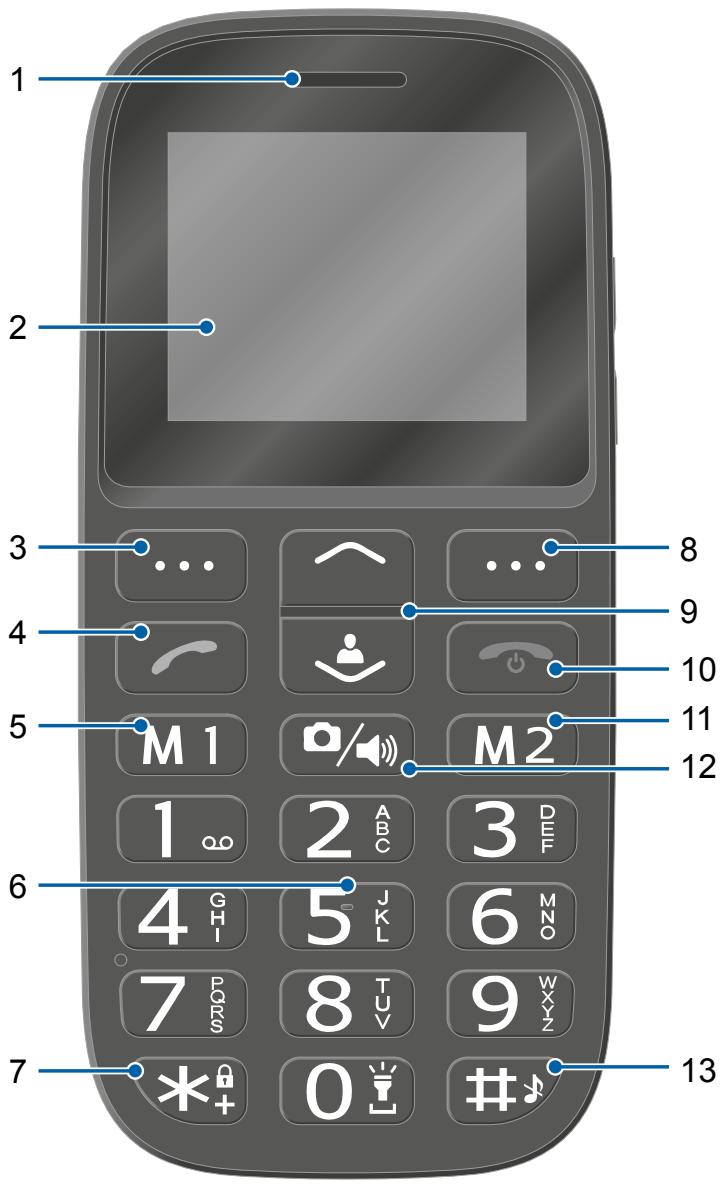
The following diagrams illustrate the keys and operating elements which you can use to exploit the functional scope of the mobile phone to the full.
1 Loudspeaker
2 Display
3 Softkey, left
4 Call key
5 Favourites key M1
6 Keypad
7 Star key
8 Softkey, right
9 Navigation keys
10 On-hook / reject key
11 Favourites key M2
12 Camera / loudspeaker key
13 Hash key
text_image
1 2 3 4 5 M 1 6 7 8 9 10 11 12 13 2 ABC 3 DEF 4 GH 5 J K L 6 M N O 7 P D Q R S 8 T U V 9 W X Y Z * + 0 #View of Rear and Underside
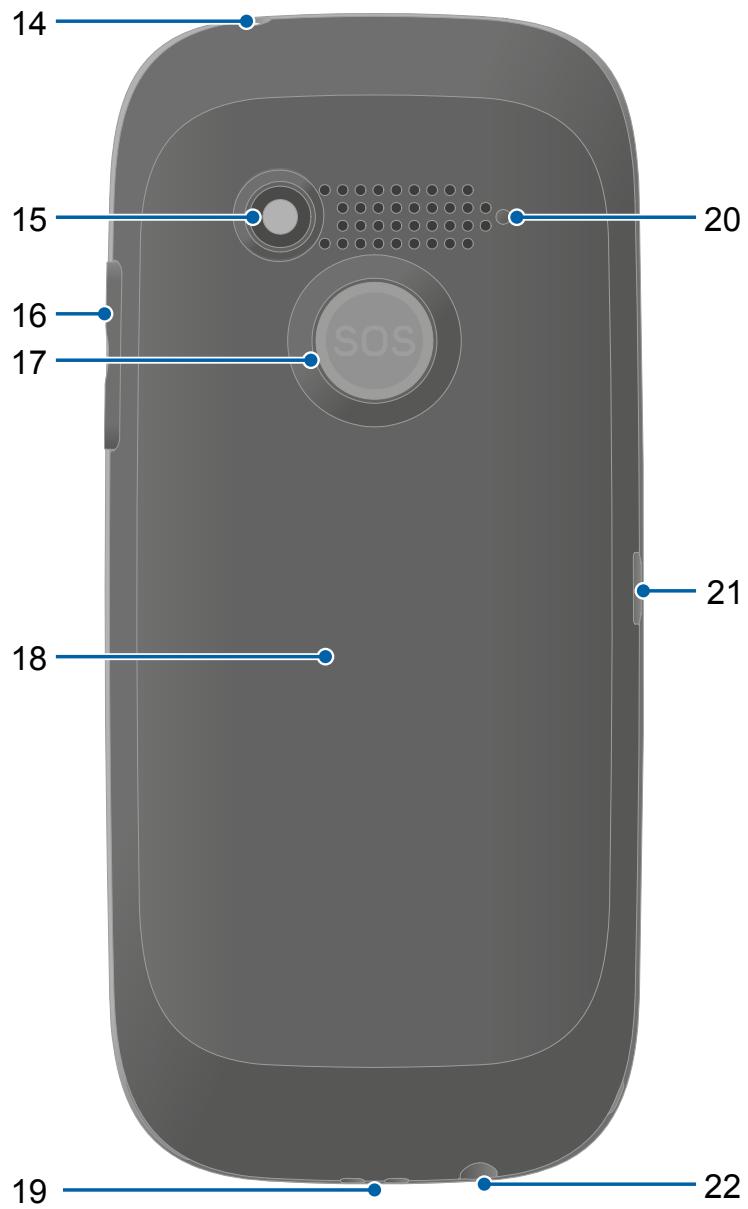
On the rear and underside of your mobile phone, you will find further elements which you can use to perform various functions.
14 Torch (LED)
15 Camera
16 Volume key
17 Emergency call key (SOS)
18 Battery compartment cover
19 Charge contacts
20 Loudspeaker
21 MicroUSB connection port
22 Headphone connection port
text_image
14 15 16 17 20 21 18 19 22Putting the Mobile Phone into Operation
This chapter provides information on how to put your mobile phone into operation. Your mobile phone is ready for use in just a few steps.

Before you start, please read the information in Section Observe Safety Instructions on Page 9.
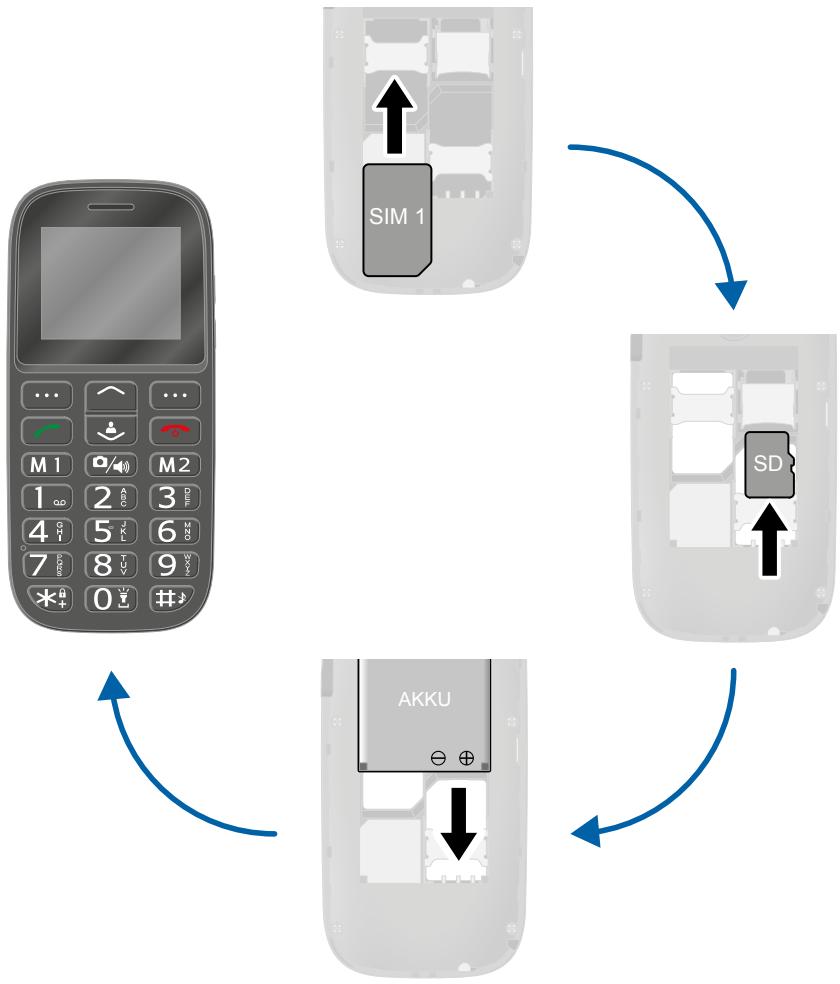
flowchart
graph TD
    A["Main Device"] --> B["SIM 1"]
    B --> C["SD"]
    C --> D["AKKU"]
    D --> A
Inserting SIM Cards
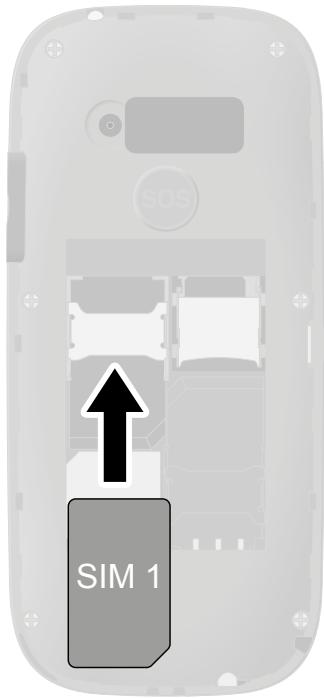
Before you can use your mobile phone, you must insert your SIM card (not included).
Only use SIM cards of the size illustrated (mini SIM). Micro or nano cards which have already been broken out can cause contact problems or malfunctions. If you wish to use a micro or nano card for your mobile phone, you need an adapter.
The battery compartment contains a shaped mould which indicates how to position and align the SIM card correctly in the compartment.
1 Remove the battery compartment cover. To do this, use the recess in the battery compartment cover on the rear of the mobile phone.
2 Insert the SIM card as shown.

The compartment shape makes it impossible to insert the card incorrectly.
text_image
SIM 1Inserting a MicroSD Memory Card
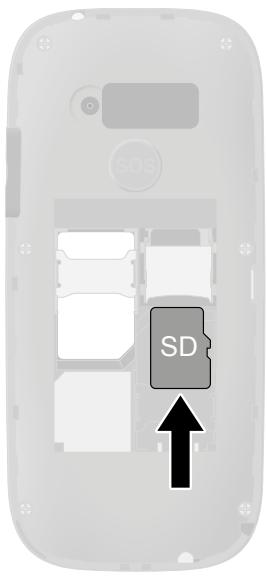
You have the option of inserting a microSD memory card (not included in the equipment supplied) in your mobile phone. This increases the data volume (e.g. for photos) which you can store on your phone.
1 Insert the microSD memory card into the open compartment as shown.

The compartment shape makes it impossible to insert it incorrectly.
text_image
SDInserting the Battery
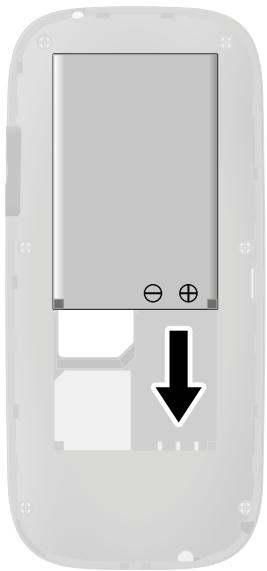
Before you can use your mobile phone, you must insert the battery.
1 Insert the battery as shown.

The compartment shape makes it impossible to insert it incorrectly.
2 Replace the battery compartment cover. The battery compartment cover latches audibly into place.
natural_image
Diagram of a mobile phone casing with a black arrow pointing to a button (no text or symbols present)Charging the Battery
Your mobile phone battery is fully charged after approx. 2 hours. Some batteries only reach their full capacity after several complete charge/discharge cycles. If the battery is fully discharged, it may take some time before the mobile phone switches on and displays the charging process.
Before starting to charge the battery, check that it has been installed properly.

IMPORTANT! Do not remove the battery while the battery is being charged. This could damage the mobile phone.
Charging the battery, charging adapter
1 Connect the power plug to a properly installed power socket.
2 Connect the microUSB plug to the microUSB connection port on the mobile phone. Ensure that the microUSB plug is correctly aligned to the microUSB connection port when connecting it.
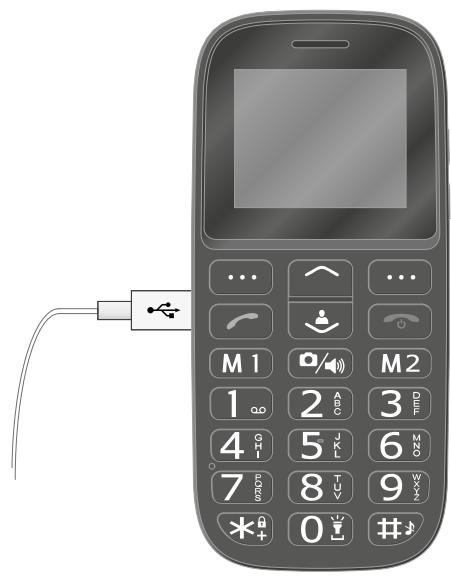
text_image
Diagram of a mobile phone with labeled keypad and ports, showing connections to the right port.
The charging process is indicated in the display by means of a charging battery icon.
Charging the battery, charging cradle
1 Connect the power plug to a properly installed power socket.
2 Connect the microUSB plug to the USB connection port on the rear side of the charging cradle.
3 Place the mobile phone in the charging cradle as illustrated.
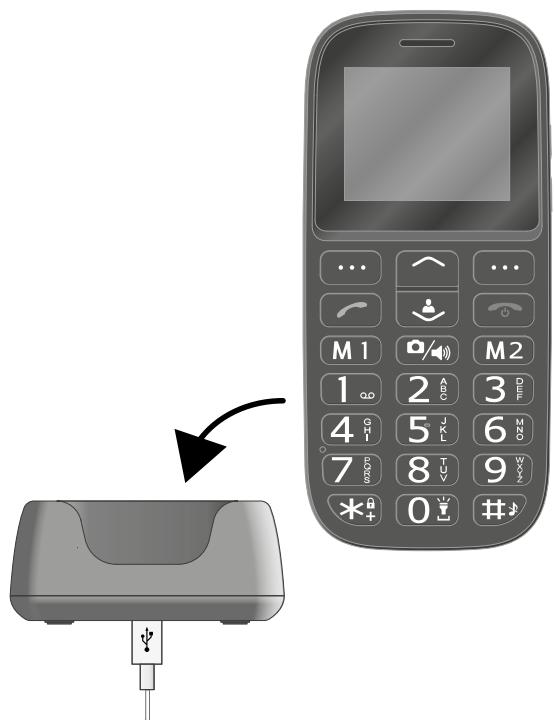
text_image
Diagram showing the change in device position from a mobile phone to a physical device, with labeled buttons and ports.Switching the Mobile Phone On and Off
1 Press and hold the On-hook key for 3 seconds.
Some SIM cards will require you to enter a PIN code. Follow the instructions on the screen.
2 The display shows an animated graphic, followed by the start screen.
3 As soon as the display shows the name of your network operator, the SIM card has established a connection with the mobile phone network.
Your mobile phone is now ready to use.
1
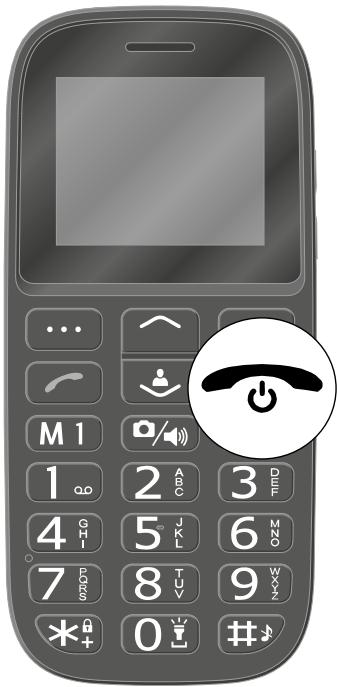
text_image
Image of a mobile phone with a power button icon highlighting the function.2
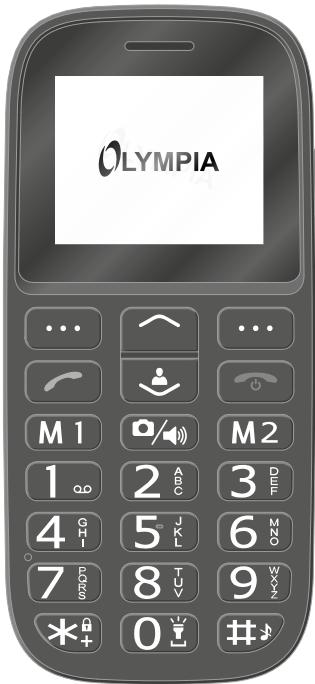
text_image
OLYMPIA3
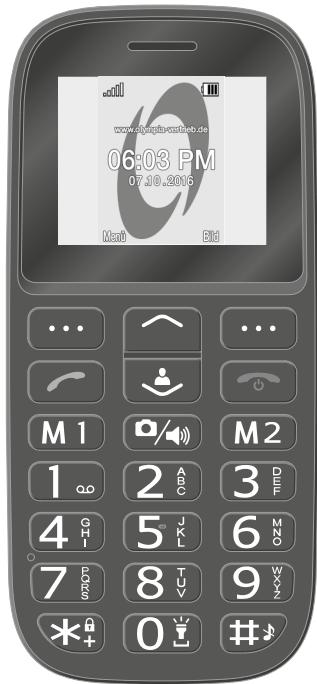
text_image
www.ohygb.com/ce.de 06:03 PM 07.10.2018 Mard EdStart Screen
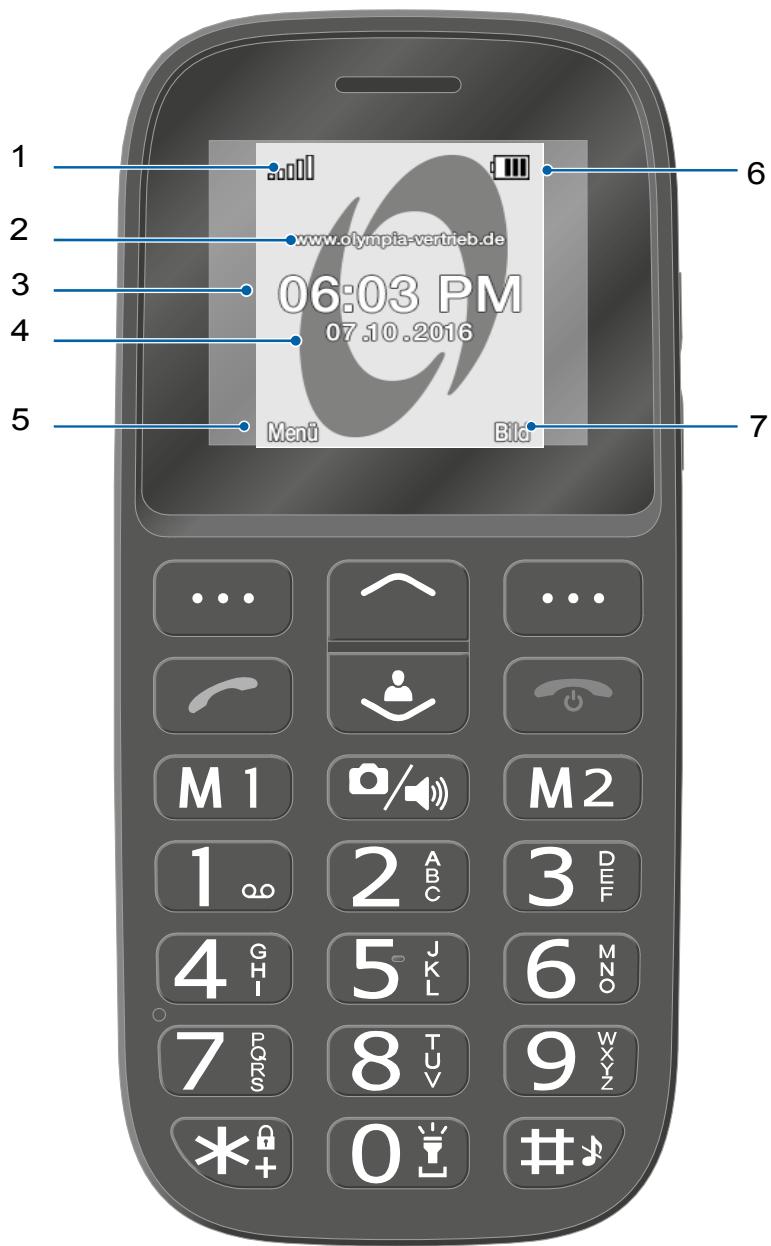
The start screen is the standard display which appears when the mobile phone is switched on. The start screen shows you useful information.
Flip open the mobile phone to switch on the start screen on the mobile phone display.

You can open the start screen at any time by pressing the On-hook key.
1 Network availability
2 Network operator
3 Time
4 Date
5 Display text MENU - changes according to the context
6 Battery charge
7 Display text [PICTURE] - changes according to the context
text_image
1 2 3 4 5 6 www.olympia-vertrieb.de 06:03 PM 07.10.2016 Menü Bild M 1 M 2 1 2 ABC 3 DEF 4 GHI 5 JKL 6 MNO 7 PQRS 8 TUV 9 WXYZ *+ 0 #Other icons on the start screen
Apart from the icons permanently on the start screen, other icons appear at the top edge of the start screen according to the current settings.
The following overview gives a selection of the most frequently used symbols.

The Bluetooth function is activated.

The mobile phone rings and vibrates when calls or texts are received.

The mobile phone is muted.

The key lock function is switched on.

A text which has not yet been read is in your inbox.

The roaming service (use of a different mobile network, e.g. when abroad) is active.
Please note that using roaming services can incur additional charges.
Using the Mobile Phone
This section explains how to navigate through the mobile phone menus, enter phone numbers and letters and how you can respond to incoming and outgoing calls.
Navigating in the Menu
Use the following keys to navigate through the menus provided by the mobile phone.
text_image
User interface with a large circular icon containing an upward arrow, surrounded by a grid of icons labeled M1 and M2.Navigate up in the menu.
text_image
Mobile app interface with a user icon and control buttons labeled M1, M2Navigate down in the menu.
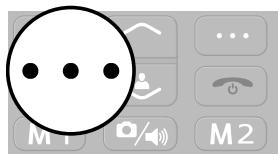
text_image
Cropped image showing a large circular icon with three dots, alongside a keypad with phone icons and M1, M2 labels.Open submenus or confirm your entries.
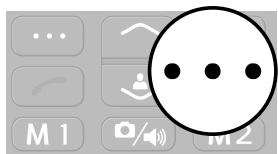
text_image
User interface screenshot showing a black circular icon with three dots and control buttons labeled M1, M2Navigate one menu level back or discard all your entries and settings.
Entering Phone Numbers and Letters
In order to enter phone numbers and letters or delete entries, use the digit keys or the softkeys on the mobile phone keypad.
Multi-tap
When the mobile phone is initially supplied, Multitap_de (German) is set. You can change the input method (e.g. to UPPER CASE, lower case or digits 123) by going to Text mode and pressing the Hash key as often as necessary.
If you want to enter text in multi-tap mode, press the key containing the letter/character you want the corresponding number of times. The letters/characters assigned to a key are imprinted on the respective key.
Pressing the key 4, for example, enables you to enter the digit 4 as well as the letters G, H and I. If you want the first letter in the group, press the key once. If the second character is required, press it twice, and so on.
To enter two characters assigned to the same key, press the key the respective number of times to enter the first character. Wait until the cursor skips to the next position and then enter the letter.

You can alter and save your preferred input method in the SETTINGS → PHONE → PREF. INPUT METHOD menu.
Punctuation and Special Characters
Press the star key while writing a message or other text.
All the punctuation marks and special characters available are displayed. Select the character you want with the navigation keys and confirm with the left-hand softkey.
Repeatedly pressing the 1 key in Edit mode scrolls through a list of frequently used punctuation and special characters.
Other Entries and Functions
Press the 0 key to enter a space.
Press the right-hand softkey to delete characters.
Press and hold the right-hand softkey for 2 seconds to delete all the characters.
Making Calls
Proceed as follows to make a call:
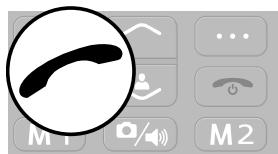
text_image
User interface screenshot showing a magnifying glass over a black curved icon, with control buttons and keyboard shortcuts visible.Enter the required phone number using the keypad and then press the Call key.
Taking, Ending and Rejecting Calls
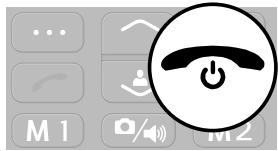
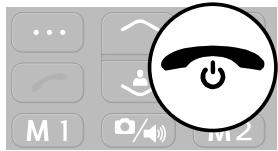
When you want to take, end or reject calls, use the following keys:
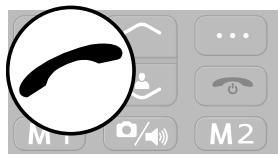
text_image
Mobile phone interface screenshot showing a black curved icon with control buttons and status indicatorsTake an incoming call.
text_image
User interface screenshot showing a power button icon with 'M1' and 'M2' labels and a play buttonEnd a call in progress.
text_image
User interface screenshot showing a keypad with icons and a power button icon, likely for phone control or app settings.Reject an incoming call.
Making an Emergency Call
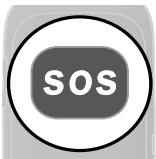
If you want or need to make an emergency call, use the following key on the rear of the phone:
text_image
SOSPress and hold the emergency call key (SOS) for 3 seconds.

If you want to cancel an emergency call for any reason, press and hold the SOS key again for around 5 seconds.
Quick Access
You can use some keys on your phone as quick access keys. A quick access is performed directly on the start screen.
Torch

text_image
0 6 MNO 9 WXYZ #Press and hold the 0 key to switch the mobile phone's torch on and off.
User Profiles
text_image
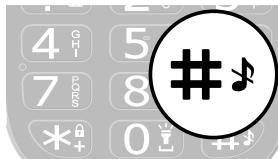
Digital keypad interface with musical note icons and a large hash symbol overlayPress and hold the Hash key to switch between the available user profiles. Further information is provided in Section User Profiles on Page 85.
Phone Book
text_image
Mobile app interface with a user icon and labeled buttons M1, M2Open the Phone Book menu. Further information is provided in Section Phone Book on Page 43
Text Messages
text_image
User interface with a large circular icon containing an upward arrow, surrounded by gray buttons labeled M1 and M2.Open the Text Messages menu. Further information is provided in Section Writing a Text Message on Page 49.
Mobile Phone Menu
The main mobile phone menu is divided into topically organised groups (submenus).
The following descriptions always assume that the starting point for the operation is the mobile phone's start screen.
Menu Structure
The higher level menus, such as the Phone Book, Messages and Settings menus, are located on the start screen of the mobile phone.
Use the navigation keys and softkeys to navigate through the entire menu provided on the mobile phone.
Display Texts
In this operating manual, all important functions are explained with the help of texts, illustrations and examples.
You will find display texts illustrated in many sections of this operating manual. These display texts correspond to the texts which appear on the screen of your mobile phone.
If several display texts are shown in succession, navigate with the navigation keys and the softkeys to the display texts shown.
Menu Options Available During a Call
While a call is in progress, it is possible to change the volume, activate the handsfree function, mute the microphone and activate a conference with other call participants.
Volume during a call
text_image
User interface with bidirectional arrow icon and keyboard controls labeled M1, M2Change the volume during a call using the navigation keys Up and Down.
Handsfree function
You can select whether to hear the caller via the loudspeaker.
1 Select H-FREE while a call is in progress. The caller can then be heard via the loudspeaker.
2 Select H-HELD to switch off the caller via the loudspeaker.
Muting the microphone
You can switch the microphone off while the call is in progress. Mut-ing the phone means that the call continues to be connected, you can still hear the caller but the caller can no longer hear you.
1 When a call is in progress, select OPTIONS → MUTE. The microphone is muted, the caller can no longer hear you.
2 Select OPTION → UNMUTE. The muting function is deactivated and the caller is able to hear you again.
Putting a call on hold
You can select whether to put the call in progress on hold. Putting a call on hold means putting it into holding mode. The call is put into a waiting loop while you set up a call with another person. The first caller cannot hear this call.
1 When a call is in progress, select OPTION → HOLD. The caller is put on hold.
2 Navigate to OPTION → RETRIEVE to resume the call.
Conference facility
You can set up a conference call, meaning communicating with at least two other parties at the same time.
1 When a call is in progress, select OPTIONS → PHONEBOOK and select the number of a third contact.
2 Press the Call key.
3 The number of the contact selected is dialled.

During this time, the call with the first caller is held until the second caller has answered and you start the conference.
4 Wait until the second contact has answered the call, then select OPTION → CONFERENCE. The conference call facility is activated and you can talk to both parties (or more).
5 Press the On-hook key to end the conference. Alternatively, select OPTION → END CONF. CALL if you want to end the conference with one of the callers.
Call Logs
The menu CALL HISTORY shows the numbers you called last as well as received and missed calls in different call lists.
If a number in one of the call lists matches an entry in your phone book, the corresponding name is displayed.
Options for the call lists
The following descriptions of the call list options apply to missed calls, received calls and numbers called. Navigation and use is the same in all the submenus.
Making a call
You can call an entry from the call lists.
1 Press the left-hand softkey to open the main menu.
2 Navigate to CALL HISTORY.
3 Select the required call list.
4 Select the required entry.
5 Press the Call key. The entry selected is dialled.
View
This option provides more detailed information (e.g. time and date of the call and number of calls) regarding the entry selected.
1 Press the left-hand softkey to open the main menu.
2 Navigate to CALL HISTORY.
3 Select the required call list.
4 Select the required entry.
5 Select OPTION → VIEW. An overview of more detailed information on the selected entry is displayed.
Writing a Text Message
You can write and send a text message to the selected entry.
1 Press the left-hand softkey to open the main menu.
2 Navigate to CALL HISTORY.
3 Select the required call list.
4 Select the required entry.
5 Select OPTION → SEND MESSAGE.
6 Enter your text.
7 Select OPTION → SEND.
8 Select the required contact.
9 Select OPTION → SEND. The text message is sent.
Saving in the phone book
You can store entries in the call list in your phone book.
1 Press the left-hand softkey to open the main menu.
2 Navigate to CALL HISTORY.
3 Select the required call list.
4 Select the required entry.
5 Select OPTION → SAVE.
6 Select a storage location for the phone book entry.
7 Enter a name for the phone book contact.
8 Confirm with OPTION → DONE. The setting is saved.
Deleting entries
You can delete an entry from the call lists.
1 Press the left-hand softkey to open the main menu.
2 Navigate to CALL HISTORY.
3 Select the required call list.
4 Select the required entry.
5 Select OPTION → CLEAR and confirm the prompt. The contact is deleted.
Alternatively, you can delete all the call lists in one operation. Navigate to CALL HISTORY → DELETE CALL LOGS. Confirm the prompt. All the entries in the call logs are deleted.
Phone Book
The phone book in the phone can store up to 300 contacts. You can store more contacts on the SIM card.
If the mobile phone or SIM card memory is full, a corresponding message appears in the display. In order to add new entries, you must first delete old entries or select a different storage location.
The contacts are arranged in alphabetical order.
Adding a contact
Save your contacts in the phone book in order to be able to access important phone numbers quickly.
1 Press the left-hand softkey to open the main menu.
2 Navigate to PHONEBOOK → ADD NEW CONTACT.
3 Select the storage location for the new contact.
4 Enter the name and phone number.
5 Confirm with OPTION → SAVE. The new contact is saved.
You can also assign pictures to contacts stored in the phone book. Further information is provided in Section Speed dialling on Page 57 or Dialling Picture Contacts on Page 89.
Calling a contact
You can call contacts stored in the phone book as follows.
1 Press the left-hand softkey to open the main menu.
2 Navigate to PHONEBOOK and select a contact.
Enter the first letters of the stored name using the keypad to jump to a specific entry. It may be necessary to press a key several times. Further information is provided in Section Preferred input method on Page 59.
3 Press the Call key. The phone number is dialled.
Deleting a contact
Delete contacts from the phone book.
1 Press the left-hand softkey to open the main menu.
2 Navigate to PHONEBOOK.
3 Select the required contact.
4 Select OPTION → CLEAR and confirm the prompt. The contact is deleted.
Editing a contact
Edit contacts in the phone book.
1 Press the left-hand softkey to open the main menu.
2 Navigate to PHONEBOOK.
3 Select the required contact.
4 Select OPTION → EDIT.
5 Edit the contact details.
6 Confirm with OPTION → SAVE. The modifications are saved.
Phone book settings
In the phone book settings, you can make further settings. You can define, for example, where new phone book entries should be stored.
Memory status
Information appears regarding the number of contacts stored and storage locations available:
1 Press the left-hand softkey to open the main menu.
2 Navigate to PHONEBOOK → OPTION →
PHONEBOOK SETTINGS → MEMORY STATUS. The storage locations still available are displayed.
Text Messages
You can use the MESSAGES menu to write text messages (also called "SMS"), view, answer and forward received and sent text messages, write drafts and make further settings.
The following descriptions relate to the INBOX, DRAFTS, OUTBOX and SENT MESSAGES submenus. Navigation and use is the same in all the submenus.

A standard message normally contains maximally 160 characters.
Sending a text message with more than 160 characters could result in additional costs, depending on the terms of your SIM card.
It is possible that not all functions described are supported by every mobile service provider. Therefore, please contact your local mobile service provider for details.
Writing a Text Message
Write a text message.
1 Press the left-hand softkey to open the main menu.
2 Navigate to MESSAGES → WRITE MESSAGE.
3 Enter your text.
4 Select OPTION → SEND.
5 Select OPTION → CONTACTS and then the phone book contact you want.

flowchart
graph LR
    A["Alternative, select"] --> B["MESSAGES"]
    B --> C["WRITE MESSAGE"]
    C --> D["OPTION"]
    D --> E["SEND"]
    E --> F["OPTION"]
    F --> G["ENTER RECIPIENT"]
    G --> H["phone number manually."]
6 Select OPTION → SEND. The text message is sent.
Viewing a Text Message
Open any text message in order to view the full content of the message.
1 Press the left-hand softkey to open the main menu.
2 Navigate to MESSAGES → INBOX.
3 Select the required text message.
4 Select VIEW. The text message is opened.
Replying to a Text Message
Send a reply to the sender of a received text message.
1 Press the left-hand softkey to open the main menu.
2 Navigate to MESSAGES → INBOX.
3 Select the required text message.
4 Select OPTION → SEND.
5 Enter your text.
6 Select OPTION → SEND.
7 Select the sender of the text message received.
8 Select OPTION → SEND. The text message is sent.
Calling the Sender of a Text Message
Call the sender of a text message received.
1 Press the left-hand softkey to open the main menu.
2 Navigate to MESSAGES → INBOX.
3 Select the required text message.
4 Select OPTION → ADVANCED → CALL SENDER. The sender of the message received is called.
Forwarding a Text Message
Forward a text message.
1 Press the left-hand softkey to open the main menu.
2 Navigate to MESSAGES → INBOX.
3 Select the required text message.
4 Select OPTION → FORWARD.
5 If necessary, edit the selected text message.
6 Select OPTION → SEND.
7 Select OPTION → CONTACTS and then the phone book contact you want.

flowchart
graph LR
    A["Alternative, select"] --> B["MESSAGES"]
    B --> C["INBOX"]
    C --> D["OPTION"]
    D --> E["ENTER RECIPIENT"]
    E --> F["AND ENTER the number manually."]
8 Select OPTION → SEND. The text message is sent.
Deleting a Text Message
Delete a text message.
1 Press the left-hand softkey to open the main menu.
2 Navigate to MESSAGES → INBOX.
3 Select the required text message.
4 Select OPTION → CLEAR and confirm the prompt. The text message is deleted
Saving Phone Numbers in the Phone Book
You can save a phone number, from which you have received a text message, in your phone book.
1 Press the left-hand softkey to open the main menu.
2 Navigate to MESSAGES → INBOX.
3 Select the required text message.
4 Select OPTION → SAVE.
5 Select the storage location.
6 Select OPTION → EDIT and enter a name.
7 Confirm with OPTION → SAVE. The phone number from which a text message was received is stored as a phone book entry.
Saving a text message as a draft
Write a text which you want to save as a draft.
1 Press the left-hand softkey to open the main menu.
2 Navigate to MESSAGES → WRITE MESSAGE.
3 Enter your text.
4 Confirm with OPTION → SAVE. The text message is saved as a draft.
Settings for Text Messages
You can make further settings, such as the preferred storage location of your text messages or saving delivery reports for sent messages.
Preferred storage
This defines whether the text messages are stored on the mobile phone or SIM card.
1 Press the left-hand softkey to open the main menu.
2 Navigate to SETTINGS STORAGE.
3 Select OPTION → OK.
4 Select the storage location for your text messages.
5 Confirm with OK.
Delivery reports
You can define whether you want to receive a delivery (transmission) report for text messages sent.
1 Press the left-hand softkey to open the main menu.
2 Navigate to MESSAGES → SMS SETTINGS → SENT MESSAGES.
3 Select OPTION → OK.
4 Select the setting you want for the sent text messages.
5 Confirm with OK.
When the default setting is set, the text messages sent are saved.
Memory status
You can check how much memory space is available for your text messages.
1 Press the left-hand softkey to open the main menu.
2 Navigate to SETTINGS STATUS . The memory capacity of the SIM card and mobile phone is displayed.
Settings
The SETTINGS menu is used to adapt the basic settings of the mobile phone, such as time, language, call settings, phone settings, network and security settings, to your own needs.
Settings also contains the Emergency Call function (SOS key), Battery Low reminder function when the battery power is getting low and Dual SIM settings, for example.
Phone Settings
Setting the time and date
Set the time and date before using the mobile phone for the first time.
1 Press the left-hand softkey to open the main menu.
2 Navigate to SETTINGS → PHONE → SET DATE AND TIME.
3 Enter the current time and date using the keypad.

Adapt the settings for time zone as well as the time and date format according to your needs.
4 Confirm with SAVE. The setting is saved.
Setting the language
Set one of the four menu languages available on your mobile phone.
1 Press the left-hand softkey to open the main menu.
2 Navigate to SETTINGS → PHONE → LANGUAGE.
3 Select the required setting.
4 Confirm with OK. Your mobile phone menu will be shown in the selected language.
Speed dialling
If you want to be able to dial certain phone numbers even more quickly, you can assign the respective phone book entries to digit keys 2 to 9.
Firstly, the speed dialling function must be switched on.
Activating speed dialling
You can only assign speed dialling numbers to contacts who are already stored in the phone book.
1 Press the left-hand softkey to open the main menu.
2 Navigate to SETTINGS → PHONE → SPEED DIAL → STATUS.
3 Select ON. The SPEED DIAL function is activated.
Adding a contact to speed dialling
Using the keys 2 to 9, define contacts you want to speed dial.
1 Press the left-hand softkey to open the main menu.
2 Navigate to SETTINGS → PHONE → SPEED DIAL → SET NUMBERS → EDIT NUMBER.
The memory locations displayed correspond to the digit keys on the mobile phone.
3 Select an empty memory location and confirm it with EDIT.
4 Select a contact in your phone book.
5 Confirm with OK. The contact is added to speed dialling.
Calling using speed dialling
You can use the speed dialling function from the start screen.
Press and hold one of the keys 2 to 9 for three seconds. The phone number saved as a speed dial number is dialled.
More phone settings
Preferred input method
You can define the method by which you enter text. This setting affects all the operating modes in which text can be entered (creating phone book contacts, writing text messages, etc.).
1 Press the left-hand softkey to open the main menu.
2 Navigate to SETTINGS → PHONE → PREF. INPUT METHOD.
3 Select the required setting.
4 Confirm with OK. The setting is saved and affects all the relevant menus.
Setting the back-lighting
You can define how bright the back-lighting of the screen display should be and how long it should be active.
1 Press the left-hand softkey to open the main menu.
2 Navigate to SETTINGS → PHONE → BRIGHTNESS.
3 Select the required settings. Alter the settings using the M1 and/or M2 navigation keys.
4 Confirm with OK. The setting is saved.
Setting the background image (wallpaper)
You can select a picture which should appear on the start screen.
1 Press the left-hand softkey to open the main menu.
2 Navigate to SETTINGS → PHONE → WALLPAPER.
3 Navigate to the storage location of the wallpaper (background image).
4 You can select from a total of eight wallpapers stored.
5 Confirm with OK. The setting is saved. The wallpaper selected appears permanently on the start screen.
If you have installed a microSD memory card in your mobile phone and you have stored a suitable image on it, you can use this image as your wallpaper.
Call Settings
You can define various settings in order to specify certain telephone reactions and features for your mobile phone.
Transmitting your own caller ID
You can define whether your own phone number is transmitted to the call partner, not transmitted or the setting should be defined by your mobile phone provider.
1 Press the left-hand softkey to open the main menu.
2 Navigate to SETTINGS → CALL SETTINGS → CALLER ID.
3 Select the setting you want AUTOMATIC, SEND ID or HIDE ID.
4 Confirm with OK. The setting is saved.
Call Waiting
Define whether a new, incoming call should be indicated by means of the call waiting signal while a call is already in progress.
1 Press the left-hand softkey to open the main menu.
2 Navigate to SETTINGS → CALL SETTINGS → CALL WAITING.
3 Select ACTIVATE or DEACTIVATE. The setting is saved.
You can check whether the service is available in QUERY STATUS. Contact your mobile phone provider if you want to enable the service. Please note that the range of functions available can vary according to the mobile phone provider.
Call Divert
Define whether and in what situations incoming calls to the mobile phone should be diverted to another, specified phone number.
1 Press the left-hand softkey to open the main menu.
2 Navigate to SETTINGS → CALL SETTINGS → CALL DIVERT.
3 Select the required call divert setting.
4 Select ACTIVATE → ENTER RECIPIENT and enter the number you want your calls to be diverted to.
Alternatively, select ACTIVATE → ENTER RECIPIENT → OPTION → FROM PHONEBOOK and select a contact from your phone book.
5 Confirm with OPTION → SAVE. The setting is saved.
If necessary, deactivate all the call diversions you have set up.
Navigate to SETTINGS → CALL SETTINGS → CALL DIVERT → CANCEL ALL DIVERTS.
Security Settings
Define an individual PIN (Personal Identification Number) to secure the SIM card and a phone lock password to secure the mobile phone.

If you change your PIN or phone lock password, we urgently recommend that you make a note of the new PIN or password and keep it in a safe place.
Switching the PIN request On/Off
You can deactivate the request for your PIN from the SIM card if so required. This entails the risk that if you lose your mobile phone, your data can be misused by a third party, and costs may be charged to you.
1 Press the left-hand softkey to open the main menu.
2 Navigate to SETTINGS → SECURITY SETTINGS → SIM SECURITY → SIM LOCK.
3 Enter the PIN. The standard PIN is contained with the documents provided with the SIM card.
4 Confirm with OK. The setting is saved. The PIN request is switched on or off.
Changing the PIN
Change the pre-set PIN to a combination of numbers you can remember easily.

We recommend that you choose your PIN so that it is not possible for unauthorised persons to determine the number combination simply by trial and error with easy combinations (such as 1-2-3-4 or 0-0-0-0).
1 Press the left-hand softkey to open the main menu.
2 Navigate to SETTINGS → TO SIM → SIM LOCK → CHANGE PASSWORD.
3 Enter your PIN.

You can find the standard PIN in your SIM card documents.
4 Enter the new PIN.
5 Enter the new PIN again.
6 Confirm the prompt. The setting is saved.
The PIN is saved on your SIM card. If you pass your SIM card on to a third party or use another mobile phone yourself, the PIN last set remains valid.
If you forget your PIN, you can reset your SIM card to factory settings using the PUK. More detailed information on this is available from your mobile phone provider.
Switching the phone lock On/Off
1 Press the left-hand softkey to open the main menu.
2 Navigate to SETTINGS → SECURITY SETTINGS → PHONE SECURITY → PHONE LOCK.
3 Enter the phone lock password. The setting is saved.
In its default setting, the phone lock password is 1122.
The phone lock is also active if no SIM card is installed in the mobile phone.
Changing the phone lock password
1 Press the left-hand softkey to open the main menu.
2 Navigate to SETTINGS → SECURITY SETTINGS → PHONE SECURITY → CHANGE PASSWORD.
3 Enter the phone lock password.
4 Enter the new phone lock password.
5 Enter the new phone lock password again. The setting is saved.
Network Settings
The mobile phone searches for and automatically selects the mobile network assigned to the SIM card or mobile phone provider (network operator).
The presettings in this menu are set up by the SIM card or network operator.

We recommend that you do not alter the settings in this menu.
Bluetooth
With the Bluetooth function, a standard for wireless data transfer, you can exchange data with other Bluetooth-capable devices free of charge.
Switching Bluetooth On/Off
1 Press the left-hand softkey to open the main menu.
2 Navigate to SETTINGS → BLUETOOTH → STATUS.
3 Select ON or OFF. The Bluetooth function is switched on or off, accordingly.
Visibility
You can define whether your mobile phone should be visible for other Bluetooth-capable devices in the environment.
1 Press the left-hand softkey to open the main menu.
2 Navigate to SETTINGS → BLUETOOTH → VISIBILITY.
3 Select ON or OFF. The mobile phone is visible or not visible for other Bluetooth-capable devices.
Connecting devices via Bluetooth
Search for other Bluetooth-capable devices in your environment with which you want to connect your mobile phone.
1 Press the left-hand softkey to open the main menu.
2 Navigate to SETTINGS → BLUETOOTH → MY DEVICE → SEARCH NEW DEVICE.
3 Follow the instructions on the screen. Your mobile phone is connected to the device selected.
Changing the device name
You can give your mobile phone a name under which other Bluetooth-capable devices can find it.
1 Press the left-hand softkey to open the main menu.
2 Navigate to SETTINGS → BLUETOOTH → MY NAME.
The name of the mobile phone is limited to 18 characters.
3 Enter a name for the mobile phone.
4 Confirm with OPTIONS → SAVE. The setting is saved.

Emergency call key (SOS)

CAUTION! The acoustic alarm signal is very loud and can cause hearing damage if sounded close to the ear. When you press the emergency call key (SOS), hold the mobile phone away from your head.
The emergency call key (SOS) on your mobile phone has an emergency call function. Press and hold the emergency call key (SOS) for approx. 3 seconds to trigger an emergency call. An alarm signal sounds and emergency text messages are sent to stored phone numbers. After that, the respective phone numbers stored are dialled in succession in handsfree mode. You can assign up to four phone numbers to the emergency call key (SOS).

If you inadvertently activate an emergency call, you can stop the process. Press and hold the emergency call key (SOS) for 5 seconds.
Inform all the people who are to be entered in the list to receive the emergency call in advance before actually storing the list of emergency phone numbers.
Switching the emergency call function On/Off
Switch the emergency call function on or off.
1 Press the left-hand softkey to open the main menu.
2 Navigate to SETTINGS → SOS SETTINGS → STATUS.
3 Select ACTIVATE or DEACTIVATE. The emergency call function is activated or deactivated, accordingly.
Setting up a call chain
Define whether the emergency call numbers should be called three times or continually.
When the call chain is activated, the emergency call numbers stored are called in succession until you abort the emergency call function manually. This ensures that the emergency call function is not interrupted by answering machines or mailboxes.
1 Press the left-hand softkey to open the main menu.
2 Navigate to SETTINGS → SOS SETTINGS → SOS CHAIN.
3 Select ON or OFF. The call chain is activated or deactivated.
Cancelling an emergency call
Have you sent the emergency call successfully or do you want to stop the emergency call for other reasons?
1 Press and hold the emergency call key (SOS) for around 5 seconds. The emergency call function is stopped.
Emergency call function settings
Defining the list of emergency call numbers
Save up to five phone numbers which will receive an emergency call and text message in an emergency when you press the emergency call key (SOS) on the front of your mobile phone.
1 Press the left-hand softkey to open the main menu.
2 Navigate to SETTINGS → SOS SETTINGS → SOS NUMBERS.
3 Select a storage location which is empty.
Do not assign any official emergency call numbers. A false alarm can lead to considerable costs which could be charged to you.
4 Select OPTION → EDIT.
5 Enter the necessary phone number.
Alternatively, select SETTINGS → SOS SETTINGS → SOS NUMBERS → OPTION → FROM PHONEBOOK and select a contact from your phone book.
6 Confirm with OK. The saved phone number is called and receives an emergency text message when you press the emergency call key (SOS).
Defining a text message for the emergency call
Enter a text from which it is clearly evident to the recipient that you are in an emergency situation and require help.
1 Press the left-hand softkey to open the main menu.
2 Navigate to SETTINGS → SOS SETTINGS → SOS MESSAGE.

In the standard settings, the text of your emergency text message is SOS - help! The length of the emergency text message is limited to eighteen characters.
3 Edit the emergency text message.
4 Confirm with OPTION → SAVE. The emergency text message you have saved is sent to the emergency call numbers when you press the emergency call key (SOS) on the front of your mobile phone.
Low Battery Power Alert
The alert function in the case of low battery power can be used to initiate the dispatch of a text message to any phone numbers informing you that the battery in your mobile phone is almost empty and must be recharged.
Switching the low battery alert on/off
Switch the function on or off.
1 Press the left-hand softkey to open the main menu.
2 Navigate to SETTINGS → CHARGE REMINDER → STATUS.
3 Select ON or OFF. The charge remind function is activated or deactivated.
Settings for low battery power alert
Defining the list of phone numbers
Set up a list not exceeding five phone numbers to which the text message should be sent.
1 Press the left-hand softkey to open the main menu.
2 Navigate to SETTINGS → CHARGE REMINDER → NUMBER.
3 Select a storage location which is empty.
4 Select OPTION → EDIT.
5 Enter the necessary phone number.
6 Confirm with OK. The phone number stored is called and receives an alert text message when the battery in your mobile phone is almost empty.
Restoring the Default Factory Settings
Restore the default factory settings of your mobile phone before handing it over to a third party, e.g. for repair or sale.
First, save your personal data (e.g. phone book entries, photos or text messages) to your SIM card or a microSD memory card.
1 Press the left-hand softkey to open the main menu.
2 Navigate to SETTINGS → RESTORE FACTORY SETTINGS.
3 Enter the phone lock password.
In its default setting, the phone lock password is 1122.
4 Confirm the prompt. The default factory settings of your mobile phone are restored.
Organiser
You can save important tasks in the organiser provided on the mobile phone. You can enter tasks you want to be reminded of, use your mobile phone as an alarm clock or use the calendar function.
Calendar
The calendar provides an overview of the days, weeks and months of the year.
1 Press the left-hand softkey to open the main menu.
2 Navigate to ORGANIZER → CALENDAR. An overview of the current month with the weekdays appears.
3 Use the navigation keys to navigate horizontally and vertically.
Jump to date
You can skip directly to a date in the future or past as necessary. This may be useful, for example if you want to know on which week-day a birthday, wedding or other important events fall in the following year.
1 Press the left-hand softkey to open the main menu.
2 Navigate to ORGANIZER → CALENDAR → OPTION → JUMP TO DATE.
3 Enter the required date using the keypad.
4 Confirm with OK. The date entered is highlighted in the calendar overview on the screen.
Alarm clock
You can use the mobile phone as an alarm clock.
Switching the alarm clock on
1 Press the left-hand softkey to open the main menu.
2 Navigate to ORGANIZER → ALARM.
You can set up to five different alarm clocks.
3 Select the required alarm and confirm it by selecting EDIT.
4 Select STATUS → OK → ON. The selected alarm clock is set.
Subsequently, you can make further settings to adapt the alarm clock to your requirements.
Setting the time
Set the time at which the alarm should ring.
Use the keypad to enter the alarm time.
Setting the snooze function
Set the period of time after which the alarm clock should ring again when you have temporarily switched off the alarm using the Snooze key.
1 Select SNOOZE (MIN).
2 Select the required entry.
3 Confirm with OK. The snooze time is set.
Setting the date
You can define whether and how often the alarm clock rings (once, daily or on certain days).
1 Select REPEAT.
2 Select the required entry.
3 Confirm with OK.
Define other settings to the weekdays according to the selection or set the days on which the alarm should wake you.
Setting the ringtone
Set the ringtone you want to use.
1 Select ALARM TONE.
2 Select one of the six different alarm tones and confirm with OK. The selected ringtone is set.
Adjusting the volume
Set the volume of the alarm tone.
1 Select RING VOLUME → OK.
2 Select from a range of seven different volumes.
3 Confirm with OK. The selected volume is set.
Camera
The camera can be used to take photos. Insert a microSD memory card into your mobile phone before you use the camera. Pay attention to the information in Section Inserting a MicroSD Memory Card on Page 22.
Observe local regulations and respect other peoples' rights of privacy.
1 Press the left-hand softkey to open the main menu.
2 Navigate to MULTIMEDIA → CAMERA.
The subject in front of the camera lens appears on the mobile phone screen.
3 Press the Camera / Loudspeaker key. The camera integrated in the mobile phone stores the photo.
You can adjust the quality of the photos taken, activate various effects on the camera, change the white balance and define a variety of other settings.
Some settings assume an in-depth knowledge of photography. Test the most convenient way of presenting photos for yourself.
Storage location
The photos you take are automatically saved on the installed microSD memory card.

The photos stored on the microSD memory card can be assigned to contacts in the picture dialling function, for example. Pay attention to the information in Section Dialling Picture Contacts on Page 89.
Image viewer
You can use the image viewer to view and organise your photos.
1 Select OPTION → IMAGE VIEWER → VIEW.
Under OPTION → IMAGE INFORMATION you can view further information about your photos. The photos can also be used as wallpaper, sent via Bluetooth, renamed, deleted or used as an image when switching the mobile phone on and off.
Camera settings
Image settings
Define the settings for image size and image quality.
1 Select OPTION → IMAGE SETTINGS. Adjust and define the settings as required.
Camera settings
Define the settings for shutter time, exposure value, contrast, self-timer and serial exposure.
1 Select OPTION → CAMERA SETTINGS. Adjust and define the settings as required.
Radio
The mobile phone is equipped with an integrated radio with which you can receive radio stations in the FM frequency range.
1 Connect the headphone to the headphone connection port on the mobile phone.
2 Press the left-hand softkey to open the main menu.
3 Navigate to MULTIMEDIA → FM RADIO.
Searching for and storing radio stations manually
Enter the transmission frequency manually to access a radio station directly.
1 Press the left-hand softkey to open the main menu.
2 Navigate to MULTIMEDIA → FM RADIO → OPTION → TUNE.
3 Select OPTION → EDIT.
4 Enter the transmission frequency of the radio station.
5 Confirm with OPTION → SAVE. You will hear the manually entered radio station.
Save your radio stations in the channel list.
1 Press the left-hand softkey to open the main menu.
2 Navigate to MULTIMEDIA → FM RADIO → OPTION → CHANNEL LIST.
3 Select a memory location which is empty.
4 Select OPTION → EDIT.
5 Enter the name of a channel and the transmission frequency of the channel.
6 Confirm with SAVE. The radio station is saved in the channel list.
Searching for and storing radio stations automatically
The mobile phone can search for all the locally available radio stations over the entire frequency band automatically and save those found in the channel list.
1 Press the left-hand softkey to open the main menu.
2 Navigate to MULTIMEDIA → FM RADIO → OPTION → PRESET AUTO SEARCH.
3 Confirm the prompt. All the locally available radio stations are saved in the channel list.
4 Change the channel names in the channel list, if necessary.
Volume control
You can increase or reduce the volume of the radio station being played to various levels.
1 Press the Volume keys on the side of the phone. The volume is raised or lowered.
A change in the volume level affects the volume being played on both the loudspeaker and the headset.

CAUTION! Exposure to the receiver earpiece at full volume for a long period could cause hearing damage. Do not hold the mobile phone directly on the ear when listening to the radio via the loudspeaker.
More settings for the radio
Make any necessary adjustments to the background play of the radio and the telephone loudspeaker.
Background play
Define whether the radio should remain on in the background (meaning that the radio continues to be played although the FM RADIO menu is no longer selected and the mobile phone has been closed).
1 Press the left-hand softkey to open the main menu.
2 Navigate to MULTIMEDIA → FM RADIO → OPTION → SETTINGS → BACKGROUND PLAY.
3 Change the status of background play to ON.
4 Confirm with OK. The setting is saved.
Loudspeaker
You can set the radio up so that it can be played via the telephone loudspeaker as well as the headset.
1 Press the left-hand softkey to open the main menu.
2 Navigate to MULTIMEDIA → FM RADIO → OPTION → SETTINGS → LOUD SPEAKER.
3 Change the loudspeaker status to OK.

CAUTION! Exposure to the receiver earpiece at full volume for a long period could cause hearing damage. Do not hold the mobile phone directly on the ear when listening to the radio via the loudspeaker.
4 Confirm with OK. The setting is saved.
The radio only works when the headphone is connected. The headset must also be connected in order to play the radio via the mobile phone loudspeaker.
File Manager
With the file manager, you can manage the memory of your mobile phone and the memory of an installed microSD memory card.
1 Press the left-hand softkey to open the main menu.
2 Navigate to ORGANIZER → FILE MANAGER
3 You can manage the files according to your needs.
User Profiles
A user profile compiles diverse settings, such as ringing tone, ringing volume, vibration alert, text message tones, volume, switching on/off tones and other acoustic signals, together in a personalised menu.
You have the option of choosing a preinstalled user profile and/or adapting it to suit your own needs.
We recommend that you use the GENERAL user profile if you want to complete personal adjustments.
Activating the user profile
Switch on any user profile. All settings that define the user profile (such as ring tones, volume etc.) are active.
1 Press the left-hand softkey to open the main menu.
2 Navigate to SETTINGS → PROFILES.
3 Select the user profile required.
4 Confirm with OPTION → ACTIVATE. The user profile selected is activated.
Adapting the user profile
Adapt your user profile according to your needs. You can customise all user profiles.
1 Press the left-hand softkey to open the main menu.
2 Navigate to SETTINGS → PROFILES.
3 Select the user profile required.
4 Select OPTION → CUSTOMIZE.
Setting the type of alert signal
You can define what type of alert signal you require from the mobile phone in the event of incoming calls and text messages.
1 Navigate to ALERT TYPE.
2 Select OPTION → CHANGE.
3 Select the required setting.
4 Confirm with OK.
Setting the ring type
You can define whether the mobile phone should issue a single acoustic signal (single signal), a slowly increasingly loud signal (ascending) or if the set signal tone should be played repeatedly (repeat).
1 Navigate to RING TYPE.
2 Select OPTION → CHANGE.
3 Select the required setting.
4 Confirm with OK.
Setting the ringtones
You can select your favourites from the different ringtones available.
1 Navigate to RINGTONE.
2 Select OPTION → CHANGE.
3 Select the required setting.
4 Confirm with OK.
Adjusting the volume
Adapt the volume of the incoming calls.
1 Navigate to RINGTONE VOLUME.
2 Select OPTION → CHANGE.
3 Select the required setting.
4 Confirm with OK.
Other settings
Use this menu to adapt the settings of other tones (such as MESSAGE or KEYPAD).
Dialling Picture Contacts
Assign pictures to your favourite contacts. These pictures are displayed in the picture menu. On selecting a picture, the phone number of the contact assigned to the picture is dialled.
You can import your own images from a computer to your mobile phone or the memory card and use these images for your picture contacts. To ensure optimal display quality of the pictures, only use photos with a resolution of 58 x 68 pixels. Otherwise, pictures could be blurred or not shown at all. Only pictures in ".jpeg" format can be displayed.
If you want to alter your images to the right format, use our practical image converter at
www.olympia-vertrieb.de.
Transferring photos from a computer
Transfer photos from your computer to a microSD memory card.
1 Connect the mobile phone to a computer using the USB cable.
2 Select Mass storage.
3 Transfer the pictures required to the mobile phone.
Adding contacts to picture selection
Assign pictures to any contacts.
1 Press the right-hand softkey to open the Picture menu.
2 Select a memory location which is empty.
3 Confirm with OK.
4 Confirm the prompt.
5 Select the required phone book entry.
6 Confirm with OK. The required phone book entry is stored in the picture selection.
Adding a picture to the picture contacts
You can use pictures which you have transferred from your computer onto the mobile phone for the picture contacts.
1 Press the right-hand softkey to open the Picture menu.
2 Select the required picture contact.
3 Select OPTION → SELECT → SELECT FROM FILE.
4 Select the required picture. The picture is added to the picture contact selected and can be viewed in the menu.
Dialling via the picture menu
You can call the phone book entry by selecting the corresponding picture. You can then see the person to be called on the screen before actually making the call.
1 Press the right-hand softkey to open the Picture menu.
2 Select the required picture contact.
3 Select OPTION → CALL. The picture contact is dialled.
Sending text messages to picture contacts
1 Press the right-hand softkey to open the Picture menu.
2 Select the required picture contact.
3 Select OPTION → SEND MESSAGE.
4 Enter your text.
5 Select OPTION → SEND.
6 Select the picture contact displayed.
7 Select OPTION → SEND. The text message is sent.
Other settings
If you require, make other settings for your picture contacts.
Editing a picture contact
1 Press the right-hand softkey to open the Picture menu.
2 Select the required picture contact.
3 Select OPTION → EDIT. Edit the name and phone number of the selected picture contact.
4 Confirm with OK. The settings are saved.
Deleting a picture contact
1 Press the right-hand softkey to open the Picture menu.
2 Select the required picture contact.
3 Select OPTION → CLEAR.
4 Confirm the prompt. The picture dialling contact is deleted.
Additional Functions
Favourite contacts keys (M1 and M2)
You can assign favourite contacts to two one-touch dialling keys on your mobile phone.
1 Press the left-hand softkey to open the main menu.
2 Select SETTINGS → PHONE → DIRECT NUMBER → M1 M2
3 Select ENTRY → FROM PHONEBOOK and choose a contact from your phone book.
4 Alternatively, select CLEAR and enter the number manually.
5 Select SAVE. The contact is assigned to the one-touch dialling key.
Other Important Information
Technical Data
| Frequency | GSM: 850 / 900 / 1,800 / 1,900 MHzBluetooth: 2,402 - 2,480 GHz |
| Sending power (max.) | GSM: 1.58 WBluetooth: 2.51 mW |
| Power supply | Input: 100 - 240 V, 50 - 60 Hz, 500 mAOutput: 5 V, 500 mA |
| Battery | 3.7 V, 600 mAh |
| Charging time | Approx. 2 hours until fully charged |
| Standby | Up to 350 hours |
| Max. talk time | Up to 6 hours |
| Display | 1.77" LCD with back-lighting |
| Interfaces | microUSB, 3.5-mm jack |
| Dual SIM | No |
| Dimensions | 118 x 54 x 10.8 [mm] |
| Weight | 68 g including battery |
| Permissible ambient conditions | -10 °C to 40 °C at30 to 75% relative humidity |
Subject to change without notice!
Declaration of Conformity

Olympia Business Systems Vertriebs GmbH, Zum Kraftwerk 1, 45527 Hattingen hereby declares that this device in fulfils the basic requirements and other relevant provisions stipulated in the Directive 2014/53/EC.

The CE mark on the devices confirm their conformity. The Declaration of Conformity for this product is available at http://productip.com/?f=6abc3
Guarantee
Dear Customer,
we are pleased that you have chosen this equipment.
In the case of a defect, please return the device together with the receipt and original packing material to the point-of-sale.
Care Instructions
Clean the housing surfaces with a soft, fluff-free cloth. Do not use any solvents or cleaning agents.
Disposal
In order to dispose of your device, take it to a collection point provided by your local public waste authorities (e.g. recycling centre). According to laws on the disposal of electronic and electrical devices, owners are obliged to dispose of old electronic and electrical devices in a separate waste container.

The symbol indicates that the device must not be disposed of in normal domestic waste! Risks to health and the environment from batteries! Never open, damage or swallow batteries or allow them to pollute the environment. Batteries may contain toxic, ecologically hazardous heavy metals. You are legally obliged to dispose of batteries and power packs at a battery retailer or in the corresponding containers provided at collection points by local public waste authorities. Disposal is free of charge. The symbol indicates that the batteries must not be disposed of in normal domestic waste and that they must be brought to collection points provided by local public waste authorities.

Packaging materials must be disposed of according to local regulations.
Frequently Asked Questions (FAQ)
In the event of a problem, use the information on the following pages first to try and identify it and implement the solutions proposed.
The mobile phone cannot be switched on.
There is no battery inserted or the battery is not sufficiently charged. Insert or charge the battery, whichever is necessary. Further information is provided in Section Putting the Mobile Phone into Operation on Page 20.
When the battery charge drops below a minimum status, the mobile phone switches off automatically. Charge the battery in the mobile phone.
When I press the SOS key, the mobile phone's emergency call function does not react.
As described in the menu Emergency call key (SOS) on Page 69, enter emergency call contacts and save the phone numbers to be called and/or to receive an emergency text message to notify them if you need help.
The emergency call function of the mobile phone uses the SIM card 1. Insert the SIM card into the compartment marked SIM1.
Neither the signal strength nor my mobile phone network are displayed on the start screen.
There is no network connection. Your mobile phone could be in a location without any network coverage. Move to a different location or contact your mobile phone provider (network operator).
Check that the SIM card is inserted correctly. Further information is provided in Section Inserting SIM Cards on Page 21.
If you use the Dual SIM function offered by the mobile phone, the network availability and name of each mobile phone network used are displayed. Some mobile phone networks offer better coverage than others in different areas.
The keypad does not function or only reacts very slowly to my input.
The operating speed of the display is reduced in the case of low temperatures, for example. Use the mobile phone within the ambient conditions specified in the Technical Data. Further information is provided in Section Technical Data on Page 95.
Restart your mobile phone, if necessary. Further information is provided in Section Switching the Mobile Phone On and Off on Page 25.
In the case of some function, a message appears indicating it cannot be executed.
Some services only function when you have enabled or activated the service. Please contact your mobile service provider for details.
The display of my mobile phone has "frozen" and the mobile phone does not react when keys are pressed.
Your mobile phone can occasionally crash. Remove the battery, wait 30 seconds, replace the battery in the phone and start it up again. Further information is provided in Section Switching the Mobile Phone On and Off on Page 25.
The battery cannot be charged or is empty within a short time.
Charge the mobile phone for at least two hours. Please note that the battery only reaches its full capacity after several full charging processes.
If the problem continues, the battery may be defective and need to be changed. Please contact our service department in such cases.
My mobile phone does not ring, either for incoming calls or incoming text messages.
Check the user profile which is currently active. Adapt the ringing behaviour in the active user profile of the mobile phone to your needs. Further information is provided in Section User Profiles on Page 85.
The caller is too quiet or difficult to understand.
Increase the volume of the caller using the navigation keys or the function keys on the side of the mobile phone. Further information is provided in Section Volume during a call on Page 36.
The camera on my mobile phone works but I cannot save any pictures.
Expand the memory of the mobile phone by inserting a microSD memory card. You can purchase a microSD memory card from specialist retailers. Further information is provided in Section Camera on Page 78 and Inserting a MicroSD Memory Card on Page 22.
I want to execute a function. A message in the mobile phone display requests that I enter the phone lock password.
The default setting for the mobile phone's phone lock password is 1-1-2-2. Switch the prompt for the phone lock password on or off in the SETTINGS → SECURITY → PHONE SECURITY → PHONE LOCK menu.
If the proposed solutions above do not lead to the mobile phone working as expected:
Refer to the FAQs in the Internet under www.olympia-vertrieb.de or contact our Service department.
Subject to change without prior notice.
Art. No. 2214 / Version 2018.04