Urban Revolt

Fire - Casca Urban Revolt - Manual de utilizare gratuit

Găsiți gratuit manualul dispozitivului Fire Urban Revolt în format PDF.

📄 2 pagini Română RO Descărcați 💬 Întrebare IA
Notice Urban Revolt Fire - page 1
Alegeți limba și furnizați adresa dvs. de email: vă vom trimite o versiune tradusă special.

Întrebările utilizatorilor despre Fire Urban Revolt

0 întrebare despre acest aparat. Răspundeți la cele pe care le cunoașteți sau puneți-vă propria.

Pune o întrebare nouă despre acest aparat

Emailul rămâne privat: este folosit doar pentru a vă anunța dacă cineva răspunde la întrebarea dumneavoastră.

Nicio întrebare deocamdată. Fiți primul care pune una.

Descărcați instrucțiunile pentru Casca în format PDF gratuit! Găsiți manualul dvs. Fire - Urban Revolt și luați din nou în mână dispozitivul dvs. electronic. Pe această pagină sunt publicate toate documentele necesare pentru utilizarea dispozitivului dvs. Fire mărcii Urban Revolt.

MANUAL DE UTILIZARE Fire Urban Revolt

Urban Revolt Fire - 1

natural_image Exterior view of a modern blue and white headband with 'Trust' logo (no text on headset or background)

Quick Installation Guide

1739417556
Urban Revolt1752217557
1755517558

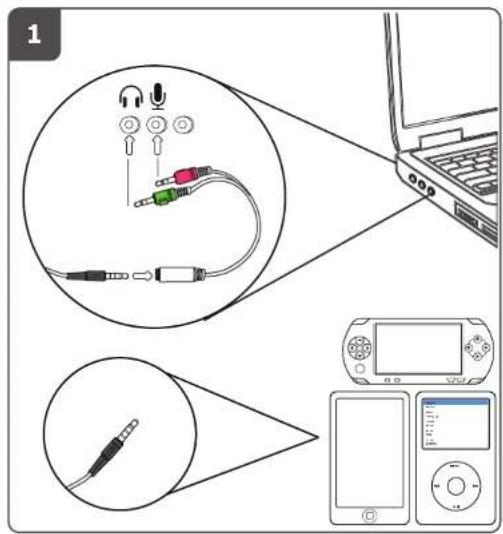
Diagram illustrating audio cable connections to a laptop, showing audio cable being inserted into a microphone and connected to a device.

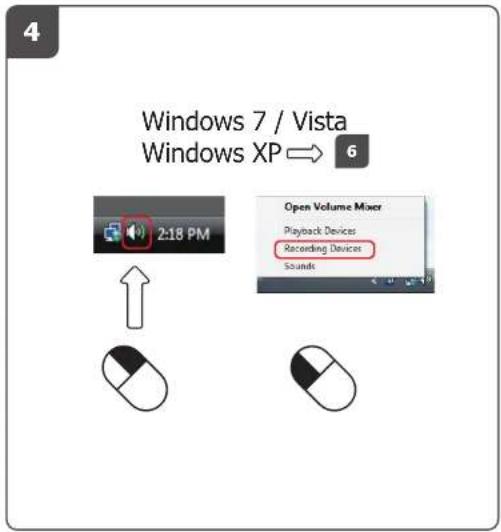
4 Windows 7 / Vista Windows XP → 6 2:18 PM Open Volume Mixer Playback Devices Recording Devices Sounds

Urban Revolt Fire - 4

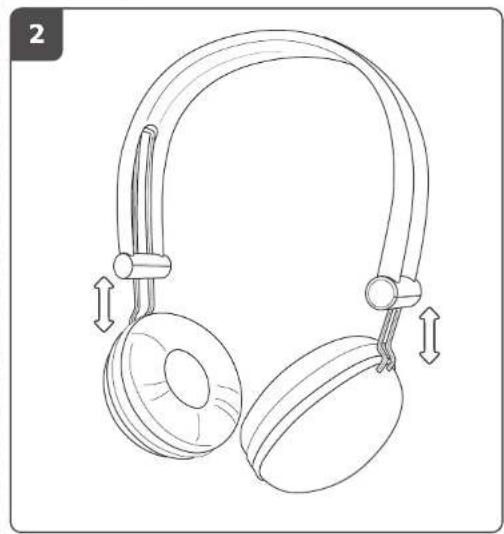
natural_image Line drawing of a pair of headphones with adjustable arm joints and headband (no text or symbols)
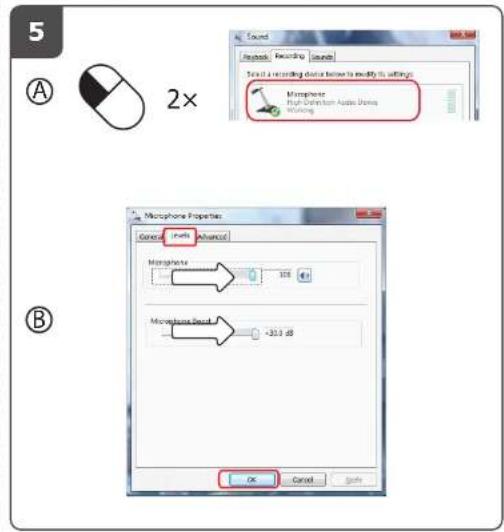
Sound Keybook Recording Sounds To set a recording device below to modify its settings Morphome High-Definition Audio Bounds Working 2x Microphone Properties General Speed Advanced Morphome 100 Microphone Speed +30.0 dB OK Cancel Save

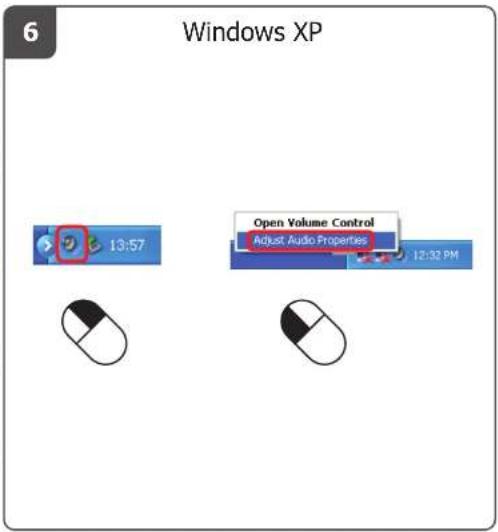
6 Windows XP 13:57 Open Volume Control Adjust Audio Properties 12:32 PM

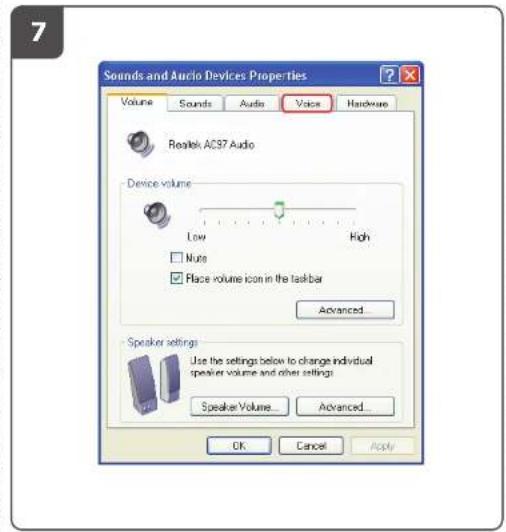
7 Sounds and Audio Devices Properties Volume Sounds Audio Voice Hardware Realtek AC37 Audio Device volume Low High None Place volume icon in the taskbar Advanced... Speaker settings Use the settings below to change individual speaker volume and other settings Speaker Volume... Advanced... OK Cancel Apply

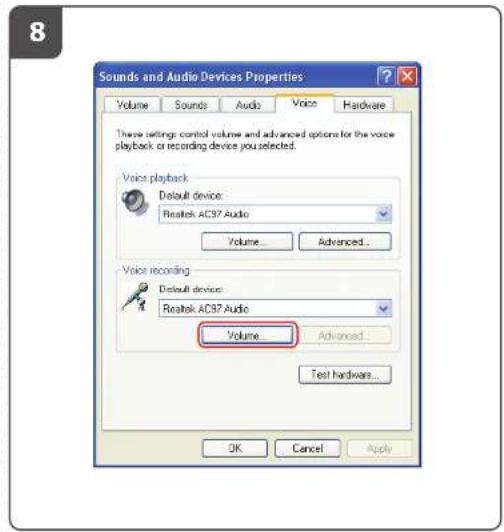
8 Sounds and Audio Devices Properties Volume Sounds Audio Voice Hardware These settings control volume and advanced options for the voice playback or recording device you selected. Voice playback Default device: Realtek AC37 Audio Volume... Advanced... Voice recording Default device: Realtek AC37 Audio Volume... Advanced... Test hardware... OK Cancel Apply

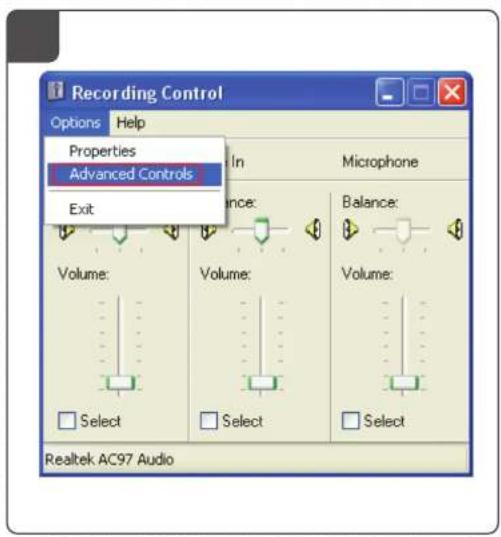
Recording Control Options Help Properties Advanced Controls In Microphone Exit Volume: Volume: Balance: Volume: Select Select Select Realtek AC97 Audio

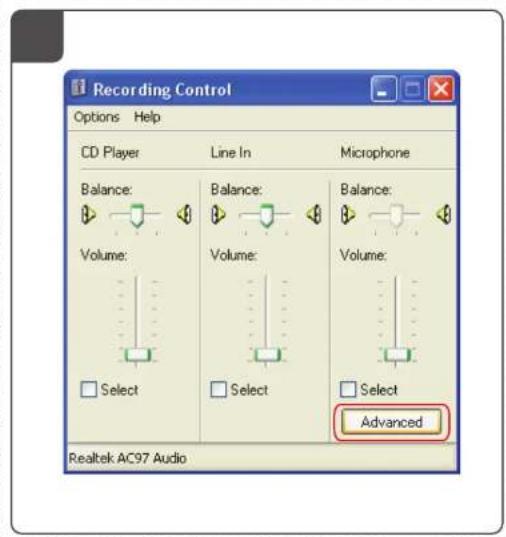
Recording Control Options Help CD Player Line In Microphone Balance: Balance: Balance: Volume: Volume: Volume: Select Select Select Advanced Realtek AC97 Audio

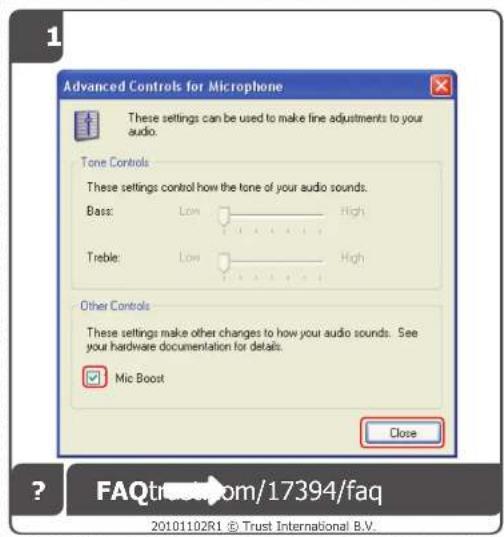
Advanced Controls for Microphone These settings can be used to make fine adjustments to your audio. Tone Controls These settings control how the tone of your audio sounds. Bass: Low High Treble: Low High Other Controls These settings make other changes to how your audio sounds. See your hardware documentation for details. Mic Boost Close FAQtrac.com/17394/faq 20101102R1 © Trust International B.V.

Asistent manual
Oferit de Anthropic
Așteptând mesajul dvs.
Informații despre produs

Marcă : Urban Revolt

Model : Fire

Categorie : Casca