TRUST 31022 - Placă de rețea / adaptor

31022 - Placă de rețea / adaptor TRUST - Manual de utilizare gratuit

Găsiți gratuit manualul dispozitivului 31022 TRUST în format PDF.

📄 2 pagini Română RO Descărcați 💬 Întrebare IA
Notice TRUST 31022 - page 1
Alegeți limba și furnizați adresa dvs. de email: vă vom trimite o versiune tradusă special.

Întrebările utilizatorilor despre 31022 TRUST

0 întrebare despre acest aparat. Răspundeți la cele pe care le cunoașteți sau puneți-vă propria.

Pune o întrebare nouă despre acest aparat

Emailul rămâne privat: este folosit doar pentru a vă anunța dacă cineva răspunde la întrebarea dumneavoastră.

Nicio întrebare deocamdată. Fiți primul care pune una.

Descărcați instrucțiunile pentru Placă de rețea / adaptor în format PDF gratuit! Găsiți manualul dvs. 31022 - TRUST și luați din nou în mână dispozitivul dvs. electronic. Pe această pagină sunt publicate toate documentele necesare pentru utilizarea dispozitivului dvs. 31022 mărcii TRUST.

MANUAL DE UTILIZARE 31022 TRUST

Trust
TRUST 31022 - 1

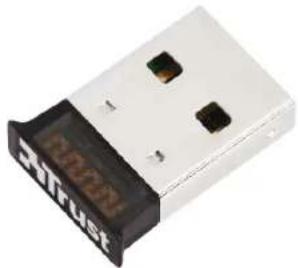
natural_image Close-up of a white USB flash drive with black buttons and a digital display showing '32708' (no readable text beyond branding)

quick installation guide

31022bluetooth adapter

pc/notebook
CD Xlust

TRUST 31022 - 3

www.trust.com/31022/drivers

netbook

2
AutoPlay DVD RW Drive (K) Disc Always click this software and games. Form call to change from your name. Run Setup Powered by Trust International Cancel options Custom buttons to allow files using custom options Your own Auto Play options on Platform/Word

B
TRUST 31022 - 5

! restart your pc

USB

TRUST 31022 - 7

TRUST 31022 - 8

3
Windows 7
Add a Device Allow a Device to Connect Show Bluetooth Devices Join a Personal Area Network Open Settings Turn Adapter Off Remove Icon Customize... 12:09 26-4-2010

4
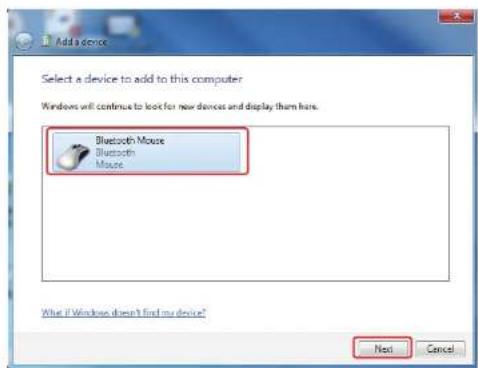
Add a device Select a device to add to this computer Windows will continue to look for new devices and display them here. Bluetooth Mouse Bluetooth Mouse What if Windows doesn't find my device? Next Cancel

5
This device has been successfully added to this computer Windows is now checking for drivers and will install them if necessary. You may need to wait for this to finish before your device is ready to use. To verify if this device finished installing properly, look for it in Devices and Printers Bluetooth Mouse Close

6 Windows XP Show messages My Bluetooth-location Bluetooth configuration 1:51 PM

Bluetooth Suite File Edit View Bluetooth Requests Tools Help Address Bluetooth Suite Bluetooth Tasks Discovery My own Services Configuration Other Places Debug My Computer My Documents Bluetooth Exchange Folder My Network Files Readers and Pares Reminder: Discovery Mode Do sure the remote device is in . Discovery Mode When ready did. Click to proceed or Cancel to abort the operation Show this message in the future OK Cancel

8 Reminder: Pairing Mode Ensure the remote device is in: Pairing Mode When ready click Ok to proceed or Cancel to abort the operation Show this message in the future Ok Cancel Bluetooth Pairing Please input the security code using remote keyboard Keyboard 20:42:51:09:25:71 Ok Cancel

Bluetooth Suite File Edit View Bluetooth Favorites Tools Help Back Search Folders Address Bluetooth Suite Bluetooth Tasks Discovery My Local Services Configuration Other Places Desktop My Computer My Documents Bluetooth Exchange Folder My Network Places Printers and Files Trust Bluetooth Keyboard Name Discovery Review Dictionary Propelix

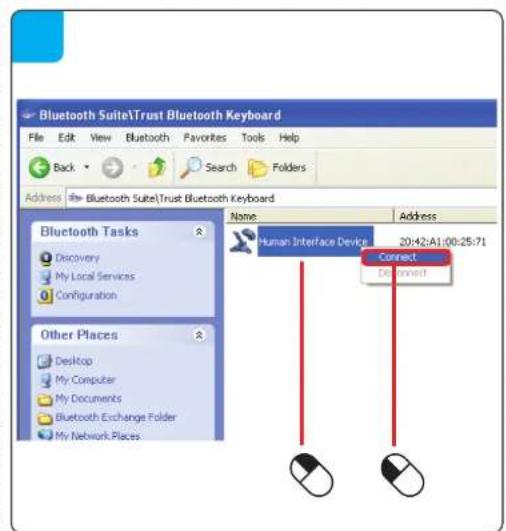
Bluetooth Suite\Trust Bluetooth Keyboard File Edit View Bluetooth Favorites Tools Help Back Search Folders Address Bluetooth Suite\Trust Bluetooth Keyboard Bluetooth Tasks Discovery My Local Services Configuration Other Places Desktop My Computer My Documents Bluetooth Exchange Folder My Network Places Name Address Human Interface Device 20:42:A1:00:25:71 Connect Connect

Bluetooth Suite Information Human Interface Device - Connected 2:47 PM FAQtrans-10om/31022/faq 20100427R1 © Trust International B.V.

Asistent manual
Oferit de Anthropic
Așteptând mesajul dvs.
Informații despre produs

Marcă : TRUST

Model : 31022

Categorie : Placă de rețea / adaptor