TRUST 31009 - Cască

31009 - Cască TRUST - Manual de utilizare gratuit

Găsiți gratuit manualul dispozitivului 31009 TRUST în format PDF.

📄 2 pagini Română RO Descărcați 💬 Întrebare IA
Notice TRUST 31009 - page 1
Alegeți limba și furnizați adresa dvs. de email: vă vom trimite o versiune tradusă special.

Întrebările utilizatorilor despre 31009 TRUST

0 întrebare despre acest aparat. Răspundeți la cele pe care le cunoașteți sau puneți-vă propria.

Pune o întrebare nouă despre acest aparat

Emailul rămâne privat: este folosit doar pentru a vă anunța dacă cineva răspunde la întrebarea dumneavoastră.

Nicio întrebare deocamdată. Fiți primul care pune una.

Descărcați instrucțiunile pentru Cască în format PDF gratuit! Găsiți manualul dvs. 31009 - TRUST și luați din nou în mână dispozitivul dvs. electronic. Pe această pagină sunt publicate toate documentele necesare pentru utilizarea dispozitivului dvs. 31009 mărcii TRUST.

MANUAL DE UTILIZARE 31009 TRUST

Trust
TRUST 31009 - 1

natural_image Black and white headset with earbuds and microphone (no visible text or symbols)

quick installation guide

comfort headset

31009
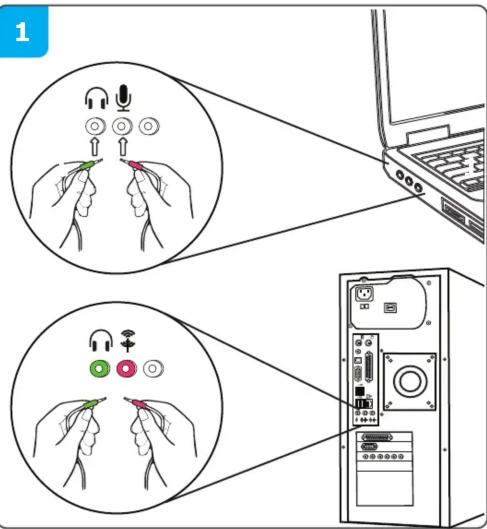
Diagram illustrating wireless device connection to a laptop, showing hand gestures and ports with labels

TRUST 31009 - 3

natural_image Line drawing of a multi-band headphones with earplands and a microphone, no text or symbols present

3
+ ←→ - 8 % on/off

4

Windows 7 / Vista

Windows XP 6

TRUST 31009 - 5

Open Volume Mixer Playback Devices Recording Devices Sounds

5
A
TRUST 31009 - 7

TRUST 31009 - 8

B
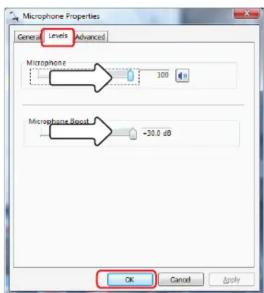
Macrophone Properties General Levels Advanced Macrophone 100 Microphone Reset -20.0 dB OK Cancel Apply

6 Windows XP 13:57 Open Volume Control Adjust Audio Properties 12:32 PM

7 Sounds and Audio Devices Properties Volume Sounds Audio Voice Hardware Realtek AC37 Audio Device volume Low High Mute Place volume icon in the taskbar Advanced... Speaker settings Use the settings below to change individual speaker volume and other settings: Speaker Volume... Advanced... OK Cancel Apply

8 Sounds and Audio Devices Properties Volume Sounds Audio Voice Hardware These settings: control volume and advanced options for the voice playback or recording device you selected. Voice playback Default device: Realtek AC97 Audio Volume... Advanced... Voice recording Default device: Realtek AC97 Audio Volume... Advanced... Test hardware... OK Cancel Apply

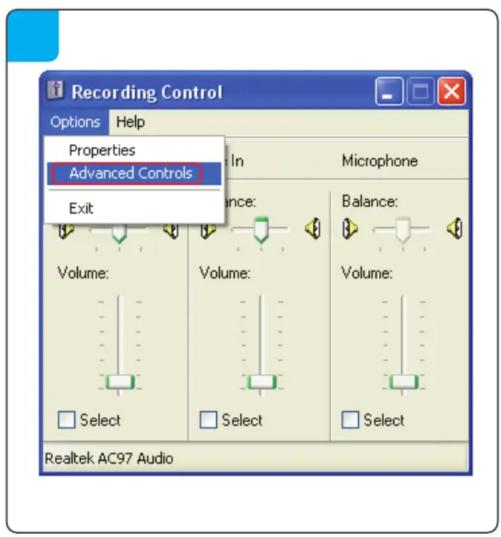
Recording Control Options Help Properties Advanced Controls Exit Balance: Volume: Volume: Volume: Select Select Select Realtek AC97 Audio

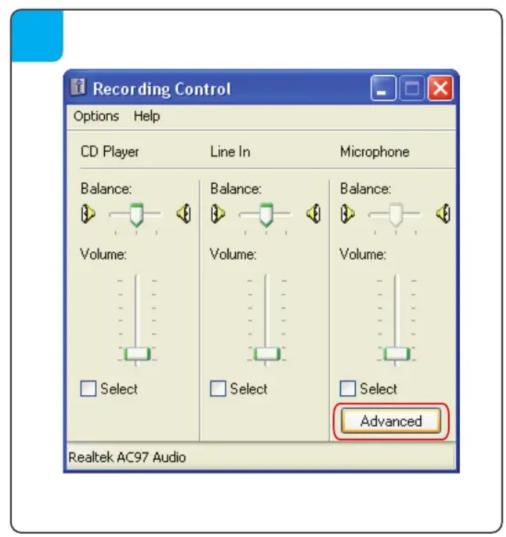
Recording Control Options Help CD Player Line In Microphone Balance: Balance: Balance: Volume: Volume: Volume: Select Select Select Advanced Realtek AC97 Audio

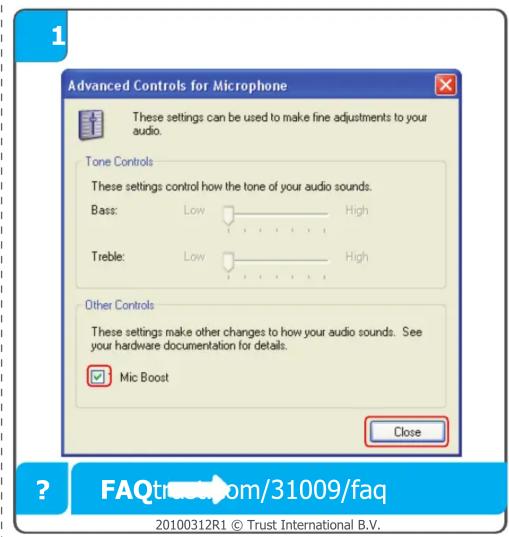
Advanced Controls for Microphone These settings can be used to make fine adjustments to your audio. Tone Controls These settings control how the tone of your audio sounds. Bass: Low High Treble: Low High Other Controls These settings make other changes to how your audio sounds. See your hardware documentation for details. Mic Boost Close FAQtrustroom/31009/faq 20100312R1 © Trust International B.V.

Asistent manual
Oferit de Anthropic
Așteptând mesajul dvs.
Informații despre produs

Marcă : TRUST

Model : 31009

Categorie : Cască