
WT80B4200LL - Pralka SAMSUNG - Bezpłatna instrukcja obsługi
Znajdź bezpłatnie instrukcję urządzenia WT80B4200LL SAMSUNG w formacie PDF.


| Typ produktu | Pralka ładowana od góry |
| Model | WT80B4200LL |
| Marka | Samsung |
| Pojemność | 8 kg |
| Prędkość wirowania | 1400 obr./min |
| Wymiary (SxGxW) | 600 x 600 x 850 mm |
| Masa netto | 58 kg |
| Napięcie zasilania | 220-240 V, 50 Hz |
| Pobór mocy | 2000 W |
| Programy prania | 15 programów (bawełna, syntetyki, delikatne, szybkie, wełna, ręczne, płukanie, wirowanie, itp.) |
| Wyświetlacz | Cyfrowy LED |
| Funkcja opóźnienia startu | Tak (do 24 godzin) |
| Blokada rodzicielska | Tak |
| System zabezpieczający przed zalaniem | AquaStop |
| Poziom hałasu (pranie/wirowanie) | 58 dB / 75 dB |
| Klasa energetyczna | A+++ |
| Klasa wirowania | B |
| Pojemność zbiornika na detergent | Automatyczne dozowanie (opcjonalnie) |
| Samoczyszczenie bębna | Tak (program Eco Drum Clean) |
| Gwarancja | 2 lata |
Często zadawane pytania - WT80B4200LL SAMSUNG
Pytania użytkowników dotyczące WT80B4200LL SAMSUNG
0 pytanie dotyczące tego urządzenia. Odpowiedz na te, które znasz, lub zadaj własne.
Zadaj nowe pytanie dotyczące tego urządzenia
Pobierz instrukcję dla swojego Pralka w formacie PDF za darmo! Znajdź swoją instrukcję WT80B4200LL - SAMSUNG i weź swoje urządzenie elektroniczne z powrotem w ręce. Na tej stronie opublikowane są wszystkie dokumenty niezbędne do korzystania z urządzenia. WT80B4200LL marki SAMSUNG.
INSTRUKCJA OBSŁUGI WT80B4200LL SAMSUNG
Washing Machine user manual
imagine the possibilities
Thank you for purchasing this Samsung product. To receive a more complete service, please register your product at
www.samsung.com/in
SAMSUNG
contents
Before operating the unit, please read this meanual throughly, and retain for future reference.
FEATURES 2
SAFETY INSTRUCTIONS .....2
Cautions. 2
Precautions when operating 3
DESCRIPTION OF PARTS 4
CONTROL PANEL 5
INSTALLATION 6
Environment 6
Connecting the drain hose....6
Connecting the inlet hose....6
CLEANING THE MACHINE....6
Cleaning the magic filter....6
Cleaning the wash tub. 6
WASHING PROCEDURE 6
Washing....6
Spinning dry 7
Rinsing 7
Overflow rinse 8
Additional rinse 8
LAUNDRY GUIDE 8
MAINTENANCE 9
TROUBLESHOOTING 9
SPECIFICATIONS....10
Instructions about the WEEE
Correct Disposal of This Product (Waste Electrical & Electronic Equipment)
(Applicable In countries with separate collection systems)


This marking on the product, accessories or literature indicates that the product and its electronic accessories (e.g. charger, headset, USB cable) should not be disposed of with other household waste at the end of their working life. To prevent possible harm to the environment or human health from uncontrolled waste disposal, please separate these items from other types of waste and recycle them responsibly to promote the sustainable reuse of material resources. Household users should contact either the retailer where they purchased this product, or their local government office, for details of where and how they can take these items for environmentally safe recycling. Business users should contact their supplier and check the terms and conditions of the purchase contract. This product and its electronic accessories should not be mixed with other commercial wastes for disposal,
For more information on safe disposal and recycling, visit our website www.samsung.com or contact our Helpline numbers on the last page.
features
• Double Storm Pulsator
- By rotating an inner and outer blade at different speeds, two powerful currents of water created that ensure that clothes get clean with less damage than a conventional washing machine. The Double Storm like water currents enhance both washing and rinsing power while reducing unnecessary fractions and in creating both the durability and reliability of your fabrics by preventing the laundry from getting twisted and knotted.
• Air turbo Drying system
- Air Turbo technology spins hard and fast so you can spend less time drying.
- Time Saving AIR TURBO saves your time, ensuring your clothes are dried 30% \~ 40% faster than line drying alone. Especially during the rainy season and in high-humid weather, laundry that once took days to drip-dry, such as heavy jeans, bulky sweaters, and thick blankets are dried more rapidly.
• Transparent Lids (option)
- This Transparent Window is the new concept to solve the curiosity of users to see inside of washing machine while operation. While operation, the laundry progress inside of washing machine can be checked by looking through the transparent window.
- Magic Filter
- This unique magic Filter ensures that all the lint inside the tub is captured for top quality filtering results to deliver consistently effective cleaning results.
safety instructions
- Must follow the cautions and precautions for safety intend to prevent unpredictable danger and damage by helping the proper use in safety.
cautions
- Be sure that the washing machine is grounded.
To avoid electrical shock, use a metal pipe for the ground connection. But, don't ground the washing machine with gas pipes or telephone lines to avoid to dangers of explosion or lightning strike.
- Do not put your hands into the spin dryer basket when it is spinning.
Your fingers can be caught by spinning laundry and damaged.


- Never allow children to operate or play with the washing machine.
Children playing with the washing machine may accidentally fall into the washing tub.

- Do not climb up the Washing Machine or lids (Wash and Spin Lid)
- Disconnect the power cord from the power supply when not in use.
- Ventilation opening must not be obstructed by carpeting when the washing machine is installed on a carpeted floor.
- If the supply cord is damaged, it must be replaced by the manufacturer, its service agent or similarly qualified persons in order to avoid a hazard.
- To avoid overfilling and damages this appliance must be filled with the operator present using a moderate water supply pressure only.
- For washing machines with ventilation openings in the base, that a carpet must not obstruct the openings.
- Do not use adapter or extension cord to supply power to your washing machine.
- This appliance is not intended for use by persons (including children) with reduced physical, sensory or mental capabilities, or lack of experience and knowledge, unless they have been given supervision or instruction concerning use of the appliance by a person responsible for their safety.
• Children should be supervised to ensure that they do not play with the appliance.
⚠️ precautions when operating
- Don't use excessively hot water. (50°C or more)
Plastic parts may be deformed or damaged. Also, clothing may be deformed or decolored.
Do not connect to the hot water supply.

• Before washing, check all pockets.
If nails or pins remain in pockets, they may damage the washing machine or clothes.
- Close the water tap a little if the water pressure is too high.
• To avoid water splashes, close the wash tub lid.
• Never splash water on the control panel.
• Take out personal belongings from pockets.


Check the pockets! Hairpins and coins cause damages to clothes and washing machine.
They make noise and problems to the machine. Must check the pocket.

Do not put clothes with such substances in the tub like keys, pins, nails, sharp items, coins.
Kindly ensure that all metallic buckles / zippers / hooks must be turned inside.
- Be sure to cover with the inner cover on laundry before spinning.
This prevents laundry from being tossed out and damaged.

- Be sure lay the drain hose(A) down.

- Don't pull off the Knobs. Knobs can't take off from outside of the Panel.
- Do not pour castic soda & bleach over the washing machine. It causes damages to rubber parts.
- Do not expose the washing machine to direct sunlight or rain.

| 1 | INLET HOSE |
| 2 | WASH/SPIN INLET SELECTOR |
| 3 | PLASTIC FILTER |
| 4 | TWIN TUB |
| 5 | WASH LIDBe sure to keep the lid closed during washing and spinning. |
| 6 | DRAIN HOSE |
| 7 | PULSATOR |
| 8 | SPIN TUB |
| 9 | POWER CORDThe plug's shape may not correspond with this drawing. |
| 10 | INNER LID |
| 11 | SPIN LIDWhen you open this lid while the spin basket is spinning, the spinning will be stopped by brake system. |
| 12 | MAGIC FILTERLint will be collected in the filter during washing |
4\_ description of parts
WT75B3200GD / WT75B3200LL
WT75B3200GG / WT75B3200RR
WT85B4200GD / WT85B4200LL
WT85B4200GG / WT85B4200RR
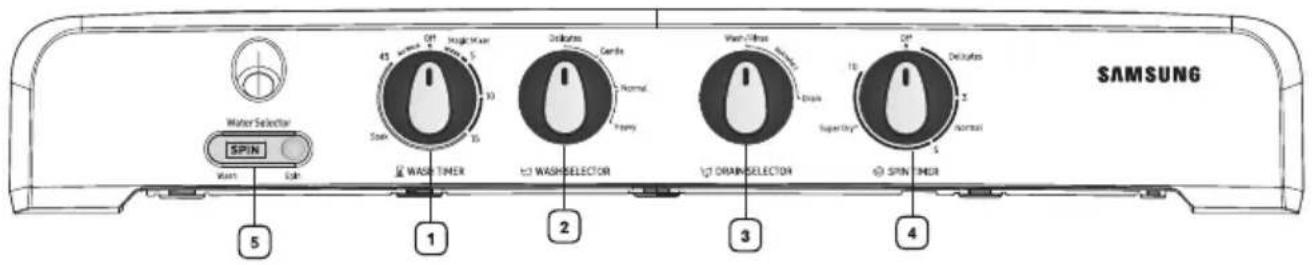
WT75C3200GG / WT85C4200GG / WT80C4200GG

WT80C4000RR

| 1 | WASH TIMER | This is used to set the wash time, 1-45 minutes. 1-35 minutes. |
| 2 | WASH SELECTOR | This is used to select wash action. |
| 3 | DRAIN SELECTOR | This is used to select the Washing / draining. |
| 4 | SPIN TIMER | This is used to set the spin time, 1-10 minutes |
| 5 | WATER SELECTOR | This is used to direct water supply to wash tub for washing or spin tub for spin shower. |
Environment
- Leave some space.
Space at last 15 cm between the washing machine and the wall.
- Place the washing machine on a sturdy flat surface.
If the washing machine is placed on an uneven or weak surface, noise or vibration may be occurred. (Allowable Is 2°)
• How to move the Machine
Casters are provided for easy translocation of machine. Hold the machine properly as shown in fig. Be Careful that the machine should not be dropped. Machine should not be move when loaded.
• Never install the washing machine near water.
Do not place the washing machine in steamy rooms or where the washing machine is directly exposed to rain. Moisture may destroy the electrical insulation and cause an electrical shock hazard.
- Avoid direct sunlight or heating devices.
As plastic and electrical components are affected by direct heat, never place the washing machine near heaters, boilers, etc. Do not place under direct sunlight.

Connecting the drain hose

General type
- Press and hold down the joint ring, and insert it into the drain hose

- Insert the drain hose into the drain outlet. Make sure to connect them firmly using the joint ring
- Push it with force further to the bottom of the drain outlet
- Check the drain hose for not getting apart from the outlet by drawing it.
Connecting the inlet hose

(Insert the inlet hose into washing machine)
(Insert the inlet hose into faucet)
The new hose-sets supplied with the appliance are to be used and that old hose-sets should not be reused.
cleaning the machine
Cleaning the Magic filter
Clean the filter net often to keep the washing machine clean.
-
Push the upper part of the Magic filter and pull in.
-
Open the cover as shown in the figure.
-
Clean the Magic filter.
-
Close the cover and insert the lower part of the filter in the basket first and then push the filter with 'click' sound.

natural_image
Illustration showing three steps of a device manipulation: adding a component, adding a close-up view, and adding a base (no text or symbols present)

Cleaning the wash tub
-
Wipe off stains on the cabinet and operation panel with soft cloth.
-
Do not use benzene, thinners, cleanser, or wax, nor scrub the washing machine with a brush. Painted surfaces or plastic parts will be damaged.
-
When cleaning don't spray water directly to the parts of the washer, it may make its life span shorter. Also an electric shock or fire may take place.
washing procedure
Washing
-
Before starting washing, check the following;
-
Connect the water inlet hose and open the water tap.
- Connect the power cord to the power supply outlet.
- Lay the drain hose(A) down toward a sinkhole.

- Set the WASH SELECTOR KNOB to the desired mode.

- Set the DRAIN SELECTOR KNOB to 'WASH'.
- Set the LEVEL WATER SELECTOR to WASH
WASH WATER SELECTOR
- Load laundry in the wash tub.

natural_image
Line drawing of a washing machine with handle and side panel (no text or symbols)- Fill water in the wash tub and add the detergent.

natural_image
Cartoon character shaped like a box with a smiling face and thumbs up (no text or symbols)- Set the WASH TIMER.

WASH TIMER

WASH THER
Set the Wash Timer 1-45 min. (Set the Wash Timer to a point between 15 to 45 mins for soak function).
SOAK FUNCTION(option)
If the WASH TIMER is set to a point between "15" to "45", the washing machine start the wash (15 min), after the soak (30.0 min) is completed. The Soak function (30.0 min) repeats the cycle that is 1.5-2.0 min on washing.
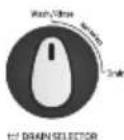
- After washing, set the DRAIN SELECTOR KNOB to 'DRAIN' for drain.

DRAIN SELECTOR
Spinning dry
- Transfer the clothes into the spin basket and arrange the clothes evenly.

Bottom of balancer

safety cover
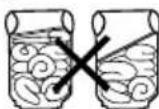
- Be sure to attach the safety cover and close the inner lid.

- Close the spin dryer lid.

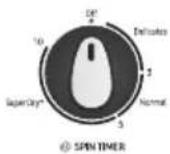
- Set the SPIN DRYER TIMER 1-10 minutes.
1-10 min Spin Dry Timer
- Incomplete spinning.(Severe vibration or unbalance) See "When you load ..." on page 9.
Rinsing
- Set the DRAIN SELECTOR KNOB to 'WASH'

-
Supply the proper amount of water as not to overflow the top of the washing tub.
-
Set the WASH TIMER 2-3 minutes.

- Drain the water. Set the DRAIN SELECTOR KNOB to 'DRAIN'.

-
Repeat this cycle until drain water is clean. (2\~3 cycles)
-
Be sure lay the drain hose down.
*Note - During Spin Shower, if water comes to wash tub, then reduce the water pressure.
Over flow rinse
- Keep supplying water.

Adjust water pressure to ensure that the amount of water supplied does not exceed that water drained.

-
Set the WASH TIMER 6\~8 minutes.
-
As soon as the WASH TIMER shuts off, turn off the water tap.


- Set the DRAIN SELECTOR KNOB to 'DRAIN'.

Additional rinse
After rinsing you can select this course for more effective rinse (Don't select only this course for rinse.)
- Load the laundry evenly into the spin basket.

- Set the LEVER WATER SELECTOR to SPIN(a) and DRAIN SELECTOR KNOB to 'DRAIN(b)'


- Supply water for about 1 minute. Adjust the water flow to prevent overflow from the wash tub.

- After stopping water supply, cover the laundry with safety cover and close the inner lid.

- Close the spin dryer lid.

- Set the SPIN DRY TIMER 2\~3 minutes.

laundry guide
Washing time
| Kinds of clothing | Washing time | Washing Selection |
| Extremely soiled heavy fabric | 10 to 15 minutes | HEAVY |
| Linen,cotton,etc. | 8 to 10 minutes | |
| Ordinary clothes (underwear,etc) | 7 minutes | NORMAL/ GENTLE |
| Slightly soiled synthetic fiber | 2 to 5 minutes | |
| 100% wool,mixed wool knitting, thin synthetic fiber with tags indicating hand washing | 2 to 5 minutes |
Detergent
| 7.5 kg Capacity | |
| Amount of detergent | Water level |
| 42 g | Low (64l) |
| 52 g | Medium (72.5l) |
| 62 g | High (81.0l) |
Detergent
| 8.0/8.5 kg Capacity | |
| Amount of detergent | Water level |
| 42 g | Low (64l) |
| 52 g | Medium (72.5l) |
| 62 g | High (81.0l) |
The amount of detergent is average.
Follow the instruction detergent printed on the package for amount of detergent.
Choose the amount of detergent depending on the fabric type.
Spin dry time
| Type of laundry | Time |
| Thin (synthetic fiber) | 1 min. |
| Wool | 1~2 min. |
| Cotton | 3~5 min. |
| Thick (cotton) | 5 min. |
| 10 min. (Air Turbo) |
8\_ laundry guide
WHEN YOU LOAD THE LAUNDRY INTO THE SPIN BASKET.
Press the laundry evenly and put the safety cover into the spin basket drum as shown in the figure.

TO PICK OUT THE CLOTHING WHICH HAS FALLEN BETWEEN THE BASKET AND TUB.
For safety, pull the power supply plug out of the socket.
- Disassemble, pull the power supply plug out of the socket.
- The spin dryer hatch is fixed to the brlm by the concave and convex parts at two places. Expand the concave and convex parts, and pull up the spin dryer hatch to remove it.
- Remove the clothing
- Close the spin dryer hatch. Push the hatch firmly until the catch at the front is engaged securely;

troubleshooting
| TROUBLE | CHECK POINT |
| The washing machine does not work. | Check that the power cord is connected to a power outlet well.Power stoppage? |
| Clothes does not move freely. | Is the laundry overloaded? |
| Incomplete spinning.(Severe vibration or unbalance.) | Are the laundry arranged evenly?See “When you load...” on page 9. |
| Water does not drain. | Be sure lay the drain hose down.See page 3. |
| The spin dryer basket does not run. | Is the spin dryer lid closed completely?Are laundry (socks,etc.) falling out of the spin dryer basket and clinging to the axle?See “To plck out the clothing....” on page 9. |
| The water drains out immediately. | Is the Drain Selector set to drain?Is the drain hose clogged with scrap?Hang up drain hose over the drain hose hook. Half fill the wash tub with the water and try for drain again. (Scrab will be removed by water drain pressure.) |
| Pulsator not moving. | Although the machine may stay still,maximum 5 minutes.If the WASH TIMER indicates in excessof 15 minutes. It is just in the processof soaking and not a breakdown.Check the knob position.It should not be in ‘No Work’ zone.  WASH TIMER WASH TIMER |
| Spin Basket not moving | Check the knob position.It should not be in ‘No Work’ zone.  |
| CAPACITY | MODEL | WASH |
| WT75B3200GD 7.5 kg | ||
| WT75B3200GG | 7.5 kg | |
| WT75B3200LL | 7.5 kg | |
| WT75B3200RR | 7.5 kg | |
| WT85B4200GD 8.5 kg | ||
| WT85B4200GG | 8.5 kg | |
| WT85B4200LL | 8.5 kg | |
| WT85B4200RR | 8.5 kg | |
| WT85C4200GG | 8.5 kg | |
| WT80C4200GG | 8.0 kg | |
| WT80C4000RR | 8.0 kg | |
| WT75C3200GG | 7.5 kg | |
| DIMENSIONS (W x D x H)mm (7.5Kg) | 830(W) x 485(D) x 1000(H) | |
| DIMENSIONS (W x D x H)mm (8.0Kg / 8.5Kg) | 830(W) x 485(D) x 1030(H) | |
| WATER PRESSURE | 0.05~0.3 MPa0.5 ~ 3.0 kg·f/cm2 | |
| WEIGHT (7.5Kg) | 23.70 kg | |
| WEIGHT (8.0Kg / 8.5Kg) | 24.50 kg | |
| STANDARD QUANTITY OF WATER | 81 l | |
* The energy label specifications have been determined by using the following program according to IEC 60456.
For 7.5 Kg: Program is Wash 15min -> Rinse 10min -> Spin 5min -> Spin 5min. (Wash selector: Delicate, Water level: Maximum, Spin Weight: Half+Half)
For 8.5 Kg: Program is Wash 15min -> Rinse 10min -> Spin 5min -> Spin 5min. (Wash selector: Delicate, Water level: Maximum, Spin Weight: Half+Half)
For 8.0 Kg: Program is Wash 12min -> Rinse 8min -> Spin 3min -> Spin 3min. (Wash selector: Delicate, Water level: Maximum, Spin Weight: Half+Half)
Terms of Warranty
Warranty not applicable in any of the following cases
-
The Complete warranty Card is not presented to the service engineer at the time of repairs being undertaken/ requested.
-
The Product is not purchased from an Authorized Samsung Sales Dealer.
-
The Product purchased is not used according to the instruction given in the INSTRUCTION MANUAL as determined by company personnel.
-
Defect Caused by improper use, as determined by the authorized service centers/Company Personnel.
-
Modification or alterations of any nature mode in the circuitry by the Purchaser or unauthorized Personnel, as determined by Company personnel.
-
The Warranty is not applicable if the washing machine used for commercial purpose or Public places like Hotels, training centers and other similar applications.
-
The Original Serial number is removed, obliterated or altered from the Product.
-
Defect due to causes beyond control like lightening, abnormal voltage, acts of god or while in transit to service center or to the purchaser residence.
-
Correcting the installation for example leveling the product, adjustment of drain hose, Adjustment of Tap adopter.
-
Noise or Vibration that is considered as normal for example water drain sound, spin sound or warning beeps.
-
Removal of foreign objects/substances from machine, including the Drain Valve and inlet hose filter for example coin, Grit, safety pin, buttons, hooks, Dirt accumulation etc.
-
Replace fuse, correcting house wiring, house plumbing and defect or damage caused by household pets, rats, cockroaches or any other animals or insects.
For warranty conditions refer warranty card.
memo

natural_image
Black-and-white product photo showing various household appliances and electronics including refrigerator, washing machine, TV, air conditioner, and printer (no visible text or labels)This warranty card gives the key points related to warranty claim. for further details log on to www.samsung.com/in/support.
Warranty Card
*TERMS & CONDITIONS
- Proof of purchase is a pre-requisite to claim warranty.
2 The product should have been purchased from an authorised Samsung Sales Dealer in India. - Warranty can be claimed only if the repair was carried out by the Samsung authorised service center.
- Carry-in service or In-Home service applicability depends on the product category and Samsung policy.
- Free installation or demo of the product, if applicable, can be availed only once and within 6 month from the date of purchase. In case of installation, any additional material required over and above the standard installation kit shall be on the chargeable basis.
- In case of defective accessory, only the accessory will be repaired or replaced.
- Cosmetic/ Aesthetic / Plastic / Glass Parts /Bulbs / Cable /Wiring / Piping/ Consumables are not covered under warranty.
- The defective parts/ products which were replaced by Samsung under this warranty shall be the property of Samsung.
- While carrying out repair, Samsung may use accessories or parts that are new or refurbished or reconditioned.
- Samsung shall not be liable for any losses or consequential losses due to product failure or the installed software.
- Samsung shall be free to decide on whether or not to provide a software update for its products.
- Samsung shall not be responsible for any loss or misuse of data, personal information, setting, third party software during product usage or repair or software update.
- Samsung shall not be liable for any loss, cost, expense, inconvenience or damage that may result from use inability to use the product. Under no circumstances shall Samsung be liable for any loss, cost, expense, inconvenience or damage exceeding the purchase price of the product.
- Defects caused by customer negligence, tampering shall void the product warranty.
- Any extended/addition warranty offered by Samsung has to be supported by relevant proofs.
- Usage of power stabilizers of proper rating is necessary unless explicitly mentioned by Samsung on product literature/instruction booklet.
- In case of defect arising out of installation done by party other than Samsung authorised party, the limited warranty will be applicable as per revised T&C as Samsung shall deem fit.
- Regular upkeep, maintenance and cleaning of parts are necessary in certain products. Such periodic maintenance shall be on chargeable basis unless otherwise provided and not covered under warranty.
- In the event of any unforeseen circumstances, and spares not being available Samsung's prevailing depreciation rules will be binding on the purchaser and same shall be considered as a commercial solution in lieu of repairs.
- Defects arising out of the following are not covered under warranty like Mishandling/Misuse, Improper ventilation, Improper voltage, Use of external material, Normal wear and tear, Physical damage and / or electrical damage caused by physical impact.
- Complaints related to playability, printability, compatibility with external accessories, software, file systems, third party applications, CODEs, signals, Networks& ISP bandwidth shall not be considered as defect in product and not covered under warranty.
- This warranty covers only the defects in products arising out of manufacturing or faulty workmanship.
- This warranty covers repair/replacement of parts.
- Warranty period of parts & accessories may vary from product to product.
- Maximum liability out of this warranty is limited to the product purchase value/MRP.
- No warranty on certain parts/conditions/types of product failures.
- Under certain conditions where warranty obligations cannot be met, depreciation will be applicable on the existing product.
CUSTOMER DETAILS CUM WARRANTY CARD
Customer copy ( to be retained by customer):
Model No:
Product Serial No.:
Date of Purchase:
Name:
Address in Full:
Telephone No.:
Model No:
Dealer Name & Address :
Dealer's Signature with rubber stamp
The Warranty shall be null and void in any of the following cases, and in such cases Samsung may at its sole discretion repair the equipment on a chargeable basis. The decision of Samsung, whether a complaint falls in any of these categories or not shall be binding on the Purchaser.
- The dully filled warranty card/proof of purchase is not presented to the service engineer at the time of repairs being undertaken / requested.
• The original serial number of the product is removed, altered or obliterated from the product. - The product purchased is not used as per the rated power conditions or instructions mentioned in the INSTRUCTION MANUAL.
- The product is being used for commercial purpose OR if the product has been used excessively and beyond reasonable usage as permitted within the product instruction manual.
• Site (premises where the product is used/ kept) conditions that do not conform to the recommended operations of the product. - Defects caused due to exposure to moisture/dampness/extreme thermal or environmental conditions or rapid changes in such of conditions/corrosions/oxidations/spilling of food/liquid/influence of Chemical substances.
• Defects due to causes beyond control like lightning, abnormal voltage, spikes, external sources (ex: cable/set top box connections), fire, water logging, natural calamities, commotion, riots, theft, anti-social action, acts of God or while in transit.
• Defects caused by household pets, rats, cockroaches, ants, pests, fungi or any other animal/birds/insects. - Defects caused due to negligence/omission of the Purchaser on account of periodic maintenance(s)/periodic servicing as mentioned in the instruction manual of the product.
• Defects caused due to usage of third party material/non Samsung Authorized Consumables. - Any modifications, including but not limited to, rooting attempts, reverse engineering, unlocking, jail-breaking etc. of the original firmware(s) or software(s) of the product.
• Repair due to misuse/third party repair attempts are not covered in warranty.
• Warranty does not cover repair due to external factors/mediums/data types.
• Warranty shall apply only if the product is used as per its usage specifications (ex: personal, commercial etc.)
• Warranty shall be void if product has failed under certain conditions/types (ex: water logging, misuse, etc.)
All disputes arising out of this warranty are subject to Delhi jurisdiction only.
Warranty period commences from the date of purchase of the product unless specified otherwise.
| Product Group | Product Description | Warranty Period (Months) | Parts/Accessory Warranty(if applicable) |
| AC | Room/Split Air Conditioner/Floor Standing Air Conditioners (F AC) | 12 | Compressor : 60 months (120 months for Digital Inverter Compressor)*Condenser : 60 months (12 months for Fin & Tube type)* |
| Window Air Conditioner | 12 | 60 Months on Compressor# | |
| Duct Type Air Conditioner | 15* | 36 Months on Compressor# | |
| Cassette Air Conditioner | 15* | ||
| FJM | 15* | ||
| Indoor DVM & Outdoor DVM | 12** | 12 Months on Compressor# | |
| Ventilation | ERV | 12** | |
| Dish Washer | Dish Washer | 12 | |
| Microwave | Microwave | 12 | 120 Months on Ceramic Enamel Cavity* |
| Refrigerator | Refrigerator | 12 | Compressor : 60 months (240 months for Digital Inverter Compressor)* |
| Washing Machine | Semi Automatic | 24 | Wash Motor : 60 months on Semi Automatic Wash Motor * |
| Rear control panel Top Loading Fully Automatic | 24 | AC Motor : 120 months*Digital Inverter Motor : 240 months *(Applicable for Rear & Front Control Panel models with Wobble Pulsator)# | |
| Front control panel Top Loading Fully Automatic | 24 | ||
| Fully Auto Front Loading | 24 | Universal motor : 60 months*Digital Inverter Motor : 240 months | |
| Air Cleaner | Air Cleaner | 12 | Warranty not applicable on Air Purifier Filters |
* 15 Months from date of purchase or 12 months from installation, whichever ends early. **12 Months from date of commissioning.
^a In case of parts warranty, labour cost and gas charging cost(if applicable) will be chargeable as per the applicable rates.

Correct disposal of the product (Waste Electrical & Electronic Equipment)
This marking on the product, accessories or literature indicates that the electronic accessories (e.g. charger, headset, and USB cable) should not be dispose with other household waste at the end of their working life.
For more information on safe disposal and recycling visit our website or contact number.
SAMSUNG
QUESTIONS OR COMMENTS?
| COUNTRY | CALL | OR VISIT US ONLINE AT |
| INDIA | 1800 40 7267864(1800 40 SAMSUNG)1800 5 7267864(1800 5 SAMSUNG) | www.samsung.com/in/support |
Washing Machine
उपभोक्ता निर्देशिका
सपनों से परे – खूबियाँ अपार
सैमसंग उत्पाद को खरीदने पर आपको धन्यवाद!
कृपया इस उत्पाद को और अधिक सुनियोजित
सेवाएं प्राप्त करने हेतु पंजीकृत करवाएं !
www.samsung.com/in
SAMSUNG
विवरणी
यूनिट को चालू करने से पहले कृपया मेनुअल को अच्छी तरह पढ़े तथा भविष्य के संदर्म हैतु सुरक्षित रखें। गुण....2
सुरक्षा निर्देश......2
चेतावनी 2
मशीन चालू रहने पर सुरक्षा उपाय....3
हिसरों – पुर्जों की पहचान.....4
कंट्रोल पैनल....5
मशीन स्थापना....6
आस—पास का वातावरण....6
ड़न होज को जोड्ना....6
इनलेट होज को जोड़ना....6
मशीन की साफ-सफाई......6
मैजिक फिल्टर सफाई......6
वॉश टब सफाई....6
घुलाई का तरीका....6
धुलाई 6
कपड़े सुखाना....7
खंगालना....7
ओवर फलो खंगालना 8
अतिरिक्त खंगालना....8
कपड़ो की धुलाई पर सुझाव 8
रख-रखाव 9
समस्या तथा उपाय....9
विशेषताएं.....10
WEEE (इलेक्ट्रॉनिक और इलेक्ट्रैकल
कबाङ्ड उपकरण) के सम्बंध में निर्देश——
उत्पाद का उचित तरीके से कूड़ा-निपटान
( अलग से कूडा— ग्रहण की व्यवस्था वाले देशों में प्रभावी)

मशीन , इसकी किताब तथा सहायक इलेक्ट्रॉनिक उपकरणों पर जैसे चार्जर, हेडसेट, यू.एस.बी.केबल आदि पर लगे निशान बताते हैं कि बेकार होने पर इन्हें घर के कूर्ड़े की तरह नहीं फेंका जा सकता है। मनुष्य तथा वातावरण को असंतुलित कूड़ा निपटान से उत्पन्न खतरे से बचाने हेतु इन्हें दूसरे कूड़े से अलग कर जिम्मेदारी से रिसाइकिल करें ताकि भौतिक संसाधनों की सुरक्षा की जा संके। वातावरण में इनके सुरक्षित रिसाइकिलिंग करने के लिए घरेलू उपभोक्ता या तो स्थानीय सरकारी कार्यालय से संपर्क करें या फिर रिटेलर से जिससे आपने उत्पाद खरीदा हो ताकि इन्हें कैसे और किस सुरक्षित जगह पर हम लेकर जा सकते है। व्यवसायिक उपभोक्ता अपने निविदा (कॉन्ट्रैक्ट) के निबंधन व शतों के अनुसार अपने आपूर्तिकर्ता (सप्लायर) से संपर्क करें। उत्पाद तथा इसके सहायक इलेक्ट्रॉनिक हिस्से—पुर्जें के निपटान के लिए व्यवसायिक कूड़े में इसे ना मिलाएं।
सुरक्षित कूड़ा निपटान तथा रिसाइकिलिंग की जानकारी के लिए हमारी वेबसाइट www.samsung.com को देखें या आंतिम पेज पर लिखें हमारे सहायता केंद्र से संपर्क करें।
2\_ विवरणी
गुण
- डबल स्टॉर्म पल्सेटर
— सामान्य वाशिंग मशीन की अपेक्षा इस मशीन में लगे अंदर और बाहर के ब्लेड अलग—अलग गति से घूम कर ताकतवर पानी की धारा बनाते हैं ताकि कपड़े अच्छी तरफ से साफ तथा कम खराब हों। डबल स्ट्रॉर्म पानी की धारा अनावश्यक घर्षण को कम कर धोने व खंगालने की ताकत को बढ़ाती है। साथ ही यह घुले कपड़ों को मुडने और गाँठ पड़ने से बचा कर आपके कपड़ों की गुणवत्ता को बनाए रखता है ।
- एयर टबों झाइंग सिस्टम
- एयर टर्बों स्पीन की तेज व प्रभावी तकनीकी से कपड़े सुखाने में आपका समय कम लगता है । - सीघे सुखाने की अपेक्षा एयर टर्बों 30 से 40% कपड़े तेज सुखाकर आप के समय की बचत करता है । विशेषकर बारिश और आधिक आर्दता वाले मौसम में, जहां धुले कपड़े जैसे भारी जिन्स, बड़े स्वेटर तथा मोटे कंबल आदि को सामान्यतः सूखने में कई दिन लेते है । परंतु यह उन्हें तेजी से सुखाता है ।
- पारदर्शीं लीड(यदि चयनित हो)
- वाशिंग मशीन चालू रहने के दौरान उपयोगकर्ता अंदर देख सके-पारदर्शीं विंडो इसकी आधुनिक सुविधा देता है। पारदर्शीं विंडो द्वारा चालू मशीन के अंदर देखकर कपड़े धुलने की स्थिति की जांच की जा सकती है।
- मैजिक फिल्टर
- विशेष फिल्टर के द्वारा टब के अंदर मौजूद लींट को ठीक से छानकर कपड़ों की अच्छी धुलाई की जाती है।
सुरक्षा निर्देश—
- आप हमेशा सभी सुरक्षा चेतावनी एवं सावधानियां पर अमल करें ताकि किसी भी अप्रत्याशित खतरे एवं नुकसान से बचा जा सके।
चेतावनी-
- सुनिश्चित करें कि वाशिंग मशीन की अर्थिंग की गई हो। बिजली के झाटकों से बचने के लिए धातु की पाइप से ही जमीन की अर्थिंग करें। वाशिंग मशीन को गैस पाइप या टेलीफोन तार से अर्थिंग न करें जिसरों विस्फोट या बिजली पतन के खतरों की साम्भावना से बचा जा सके।
- स्पिन झायर बास्केट के चलते समय अपने हाथ उसमें न डालें । आपकी उंगलियां घूमते कपड़ों में फैसकर उनको नुकसान पहुचा सकती हैं ।
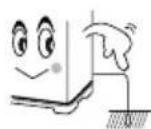

- बच्चों को वाशिंग मशीन चलाने या इसके साथ खेलने की इजाजत न दे। वॉशिन मशीन से खेलते हुए बच्चे कभी भी दुर्घटनावश वाशिंग टब में गिर सकते हैं।

- वाशिंग मशीन या लीड( वाश या स्पीन) के ऊपर ना चढ़े।
- मशीन जब चालू न हो तो बिजली के तार (पावर कॉर्ड़) को पावर साकेट से निकाल दें।
- जब भी वाशिंग मशीन कारपेट फलोर पर रखी जाए तो ध्यान रहे कि हवा निकारी (ventilation) हेतु बने छेद को कारपेट द्वारा रोका न जाए।
यदि पावर सप्लाई का तार खराब हो जाए तो इसे निर्माता या सर्विस एजेंट या वैसे ही किसी योग्य व्यक्ति द्वारा बदला जाए ताकि किसी खतरे की संभावना न रहे।
- इस मशीन को ऑपरेटर की मौजूदगी में मध्यम पानी साप्लाई से ही भरा जाए ताकि जल भराव से कोई नुकसान ना पहुंचे।
- वाशिंग मशीन जिसकी हवा निकासी का छेद मशीन के ब्रेस में बना हुआ है। उसमें यह ध्यान रहे कि कारपेट से वह बंद न हो।
- अपने वाशिंग मशीन में पावर सप्लाई के लिए एडाप्टर या एक्स्टेंशन कॉर्ड का प्रयोग न करें।
- वैसे लोग जिनकी शारीरिक, मानासिक, स्पर्श शक्ति कमजोर हो या अनुभव तथा जानकारी का आभाव हो, जिसमें बच्चे भी शामिल है– के द्वारा तबतक मशीन को नहीं चलाना चाहिए जबतक कि उनकी सुरक्षा के प्रति जवाबदेह किसी व्यक्ति द्वारा मशीन के संघालन संबंधी निर्देश न दिया जाय या देखरेख न किया जाए।
- बच्चों पर निगरानी रखनी चाहिए ताकि वे मशीन के साथ खिलवाङ़ न करें।
⚠️ मशीन संचालन में सावधानियां-
- अत्याधिक गर्म पानी (50 डिग्री से अधिक) का प्रयोग ना करें। इससे मशीन के प्लास्टिक हिस्से—पूर्जे बेकार या खराब हो सकते हैं। कपड़े बेकार और बेरंग हो सकते हैं ।
CAUTION गरम पानी की सप्लाई से मशीन को ना जोड़े।
- घुलाई के पहले कपड़ों के सभी पैकेट की जांच कर लैं । यदि कॉटी या पिन पॉकेट में छूट जाते हैं तो यह मशीन तथा कपड़ों को नुकसान पहुंचा सकते हैं ।
- पानी का प्रेशर अधिक होने पर नल को थोड़ा बंद कर दे।
- पानी के छीटॉं से बचाव के लिए वॉश टब लीड को बंद करें।
- कंट्रोल पैनल पर पानी न गिरने दे।
- कपड़ों के पैकेट से अपनी सारी वस्तुएं निकाले।

CAUTION हयर पिन तथा सिक्क मशान तथा कपड़ा का नुकसान पहुंचा सकते हैं। इससे मशीन में आवाज के साथ परेशानी भी पैदा हो सकती है। पाँकेट को जरुर जांच करें।
कपड़ों के साथ बाहरी चीजें जैसे चाबी, पिन, कील, नुकीली वस्तुएं व सिक्के टब में न डालें। कृपया सुनिश्चित करें कि सभी धातु की चीजें जैसे बककल/ जिपर/हुक अन्दर की तरफ मुड़े हों।
- कपड़ों को स्पिन (घुमाने) से पहले मशीन का ढक्कन (इनर लीड) जरूर बंद करें। इसरो कपड़े बाहर निकलने एवं खराब होने से बचते हैं ।

- ऋंन पाइप (होज) को नीचे जमीन पर समतल रखें।

- मशीन में लगे बटन को नाँब को बाहर न खीचें। नाँब को पैनल के बाहरी और से नही निकाला जा सकता।
- वाशिंग मशीन के ऊपर कास्टिक सोडा तथा ब्लीच न फैलाएं, इससे रबर के हिस्से पुर्जों को नुकसान पहुंच सकता है।
- वाशिंग मशीन को सीधे घूप या बारिश से बचाए ।

| 1 | इनलेट होज |
| 2 | वॉशस्पीन सलेक्टर |
| 3 | प्लास्टिक फिल्टर |
| 4 | ट्वीन टब |
| 5 | वॉश लीड – धुलाई व घूमने के दौरान ढक्कन(लीड) को बंद रखें। |
| 6 | झेन होज |
| 7 | पल्सेटर |
| 8 | स्पीन टब |
| 9 | पावर कोई – चित्र के अनुसार हमेशा पावर प्लग का आकार समान नहीं हो सकता है। |
| 10 | इनर लीड |
| 11 | स्पीन लीड – स्पीन बास्केट घूमते समय यदि आप इसे खोलते हैं तो इसे ब्रेक सिस्टम द्वारा बंद कर दिया जाएगा। |
| 12 | मैजिक फिल्टरधोने के दौरान फिल्टर में लिंट एकत्र किया जाएगा। |
4_ हिस्सों-पुर्जों की पहचान
WT75B3200GD / WT75B3200LL
WT85B4200GD / WT85B4200LL
WT75B3200GG / WT75B3200RR
WT85B4200GG / WT85B4200RR

WT75C3200GG / WT85C4200GG / WT80C4200GG

WT80C4000RR

| 1 | वॉश टाइमर | वाशिंग का समय तय करने हेत1-35 मिनट चयन द्वारा1-45 मिनट चयन द्वारा |
| 2 | वॉश सलेक्टर | वॉशिंग के तरीके चुनने हेतु |
| 3 | ड्रेन सेलेक्टर | वॉशिंग व ड्रेनिंग के लिये |
| 4 | स्पीन टाइमर | घूमने (स्पीन ) का समय तय करने हेतु1 -10 मिनट चयन द्वारा |
| 5 | वॉटर सेलेक्टर | यह धुलाई के दौरान वॉश टब तथा स्पिन टब में स्पिन शावर के लिए पानी की आपूर्ति को निर्देशित करने के लिए उपयोग किया जाता है। |
आस-पास का वातावरण
- कुछ जगह छोड़े
वाशिंग मशीन और दिवार के बीच कम से कम 15 सेंटीमीटर की जगह छोड़े।
- वॉर्शिंग मशीन को सख्त समतल सतह पर रखें
यदि वॉर्शिंग मशीन को टेड़े या मुलायम फर्श पर रखा जाता है तो आवाज और झनझनाहट पैदा हो सकती है केवल 2 डिग्री टेढा होने तक मान्य।
- कैसे मशीन को सरकाएँ
मशीन को इधर-उधर ले जाने के लिए कैस्टर्स दिए गए हैं चित्र के अनुसार मशीन को पकड़े सावधान रहें कहीं मशीन गिर न जाए जब मशीन कपड़ों भरी हुई हो तो इसे न सरकाए।

- पानी के निकट वॉर्शिंग मशीन को न लगाएं वॉर्शिंग मशीन को गीलेपल या सीधी बारिश वाले जगह पर न रखे। इलेक्ट्रिकल इंसुलेशन गीलेपन के कारण खराब हो सकता है तथा बिजली के झटके का खतरा हो सकता हैं ।
- गर्मी देने वाले बिजली के उपकरणों और सूरज की रोशनी से दूर रखें .
प्लास्टिक तथा बिजली के हिस्से पूर्ज जो सीधे गर्मी लगने से प्रभावित होते हैं उसे वाशिंग मशीन के कभी भी हिटर, बॉयलर आदि के निकट ना रखें । सीधे धूप से बचाए ।
सामान्य प्रकार के ड्रेन होज को जोड़ना-

चित्र 1. के अनुसार ज्वाइंट रिंग को दबाकर पकड़े तथा उसमें झ्रेन होज को लगाएं ।

चित्र 2. के अनुसार इ़न आउटलेट में इ़न होज को लगाए। ज्वाइंट रिंग की सहायता से इसे अक्छी तरह मशीन से जोड़ दें।
- ऋन आउटलेट के नीचे की तरफ इसे ताकत से दबाए ।
- ड्रेन होज को बाहर की तरफ खींच कर यह जांचे कि कहीं यह बाहर तो नहीं निकल रहा है ।
इनलेट होज को जोड़ना

(वाशिंग मशीन में इनलेट होज को जोड़े)
(इनलेट होज को नल से जोड़े)
मशीन के साथ दिए गए नए होज सेट का ही प्रयोग करें । पुराने होज सेट को दुबारा प्रयोग में ना लाएं।
मैजिक फिल्टर साफ-सफाई
वाशिंग मशीन साफ रखने के लिए फिल्टर की जाली को समय-समय पर साफ करें।
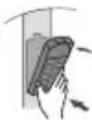
- मैजिक फिल्टर के ऊपरी हिस्से को दबाकर बाहर निकाले।

- चित्र के अनुसार द़क्कन को खोलें ।

- मैजिक फिल्टर साफ करें।

- ढक्कन को बंद करें तथा फिल्टर के निचले हिस्से को बास्केट में लगाकर इसे दबाए ताकि किलक की ध्वनि सुनाई दे।
वॉश टब की साफ-सफाई
- मुलायम कपड़े से मशीन की बॉडी तथा ऑपरेशन पैनल से दाग को हटाए ।
- वाशिंग मशीन पर बेंजीन, थिनर, क्लीनर व वैक्स, का प्रयोग ना करें और न इसे ब्रश से खुरघे। रंगीन तथा प्लस्टिक के हिस्से खराब हो सकते है।
- साफ करते वक्त सीधे वॉशर के हिस्सों पर पानी ना छिडके इससे मशीन की काम करने की क्षमता कम होती है। साथ ही बिजली के झटके या आग लगने का खतरा बना रहता है।
धुलाई का तरीका
घुलाई
- धुलाई करने से पहले नीचे लिखे गए निर्देशों की जांच करें
- वॉटर इनलेट होज को जोड़े तथा नल को खोलें।
- पावर कॉर्ड को पावर सप्लाई ज्लग से जोड़े ।
- इन होज को सिंक होल की तरफ फैला कर सीधा करें ।

- वॉश सेलेक्टर बटन को अपनी इच्छा के अनुसार सेलेक्ट करें।

- इंन सेलेक्टर बटन को वॉश मोड में रखें।

- वॉटर लेवल सलेक्टर को वॉश मोड में रखें।
WASH WATER SELECTOR
- कपड़ों को वॉश टब में डाले ।

natural_image
Line drawing of a refrigerator interior with handle and side panel (no text or symbols)- वॉटर टब को भरकर निश्चित मात्रा में वाशिंग पाउडर डाले।

natural_image
Cartoon character shaped like a box with a smiling face and thumbs up (no text or symbols)- वॉश टाइमर सेट करें
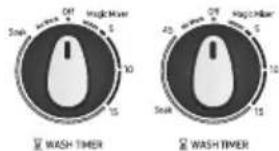
वॉश टाइमर सेट करें 1–15 मिनट (के अनुसार) वॉश टाइमर सेट करें 1–45 मिनट (के अनुसार) (वॉश टाइमर को 15 से 45 मिनट के बीच धोने के लिए रखे )
भिगोने के लिए
यदि वाश टाइमर को 15 से 45 मिनट के बीच रखा गया है तो शुरू के 35 मिनट भिगोने के बाद ही 15 मिनट तक मशीन द्वारा कपड़ों की घुलाई होती है । घुलाई के दौरान भिगोने की क्रिया हर 1.5 से 2 मिनट तक चलती है तथा पूरे 35 मिनट के बाद चक्र को पूरा किया जाता है ।
- धुलाई के बाद झेन सेलेक्टर बटन को झेन पर ले जाएं।

कपडे सुखाना
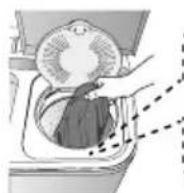
- कपड़ों को ठीक दंग से समान रूप से दबाकर स्पीन टब में डाले।
Bottom of balancer
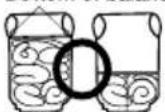

safety cover
- इनर लीड को बंद करने तथा सुरक्षा कवर को लगाने का हमेशा ध्यान रखें ।

- स्पीन झायर लीड को बंद करें ।

- स्पीन झायर का समय 1 से 10 मिनट पर सेट करें।
स्पीन झायर का समय 1 से 10 मिनट सुविधा के अनुसार चुने ।

- यदि घूमने (स्पिन) के दौरान तेजी से मशीन हिले या अस्थिर हो जाए तो पेज नम्बर 9 पे देखें (स्पिन बास्केट में कपड़े डालते समय.....)
खंगालना
- झेन सेलेक्टर नाँब को वॉश मोड में सेट करें।

DRAIN SELECTOR
-
पानी की सही मात्रा मशीन में डाले, ध्यान रहे पानी वॉश टब के ऊपर से बाहर न निकलें ।
-
वॉश टाइमर को 2 से 3 मिनट के बीच में रखे ।


- पानी बाहर निकाले, झ्छन सेलेक्टर बटन को झ्छन पर रखे ।

-
झेन वाटर साफ होने तक इसी चक्र को 2 से 3 बार दोहराएँ।
-
ध्यान रहे कि ड्रेन होज को नीचे अच्छी तरह से रखें।
*Note - स्पिन शावर के दौरान, अगर पानी वाश टब में आता है, तो पानी के प्रवाह को कम करें।
ओवर फ्लो खंगालना
- पानी की सप्लाई चालू रखें।

पानी के दबाव को इस तरह बनाए रखें ताकि मर्शीन के अंदर जाने वाला पानी झ्रेन से बाहर निकलने वाले पानी की मात्रा से ज्यादा न हो।
- वॉश टाइमर को 6 से 8 मिनट के बीच रखे ।

MASH TIMER
- वॉश टाइमर के बंद होते ही नल बंद कर दे ।

WASH TIMER

Y WASH TIMES

- झेन सलेक्टर बटन को झेन पर ले जाए।
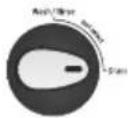
DRAN SELECTOR
अतिरिक्त्र खंगालना
खंगालने की प्रक्रिया के बाद आप इस्त तरीके का चुनाव ज्यादा प्रभावी ढंग से खंगालने के लिए कर सकते हैं। (केवल खंगालने के लिए इसका प्रयोग ना करे )
- स्पीन टब में कपड़ों को समान रूप से फैलाएं।

(a)
- वॉटर सेलेक्टर बटन को स्पीन तथा झ्नेन सेलेक्टर बटन को झ्नेन मोड पर रखे ।


DRAIN SELECTOR
- पानी की सप्लाई को 1 मिनट के लिए चालू करें। पानी के बहाव को नियंत्रित करने के बाद लॉड़ी को सुरक्षा के साथ ढङके।

- पानी की सप्लाई बंद करने के बाद कपड़ों को सुरक्षा कवर तथा इनर लीड सै ढक दें।
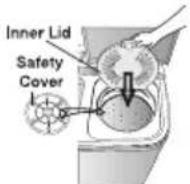
- स्पीन झायर लीड को बंद करें ।

- स्पीन झायर टाइमर को 2 से 3 मिनट के बीच रखें ।

© SPIN TIMER
कपड़ो की धुलाई पर सुझाव
धुलाई का समय
| कपड़ों के प्रकार | घुलाई का समय | वाशिंग का चुनाव |
| बेहद गंदे भारी कपड़े | 10 से 15 मिनट | Heavy हैवी |
| चादर, सूती कपड़े | 8 से 10 मिनट | |
| सामान्य कपड़े (अंडर वियर, आदि) | 7 मिनट | Normal / Gentle |
| हल्के गंदे सिंथेटिक कपड़े | 2 से 5 मिनट | |
| शत प्रतिशत ऊनी. मिश्रित ऊनी स्वेटर नाजुक सिंथेटिक कपड़े जिनको हाथ से धुला जाना हो। | 2 से 5 मिनट |
डिटर्जॉंट (वाशिंग पाउडर)
| 7.5 किलोग्राम क्षमता | |
| डिटर्जेंट की मात्र | पानी का स्तर |
| 42 ग्राम | कम 64 लीटर |
| 52 ग्राम | मध्यम 72.5 लीटर |
| 62 ग्राम | अधिक 81 लीटर |
डिटर्जैंट (वाशिंग पाउडर)
| 8.0/8.5 किलोग्राम क्षमता | |
| डिटर्जैट की मात्र | पानी का स्तर |
| 42 ग्राम | कम 64 लीटर |
| 52 ग्राम | मध्यम 72.5 लीटर |
| 62 ग्राम | अधिक 81 लीटर |
- डिटर्जैंट की मात्रा सामान्य है ।
- पैकेट पर लिखी गई मात्रा के अनुसार डिटर्जेंट का प्रयोग करें ।
- कपड़ों के अनुसार डिटर्जेंट का प्रयोग करें ।
कपड़े सुखाने का समय
| कपड़ों का प्रकार | समय |
| नाजुक सिंधेटिक कपड़े | 1 मिनट |
| ऊनी कपड़े | 1 से 2 मिनट |
| सूती कपड़े | 3 से 5 मिनट |
| मोटे सूती कपड़े | 10 मिनट( एयर टर्बों ) |
8_ कपड़ो की धुलाई पर सुझाव
स्पिन बास्केट में कपड़े डालते समय
चित्र के अनुसार कपड़ों को दबाकर समान रूप से फैलाएं तथा स्पीन बास्केट ड्रूम के ऊपर सुरक्षा कवर लगाए।

अगर कपड़े बास्केट तथा टब के बीच में गिर गए हो तो
- सुरक्षा के लिए पावर सप्लाई प्लग को पावर सॉकेट से निकाले ।
- स्पीन झायर हैच मशीन के ऊपर किनारे पर दो जगह पर उतल एवं अवतल हिस्सों से जुड़ा है। दोनों हिस्सों को फैलाकर स्पीन झायर हैच को निकाले ।
- फँसे हुए कपड़ों को निकाले ।
- स्पीन झायर हैय को बंद करें। हैय को अंदर की ओर अच्छी तरह दबाएं ताकि ऊपर बने हुक में यह अच्छी तरह यह फॉस जाए।

समस्या तथा उपाय
| समस्या | जांच बिंदु | |
| वाशिंग मशीन काम नहीं कर रहा है । | पावर मशीन तक नहीं पहुंच पा रहा है। जांच लें कि पावर कॉर्ड अच्छी तरह पावर सॉकेट से जुड़ा है । | |
| कपड़े आसानी से घूम नहीं रहे हैं । | क्या मशीन में वजन से ज्यादा कपड़े डाले गए हैं ? | |
| मशीन का तेजी से हिलना अस्थिर हो जाना तथा अचानक घूमना रुक जाना। | क्या कपड़े टब में समान रूप से दबा कर रखे गए हैं? चित्र के अनुसार कपड़ों को दबाकर समान रूप से फैलाएं तथा स्पीन बास्केट झम के ऊपर सुरक्षा कवर लगाए।● पेज 9 पर (अगर कपड़े बास्केट ......) देखें । | |
| पानी का नहीं निकलना | सुनिश्चित करें कि झेन होज नीचे समतल पर रखा गया हो।● पेज संख्या 3 देखें । | |
| स्पीन झायर बास्केट चल नहीं रहा है । | क्या स्पीन झाई लीड को अच्छी तरह बंद किया गया है? क्या मोजे आदि छोटे कपड़े स्पीन झायर बास्केट से बाहर निकलकर एक्सेल में फौस गए हैं ? अगर कपड़े बास्केट तथा टब के बीच में गिर गए हो तो● पेज 9 पर (अगर कपड़े बास्केट ......) देखें । | |
| पानी तुरंत बाहर निकल जा रहा है । | क्या झेन सेलेक्टर बटन झेन पर है ?क्या झेन होज में गंदगी जम गई हैं ?● झेन हुक के ऊपर झेन होज को लटकाए। वाश टब को पानी से आधा भरकर फिर से पानी निकालने का प्रयास करें। जमी गंदगी पानी के दबाव से निकल जाएगी । | |
| पलसेटर घूम नहीं रहा है । | मशीन अधिकतम 5 मिनट तक रूक सकती हैयदि वाश टाइमर को 15 मिनट से ज्यादा के लिए चुना गया हो। हो सकता है कि अभी भी भिगोने की क्रिया चालू हो। यह कोई मशीनी खराबी नहीं है।• सलेक्टर बटन (नाब) की स्थिति जाँवें। यह कभी भी नो वर्क के स्थान पर नहीं होना चाहिए । |  |
| स्पीन बास्केट नहीं घूम रहा है | • सेलेक्टर बटन को जांचें। यह कभी भी 'नो वर्क' के स्थान पर नहीं होना चाहिए। |  |
| क्षमता | मॉडल | वॉश |
| WT75B3200GD 7.5 | किलो | |
| WT75B3200GG | 7.5 किलो | |
| WT75B3200LL | 7.5 किलो | |
| WT75B3200RR | 7.5 किलो | |
| WT85B4200GD 8.5 | किलो | |
| WT85B4200GG | 8.5 किलो | |
| WT85B4200LL | 8.5 किलो | |
| WT85B4200RR | 8.5 किलो | |
| WT85C4200GG | 8.5 किलो | |
| WT80C4200GG | 8.0 किलो | |
| WT80C4000RR | 8.0 किलो | |
| WT75C3200GG | 7.5 किलो | |
| आकार (चौड़ाई × गहराई × ऊंचाई) मिली मीटर (7.5Kg) | 830 चौड़ाई × 485 गहराई ×1000 ऊंचाई | |
| आकार (चौड़ाई × गहराई × ऊंचाई) मिली मीटर (8.0Kg / 8.5Kg) | 830 चौड़ाई × 485 गहराई ×1030 ऊंचाई | |
| पानी का दबाव | 0.05 ~ 0.3 Mpa0.5 ~ 3.0 kg.f/cm2 | |
| भार (7.5Kg) | 23.70 किलोग्राम | |
| भार (8.0Kg / 8.5Kg) | 24.50 किलोग्राम | |
| पानी की मानक मात्रा | 81 लीटर | |
* उर्जा लेबल विनिर्देशों IEC 60456 के अनुसार निम्नलिखित कार्यक्रम का उपयोग करके निर्धारित किया जाता है।
* 7.5 किलोग्राम के लिए – वॉश प्रोग्राम है – 15 मिनट ->रीन्स 10 मिनट-> स्पिन- 5 मिनट-> स्पिन- 5 मिनट, (वॉश सेलेक्टर- डलीकेट, जल-स्तर: ज्यादा से ज्यादा, स्पिन वजन: आधा+आधा
* 8.5 किलोग्राम के लिए - वॉश प्रोग्राम है - 15 मिनट ->रीन्स 10 मिनट-> स्पिन- 5 मिनट -> स्पिन- 5 मिनट, (वॉश सेलेक्टर- डलीकेट, जल-स्तर: ज्यादा से ज्यादा, स्पिन वजन: आधा+आधा
* 8.0 किलोग्राम के लिए – वॉश प्रोग्राम है – 12 मिनट->रीन्स 8 मिनट-> स्पिन- 3 मिनट-> स्पिन- 3 मिनट, (वॉश सेलेक्टर- डलीकेट, जल-स्तर: ज्यादा से ज्यादा, स्पिन वजन: आधा+आधा
वारंटी शर्तें
इन मामलों में वारंटी लागू नहीं होगी
-
मरम्मत का अनुरोध या मशीन दुरुस्त करते वक्त सर्विस इंजीनियर को वारंटी कार्ड के साथ सभी कागजात नहीं दिए गए हो ।
-
उत्पाद को Samsung के अधिकृत विक्रेता से नहीं खरीदा गया हो।
-
जब कंपनी प्रतिनिधि द्वारा यह निर्धारित किया गया हो कि खरीदे गए उत्पाद को निर्देश मेनुअल मैं बताए गए तरीकों के अनुसार प्रयोग में नहीं लाया गया है।
-
अधिकृत सर्विस सेंटर या कंपनी प्रतिनिधि द्वारा यह निर्धारित किया गया हो कि खराबी गलत तरीकों से इस्तेमाल के कारण हुई है।
-
जब कंपनी प्रतिनिधि द्वारा यह निर्धारित किया गया हो कि खरीददार या अनाधिकृत व्यक्ति द्वारा इलेक्टिकल सर्किंट में किसी प्रकार का बदलाव या संशोधन किया गया हो ।
-
यदि वाशिंग मशीन का व्यवसायिक या पब्लिक जगह पर जैसे कि होटल प्रशिक्षण केंद्र तथा ऐसे दूसरे कामों में उपयोग किया गया हो तो उस स्थिति में वारंटी प्रभावी नहीं होगी ।
-
उत्पाद पर से असली क्रम संख्या हटाया बदला या खुरच दिया गया हो।
-
जब बिजली गिरने अनियंत्रित वोल्टेज, प्राकृतिक आपदा या सर्विस सेंटर से खरीददार के घर ले जाते वक्त्र अपने नियंत्रण से बाहर मामलों के फलस्वरूप खराबी आ गई हो।
-
मशीन संस्थापना के बाद मशीन के लेवल होज तथा नल एडाप्टर की स्थिति में बदलाव किया गया हो ।
-
वैसे मामलों में जहां वाटर झ्नेज, स्पीन या चेतावनी की ध्वनि जिसे मशीन चलने के दौरान सामान्य माना जाता है।
-
सिक्के, सेफटी पिन, बटन, हुक, जमी हुई गंदगी आदि बाहरी चीजों के साथ—साथ झेन वाल्व तथा इनर होज फिल्टर को मशीन से निकालने के मामलों में वारंटी लागू नहीं होगी ।
-
वैसी स्थिति में में जब की खराबी या नुकसान घर के बिजली के तार या फ्यूज बदलने, प्लंबिंग काम के दौरान या फिर पालतू जानवरों, चूहों, तिलचट्टो या अन्य किसी प्रकार के जानवर या कीट पतंगों के कारण हुआ हो।
वारंटी शतों के लिए वारंटी कार्ड देखें।
SAMSUNG
प्रश्न या सुझाव
| देश | सम्पर्क करें | या आनलाइन देखें |
| भारत | 1800 40 7267864(1800 40 SAMSUNG)1800 5 7267864(1800 5 SAMSUNG) | www.samsung.com/in/support |
- Washing Machine user manual
- contents
- FEATURES 2
- SAFETY INSTRUCTIONS .....2
- DESCRIPTION OF PARTS 4
- CONTROL PANEL 5
- INSTALLATION 6
- CLEANING THE MACHINE....6
- WASHING PROCEDURE 6
- LAUNDRY GUIDE 8
- MAINTENANCE 9
- TROUBLESHOOTING 9
- SPECIFICATIONS....10
- Instructions about the WEEE
- Correct Disposal of This Product (Waste Electrical & Electronic Equipment)
- features
- • Double Storm Pulsator
- • Air turbo Drying system
- • Transparent Lids (option)
- - Magic Filter
- safety instructions
- cautions
- - Be sure that the washing machine is grounded.
- - Do not put your hands into the spin dryer basket when it is spinning.
- ⚠️ precautions when operating
- 4\_ description of parts
- Environment
- Connecting the drain hose
- General type
- Connecting the inlet hose
- cleaning the machine
- Cleaning the Magic filter
- Cleaning the wash tub
- washing procedure
- Washing
- SOAK FUNCTION(option)
- Spinning dry
- Rinsing
- Over flow rinse
- Additional rinse
- laundry guide
- 8\_ laundry guide
- WHEN YOU LOAD THE LAUNDRY INTO THE SPIN BASKET.
- TO PICK OUT THE CLOTHING WHICH HAS FALLEN BETWEEN THE BASKET AND TUB.
- troubleshooting
- Terms of Warranty
- Warranty not applicable in any of the following cases
- Warranty Card
- CUSTOMER DETAILS CUM WARRANTY CARD
- The Warranty shall be null and void in any of the following cases, and in such cases Samsung may at its sole discretion repair the equipment on a chargeable basis. The decision of Samsung, whether a complaint falls in any of these categories or not shall be binding on the Purchaser.
- SAMSUNG
- Washing Machine
- उपभोक्ता निर्देशिका
- विवरणी
- 2\_ विवरणी
- गुण
- - डबल स्टॉर्म पल्सेटर
- - एयर टबों झाइंग सिस्टम
- - पारदर्शीं लीड(यदि चयनित हो)
- - मैजिक फिल्टर
- सुरक्षा निर्देश—
- चेतावनी-
- ⚠️ मशीन संचालन में सावधानियां-
- CAUTION गरम पानी की सप्लाई से मशीन को ना जोड़े।
- CAUTION हयर पिन तथा सिक्क मशान तथा कपड़ा का नुकसान पहुंचा सकते हैं। इससे मशीन में आवाज के साथ परेशानी भी पैदा हो सकती है। पाँकेट को जरुर जांच करें।
- कपड़ों के साथ बाहरी चीजें जैसे चाबी, पिन, कील, नुकीली वस्तुएं व सिक्के टब में न डालें। कृपया सुनिश्चित करें कि सभी धातु की चीजें जैसे बककल/ जिपर/हुक अन्दर की तरफ मुड़े हों।
- आस-पास का वातावरण
- सामान्य प्रकार के ड्रेन होज को जोड़ना-
- इनलेट होज को जोड़ना
- मैजिक फिल्टर साफ-सफाई
- वॉश टब की साफ-सफाई
- धुलाई का तरीका
- घुलाई
- भिगोने के लिए
- कपडे सुखाना
- खंगालना
- ओवर फ्लो खंगालना
- अतिरिक्त्र खंगालना
- कपड़ो की धुलाई पर सुझाव
- धुलाई का समय
- डिटर्जॉंट (वाशिंग पाउडर)
- डिटर्जैंट (वाशिंग पाउडर)
- कपड़े सुखाने का समय
- स्पिन बास्केट में कपड़े डालते समय
- अगर कपड़े बास्केट तथा टब के बीच में गिर गए हो तो
- समस्या तथा उपाय
- वारंटी शर्तें
- इन मामलों में वारंटी लागू नहीं होगी
Marka : SAMSUNG
Model : WT80B4200LL
Kategoria : Pralka