ENTRYpro 7072 REMOTE - Sejf BURG WACHTER - Bezpłatna instrukcja obsługi
Znajdź bezpłatnie instrukcję urządzenia ENTRYpro 7072 REMOTE BURG WACHTER w formacie PDF.


| Typ produktu | Sejf elektroniczny |
| Model | ENTRYpro 7072 REMOTE |
| Marka | BURG WACHTER |
| Wymiary zewnętrzne (wys. x szer. x gł.) | 70 x 50 x 45 cm |
| Waga | ok. 50 kg |
| Pojemność | 100 l |
| Materiał | Stal wysokogatunkowa |
| Rodzaj zamka | Elektroniczny + pilot zdalnego sterowania |
| Zasilanie | 4 baterie AA (zapasowa bateria awaryjna) |
| Funkcje | Otwieranie pilotem, kod cyfrowy, alarm wstrząsowy, podświetlenie klawiatury |
| Bezpieczeństwo | Kotwy montażowe, drzwi dwuścienne, rygle stalowe |
| Zestaw zawiera | Sejf, pilot, klucze awaryjne, instrukcja obsługi, śruby montażowe |
| Kolor | Czarny (lub antracyt) |
| Konserwacja i czyszczenie | Przecierać wilgotną szmatką, nie używać środków ściernych |
| Gwarancja | 2 lata |
Często zadawane pytania - ENTRYpro 7072 REMOTE BURG WACHTER
Pytania użytkowników dotyczące ENTRYpro 7072 REMOTE BURG WACHTER
0 pytanie dotyczące tego urządzenia. Odpowiedz na te, które znasz, lub zadaj własne.
Zadaj nowe pytanie dotyczące tego urządzenia
Pobierz instrukcję dla swojego Sejf w formacie PDF za darmo! Znajdź swoją instrukcję ENTRYpro 7072 REMOTE - BURG WACHTER i weź swoje urządzenie elektroniczne z powrotem w ręce. Na tej stronie opublikowane są wszystkie dokumenty niezbędne do korzystania z urządzenia. ENTRYpro 7072 REMOTE marki BURG WACHTER.
INSTRUKCJA OBSŁUGI ENTRYpro 7072 REMOTE BURG WACHTER


Elektronisches Türschloss secuENTRY pro 7072 REMOTE
m Download: www.burg.biz
Download: www.burg.biz
Download: www.burg.biz
Download: www.burg.biz
Descarga: www.burg.biz
pe Download: www.burg.biz
Download: www.burg.biz
60 Download: www.burg.bz
Download: www.burg.biz
n. Ladattava tiedosto: www.burg.biz
a) https://www.burg.biz
Indir: www.burg.biz
20 Descarcane: www.burg.hiz
Pobiaranie pliku: www.burg.biz
7 Stáhnout: www.burg.biz
by Letalthefo: www.burg.biz
Download: www.burg.biz
Download: www.bing.biz
ar Download: www.burg.biz
N zorpyaka: www.burg.biz
65 Download (arredei) www.burg.biz
et Download: www.burg.biz
BW Remote BA sE 013120
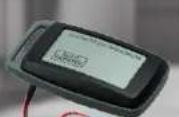
Bedienungsanleitung
Spannungsversorgung: stabilisiertes Netzteil (5V-12V)
Mit dem secuENTRY pro 7072 REMOTE haben Sie die Möglichkeit secuENTRY Zylinder und das secuENTRY pro 7071 RELAY zu schalten.
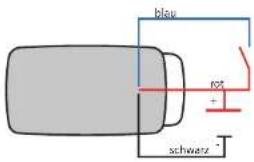
Das secuENTRY pro 7072 REMOTE wird durch einen potentialfreien Schaltkontakt mit einer Impulsdauer von 0,5-1 Sekunde ausgelöst. Der potentialfreie Kontakt muss zwischen dem blauen Anschlussdraht und dem Pluspol (roter Anschluss) der Versorgungsspannungsquelle angeschlossen werden.
Bitte schließen Sie die Drante entsprechend dem Diagramm an.
Wichtig: Bei Schaden durch Fehinstallation erlischt jeglicher Gewährleistungsanspruch. Die BURG-WÄCHTER KG behält sich das Recht vor, ohne vorherige Mittelung, Änderungen bezüglich Produkt, technischer Daten oder der Bedienungsanleitung vorzunehmen. Bitte lesen Sie die Bedienungsanleitung vor Inbetriebnahme genau durch. Die Montage sollte nur mit entsprechenden Fachkenntnissen ausgeführt werden. Das secuENTRY pro 7072 REMOTE ist nicht für die Außenbereichsnontage vorgesehen, sie sollte somit keiner direkten Bewitterung ausgesetzt werden. Wir empfehlen für Sicherheitsanwendungen die Montage in einem gesicherten Bereich vorzunehmen.
QR-Code
Jedern secuENTRY pro 7072 REMOTE liegt ein QR-Code bei. Dieser QR-Code wird bei der Einrichtung der Schaltmöglichkeit über die secuENTRY Software benötigt.
Achtung! Bei Verlust des QR-Codes ist ein Anlernen des secuENTRY pro 7072 REMOTE nicht mehr möglich und kann deshalb nicht mehr verwendet werden. Bitte bewahren Sie den QR-Code sorgfältig auf!
Tipp: Der QR-Code kann auch in elektronischer Form als Datei eingescannt oder als Foto auf einem geschützten Datenträger gespeichert werden.
Inbetriebnahme
Das secuENTRY pro 7072 REMOTE fungiert als Schalteinheit, die über die PC Software in ihre Schließung eingebunden wird. In dieser Anleitung wird nur die Vorgehensweise zum Einbinden des secuENTRY pro 7072 REMOTE aufgezeigt, näherer Einzelheiten entnehmen Sie bitte der Anleitung der PC-Software.
Anlernen des secuENTRY pro 7072 REMOTE
Zum Anlernen an die PC-Software muss der QR-Code gescannt werden.
• Schließen Sie eine Web-Cam an
- Wahlen Sie mit einem Rechtsklick unter Benutzer in der
Administration das Feld Seriennummer aus
- Wählen Sie QR-Code einscannen und dann Key/Remote scannen
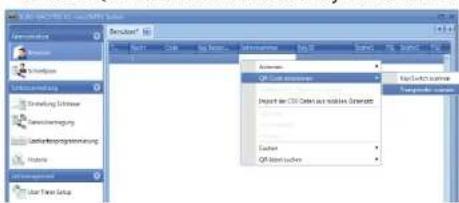
Abb.1: Transponder einscannen
- Halten Sie den QR-Code so vor die Kamera, dass dieser erfasst wird Bitte beachten Sie, dass der QR-Code des Key/Remote folgende Angaben enthält: (UID, BW, und Type)
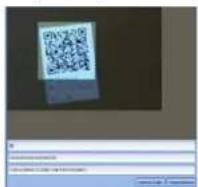
Abb.2: QR-Code einscannen
- Drücken Sie Capture, die Daten werden übernommen
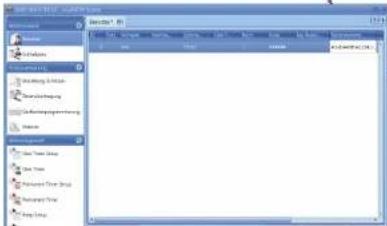
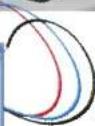
Abb.3: Benutzerverwaltung
- Drücken Sie Speichern, die Daten werden übernommen
Programmiermodus
Für das secuENTRY pro 7072 Remote kann über die PC-Software eine 1:1 oder eine 1:n Zuweisung der einprogrammierten Schlösser erfolgen. Für diese Einstellung muss sich das Remote im Programmierstatuts befinden. Dazu muss der Kontakt zwischen dem blauen Anschlussdraht und dem roten Fluspol für 10 Sek. geschlossen werden und das Remote wechselt für 405ek. In den Programmierstatus. Weitere Details zu den Zuweisungsmöglichkeiten können Sie der Anleitung der PC-Software entnehmen.
Gewährleistung
Um Ihnen ein qualitativ einwandfreies und hochwertiges Produkt zu liefern und Ihnen im Service- oder Reparaturfall optimal zu helfen, ist es erforderlich, dass fehlerhafte oder defekte Geräte zusammen mit dem QR-Code bei Ihrem Händler mit dem Originalkaufbeleg vorgelegt werden.
Entsorgung des Gerätes
Sehr geehrter Kunde,
bitte helfen Sie Abfall zu vermeiden. Sollten Sie zu einem Zeitpunkt beabsichtigen, dieses Gerät zu entsorgen, denken Sie bitte daran, dass viele Bestandteile dieses Gerätes aus wertvollen Materialien bestehen, welche man recyclein kann.

Wir weisen darauf hin, dass Elektro- und Elektronikgeräte sowie Batterien, nicht über den Hausmüll, sondern getrennt bzw. separat gesammelt werden müssen. Bitte erkundigen Sie sich bei der zuständigen Stelle in Ihrer Stadt / Gemeinde nach Sammelstellen für Batterien und Elektromüll.

Bei Fragen zur EG-Konformitätserklärung wenden Sie sich bitte an die info@burg.biz.
Druck- und Satzleitler sowie technische Änderungen vorbehalten,

Instructions for use
Power supply: Stabilised mains adapter (5V - 12V)
With the secuENTRY pro 7072 REMOTE you have the chance to switch a secuENTRY cylinder and the secuENTRY pro 7071 RELAY. The secuENTRY pro 7072 REMOTE is being initiated by a
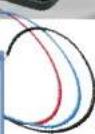
potential-free switch contact with an impulse duration of 0.5-1 second. The potential-free contact has to be connected between the blue connecting wire and the positive pole (red connector) to the voltage source.
Please connect the wires according to the diagram.
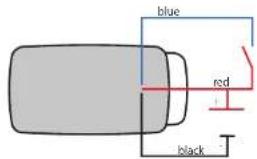
Important: With damage due to wrong installation, the warranty claim expires. The BURG-WÄCHTER KG reserves the right to make changes regarding the product, technical data or the user manual without prior notice.
Please read the instruction manual carefully before commissioning. The installation should only be performed with the necessary knowledge. The secuENTRY pro 7072 REMOTE is not constructed for exterior assembly, it should not be exposed to direct weather. For secure appliance we advise you to conduct the assembly in a weather protected area.
QR code
Enclosed to every secuENTRY pro 7072 REMOTE is a QR code. This QR code is required for setting up the switching possibilities via the secuENTRY software.
Attention! With a loss of the QR code, the secuENTRY pro 7072 REMOTE cannot be introduced to the software and is therefore unusable. Please store the code away safely!
m Download: www.burg.biz
Download: www.burg.biz
Download: www.burg.biz
Download: www.burg.biz
Descarga: www.burg.biz
Download: www.burg.biz
- Download: www.burg.biz
no Download: www.burg.bz
Download: www.burg.biz
n Ladattava tiedosto: www.burg.biz -
-
-
-
-
-
-
-
-
-
-
-
-
-
-
-
-
-
-
-
-
-
-
-
-
-
-
-
-
-
-
-
-
-
-
-
-
-
-
-
-
-
-
-
-
-
-
-
-
-
-
-
-
-
-
-
-
-
-
-
-
-
-
-
-
-
-
-
-
-
-
-
-
-
-
-
-
-
-
-
-
- Indir:www.burg.biz
-
-
-
-
-
-
-
-
-
-
-
-
-
-
-
-
-
-
-
-
-
-
-
-
-
-
-
-
-
-
-
-
-
-
-
-
-
-
-
-
-
-
-
-
-
-
-
-
-
-
-
-
-
-
-
-
-
-
-
-
-
-
-
-
-
-
-
-
-
-
-
-
-
-
-
-
-
-
-
-
m Descarcane: www.burg.hiz
N. Pobiaranie pliku: www.burg.biz
a Stáhnout: www.burg.biz
by Letaltheto: www.burg.biz
Download: www.burg.biz
Download: www.bing.biz
ar Download: www.burg.biz
N загруза: www.burg.biz
63 Download (наредии) www.burg.biz
et Download: www.burg.hiz
BW Remote BA sE 013120
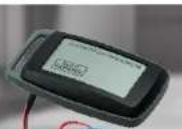
Tip: The QR-code can also be scanned in electronic form as a file or saved as a photo onto a protected data carrier.
Commissioning
The secuENTRY pro 7072 REMOTE functions as an evaluation unit that is integrated into your locking environment via the PC software. This instruction manual demonstrates only the procedure for incorporating the secuENTRY pro 7072 REMOTE, learn more details from the instructions for the PC software.
Instructing the secuENTRY pro 7072 REMOTE
For instruction to the software, the QR code needs to be scanned. - Connect a webcam
- Right-click in the user administrator menu on the field "Serial Number"
- Select "Scan QR-Ident" and afterwards "Scan Key/Switch"
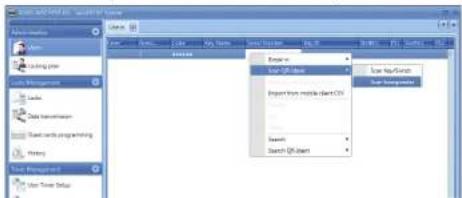
III.1: Scanning of the transponder
- Hold the QR code in front of the camera so that it can be read properly. Please note that the QR code of the Key/Remote includes the following information: (UID, BW and Type)
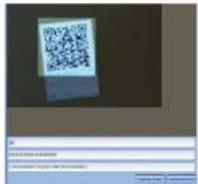
III.2: Scanning QR code
- Click Capture so that the data can be saved
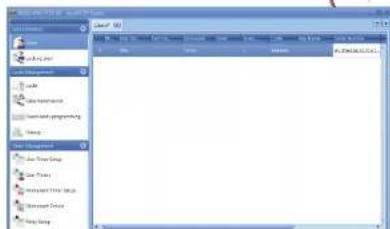
III.3: User administration
- Click Save - the data is transferred
Programming mode
The secUENTRY pro 7072 Remote can be assigned via the PC software as 1:1 or 1:n to the programmed locks. For this setting, the Remote must be in programming mode. This requires the contact between the blue lead wire and the red positive pole for 10 sec. to be closed and the remote switches for 40 sec. to the programming mode. Further details on the allocation options can be found in the manual of the PC software.
Warranty
To provide you with a qualitative impeccable and valuable product and to optimally help you in the case of service or repair, it is necessary that flawed or defective devices are handed back to your retailer together with the QR code and the original proof of purchase.
Disposal of your device
Dear customer,
please help to avoid waste. If you consider to dispose of this device, please note that many components of it consist of valuable materials that can be recycled.

We point to the fact that electric and electronical devices as well as batteries are not to be disposed via household rubbish but need to be collected separately. Please inform yourself at your local competent authority about respective collecting points for batteries and electric waste.

For questions about the EG declaration of conformity please contact info@burg.biz.
Printing and typographical errors as well as technical alterations reserved.