
HDAW-203 - Rozdzielacz Monacor - Bezpłatna instrukcja obsługi
Znajdź bezpłatnie instrukcję urządzenia HDAW-203 Monacor w formacie PDF.


| Produkt | Rozdzielacz HDMI z funkcjami audio |
| Marka | Monacor |
| Model | HDAW-203 |
| Rodzaj | Rozdzielacz / Ekstraktor / Embedder audio |
| Wymiary (szer. x wys. x gł.) | 205 x 74 x 26 mm |
| Waga | 363 g |
| Zasilanie | Zasilacz sieciowy: 100-240 V AC, 50/60 Hz; wyjście: 5 V DC / 1 A |
| Pobór prądu (maks.) | 500 mA |
| Rozdzielczość HDMI | 480i/p, 576i/p, 720p, 1080i/p, 2160p (4K) @24/30/50/60 fps |
| Głębia kolorów | 24/30/36-bit przy 1080p; 24-bit przy 2160p |
| Obsługiwane formaty audio HDMI | DTS-HD, Dolby TrueHD, LPCM 7.1, DTS, Dolby AC3, DSD |
| Wyjście audio cyfrowe (Toslink/Coax) | Formaty: LPCM 2.0, Dolby AC3, DTS; próbkowanie do 192 kHz (LPCM 2.0) |
| Wejście audio cyfrowe (Toslink/Coax) | Formaty: LPCM 2.0, Dolby AC3, DTS; próbkowanie do 96 kHz |
| Wejście/wyjście audio analogowe (L/R) | Maks. napięcie: 2 V P-P; pasmo: 70 Hz – 16 kHz |
| Maks. długość kabla HDMI | ≤8 m (kabel AWG26) |
| Zakres temperatury pracy | 0°C do +40°C |
| Wilgotność pracy | 5–85% RH (bez kondensacji) |
| Funkcje specjalne | ARC, EDID (2.0/5.1/Passthrough), ekstrakcja/embedowanie audio, tryb gotowości |
| Złącza | 1x HDMI wejście, 1x HDMI wyjście, 1x Toslink wejście, 1x Toslink wyjście, 1x Coax wejście/wyjście, 1x L/R wejście/wyjście (RCA), gniazdo DC 5 V |
| Wyposażenie | Zasilacz 5 V/1 A, pilot zdalnego sterowania, instrukcja obsługi |
| Zastosowanie | Systemy AV, konferencje, kino domowe |
| Gwarancja | Standardowa gwarancja producenta |
Często zadawane pytania - HDAW-203 Monacor
Pytania użytkowników dotyczące HDAW-203 Monacor
0 pytanie dotyczące tego urządzenia. Odpowiedz na te, które znasz, lub zadaj własne.
Zadaj nowe pytanie dotyczące tego urządzenia
Pobierz instrukcję dla swojego Rozdzielacz w formacie PDF za darmo! Znajdź swoją instrukcję HDAW-203 - Monacor i weź swoje urządzenie elektroniczne z powrotem w ręce. Na tej stronie opublikowane są wszystkie dokumenty niezbędne do korzystania z urządzenia. HDAW-203 marki Monacor.
INSTRUKCJA OBSŁUGI HDAW-203 Monacor
HDMI Audio Embedded & Extractor
HDAW-203
Dear customer
Thank you for purchasing this product. For optimum performance and safety, please read these instructions carefully before connecting, operating or adjusting this product. Please keep this manual for future reference.
Our series of converters, switchers, extenders, matrixes and splitters are designed to make your A/V device use more convenient, more comfortable, more productive and more cost-efficient.
The device can switch 1 HDMI Inputs to one HDMI Output. It also can support audio extract mode and audio embed mode. Audio Embed mode can let the audio input by the Toslink Port, Coax Port and LR Port and output by the HDMI Output port; Audio extract mode supports 2.0CH,5.1CH and Pass Three audio EDID set; Audio embed mode can choose the Toslink, Coax or LR Audio input by pressing the switch button.
Audio ports can be used as input/output, this design can save the cost/space to let the device become simple at outlook and use.
The deice also supports 4K,ARC feature to make more easier connection between the home entertainment device.
Our devices offer solutions for noise, space and security concerns, data center control, information distribution, conference room presentation, school and corporate training environments.
INTRODUCITON
Feature:
● One HDMI Inputs switch to one HDMI Output
- Support 4K
- By pressing the button at device can do switch between the Audio Extract Mode and Audio Embed Mode
- Coax Port and LR Port can be used as the Input/Output at Audio Extract and Audio Embed mode to reduce the number of port to let device become more simple and easy-use.
- At Audio Extract Mode, Digital Port of Toslink and Coax can support 192Khz Sampling Rate(LPCM2.0 Audio Format)
- At Audio Extract Mode, it supports 2.0CH,5.1CH and Pass Three Audio EDID Set.
- At Audio Embed Mode, Digital Audio Port of Toslink and Coax supports max 96KHz Sampling Rate ( Only when input audio source is LPCM 2.0 Audio Format), also it supports Dolby-AC3 and DTS Audio Format Input. The analog audio (LR Channel) supports max 2V P-P analog audio input.
- It supports ARC. The ARC audio can output by the digital port of Toslink and Coax and the analog LR audio port(analog audio only can output when the ARC Audio source is LPCM 2.0 Audio format).
- Support Power Off Memory Function, it can remember the last working state. When power on again, it can back to the last working state.
● LED Status Light shows clearly the working state.
- HDMI Input and Output distance can be up to 8m using the AWG26 standard HDMI Cable.
- No Loss of Signal
- Easy-Install
● DC5V1A Power Adaptor
Accessories Content:
1、5V/1A Power Adaptor
2、Manual
3、Remote
Physical Connect Port:
Picture 1.0 Front Panel Showing

A: Standby and Start Button
B: Standby Status LED, when light goes bright, the device goes to Standby State.
C: ARC On/Off Button
D: Audio Embed Mode On/Off Button
E: Audio Embed Channel Switch Button
F: EDID Mode Switch Button
G: ARC Status LED Light, when light goes bright, ARC function on.
H: Audio Embed On/Off Led Status Light, when LED light goes bright, Audio Embed function on.
I: Remote IR Window Port
J: At Audio Embed Mode, LR Input Channel LED Status Light.
K: At Audio Embed Mode, Coax Input Channel LED Status Light.
L: At Audio Embed Mode, Toslink Input Channel LED Status Light.
M: EDID 2CH LED Status Light
N: EDID 5.1CH LED Status Light
O: EDID Pass Mode LED Status Light.
Picture 1.1 Rear Panel Showing

A: 5V DC Port
B: HDMI Input Port
C: Digital Audio Toslink Input Port
D: Digital Coax Input/Output Port
E: Analog LR Audio Input/Output Port.
F: HDMI Output Port
G: Digital Audio Toslink Output Port
Remote Button Function Showing


Standby and Start Button, when device is working normally, it will go to Standby status if you press the button and also the Standby Led Status Light will go bright; when press the button again, the device will back to normal working status and the Standby LED Light at device will also off.
EDID:
2CH: EDID 2.0 Button. After press the 2.0 button, the 2.0CH LED light will go bright, and the device will change to support only LPCM 2.0 Audio Format; the source will output LPCM 2.0 audio as the supplied info from the device.
5.1CH: EDID 5.1 Button. After press the 5.1 button, the 5.1CH LED light will go bright, and the device will change to being compliant with Dolby-AC3,DTS ,LPCM2 .0 Audio Format; the source will output the best audio format as the supplied info from the device and the source film supported audio format.
PASS: EDID PASS Button. After press the button, the PASS LED Light will go bright; the device can auto read the sink device supported audio format and feedback it to the source; the source will output the best audio format as the supplied info from the device and the
Note: The EDID button only has effect at the audio format; the video format will depend on your display video support ability. Also some special source will effect only after restart; if you find no effect after you press the EDID button, pls restart the source and check again.
HDMI:
ARC On/Off Button. ARC will on after press the button and ARC LED light at device will go bright; press second time, ARC will off and the ARC LED light will off. ARC Audio will output from the Toslink Port, Coax Port, L/R Port.(LR port only can output the audio when ARC audio source is LPCM 2.0).
When use ARC, pls confirm you have turned on the TV CEC and used the HDMI 1.4V Cable. If no audio out, then pls restart your equipment.
Audio:
Audio Extract Button. When you press the Extract Button, the device Extract function will turn on and the Audio Embed function will off (the Embed Function LED Light and Embed input audio port LED light will both off). The device will do audio extract from the input HDMI signal and outputs it by the Toslink, Coax, L/R audio port.(L/R port only can output audio when the input HDMI audio source is LPCM 2.0).
Embed: Audio Embed Function Button. When you press the Embed button, the Audio Embed function of device will turn on and the Audio Extract Function will off; the Embed LED Light and the audio embed Led light for LR, Coax and Toslink port will off. You can choose to embed the audio to the HDMI output channel by the LR Port, Coax Port or Toslink Port.
Optical, Coax, L/R: Audio Embed Input Selection Port Button, when you press the Optical button, it will choose the Optical Input audio and the Optical LED Light will go bright; the same does when press the Coax or L/R button.
* PIs take out the film at the rear of the remote before you use. PIs insert the film to remote rear if you do not use the remote for long time.
©
Audio Embed Connect Diagram:
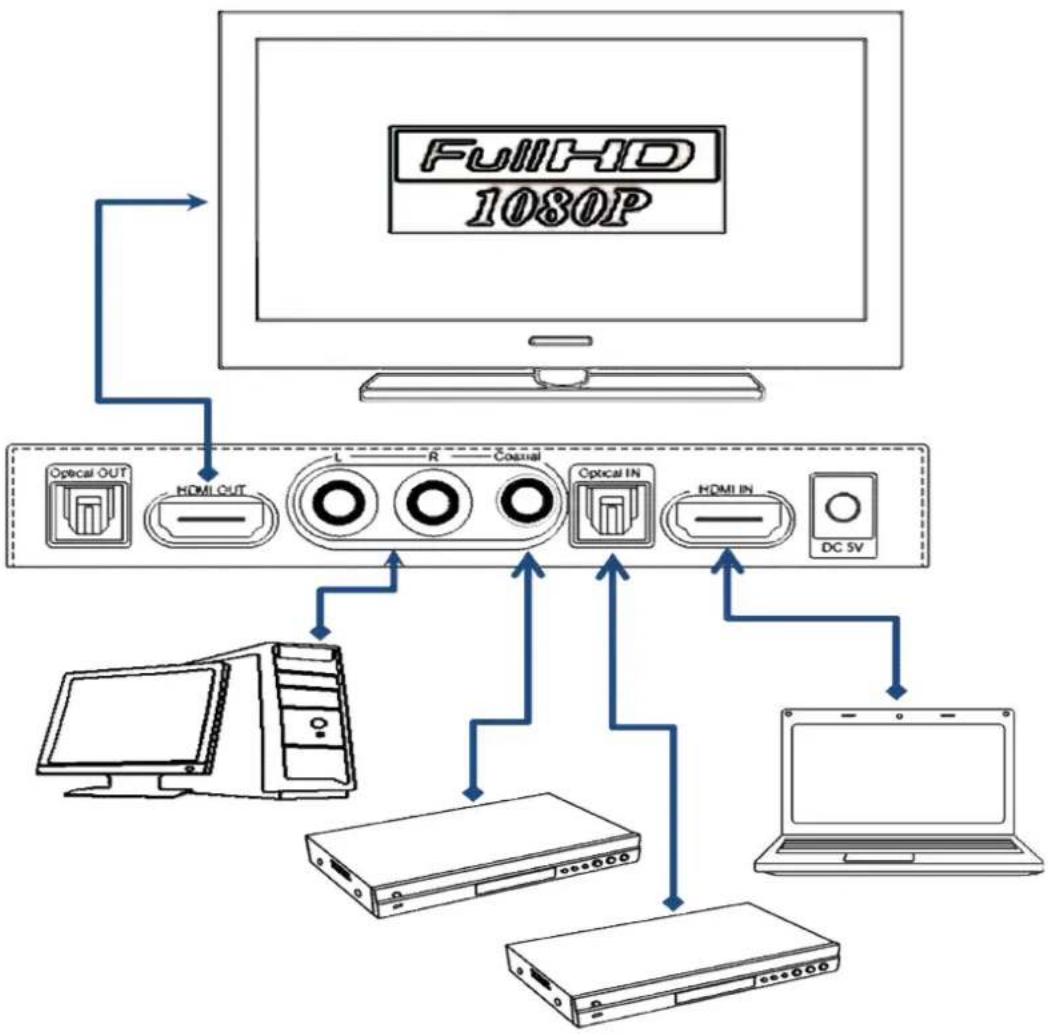
Instruction for operate:

- To use one HDMI Cable to connect the HD Source with the HDMI Input port of device.
-
To use HDMI Cable to connect the HDMI Output port of device with the Display.
-
To use optical cable or coax cable to connect the Toslink output port or coax port with the AV Receiver(Audio Extract Mode)
- To use the analog av cable to connect the LR port of the device with the AV Receiver.(Audio Extract Mode)
- To use the optical cable or coax cable to connect the Toslink input port or coax port of the device with the digital audio input port of Toslink or coax of the Audio source like BD Player or CD Player.(Audio Embed Mode)
- To use analog av cable to connect LR port with the LR input port of the analog audio source like CD Player, PC.(Audio Embed Mode)
- To connect the DC5V power adaptor with the DC5V port of the device.
- To press button“ ” at remote or the button“ ” at device to turn on the device and turn off the device.
- ARC Button: It has same function with the ARC button at remote.
- Audio Embed Button: When press the Embed button, it can turn on or turn off the Audio Embed Function.
- Audio Switch Button: When you press the button, it can switch the Optical,Coax,LR audio to do embed to the HDMI channel. Also the matched LED light will go bright when you have chosen the input audio channel.
- EDID Button: When you press the EDID button, you can select the three Audio EDID Mode like 2.0CH, 5.1CH and Pass. The matched LED light will go bright also after you have chosen the audio EDID set mode.
Spec:
HDAW-203
HDMI Resolution.....24/50/60fs/1080P/1080i/720p/576p/576i/480P/480i,24/30/2160P
Deep Color ....24/30/36bit/1080P/1080i/720p/576p/576i/480P/480i,24bit//2160P
HDMI In/Out Supported Audio Format....
DTS-HD/Dolby-trueHD/LPCM7.1/DTS/Dolby-AC3/DSD
Digital Audio Output Supported Audio Format.....LPCM2.0/Dolby AC3/DTS
Digital Audio Output Sampling Rate....32KHz, 44.1KHz, 48KHz, 88.2KHz,
96KHz, 176.4KHz, 192KHz
Digital Audio Output Max Bandwidth 25MHz
Digital Audio Input Audio Format.....LPCM2.0/Dolby AC3/DTS
Digital Audio Output Sampling Rate......32KHz, 44.1KHz, 48KHz, 88.2KHz, 96KHz
Analog Audio Max Input/Output Voltage.... 2V P_P
Analog Audio Max Input/Output Frequency Range....70Hz\~16KHZ
HDMI Channel Max Bandwidth....300MHz
Input / Output DDC signal.... 5Vp-p(TTL)
HDMI Input Cable Length....≤8m AWG26 HDMI standard cable
HDMI Output Cable Length....≤8m AWG26 HDMI standard cable
Max Working Current....500mA
Power Adaptor Format:.....AC Input (50 /60HZ) :100V-240V;DC Output:5V/1A
Working Temperature Range....(-0 to +40)°C
Working Humidity Range....5 to 85%RH (No Condensation)
Size.... 205x74x26 (mm)
Weight....363g
Notes:
Pls use the machine as the instruction listed to keep the long use lifetime of the machine.
- The machine should be placed at the spot far from the Damp, High-Temperature, Dusty, Erosive, and oxidative environment.
- All parts will be free from the strong shake, hit, fall.
- Touching the power adaptor with the wet hands is prohibited.
- PIs hold the power adaptor head and do not pull the power cord when cut off from the socket.
- PIs turn the power off when the machine is not used for long time.
- Pls do not open the cover and do not touch the inside parts.
- PIs use the original factory power adaptor.
- .It does not support the conversion between DVI and HDMI signal PIs use your signal source and display following the correct process.
Before power on, pls check the connection line carefully. And make sure that all interfaces are normally connected. The common trouble shooting way shows below:
| Serial NO | TroubleDescription | Cause and Ways to deal with |
| 1 Non-Power-Connected | 1、Check if the power adaptor head is truly and correctly inserted the power socket.2、Check the power switch if it is in on status. | |
| 2 No Picture | 1、PIs to make sure that the TV is on and has been connected with the machine,.2、To check if the signal source is on and well | |
| connected.3、Check the system connection quality.4、Check if the line is all good quality.5、Check the cable quality. | ||
| 3 Obscure Picture | 1、To try again to connect the cable to be free from the unsuccessful connection.2、HDMI Cable Quality | |
| 4 No sound | 1、Please confirm the setting position of audio mode switch | |
| 5 Remote | 1、Pls check if the film that stops the current has been taken out.2、To check if the remote battery is working well. | |


Marka : Monacor
Model : HDAW-203
Kategoria : Rozdzielacz