CVXR-A339 - Smartwatch U8 - Bezpłatna instrukcja obsługi
Znajdź bezpłatnie instrukcję urządzenia CVXR-A339 U8 w formacie PDF.


| Typ produktu | Smartwatch |
| Model | CVXR-A339 |
| Marka | U8 |
| Wymiary | 45 x 38 x 10 mm |
| Waga | 50 g |
| Wyświetlacz | 1.3 cala TFT, dotykowy |
| Bateria | 200 mAh litowo-jonowa |
| Czas ładowania | Około 2 godziny |
| Łączność | Bluetooth 4.0 |
| Kompatybilność | Android 4.4+ / iOS 8.0+ |
| Wodoodporność | IP67 (krótkie zanurzenie do 1 m) |
| Czujnik tętna | Tak, optyczny |
| Krokomierz | Tak |
| Monitor snu | Tak |
| Powiadomienia | SMS, połączenia, aplikacje |
| Funkcje sportowe | Bieganie, chodzenie, jazda na rowerze |
| Materiał paska | Silikon |
| Złącze ładowania | Magnetyczne, 2-pinowe |
| Konserwacja | Przecierać miękką suchą szmatką; unikać kontaktu z chemikaliami |
| Bezpieczeństwo | Nie demontować; nie wystawiać na wysokie temperatury |
Często zadawane pytania - CVXR-A339 U8
Pytania użytkowników dotyczące CVXR-A339 U8
0 pytanie dotyczące tego urządzenia. Odpowiedz na te, które znasz, lub zadaj własne.
Zadaj nowe pytanie dotyczące tego urządzenia
Pobierz instrukcję dla swojego Smartwatch w formacie PDF za darmo! Znajdź swoją instrukcję CVXR-A339 - U8 i weź swoje urządzenie elektroniczne z powrotem w ręce. Na tej stronie opublikowane są wszystkie dokumenty niezbędne do korzystania z urządzenia. CVXR-A339 marki U8.
INSTRUKCJA OBSŁUGI CVXR-A339 U8
Bluetooth Watch Instructions
Thank you for choosing our U8 devices. You can read the manual, a comprehensive understanding of the use of equipment, in fact, with a taste of the function and simple method of operation.
This device is used as long as the brand of intelligent machines are adapted to use intelligent machines can synchronize phonebook and provides a variety of useful features and services to facilitate your work and leisure activities in the smart machine operation.
The Company reserves the right to make any prior notice in the case of the contents of this manual for the right to amend, without notice.
When you get a U8, and install "BTNotification.apk" program on the smart phone, realize SMS, LINE, Facebook, Instugrate, Facebook Message, QQ, weather forecasts and other instant messaging reminders.
APK Access mode: Downloaded from Web address
IP Address: ftp://211.144.196.251
User: 123456
Password: 123456
Download the "BTNotification.apk" AndroidPackage at the "U watch" document
Smart phone after installing "BTNotification.apk", and smart phone to U8 connection, First pen smart phone and U8 Bluetooth feature, search U8 Equipment and connections, smart phone will send "Bluetooth pairing request" and then press "confirm". After pairing U8 will prompt "" (Connected) ", About 5 seconds later the watch will prompt "sync date&time with remote" (synchronous date and time functions need to install "BTNotification.apk" in the smart phone),
while there will be a standby interface " 🔊 " icon indicates a successful connection has been your smartphone, After a successful connection You can watch the operation according to the following steps:
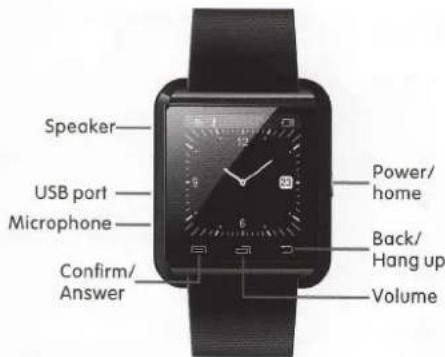
※ The whole machine institutions to introduce
Power on or off key/HOME key \~ Long press this button to start power on/off. Short Press to return to the standby interface.
Back key/Hang up key - click to back to previous menu or hang up when calling
Volume key - click to pop-up volume adjustment interface
Confirm/answer key \~ Standby interface click to enter the main menu, confirm key in the main menu, answer key when calling.
Microphone \~ Don't keep out the hole while calling.
USB port – battery charging.
Speaker - Don't keep out the hole while calling.
RESET hole \~ click on this key to achieve the system reset when the watch is abnormal.
※ Introduce the main menu: According to watch the main function is divided into 4 page
First page:Bluetooth, Phonebook, Dialer, Messaging;
Second page: Call log, Notification, Music, Remote capture;
Third page:Settings,Anti lost,Power saving,Ringtone;
Fourth page: Barometer, Altimeter, Pedometer, Stopwatch.
User Guide
Function information:
- Bluetooth: Open this function will see the following menu
1) Bluetooth dialer \~ search and a matching connection with bluetooth devices
2) Bluetooth settings \~ Bluetooth can be turned on and off set and the machine equipment name display
- Phonebook: The watch is connected with the mobile phone will display mobile phone contacts in the machine(can display 1000)
- dialer: Watch is connected to the phone can dial
- Messaging:Open this function will see the following menu,This function needs to install the "BTNotification.apk" application for use in mobile phone terminal.
1) Inbox: Show a mobile phone short message
2) Sent messages: Show a mobile phone sent message
- Call log: Open this function will see the following menu
1) Missed calls \~ Display the missed call, At the same time can call the corresponding contact
2) Dialed calls \~ Display the dialed call, At the same time can call the corresponding contact
3) Received calls \~ Display the received call, At the same time can call the corresponding contact
4) All calls \~ Display mobile phone calls all phone records
- Notification: Can query the QQ/ Wechat and other timely news, This function needs to install the "BTNotification.apk" application for use in mobile phone terminal.
●Music: Can control the music playing in the mobile phone
- Remote capture: Remote on/off mobile phone camera press confirm to complete pictures
- Settings: Open this function will see the following menu
1) Clock type - For analog and digital clock selection.
2) Set Time \~ Can set up time.
3) Set Date \~ Can set up date.
4) About watch \~ Display mobile phone software version information.
- Anti lost: Watch wil shake alarm after keep away from the mobile phone for a certain distance, Open this function will see the following menu.
1) Enable
●Power saving: Open this function the use of the time of the watch will
be more durable
- Ringtone: For different state set ringtones, Open this function will see the following menu.
1) Mute
2) Vibration
3) Ring1
4) Ring2
5) Ring3
- Barometer: Open this function to display the current atmospheric pressure altitude and the current temperature.
- Altimeter: Calculation of vertical to watch moving downward relative height after a certain distance, Open this function will see the following menu
1) Cur Alitmeter(m)\~
2) Set start altitude\~ Click the menu setting initial height, Then the vertical upwards or downwards Watch
3) Relative Alitmeter(m) \~ Display watch the relative height after vertical upward or downward
- Pedometer: Calculation of the walking distance of time (time, minutes, seconds) and the number of kilometers (km), Open this function will see the following menu.
1) Pedometer \~ After entering the menu then press the mechanical keys trigger timing starts
2) Last Record - Record the minutes of the last walking time and mileage
3) Step Setting(CM) \~ According to height ratio setting step distance
-Stopwatch:Open this function can be timing.