Freelance XB2500 - Telefon BT - Bezpłatna instrukcja obsługi
Znajdź bezpłatnie instrukcję urządzenia Freelance XB2500 BT w formacie PDF.


| Typ produktu | Telefon bezprzewodowy DECT |
| Marka | BT |
| Model | Freelance XB2500 |
| Wymiary (słuchawka) | Około 160 x 50 x 30 mm |
| Waga (słuchawka) | Około 120 g |
| Zasilanie | Baza: 230 V AC, słuchawka: akumulator NiMH 2,4 V |
| Zasięg | Do 50 m wewnątrz, do 300 m na zewnątrz |
| Funkcje podstawowe | Identyfikacja rozmówcy, książka telefoniczna (do 100 wpisów), głośnomówiący, wybieranie numerów z pamięci |
| Wyświetlacz | Podświetlany LCD, 1.5 cala, monochromatyczny |
| Klawiatura | Alfanumeryczna z klawiszami funkcyjnymi |
| Rejestracja rozmów | Lista połączeń (do 30 pozycji) |
| Czas czuwania | Do 100 godzin |
| Czas rozmowy | Do 10 godzin |
| Liczba słuchawek | Do 4 (w zestawie 1) |
| Kodowanie dźwięku | G.722 (wysokiej jakości) |
| Kompatybilność z aparatami słuchowymi | Tak (stopień M3/T3) |
| Bezpieczeństwo | Zabezpieczenie przed nieautoryzowanym dostępem, blokada klawiatury |
| Konserwacja i czyszczenie | Przecierać suchą lub lekko wilgotną szmatką, nie używać rozpuszczalników |
| Części zamienne i naprawy | Akumulator, ładowarka, słuchawka – dostępne u autoryzowanych serwisów |
| Informacje ogólne | Telefon przeznaczony do użytku domowego i biurowego, zasilacz sieciowy w zestawie |
Często zadawane pytania - Freelance XB2500 BT
Pytania użytkowników dotyczące Freelance XB2500 BT
0 pytanie dotyczące tego urządzenia. Odpowiedz na te, które znasz, lub zadaj własne.
Zadaj nowe pytanie dotyczące tego urządzenia
Pobierz instrukcję dla swojego Telefon w formacie PDF za darmo! Znajdź swoją instrukcję Freelance XB2500 - BT i weź swoje urządzenie elektroniczne z powrotem w ręce. Na tej stronie opublikowane są wszystkie dokumenty niezbędne do korzystania z urządzenia. Freelance XB2500 marki BT.
INSTRUKCJA OBSŁUGI Freelance XB2500 BT

Please turn over
Your BT Freelance XB2500 is now ready for use.
If you ever need to remove the batteries, simplify slide open the battery compartment cover and inspect your finger nail under the end of the battery to pull it out.
3 Place handset on the charger to charge for 16 hours.
2 Activate batteries as shown above.
into the mains wall socket and switch the power on.
- For each additional handset and charger: plug the mains power adaptor [Item code (G45657) into the socket on the underside of the charger and plug the other end
Set up your additional handsets (multipacks only)
16hrs
or your phone may not work.
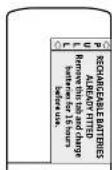
Important Charge the handset batteries for 16 hours
cord into the telephone wall socket.
3 After 16 hours. plug the telephone line
2 Place handset on base to charge.
the handset.
plastic cab away from the back of
1 Active batteries by pulling the
2 Charge
General information
For information on safety instructions, cleaning, technical information or connecting to a switchboard, please refer to the 'General Information' section in the full user guide at www.bt.com/producthelp
Guarantee
Your BT Freelance XE2500 is guaranteed for a period of 12 months from the date of purchase.
Subject to the terms listed below, the guarantee will provide for the repair of, or at 87's or its agent's discretion; the option to replace the BT Finance XB2500, or any component thereof, (other than batteries), which is identified as faulty or below standard, or as a result of inferior profitability or materials. Products over 78 days and from the date of purchase may be replaced with a return shock or repaired product:
The conditions of this guarantee are
- The guarantee shall only apply to defects that occur within the 12 month guarantee period. - Proof of purchase is required.
• The equipment is returned to DT or its agent as restricted.
This guarantee does not cover any faults or defects caused by accidents, misuse, fair wear and tear, neglect, tampering with the equipment, or any attempt at adjustment or repair other than through approved agents.
This guarantee does not affect your statutory rights. For further information within and outside the 12 month guarantee, please refer to the full user guide www.bt.com/producthelp
Product disposal instructions
官
The symbol shown here and on the product means that the product is closed as Electrical or Electronic Equipment and should not be disposed with other household or commercial waste at the end of its working life.
The Waste of Electrical and Electronic Equipment (WEEF) Directive (2002/96/EQ) has been put in place to recycle products using best available recovery and recycling techniques to minimize the impact on the environment, treat any hazardous substances and avoid the increasing landfill.
Product disposal instructions for residential users
Some year created in effect that it, please highlight any batteries and dispose of them and the product as per your local authority's recycling process. For more information please contact your local authority or the retailer where the product was purchased.
Product disposal instructions for business users
Business users should contact their suppliers and check the terms and conditions of the purchase contract, and ensure that this product is not mixed with other
R&TTE Directive & Declaration
of Conformity
This product is intended for use within the UK for connection to the public telephone network and compatible switchboards.
This equipment complies with the essential requirements for the Radix Equipment and Telecommunications Terminal Equipment Directive (1999)5/EC.
For a copy of the Declaration of Conformity please refer to www.bt.com/producthelp
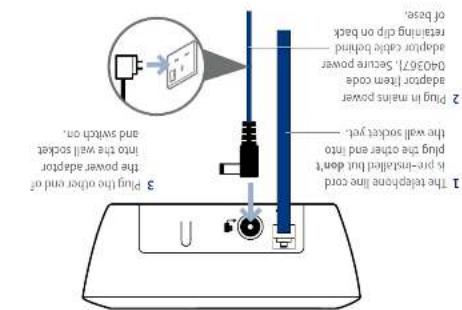
1 Plug in
BT & British Gas
Working together, supporting energy saving products
BT & British Gas have joined forces to help our customers find new ways to save energy around the home, so we can all do our bit for the environment & save money tool
BT is a sustainability leader
To find out how we're making our products greener visit bt.com/betterworld/products
Offices worldwide
The source described in this publication are subject to essentiality and may be modified from time to time. Services and equipment are supplied subject to British Telecom's electrical equipment, distributed by the one or more, nothing in the public sector for many parts of the company.
© British Telecommunications Inc. 2008. Registered Office: 83 Hongkai Street, London EC4741. Registered in England No. 130000.
Designed and sold over by The Art & Design Partnership Ltd.
Printed in China (China 1742P20-08)


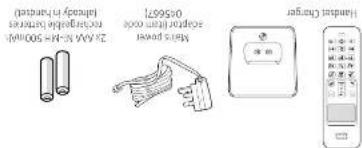
Contains for each additional handset (multipacks only)
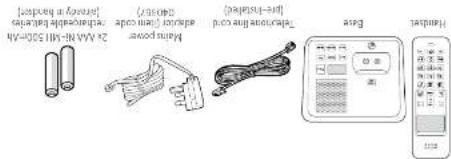
Check box contents
BT Freelance XB2500
User Guide

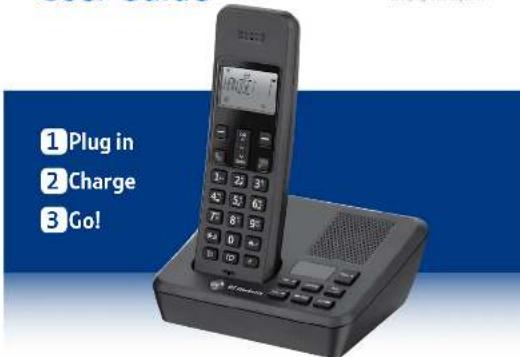
Setting up is easy. Just follow the simple steps in this guide.
If you need further assistance, please visit our website www.bt.com/producthelp to view our advanced user guide or call our helpdesk on 0800 218 2182*
*Labrada for with the US, not had network on Fox. Not heard intracruzal co-ctomagery.
Your phone
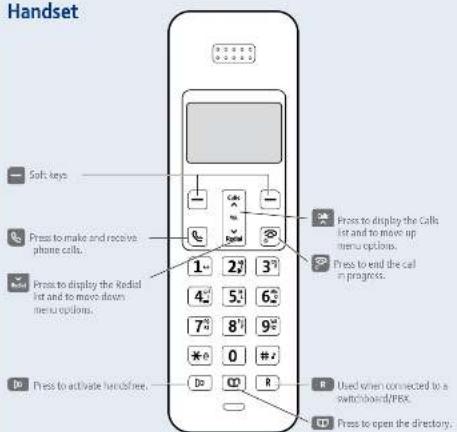
Handset
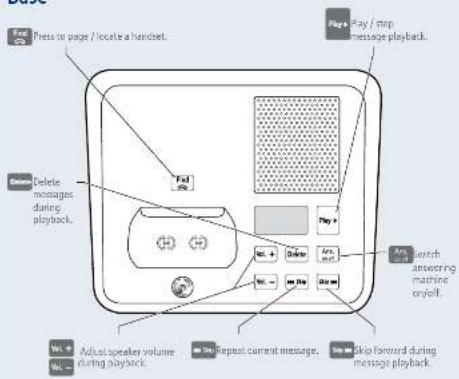
Base
3 Go!
Set time and date
Press left soft key (the left-hand button) to open main menu.
Press 📋 to scroll to HS SETTINGS and press OK soft key. DATE & TIME is displayed, press OK soft key.
Press 📋 to SET TIME and press OK soft key. Enter 2 digits for the hour and 2 for the minute using the 24hr format and pressOK soft key. You will hear a confirmation tone.
Press SET DATE is displayed. Press OK. Enter the day, month and year using the dd-mm-yy format and press OK. You will hear a confirmation tone.
Making calls
Press en dial the phone number. Press to find the call.
Answering calls
If you have subscribed to Caller Display, the caller's details will be displayed before you answer (see the full user guide online at www.bt.com/producthelp for details).
Lift the handset from the base or charger to answer incoming calls. If the handset is not on the base or charger, press 📞.
Handsfree
Press to during a call to switch the call to loudspeaker.
Secrecy (Mute)
Press the C soft key during a call to activate secrecy mode. Press the C soft key again to resume your call.
Redial
Press 📄 Press 📄 or 📄 to scroll through the list,
Press to redial the number displayed.
Directory
Storing new directory entries
Press OK a first entry (or LIST EMPTY) is displayed.
Press the left soft key, ADD is displayed. press OK. NAME is displayed. Using the letters on the keypad, enter the name, then press OK. You may need to press the same button a few times until the letter you want is displayed. For example, press 27 once for A, or twice for B. NUMBER is displayed, enter the phone number for the entry and press OK.
Press 📄 or 📋 to select a ringtone to associate with the entry and press OK to confirm. Press ➤ to return to standby.
Dialling a directory entry
Press 📄 Scroll 📋 or 📋 to the entry you want. Press 📋 to dial.
Caller Display and the Calls list
You must subscribe to a Caller Display service for this feature to work. Your network provider may charge you for this service.
View and dial from the Calls list
Press 📁, then 📁 or 📁 to scroll through the last 40 incoming calls.
Press or digital the number displayed.
Answering machine
Your answering machine is on and ready to record messages. The controls are shown in the base diagram to the bottom left and the features can also be accessed via the handset ANS MACHINE menu.
Recording your own outgoing message
Press the ☑ left soft key, display showsANS MACHINE and press OK.
Press 🧑️ to scroll to ANS SETTINGSand press OK
(1) 2017年1月1日
Press 📄 to scroll to 00 TOOING M83and press UK.
Press or to select either ANS & REC or ANSWER ONLY and press OK.
Press 📄 to scroll to RECORDING MSG and press OK to record your message.
When prompted, speak your message into the handset. When finished press OK.
Your message will be played back to you.
For detailed instructions on all the answering machine features see the full user guide online at www.bt.com/producthelp

Help
Most problems can be fixed with a few simple checks.
| Problem | Solution |
| No dial tone | Only use the cables and batteries supplied.Make sure both the mains power adaptor cable and telephone line card are plugged into the correct sockets. |
| Poor speech quality | Make sure the product is not located too close to other electrical appliances. This can also help improve the handset range from the base. |
| Battery icon not full/handset dead | Make sure you charge the batteries for 16 hours before use to ensure maximum battery performance. |
| Using broadband on the same phone line? | Make sure you plug the phone into the wall socket via an ADSL microfilter (not supplied), otherwise you may have problems with this product and your broadband service. |

Find out more
• New Frequently Asked Questions available at www.bt.com/producthelp
- If you need more detailed instructions, a full user guide is available to download from www.bt.com/producthelp
- If you cannot find the answer to your problem in the full online user guide, then please call the free Helpline on 0800 218 2182* or email bt.helpdesk@vtecheurope.com. Our dedicated advisors are more likely to help you than the retailer where you made your purchase.