AMP20MK2 - Odbiornik Audac - Bezpłatna instrukcja obsługi
Znajdź bezpłatnie instrukcję urządzenia AMP20MK2 Audac w formacie PDF.


| Typ produktu | Odbiornik |
| Marka | Audac |
| Model | AMP20MK2 |
| Wymiary (szer. x wys. x gł.) | 482 x 44 x 250 mm (19" 1U) |
| Waga | 3,5 kg |
| Zasilanie | 230 V AC, 50 Hz |
| Pobór mocy | 150 W |
| Zakres częstotliwości tunera | FM: 87,5–108 MHz; AM: 522–1620 kHz |
| Moc wyjściowa (RMS) | 2 x 100 W przy 4 Ω |
| Wejścia audio | 2 x RCA, 1 x optyczne, 1 x koaksjalne |
| Wyjścia audio | 1 x RCA, 1 x subwoofer, 1 x słuchawkowe |
| Funkcje dodatkowe | Bluetooth, radio FM/AM, pilot zdalnego sterowania |
| Pilot zdalnego sterowania | Tak, w zestawie |
| Zakres regulacji głośności | -80 dB do 0 dB |
| Wskaźniki LED | Zasilanie, sygnał, przesterowanie |
| Bezpieczeństwo | Klasa ochrony II, zabezpieczenie przed zwarciem i przegrzaniem |
| Części zamienne i naprawy | Dostępne u autoryzowanych serwisantów; okres gwarancji 2 lata |
| Konserwacja i czyszczenie | Przecierać suchą miękką szmatką; nie używać rozpuszczalników |
| Informacje ogólne | Kompatybilny z systemami Hi-Fi; montaż w szafie RACK |
Często zadawane pytania - AMP20MK2 Audac
Pytania użytkowników dotyczące AMP20MK2 Audac
0 pytanie dotyczące tego urządzenia. Odpowiedz na te, które znasz, lub zadaj własne.
Zadaj nowe pytanie dotyczące tego urządzenia
Pobierz instrukcję dla swojego Odbiornik w formacie PDF za darmo! Znajdź swoją instrukcję AMP20MK2 - Audac i weź swoje urządzenie elektroniczne z powrotem w ręce. Na tej stronie opublikowane są wszystkie dokumenty niezbędne do korzystania z urządzenia. AMP20MK2 marki Audac.
INSTRUKCJA OBSŁUGI AMP20MK2 Audac
AMP20
User Manual
Index
Introduction 5
Precautions 6
Safety requirements 6
Caution servicing 7
EC Declaration of Conformity 7
Waste of Electrical and Electronic Equipment (WEEE) 7
Chapter 1: Connections and connectors 9
Connection standards 9
Chapter 2: Overview AMP20 11
Front panel 11
Rear panel 12
Chapter 3: AMP20 Quick start guide 14
Connecting the AMP20 14
Configuring the AMP20 15
Ready 15
Chapter 4: Technical specifications 16
Introduction
Mini Stereo Power Amplifier
The AMP20 is a Mini Stereo Power Amplifier with a power rating of 2 x 15 Watt, which lends itself perfectly to small speaker systems requiring compact and economical audio solutions. It offers the ideal solution for applications such as classrooms, offices and meeting rooms where a small amount of speakers are required.
The compact size and very high efficiency makes it perfectly suited to be hidden in a closet, on a false ceiling or mounted under a desk or table.
The combination of the stereo balanced line and microphone input make it perfectly suited for applications where it should be used in combination with projection screens and video sources while a microphone is connected. Two gain potentiometers make it possible to control the sensitivity and balance between music and speech, while a switch allows bridging of the output channels to obtain one channel with merged output power.
A remote wall mixer can be connected for applications where local mixing of the inputs is desirable, while large distances can be covered between the source and amplifier using simple CAT5 twisted pair cabling. The volume controller input allows connection of an additional wall controller for overall volume control.
The Class-D Amplifier technology, standby mode and included switching power supply makes this device compliant to Energy Star 3.0 and other strict energy efficiency and environmental requirements.

Precautions
READ FOLLOWING INSTRUCTIONS FOR YOUR OWN SAFETY
- ALWAYS KEEP THESE INSTRUCTIONS FOR FUTURE REFERENCE. NEVER THROW THEM AWAY
• ALWAYS HANDLE THIS UNIT WITH CARE - CLEAN ONLY WITH DRY CLOTH
• HEED ALL WARNINGS AND FOLLOW ALL INSTRUCTIONS - NEVER EXPOSE THIS EQUIPMENT TO RAIN, MOISTURE, ANY DRIPPING OR SPLASHING LIQUID. NEVER PLACE AN OBJECT FILLED WITH LIQUID ON TOP OF THIS DEVICE
- DO NOT INSTALL THIS UNIT NEAR ANY HEAT SOURCES SUCH AS RADIATORS OR OTHER APPARATUS THAT PRODUCE HEAT
- DO NOT PLACE THIS UNIT IN ENVIRONMENTS WITH A HIGH LEVEL OF DUST, HEAT, MOISTURE OR VIBRATION
- THIS UNIT IS DEVELOPED FOR INDOOR USE ONLY. DO NOT USE IT OUTDOORS
- PLACE THE UNIT ON A STABLE BASE OR MOUNT IT IN A STABLE RACK
- ONLY USE ATTACHMENTS & ACCESSORIES SPECIFIED BY THE MANUFACTURER.
- UNPLUG THIS APPARATUS DURING LIGHTNING STORMS OR WHEN UNUSED FOR LONG PERIODS OF TIME
- CAREFULLY CHECK THE UNIT'S CONDITION AFTER UNPACKING. IF THERE IS ANY DAMAGE TO THE CARTON BOX OR THE UNIT ITSELF, INFORM YOUR VENDOR IMMEDIATELY.
- ONLY CONNECT THIS UNIT TO A MAINS SOCKET OUTLET WITH PROTECTIVE EARTHING CONNECTION
- THE INSTALLATION, CONNECTION AND CONFIGURATION OF THE DEVICE SHOULD BE DONE BY QUALIFIED TECHNICIANS
CAUTION
- USE CABLES OF THE RIGHT GAUGE FOR CONNECTING LOUDSPEAKERS TO THE AMPLIFIED OUTPUTS
- USE CABLES WITH CLEAR COLOUR CODING INDICATING THE POLARITY AND MAINTAIN THE SAME POLARITY THROUGHOUT THE WHOLE SYSTEM.
- ONLY USE THE CORRECT LOAD IMPEDANCE (MIN 4 OHM) WHEN CONNECTING LOUDSPEAKERS TO THE AMPLIFIED OUTPUTS. EXCEEDING THESE LIMITS COULD CAUSE FIRE OR OTHER FAILURES.
• DO NOT CONNECT INDUCTIVE LOADS DIRECTLY TO THE AMPLIFIED OUTPUTS
• AVOID ELECTRIC SHOCKS: SWITCH OFF THE AMPLIFIER WHEN CONNECTING

natural_image
White hand gesture with index finger raised (no text or symbols)CAUTION – SERVICING
This product contains no user serviceable parts. Refer all servicing to qualified service personnel. Do not perform any servicing (unless you are qualified to do so.)

EC DECLARATION OF CONFORMITY
This product conforms to all the essential requirements and further relevant specifications described in following directives: 2004/108/EC (EMC) and 2006/95/EC (LVD)
natural_image
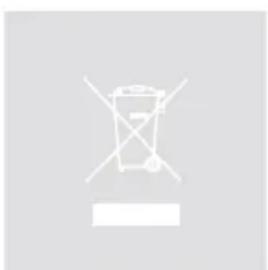
Simple line drawing of a trash bin with crossed handle and no text or symbolsWASTE ELECTRICAL AND ELECTRONIC EQUIPMENT (WEEE)
The WEEE marking indicates that this product should not be disposed with regular household waste at the end of its product life. This regulation is created to protect both the environment and human health.
This product is developed and manufactured with high quality materials and components which can be recycled and/or reused. Please dispose of this product at your local collection point or recycling centre for electrical and electronic waste. Do this to make sure that the product is recycled in an environmental friendly way, and help to protect the environment in which we all live.
Chapter 1
Connections and connectors
CONNECTION STANDARDS
The in- and output connections for AUDAC audio equipment are performed corresponding to international wiring standards for professional audio equipment.
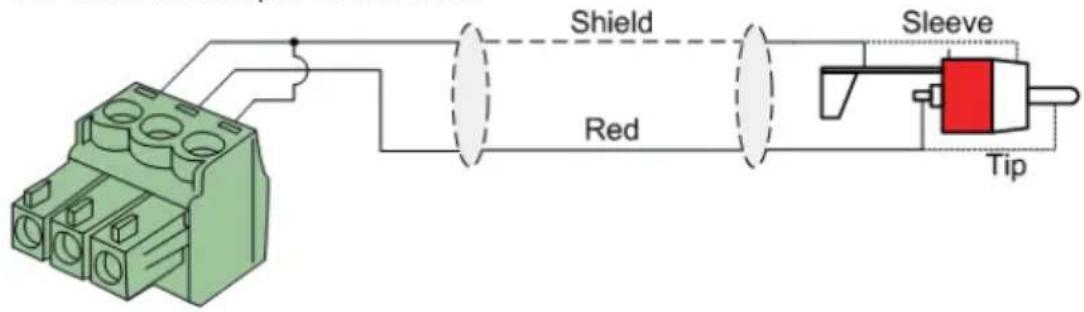
Cinch (RCA):
For unbalanced line input connections
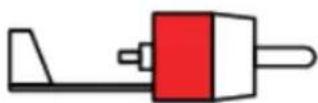
Tip: Signal
White: Left
Sleeve: Ground
Red: Right
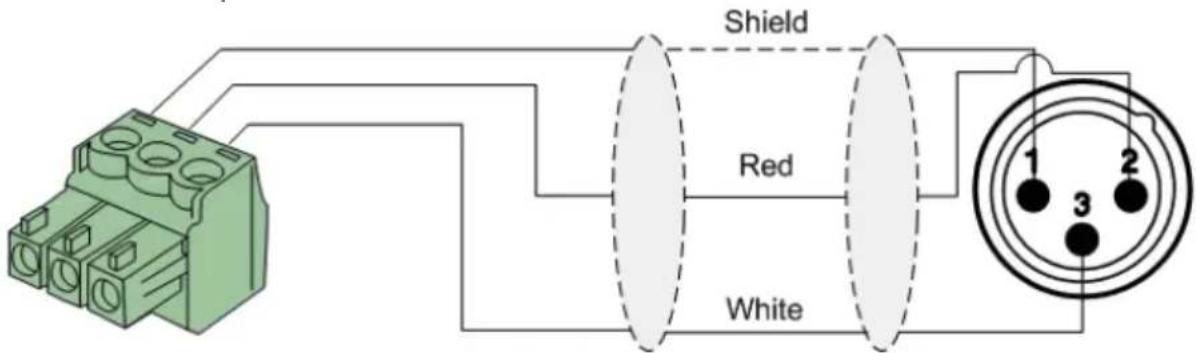
XLR:
For balanced input connections
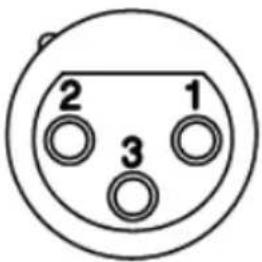
Pin 1: Ground
Pin 2: Signal +
Pin 3: Signal –
3-Pin Euro-Terminal Block:
For balanced input connections
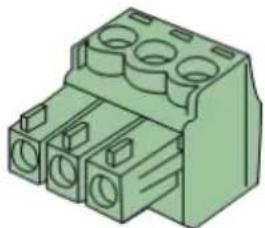
natural_image
Green 3D diagram of a connector with multiple circular ports (no text or symbols)Left: Signal – (XLR Pin 3)
Center: Signal + (XLR Pin 2)
Right: Ground (XLR Pin 1)
For balanced input connections:
For unbalanced input connections:
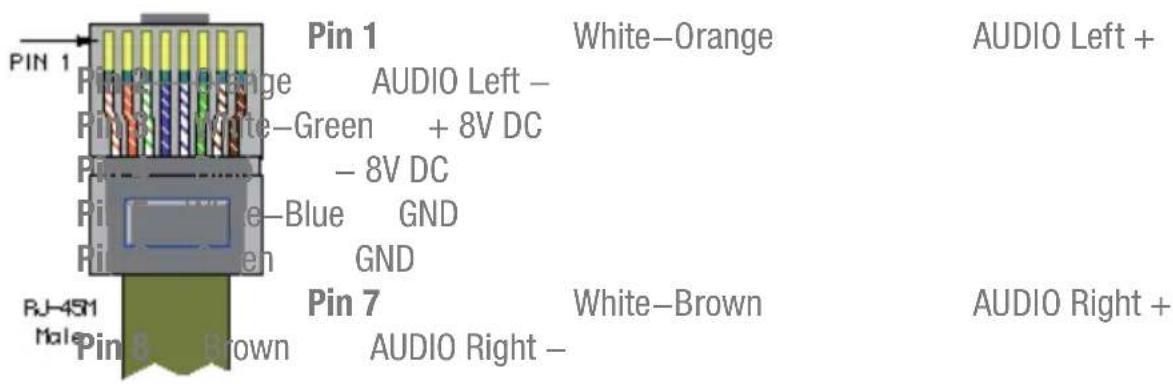
REMOTE WALL MIXER RJ45 (Audio, +8V DC, -8V DC):
For connection to Remote Wall Mixers (Audio Input & Mixing)
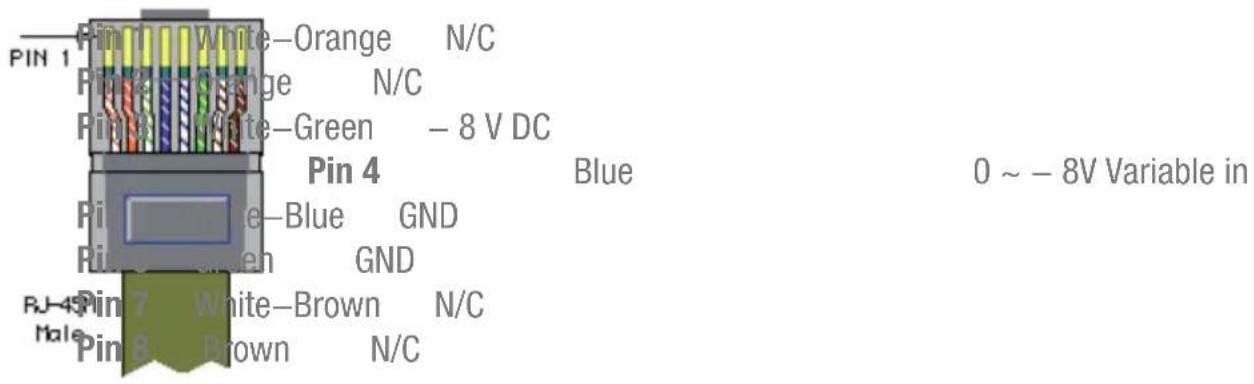
VOLUME CONTROLLER RJ45:
For connection to wall mounted volume controllers (Overall volume control)

natural_image
Abstract white line drawing of a stylized bird or wave (no text or symbols)ATTENTION
The twisted pair cabling must always be 'straight'. In case of self made cabling, it must be wired as described above, to make the system work properly.
Chapter 2
Overview AMP20
Front panel
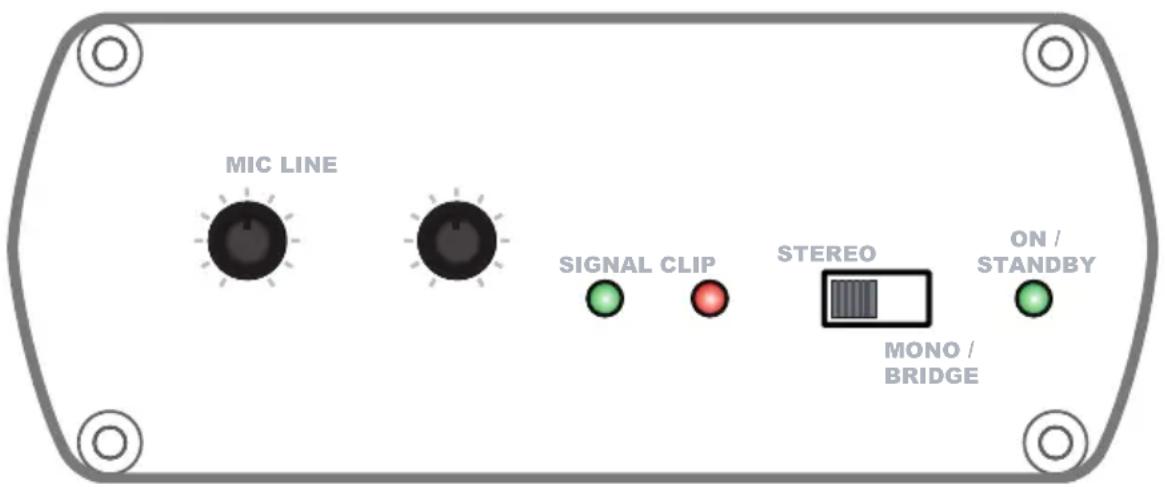
The front panel of the AMP20 contains all the control and indicator functions.
Two gain control potentiometers are provided with which the gain of the line and microphone inputs can be regulated separately and the balance between the music and speech can be set.
A slide switch provides the possibility to switch the amplifier between Stereo and Mono / Bridge mode. If this switch is set to stereo, the output will be stereo. If its set to Mono / Bridge, the Left and Right channels will be summed to a dual–mono output.
Three indication LED's for ‘ON / STANDBY’, ‘SIGNAL’ and ‘CLIP’ indicate the operation mode of the amplifier. The ‘ON / STANDBY’ LED will turn green when the device is switched ON and running. When no signal with a sufficiently high level is detected for a certain period of time, it will switch to standby mode and this LED will turn orange. The ‘SIGNAL’ LED will turn green when a signal with a sufficiently high level is detected and the ‘CLIP’ LED will start blinking when the signal reached the clipping level and the internal limiter starts working.
Rear panel
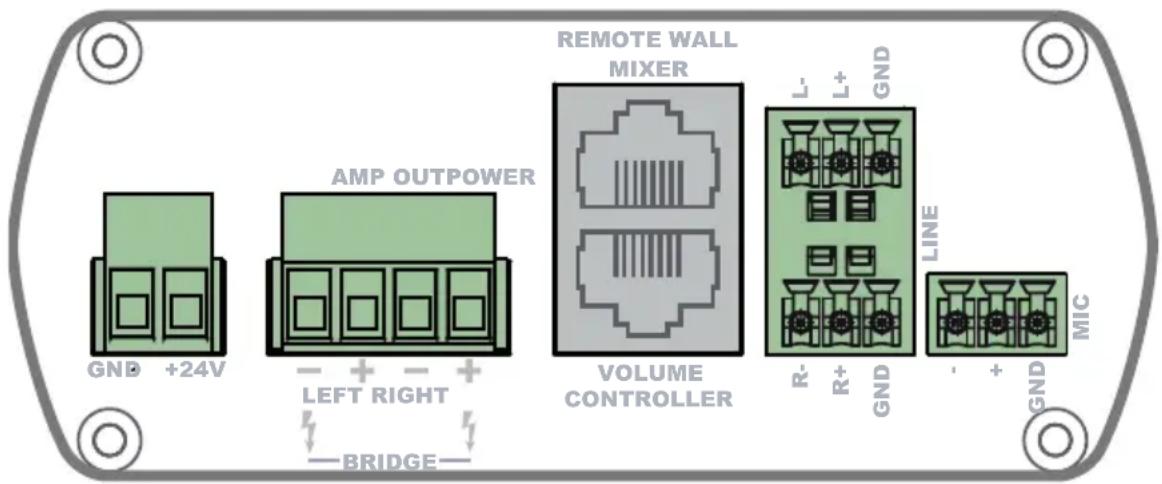
All necessary connections of the AMP20 are provided at the backside of the device. An overview and explanation of all the connectors and possibilities is given below.
1) 24 Volts power connector:
The 24 Volts power supply connection is provided on the left side of the AMP20's rear panel. The included power supply (PSD241) should be connected to the terminal block connectors. Pay attention to the polarity when connecting the power supply.
2) Loudspeaker output:
The loudspeakers should be connected to the 4-pins 'AMP OUT' Terminal Block connector. Depending on the position of the Stereo and Mono / Bridge switch on the front panel, the corresponding audio output will be available here. When used in Stereo mode, the left loudspeaker(s) should be connected to the two leftmost terminals and the right loudspeaker(s) should be connected to the two rightmost terminals. When used in Bridge mode, the loudspeaker(s) should be connected to the two outer terminals.
3) Remote wall mixer and Volume controller connections:
Two RJ45 connectors are provided for connecting Remote wall mixers and external overall volume controllers. The connections on these extension ports should be made by using a simple CAT5 twisted pair (or better) cable in a straight pinout configuration. The pinout and colour coding is described on Chapter 1 of this instruction manual.
The remote wall mixer connection carries the supply voltage to the wall input unit and a stereo differential audio signal from the wall input unit to the amplifier.
The audio signal coming from the remote wall mixer will be proportionally mixed with the direct line and microphone inputs.
The volume controller connection carries a negative supply voltage to the external volume controller and has an input for a variable negative voltage. Depending on this voltage, the overall volume will be regulated. When no external volume controller is connected, the overall volume of the device will be defaulted to its maximum.
4) Balanced Stereo Line and Microphone inputs:
The balanced stereo line and microphone input are performed using 3-pins terminal block connectors.
All different kinds of balanced and unbalanced line level audio sources can be connected to the line inputs. Some examples are CD & MP3 players, Tuners, Laptops, DVD players, ...
The microphone input provides the possibility of connecting any kind of microphone without phantom power requirement.
Chapter 3
AMP20 Quick start guide
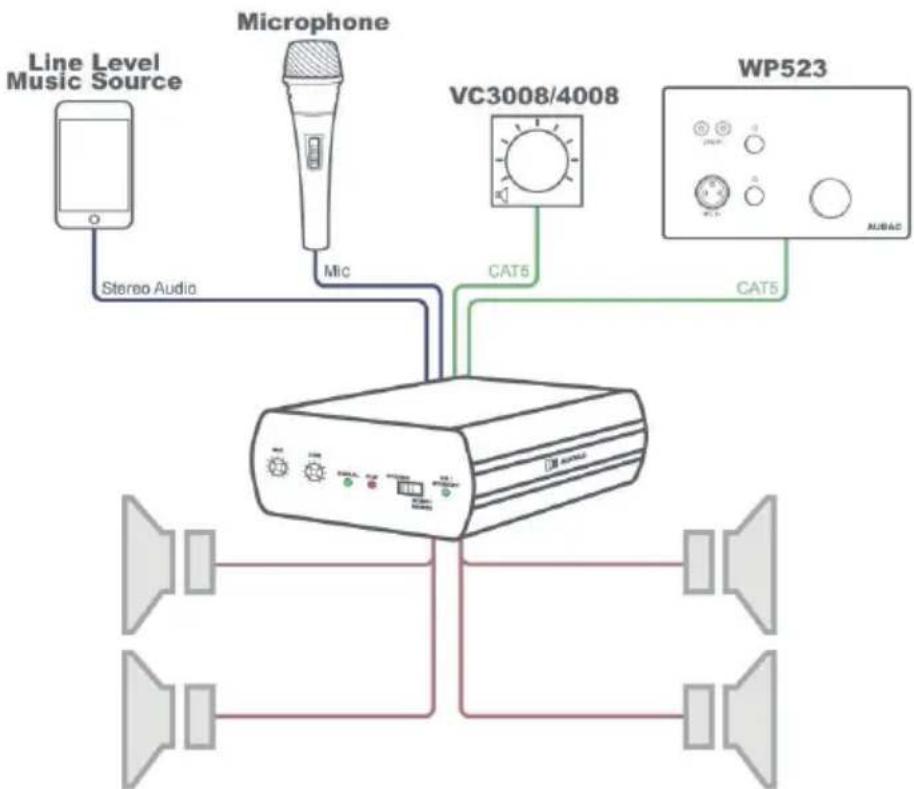
This chapter guides you through the setup process for a basic AMP20 project where to a line level audio source and a microphone are connected directly. An external volume controller and remote wall mixer are installed remotely.
flowchart
graph TD
    A["Line Level Music Source"] -->|Stereo Audio| B["Audio Processor"]
    C["Microphone"] -->|Mic| B
    D["VC3008/4008"] -->|CAT5| B
    E["WP523"] -->|CAT5| B
    B --> F["AUBAC"]
Overview of the AMP20 setup
Connecting the AMP20
1) Connecting audio inputs
Connect all your audio sources (CD & MP3 players, tuners, microphones, ...) to the audio inputs of the AMP20. All the direct audio inputs are performed using 3-pins terminal block connectors. For more information about the connections and wiring pinout, check Chapter 1 of this manual.
2) Connecting audio outputs
This suggested application uses a total of four loudspeakers. The AMP20 contains two speaker outputs (stereo) meaning that two speakers should be connected on every amplified output. The speakers must be connected in parallel and the load on each amplifier output channel should be 4 Ohm or higher.
3) Connecting the external units
The external (optional) wall volume controllers and remote wall mixers should be connected to the corresponding RJ45 connector ports. The connections should be made by using simple CAT5 twisted pair (or better) cabling in a straight pinout configuration. The maximum cable length between the external units and the AMP20 may not exceed a total cable length of 100 meters.
4) Connecting the power supply
The included power supply should be connected to the 2-pins Euro Terminal block connector. Watch the polarity when connecting the power supply.
Configuring the AMP20
1) Adjusting the input sensitivity & volume
The configuration of the AMP20 only includes the sensitivity adjustment of the inputs and the overall volume regulation. The sensitivity of the inputs can be regulated by the two potentiometers on the front panel of the AMP20. The correct regulation depends on the signal level of the connected sources and the requirements for each specific application. The regulation should be done experimentally, making a good balance between the music signal from the audio source and the speech from the microphone.
The line and microphone level signal coming from the remote wall mixer is mixed locally and the balance can be set using both push-lock potentiometers. The output level can be set using the big volume dial. This signal is mixed with the direct line and microphone inputs at equal levels.
After all sensitivity settings have been made, the overall volume control can be done using the VC3008/4008 volume controller.
Ready
Your system is now ready for use.
Chapter 4
Technical specifications
Inputs Type Stereo Balanced Line
Connectors 2 x 3-pins Euro Terminal Block \~ 3.81 mm
Impedance 20 k Ohm
Sensitivity - 12 dBV \~ +10 dBV
Type Balanced Microphone
Connectors 3-pins Euro Terminal Block \~ 3.81 mm
Impedance 47 k Ohm
Sensitivity -34 dBV \~ -18 dBV
Output Type Stereo Loudspeaker Output
Connectors 4-pins Euro Terminal Block \~ 5.08 mm
Impedance Min Load of 4 Ohm
Power 2 x 7.5 Watt @ 8 Ohm Stereo
2 x 15 Watt @ 4 Ohm Stereo
1 x 30 Watt @ 8 Ohm Bridge
THD+N < 0.1 %
Crosstalk – 75 dB
Signal / Noise ratio > 95 dB
Power consumption Standby 0.8 Watt
Nominal
(1/8 MUP)
5.3 Watt
Absolute Max
35 Watt
Efficiency 1/8 MUP 70%
MUP 87%
Cooling Passive
Protection Over-Heat
Short circuit
Limiter
Auto Power Down Minimum signal -46 dB
Timing
Max 90 Seconds
Power supply
24V DC
PSD241 switching power supply included
100 \~ 240V AC / 47\~63 Hz
NOTE: 'MUP' stands for Maximum Undistorted Power
Dimensions (W x H x D)
108 x 44 x 164 mm
Weight
0.80 Kg
Packaging
Carton box
Shipping weight & Volume
1.12 Kg - 0.0078 Cbm
Optional Accessories
VC3008/4008
Remote Volume controller
WP523
Remote Wall Mixer
MBS200
Mounting Bracket
CLA832
RCA / Cinch to Terminal Block cable
CLA835
XLR Female to Terminal Block cable
TR3030
100V Line Transformer 30 Watt