
MIRAGE EDITION - Logiciel d'impression professionnelle CANON - Notice d'utilisation et mode d'emploi gratuit
Retrouvez gratuitement la notice de l'appareil MIRAGE EDITION CANON au format PDF.


| Type de produit | Logiciel d'impression professionnelle |
| Marque | CANON |
| Modèle | MIRAGE MASTER EDITION CANON / MIRAGE 8 & 12 COLOR EDITION CANON |
| Systèmes d'exploitation supportés | Microsoft Windows XP SP3, Vista, 7, 8, 8.1 (32 et 64 bits) ; Apple Mac OS X 10.6.8 à 10.9 (Intel) |
| Applications supportées | Adobe Photoshop CS3 à CC, Photoshop Elements 6-12, InDesign CS3 à CC, Illustrator CS3 à CC |
| Langues disponibles | Anglais, Français, Italien, Allemand, Espagnol |
| Fonction principale | Impression professionnelle de photographies et d'art graphique |
| Aperçu avant impression | Oui, avec soft proof couleur pour une visualisation exacte |
| Gestion des couleurs | Support de tous les modes couleur (RGB, CMYK et mixte) |
| Impression en série | Oui, impression multiple d'images simultanément avec disposition automatique |
| Impression autonome | Oui, via Mirage Stand-Alone pour fichiers PDF, JPEG, TIFF |
| Licence | Licence unique pour un nombre illimité d'imprimantes |
| Types d'imprimantes Canon supportés | Série imagePROGRAF (selon édition : Master supporte 5,6,8,12 couleurs ; 8&12 Color supporte 8 et 12 couleurs) |
| Option Pro Extension | Ajoute le support des iPF6400S et iPF6450 avec spectrophotomètre pour création de profils ICC |
| Configuration recommandée | Processeur Intel, 2 Go RAM, écran 1024x768 |
| Taille du téléchargement | Environ 300 Mo (estimation) |
| Entretien | Mises à jour logicielles régulières via téléchargement sur le site DINAX |
| Sécurité | Compatible avec les systèmes d'exploitation sécurisés |
| Mise à jour | Téléchargement depuis www.dinax.com |
FOIRE AUX QUESTIONS - MIRAGE EDITION CANON
Questions des utilisateurs sur MIRAGE EDITION CANON
0 question sur cet appareil. Repondez a celles que vous connaissez ou posez la votre.
Poser une nouvelle question sur cet appareil
Téléchargez la notice de votre Logiciel d'impression professionnelle au format PDF gratuitement ! Retrouvez votre notice MIRAGE EDITION - CANON et reprennez votre appareil électronique en main. Sur cette page sont publiés tous les documents nécessaires à l'utilisation de votre appareil MIRAGE EDITION de la marque CANON.
MODE D'EMPLOI MIRAGE EDITION CANON
Professional Print Solution for photography and fine art and for print service providers
Mirage Canon Edition
you can
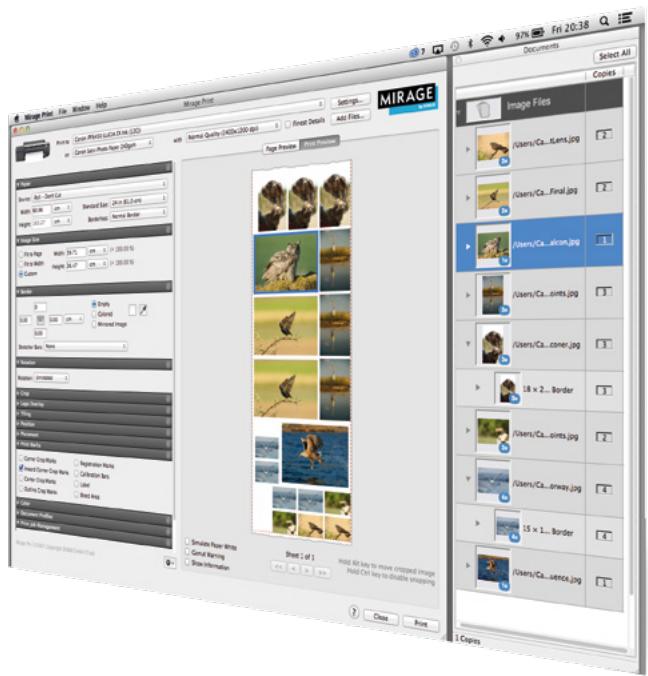
Mirage Canon Edition for Professional Print Solution
Mirage is the most advanced professional print plug-in for a range of applications including Adobe Photoshop, Illustrator and InDesign. Designed to allow users to work faster and more efficiently, Mirage is perfect for the production of photography and fine art and for print service providers, offering the highest print quality available in one simple, fast, great value solution.
Detailed Features
Work faster and more efficiently
Mirage makes top quality creative printing simple. All the features, tools and settings you need are at your fingertips in one intuitive, clear and professional user interface. You can start printing in seconds and minimise the risk of costly misprints due to 'user error'.
Save time with multiple images
Save time by printing as many images as you want, all at the same time. Simply choose the settings for each image and Mirage will lay them out efficiently, ensuring easy cutting and minimum waste.
No surprises
The Mirage preview window shows the exact print results. Not only will you see how images will be laid out on the paper, you will see exactly what the colours will look like in print. This 'soft proof* means there are no surprises, you just get your project exactly as you want it.
Precise colour reproduction
Mirage supports all colour modes, even mixed modes such as RGB and CMYK in one document. Mirage is optimised for the production of photography and fine art, offering the highest possible print quality.
Mirage Stand-Alone
The "Mirage Stand-Alone" allows you to print supported files without the need for a host application. Simply drag PDF, JPEG or TIFF files or folders to the "Mirage Standalone" application and print without the need for an application such as Photoshop©, Illustrator© or InDesign©.
No limits
Mirage supports an unlimited number of printers of various sizes with just one license. There is no length limitation, meaning you can print panoramic images with ease. Mirage is compatible with Apple OSX and Microsoft Windows operating systems. Mirage offers professional printing minus the limitations.
There are two versions of Mirage dedicated to Canon printers; "Mirage 8 & 12 Color Edition Canon" supports 8 & 12 colour imagePROGRAF, whilst "Mirage Master Edition Canon" supports the entire imagePROGRAF series.
| PRODUCT NAME | Mirage MASTER EDITION CANON | Mirage 8 & 12 COLOR EDITION CANON | |
| Supported printer models | Canon imagePROGRAF 5, 6, 8 and 12 colour models | Canon imagePROGRAF 8 and 12 colour models | |
| Languages | English, French, Italian, German, Spanish | ||
| Operating System | Microsoft Windows | Windows XP SP3 or later (64bit NOT Supported) Windows Vista (32 & 64 bit), Windows 7 (32 & 64 bit), Windows 8 (32 & 64 bit), Windows 8.1 (32 & 64 bit) | |
| Apple Macintosh | OS X 10.6.8, 10.7, 10.8, 10.9 (Intel) | ||
| Application Support | Adobe Photoshop | CS3, CS4, CS5, CS 5.5, CS6 and CC | |
| Adobe Photoshop Elements | 6, 7, 8, 9, 10, 11, 12 | ||
| Adobe InDesign | CS3, CS4, CS5, CS6 and CC | ||
| Adobe Illustrator | CS3, CS4, CS5, CS6 and CC | ||
| OPTIONS | Mirage Pro Extension | Mirage Pro Extension is Optional and adds support for iPF6400S and iPF6450 models that have Optional Spectrophotometers fitted for creating ICC profiles. | |
Supported CANON Printers
| Mirage 8 & 12 COLOR EDITION CANON | Mirage MASTER EDITION CANON | Mirage PRO EXTENSION* |
| 12 Colour Models | 12 Colour Models | 12 Colour Models |
| ·iPF5100/6400/6450/8400/9400 | ·iPF5100/6400/6450/8400/9400 | ·iPF6400 |
| 8 Colour Models | 8 Colour Models | 8 Colour Models |
| ·iPF6400S/8400S/9400S | ·iPF6400S/8400S/9400S | ·iPF6400S |
| 6 Colour Models | ||
| ·iPF6400SE/8400SE | ||
| 5 Colour Models | ||
| ·iPF510/605/610/680/685/750/780/785/815/825 | ||
| ·Mirage Pro Extension is Optional and adds support for iPF6400S and iPF6450 models that have optional spectrophotometers (SU-21) fitted. ·Some legacy printers are also supported | ||
MirageTM and DINAXTM are registered trademarks of DINAX GmbH, Neuss - Germany. The software Mirage is copyright protected and property of DINAX GmbH, Neuss - Germany. www.dinax.com


Canon Inc. Canon Europe Ltd canon.com 3 The Square, Stockley Uxbridge, Middlesex Canon Europe UB11 1ET canon-europe.com United Kingdom